dsh-edit-approval
Ask-before-act approval for DeepSeek Harness: every write / edit call asks before the file is touched — a red/green line-level diff, approve once or reject — and every bash command asks before it runs, each with its own master switch on the plugin's own page under Plugins in the sidebar.


English | 中文
A deliberately focused plugin with two mirror-symmetric approval gates — edits and commands — so the agent can never modify files or run commands without your say-so.
| Gate |
Intercepts |
Default |
Panel |
| Edit approval |
write / edit (str_replace_editor on request) |
On |
Red/green line-level diff — approve once or reject |
| Bash approval |
bash |
Off |
Description headline + native command row |
Both gates ride the harness's own serviceAsk seam: the plugin returns { kind: 'ask', reason } from tools/pre-execute, the harness routes it into the web approval panel — zero UI changes in the host — allowed-once proceeds, rejected denies the call, and under the never policy the plugin delegates so full-access sessions keep working.
Preview
Every write-family call shows the red/green diff panel; after you enable command approval, every command shows a panel whose white headline is the agent's description and whose grey row is the raw command text. Both master switches live on this bundle's page in the sidebar's Plugins panel, staged through the harness's own form (captured on v0.4.0).
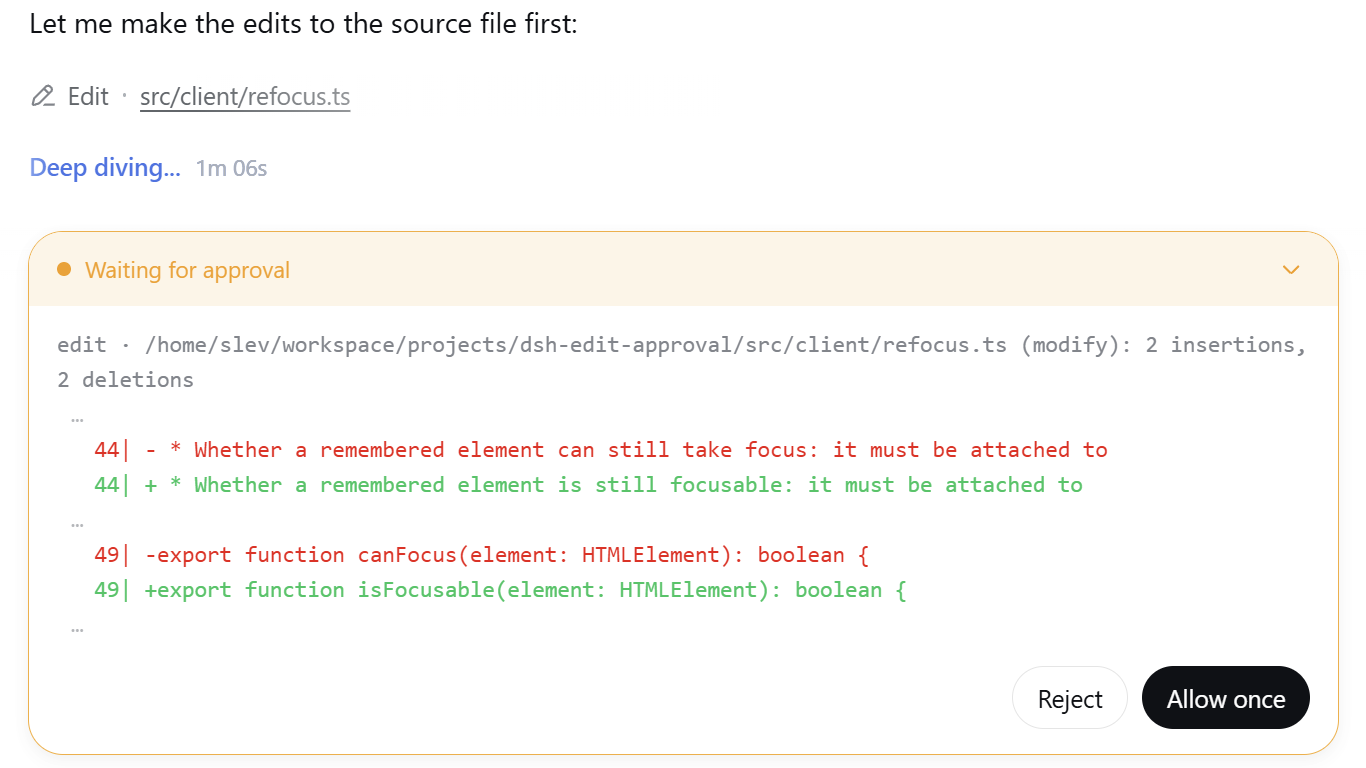
Edit approval panel — red/green line diff |
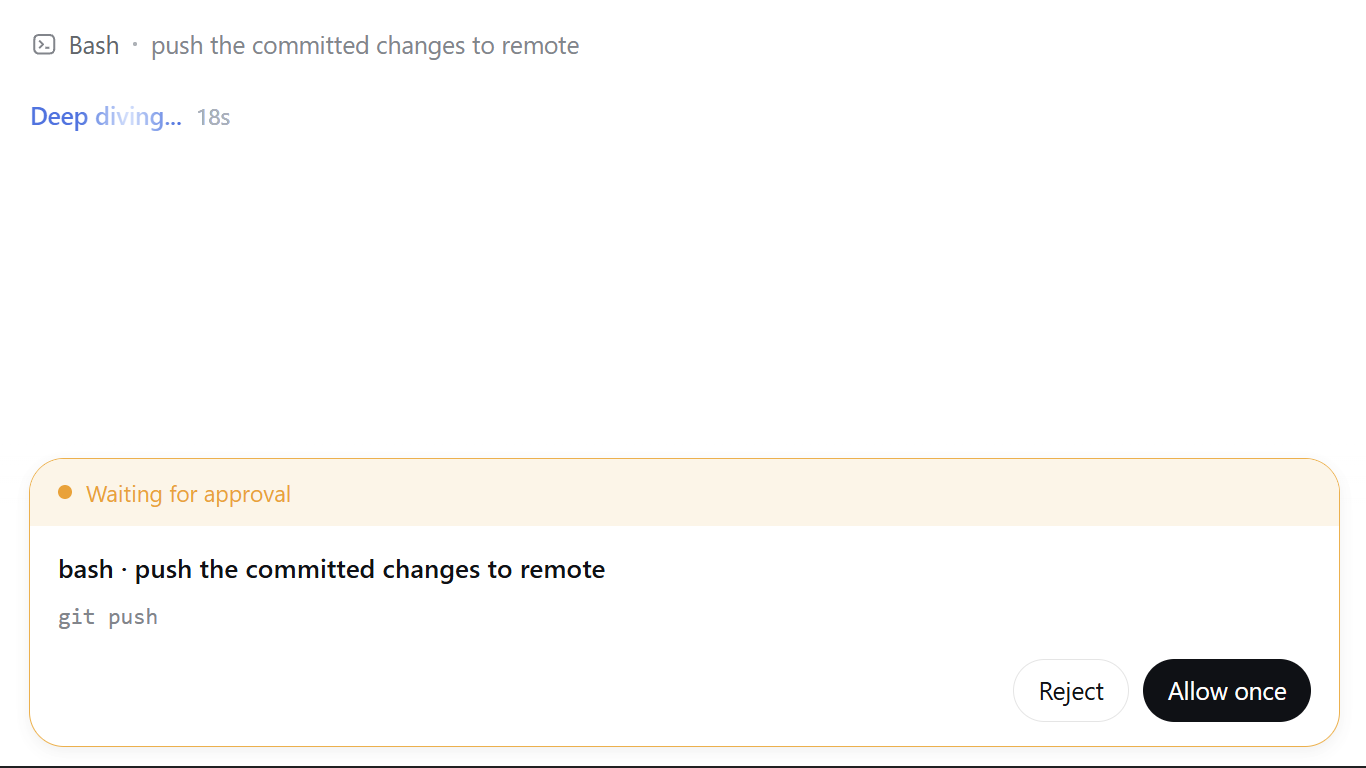
Bash approval panel — description + command |
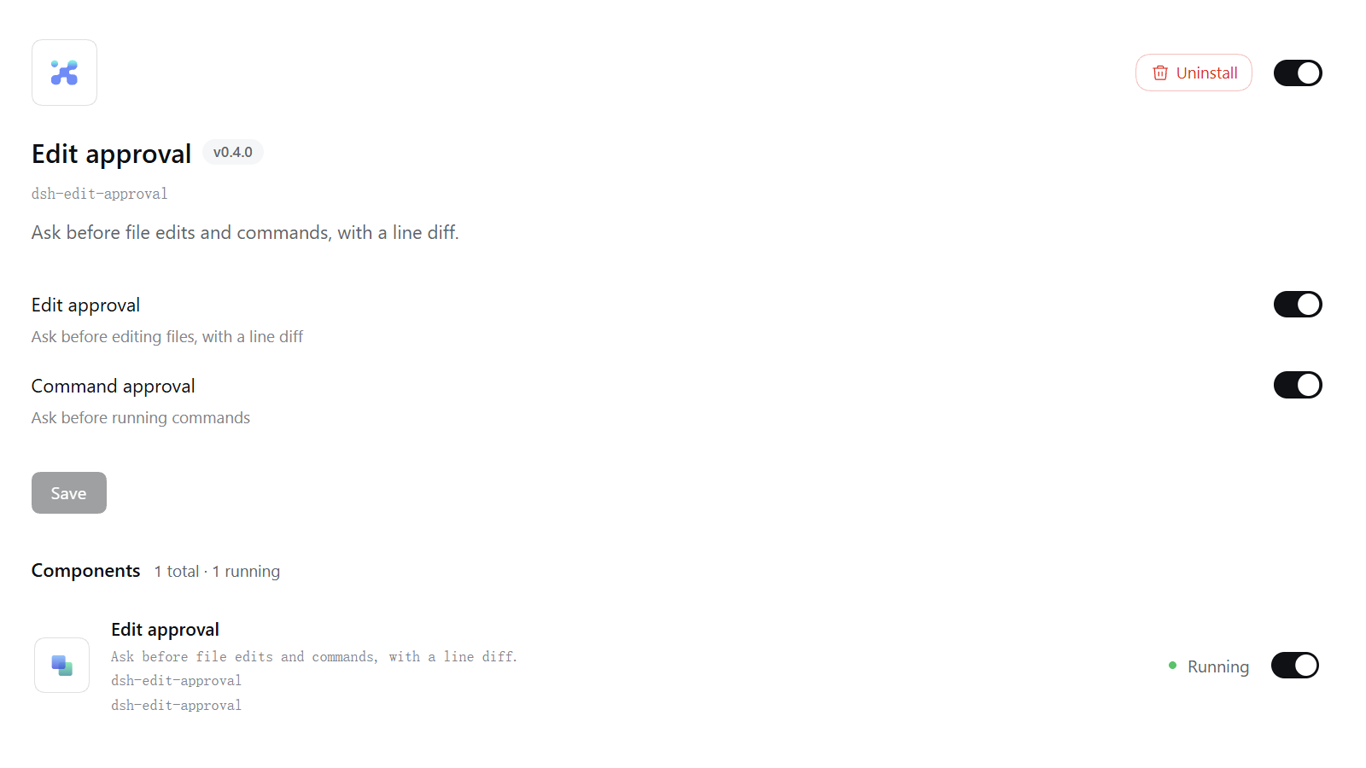
Master switches on the bundle's page in the sidebar's Plugins panel |
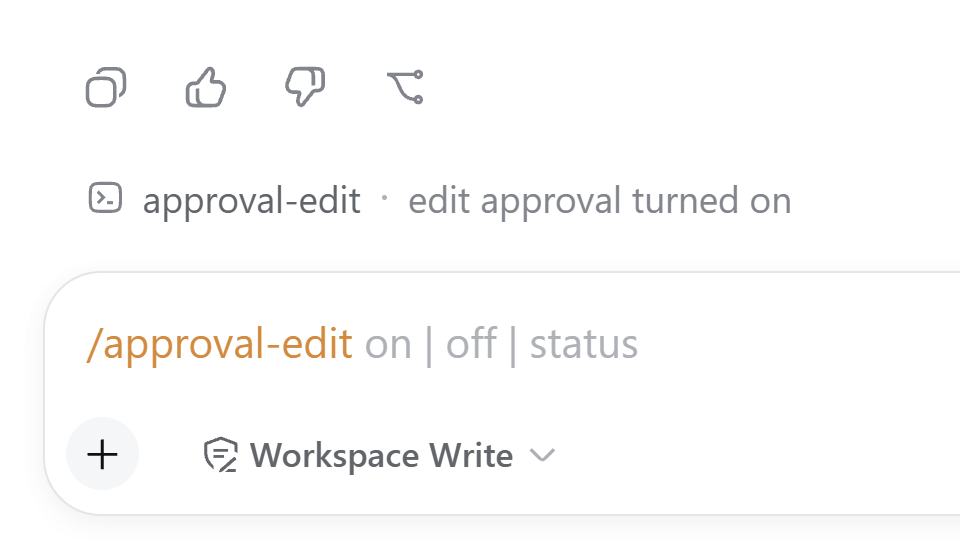
/approval-edit and /approval-bash commands |
Install
dsh plugin --profile web add dsh-edit-approval
Restart dsh web (--profile web) after installing.
For contributors: install from a local checkout or a pinned commit — dsh plugin --profile web add /path/to/dsh-edit-approval or dsh plugin --profile web add github:SiriLee/dsh-edit-approval#<sha> — or from an offline tarball (npm pack then dsh plugin --profile web add ./dsh-edit-approval-<version>.tgz). A git install fails on first run until you add an allowBuilds key to the profile's pnpm-workspace.yaml (pnpm blocks git dependencies from running build scripts); after that it runs the plugin's prepare and installs it. npm pack also runs prepare, so a tarball always carries a prebuilt lib/ (with .d.ts) and the LICENSE.
Usage
- Edit approval is on by default. Any
write / edit call asks before the file is touched. The panel shows only the changed lines — removals red, additions green — with a right-aligned NN| line-number gutter and a … ellipsis marking skipped context and hunk gaps.
- Approve once or reject.
allowed-once lets the call proceed; rejected denies it and reports back to the model.
- Command approval is off by default — enable it on the plugin's card or with the command below. The panel's white headline is the description (e.g.
bash · push to remote); the grey row below is the raw command text, rendered natively by the harness.
- Command-line entry:
/approval-edit on|off|status and /approval-bash on|off|status — the same document the Plugins panel edits, so the two cannot disagree.
- Allow-list (config file):
bashAllow holds command prefixes that always pass. Matching is whitespace-normalized (git push hits git push) so a bypass via extra spaces fails. There is deliberately no UI for it yet.
How it works
The plugin listens on the tools/pre-execute waterfall (the seam the harness runs before a tool executes) and dispatches to one of two gates by tool name — edits win on overlap.
1. Edit approval
For each intercepted write-family call it:
- Resolves the target through
ctx.fs, using the session cwd exactly as the fs tools spell it (DSH 0.1.7 no longer canonicalizes a parent-traversing cwd, so neither does this preview).
- Reads the current content and reconstructs the proposed content from the tool's arguments, mirroring each tool's semantics:
write — full text; edit — single unique replace (or replace_all); str_replace_editor — str_replace unique replace, insert line insertion, create uses file_text.
- Computes a line-level diff with jsdiff's
structuredPatch (Myers) — the same reference implementation and the same 3-line context window the harness's write/edit result cards use — so the approval preview and the post-approval result card derive from the same algorithm, and a one-line edit in a large file stays a one-line diff.
- Returns
{ kind: 'ask', reason } with a header line (tool · file (op): N insertions, M deletions) plus the diff text. The harness's serviceAsk routes it through ctx.approval into the web approval panel.
2. Bash approval
A pure decision, no fs involved — it never reads or writes anything:
- Passes when the gate is disabled, the tool is not in
bashTools, the command is blank, or the call is a sandbox escalation (sandbox_permissions + justification — those carry their own approval and must not double-prompt).
- Allow-list first: a whitespace-normalized prefix match passes without asking.
- Otherwise returns
{ kind: 'ask', reason } with a single-line headline — bash · <description> (or just bash when the description is blank). The command text is not embedded in the reason: the harness renders it natively in the panel's command row, so nothing is duplicated.
3. Shared policy handling
The session approval policy (ask / never) keeps applying. Under never (e.g. danger-full-access), every ask this plugin emits would be deterministically rejected by the approval service, silently breaking every edit and command in a full-access session — so both gates delegate via next() and let the sandbox enforce. The plugin never expands access or changes the sandbox mode.
4. The approval panel
The browser half (dsh.client) enhances panels as they appear (a per-animation-frame MutationObserver, all side effects inside a single ctx.effect torn down on unload / HMR):
- Edit panels are rebuilt from the plain-text headline into only the changed rows — removals red, additions green, right-aligned
NN| gutter — plus a white-space: pre-wrap compensation and a collapse button on multi-line diffs.
- Command panels are left harness-native: a
dsh-ea-kind-command marker only, no restyling, no rebuild — the white description headline and grey command row are exactly what the harness renders.
Configuration
The plugin's whole configuration is one profile entry — the dsh-edit-approval row its bundle patch inserts — layered as schema defaults < row config < persisted user layer. The patch ships no config on purpose: the schema defaults in src/index.ts are the single source of truth, so a profile patch restates only the keys it changes:
# profile's cordis.patch.yml
- id: dsh-edit-approval
  name: dsh-edit-approval
  config:
    editMinDiffLines: 2
    editIncludeCreate: false
    bashEnabled: true
| Key |
Default |
Where |
Description |
editEnabled |
true |
Plugins panel |
Master switch for edit approval |
bashEnabled |
false |
Plugins panel |
Master switch for command approval |
editTools |
['write','edit'] |
profile file |
Intercepted write-family tool names |
editMinDiffLines |
0 |
profile file |
Ask only when the change touches at least this many lines; smaller changes pass silently |
editIncludeCreate |
true |
profile file |
Whether creating a new file asks for approval |
editIncludeDelete |
true |
profile file |
Whether clearing/emptying a file asks for approval |
bashTools |
['bash'] |
profile file |
Intercepted command-tool names |
bashAllow |
[] |
profile file |
Command prefixes that always pass (whitespace-normalized) |
Only the two master switches are live fields, which is exactly what makes them the only ones the Plugins panel shows and the only ones a settings write may address: they take effect immediately, without a restart. Everything else is ordinary configuration read when the entry loads, so it lives in the profile file.
A switch moved back to its schema default is cleared rather than pinned, so the profile patch keeps only what you actually changed and a later default change still reaches you.
str_replace_editor is not intercepted by default — it stopped being a default DSH tool in 0.1.3. The guard branches for it are still shipped and tested; add str_replace_editor to editTools to gate it.
Upgrading from 0.3.x. The edit-approval and bash-approval settings namespaces are gone, and their keys are renamed to the flat fields above. DSH's settings service imports a legacy settings.yaml section into the entry of the same name, and neither old name is a profile entry id, so those sections do not migrate. Restate bashEnabled: true in the profile patch (or flip the switch once) to keep a prior command-approval preference.
What it deliberately does NOT do
- Escape or expand sandboxing — it never changes the sandbox mode or grants access; escalation calls pass through to the sandbox's own approval.
- Intercept inside commands — file edits performed inside a
bash command are not edit-gated (they are covered by command approval, when enabled).
- Partial application — the diff is a read-only preview (
+ / - line markers); "apply only some lines" is not supported.
- Ask about calls the tool itself would fail on — e.g.
str_replace_editor create against an existing file, a non-unique or missing old_str / old_string; they pass through for the tool to report. An empty old_string edit preview deviates from the tool (treated as not-found) — safe, it never falsely blocks.
- Keyboard shortcuts (Enter to approve / Esc to reject) — split into the dedicated dsh-approval-hotkeys plugin.
- Post-edit review / rollback — covered by the community dsh-change-review.
- Permission-tier extensions — covered by the community dsh-auto-approval-plugin.
Compatibility
- Node.js
^22.19.0 || >=24.0.0.
- DeepSeek Harness web profile (
dsh --profile web); @deepseek-ai/* packages are resolved by the harness at runtime, never fetched by this package.
- The DSH
0.2.0 line only — verified against 0.2.0-rc.1, the version this release pins in devDependencies. Declared as a single ^0.2.0-rc.1 peer tuple per harness package, with engines.dsh = ">=0.2.0-rc.1". The plugin tracks one DSH line at a time and drops the previous one when the line moves: this range admits 0.2.0-rc.1 through 0.2.x (a same-tuple prerelease roll needs no peer change), while 0.1.7-rc.2 and 0.3.0-rc.1 are skipped at startup with a peer diagnostic instead of loading the bundle into a half-broken state.
node scripts/check-dsh-version.mjs watches the release cadence: it verifies the declaration is internally consistent (one tuple across every harness peer, engine floor in sync) and reports when DSH publishes above the declared window.- Why one line. DSH 0.1.7 replaced the settings-namespace registry this plugin used for both features with one live
Config per profile entry, and removed the browser dsh-client-runtime package and the settingsScope service. There is no 1:1 successor for the old model, so keeping an older line as well would mean maintaining two settings models, two client write paths and two session-read shapes. The full seam-by-seam record — including which failures were silent — is in docs/compat/0.1.7-audit.md.
- The registered tool name is
str_replace_editor (underscores), distinct from the npm package name @deepseek-ai/dsh-tool-str-replace-editor.
[!WARNING]
This project and DSH are both in developer preview. Pin exact versions in
reproducible environments and review the behavior notes above.
Security
The plugin reads the target file only to compute the edit preview (at the tools/pre-execute interception point); the command gate touches no files at all. It never writes files itself — the tool body performs the write only after you approve. It makes no network requests and accesses no credentials.
Development
npm install            # devDeps (harness packages pinned exactly to the target line)
npm run typecheck      # tsc on both surfaces, against the real DSH types
npm test               # vitest: diff / guards / config / integration / client / package-layout
npm run build          # scripts/build.mjs: declarations + both bundles + smoke checks
npm run verify:host    # drive the BUILT host artifact on a real cordis Context
npm run check          # typecheck + tests + build + verify:host + npm pack --dry-run
prepare runs the build, so git installs and npm pack / npm publish always produce a complete lib/ (with .d.ts) and the LICENSE.
Two of those steps exist because the two failure modes that cost this plugin an entire DSH line were both silent:
- The build refuses to ship on its own smoke checks. The client bundle may inline no
node_modules input at all (checked through esbuild's metafile), so a platform module missing from the externals list fails the build instead of quietly embedding a second copy of React; and neither bundle may reference a package the target line removed.
verify:host anchors its settings double to the real SettingsForms.prototype in both directions. The previous double implemented exactly one method — settings.register, the one method 0.1.7 deleted — so the suite agreed with the plugin and with nothing real, and stayed green through the very break it existed to catch.
Release
Releases go out through GitHub Actions Trusted Publishing (OIDC, no stored NPM_TOKEN). See docs/npm-trusted-publishing-guide.md.
npm version patch && git push origin main --tags # triggers .github/workflows/publish.yml
The workflow verifies the tag matches package.json, runs typecheck + tests + a full build + artifact verification, publishes with Sigstore provenance, and creates a GitHub Release. CI (.github/workflows/ci.yml) runs the same checks on every push / PR. The publish step is idempotent — a version already on npm is skipped.
License
MIT


