
安全与治理
插件

mirage
strukto-ai
The World's First Unified Virtual Filesystem For AI Agents
PROJECT TOPICS
INSTALL REFERENCE
dsh plugin --profile web add github:SiriLee/dsh-approval-hotkeys
该命令指向仓库当前默认分支;尚无绑定当前 commit 的完整验证结果。
PROJECT README


Approval-panel hotkeys for DeepSeek Harness, for every approval source — not just edits.
English | 中文
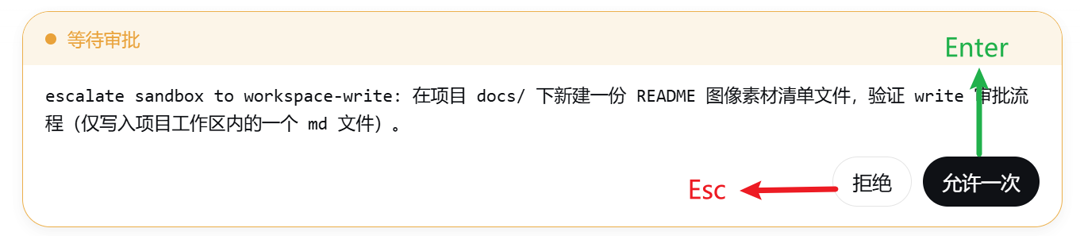
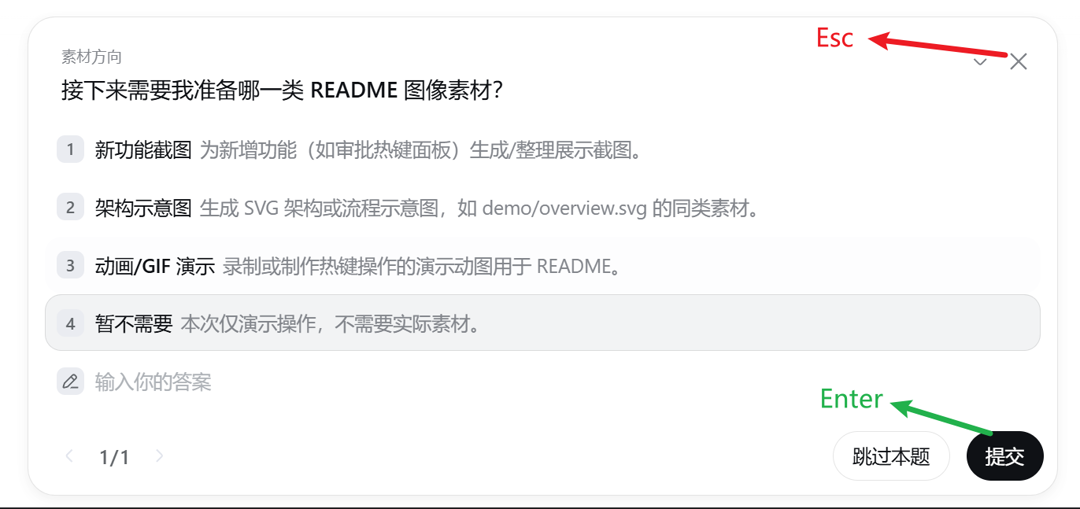
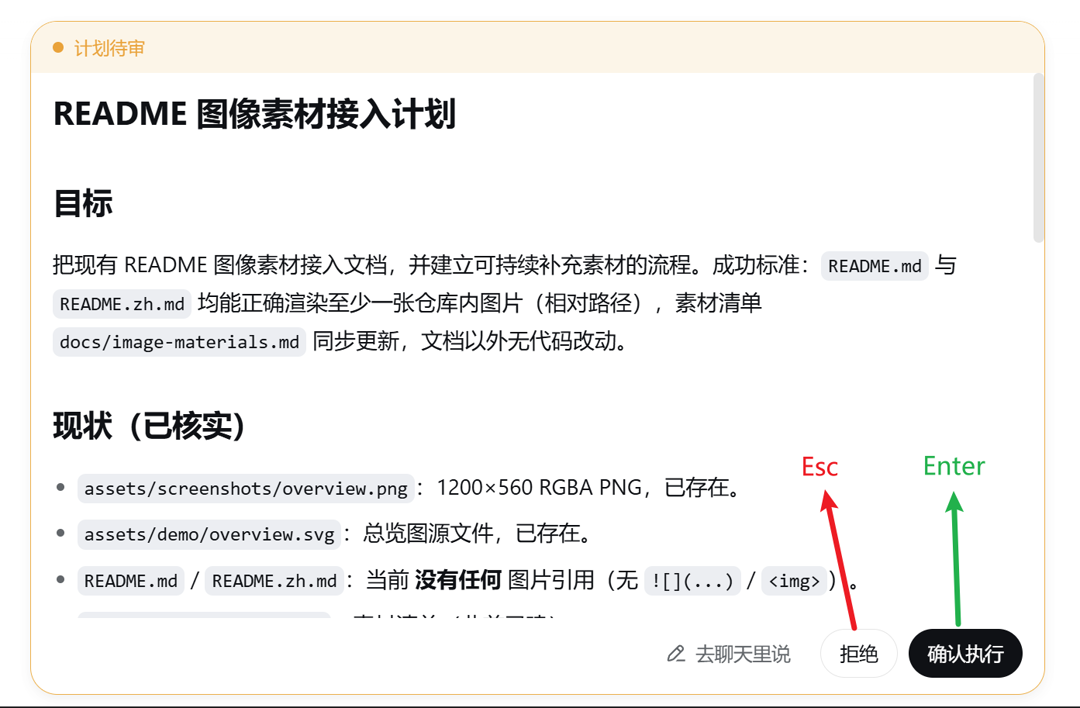
A deliberately minimal plugin with one generic rule: Enter always presses the confirm button (the primary, right-most action); Esc always presses the cancel button — on every button-bearing interaction panel the harness renders.
| Panel | Enter → confirm | Esc → cancel |
|---|---|---|
Approval ([data-approval-key]) |
Allow once | Reject |
Question / choice ([data-question-key]) |
Submit / Next | Discard the group |
Plan review ([data-plan-review-key]) |
Approve | Decline (or discuss) |
The panel anchors are harness-generic, so the hotkeys work on every interaction the GUI shows — edit approvals, permission escalations, tool questions, plan reviews. This is the Claude Code habit: confirm with Enter, refuse with Esc.
Every approval — edits, permission escalations, anything routed through the ApprovalPanel. Enter presses Allow once, Esc presses Reject.
Tool questions (ask_user_question). Enter presses Submit / Next,
Esc presses Discard the group.
Enter presses Approve, Esc presses Decline (or Discuss when the panel has no decline action).
dsh plugin --profile web add dsh-approval-hotkeysRestart dsh web — or, since this plugin is pure browser-side, just refresh the page when the host side did not change. No configuration, no settings page.
For contributors: install from a local checkout or a pinned commit — dsh plugin --profile web add /path/to/dsh-approval-hotkeys or dsh plugin --profile web add github:SiriLee/dsh-approval-hotkeys#<sha>. A git install fails on first run until you add an allowBuilds key to the profile's pnpm-workspace.yaml (pnpm blocks git dependencies from running build scripts); after that it runs the plugin's prepare and installs it.
Button component has no stable data-variant attribute (variants are
CSS-Modules hash classes), so the plugin anchors on the layout contract
that the confirm action always renders last — which is exactly the
primary-colored button.Enter/Esc there — e.g.
Shift+Enter newline, Esc dismisses suggestions).Ctrl/Meta/Alt+key combinations and
held-key repeats are left alone.data-hotkey="none")Enter/Esc resolve their buttons by position (first / last / header-last /
footer-last), not by a stable semantic attribute — the harness's Button
component exposes no reliable data-role/data-variant, so position is the
only stable signal available to a client plugin that does not own the panel
DOM. That makes button order the single coupling point to the harness layout.
To keep that coupling safe when other plugins inject buttons into a panel
(utility toggles, decorative controls), this plugin skips any button marked
data-hotkey="none" when resolving the confirm/cancel action. Any plugin that
adds a non-action button into an interaction panel should mark it:
<button data-hotkey="none">Collapse diff</button>This is a cooperative, opt-out contract, not a hard guarantee. It reliably covers "a plugin inserts an extra non-action button ahead of the action row" (such as dsh-edit-approval's diff collapse toggle). It does not cover:
Those cases need a stable semantic anchor in the harness panel DOM (e.g.
data-role="confirm" / data-role="cancel") — a harness-repo change, not a
client-plugin fix. File an issue / PR against deepseek-harness if it bites.
document keydown listener registered inside one
ctx.effect, torn down on unload/HMR.disabled after an answer — so a double-answer is
impossible and the button-order dependency is the only harness coupling.npm install
npm run typecheck # tsc --noEmit (host + client)
npm test # vitest (jsdom unit tests for the dispatch logic)
npm run build # esbuild: lib/index.js + lib/client.js + .d.ts
node scripts/verify-host.mjsThe first publish is manual (npm publish --access public), then the
GitHub Actions Trusted Publishing workflow takes over — push a v<semver>
tag and CI publishes with provenance. Full steps: docs/release.md.
Pure browser-side plugin: the host half is an empty stub, and all behavior is a document-level keydown listener that clicks existing panel buttons. No network requests, no file access, no credentials.
CLASSIFICATION EVIDENCE
系统优先读取 GitHub Topics,再与站内分类词典和词根规则比对。当前命中: approval。
strukto-ai
The World's First Unified Virtual Filesystem For AI Agents

toby-bridges
Local security audit for AI API relays and LLM proxies: detects prompt injection, model substitution, tool-call rewriting, SSE anomalies, error leakage, and Web3 wallet risks.

xiaods
k8e.sh - OpenSource Agentic AI Sandbox Matrix