
其他
完整应用

deepseek-harness
deepseek-ai
DeepSeek Harness: Everything is a Plugin.
PROJECT TOPICS
PROJECT README
obsidian-dsh-acp is an ACP (Agent Client Protocol) plugin/adapter that
bridges DeepSeek Harness (DSH) into Obsidian. Configure it as a
Custom Agent in Obsidian's Agent Client plugin (or install it as a
cordis plugin in a DSH profile) and you can drive DSH from inside Obsidian —
running DeepSeek Harness conversations and tasks without ever leaving the app.
It is an ACP server (speaks ACP v1 over stdin/stdout), standing between Obsidian and DSH:
Obsidian (Agent Client plugin)
      │  ① launched as a Custom Agent over ACP
      ▼
obsidian-dsh-acp (ACP server)
      │  ② one prompt per turn
      ▼
dsh --profile headless "<prompt>"   (one-shot DeepSeek Harness task)
It mirrors how claude-agent-acp wraps Claude Code. Each prompt turn:
dsh --profile headless "<prompt>" (one-shot task)agent_message_chunk updatesend_turn result when doneIt also supports session management: a persistent session list (so Obsidian's
"Session history" can reload real sessions), session/fork session branching,
and mirroring each turn into a DSH archive.
This repository ships two complementary pieces:
dsh-acp.mjs — the standalone ACP server binary (bin: dsh-acp).
GUI ACP clients (Obsidian Agent Client) spawn this directly as a subprocess.index.mjs — a cordis plugin that registers the dsh.acp
service and manages the adapter process inside the harness, for use via
dsh plugin --profile <name> add obsidian-dsh-acp.Obsidian Agent Client ──(ACP JSON-RPC over stdin/stdout)──▶ dsh-acp ──spawn──▶ dsh --profile headless "<prompt>"
▲ session/update chunks │
└──────────────── stdout streamed back ─────────┘agent_message_chunk updates, then returns a
result (stopReason: "end_turn").cwd is honored; a persistent session layer makes session management usable.Beyond the stateless per-turn model, dsh-acp adds a persistent session layer
(archive-store.mjs) that powers three things:
Reload session list — session/list returns durable sessions from a
JSON index on disk (default ~/.dsh-acp/dsh-acp-sessions.json), so Obsidian's
"Session history" reload shows real sessions across adapter restarts. The
adapter advertises sessionCapabilities.list at initialize.
Fork a session — session/fork deep-copies a source session's message
history into a new session id, records the parent link, and advertises
sessionCapabilities.fork, so the client's "fork" action works.
Back up each turn — every completed turn (user + assistant) is appended
to a DSH-shaped event archive at
<DSH_HOME>/dsh-acp-archives/<encoded-cwd>/session-<id>/session.jsonl.
It is kept under dsh-acp-archives/ (not the web process's sessions/)
so its plain .jsonl never clashes with the main process's zstd-compressed
session logs. Set DSH_ACP_ARCHIVE_IN_MAIN=1 to place it under sessions/
instead (only if you are running the archive in the same compression mode).
Delete a session permanently (v0.1.4) — session/delete removes the
session record and the on-disk archive directory under both
<DSH_HOME>/dsh-acp-archives/ and <DSH_HOME>/sessions/ (the archive dir is
named after the record's session-<uuid> key), so a deleted session does not
"come back" on the next list. The adapter advertises
sessionCapabilities.delete.
session/resume and session/load reopen an existing stored session.
Beta release (2026-09-22, npm tag
rc): opt in withDSH_ACP_USE_OFFICIAL_BRIDGE=1. Routes prompts throughdsh.apply()(the official DSH ACP bridge) instead of the legacy long-runtime path.DoD status (verified by
test/http-gateway-official-dod.test.mjs, real LLM Qwen3.8-Flash-Next, 60 s timeout):
v2 plan §0.3 DoD Status #1 tool_call_update(in_progress + completed)✅ PASS — official path now wires createUpdateTranslator(Session A)#2 session/request_permissionpopup❌ known gap — official router does not yet hang PermissionGate (deferred to 0.3.0) #3 cwd 越权 validation ❌ known gap — router hardcodes process.cwd()inensureSession(deferred to 0.3.0)Known gaps: see
docs/实施计划/0.3.0-rc.1-known-gaps.mdfor full data (real frames counts, fail reasons, repair plan).To install the beta explicitly (avoid the
lateststable line):npm install obsidian-dsh-acp@rc.
Each session can carry its own model. The adapter advertises a model session
config option (SessionConfigSelect) on session/new / session/load /
session/resume, so clients like Obsidian render a model dropdown (the same
mechanism claude uses). session/set_config_option persists the chosen model on
the session record; on the next prompt the adapter spawns dsh --profile headless --patch <disposable model overlay> so only that invocation uses the
selected model — shared profile settings are never mutated.
Available models default to the headless catalog (DeepSeek-V4-Flash,
Kimi-K2.6, gemini-2.5-pro, Qwen3.8) and can be overridden with
DSH_ACP_MODELS (comma-separated id(display) pairs) and
DSH_ACP_DEFAULT_MODEL.
After each exchange, dsh-acp asks the model to write a one-line summary of
the conversation (in the conversation's language) and stores it on the session
record (summary / summaryAt). session/list returns it to the client under
_meta.summary / _meta.summaryAt, so a session-history panel can preview the
main content of each past conversation. Summaries regenerate after a few new
messages (debounced); DSH_ACP_GC=off is unrelated. Disable summary generation
is not required — it is best-effort and never blocks the response.
Import a session exported by another ACP agent (e.g. claude / Obsidian Agent Client) into the dsh-acp store:
node dsh-acp.mjs import <session.json> [--title '..'] [--cwd /path]
# or, inside an Obsidian dsh-acp session, send the command:
#   /import /path/to/claude-session.json
It accepts both the claude-agent-acp shape
({ sessionId, messages:[{id,role,content,timestamp}] }) and dsh-acp's own
record shape, keeps only user/assistant turns, and writes them into a fresh
durable session (including the DSH archive). Imported sessions then appear in
the client's session list.
Durability & concurrency (v0.1.4): the in-memory session index is persisted on a short debounce (
DSH_ACP_PERSIST_DEBOUNCE_MS) and flushed before exit, so bursts of messages coalesce into few disk writes. Concurrent adapter processes sharing one store merge their writes before persisting and never resurrect a deleted record. Seedocs/计划/开发现状.mdfor the full REQ changelog.
Beyond the Obsidian-only adapter, this package also ships a dsh web session
management panel (a cordis web plugin, default enableWebPanel: true) and a
one-click Obsidian import that writes DSH-native sessions (visible in the
dsh conversation list on the left, resumable, sharing tools/preset). It follows
the same plugin surface as dsh-chat-import.
lib/client.js, web/session-panel.mjs): a sidebar
sidebar.footer.action button opens a slide-out panel with three tabs —
Sessions (own ~/.dsh-acp store: list / export / archive / move),
DSH Native (lists the dsh session store via sessionPersistence),
and Obsidian Import (discover + one-click import of Obsidian Agent Client
sessions).web/obsidian-import.mjs): discovers the Obsidian
agent-client/sessions/*.json in your vaults (DSH_ACP_OBSIDIAN_DIRS to
override), and imports each into the dsh native session store — writing
via sessionPersistence (SessionHandle: create(header) → append →
flush → close), synthesizing DSH session events (assistant/message
carries the settlement stream), and attaching to a workspace so the session
appears in the dsh conversation list and can be resumed.SESSION_FORMAT_VERSION = 3),
sessionPersistence SessionHandle model, sp.open('read').read() for the
read/preview route, and snapshot-normalized sp.list()./api-session/*: list, export, archive,
move, dsh-list, dsh-read, obsidian-list, obsidian-import. The panel
endpoints read the dsh host services via ctx.get('sessionPersistence' | 'agents' | 'sessionProjectionCache' | ...), unavailable → 503, legacy
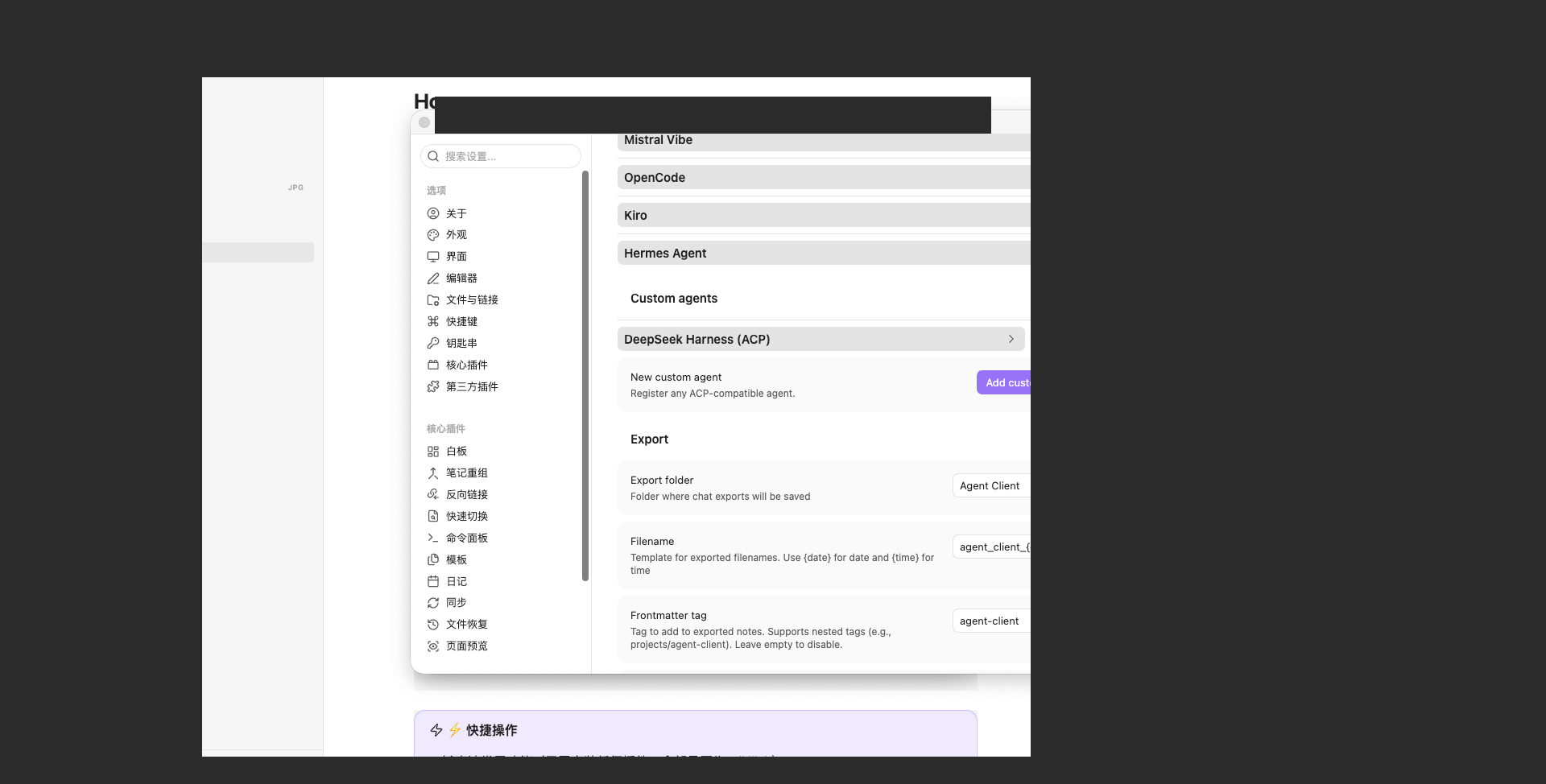
~/.dsh-acp routes still work.Three screenshots of the plugin in action inside Obsidian Agent Client:
Agent settings — DeepSeek Harness (ACP) registered as a custom agent
(plus model picker DeepSeek-V4-Flash), live in the Obsidian settings.
Run a conversation — right-pane DeepSeek Harness (ACP) chat with the
capabilities overview and an @Home note mention.

Session history — the Session history dialog listing DSH sessions (resume / fork / delete actions per row).
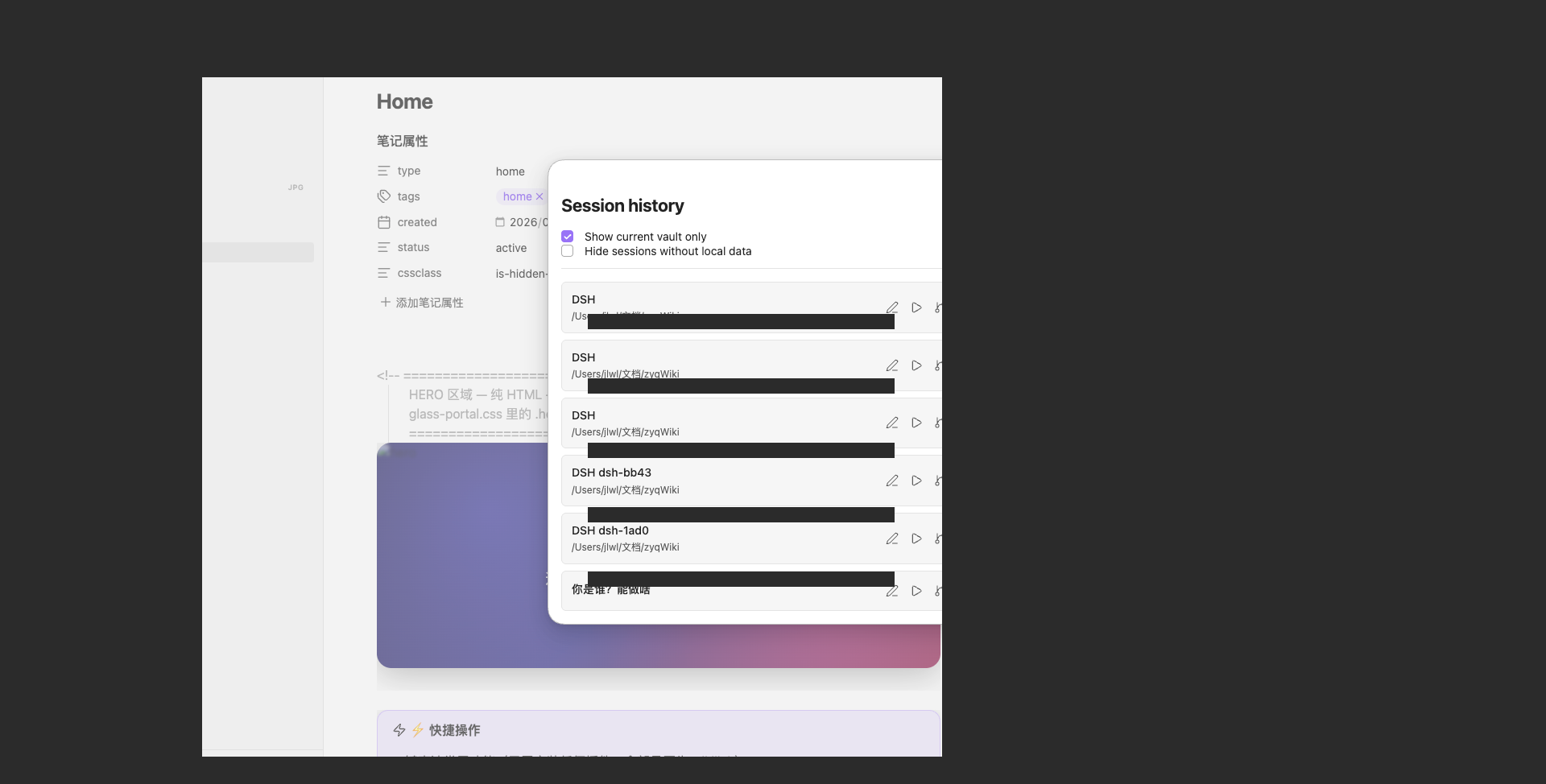
These are the same images referenced by
screenshots.jsonfor the awesome-dsh-plugin / dsh-market listing (App Store-style gallery). Images are GitHub-hosted and read directly from this repository; they are intentionally not part of the npm tarball (fileswhitelist).
dsh backend (see Headless profile bootstrap)| dsh version | legacy spawn | P2 long-running | official bridge |
|---|---|---|---|
0.1.6-alpha.x / 0.1.7+ |
✅ | ✅ | ✅ (env switch) |
0.1.5-rc.3 |
✅ | ❌ | ✅ (env switch) |
0.1.5-rc.3 degrades gracefully. The P2 subpackages
(@deepseek-ai/dsh-{agent-loop,llm,acp}) are probed at runtime by
lib/version-detect.mjs::hasP2Apis(). On 0.1.5-rc.x the probe reports
false, which forces runtime.mode = spawn — so the adapter keeps working
with full session support (V3 sessions, session/list, session/fork,
session/delete, archives) and simply omits the P2 long-running features
(tool-approval dialogs, live reasoning/tool streams).
This is a conservative gate, not a bug: the rc line does ship the
subpackages, but long-running mode has not been validated against it, so the
adapter deliberately falls back to the spawn path rather than risk
ERR_MODULE_NOT_FOUND at import time.
| Path | Role |
|---|---|
dsh-acp.mjs |
Standalone ACP server binary (bin: dsh-acp) |
archive-store.mjs |
Persistent session store + DSH-format archive writer |
index.mjs |
cordis plugin entry (dsh.acp service + adapter process manager) |
cordis.patch.yml |
plugin insert layer for dsh plugin ... add obsidian-dsh-acp |
session-manage.mjs |
P1b session management core (export / archive / move workspace / list) |
web/session-panel.mjs |
dsh web panel backend: /api-session/{list,export,archive,move,dsh-list,dsh-read,obsidian-list,obsidian-import} routes |
web/obsidian-import.mjs |
Discover + one-click import of Obsidian Agent Client sessions → dsh native store (SessionHandle, V3) |
lib/client.js |
dsh web panel frontend (React): sidebar button + Sessions / DSH Native / Obsidian Import tabs |
install.sh |
one-click installer (DSH profile + Obsidian custom agent) |
README.zh-CN.md |
中文版说明文档 (Chinese) |
README.ru.md |
Документация на русском (Russian) |
The package ships install.sh — a parameterized installer that (a) installs the
plugin into a DSH profile via the official dsh plugin add path and (b) wires
an Obsidian Agent Client custom agent to the ACP server, with optional env
config. It is idempotent, backs up every file before touching it,
supports any Obsidian vault, and can be previewed with --dry-run.
# dry-run preview first (recommended)
./install.sh --obsidian-vault /path/to/any/vault --dry-run

# real install into the "web" profile + wire Obsidian
./install.sh --obsidian-vault /path/to/any/vault

# install into another DSH profile
./install.sh --profile headless --obsidian-vault /path/to/any/vault

# DSH-only (skip Obsidian)
./install.sh --no-obsidian
Run ./install.sh --help for every option. Highlights:
| Option | Meaning |
|---|---|
--profile <name> |
DSH profile to install into (default web) |
--dsh-home <dir> |
DSH data root (default $DSH_HOME or ~/.dsh) |
--obsidian-vault <dir> |
any Obsidian vault to wire into (supports arbitrary path) |
--package <src> |
plugin source: <tgz> / <npm name> / link:<dir> |
--node-bin <path> |
node binary for the custom agent |
--profile-env |
print recommended adapter env |
--no-obsidian |
skip the Obsidian wiring step |
--dry-run |
preview only, change nothing |
--uninstall |
restore backups, remove the DSH plugin (dsh plugin remove) and Obsidian config this script added |
With the package installed (or directly from a checkout):
node dsh-acp.mjs            # serve ACP v1 on stdin/stdout
node dsh-acp.mjs doctor # health-check + one-click repair hints (v0.1.x experimental)doctor, experimental)When DSH or Obsidian reports a connection problem ("ACP connection closed",
"dsh exited 1", MISSING_CREDENTIAL …), the adapter auto-injects a diagnostic
block with copy-pasteable repair commands into the ACP reply. You can also run
a standalone health check:
node dsh-acp.mjs doctor            # diagnose + print one-click fix commands
node dsh-acp.mjs doctor --auto     # attempt auto-fix (each step asks for confirmation first)
doctor is version-agnostic — it works with both 0.1.1-rc.2 and
0.1.2-alpha of dsh, and only does generic checks (dsh binary, dsh version,
missing API-key credentials, npm update hint). It never depends on any
dsh-version-specific internal API.
gc, automatic)Problem: Obsidian Agent Client's delete button only removes its own local
sessions/<id>.json, and never sends the ACP session/delete — so
obsidian-dsh-acp's own durable index + archives go stale and the session
"comes back" on the next session/list.
Fix (automatic): on every session/list, the adapter reconciles its durable
session index against the Obsidian local agent-client/sessions directories and
removes sessions Obsidian no longer tracks (their disk archives included). This
is conservative — sessions still present in Obsidian are never removed.
Detection / opt-in:
node dsh-acp.mjs doctor          # shows which Obsidian sessions dirs were detected & orphan count
node dsh-acp.mjs doctor --gc     # immediately run garbage collection now
Config env vars:
| var | default | meaning |
|---|---|---|
| DSH_ACP_GC | on | off disables auto GC |
| DSH_ACP_GC_OBSIDIAN_DIRS | (auto-detect) | comma-separated extra agent-client/sessions dirs to reconcile |
| DSH_ACP_GC_NEED_ARCHIVE | 0 | when 1, only remove orphans that still have a disk archive |
| DSH_ACP_GC_REPORT_ONLY | 0 | 1 = dry-run (report only, never delete) |
| DSH_ACP_GC_VERBOSE | 0 | 1 = log GC actions to stderr |
There are two ways to configure the custom agent: one-click (run
install.sh --obsidian-vault <vault>, see above) or manually as follows.
Manual steps in Obsidian:
dsh-acpDeepSeek Harness (ACP)dsh-acp.mjsDSH_ACP_LOG_DIR → /absolute/path/to/logsnode binary (>= 22.13) so the
script's shebang resolves.If you configure it by editing data.json directly:
{
  "id": "dsh-acp",
  "displayName": "DeepSeek Harness (ACP)",
  "command": "/absolute/path/to/dsh-acp/dsh-acp.mjs",
  "args": [],
  "env": [{ "name": "DSH_ACP_LOG_DIR", "value": "/absolute/path/to/dsh-acp/logs" }]
}Install into a DSH profile via the official plugin mechanism (this makes the
plugin installable with dsh plugin add thanks to the dsh.bundle manifest in
package.json):
# from the npm registry (after publish)
dsh plugin --profile web add obsidian-dsh-acp

# from a local publish artifact (tarball)
dsh plugin --profile web add ./obsidian-dsh-acp-0.1.0.tgz

# from a local checkout (symlink, dev mode)
dsh plugin --profile web add -w link:/path/to/dsh-acp
Verify the plugin is registered in the profile's config tree:
dsh --profile web --dump-config | grep -A1 "dsh-acp"
# -> # == obsidian-dsh-acp
#    - id: dsh-acp
#      name: obsidian-dsh-acp
The plugin reads cordis.patch.yml to insert its dsh-acp entry into the
profile's plugin tree, then exposes the dsh.acp service:
ctx.get("dsh.acp") — the DshAcpService instance.service.start() / service.stop() — spawn / terminate the adapter
subprocess.service.process — the live ChildProcess (null when not running).The spawned dsh --profile <name> process reads these environment variables.
Set them for the adapter (custom-agent env in Obsidian, or the profile/managed
process) as needed:
| Variable | Meaning | Default |
|---|---|---|
DSH_BIN |
dsh executable |
dsh on PATH |
DSH_PROFILE |
profile to boot | headless |
DSH_ARGS |
extra args before the prompt (space-separated) | (none) |
DSH_ACP_LOG_DIR |
directory for a runtime log | (disabled) |
DSH_ACP_LOG_MAX_BYTES |
size cap (bytes) before the log rotates | 5242880 (5 MB) |
DSH_ACP_LOG_KEEP |
number of rotated .1/.2… log files to keep |
2 |
DSH_ACP_STORE_DIR |
directory for the durable session JSON index | ~/.dsh-acp |
DSH_ACP_PERSIST_DEBOUNCE_MS |
debounce window (ms) for coalescing index writes | 100 |
DSH_ACP_ARCHIVE_IN_MAIN |
place turn archives under sessions/ instead of dsh-acp-archives/ |
0 |
Config (loader-provided):
# cordis.patch.yml entry example
- id: dsh-acp
  name: dsh-acp
  config:
    spawn: true        # start the adapter on app/ready
    profile: headless  # DSH profile for the adapter
env: {} # extra env for the adapter processdsh --profile headless needs a default model provider the headless profile
can resolve. If your global $DSH_HOME/settings.yaml pins a web-only provider
(e.g. my-web-only-provider), give the headless profile its own settings:
~/.dsh/profiles/headless/settings.yaml — an llm-pi-ai route +
agent-default-model.~/.dsh/profiles/headless/cordis.patch.yml — mount that settings file via a
settings id override and set agent-default-model.CLASSIFICATION EVIDENCE
系统优先读取 GitHub Topics,再与站内分类词典和词根规则比对。当前命中: 无有效分类标签。
deepseek-ai
DeepSeek Harness: Everything is a Plugin.

anywhere-labs
为 DeepSeek Harness (DSH) 插件生态打造的现代化桌面端解决方案。万物皆「插件」,桌面本身也是「插件」。

awesome-dsh-plugin
A curated list of plugins for DeepSeek Harness (dsh) · DeepSeek Harness 插件精选列表