dsh-qwen-mm-plugins
English · 中文
A DeepSeek Harness (DSH) plugin that brings the cloud multimodal capabilities of QwenLM/Qwen-MM-Plugins to DSH.
Features
- MCP tools — 12 tools under
mcp__qwen-mm-plugins-api__*: vision_chat (image understanding), ocr, grounding, transcribe_audio (ASR), omni_multi_speaker_asr (speaker diarization), omni_av_caption / omni_av_grounding (audio-video understanding), and more.
- Bundled skill — the
qwen-mm-plugins-api skill ships with the plugin; no manual ~/.dsh/skills copying.
- Settings page — Web GUI → Settings → Qwen 多模态: paste a Qwen API Key and go. Keys live in the credential store
$DSH_HOME/.credentials.yaml (0600), never in session logs.
- Live switch — saving or rotating the key restarts the MCP child automatically; no DSH restart needed.
- Capability management — all 8 capabilities (core / api / search / video-memory / video-edit / blender / freecad / edu-agent) with a 3-state model — not installed → disabled → enabled — plus one-click install/enable/disable.
/qwen-mm command — status, verify, caps, install <cap>, disable <cap>, model set <vl|omni> <id>.- Model configuration — the Models card on the settings page lets you change the VL / Omni models anytime; saves take effect immediately, no DSH restart.
Quick Install
Prerequisites: Node ≥ 18, a DeepSeek Harness installation, and either pnpm or Corepack.
# 1. Clone the plugin
git clone git@github.com:ShuiHan268/dsh-qwen-mm-plugins.git

# 2. One-command install (idempotent)
cd dsh-qwen-mm-plugins
node install.js

# 3. Restart DSH
npx @deepseek-ai/dsh web
The installer: bootstraps the web profile → installs uv if missing → builds the plugin venv from the immutable tag → registers the plugin through the profile's pnpm layout (using Corepack when pnpm is not directly available) → normalizes the YAML patch → runs a system self-check. Re-running repairs interrupted or legacy npm-based installs.
Open Settings → Qwen 多模态, paste your Qwen API Key, and save. A key in a legacy ~/.qwen-mm-plugins/config is migrated automatically.
Options:
--install-source <dir-or-url>: use a local checkout (or mirror URL) as the capability install source.--skip-venv: skip venv creation; the plugin auto-provisions it on first boot.DSH_HOME=<path>: custom DSH home (default ~/.dsh).
Installing from the DeepSeek Harness plugin catalog
You can also skip install.js entirely: open the plugin catalog in the DeepSeek Harness GUI and, in a conversation, ask the Agent to install this plugin — the Agent handles registration and configuration for you.
Usage
Once capabilities are installed and enabled, you don't select them manually — just describe what you want in plain language and attach files with @; the model calls the right tools for you.
Common examples:
| What you want |
Just say |
| Look at an image |
@photo.jpg what's in this image? |
| Extract text |
extract the text from @scan.png with OCR |
| Transcribe audio |
transcribe @meeting.wav into timestamped subtitles |
| Meeting with speakers |
transcribe @meeting.mp4 with speaker labels |
| Video highlights |
summarize @lecture.mp4 by timeline |
| Read documents |
summarize page 3 of @report.pdf and extract the tables (needs core installed) |
Three things to remember:
- No capability picker: each enabled capability's tools are in the model's catalog;
api works out of the box once the Qwen API Key is saved.
- Use a new session: after installing or enabling a capability, start a new session so the new tools are fully available.
- Check status anytime: send
/qwen-mm caps in the chat, or open Settings → Qwen 多模态 to see each capability as "not installed / disabled / enabled".
Notes: core and video-memory need a one-click install first (dependencies take 1–2 minutes); search also needs a Serper/Exa/Tavily key; blender and freecad need those apps installed locally; audio/video tools need ffmpeg.
Capability Management
| State |
Badge |
Button |
| Not installed |
gray |
[Install] |
| Disabled |
yellow |
[Enable] |
| Enabled |
green |
[Disable] |
| Installing… |
yellow |
— |
- Install adds the capability's dependencies to the shared venv and mounts its MCP server; disable removes the tools (dependencies stay) and can be re-enabled anytime.
- Dependency-level uninstall is not offered: upstream ships one distribution with shared dependencies across capabilities, so per-capability uninstall cannot be done safely.
edu-agent is skill-only and not bundled here; api is the core and cannot be disabled.
UI Overview
After installing and configuring, open Settings → Qwen 多模态 (in the left nav, alongside General, Models, and the rest) — the page looks like this:
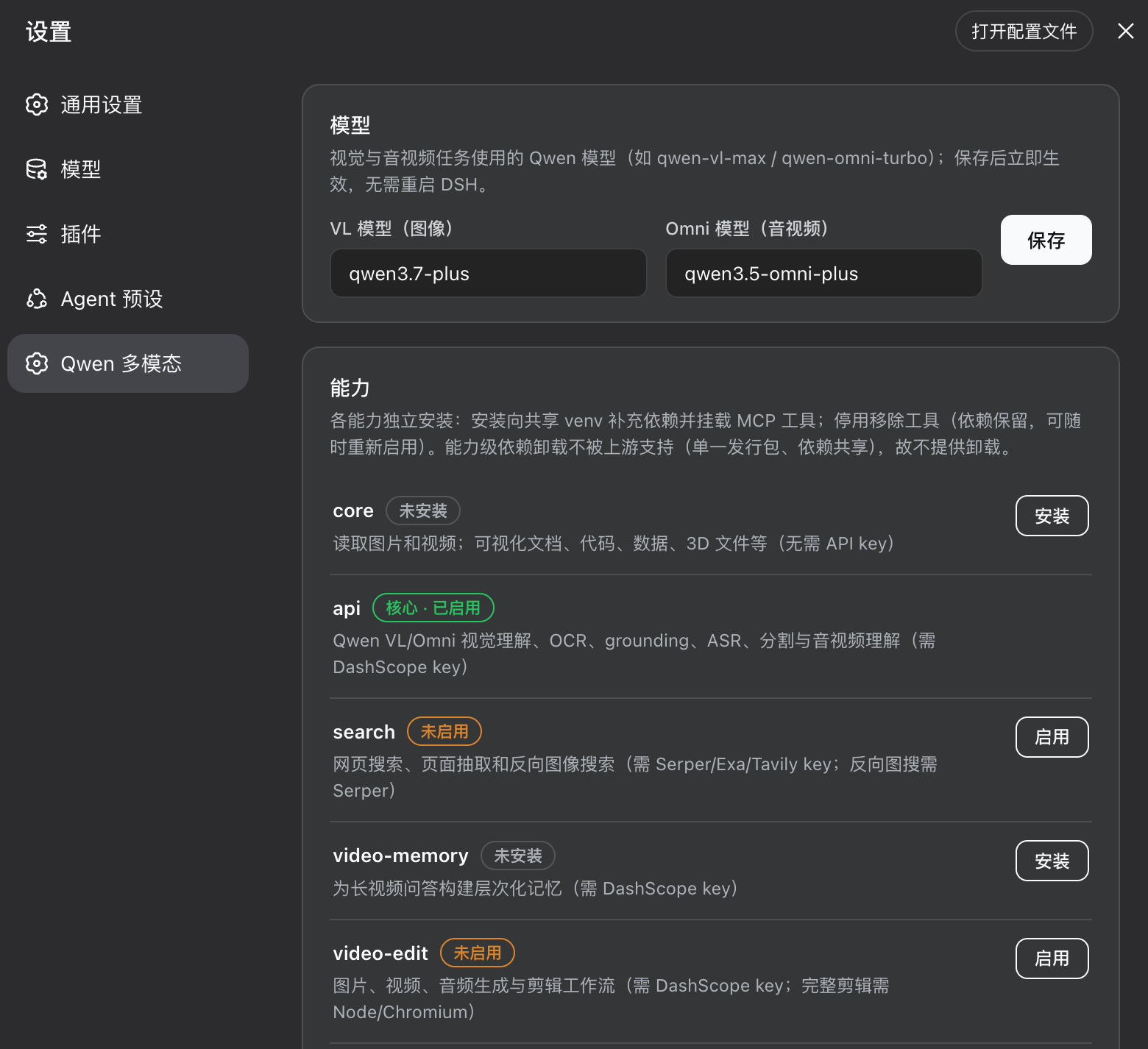
- Qwen API Key card: paste the Qwen API Key from Alibaba Cloud Model Studio and click 保存 — it takes effect immediately. The dot on the top-right shows the state (green = configured, red = not configured).
- Capability card: lists all 8 capabilities, each row with the capability name, a state badge (not installed / disabled / enabled / installing…), and an action button (install / enable / disable); missing system dependencies are called out (e.g. blender shows 「缺系统依赖:blender」 in the screenshot).
- Live status: state refreshes right after a button click, and post-install dependency probes sync to the page within seconds.
Manual Install
Equivalent steps to the installer, for troubleshooting or customization.
1. Add the plugin through the profile package manager
cd ~/.dsh/profiles/web
corepack pnpm add file:/absolute/path/to/dsh-qwen-mm-plugins
Do not create a raw node_modules symlink: it bypasses DSH's pnpm dependency layout and prevents the plugin's DSH peer dependencies from resolving.
2. Add the plugin row to ~/.dsh/profiles/web/cordis.patch.yml
- insert:
    - id: qwen-mm-plugins
      name: 'dsh-qwen-mm-plugins'
      config:
        venvPath: '/Users/you/.dsh/mcp-envs/qwen-mm-plugins'   # when a venv exists
        # empty = uvx + immutable tag (requires uvx and GitHub access)
3. Python environment
4. Restart
Open Settings → Qwen 多模态, paste the API Key, and save.
Dependencies
ffmpeg / ffprobe for audio/video tools (macOS: brew install ffmpeg; Debian/Ubuntu: apt install ffmpeg).- Qwen API Key from Alibaba Cloud Model Studio (key management); free tier ~1M tokens per model / 90 days; ASR models must be enabled per workspace.
How It Works
- Keys go through the DSH credentials seam (
ctx.credentials, ref QMP_DASHSCOPE_API_KEY); the page uses the baked api.credentials.{describe,set} remotes — the official third-party path in rc.6, whose settings boundary is an explicit allowlist.
- Capability status is pushed via the
qwen-mm-caps session projection; actions run through the /qwen-mm … command channel, with status re-folding on the command lifecycle.
- The key is injected into MCP children via env vars;
credentials/updated re-spawns the child after a save.
Testing
node test/host.test.mjs    # host: config, credential→env, skill provider, live switch, migration, capability lifecycle
node test/client.test.mjs  # client: bundle registration smoke test
node test/install-profile.test.mjs # YAML patch normalization and pnpm-runner selection
node test/install-script.test.mjs  # interrupted-install repair and idempotency
Full integration is verified with an isolated dry-boot: copy the profile into a scratch DSH_HOME, patch the webserver port to 0, and check a clean boot log, a spawned MCP child, and the client module in the boot graph.
Notes & Limitations
- Media is preprocessed locally then uploaded to DashScope — do not use with sensitive content.
gitTag defaults to qwen-mm-plugins-api-v1.0.3; bump it to follow upstream releases.
License
Apache-2.0


