


模型与 MCP
待识别

rea
morluto
Reverse engineer anything with agents, from app behavior down to native binaries.
PROJECT TOPICS
INSTALL REFERENCE
dsh plugin --profile web add github:ShawnRen57/dsh-whoop-easy-connect
该命令指向仓库当前默认分支;尚无绑定当前 commit 的完整验证结果。
PROJECT README
dsh-whoop-easy-connect · 在 DeepSeek Harness(dsh)里轻松连接你的 WHOOP 账号,数据自动同步,并拥有一个专属的健康看板。






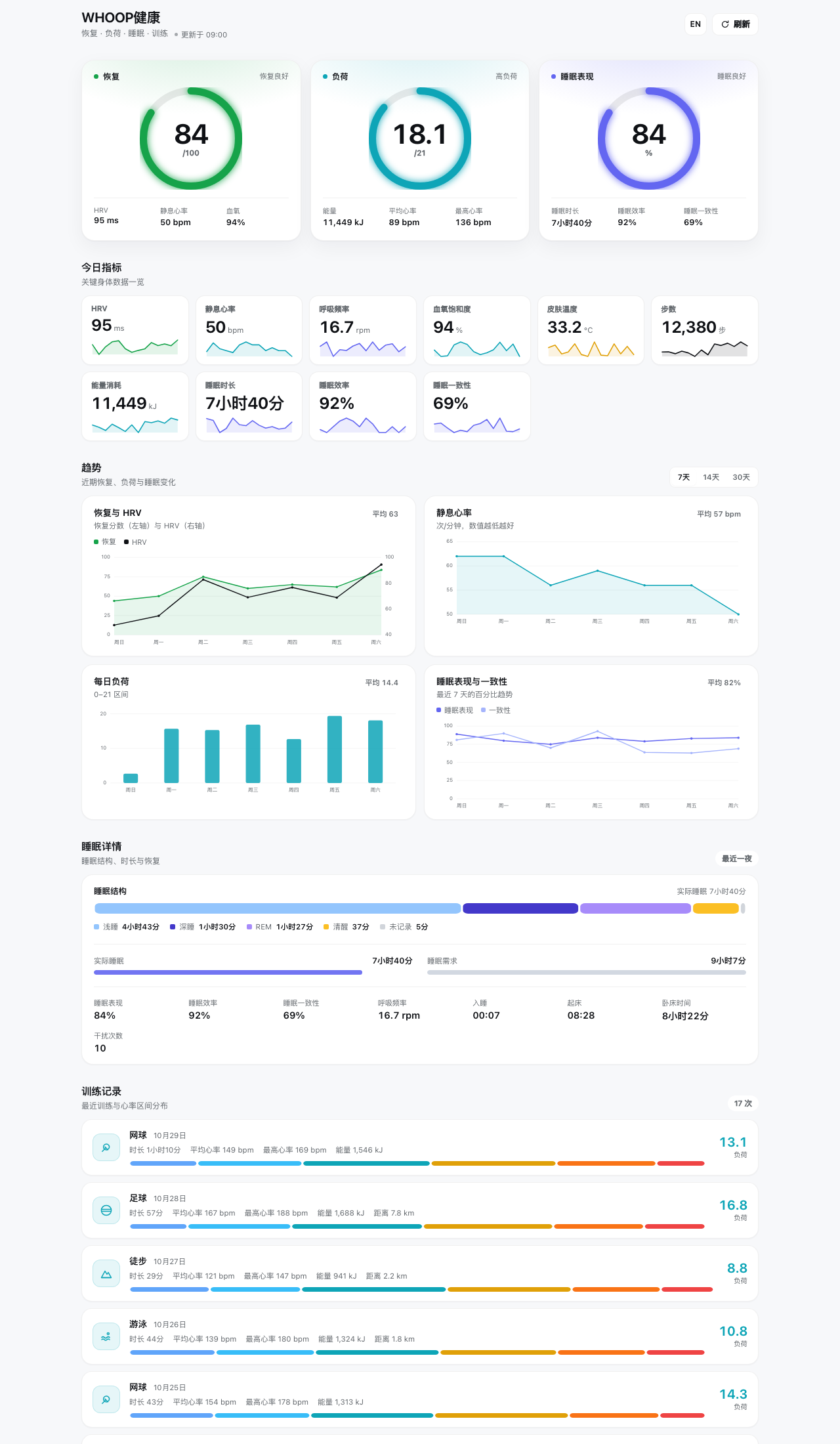
offline scope),不需要反复登录。| 区域 | 内容 |
|---|---|
| 三环主视觉 | 恢复分数(0–100,绿/黄/红语义)、每日负荷(0–21)、睡眠表现(0–100) |
| 今日指标 | HRV、静息心率、呼吸频率、血氧、皮肤温度、步数、能量消耗、睡眠时长 / 效率 / 一致性 |
| 趋势 | 恢复 + HRV、静息心率、每日负荷、睡眠表现与一致性,支持 7 / 14 / 30 天切换 |
| 睡眠详情 | 浅睡 / 深睡 / REM / 清醒结构、实际睡眠 vs 所需睡眠、入睡/起床时间、干扰次数 |
| 训练记录 | 运动类型、时长、负荷、平均/最高心率、能量、距离、心率区间分布 |
| 身体与资料 | WHOOP 账号姓名 / 邮箱、身高、体重、最大心率 |
看板右上角可以 切换中英文、手动刷新;页面每次进入都会自动刷新一次。界面适配 DSH 的明暗主题。
方式一:直接安装 GitHub 仓库(推荐)
在终端运行(把 desktop 换成你的 DSH profile 名称):
dsh plugin --profile desktop add github:ShawnRen57/dsh-whoop-easy-connect也可以让 DSH 里的 Agent 帮你安装:
plugin_manager install_bundle target=github:ShawnRen57/dsh-whoop-easy-connect安装后在 DSH 左侧栏出现 WHOOP健康 入口;如果页面没有立即刷新,刷新一次页面。
方式二:插件市场
在 DSH 的 插件 → 发现 中添加社区插件索引,搜索 “WHOOP Easy Connect” 后安装。开放插件市场索引地址:https://dshopen.org/index.json。
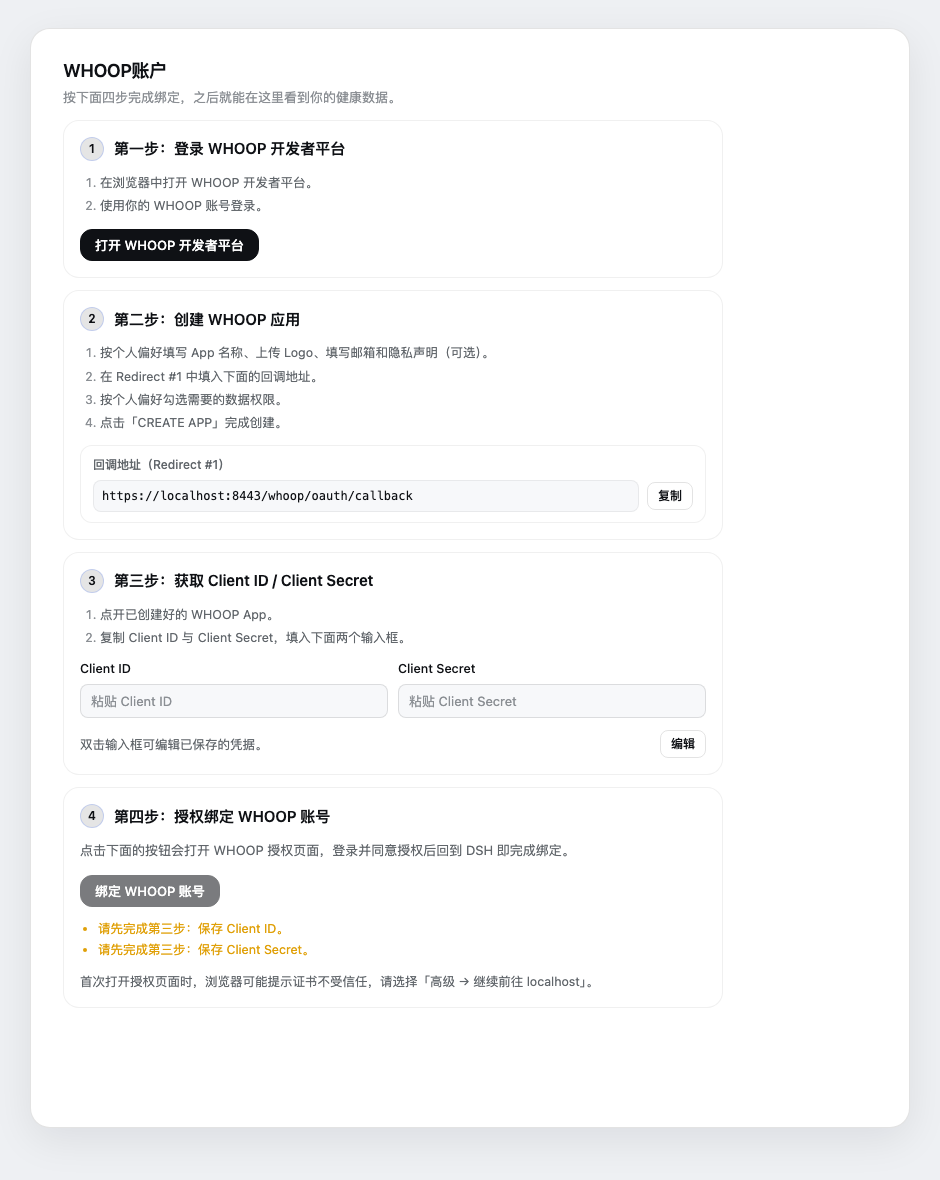
Redirect #1;勾选数据权限后点 CREATE APP。授权完成、浏览器显示「WHOOP 账号已连接」后回到 DSH,看板就会显示你的真实数据。
为什么需要自己创建 WHOOP 应用?WHOOP 要求每个应用使用自己的 OAuth 凭据。你只需要在它的开发者后台创建一次应用;回调、令牌交换和续期都由插件自动完成。
~/.dsh-whoop-easy-connect/state.json(文件权限 0600),自签名证书保存在同目录的 tls/ 下。api.prod.whoop.com),不向其他第三方发送你的健康数据,也没有遥测。https://localhost:8443,选「高级 → 继续前往 localhost」即可。Redirect #1 与页面显示的地址完全一致;再确认第 3 步的 Client ID / Secret 已保存成功。node scripts/build-client.mjs # 生成浏览器端 lib/client.js
node --test scripts/test-host.mjs # Host 端单元测试(不联网)插件由两半组成:Host 端负责 OAuth、令牌存储和 WHOOP API 聚合;浏览器端负责侧边栏入口、设置引导和健康看板。看板使用纯 SVG 绘制图表,不依赖第三方图表库。
MIT © 2026 ShawnRen57
WHOOP、WHOOP 标志及相关名称是 WHOOP, Inc. 的商标。本项目是个人开发的第三方插件,与 WHOOP 官方无关,也未获得 WHOOP 官方背书。
dsh-whoop-easy-connect — connect your WHOOP account to DeepSeek Harness (dsh) in minutes, keep your data in sync, and explore it in a dedicated health dashboard.
offline scope), so you don't have to sign in again.| Section | Contents |
|---|---|
| Hero rings | Recovery score (0–100, green/yellow/red), daily strain (0–21), sleep performance (0–100) |
| Today | HRV, resting HR, respiratory rate, SpO₂, skin temperature, steps, energy, sleep duration / efficiency / consistency |
| Trends | Recovery + HRV, resting HR, daily strain, sleep performance & consistency — 7 / 14 / 30 days |
| Sleep | Light / deep / REM / awake stages, actual vs. needed sleep, bedtime & wake time, disturbances |
| Workouts | Sport, duration, strain, average/max HR, energy, distance, heart-rate zones |
| Body & profile | WHOOP name / email, height, weight, max heart rate |
Switch between Chinese and English or refresh manually from the top-right corner. The page refreshes once every time you open it, and follows DSH's light and dark themes.
From GitHub (recommended)
dsh plugin --profile desktop add github:ShawnRen57/dsh-whoop-easy-connectOr ask the agent inside DSH:
plugin_manager install_bundle target=github:ShawnRen57/dsh-whoop-easy-connectAfter installing, the WHOOP健康 entry appears in the DSH sidebar. Refresh the page once if it does not show up immediately.
From the plugin market
Add a community plugin index under Plugins → Discover in DSH and search for “WHOOP Easy Connect”. The Open Plugin Market index is https://dshopen.org/index.json.
Redirect #1; pick the data permissions and click CREATE APP.Once the browser shows “WHOOP account connected”, go back to DSH and the dashboard will show your real data.
Why create your own WHOOP app? WHOOP requires each app to use its own OAuth credentials. You only create it once in the developer dashboard; the plugin takes care of the callback, token exchange and refresh.
~/.dsh-whoop-easy-connect/state.json (mode 0600); the self-signed certificate lives under tls/ in the same directory.api.prod.whoop.com). It does not send your health data anywhere else and contains no telemetry.https://localhost:8443; choose “Advanced → Proceed to localhost”.Redirect #1 value registered in your WHOOP app exactly matches the callback URL shown by the plugin, and that the Client ID / Secret were saved successfully.node scripts/build-client.mjs # build the browser bundle lib/client.js
node --test scripts/test-host.mjs # Host-side unit tests (offline)The plugin has two halves: the Host half owns OAuth, token storage and WHOOP API aggregation; the browser half owns the sidebar entry, the setup wizard and the dashboard. Charts are hand-drawn SVG — no chart library.
MIT © 2026 ShawnRen57
WHOOP, the WHOOP logo and related names are trademarks of WHOOP, Inc. This is an independent third-party plugin, not affiliated with or endorsed by WHOOP.
Built with DeepSeek Harness
CLASSIFICATION EVIDENCE
系统优先读取 GitHub Topics,再与站内分类词典和词根规则比对。当前命中: deepseek、deepseek-harness。
morluto
Reverse engineer anything with agents, from app behavior down to native binaries.

deepseek-ai
DeepSeek Harness: Everything is a Plugin.

nexu-io
The 1st Collaborative AI Design Agent Workspace. Local-first and open source. Create motion, prototypes, websites, apps, dashboards, presentations, images, and videos with your team and AI agents. Share work, exchange feedback, and iterate together in one workspace.