模型与 MCP
待识别

rea
morluto
Reverse engineer anything with agents, from app behavior down to native binaries.

Senguk520/dsh-multitask
A Multitask "shock absorber" plugin & agent preset for DeepSeek Harness (DSH): the main chat only plans, briefs subagents and summarizes results, while file reads, commands, search and builds all run inside subagent contexts. Four worker types, an approval gate, zero DSH source changes.
PROJECT TOPICS
INSTALL REFERENCE
dsh plugin --profile web add github:Senguk520/dsh-multitask
该命令指向仓库当前默认分支;尚无绑定当前 commit 的完整验证结果。
PROJECT README

The Multitask "shock absorber" mode for DeepSeek Harness — the main conversation never touches your codebase.











English · 中文 · Design notes and measured evidence · MIT License
A work mode for DeepSeek Harness(DSH) in which the main conversation does exactly three things: understand what you asked for, turn it into task briefs, and report back what the Subagents concluded. Every piece of process data — file contents, command output, build logs, search results, dead ends — is digested inside a Subagent's context and never enters the main one. The main conversation therefore holds only high-value information.
This is a mechanism, not a prompt asking the model to behave. Once the mode is selected, the main conversation (the coordinator) genuinely has a narrower tool surface: the tools that would drag in process data — writing files, running commands, searching the web — are not in its visible set. It cannot call them, so it cannot pollute its own context. A Subagent (worker) is the opposite: it gets the full tool surface, does the work, and returns only its conclusion.
Zero runtime dependencies. No changes to DSH source.
At a glance:
| Capability | What it gives you |
|---|---|
| Narrowed coordinator tool surface | the main conversation cannot write, run commands or search — those tools are genuinely absent, not merely discouraged |
| Process data never reaches the main conversation | file contents, command output, build logs and dead ends stay inside a worker's context |
| Four kinds of Subagent | a full-surface worker, a fork that inherits completed turns, a programmatic PTC worker and a read-only worker, chosen by task shape |
| Dispatch to another mode | hand a brief to any other installed agent preset and receive only its conclusion |
| Two-level approval gate | safe commands run untouched; dangerous ones raise a card in the main conversation |
| Corrections take effect immediately | a follow-up message stops the worker's current turn first instead of queueing behind the wrong work |
| Mode isolation | several modes can share one workspace; each narrows only its own sessions |
| Cross-session settings | pick a model per worker kind and set the parallelism limit, both in Settings |
| Automatic workspace permission repair | on Windows the one missing permission is added at session start, and only that one |
Read-only metadata tool file_info |
byte counts and file kinds without reading contents, so the coordinator can verify a claim itself |
| Zero runtime dependencies | no changes to DSH source |
| Main conversation (coordinator) | Subagent (worker) | |
|---|---|---|
| Tool surface | read-only checks + delegation + result retrieval + interaction | full (write files, run commands, build, search…) |
| Context | your request + task briefs + conclusions | all the process data |
| Job | understand, translate, dispatch, verify, report | do the work |
What the coordinator keeps (a whitelist):
read grep glob file_infosubagent subagent_fork subagent_ptc subagent_minimalsend_message interrupt_agent list_agentsjob_list job_output job_killworkflowask_user_question todo_write create_goal get_goal update_goal exit_plan_mode present skillAnything not on that list is withheld by default — write, edit, pwsh, web_search, web_fetch, read_image, ssh_*, task_board_*, plugin_manager, and so on. The rule is a complement: withheld = currently visible − kept. Any tool the host adds later is therefore also withheld from the coordinator by default, with no change needed in this plugin.
The read-only tools are kept on purpose: the coordinator is meant to verify a Subagent's claims independently instead of trusting them blindly.
The narrowing is applied only to sessions whose live preset binding is this preset. A session belonging to another mode in the same workspace keeps its own tool roster and is not touched — so you can run several modes side by side without them eating each other's tools.
Switching a session out of the mode lifts the restriction again, and switching into it before the first turn narrows it before the first request is even made.
presetId is that ownership key. If you change it to install variants side by side, each variant narrows only its own sessions; and if it no longer matches the registered preset id, no session is narrowed at all — the mode can look installed while quietly doing nothing.
When ownership cannot be read, the guard prefers not to narrow rather than risk narrowing a neighbour's session. The cost of a registry hiccup is therefore one possibly un-narrowed turn, never a broken neighbouring mode.
dsh plugin --profile <profile> add dsh-multitask--profile is an option and cannot be dropped — dsh plugin add dsh-multitask fails outright with error: required option '--profile <name>' not specified. <profile> is the profile to install into: the desktop app owns one called desktop, and this checkout commonly uses web; if you are unsure, look at the directories under ~/.dsh/profiles/.
The package then lands in that profile's node_modules, and DSH automatically appends dsh-multitask to the profile's dsh.profile.bundles layer list (because this package declares dsh.bundle.patch). The bundled cordis.patch.yml inserts a bare package name with no absolute paths — so it works on any machine, any user name, any install location. Restart the app afterwards — bundle layers are composed at startup.
You can also install it from the in-app Plugins page, which needs no command line.
Desktop (Electron) note. Fully quit the app first — pnpm rewrites the profile's
node_modules, and the running app holding those files open will make it fail. The desktop app's owndshlauncher can managedesktop; adshinstalled separately from npm is refused outright (error: profile "desktop" is managed exclusively by the Electron application). In that case use the in-app Plugins page, or the source route below.
To run the sources in your working tree (edits without going through npm), append this block to the profile's cordis.patch.yml, pointing at your local entry with an absolute file:// URL:
- insert:
    - id: multitask
      name: 'file:///absolute/path/to/dsh-multitask/lib/index.js?v=6'
Two things to watch:
% in the path must be percent-encoded (common on Windows). Let a program encode it rather than typing it by hand — in PowerShell: (New-Object System.Uri('H:\my repo\dsh-multitask\lib\index.js')).AbsoluteUri.?v=N is a cache key, and it only means anything in this file:// mode (see Development → "Making source edits take effect").Adding this row needs no restart: DSH watches cordis.patch.yml and hot-reloads it.
When creating a new session, pick "Multitask 减震器模式" in the mode selector, then just ask for what you want.
The mode can be chosen before a session's first turn starts, and a session whose first turn has not yet started can still be switched into or out of it. What is frozen is a session that has already started running its first turn — that is an existing DSH constraint (the tool surface and prompt freeze on the first turn), not a limitation of this plugin.
The coordinator translates your request into self-contained task briefs — a Subagent cannot see this conversation, so a brief must carry everything it needs (goal, verified current state, project conventions, safety rails, numbered tasks, conditional branches, stop conditions, report format). Independent briefs are dispatched in parallel, and the coordinator then ends its turn — the runtime wakes it with a new turn when a worker reports, so nothing is lost and the context stays clean.
The coordinator has four delegation paths, and the difference is mainly the tool surface:
| Delegation tool | Tool surface | Best for |
|---|---|---|
subagent |
full | the default — writing code, running tests, editing files, execution work |
subagent_fork |
full + the completed turns of this conversation — it does not see the turn currently in flight, so a fact stated in the dispatching turn must be repeated in the brief | review and continuation — when the work must build on what is already established here |
subagent_ptc |
PTC-collapsed: only run_code is directly callable; every other tool is reached from inside a program via a generated SDK |
programmatic bulk work — filtering, aggregating, or moving large data sets whose intermediate values should never enter the context |
subagent_minimal |
read-only: write and execute tools are removed, but it keeps read grep glob read_image file_info skill todo_write present and can still search and fetch the web |
investigation, quick answers, fact-checking |
Pick by the shape of the task, not by habit. The four paths have different tool surfaces, and the choice is made per delegation in the coordinator persona (section ## Choosing which worker to delegate to).
Delegation is one level deep: coordinator → worker, and a worker cannot delegate further. Jobs that need splitting are split by the coordinator into flat briefs.
The four kinds also differ in persona, not only in tool surface. A fork worker is told that the seeded turns are the coordinator's work and not its own, so it reviews instead of pretending to have done it. A PTC worker is told that its closing message is the fallback channel if run_code breaks. The read-only worker is told it may search and fetch the web, so it does not report back that it "cannot look anything up".
On top of that, five delegation tools — subagent, subagent_fork, subagent_ptc, subagent_minimal, subagent_preset — are removed from a worker's tool catalog outright, for every kind except the read-only worker. A worker therefore cannot delegate: the tool is not there rather than present-and-refused. This costs no capability, because the host's fixed depth of 1 would refuse every such call anyway; it only stops that schema being re-sent on every single request. The coordinator is untouched by this, and the read-only worker is narrowed by its own allowlist instead.
This is not a security boundary — the real block is the host's depth limit. If it fails to install it degrades silently, leaving only a log line containing WORKER-GUARD-SKIPPED, and nothing is lost functionally. Its switch is the worker-guard row's config.enabled in presets/multitask/composition.mjs (which also accepts an additive config.extraDeny), and changing it requires a restart.
If a worker's persona cannot be installed at all, that worker keeps the coordinator persona and the log shows WORKER-PERSONA-SKIPPED.
When the coordinator sends a follow-up to a running worker, the target's current turn is stopped first, and only then is the message delivered — it does not queue until the next step boundary. This matters because a single step can be one long tool call: a build, a dependency pull, a recursive scan. A correction that merely queued would let the wrong instruction run to completion before your new one was even read.
Stopping is not "the task was cancelled". The inbox and any descendants are kept, and every fact already accepted is still in the session log. What is dropped is the rest of that turn: the tool batch that was in flight and its result, the steps it had not reached yet, and any reply it was still composing. A pending approval request is dropped too, and that is the one that bites: the turn is gone, so the request is settled as cancelled — the click the user was about to make is discarded, and the worker re-issues the same call as a fresh request whose card is byte-identical to the old one. A correction to work that was on the right track therefore still costs a restart of that turn — and the message may carry information the worker could not have had.
Telling a worker to stop is not stopping it. send_message is not a stop button, and interrupt_agent is the one that is: sending aborts the target's current turn and then opens a new one carrying your text, so a worker you told to stop is still running — and that message stays in its inbox and survives an interrupt, which is why "send a stop message, then interrupt" stops nothing: the queued message wakes the worker again. interrupt_agent aborts the current turn, opens no new one, and the worker goes inactive without ever reporting; the files it already wrote stay written, possibly half-finished.
The handover case is the exception: tell the old worker to write a handoff note — what is done, which files it touched and their state, what is half-written, what you would do next — and then end its turn; that is exactly what the extra turn is for. Wait for that note before dispatching the replacement, or the turn you paid for buys nothing.
It only ever acts in the coordinator → worker direction. A message that a worker sends upward is not preceded by an interrupt, because that would cut the main conversation's own turn. If the interrupt fails, or the deployment exposes no interrupt capability, the message is still sent normally and corrections simply revert to queueing: you see an info line, not an error. Its only switch is the interrupt-before-send row's config.enabled in the composition, and changing it requires a restart.
Every brief carries a line task: <slug>, and the key is enforced, not advisory: it is on by default, and it covers the four built-in delegation paths — subagent, subagent_fork, subagent_ptc, subagent_minimal. The slug is 3-64 characters, lowercase, [a-z0-9][a-z0-9._-]{2,63} — no spaces, no capitals. Same job, same slug (including a restart or a takeover of it); different jobs, different slugs.
While a slug is live, a second dispatch with the same key is refused, and the refusal names the worker already on it — the first 8 characters of its session id and how long it has been running. There are three ways out: wait for that worker to finish, stop it first with interrupt_agent and then dispatch, or give genuinely different work a different slug.
This is the mechanical half of Corrections stop the worker first above. Without a key, "dispatch the replacement" and "dispatch a second unrelated brief" are the same call, and nothing can tell them apart; with one, the replacement is refused while the original is still alive. A key frees up when its worker's session is disposed (or is no longer live), and it is scoped to the conversation that issued it, so unrelated conversations never collide. While a worker is bound to a key there is no timeout: a job that takes 40 minutes is not expired. The one exception is the placeholder left by a dispatch that failed — the host's maxActiveSubagents cap, a provider error — so that no worker was ever created: an unbound placeholder expires after at most 10 minutes, which means the same slug can be retried as-is instead of being abandoned for a new one. Enforcement covers only those four built-in paths: spawn_teammate, subagent_preset and workflow have no verified brief schema here, so they are let through and currently take no part in deduplication. Its switch is the task-key row's config.enabled in the composition.
file_info toolIt is this package's own tool and the only self-authored tool on the coordinator's keep list. Its input is exactly one field: paths, an array of one or more path strings (up to 256), resolved by the filesystem backend with relative paths taken against the session working directory.
The output is one entry per requested path — requestedPath, resolvedPath, status, sizeKnown, sizeBytes when known, and a note explaining an odd state — plus a totals block (requested, files, directories, others, missing, errors, bytes, unknownSizes, complete).
status is one of file, directory, other, missing or error. A directory is reported as a directory with no byte count. A missing or uninspectable path is reported as such and is never reported as 0 bytes: when the backend cannot supply a size, sizeKnown is false and sizeBytes is absent rather than fabricated as zero.
totals.bytes sums only the known sizes, unknownSizes counts the rest, and complete is true only when every requested path is a known-size regular file — so a partial sum never masquerades as a total.
It never reads file contents and never modifies anything: it only resolves and stats each path. That is exactly why it is safe to keep in a mode whose entire point is keeping data out of the main conversation, and why the coordinator can use it to check a worker's claim ("five files, this many bytes") instead of trusting the report. It also serves the read-only worker, and it is deliberately not affected by the DSH_MULTITASK_MULTI_MODE switch.
If the filesystem capability is unavailable at load time the tool is simply not registered — the model never sees a route that would fail — leaving a log line containing FILE-INFO-SKIPPED; success logs FILE-INFO-ENGAGED.
The four paths above are this mode's own workers. One more path reaches outside this mode:
| Delegation tool | Target | Best for |
|---|---|---|
subagent_preset |
any installed agent preset (including third-party modes installed from the market) | when the job is genuinely something that other mode exists to do |
This is what makes the coordinator a layer between you and every installed mode: it picks one by reading what that mode says about itself, hands the brief over, and only receives the conclusion. The work happens in that mode's worker, not in your main conversation.
To use it, call with list: true first to read the roster (id, name, description, and whether each mode can currently compose a session), then choose by description. The description is the only reliable statement of a mode's capabilities — do not guess from the id. A mode marked CANNOT RUN is broken and must not be chosen.
Three boundaries:
subagent_preset belongs to the coordinator; the tool refuses a worker's call itself, with its own message ("A delegated worker cannot dispatch further (delegation depth is fixed at 1)"), before any depth limit is consulted — deliberately, so the error names the real cause instead of surfacing a bare depth 2 exceeds maxDepth 1 that looks unrelated. Splitting therefore always stays with the coordinator.A fourth boundary (measured, and worth knowing): a cross-mode worker is not governed by this mode's guards.
In setup() a subagent is attached to the target mode's scope with bindScopeParent(childKey, targetGenerationKey), and events like agent/created and tools/pre-execute reach only listeners on that scope chain. A cross-mode worker's chain is [itself, target mode] — it does not contain this mode. That cuts both ways:
never, so a cross-mode worker's dangerous operations are refused outright (fail-closed — never silently allowed), but no card is raised to ask you. It is governed by the target mode; if that mode has guards of its own, they apply.So cross-mode dispatching is a capability router, not a security proxy. Work that needs this mode's two-level gate should still go to one of the four built-in paths.
The provider is fixed to spawn and is not a configuration option: upstream requires a provider that can select another preset to declare the agentPreset capability and not inherit the parent's context. The built-in spawn satisfies both and fork does not. Hard-coding it avoids a class of capability error that would otherwise only surface at delegation time.
Once installed, DSH's settings gain the following.
The "Multitask" page — four cards
| Card | Field | What it does |
|---|---|---|
| Model used by Subagents | multitask.subagentModels[] |
the default model for each of the four worker kinds, plus that model's reasoning effort (the choices come from the model catalogue; a model that advertises none shows no control). Either "use one model for every Subagent" or per-kind; the default is "inherit coordinator". Applies only to sessions created afterwards |
| Subagent parallelism limit | subagent.maxActiveSubagents |
the same field as the row in Settings → General, and it takes effect immediately |
| Subagent stall watchdog | multitask.watchdog |
how quiet a Subagent must be to count as stalled, the check interval, and what happens then |
| Subagent context compaction | multitask.compaction |
how much room a Subagent's auto-summary gets. Out of the box and normally left alone: the summary budget is derived from each Subagent model's own context window. The card offers two modes, Automatic (per model) and Custom. Automatic (the default — neither key written): after start-up the host enumerates the model catalogue and derives one budget per model — round(context window ÷ 16), clamped to 4096–65536 — used for both headroomTokens and maxTokens; a model whose output reservation leaves less than max(16384, 10% of the window) is skipped and falls back to the global 8192 / 8192, with a warn like compaction budget skipped for N model(s): … (at most 20 models listed). A catalogue change triggers a fresh prefetch; if the catalogue cannot be read (service missing, 10-second timeout, an adapter throwing) it falls back to 8192 / 8192 silently and the mode stays usable. Custom: writing either headroomTokens or maxTokens stops the host from generating per-model policies, and that pair then applies to every model — so it has to suit your smallest context window. In the default budget (and whenever only the reserved value is set) the summary cap equals the reserved room, so by default the summary cannot outgrow it and compaction will not fire again immediately afterwards; if you set only the cap, it may exceed the reserved room, and fitting it is then your responsibility. The budget comes from this package because this preset's compaction instance sits in an isolated group (isolate), out of reach of a host patch — so the per-model policies are converted in composition and written into the compaction row, and the panel and the profile are override entries, not the source of the defaults. To change it, use this card — advanced, collapsed by default — or write multitask.compaction in the profile. This preset does not use those upstream values, and the reason is right here: upstream's 65536 / 65536 squeezes the trigger far too early (about 23% on a 128k window with a 32k completion reservation), which shows worst on models of 128k or less. Lowering headroom can move the trigger later (the bigger the completion reservation, the more so — large windows included): that is expected behaviour, not a fault. In automatic mode no inputs are drawn: the card just states that the summary size is computed from each Subagent model's context window and warns that a model whose output cap is close to its context window falls back to the default summary size (no specific numbers and no model names); only Custom mode shows the two fields, whose grey text is the value currently in effect. Picking Automatic removes both keys from the config (absent means automatic) instead of writing 0 or the defaults back. Changes apply to new sessions |
The "General" page — two rows (alongside the built-in language / appearance / developer-tools rows)
| Row | Field | Scope |
|---|---|---|
| Maximum recursion depth | subagent.maxDepth |
host-level: applies to every mode, not just Multitask |
| Subagent parallelism limit | subagent.maxActiveSubagents |
same; and it is the same value as the card on the Multitask page |
The session header also shows how many Subagents are currently running.
The model card's shape is derived, never stored: all four kinds pointing at one route means "use one model for every Subagent", anything else means per-kind. Switching the shape creates no dirty state.
enabled, presetId, order, guardEnabled, keep and extraDeny have no UI at all and are profile-YAML only — see "Tunables (profile)" below.There is only one value: the host's subagent.maxActiveSubagents. It appears in two places in Settings (the card on the Multitask page, and a row in General), but both edit the same field — change it in either and the other follows immediately. This plugin adds no cap of its own, and there is no second layer cutting you off.
That field's default is 8: with no configuration, 8 is all you get. But 8 is a default, not a ceiling — whatever you write is the limit. To run N, set it to N — in either of the two Settings locations, or by giving the host row a config:
- id: subagent
  config:
    maxActiveSubagents: 16
When the limit is exceeded, the extra delegations are dropped before anything starts, with this error, verbatim:
Error: subagent limit reached (active child limit: 8); wait for an existing child to finish or complete this work with the current agentsThe refusal is the host's. It is neither a broken plugin nor a fault: the host raises it while handing out slots, before any Subagent is created — so you get a plain error rather than a Subagent id. The fix is to wait for existing Subagents to finish, or merge several tasks into one brief for a single Subagent. Do not retry the same fan-out unchanged.
The count is "total live Subagents under one main Agent", not just the ones you started in the same round: a worker that has finished its brief but has not exited still occupies a slot. So the safe pattern is "dispatch a batch → let them all finish → dispatch the next batch".
⚠️ "I dispatched 10 and they all succeeded" does not prove the limit was raised. That is blocking / serial execution: one runs at a time, and the next starts only after the previous ends, so the live count never exceeded 1. Only a fan-out inside a single message actually competes for slots. To tell parallel from serial, look at how many Subagents are running at one instant, not at how many you dispatched in total.
In this mode all the real work is done by Subagents, and DSH turns their approval chain off by default (the policy is pinned to never, and the model is additionally told to self-censor). This plugin wires it back up as a two-level gate:
| Level | Behaviour |
|---|---|
| Level 1 (deterministic rules) | safe commands run directly, without interrupting you — no extra model request, no change to the sandbox |
| Level 2 (relay to the parent session) | dangerous commands raise an approval card in the main conversation for you to allow or reject — reusing the existing approval panel, with no new UI |
Level 1 covers what the sandbox cannot express: destructive commands inside the workspace (rm -rf ., git reset --hard, git clean -fd), non-file dangers (git push --force, npm publish, curl | bash, privilege escalation, execution-policy changes), and writes outside the workspace. A missed pattern behaves exactly like having no plugin at all, so Level 1 can only add a prompt — never remove protection.
The red line: all of this is enabled only in interactive sessions — the parent session's approval policy must be ask. Headless and unattended deployments rely on never to guarantee they are never left waiting for an answer that will not come, and this plugin does nothing at all in that environment.
DSH has an experimental feature, Auto Review: it switches the permission preset to auto, so every native tool call (and every inner call inside a PTC program) is first risk-classified by a reviewer running the same model. It and this plugin are two independent gates on the same chain, enforced by two separate pieces of code.
While it is on, this plugin's Level 1 yields — the reviewer is the authority for that session:
| Reviewer decision | Result |
|---|---|
| allow (low risk, or a medium action with explicit authorisation) | runs immediately — this plugin does not raise ask, so you are not asked twice |
deny, with the approval policy at ask |
the reviewer returns ask itself, which reaches this plugin's Level-2 relay → a card appears in the main conversation for you |
deny, with the policy at never |
the reviewer's denial is final; AUTO_REVIEW_DENIED goes straight back to the Subagent |
| reviewer failure | treated as deny (fail-closed) — never a silent allow |
With Auto Review off, behaviour is completely unchanged: this plugin raises ask from the rule table as before. The test is "is this session's permission preset auto", the same test the reviewer uses, so the two sides can never disagree about who is in charge. The switch is yieldToAutoReview (default true); pass false to keep prompting even when the reviewer is in charge.
⚠️ Two boundaries worth knowing:
run_code, only the inner calls inside it; a subagent_ptc worker can produce Node side effects directly from its program. For a PTC worker, the sandbox is still the last line, not the reviewer.Authorisation is one-shot every time: "Allow once" authorises that call only, and the same call prompts again next time. There is no "always allow".
With a background dispatch whose turn has ended, the first relay fails (it needs the parent session to have an open turn). The plugin then sends a message from that Subagent into the main conversation, naming which child session it is, what it wants to run, and where to answer — and that message itself wakes the idle parent session, so the plugin immediately retries the relay against the turn it just opened; if the parent session reads the message and ends its turn again, the relay keeps parking for the next one (at most 20 attempts, 10 minutes by default). So while the parent session has a turn open, an ordinary approval card usually appears in the main conversation within seconds; when no turn is open, the card waits until your next message opens one (see Cold start below). Answer it there.
Cold start: when the coordinator has already ended its turn, the first card does not appear immediately — it is parked until a turn opens, and your next message opens one, so the card lands right after it. That is the host's turn constraint (approval.request() throws outright while no turn is open), not this plugin giving up on the retry.
Only if that window elapses with the parent session never opening a turn (10 minutes by default, at most 20 attempts) does the request fall back to the child session named in the message — then open it and decide there. The message is not an approval — the message channel carries no approval result, so reading it as a go-ahead would bypass the gate; until you answer, that call stays blocked. While an answer is pending — including the whole time it is still parked — the coordinator must not steer that worker: an interruption settles the pending approval as cancelled and throws the answer away.
An approval can be invisible on both sides: a worker's aborted turn may leave little or no trace of the cancelled request in its own context, and a card that never relayed leaves none here — the relay may have failed, the channel may be down, or the worker may not be a direct child. So never read "I see no card" as "nothing is pending": if a worker has gone quiet in a way you cannot explain, interrupt rather than correct, and say in your report that an approval may be outstanding.
Level 1 is a pattern table, not an AI review. It only ever adds a prompt: a command no pattern matches is equivalent to not having this module at all. The families it matches:
rm -rf, Remove-Item -Recurse / -Force, del /q, rd /sformat X:, diskpart / fdisk / parted / mkfs, dd of=, bcdedit / bootrecshutdown, Restart-Computer, Stop-Computer, rebootpush --force / --force-with-lease / -f, reset --hard, clean -f, filter-branch / filter-repo, remote remove, checkout -- .npm / pnpm / yarn / bun publish / unpublish, cargo publish / yank, twine upload, dotnet nuget push, docker pushsudo / doas / pkexec / runas / gsudo, Start-Process -Verb RunAs, Set-ExecutionPolicyInvoke-Expression / iex, piping into a shell, -EncodedCommand, certutil -urlcache, bitsadmin, forced process killDeliberately not matched, so do not "fix" it into prompting on harmless commands: dry runs such as git clean -nd; icacls on a path without a mutation flag; bare net user and wmic process list; chmod +x; reading credential files; ls /etc. Writing outside the workspace is a separate check, made on the write tools' file_path rather than on command text.
Quoted text is judged by its context: inside -Pattern / -match / -like / -eq / Select-String the command text is not treated as code, so searching for a dangerous string does not prompt — while the body of -Command / -c deliberately is treated as code, so a dangerous command inside it does prompt.
The card may be shown a path that contains ... When that changes where the path really lands, the reason line and both displayed descriptions carry the resolved target next to the literal one, together with the id of the rule that matched — so you approve the destination, not just the spelling.
Authorisation is one-shot: "Allow once" authorises that call only, and the same call prompts again next time. There is no "always allow".
Level 1 never pre-empts an upstream decision. It runs after the downstream handlers and only upgrades an allow into an ask; if something earlier in the chain already said ask or deny, that verdict stands and this module's card does not appear — so a write may be stopped by a different prompt than this module's.
The mode does not appear in the new-session selector. First confirm the plugin row is actually installed (visible in the plugins list, and not disabled), then restart the app. If it is still missing, look in the log for warnings beginning with dsh-multitask — they name the cause (registry absent, composition invalid, id held by an earlier module instance, and so on).
A Subagent fails to run any command at all, with this error, verbatim:
Error: SetNamedSecurityInfoW failed (Win32 5): grantWrite(<workspace path>)This is not about concurrency (it reproduces with a single Subagent running) and not about the command (even Get-Location fails). It is a directory-permission precondition on the workspace folder: DSH's ACL sandbox must write a security descriptor onto the session's writable root, and that call includes a mandatory integrity label. The label lives in the SACL, so the call additionally needs WRITE_OWNER, while the owner's implicit rights cover only READ_CONTROL and WRITE_DAC. A folder that grants you only Modify therefore lacks it and the call fails — which is why a workspace under your user profile works with no setup, while a folder created directly under a drive root (inheriting only Modify) does not.
The repair is already automatic. At session start this plugin checks the workspace folder and, if WRITE_OWNER is missing, adds exactly that one permission (a non-inherited TakeOwnership) and stops. It needs no approval and no elevation, and you should never widen a folder to Full control for this — that would additionally hand over the right to change permissions and take ownership, far beyond what is needed.
If a Subagent is still refused, the automatic grant did not land: the folder is owned by another account, or it is not writable by this process. In that case, treat it as your decision — it is the specific, fixable cause, with the folder named. Read-only tools are unaffected, so content and file-metadata tasks are always delegable.
You hit the parallelism limit. See "The Subagent parallelism limit" above; the refusal is the host's. Wait for existing Subagents, or merge tasks into one brief.
A worker stopped mid-sentence and the turn looks like it crashed. A single reply has a hard ceiling on how much it can emit. Hitting it ends the turn with reason max-tokens, and from the outside that looks exactly like a crash. It is not context exhaustion. The fix is not to shrink what the worker should read; it is to split what it should write. Workers are told to keep one write under roughly 400–500 lines and to resume from the tail of a truncated file rather than starting over, which is why a large deliverable often arrives as a skeleton followed by successive edits. If a worker reports the same construct failing twice, that is a deliberate stop signal, not stubbornness: it will report the location and the verbatim error instead of varying the fix. The recovery is to start a fresh worker on that one spot rather than sending the same worker another retry instruction.
A brief that is too big does not crash — it drifts. The paragraph above is about one reply's output ceiling, and its fix is to split the writing. Read that narrowly: it does not mean reading volume is never a problem. A brief that keeps a worker running for many turns and reading many files runs into a second, quieter failure — context compaction. When the context is compacted, the specifics the worker established are replaced by a summary of them, and the report it finally writes describes that summary rather than the task: the goal drifts while nothing appears to break. This one really is fixed by splitting the reading and the work, so size a brief against these tests:
fix-gate-a1, fix-gate-a2), and the brief says which slice it is and what the previous slice concluded.No approval card appeared. First check that the session's approval policy is ask (a headless configuration is never, and then this plugin stays entirely out of the way). If you dispatched in the background and the turn has ended, see the paragraph beginning "With a background dispatch whose turn has ended" in "Approving dangerous operations".
Source edits have no effect. You must restart the app. Bumping ?v=N in the profile patch alone is a no-op for a row that is already running: the loader only sees that its name changed, so it neither reloads the module nor restarts it. See "Making source edits take effect" in docs/DESIGN.md.
workspace-write, delegated Subagents included. A read-only or danger-full-access session gets no grant, and the skip is logged.Earlier it only handled root sessions, on the grounds that Subagents share the parent's cwd. But when the parent is not yet in Multitask at creation time (it is switched in before the first turn, or the worker comes from cross-mode dispatch), the parent's one chance is already gone and every worker was skipped — so nobody granted anything. The criterion is now "has this cwd been handled": a parent that already granted costs one set lookup, and a parent that missed is covered by the first worker that appears. Switching the preset in before the first turn also triggers a check.
Allow entry for the current user's SID with the single right TakeOwnership and no inheritance flags. The owner, the SACL and every existing ACE are left alone. It never widens to Full control or Modify. This describes the root directory step; the inheritance and label pass over existing subdirectories is the second step, described in the next subsection.WRITE_OWNER short-circuits with no write at all, and after adding the entry the script re-reads the ACL and reports a verification failure if the entry did not land.grantWrite once before the entry lands.autoGrantWriteOwner: false — but only in the workspace-acl row's config inside presets/multitask/composition.mjs, not from the profile patch (the profile patch only rewrites the coordinator row).MULTITASK-WORKSPACE-ACL-OK, -GRANTED, -SKIPPED reason=…, -FAILED reason=… dir=….The host's three entries inherit only at creation time and are never propagated back into subdirectories that already exist. A workspace carried over from an older version therefore stays half-done for a long time: the root has all three, while the existing .git / docs / lib / presets / test have none of them; only directories created after the root was fixed are complete. That is exactly what was measured — the root complete, those seven older directories with none, a newly created research complete.
The symptom differs from the one above — do not confuse them. Once the root has WRITE_OWNER the session itself starts, but the sandbox shell runs at Low integrity with a restricted token (the restricting list holds only the logon SID / Everyone / the capability SID / the temp-directory SID, and not Authenticated Users), so creating a file inside an unstamped existing directory is refused. The canonical one-liner is:
fatal: Unable to create '.../.git/index.lock': Permission deniedusually followed by [sandbox: file access denied under workspace-write mode]. The approval card has nothing to do with it — approval only decides whether to ask, it does not permit stepping outside the sandbox, and approving once does not make that write land.
The repair is automatic again, and it runs serially right after the previous step: once the root's WRITE_OWNER is in place, the same module runs three icacls actions over the existing objects (the path still comes only from an environment variable, never spliced into the script): first grant the current user (WO) on the whole tree (writing the integrity label needs WRITE_OWNER on the object), then /inheritance:e so existing objects re-inherit the parent's inheritable entries (that is where the capability ACE comes from — the capability SID is never hardcoded), and finally /setintegritylevel to write the same Low label the host uses. The order cannot be reversed: without (WO), neither of the last two can be written.
icacls for each direct subdirectory, and if all of them already carry a Mandatory Label it prints SUB-OK and returns, without a single write. After the first repair a session only pays for those few read-only calls.config.autoRepairStampedChildren: false, independent of autoGrantWriteOwner (one covers the root, the other the existing objects).(WO,S) ACE to every existing object; a big tree (node_modules) is noticeably slower the first time and short-circuits afterwards thanks to the screen above. The default limit is 120 seconds.MULTITASK-WORKSPACE-ACL-SUB-OK, -SUB-REPAIRED, -SUB-SKIPPED, -SUB-FAILED.Everyone:(CI)(DENY)(DC) is inherited along with it — which is exactly what the host does for a new workspace, not a new rule added by this plugin.With the mode selected, have the coordinator try these:
| You say | Expected |
|---|---|
| "Read package.json yourself and tell me the version." | ✅ succeeds (read-only checks are kept) |
"Run git status yourself." |
❌ the call is impossible — the tool is not in its visible set |
"Delegate to a Subagent to run git status and report the conclusion." |
✅ the Subagent runs it and brings back only the conclusion |
| "Delegate to a Subagent to read package.json and report the file name and size." | ✅ the read-only route always works (read / file_info) |
With a log sink attached, the log shows which tools were actually withheld — grep for dsh-multitask without the trailing colon, because the informational "engaged / withheld N tools" lines use the plain dsh-multitask: prefix while the guard warnings carry their module name, e.g. dsh-multitask/coordinator-guard:, dsh-multitask/minimal-guard:, dsh-multitask/subagent-mode: or dsh-multitask/worker-persona:. Grepping for dsh-multitask: alone will miss exactly the warnings that tell you a guard failed to engage. ⚠️ This deployment does not persist that channel (measured: the only occurrences left in session logs are source text echoed in conversation), so failing to grep it does not mean nothing was withheld — the judge is that calling those tools fails:
dsh-multitask: coordinator scope engaged — withheld N tool(s): edit, pwsh, read_image, ssh_exec, ...The approval gate's preconditions and its verification steps — including the fallback path for background dispatches — are in docs/DESIGN.md, under "Verifying that it actually works" and "Approving dangerous operations".
This mode has a quiet but important property: a claim from either side must be grounded in evidence — neither gets by on "I remember" or "I assumed". It does not depend on a model being asked to review itself; it rests on two mechanisms:
read / grep / glob / file_info) is exactly what lets it go and look for itself rather than treating the report as fact.In other words: the worker is not there to agree with the brief, and the coordinator may not promote a report into a conclusion — neither side accepts the other's assertion on trust.
That is not inferred from the design intent; it was measured. The three screenshots below are consecutive views of one end-to-end test report, and the three mistakes in it were all corrected by a worker:
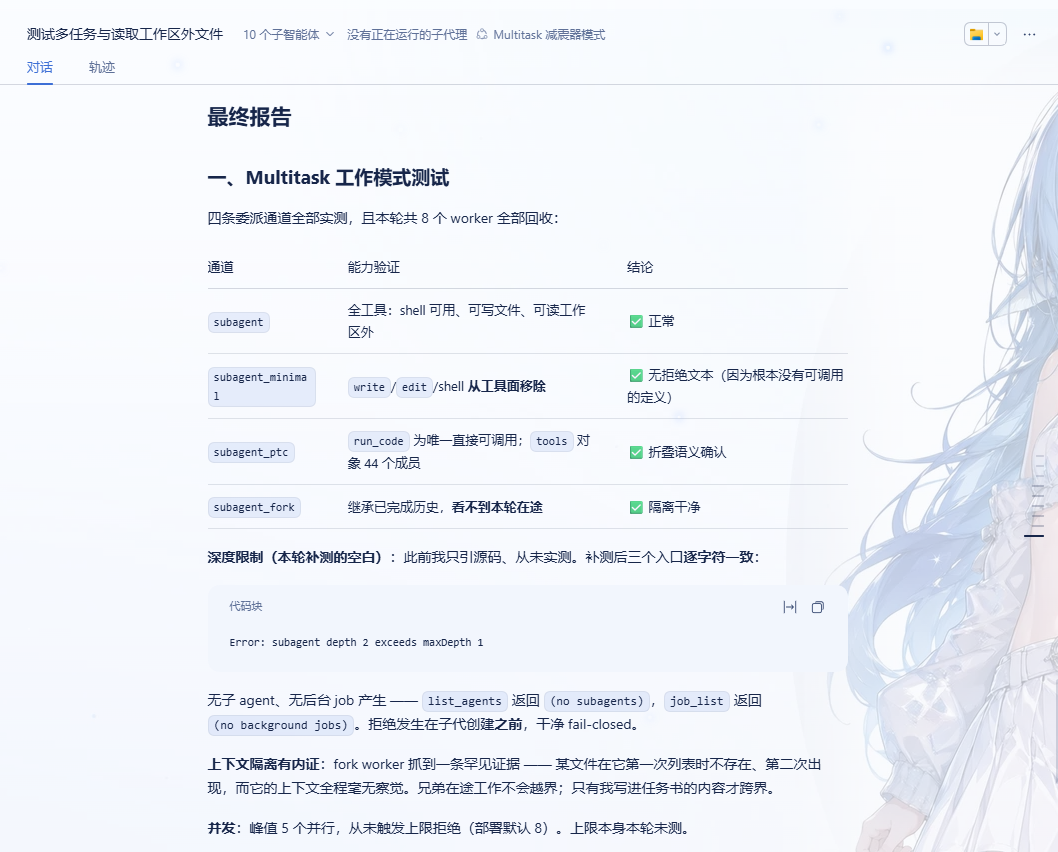
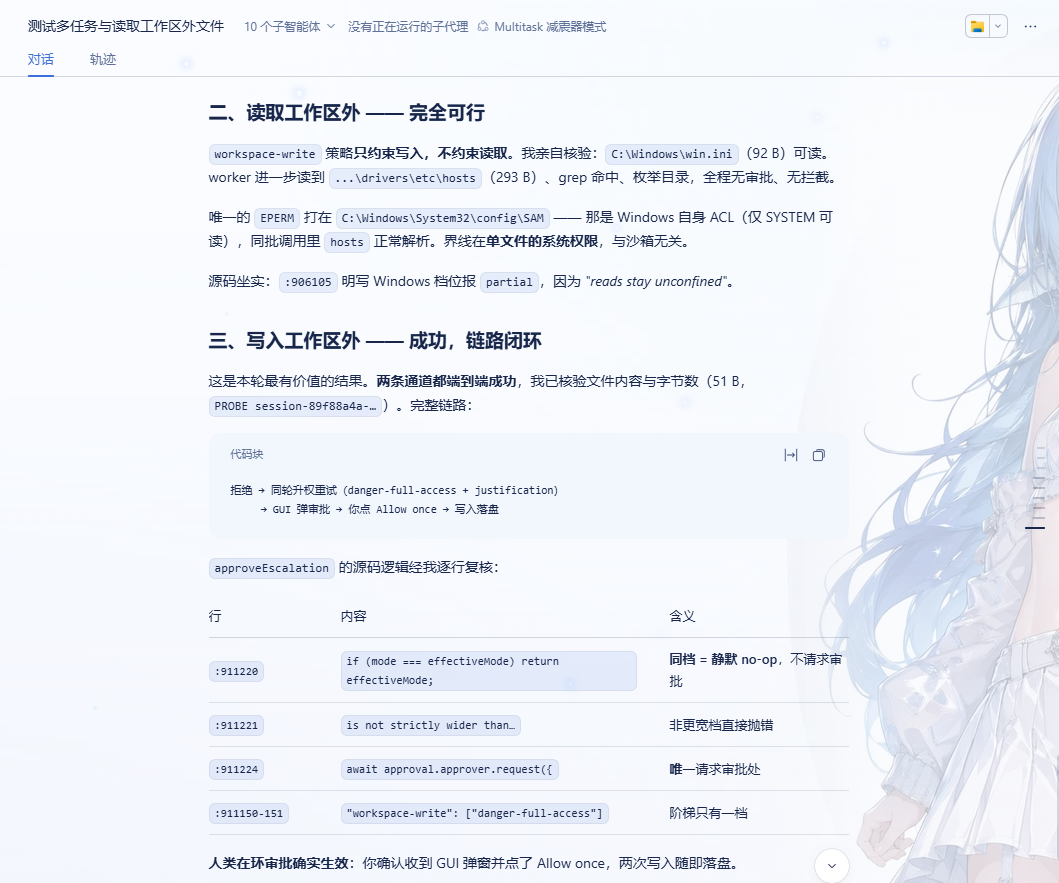
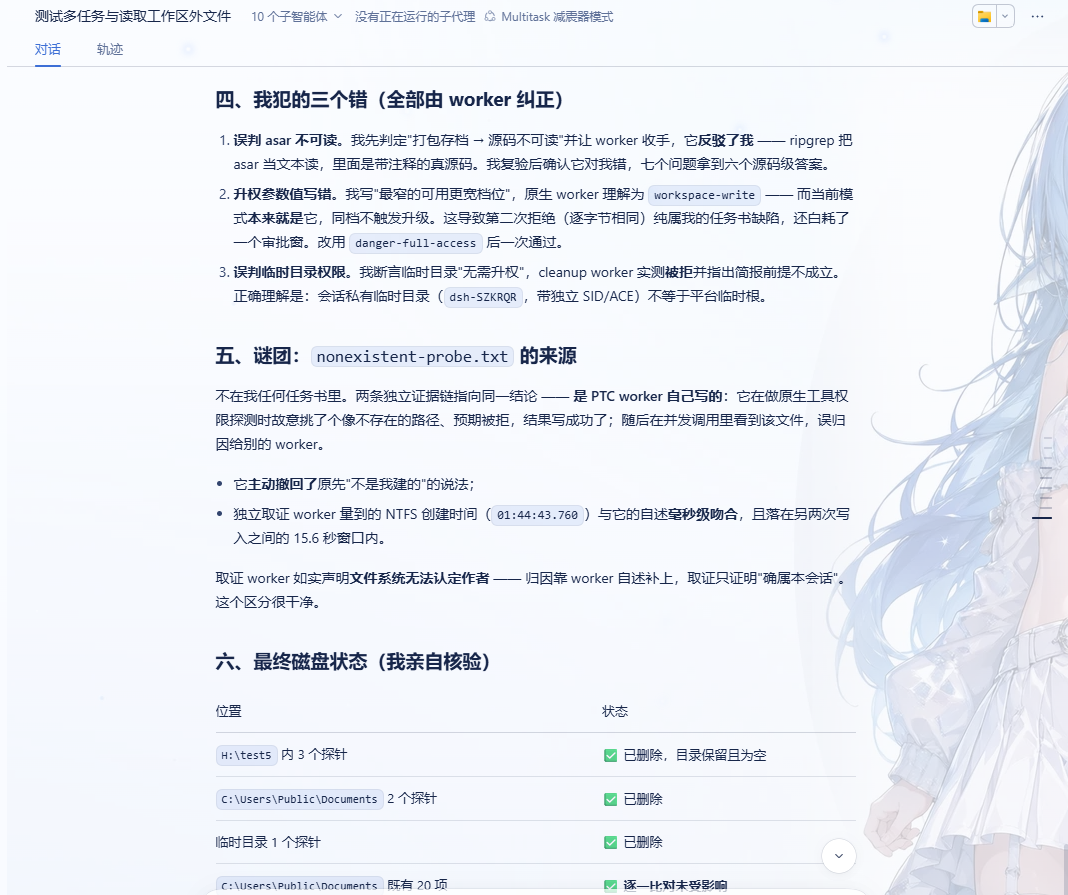
ripgrep reads .asar as text, and inside is the real, commented source. The coordinator re-checked, confirmed the worker was right and it was wrong, and got source-level answers to six of seven questions.workspace-write — the mode it was already in. Line-by-line verification of the source left no room for interpretation: app.asar:911220 reads if (mode === effectiveMode) return effectiveMode; — the same level is a silent no-op that never requests approval; :911221 reads is not strictly wider than (a level that is not wider throws outright); and the ladder has exactly one rung (:911150-151, "workspace-write": ["danger-full-access"]). The second refusal (byte-for-byte identical to the first) was therefore purely a defect in the brief, and it burned an approval window for nothing. Switching to danger-full-access went through on the first try.One more case from the same run: a file appeared that no brief had asked for, and two independent lines of evidence agreed it was written by a PTC worker probing its own native tool permissions — it deliberately picked a path that looked nonexistent, expected a refusal, and the write succeeded; seeing the file in a concurrent call, it first misattributed it to a sibling worker, and later withdrew its own "it was not me". An independent forensic worker measured the file's NTFS creation time and found it matching that account to the millisecond, inside a 15.6-second window between two other writes — while stating plainly that the filesystem cannot attribute authorship. The evidence established that the file belonged to this session; attribution came from the worker's own account, and that distinction was not glossed over.
To check this yourself: put a deliberately wrong premise in a brief (assert that some file is unreadable, say), and expect the worker to name the premise that does not hold rather than work around it.
Override by id, appending after the dsh-multitask insert block (a later entry with the same id wins):
- id: multitask
  config:
    presetId: multitask          # change this to install several variants side by side
    order: 5                     # position in the mode selector
    guardEnabled: true           # false = disable the shock absorber (soft constraints only; diagnostics)
    keep:                        # appended to the coordinator's keep list
      - web_search
      - web_fetch
    extraDeny:                   # force-remove (wins over the keep list)
      - read
enabled: false turns the whole plugin off (no preset is declared, and the mode disappears from the selector).
The remaining switches live in the config of the corresponding rows in presets/multitask/composition.mjs:
| Row | Effect of disabling |
|---|---|
subagent-mode |
the PTC presentation is off, and subagent_ptc degrades to the same native surface as subagent |
minimal-guard |
the read-only worker is not narrowed at all — it sees every tool the composition registers, including write-capable ones and anything other plugins add. There is no static layer behind it any more (DSH 0.2.1-rc.2 removed the delegation row's toolFilter), so this switch is a security downgrade, not a convenience. Because the worker guard deliberately skips the read-only worker, switching minimal-guard off also makes the five delegation tools visible to it again |
worker-guard |
the five delegation tools are no longer removed from worker catalogs; only tokens are wasted, since the host's depth limit still refuses every call. It also accepts an additive config.extraDeny |
interrupt-before-send |
corrections go back to queueing at the next step boundary instead of stopping the target's current turn |
approval-gate |
dangerous operations no longer prompt (back to default DSH behaviour) |
workspace-acl |
WRITE_OWNER is no longer granted automatically, and existing subdirectories are no longer stamped (or use config.autoGrantWriteOwner: false / config.autoRepairStampedChildren: false to switch off one half at a time) |
The environment variable DSH_MULTITASK_LIST_AGENTS_ROW forces the standalone list-agents row in the delegation group on or off. 0 / false / off / drop drop it, 1 / true / on / keep keep it; unset means the decision is made by a host probe at startup (kept when the host's @deepseek-ai/dsh-tool-subagent-control still exports ./list-agents, dropped otherwise — that subpath was removed in 0.2.2 and list_agents is registered by the main entry). The probe is only trusted when it can locate the running host install (the host package root behind the running entry point, or the copy under Electron's resourcesPath); when it cannot, the row is dropped and a warning is printed — a copy that merely happens to sit in cwd is not evidence. It is read at module load, so it needs an app restart. It is only needed when the probe cannot reach a conclusion and you know which host you are on.
The environment variable DSH_MULTITASK_MULTI_MODE=0 removes the subagent_ptc and subagent_minimal delegation paths (and their two keep-list entries) in one step, without touching the original subagent / subagent_fork. It does not unmount the PTC presentation row: subagent-mode — the row that performs the collapse — is mounted unconditionally. Because no multitask_ptc worker then exists, the collapse has nothing to act on, so the practical effect is as if the presentation were off, but the row itself is still there. To turn the presentation off for real, disable the subagent-mode row. Only 0, false and off disable the variable's switch — any other value, including a typo, leaves it enabled. It is read at module load, so it needs an app restart.
The profile patch cannot reach this row's config — the host half applies only the top-level switches, and only to the coordinator-guard row. To change it, edit its config in presets/multitask/composition.mjs and restart the app:
| Field | Default | What it does |
|---|---|---|
classify |
true |
Master switch for Level 1 (the deterministic rule table). false = dangerous commands are no longer stopped to ask; the Level-2 relay still runs |
relay |
true |
Master switch for Level 2 (the relay). false = a Subagent's request no longer reaches the main conversation |
relayRetryWindowMs |
600000 |
How long a failed relay stays parked waiting for the parent session's next open turn, when the turn was just closed (ms, 10 minutes by default). 0 disables the parked retry (back to notice-only) |
relayRetryMaxAttempts |
20 |
Maximum retries while parked. The parent session's turn may open and close again, and every turn/start is one attempt; once this cap is reached (or the window above runs out, whichever comes first) the relay falls back to its original path |
notifyOnRelayFailure |
true |
The fallback notice when the relay fails — and the only thing that can wake an idle parent session. With it on, a failed relay parks until the parent's next turn (up to relayRetryWindowMs) and only falls back to the child session when that window elapses. false turns it off: the relay still proceeds when the parent turn is already open, but when the turn is closed nothing will open one, so the parking step cannot even start and the request lands in the child session at once, blocked until you answer there |
extraDangerPatterns |
[] |
Extra danger patterns, each { id, re } or a bare string / regex. It can only add a prompt, never remove one |
safePatterns |
[] |
Extra "match but do not ask" allow-patterns. ⚠️ This is a prompt-suppressing channel: a mistake silently lets a dangerous command through |
shellTools |
['pwsh', 'bash'] |
Extra tool names whose command text should be classified (a wrong name does not error, it silently misses) |
fileTools |
['write', 'edit'] |
Extra write tools whose file_path may point outside the workspace |
autoApproveTempRoots |
each platform's temp directory | "Scratch space" roots: writing there, or deleting only there, does not prompt. Pass [] to turn this off |
yieldToAutoReview |
true |
When this session's permission preset is auto (Auto Review is on), yield to the reviewer instead of raising a second ask. Pass false to keep prompting anyway |
extraDangerPatterns / shellTools / fileTools are additive: missing one only means those cases are not examined (equivalent to not having this module), and it never lets through something this module would have asked about. safePatterns is subtractive: it cancels a danger this module has already judged, which is why it is deliberately empty by default — a mistake there is a silent permit, not one fewer prompt.
autoApproveTempRoots)The temp directory is the scratch paper every process shares — DSH itself creates dsh-subagent-* and dsh-acl-locks there. A worker writing intermediate artifacts there is ordinary work; prompting for it only trains you to click "Allow" without looking, which weakens the prompts that matter. Two cases are exempt by default:
write / edit whose file_path lands under an allowed root);The default roots are derived from TEMP / TMP / TMPDIR and %LOCALAPPDATA%\Temp (no node:os import — this package's preset modules are dependency-free), and /tmp is added on every platform. Setting this field replaces that whole list: if you list only your own cache directory, the platform temp directory is no longer exempt. To extend rather than replace, list the temp roots again together with your own. An empty array turns the exemption off entirely, so even the temp directory prompts.
The deletion exemption is deliberately strict — four conditions, all required: no shell metacharacters (,, newline, and ; | & ` $ > <); at least one absolute path argument; every path argument under an allowed root; and no relative path arguments, with no .. segment anywhere in a path. So:
| Command | Result |
|---|---|
rm -rf /tmp/x |
no prompt |
rm -rf /tmp/x /home/u |
prompts — one path is outside the roots |
rm -rf C:\Windows |
prompts |
rm -rf $env:TEMP\x |
prompts — it contains $, so no exemption |
Remove-Item -Recurse C:\Windows |
prompts |
Remove-Item -LiteralPath "/tmp/a","C:\Windows" -Recurse -Force |
prompts — comma-glued, the two paths have no space between them |
rm -rf /tmp/../../../etc |
prompts — .. walks the path outside the root |
rm -rf /tmp/a .. |
prompts — a relative path argument deletes the parent of the working directory |
The last three rows are three real holes measured on 1.2.10 (comma gluing, .. traversal, and relative path arguments all rode the exemption); the fix and its regressions land from 1.2.12.
The reason is blunt: one wrong exemption lets an entire dangerous command through, while one extra prompt costs a click. This tier only decides whether to interrupt you, never what the sandbox allows — where a worker can actually write is still decided by DSH's sandbox and ACL.
Source edits take effect only after a restart.
If you installed from the package manager, let it do the work: dsh plugin --profile <profile> remove dsh-multitask, or uninstall from the Plugins page.
If you installed from a source checkout, delete the whole - insert: - id: multitask block from the profile patch.
Either way the mode disappears from the selector for new sessions (running sessions are unaffected), and no restart is needed — DSH hot-reloads that patch, and the plugin unregisters its own preset declaration on unload. To suspend it temporarily instead, add disabled: true to that row.
dsh-multitask/
├── package.json                        # dsh.bundle.patch → inserts the host row on install; dsh.client → the browser half
├── cordis.patch.yml                    # inserts the plugin row into the profile roster
├── lib/
│   ├── index.js                        # host half: declares the bundled preset with agentPresets and registers the two worker backends
│   ├── worker-providers.js             # registers the two self-built worker backends multitask_ptc and multitask_minimal
│   └── client.js                       # browser half: the Multitask settings page + two General rows
├── presets/multitask/
│   ├── composition.mjs                 # the preset composition + coordinator persona + the four worker personas
│   ├── coordinator-guard.mjs           # the shock absorber (including the mode-isolation ownership check)
│   ├── subagent-mode.mjs               # PTC presentation: collapses a marked Subagent onto run_code
│   ├── minimal-guard.mjs               # adaptive narrowing for the read-only worker
│   ├── worker-guard.mjs                # removes the five delegation tools from a worker's catalog (it only saves tokens; the host's depth limit is the real block)
│   ├── worker-persona.mjs              # routes a worker's provider name to its persona text (so each of the four kinds gets its own persona)
│   ├── approval-gate.mjs               # the approval gate for dangerous operations
│   ├── interrupt-before-send.mjs        # correction timing: interrupt the target's turn before relaying
│   ├── preset-dispatch.mjs             # cross-mode dispatch: hands a brief to any installed agent preset
│   ├── workspace-acl.mjs               # workspace ACL: grants WRITE_OWNER and stamps existing subdirectories (the only module that changes system state, in two writes)
│   └── file-info.mjs                   # the read-only metadata tool file_info
├── docs/
│   ├── DESIGN.md                       # design reasoning, upstream evidence, known boundaries (the English edition, linked from this README)
│   ├── DESIGN_zh.md                    # the same document in Chinese
│   └── test_image/                     # the screenshots the READMEs embed
├── README.md (English) / README.zh.md (Chinese)
└── LICENSE
The preset modules (presets/multitask/*.mjs) import nothing: they pull in no @deepseek-ai/* dependency, because a failed import means the whole preset fails to mount. The cost is that a few constants are duplicated, and changing one means changing the other.
Restart the app after editing the sources. This package lives outside the HMR-watched root, so Node's ESM cache keeps serving the old module; and although the profile patch itself is hot-reloaded, bumping ?v=N on a row that is already running only changes its name — the loader takes the name-only branch and does not reload. A fresh process reading that row for the first time is what actually picks up your latest source.
Two related traps: a relative import does not inherit the entry's query (this package propagates it explicitly, so one bump refreshes the whole module graph), and "delete and re-add within one save" does not work either (the comparison is by id, so it is still the same row) — you must delete, let it settle, then add it back.
read / grep / glob and that ability is gone.subagent_ptc really is just run_code, but the SDK binding table remains fully callable from inside a program; remove it and PTC is an empty shell.minimal-guard.mjs alone (deny = visible set − allowed set): the names come from the real visible surface, so the call cannot throw, and any tool a host or plugin registers later is withheld from that worker by default. DSH 0.2.1-rc.2 removed the delegation row's toolFilter, so the old static layer no longer exists — meaning there is no fallback if this one layer fails to install (it warns loudly). Also, if a plugin registers a new mutating tool after that worker is created, it will not be withheld (a deliberate trade-off).More complete boundaries, unverified items, and the measured evidence behind every claim are in docs/DESIGN.md.
CLASSIFICATION EVIDENCE
系统优先读取 GitHub Topics,再与站内分类词典和词根规则比对。当前命中: deepseek-harness。
morluto
Reverse engineer anything with agents, from app behavior down to native binaries.

deepseek-ai
DeepSeek Harness: Everything is a Plugin.

nexu-io
The 1st Collaborative AI Design Agent Workspace. Local-first and open source. Create motion, prototypes, websites, apps, dashboards, presentations, images, and videos with your team and AI agents. Share work, exchange feedback, and iterate together in one workspace.