
Agent 与会话
插件

nuwa-skill
alchaincyf
你想蒸馏的下一个员工,何必是同事。蒸馏任何人的思维方式——心智模型、决策启发式、表达DNA。Distill how anyone thinks.
PROJECT TOPICS
INSTALL REFERENCE
dsh plugin --profile web add github:Seelerc/dsh-plugin-delete-archived
该命令指向仓库当前默认分支;尚无绑定当前 commit 的完整验证结果。
PROJECT README
Permanently delete archived DeepSeek Harness sessions and their on-disk logs.
DSH's built-in archive only hides a session from the sidebar — its history and log files stay on disk. This plugin erases an archived session together with its physical directory, while keeping restore as a way back.

English | 简体中文
Settings → Archived Sessions
Lists every archived session with its disk directory, size, archive time and workspace. Rows are selectable, with batch Restore and Delete Permanently. Sorted oldest first by default, and every destructive action asks for confirmation first.
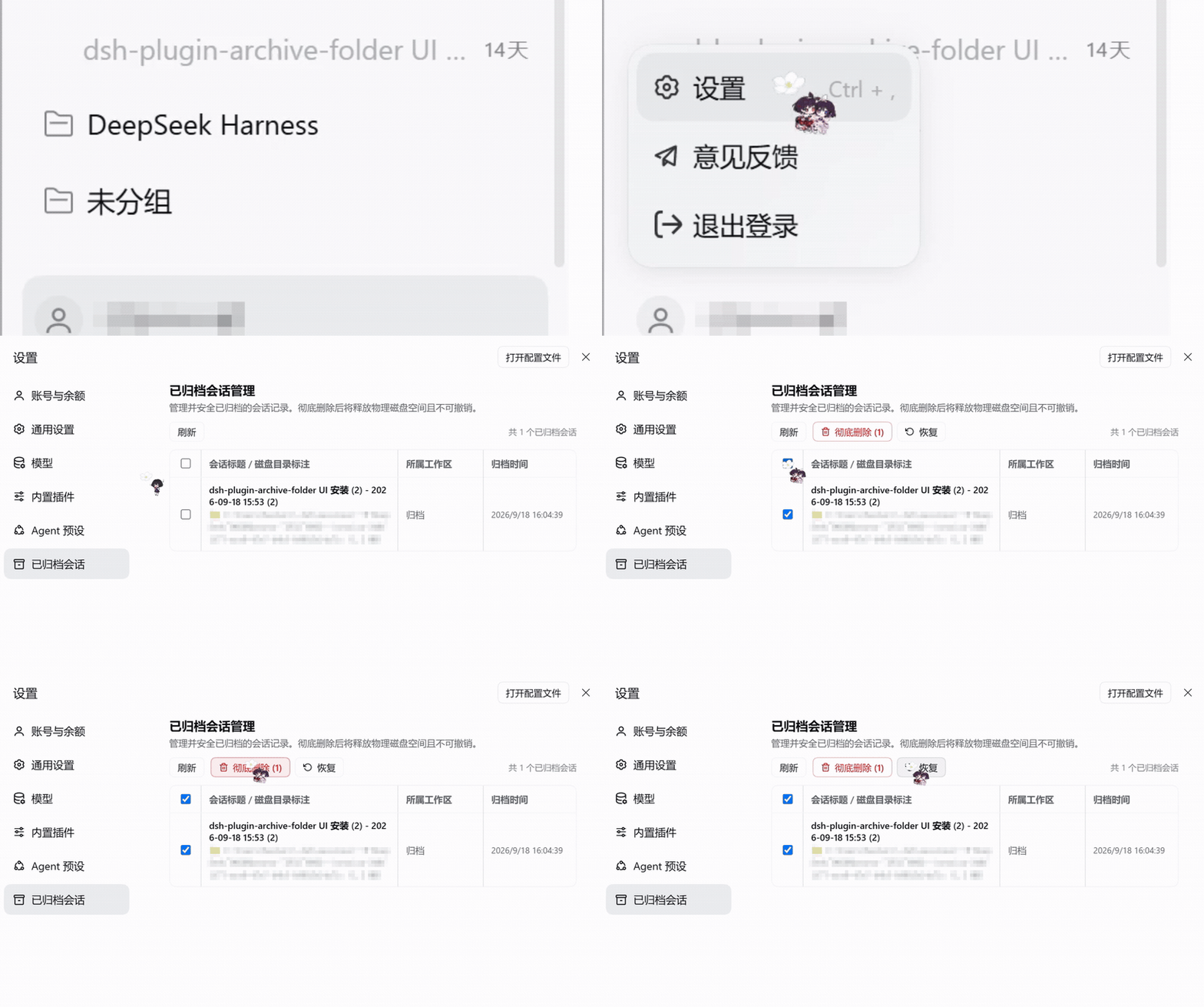
Sidebar session menu
Archived sessions gain a Delete Permanently entry in their "⋯" menu.

Agent tool
delete_archived_sessions removes one session by session_id, or every archived session when session_id is omitted. Sessions that are not archived are never touched.
Paste this into DSH's Settings → Plugins → install entry:
github:Seelerc/dsh-plugin-delete-archivedOr just ask the agent to install it — plugin_manager, action: "install_bundle", target: "github:Seelerc/dsh-plugin-delete-archived".
Prerequisites
A github: spec is resolved with pnpm and git. The desktop app injects its own bundled pnpm, but a standalone CLI profile looks for both on your PATH.
pnpm → npm i -g pnpm (or corepack enable pnpm)git → install Git, e.g. winget install Git.Git; pnpm runs git ls-remote to resolve a github: address before downloading anythingRoutes registered on DSH's web server, for scripts and integrations.
| Method | Path | Body | Response |
|---|---|---|---|
GET |
/api/archived-sessions |
— | { sessions: ArchivedSession[] } |
POST |
/api/archived-sessions/delete |
{ sessionId } |
single-delete result |
POST |
/api/archived-sessions/delete-batch |
{ sessionIds? } |
{ total, deletedCount, errors } |
POST |
/api/archived-sessions/restore |
{ sessionId } |
{ success, sessionId } |
POST |
/api/archived-sessions/restore-batch |
{ sessionIds } |
{ success, restoredCount } |
POST |
/api/archived-sessions/open-folder |
{ path } |
{ success } |
Omitting sessionIds on delete-batch means "delete every archived session".
interface ArchivedSession {
  id: string;
  title: string;
  cwd?: string;
  workspaceTitle: string;
  diskPath: string;         // placeholder when no standalone directory is found
  sizeBytes: number;
  sizeFormatted: string;    // e.g. "1.2 MB"
  createdAt: string | null; // ISO 8601
}dsh-plugin-delete-archived/
├── lib/
│ ├── index.js # backend: HTTP routes, agent tool, disk cleanup
│ └── client.js # frontend: settings page + sidebar menu (AMD loader)
├── locale/
│ ├── zh.json # Chinese strings
│ └── en.json # English strings
├── cordis.patch.yml # loader injection declaration
└── package.json # manifest: exports / dsh.bundle / dsh.clientsessionPersistence.findLog(sessionId) first, then falls back to scanning persistence.root for a directory named after the encoded session id.window.__ModuleLoader__.load() and injects into the settings.section and sidebar.workspaces.session.menu.item slots."Delete Permanently" is irreversible — it truly erases session history and log files from disk. No recycle bin, no recovery. Every delete entry point asks for confirmation, but please double-check that you no longer need the session. If you only want it out of the sidebar, DSH's native Archive is enough.
Plain JavaScript, no build step. Edit lib/client.js and the change applies immediately while the DSH client-plugin HMR receiver is active; otherwise restart DSH.
CLASSIFICATION EVIDENCE
系统优先读取 GitHub Topics,再与站内分类词典和词根规则比对。当前命中: session-management。
alchaincyf
你想蒸馏的下一个员工,何必是同事。蒸馏任何人的思维方式——心智模型、决策启发式、表达DNA。Distill how anyone thinks.

freestylefly
Prompt as Code | GPT Image 2 / 2.5 提示词与案例库,530+ 个案例、20+ 套工业级模板与可复用 Skills,新增 2.5 同提示词对比专区,附完整提示词与生成记录,持续更新。

titanwings
Distilly — Distill how they think into reusable Skills for any Agent or Bot. Formerly Colleague Skill(原同事 Skill).