
模型与 MCP
待识别

rea
morluto
Reverse engineer anything with agents, from app behavior down to native binaries.
PROJECT TOPICS
INSTALL REFERENCE
dsh plugin --profile web add github:SavaStone/dsh-provider-limits
该命令指向仓库当前默认分支;尚无绑定当前 commit 的完整验证结果。
PROJECT README


A DeepSeek Harness (DSH) plugin that shows how much of your AI provider's limit is left — right in the app, without opening a dashboard.
It supports OpenRouter (credit balance) and OpenCode Go (quota windows), detects which provider the chat you are looking at uses, and keeps the numbers up to date by itself.
Version 0.4.0 · MIT · DSH 0.2.2 or newer.
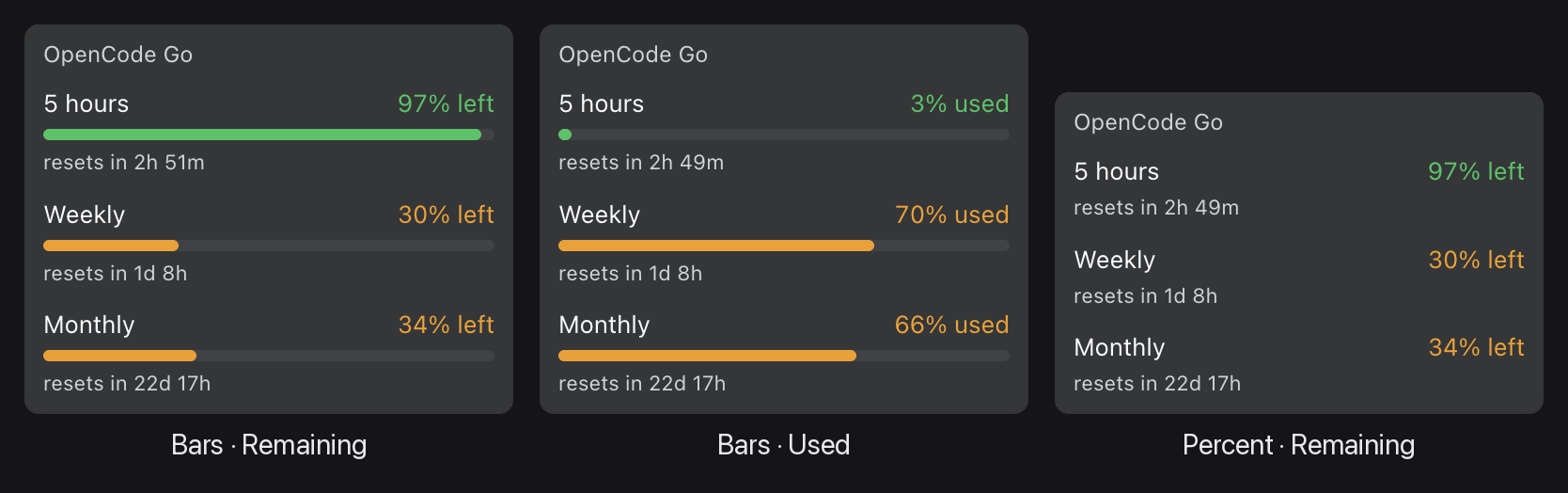
The same readout in its three display modes: bars with the share left, bars with the share used, and percentages only.
Limits button in the sidebar footer, directly above the Signed in to … account row. Click it and the current readout appears right above the button; click again and it goes away.Limits button in the panel header (visible on every section) and a Limits row on the General page. Both open the same report in place — no page switch and no dialog.OpenRouter credits are $10. The amount is bold; the rest of the sentence is normal.5 hours, Weekly, Monthly — each with the percentage left, a coloured bar and, when the provider gives one, a resets in 3h 12m countdown.unavailable, never as 0% left.There are two settings. Both live in Settings → General, together with the rest of the app's preferences, and both apply to the whole app, not to one provider. They are saved immediately and survive restarts.
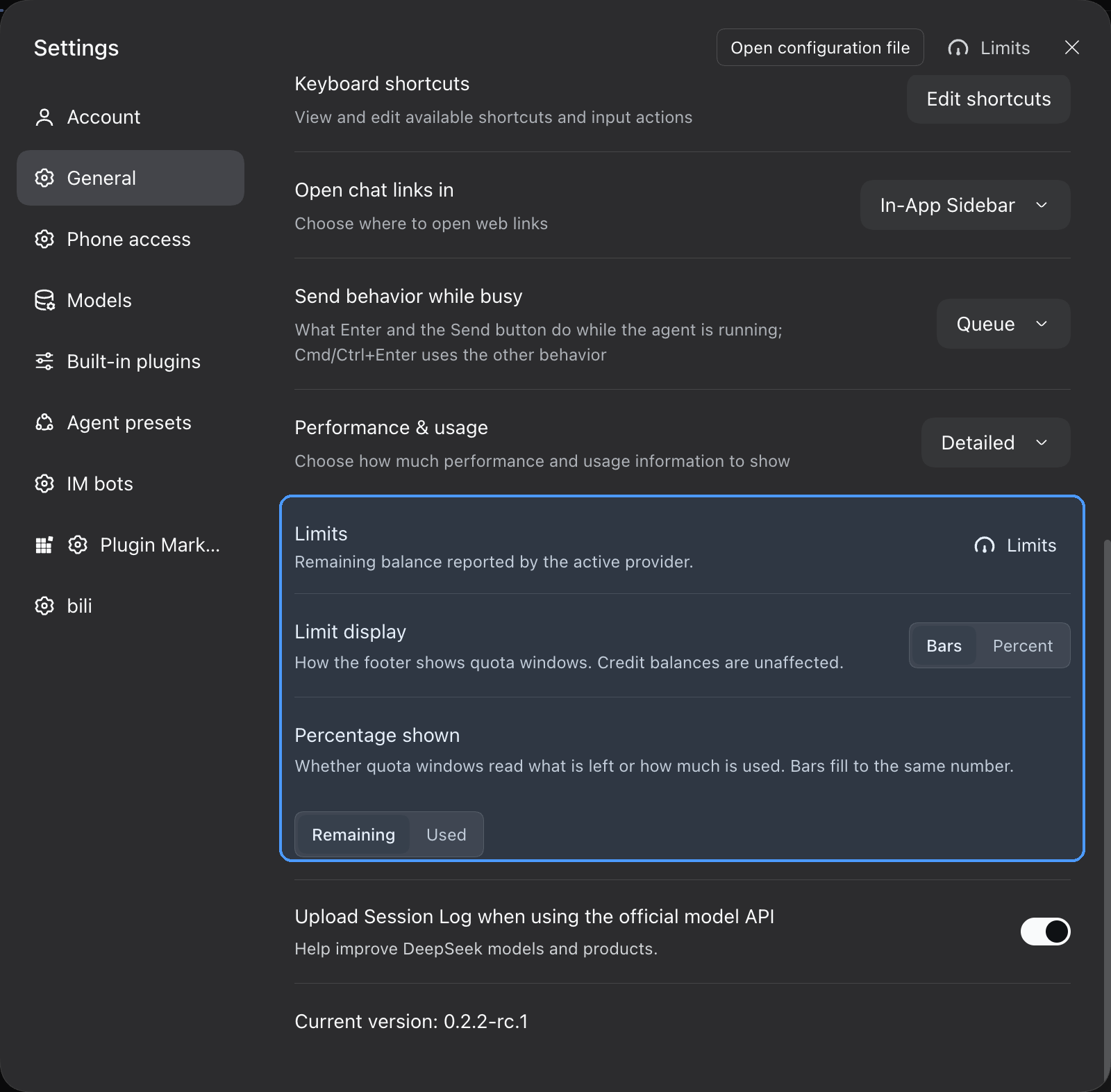
Both controls live on Settings → General; the plugin's rows are highlighted.
How quota windows are drawn:
| Choice | What you see |
|---|---|
| Bars (default) | The percentage plus a short coloured bar. |
| Percent | Only the percentage; the bar is hidden. |
Credit balances are not affected: they are a sentence, with no bar to hide. Reset countdowns stay in both modes.
What the percentage on a quota row means:
| Choice | What you see |
|---|---|
| Remaining (default) | 72% left — the bar is filled to the share still available. |
| Used | 28% used — the bar is filled to the share already spent. |
The green/amber/red colour always follows what is left, regardless of this setting: a window that is 90% used is still red, because only 10% is left.
Both settings take effect immediately in every open readout.
| Provider | Credential name |
|---|---|
| OpenRouter | OPENROUTER_API_KEY |
| OpenCode Go | OPENCODE_GO_API_KEY |
The key is read again on every refresh, so a rotated or newly added key is picked up without restarting DSH. Only a change to the plugin's own code needs a restart.
The plugin is installed into a DSH profile as a bundle. It is not published on npm, so install it from a checkout or from a packed tarball.
Get the code — either clone this repository or download the tarball from the latest release:
git clone https://github.com/SavaStone/dsh-provider-limitsInstall it into your profile:
dsh plugin --profile <profile> add ./dsh-provider-limitsWith the release tarball, pass the downloaded .tgz file instead of the checkout directory.
Restart the app. The host half is loaded at startup, so adding the bundle while the app is running is not enough.
To update, pull the new code in your checkout (or download the newer tarball) and restart DSH.
Nothing needs to be configured in a profile file: the package carries its own bundle patch, and the install command adds it to the profile's bundle list.
Press Limits anywhere it appears — the footer, the settings header, or the General row — and the readout opens in place. Press it again to close it.
What the readout looks like depends on the provider:
OpenRouter credits are $10OpenCode Go
5 hours 72% left
━━━━━━━━━━━━━━━━━━━━━━░
resets in 3h 12m
Weekly 45% left
━━━━━━━━━━━━━━░
Monthly 8% left
━━━░
resets in 6dIf no API key is configured, the readout says which variable is missing instead of showing a figure.
If the chat you are looking at uses a provider this plugin does not support yet, the readout says Limits aren’t available for this provider yet. and offers one next step: Ask DeepSeek to add this provider.
Pressing it asks for confirmation first. The confirmation explains that Creator mode will open with an English prompt already filled in — and that nothing is sent automatically: the prompt becomes a draft, and you press Send yourself. The prompt asks the agent to research the provider's balance or quota API, add the provider to the plugin, update the docs and tests, run the tests, and finally ask whether to commit and push the update.
In the web build the prompt opens in a new browser tab. In the desktop app it opens as a new session in the same window. If Creator mode cannot be opened, the prompt is copied to the clipboard instead; if that fails too, the card offers Try again.
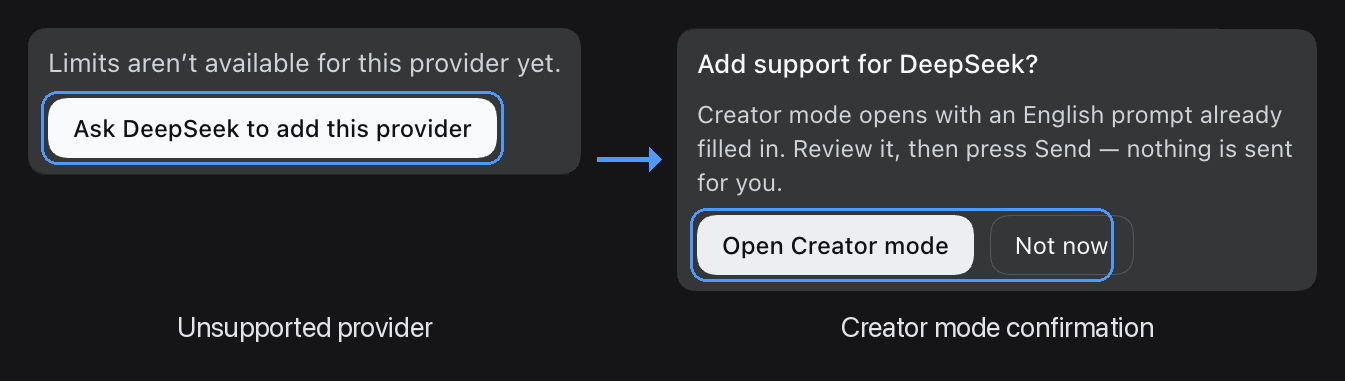
Left: the card shown for an unsupported provider. Right: the confirmation before Creator mode opens. The prompt is only drafted — you still press Send yourself.
The readout names the reason instead of failing silently. What each message means:
| What you see | Why | What to do |
|---|---|---|
… has no API key configured (NAME) |
No credential was found for the active provider — neither in the DSH credential store nor in the environment. | Set the named variable for the app process, or add the key to the DSH credential store, then click Limits again. No restart is needed. |
Limits aren’t available for this provider yet. |
The active provider has no adapter in this build. | Use the Ask DeepSeek to add this provider button, or switch to a supported provider. |
This account has no OpenCode Go subscription. |
The OpenCode Go key is valid, but the account has no Go plan. | Subscribe to OpenCode Go, or switch to a model from a provider the account does have. |
… rejected the request (HTTP 401). |
The provider refused the key. | Check that the key is valid, not revoked and has the right scope. |
Could not reach …. |
No response from the provider: DNS, network, TLS, or the 10-second timeout expired. | Check connectivity from the machine running DSH, and whether the provider's endpoint is reachable from your region. |
… returned no readable balance. |
The provider answered, but not in a shape the plugin understands — usually because the provider changed its API. | Inspect the response and update the matching adapter in index.js (see Development). |
If Limits does not appear at all, the host half is probably not mounted: check that the bundle is in the profile and that the app was restarted after adding it.
Limits answers with HTTP 200 even when the provider itself failed, because the reason is shown in the page, not as a transport error. Only a wrong HTTP method gets a non-200 status.
| Provider | Credential | Endpoint | Shipped |
|---|---|---|---|
| OpenRouter | OPENROUTER_API_KEY |
https://openrouter.ai/api/v1/credits |
yes |
| OpenCode Go | OPENCODE_GO_API_KEY |
https://opencode.ai/console/api/go/status (falls back to https://opencode.ai/zen/go/v1/usage) |
yes |
| DeepSeek | DEEPSEEK_API_KEY |
https://api.deepseek.com/user/balance |
not yet |
| Moonshot / Kimi | MOONSHOT_API_KEY |
https://api.moonshot.ai/v1/users/me/balance |
not yet |
| Zhipu / GLM | ZAI_API_KEY, GLM_API_KEY, ZHIPU_API_KEY |
https://open.bigmodel.cn/api/biz/account/query-customer-account-report |
not yet |
| MiniMax | MINIMAX_API_KEY |
https://www.minimax.io/v1/token_plan/remains |
not yet |
The four unshipped providers are declared in the provider table with their endpoints and credential names, but they are turned off until their endpoints have been verified against a live API and their adapters have been written.
The readout is derived from the exact micro-cent meters behind the Go console, so it agrees with the console's own percentages. If that route is unavailable, the plugin falls back to the public usage endpoint, which reports whole percentages that are floored rather than rounded: a spend the console shows as 2% used can read as 1% there, and the plugin would show one point more remaining than the console. Neither source reports a dollar amount, so the readout stays in percentages.
The plugin has no runtime dependencies and no build step. Node.js 20 or newer is enough.
npm test            # or: node test-host.mjs && node test-client.mjs
npm run check       # syntax check of both halves
The two suites are dependency-free and run on push and pull requests in CI (Node 20, 22 and 24):
test-host.mjs — the host half: adapter arithmetic, credential resolution, provider detection, upstream failure shapes, the HTTP contract and the read cache.test-client.mjs — the browser half: it loads client.js the way the browser does and checks every slot, state and rendered shape, including the preference rows and the unsupported-provider request.Layout:
| File | What it is |
|---|---|
index.js |
Host half: the provider table, the adapters, the two local HTTP routes and the read cache. |
client.js |
Browser half: the footer control, the settings-panel controls, the readout and the two preference rows. |
cordis.patch.yml |
The bundle patch that mounts the plugin when it is installed. |
locale/en.json, locale/zh.json |
Names and descriptions for the plugin list. |
icon.svg |
The plugin icon. |
Two edits in index.js:
PROVIDERS table: label, kind, envs (credential names, tried in order), urls (endpoints, tried in order), auth (bearer or raw) and needsKey. Set enabled: true. If the provider has a more precise source, add precise: { kind, urls }; if a 403 EntitlementError means "valid key, no subscription", add entitlement: true.ADAPTERS map, keyed by the same kind. It receives the response body and returns either a credit balance — { kind: 'balance', balance: { remaining, used, total, currency, symbol } } — or quota windows — { kind: 'windows', windows: [{ id, usedPercent, remainingPercent, resetsAt }] } — or undefined when nothing can be read. Return undefined instead of throwing; the host turns that into the "unreadable" message.The client needs no change: it renders whichever of the two shapes the adapter returns. Add the provider to the tables above, and extend both test suites.
Before enabling a provider, confirm its endpoint, auth form, response shape and units against a live API call — the unshipped rows in PROVIDERS are placeholders, not verified endpoints.
MIT © SavaStone
CLASSIFICATION EVIDENCE
系统优先读取 GitHub Topics,再与站内分类词典和词根规则比对。当前命中: openrouter、deepseek-harness。
morluto
Reverse engineer anything with agents, from app behavior down to native binaries.

deepseek-ai
DeepSeek Harness: Everything is a Plugin.

nexu-io
The 1st Collaborative AI Design Agent Workspace. Local-first and open source. Create motion, prototypes, websites, apps, dashboards, presentations, images, and videos with your team and AI agents. Share work, exchange feedback, and iterate together in one workspace.