模型与 MCP
待识别

rea
morluto
Reverse engineer anything with agents, from app behavior down to native binaries.

Sal7one/DSH-Design-Studio
Inspired By Calude design, A Deepseek harness Design Plugin!, Select elements, Use Open Router Vision agents, upload images and much more!! You can make quick changes with deepseek or invoke the Vision model with a prompt directly!
PROJECT TOPICS
INSTALL REFERENCE
dsh plugin --profile web add github:Sal7one/DSH-Design-Studio
该命令指向仓库当前默认分支;尚无绑定当前 commit 的完整验证结果。
PROJECT README
A DeepSeek Harness plugin that turns design mockups into a first-class AI workflow.
Live previews, an element picker, a real design agent, vision review, identity presets —
and a two-agent apply flow where DeepSeek edits and the design agent verifies.
Everything is backed by real files in the current workspace under
design-studio/, and the install is launch-persistent: install once, the
Design Studio tab is there on every launch.
| Preview | Selection | Ask DeepSeek | Assets |
|---|---|---|---|
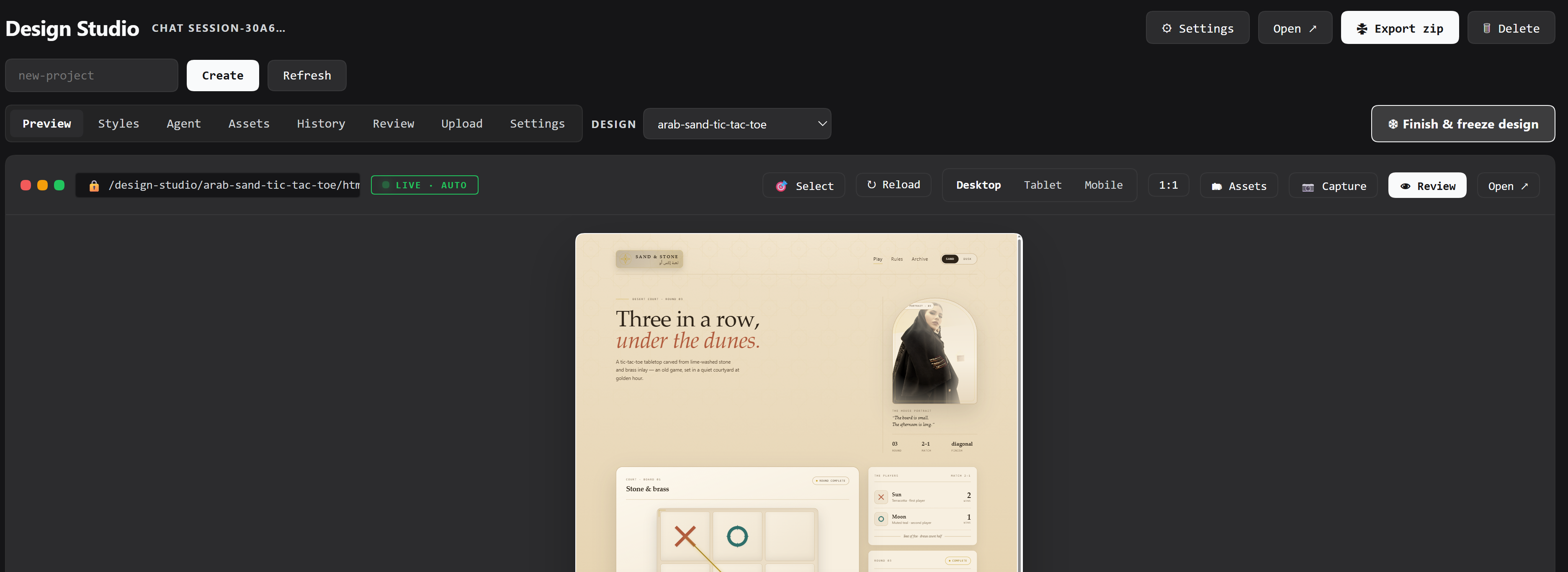 |
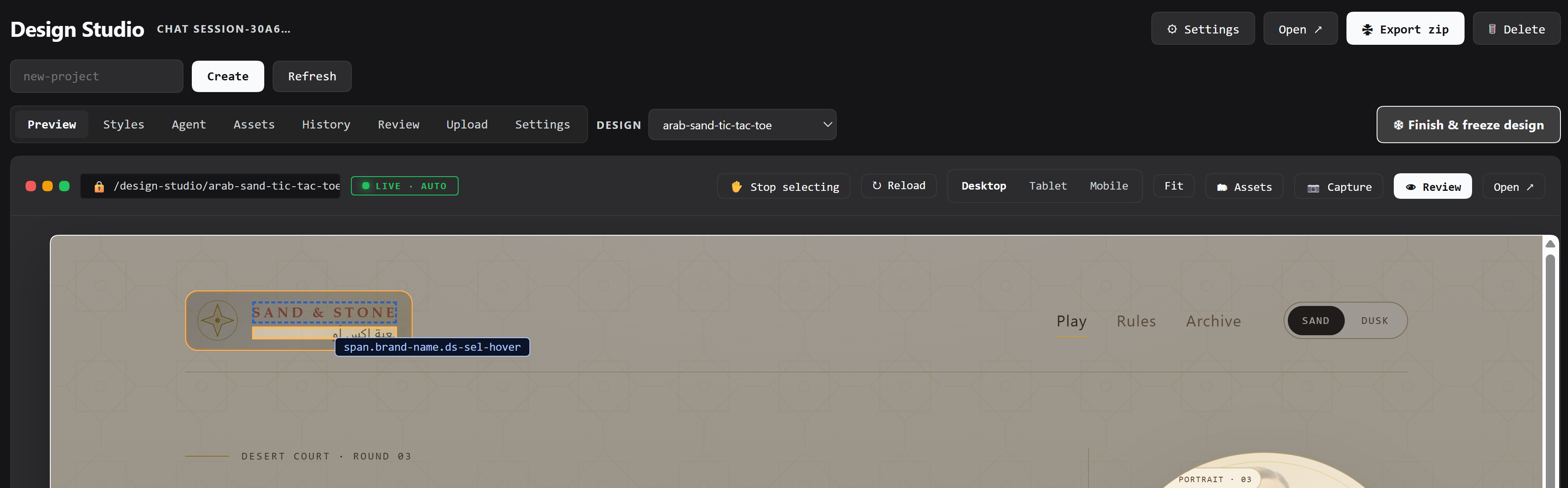 |
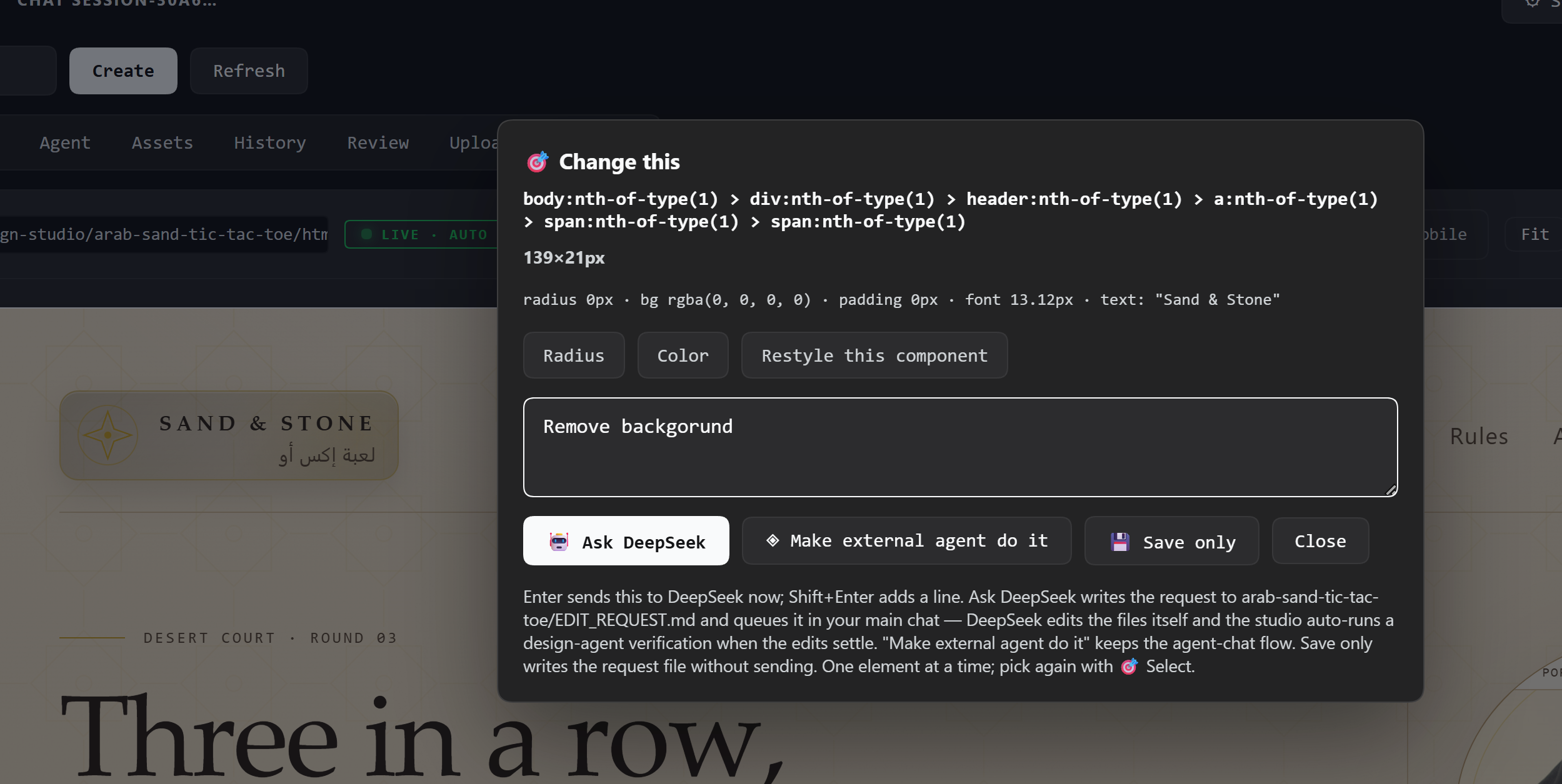 |
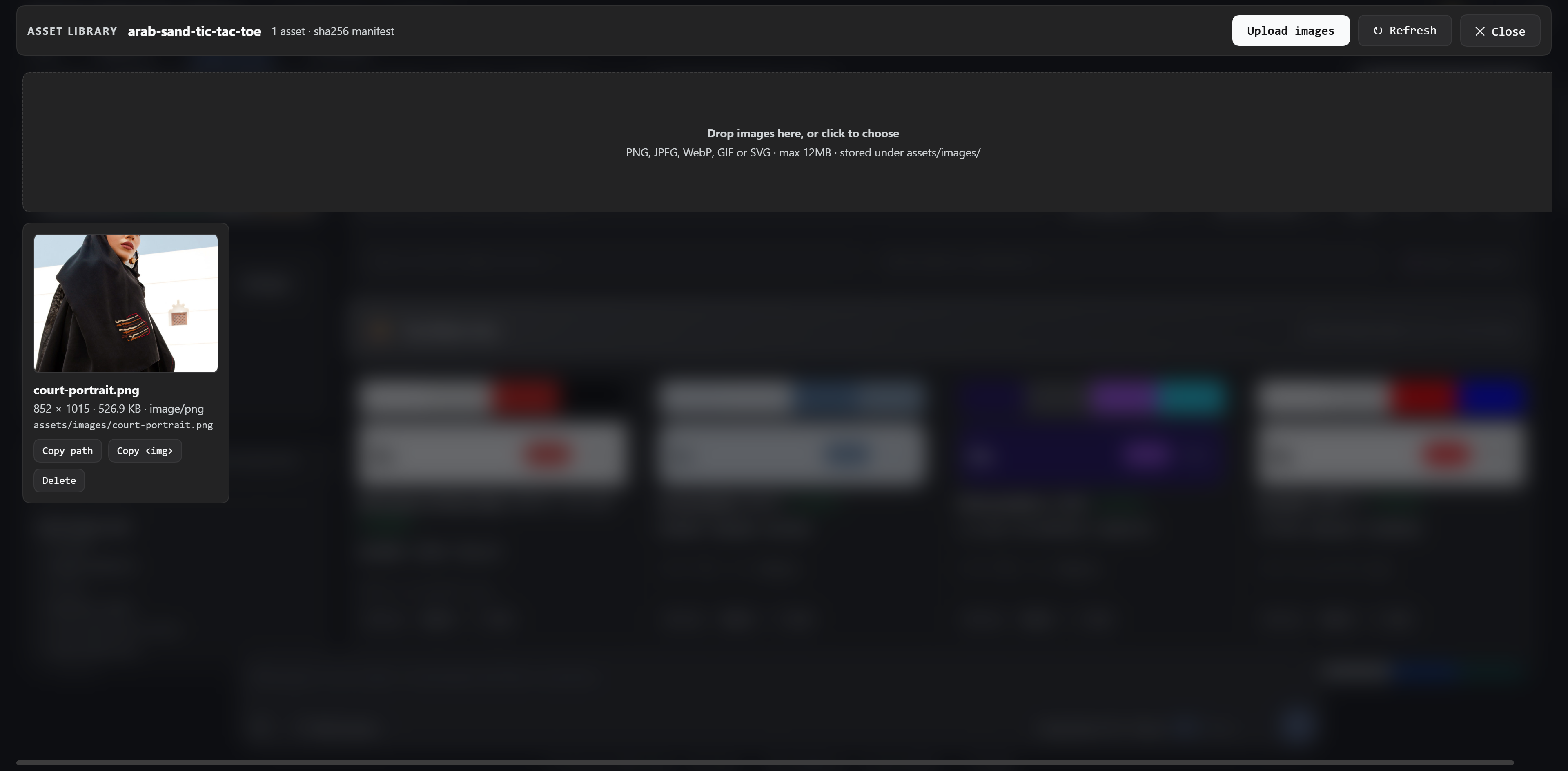 |
| Styles | Style tour | History | Settings |
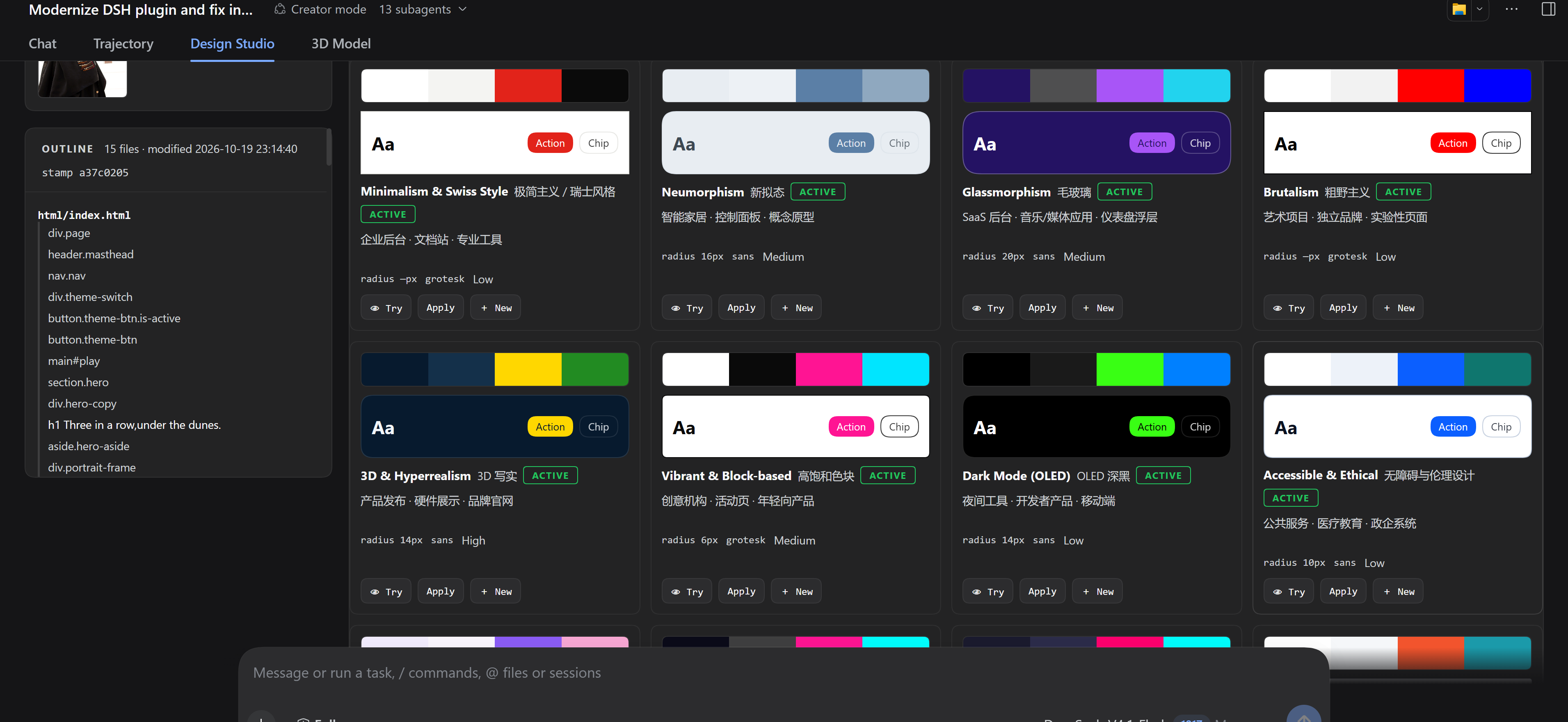 |
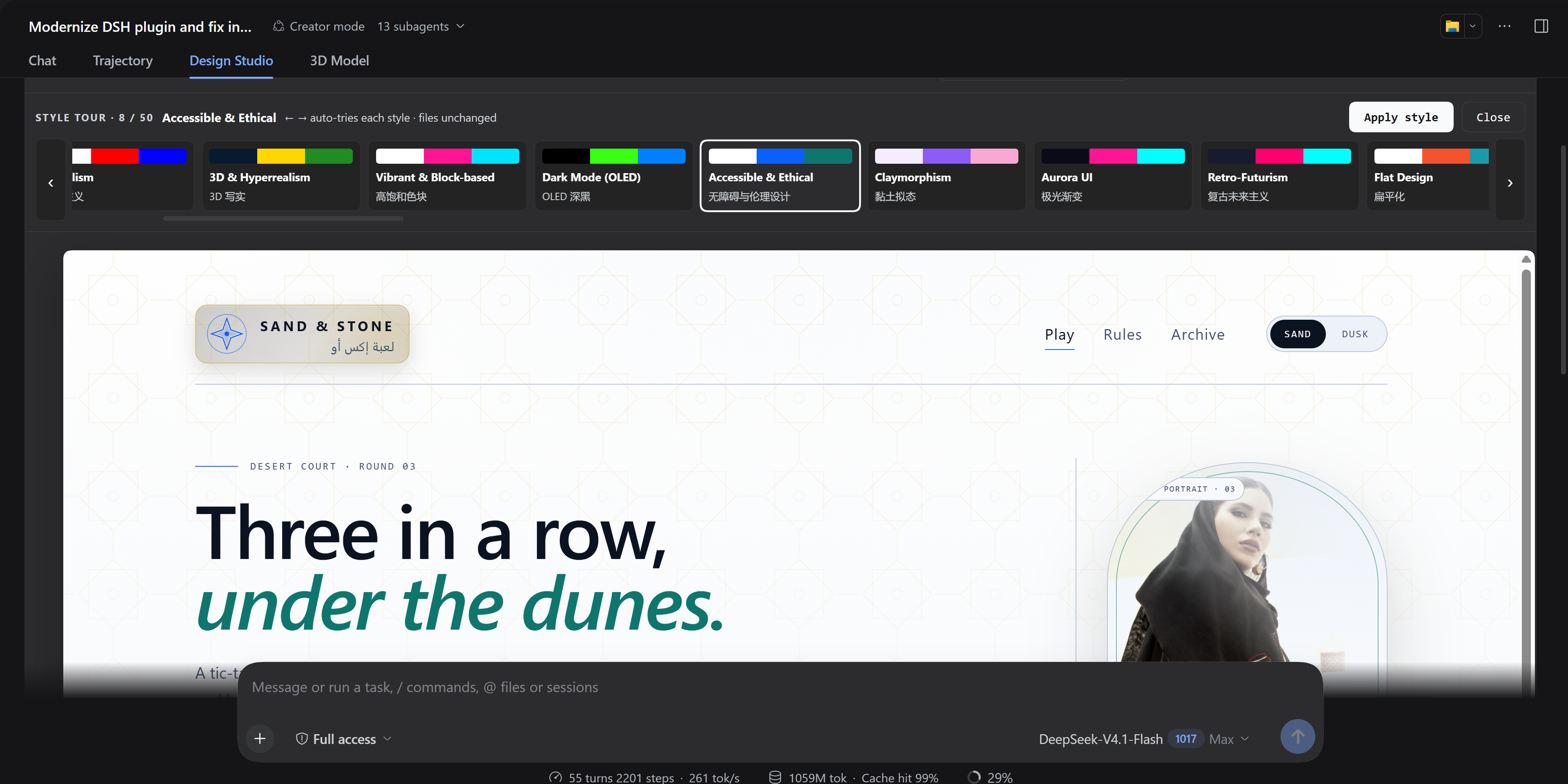 |
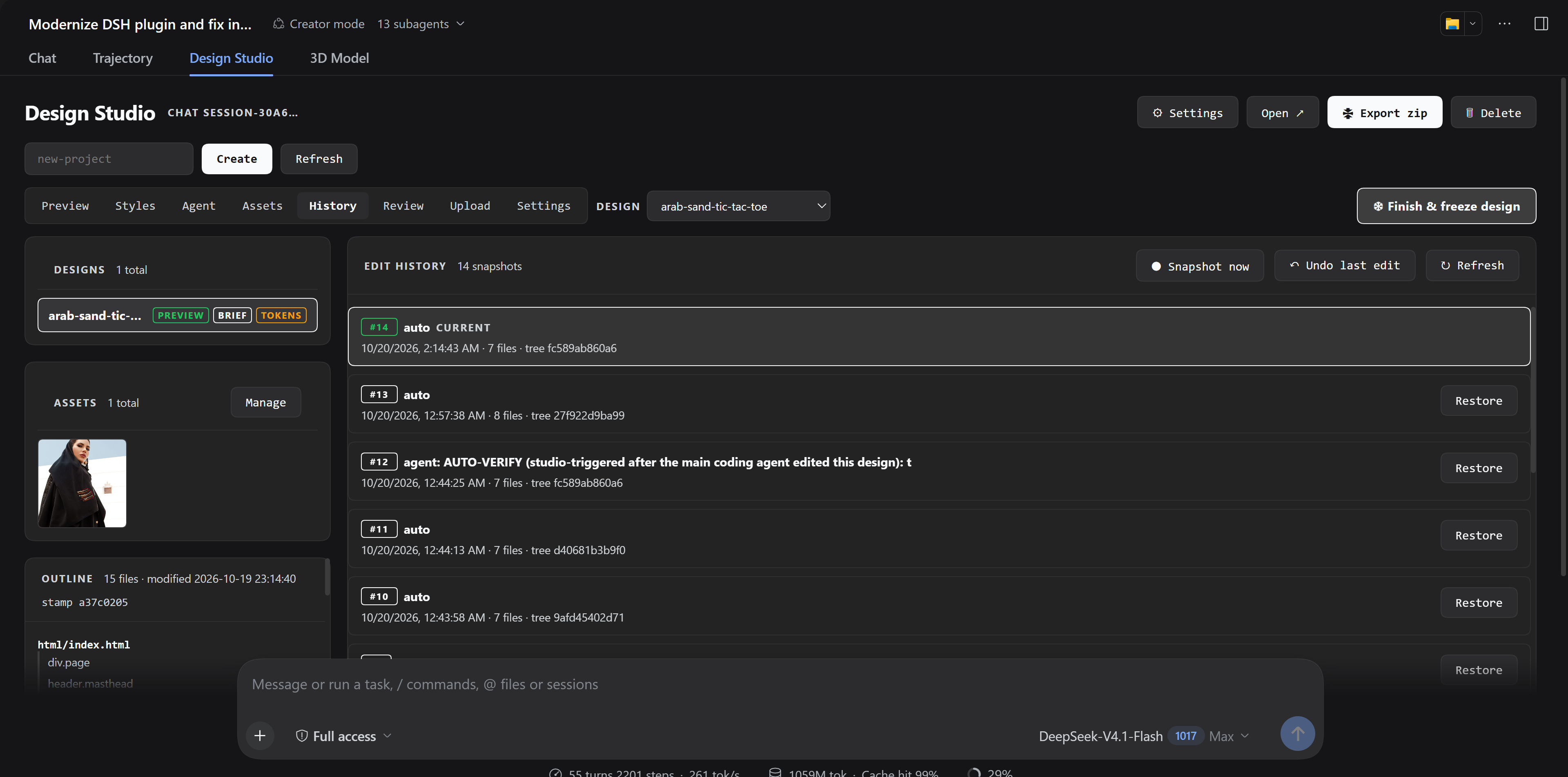 |
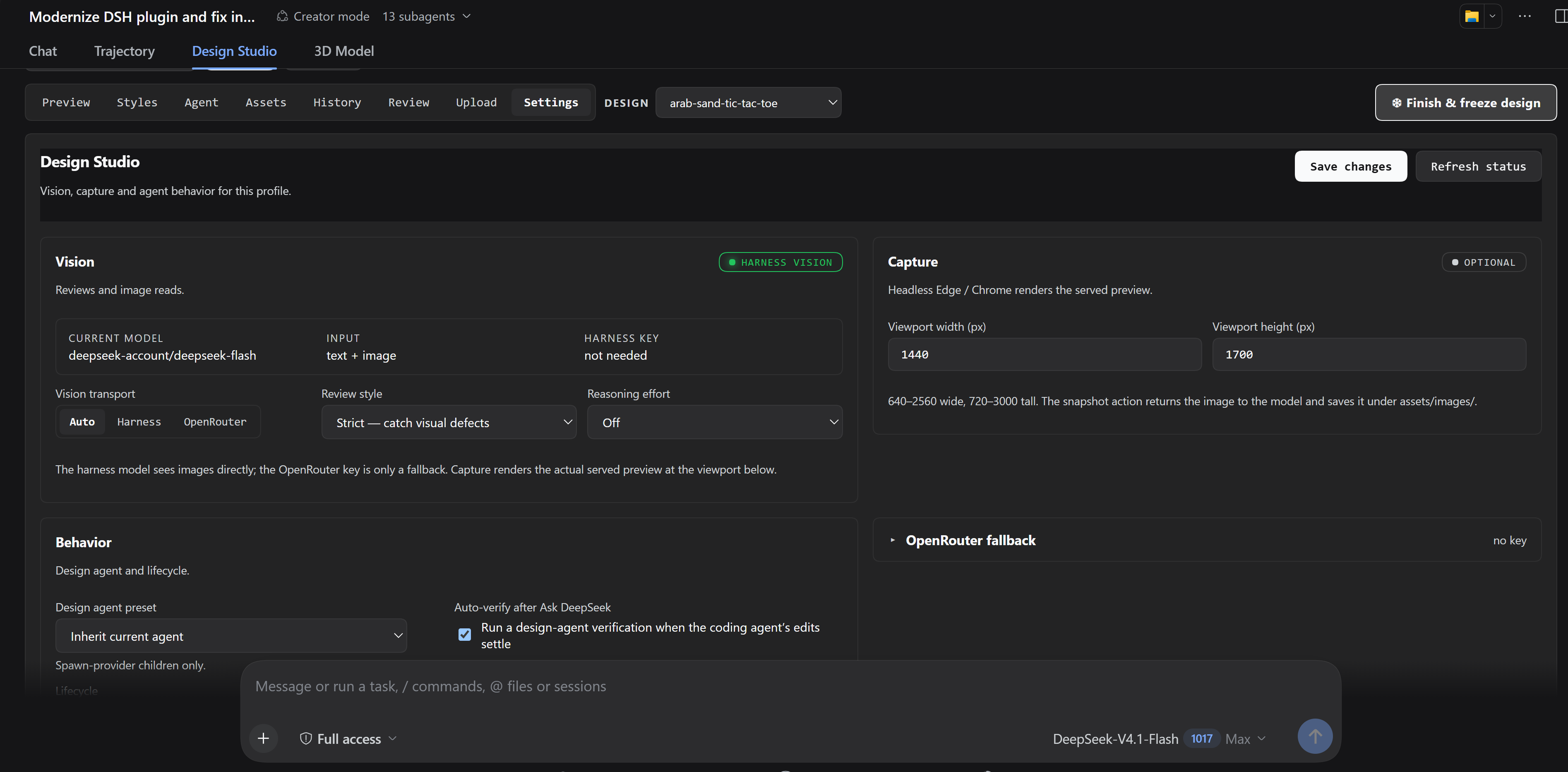 |
Click any screenshot for the full-size image.
DSH-Design-Studio/
├── package.json          # dual-face manifest: dsh.bundle (host) + dsh.client (web UI)
├── cordis.patch.yml      # the composition layer this bundle contributes
├── README.md             # this file
├── CHANGELOG.md          # release notes (2.3 atlas, 2.2 history, 2.1 split/settings)
├── LICENSE               # MIT
├── THIRD_PARTY_NOTICES.md # style-atlas attribution and MIT notices
├── icon.svg              # plugin inventory artwork
├── locale/               # plugin inventory display metadata (en/zh)
├── repo-images/          # UI screenshots shown at the top of this README
├── lib/
│   ├── data/
│   │   └── style-atlas.json # attributed 88-style snapshot (no runtime dependency)
│   ├── index.js          # host orchestrator: design systems, agent, HTTP route + tool
│   ├── host/             # host domains
│   │   ├── constants.js  # shared limits, key reference, slug regex
│   │   ├── util.js       # pure helpers: zip writer, paths, base64, PNG size
│   │   ├── node-io.js    # Node helper seam, binary writes, delete, browser capture
│   │   ├── config.js     # config load/save, key info, harness vision detection
│   │   ├── vision.js     # harness + OpenRouter review, image descriptions
│   │   ├── preview.js    # headless preview snapshot
│   │   ├── presets.js    # identity preset CRUD + apply
│   │   ├── assets.js     # asset manifest, sha256 dedupe, upload/import/delete
│   │   ├── history.js    # content-addressed blobs, trees, snapshots + restore
│   │   └── styles.js     # style atlas apply/save/create + CSS token generation
│   ├── client.js         # GENERATED self-contained ModuleLoader bundle (shipped)
│   └── client/src/       # runtime, styles, labels, primitives, api, element-picker,
│                         #   scaled-preview, assets-modal, history, style-atlas,
│                         #   studio-view, settings, index
├── scripts/
│   ├── check.mjs         # dependency-free release/check script
│   └── bundle-client.mjs # source → lib/client.js; installs never run it
├── tests/                # host + client smoke tests (node --test)
└── examples/ # example design systems (html/css/js mockups + presets)dsh.bundle + dsh.client package:
dsh plugin add once, and the tool, the preview route, the prompt section and the
Design Studio tab are present on every launch. No install-time build step, no
TypeScript, zero runtime dependencies (plain JavaScript); the client source split
is bundled ahead of release into the committed lib/client.js.design_studio agent tool — your assistant (and any subagent) can
list / all / create / read / write / zip / reveal / delete / sweep design systems,
manage business pages (page_list / page_create / page_rename / page_delete),
manage assets (asset_list / asset_upload / asset_import / asset_delete), save and
restore edit history (history / snapshot_save / snapshot_restore / snapshot_undo),
apply/save/create styles (style_list / style_apply / style_save / style_create),
manage identity presets, run vision reviews, chat with the design agent, read its history,
and configure the studio — design files live in the workspace
design-studio/<slug>/ folder (legacy profile designs remain readable).app.project at a Compose Multiplatform
project that exposes Compose Hot Reload's hotMcpServer (CMP 1.12+) and the App
tab drives the real app: start, reload, screenshot, semantic tree, logs. No Gradle
wrapper or no project means it stays off, with an honest empty state. See
docs/compose-desktop.md.SCREEN_*
tags. The Screens chips navigate via NAV_*/ROUTE_* destination tags and
report an honest fallback when the app exposes none. The session survives tab
switches via a host keepalive and reconnects automatically. See docs/android-app-targets.md./design-studio/<slug>/html/index.html, served by the
harness web server. Inline Preview is the default open tab and sits in the same
tab bar as App, Pages, Styles, Agent, Assets, History, Review, Upload and Settings — no modal, no top-right panel.
It renders a centered device at a real Desktop (1440×1600), Tablet, or Mobile viewport;
switching viewport resizes the whole device frame, and the surrounding area uses the
panel background instead of a white strip. A Fit / 1:1 control (1:1 default)
shows actual size with scrolling; Fit scales the device to the available pane. The open Studio polls the selected design's
stamp every 1.5s and auto-reloads the Preview/outline/assets on external edits.rundll32 / open / xdg-open), bypassing the DSH in-app
browser.html/index.html,
css/style.css, css/token.css, js/app.js (minimal presentation) plus
design_prompts_forcoders.md (the brief the coding agent follows) and
assets/images/ for uploads. Mock data stays honest — empty/loading states,
never fabricated live numbers.assets/images/ and auto-select in the agent chat picker. The 🗂 Assets modal
uploads by drop/picker, dedupes by sha256, records MIME/dimensions/bytes/alt in
assets/assets.json, and offers thumbnails, a lightbox, copy-path/copy-<img>, and
delete. asset_import can pull an operator attachment path directly. Preview captures
are excluded from the library.←/→ auto-try
each style live, a scrollable strip jumps anywhere, and Apply/Revert are one
action away. The tour sits above the preview and scrolls only its own strip. The
gallery also offers filters/search,
random-next, a pre-style snapshot with Undo apply, full-template New,
and “Save current” into a reusable custom style. Auto snapshots follow AI edit
batches and design-agent turns._studio/history/<slug>/: sha256 blobs, sorted tree manifests, and parent-linked
snapshots with a head cursor. Auto-capture runs after edits settle; the History
tab offers manual checkpoints, undo-last-edit, and restore-to-snapshot. Restoring
moves the head without deleting later snapshots, so earlier states stay restorable.zip binary), the OS file manager (open -R, Explorer, xdg-open), and
recursive delete without a POSIX shell.ctx.subagents.startActivation (design-studio persona, delivery: 'caller',
cwd set to the design system, maxDepth: 1 — the child is depth 1, so it
runs but cannot spawn grandchildren) that lists, reads and edits the
design files across multiple tool calls per message, then summarizes file-level changes.action config → harnessVision), images explicitly selected in the
picker (or mentioned by filename) are attached directly to the child prompt, so
the design agent inspects the pixels itself. Only when the harness model cannot accept
images does the plugin fall back to OpenRouter descriptions.Click 🎯 Select, click any element in the live preview, describe the change:
| Button | What happens |
|---|---|
| 🤖 Ask DeepSeek (default) | Saves EDIT_REQUEST.md, sends the request to your main chat through the retained Session binding (session.prompt(..., 'queue')). DeepSeek edits the files itself and invokes the design agent only when it needs a visual read. A live run banner tracks queued → working → finished in the tab, and the studio auto-runs a design-agent verification once the edits settle. |
| ◈ Make the design agent do it | The classic flow: the design agent applies the change itself and replies in its chat. |
| 💾 Save only | Just writes EDIT_REQUEST.md — apply later from either chat. |
pages/<id>.html with shared css/token.css and assets; a page
has its own css/pages/<id>.css, js/pages/<id>.js and optional
css/pages/<id>.tokens.css. Page-scoped style applies (Styles → This page)
write the page token file; Entire design writes the global css/token.css.
Sidebars, drawers, modals, tabs and filters are overlay states on the same
page — not new pages. Use a fixed overlay layer with a blurred/inert backdrop.
Add pages only for a new business screen/flow. Zip, freeze, history and delete
cover every page automatically because they work on the whole design root.design_studio rejects write/style/asset/history-restore/delete
and design-agent actions; read, snapshot, review, zip, and open still work.
list/all return frozen and the freeze record so every agent can see it.{hash, at} (fresh random hash + ISO time,
latest-status only) — the plugin detects changes from any editor via the
harness fs/observed stream, plus synchronous bumps on its own write paths.
Path comparisons are Windows-aware (the old code compared / prefixes only).GOOD | POOR verdict + one-sentence notes against the brief.
The plugin asks ctx.llm.resolveModelInfo whether the current model accepts images;
when it does, the review runs on the harness route with no OpenRouter key
(transport: harness). visionTransport can be auto (default), harness (no
fallback), or openrouter (always use the key).assets/images/preview-*.png) and returns it as an attached image. The model can
see the rendered design directly instead of guessing from source. The same capture
feeds review and the design agent. If no Chromium browser is installed, the action
reports that honestly; the rest of the studio still works.fetch (no curl, no temp files). The key is a harness credential reference
(OPENROUTER_API_KEY) and is never rendered or returned.preset_apply
writes css/token.css and copies logo assets.design-studio/; presets, config, reviews and agent history stay in the profile.For agents working in this repo, Design Studio now has a repo-local handbook and skill. These are not installed into the DSH profile yet; they are source material for future distribution.
Works with both harness distributions — the npm distribution
(npx @deepseek-ai/dsh web) and a Desktop/source checkout.
Once the package is published:
dsh plugin --profile desktop add @sal7one/dsh-design-studioOr from the Web Plugins page (the bundle is publishable and declares
dsh.bundle.patch, dsh.manifestVersion: 1, engines.dsh, display metadata and
an icon). Restart the harness after installing if your profile has no HMR.
dsh plugin --profile desktop add git+https://github.com/Sal7one/DSH-Design-Studio.gitThe package has no prepare/build script, so pnpm has no build permission to
prompt for. It only needs GitHub to be reachable during the fetch/install.
dsh plugin --profile desktop add "link:/absolute/path/to/DSH-Design-Studio"On Windows, link:S:/projects/dsh/DSH-Design-Studio is the equivalent. Use an
absolute path: a bare relative path is read as a GitHub owner/repo shorthand.
Remove with the package name:
dsh plugin --profile desktop remove @sal7one/dsh-design-studioThe bundle row is enabled by default. To keep it installed but off, override it in
your profile's own cordis.patch.yml (profile layers apply after bundle layers and win
per row):
- id: dsh-design-studio
  disabled: true
Optional: an OpenRouter key is only needed as a fallback when the current harness
model does not advertise image input. Run design_studio → config; if
harnessVision.available is true, reviews and selected images use the harness model
directly. The key is stored via the credential seam and never shown again.
npx @deepseek-ai/dsh webA browser window opens at the harness URL it prints (usually a loopback
address such as http://127.0.0.1:<port>) — that's the harness Web UI.
dsh plugin --profile desktop add @sal7one/dsh-design-studio<harness-origin>/design-studio/<name>/html/index.html (the exact
origin is the one printed by the harness).Design → freeze → implement. Describe the mockup. The plugin's injected routing keeps the agent in design mode until the design is approved. When it thinks the design is ready it asks one native question: Keep refining, Freeze only, or Freeze & implement. Freeze defaults to the current project. “LGTM / looks good / done” freezes directly; “freeze and implement” does both without another confirmation.
Iterate with the design agent. Open the Design Studio tab → select your design → type a request in the agent chat ("make the status bar left-aligned", "use this image as the background"). It reads, edits and summarizes; the preview reloads.
Pick an element and let DeepSeek change it. 🎯 Select → click the element → type the change → Enter sends it to Ask DeepSeek (Shift+Enter adds a line; Save only writes the request without sending). The request appears in your main chat, DeepSeek edits, the tab banner tracks progress, and the design agent auto-verifies the result.
Give DeepSeek a visual job. Drop a palette image on the tab (it lands in
assets/images/), then in the main chat:
In the tic-tac-toe design, read the color palette from
assets/images/palette.pngand apply it tocss/token.css. Use the design agent for the visual read.
DeepSeek routes the visual work to the design agent (design_studio → agent), the
image is auto-attached and vision-described, and the result flows back into DeepSeek's
tool result.
engines.dsh:
>=0.2.0-rc.2 <0.3.0; tested on 0.2.1-rc.2) with the standard host services
(fs, subprocess, webServer, llm, credentials, attachments,
systemPrompt, tools, plus optional agents/subagents for the design-agent chat).design-studio/ folder is created automatically on first use;
legacy profile designs remain readable. No symlink or manual setup is required.OPENROUTER_API_KEY as the fallback.uiautomator2 on
loopback, an installed debug APK, and an authorized emulator/device. Explicit
Build & install invokes the configured build and install commands; see the
security limitation.<workspace>/design-studio/<slug>/. These are ordinary
workspace files and can be committed, reviewed and edited under the normal
sandbox. They are visible in every conversation rooted at that workspace, not
just the creating chat.html/index.html. Additional pages
are pages/<id>.html with css/pages/<id>.css, js/pages/<id>.js and
css/pages/<id>.tokens.css; _studio/pages.json is the manifest. They share
the design's css/token.css, css/style.css and assets/. ZIP/freeze/history
and design delete operate on the whole design root, so all pages are included.temp_design_folder/ still holds global config, presets, the
slug registry, and legacy designs created before 2.7.0./design-studio/<slug>/
works for both workspace and legacy designs.Design Studio is a local, operator-trusted tool.
asset_import accepts local source paths. Treat the Studio API as equivalent
to local file access.The original report tried:
dsh plugin --profile desktop add git+https://github.com/sal7one/dsh-design-studio.gitand failed at commit c08abef with git fetch exit 128 /
LibreSSL SSL_connect: SSL_ERROR_SYSCALL. Three separate layers were involved:
"private": true
and was not on npm. This is fixed: private is removed, the package is public,
and it has publishConfig, files, engines.dsh, dsh.manifestVersion and a
tag-driven publish workflow.npm search repository:sal7one/dsh-design-studio does not search the repository field
in npm metadata, so it returns nothing even though
@sal7one/dsh-design-studio is published. This is a hub-side bug; the
workaround is to search/install by package name:
npm search sal7one or dsh plugin --profile desktop add @sal7one/dsh-design-studio.github.com:443 on that
machine. The current package has no prepare script and no install-time
build, so a working GitHub connection needs no allowBuilds permission;
npm install avoids git entirely.The current repository is public, publishable and installable from npm. Verify
the published artifact with npm view @sal7one/dsh-design-studio version; the
npm package name is @sal7one/dsh-design-studio, not a repository-search hit.
The hub-side search bug still needs reporting to the hub; installing by package
name bypasses it.
This plugin was built and broken against a moving harness base. The traps that remain relevant:
startActivation, not start. The current contract is
ctx.subagents.startActivation({ provider, label, request, signal, delivery });
the request carries prompt, parent, cwd, signal and maxDepth. The old
.start(provider, { persona, … }) call silently failed on 0.2.x.agent.id. The host-level
sessions service no longer exists; orphan detection reads ctx.agents.list().
Tool handlers must read exec.agent.id, not the removed exec.agent.sessionId.dsh.client.inject now names @deepseek-ai/dsh-client-ui-conversation,
…-ui-settings, …-ui-session and …-locale; immediately: true makes the tab
register at boot. The removed @deepseek-ai/dsh-client-runtime entry is gone.conversation.view hands sessionId as a standard prop. The obsolete
registration inject: (sessionId) => ({ sessionId }) face was removed; the view
reads props.sessionId directly.SessionFace.prompt. The scoped
conversation.send path is gone; the tab uses
sessions.binding(id).session.prompt([{ type: 'text', text }], 'queue').lib/. A harness checkout's .gitignore ignores lib/ — a plugin
committed inside one ships without its entry point. This repo lives at its own top
level and ships plain JS, so lib/index.js is committed.apply() runs as soon as its
injections resolve; webServer, systemPrompt, tools, etc. must be in inject
so the route/tool/section registration cannot be silently skipped.ctx.llm.resolveModelInfo for the current selection's inputModalities and only
then sends ImageBlocks. deepseek-account/deepseek-flash on this harness reports
["text","image"], so reviews and selected images run on the harness with no
OpenRouter key. A text-only route falls back to OpenRouter; visionTransport
(auto|harness|openrouter) can force either path.action snapshot resolves a
local Edge/Chrome/Chromium and renders the actual served route with a temporary
--user-data-dir; it returns an attached image block. No npm browser dependency is
added, and a missing browser is reported instead of faked.The host is plain ESM under lib/host/; the client source is split under
lib/client/src/ and bundled into the committed lib/client.js (installs never run a
build). Regenerate the bundle after client edits:
npm run build:client
npm run check        # fails if lib/client.js is stale
npm test
npm pack --dry-run
The tests use a virtual fs and a fake host context, so they run without a live
harness. The client test loads lib/client.js through the module loader in a VM and
asserts the three slot registrations plus style cleanup.
The package is publish-ready and has no install-time build step; lib/client.js is
committed in generated form:
npm publish --access publicOr push a version tag (v2.8.0); .github/workflows/publish.yml publishes to npm
using the NPM_TOKEN repository secret. .github/workflows/ci.yml runs the same
checks on pull requests and pushes.
Before tagging, verify the release smoke path:
npm run build:client && npm run check && npm test
npm pack --dry-run
npm pack contains lib/host/pages.js, scripts/, AGENTS.md, the handbook,
and no tests, research, or local design-studio/ data.page_list → page_create → style_apply scope=page →
zip → inspect the zip for pages/<id>.html, _studio/pages.json and page
CSS/JS → page_delete.v2.8.0 tag must match package.json; the workflow rejects a mismatch.Then PR one entry into awesome-deepseek-harness (alphabetical, one PR per change,
carry the #dsh-plugin topic for discovery).
MIT
The style-atlas data is adapted with attribution from dsh-ui-ux-pro-max (contributors) and its upstream ui-ux-pro-max-skill (Next Level Builder), both MIT. See THIRD_PARTY_NOTICES.md.
2.8.0 — Android app targets and Compose Desktop. Bind a design project to an installed Android app and drive it through Appium from the App tab: live screenshot/tree, hover highlighting, selection popup, project-root/build fields, capture into assets + history, and a keepalive session that survives tab switches. Also ships the optional Compose Desktop target. See docs/android-app-targets.md.
2.7.7 — larger canvas and project style scope. Preview opens at 1:1 (large design area, scrolls) with Fit available. Style apply defaults to the project/all-pages scope, configurable in Design Studio settings. All designs lives inside Design Studio as an internal tab, grouped by workspace with search, status filters, counts, latest ZIP dates, and clean preview/zip/show-in-folder/delete actions. Settings now makes unsaved changes explicit and keeps its Save/Refresh header aligned.
2.7.6 — explicit style apply scope. Style preview and tour actions expose Apply to this page and Apply to all pages buttons.
2.7.5 — sidebar-safe preview and multi-page canvases. Preview defaults to Fit with an explicit Fit / 1:1 control; wide 1:1 previews start at the left edge and scroll horizontally instead of disappearing under the open conversation sidebar. One design can now hold multiple business pages with a Pages canvas, page switcher and page-scoped style applies. Sidebars/modals stay in-page overlays.
2.7.4 — release-review hardening. Local API rejects cross-site writes, workspace write fallback is root-bound, vision brief overrides work, design switches reset the run banner, and the publish workflow checks tag/version. Freeze's project picker now lists other live chat projects and workspaces with designs. Screenshots now render on npm; the local security model is documented.
2.7.3 — design switcher. Preview now has a Design selector in the workspace bar for every visible design, with frozen badges; switching reloads that design's files, history, assets, styles and freeze state.
2.7.2 — workspace designs visible across chats. A design in
<workspace>/design-studio/appears in every conversation rooted at that workspace, not just the chat that created it. Legacy profile designs keep their old per-session behavior.2.7.1 — repeat the Design ready gate after refinement. Choose Keep refining, finish the next revision, and the native three-choice question returns. No plain-chat fallback while
ask_user_questionis available.2.7.0 — workspace-local designs. New designs live in the current workspace at
design-studio/<slug>/, readable by workspace-sandboxed agents. Profiletemp_design_folder/remains only for legacy designs, global config/presets and the slug registry.2.6.3 — design-ready question gate. When the design is done, the agent asks one native question with Keep refining / Freeze only / Freeze & implement, then acts on the choice. Asked once, not after every edit.
2.6.2 — built-in design→freeze→implementation routing. The plugin injects the workflow into the DSH system prompt: design phase is default, LGTM/done freezes, frozen means implement in the current project, and “freeze and implement” does both. No per-project boilerplate.
2.6.1 — project selector for freeze. Freeze defaults to the current conversation project; choose This project/Recent/Other path from a selector. No path typing required.
2.6.0 — design freeze. A large Finish & freeze design handoff marks the mockup read-only, records the implementation target, blocks Studio/AI writes, and switches the agent to implementation mode until an explicit Thaw.
2.5.0 — agent handbook + skill. Added a repo-local Design Studio handbook, a reusable
design-studioskill, andAGENTS.mdguidance. Not installed into the DSH profile yet.2.4.6 — assets top spacing. The full-screen Asset library starts below the OS/window controls, so Upload/Refresh/Close no longer overlap them.
2.4.5 — cancel delete. Arming Delete now shows a Cancel button, so the confirmation can be dismissed without switching tabs.
2.4.4 — tab row spacing. The workspace tab row now has breathing room above it instead of sitting flush against the Create row.
2.4.3 — vision warning. The selection editor warns when the active model has no image input and no OpenRouter fallback is configured, so you know that DeepSeek will edit from files only and cannot visually verify the result.
2.4.2 — Enter asks DeepSeek. In the selection editor, Enter now sends the change to Ask DeepSeek; Shift+Enter adds a line, and Save only remains an explicit “don’t send” action.
2.4.1 — run banner lifecycle. The Ask-DeepSeek banner now polls the session binding so a finished run clears on its own; unobserved pickups fall back to “watch the main chat” and finished/untracked banners auto-dismiss after 8s.
2.4.0 — style tour and safe applies. The Styles grid gets a large Try them now button that opens a horizontal style tour over the current design; arrow keys auto-try each style. The tour sits above the preview and has a Fit toggle that scales and centers the whole preview so the page does not scroll; the strip scrolls horizontally on its own. Random-next preview, one-click Undo apply backed by a pre-style snapshot, and auto snapshots after AI edit batches/agent turns.
2.3.0 — attributed style atlas. 88 design styles from dsh-ui-ux-pro-max (MIT) are vendored as normalized data, then exposed through a Styles tab: try a style live in the current design, apply tokens, create a new project from the full template, save the current
token.cssas a custom style, and shuffle fonts/palettes. No runtime dependency on the source repo.2.2.0 — content-addressed edit history. Every design now has a snapshot tree (
_studio/history/<slug>/) with sha256 blobs, sorted tree manifests, parent-linked snapshots and a head cursor. Auto-capture runs after edits settle; the History tab offers undo-last-edit and restore-to-snapshot.2.1.0 — settings redesign and file split. A vision-first Settings page (transport, review style, capture viewport, agent preset, auto-verify) and modular host/client sources:
lib/host/*andlib/client/src/*, with a zero-dependency bundler that emits the committedlib/client.js. Installs still need no build step.2.0.0 — modernized for DSH 0.2.x. The host now uses the current
ctx.subagents.startActivationcontract andAgent.id, the client uses the current slot registration and Sessionprompt()API, and the plugin no longer shells out tosh,curl,zip,base64orscreencapture. The buggy screenshot-capture feature and the unuseddynamic/prototype were removed. See CHANGELOG.md.
The experimental companion is off by default. To use it, enable QaLens companion in Settings → Design Studio, save, then choose Android · QaLens in App. Enabling the desktop setting does not install an SDK, start a server, pair a phone, or change a host app. The web editor and other app targets work independently.
The integration guide covers opted-in installation, QA/release variants, the existing workbench, privacy, verification and rollback. The separate agent skill helps with explicit integration requests; it is not required for mockup work. The feature in this checkout may not yet exist in a published npm version.
CLASSIFICATION EVIDENCE
系统优先读取 GitHub Topics,再与站内分类词典和词根规则比对。当前命中: deepseek-harness。
morluto
Reverse engineer anything with agents, from app behavior down to native binaries.

deepseek-ai
DeepSeek Harness: Everything is a Plugin.

nexu-io
The 1st Collaborative AI Design Agent Workspace. Local-first and open source. Create motion, prototypes, websites, apps, dashboards, presentations, images, and videos with your team and AI agents. Share work, exchange feedback, and iterate together in one workspace.