
模型与 MCP
待识别

rea
morluto
Reverse engineer anything with agents, from app behavior down to native binaries.
PROJECT TOPICS
INSTALL REFERENCE
dsh plugin --profile web add github:SOVLOOKUP/dsh-mise
该命令指向仓库当前默认分支;尚无绑定当前 commit 的完整验证结果。
PROJECT README
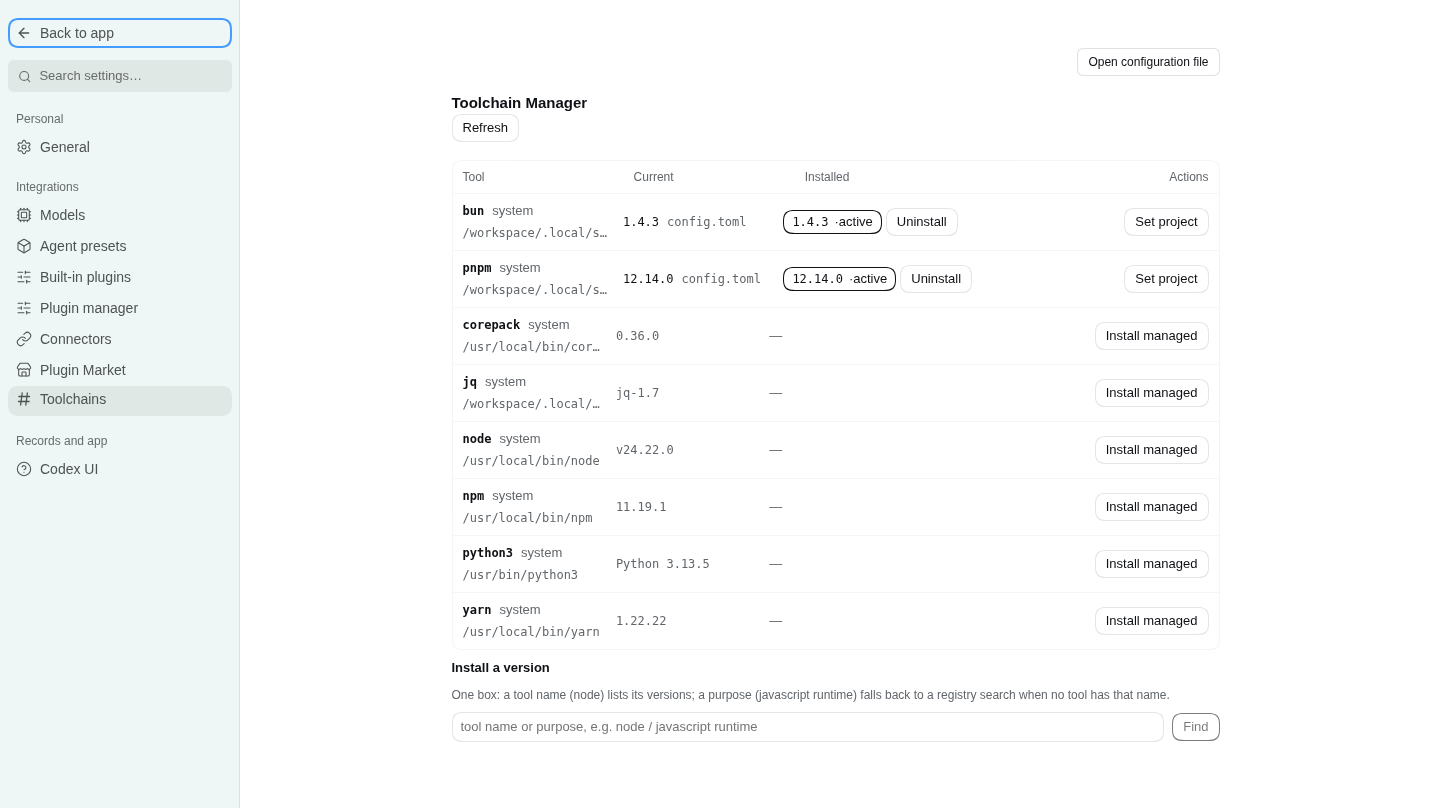
Toolchain manager for DeepSeek Harness (dsh), backed by mise. One settings page shows what is installed and what is available, and installs, pins, uninstalls and prunes by directory (.mise.toml-driven). Nine agent tools expose the same surface to the model, so an agent can see the machine, pick a version, install it, pin it and clean up afterwards without guessing.
English | 中文
src/index.ts + src/mise.ts, built to dist/): every mise invocation, JSON parsing, the write gate, and a set of endpoints on the plugin's own /mise RPC channel.src/client.ts, built to dist/client.js): a settings.section page (order 48) that talks only to that channel — it serves no HTTP route of its own and never touches a binary.No @deepseek-ai/* package is imported at runtime: the host half is plain ESM, the browser half is one self-contained bundle whose React comes from the harness module table.
dsh plugin --profile web add github:SOVLOOKUP/dsh-miseRequires dsh >= 0.2.0-rc.2 and a mise binary on the host (or miseBin pointing at one). The build output in dist/ is committed, so a source install needs no build step; mise itself is not bundled — install it from mise.jdx.dev first.
| Capability | Where |
|---|---|
| One table: the active version, how many versions are installed, what PATH resolves to | Settings → mise |
| Tools the image ships that mise does not manage | one folded row under the table (System-provided · N), read-only, collapsed by default |
| Manage a tool's versions | the ▸ in front of the tool name opens a version sub-table: version, status, install path, and the per-version actions (use / uninstall, two-step confirm) |
| Newer version available | a dashed ↑1.8.2 marker after the active version only, fed by mise outdated --inactive --bump --json; comparisons are mise's own, never re-implemented |
Requested by .mise.toml but not installed |
not installed in the current column, with install x.y.z in the sub-table and a table-wide "install everything the config asks for" |
| Search | one box: a tool name lists versions, tool@prefix (pnpm@12) narrows to that prefix, anything else falls back to a mise registry search |
| Live install output | the panel polls the running write command every 0.7 s and renders mise's own lines with \r redraws collapsed in place |
| Tool | What it does |
|---|---|
mise_status |
mise version/path, target directory, config files on the directory chain, active versions, missing versions, and whether CLI activation is on |
mise_versions |
installed / active / latest / remote versions for a tool, or a registry search for a query |
mise_system |
read-only PATH scan of 18 common dev commands: the hit path and version, whether mise also manages that tool, and the image-provided copy after skipping mise's shims |
mise_install |
install tool@version; background: true returns a task id immediately |
mise_use |
write into the project mise.toml or the global config (installs first if missing) |
mise_prune |
remove versions no config references; dryRun: true by default |
mise_uninstall |
remove one installed version, plus the config request that points at it |
mise_activate |
switch PATH activation on/off for this host process |
mise_progress |
read the live progress of one write command (what is running, for how long, recent lines, whether it finished) |
Writes are recorded as tasks because tool calls are request/response: the panel polls the running one, an agent starts with background: true and polls mise_progress. A large toolchain download therefore does not pin a single call for fifteen minutes.
Set in the plugin row (or the settings form):
| Field | Default | Meaning |
|---|---|---|
miseBin |
'' |
empty probes PATH, ~/.local/bin/mise, /usr/local/bin/mise, /opt/homebrew/bin/mise, ~/.local/share/mise/bin/mise |
cwd |
'' |
default directory for the panel and the tools; empty = the host process cwd |
env |
{} |
extra environment for every mise child process |
timeoutMs |
20000 |
timeout for read commands (ls / ls-remote / registry) |
longTimeoutMs |
900000 |
timeout for install / use / prune |
writeMode |
auto |
readonly refuses every write; ask routes agent writes through DSH's approval seam (and denies when no approver exists); auto runs them |
remoteLimit |
30 |
remote versions returned per call |
registryLimit |
40 |
registry search hits |
activate |
true |
prepend mise's shims directory to the host PATH on load, so tool commands work in any shell the host spawns |
prune always runs with --tools, so mise's config-tracking table is left alone.tool@version and is two steps: mise uninstall removes the files, then mise unuse --path <source.path> --no-prune removes the request that pointed at it — otherwise the row would linger as "not installed".mise unuse at the same explicit path.removed list is that preview, not a guess.writeMode.MISE_AUTO_INSTALL is not set: installs happen only when asked for.On load the plugin puts <data dir>/shims at the front of the host process PATH — the effect of mise activate, without editing shell config. It applies to that process and the shells it spawns; a terminal outside the host is untouched. Managed versions win where a config pins one, and shims fall back to the system copy otherwise, so a command never disappears.
If the image points XDG_CONFIG_HOME / XDG_DATA_HOME at /tmp, mise's state would be wiped on restart. Every load therefore re-creates the persistent copies under $HOME (~/.config/mise, ~/.local/share/mise) and symlinks the /tmp defaults at them; a non-empty directory is only reported as drift, never deleted.
npm install        # types only: typescript, @types/*, @deepseek-ai type packages, react for the tests
npm run build      # tsc -p tsconfig.json → dist/, then scripts/finish-client.mjs
npm run typecheck  # sources + tests
npm test           # build, then test/host.ts and test/client.ts
npm run check      # the delivery gate: build + typecheck + both tests
test/host.ts drives the channel with a fake ctx (method matrix, readonly refusal, approval gate, progress-line merging, background task polling). test/client.ts fakes window.__ModuleLoader__ and document, then really renders the page with react-test-renderer and asserts that it only uses the /mise channel and paints the host's data.
Harness loads the built files, not the sources: dist/ has to be committed.
MIT
CLASSIFICATION EVIDENCE
系统优先读取 GitHub Topics,再与站内分类词典和词根规则比对。当前命中: deepseek-harness。
morluto
Reverse engineer anything with agents, from app behavior down to native binaries.

deepseek-ai
DeepSeek Harness: Everything is a Plugin.

nexu-io
The 1st Collaborative AI Design Agent Workspace. Local-first and open source. Create motion, prototypes, websites, apps, dashboards, presentations, images, and videos with your team and AI agents. Share work, exchange feedback, and iterate together in one workspace.