
Agent 与会话
插件

nuwa-skill
alchaincyf
你想蒸馏的下一个员工,何必是同事。蒸馏任何人的思维方式——心智模型、决策启发式、表达DNA。Distill how anyone thinks.
PROJECT TOPICS
INSTALL REFERENCE
dsh plugin --profile web add github:SMPcosy/dsh-easy2restart
该命令指向仓库当前默认分支;尚无绑定当前 commit 的完整验证结果。
PROJECT README

DSH 重启 + 安全归档插件。0.2.0 起由 dsh-plugin-easy2restart 与 dsh-plugin-safe-archive 合并而来,0.2.1 完成界面重做与「自动备份」可配置化,0.2.2 修复界面上暴露的 5 处问题。
📦 包名 / 仓库已改名 旧:
dsh-plugin-easy2restart(GitHub 同名仓库)+dsh-plugin-safe-archive→ 新:dsh-easy2restart旧包仍可安装但不再更新,请迁移到新包,详见 RENAME.md。
现象|Symptom
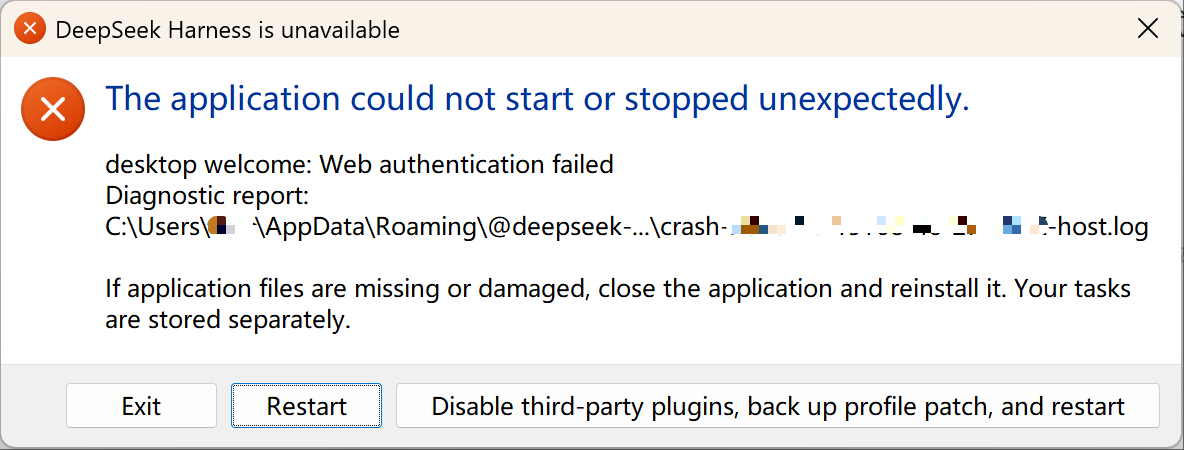
启动 DSH 时弹出上面这个窗口:「The application could not start or stopped unexpectedly.」,正文是 desktop welcome: Web authentication failed,并附诊断日志路径(%APPDATA%\@deepseek-ai\dsh-desktop\logs\ 下的 crash/host 日志);按钮为 Exit / Restart / Disable third-party plugins, back up profile patch, and restart。主界面进不去,日志目录里每次多一条 phase: startup 的崩溃记录。
原因|Cause
每次启动 DSH 都会向桌面 cookie 库新增一条 dsh-auth-* cookie(127.0.0.1、每次启动端口随机,所以 cookie 名不同、不会覆盖旧条目)。它的有效期是 30 天,30 天内不会自己消失;累积到 71 条时 Cookie 请求头超过 16 KB 上限,host 返回 431,桌面握手失败 —— 就是上面这个弹窗。所以重启越频繁,越快撞线:一天重启几次的话,大约一个月内必然出现。
为什么点「Disable…」没用|Why the "Disable" button doesn't help
这个按钮只是禁用所有第三方插件(注意是禁用,不是删除、不是清空 —— 插件本体和配置都还在),然后重启一次。问题出在 cookie 累积,跟插件没有关系,所以点完照样起不来,反而暂时失去全部第三方插件能力,还得手动重新启用。Restart 按钮同理,只会再撞一次。
处理办法|Fix
%APPDATA%\@deepseek-ai\dsh-desktop\Network\Cookies 里的 dsh-auth-*:用 SQLite 执行 DELETE FROM cookies WHERE host_key='127.0.0.1' AND name LIKE 'dsh-auth-%';,或直接删除 Cookies 文件(只影响免登录状态,不影响账号与会话)。dsh-cookie-guard:DSH 关闭时每分钟自动清理,推荐用于长期防复发。DSH 重启 + 安全归档插件:双击侧边栏按钮整体重启 DeepSeek Harness;归档会话前先确认,会话仍在活动时倒计时后才能停止归档;归档成功自动备份,备份到哪、备不备份都由你定。
sidebar.footer.action 位置注入「重启 DSH」按钮(账号头像、设置上方),图标为手绘缺口环 + 箭头。taskkill /T 强杀整个 DSH 进程树,随后重新启动 DeepSeek Harness.exe。running),鼠标悬停给出原因。<备份目录>。」workspace/session-active),对话框切换为「会话正在活动」+ 活动清单(进行中回合 / 子代理 / 后台任务 / 定时任务);workspaceRegistry.archiveSession:归档成功后等 3 秒收尾,把会话文件 + 附件 + 标题缓存 + 元数据复制到
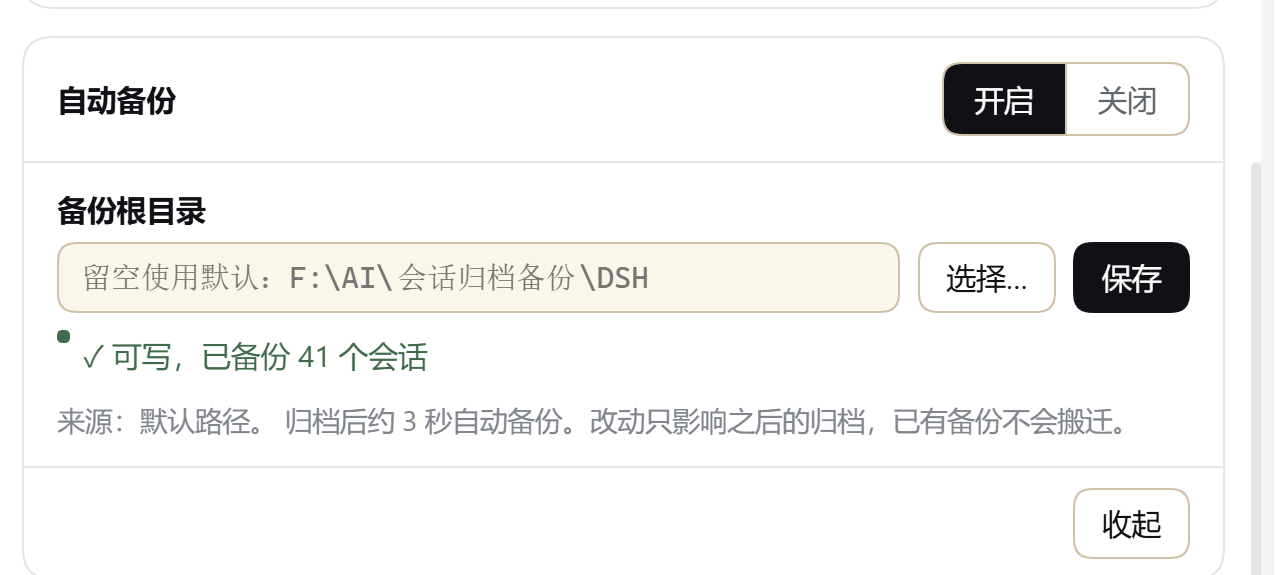
<备份根目录>\<会话名>-<归档日期-时间>\;<备份根目录>\_auto-backup-state.json;manifest.json 自动落种子;POST /scan 手动补扫;归档清单.md 与 _auto-backup-manifest.json;右侧栏「已归档会话」页顶部有「自动备份」卡片,默认收起成一行摘要(开关状态 + 当前目录 + 状态徽章),点开后:
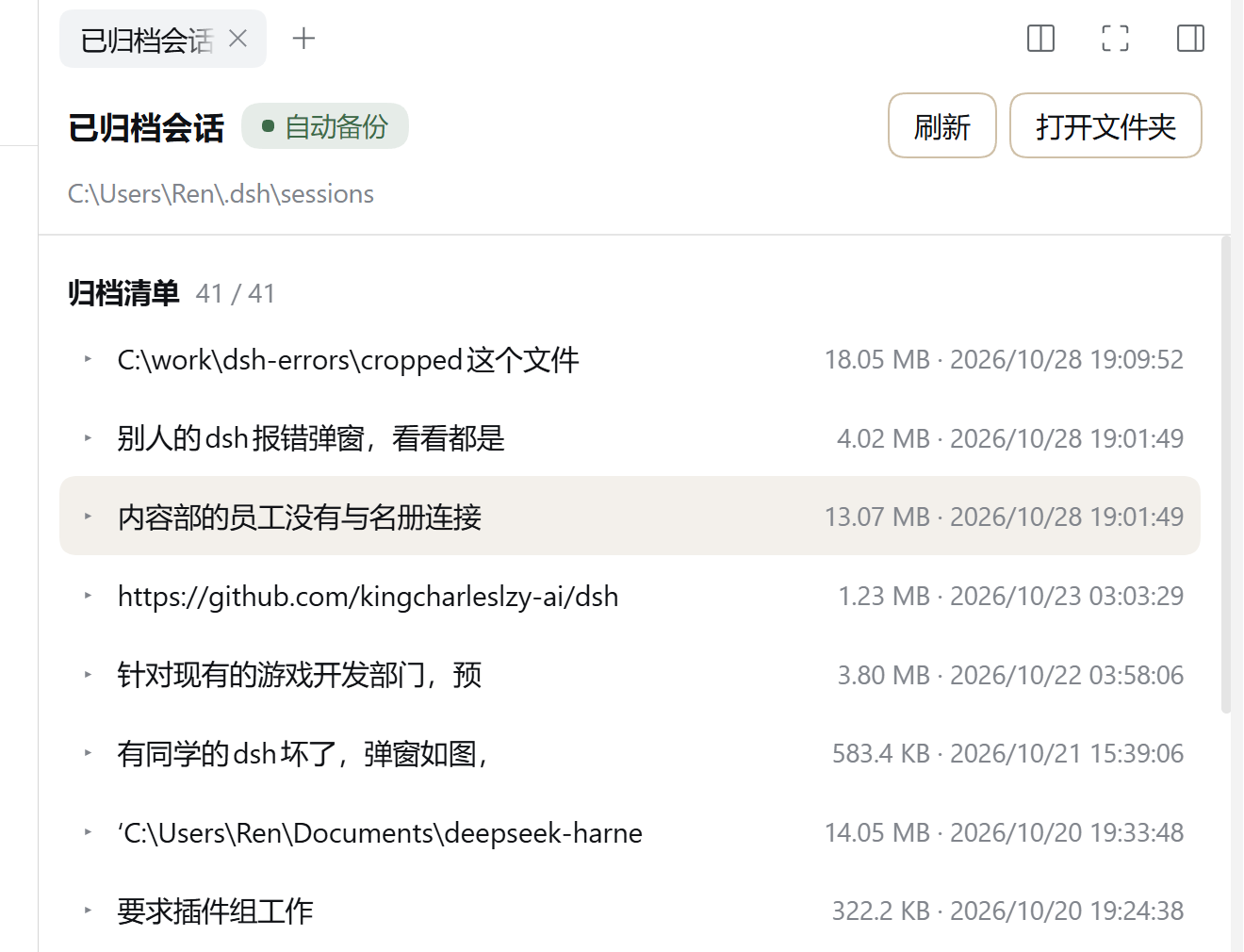
~/.dsh/storages/dsh-easy2restart/config.json,环境变量优先(见「配置」);<DSH_HOME>/sessions(归档会话文件真实位置);workspace.json 的 archivedSessionIds,标题缓存 + 会话文件回读兜底)与「会话存储目录」两棵树,文件点击可在资源管理器中定位;头部「刷新」「打开文件夹」,并实时显示「自动备份 / 备份关闭 / 备份不可写」状态。#FBF6EC / 卡 #FFFDF8 / 墨 #2A2119 / 线 #E5D8C4),红黄绿蓝紫青六色只表达语义,一屏最多两色;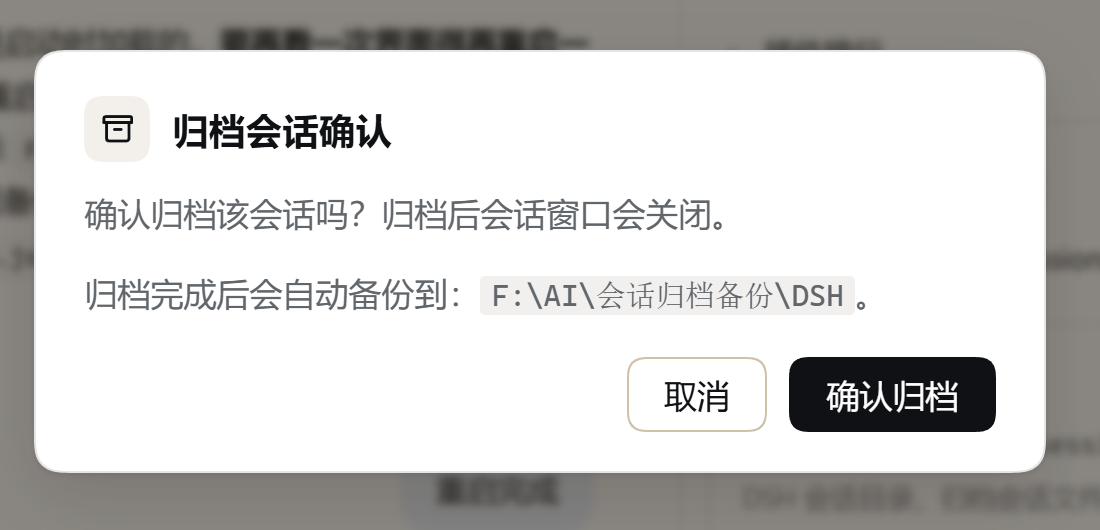 |
 |
 |
 |
更多截图:screenshots/(插件列表图标、右侧栏类型选择页、归档清单)。
| 方法 | 路径 | 说明 |
|---|---|---|
| GET | /api/dsh-easy2restart/health |
探针(宿主是否已加载本插件) |
| GET | /api/dsh-easy2restart/state |
重启待办(pending.json) |
| GET | /api/dsh-easy2restart/active |
是否有 Agent 会话在运行(按钮禁用依据) |
| POST | /api/dsh-easy2restart/restart |
{ sessionId, text } 记录待办并触发重启 |
| POST | /api/dsh-easy2restart/clear |
清除重启待办 |
| GET | /api/dsh-easy2restart/status |
已备份会话数 |
| POST | /api/dsh-easy2restart/scan |
手动补扫「已归档未备份」 |
| POST | /api/dsh-easy2restart/diag |
客户端诊断回写 |
| GET | /api/dsh-easy2restart/backup |
备份设置快照(开关 / 目录 / 来源 / 可写 / 已备份数) |
| POST | /api/dsh-easy2restart/backup |
{ enabled?, dir? } 保存设置;目录不可写返回 400 BACKUP_DIR_UNWRITABLE |
| POST | /api/dsh-easy2restart/backup/pick |
打开系统文件夹选择框,返回选中路径与探测结果 |
| GET | /api/dsh-easy2restart/archive/roots |
归档会话清单 + 数据源路径 + 备份状态 |
| GET | /api/dsh-easy2restart/archive/ls?path=<绝对路径> |
列举 sessions 下某一层目录(路径守卫) |
| POST | /api/dsh-easy2restart/archive/open |
{ path } 在资源管理器中打开/定位(路径守卫) |
离线自检(不启动 DSH、不触发重启、不动真实备份):
node test/plugin.selftest.mjs优先级:环境变量 > 配置文件 > 内置默认。
| 名称 | 取值 | 作用 |
|---|---|---|
DSH_EASY2RESTART_BACKUP |
off / 0 / false / no / disable / none |
关闭自动备份(归档照常) |
DSH_EASY2RESTART_BACKUP_DIR |
绝对路径 | 指定备份根目录,覆盖界面设置 |
~/.dsh/storages/dsh-easy2restart/config.json |
{"backup":{"enabled":true,"dir":"D:\\DSH备份"}} |
界面保存的位置 |
| 内置默认 | F:\AI\会话归档备份\DSH |
未配置时的目录(保留老用户习惯) |
环境变量存在时,界面上的开关与路径框变为只读并给出提示,避免"改了没生效"的困惑。
前提:
dsh命令在 PATH 中(DeepSeek Harness 自带)。
在「插件 / 查检中心」里搜 dsh-easy2restart,或直接:
dsh plugin --profile desktop add dsh-easy2restart@0.2.3为什么钉版本:pnpm 有
minimumReleaseAge(默认 24 小时),裸写包名时刚发布的新版会被跳过, 装到上一版是常态。想要最新版就写死版本号,装完再dsh plugin --profile desktop list核对。
装完重启 DeepSeek Harness(插件不支持热加载),侧边栏底部账号头像上方即出现重启按钮,右侧栏引导页出现「已归档会话」。
从旧包迁移:先
dsh plugin --profile desktop remove dsh-plugin-easy2restart(如果你曾在本地装过dsh-plugin-safe-archive也一并 remove;它从未发布到 npm),再装本包。 两个旧插件的能力已全部并入,状态文件、备份目录与配置完全兼容,无需迁移数据。
~/.dsh/archive-backup/auto-backup.log。dsh plugin --profile desktop remove dsh-easy2restart然后重启 DSH 使改动生效。备份目录、日志与 config.json 保留在磁盘上,可自行删除。
lib/index.js(宿主 / Cordis 插件):/api/dsh-easy2restart/*;/restart 记录待办并调用 scheduleRestart,用 schtasks 创建立即运行的重启任务(由计划任务服务启动,脱离 DSH 进程树),执行 restart/restart.ps1。workspaceRegistry.archiveSession,归档成功后 3 秒调度备份;启动 5 秒补扫。backupSetting()(env → config → 默认)、probeBackupDir()(建目录 + 探针写)、pickBackupDirectory()(PowerShell 文件夹对话框)。<DSH_HOME>/sessions,带路径守卫。restart/restart.ps1:taskkill /PID <主进程> /T /F 结束整个 DSH 进程树,等待退出后重新 Start-Process DeepSeek Harness.exe。lib/client.js(Web 客户端):注入 sidebar.footer.action(重启按钮)、shell.overlay(归档确认框)、sidebar.right.pane.tab(已归档会话页),并接管 uiWorkspace.archiveSession。dsh-easy2restart/
├─ package.json # 插件清单(dsh.client / dsh.bundle 声明)
├─ cordis.patch.yml # bundle 挂载声明
├─ lib/
│ ├─ index.js # 宿主端:重启调度 + 归档备份 + 备份设置 + 归档浏览路由
│ └─ client.js # 客户端端:重启按钮 + 归档确认框 + 已归档会话页 + 备份设置卡
├─ restart/
│ └─ restart.ps1 # 重启脚本(杀进程树 + 重启 exe)
├─ test/
│ └─ plugin.selftest.mjs # 离线自检(宿主 13 条路由 + 备份设置 + 客户端注册 + 视觉层)
└─ scripts/
├─ check-readme-assets.mjs # README 图片发布门禁
└─ make-icon.py # 插件图标生成脚本(Pillow)uiWorkspace.archiveSession 的入口;若 DSH 未来改走其他路径,归档不再弹确认框,备份也需另找触发点。F:\AI\会话归档备份\DSH\),不上传任何远端。~/.dsh/storages/dsh-easy2restart/host-boot.log、~/.dsh/storages/dsh-easy2restart/diag.log、~/.dsh/archive-backup/auto-backup.log(以及备份目录内同名日志)。MIT
DSH restart + safe-archive plugin: double-click the sidebar button to fully relaunch DeepSeek Harness; every archive goes through a confirm dialog (with a 10s countdown while the session is still busy) and is backed up automatically — where, and whether, is up to you.
📦 Renamed. Old packages
dsh-plugin-easy2restart+dsh-plugin-safe-archiveare nowdsh-easy2restart; see RENAME.md.
sidebar.footer.action slot (above the account avatar / settings), drawn as an inline SVG open ring with an arrow.taskkill /T to force-kill the whole DSH process tree, then relaunches DeepSeek Harness.exe.workspace/session-active, the dialog switches to "session is active" plus an activity list (running turn / subagents / background jobs / schedules); "stop and archive" unlocks only after a 10-second countdown.workspaceRegistry.archiveSession: 3 seconds after a successful archive it copies the session file, attachments, title cache and metadata to <backup root>\<title>-<archive-time>\.<backup root>\_auto-backup-state.json; a catch-up scan runs 5 seconds after the plugin starts, and POST /scan triggers it manually.The "Archived sessions" page carries an "Auto-backup" card, collapsed to one summary line by default. Expanded it gives:
~/.dsh/storages/dsh-easy2restart/config.json, with environment variables taking precedence;<DSH_HOME>/sessions (where archived session files really live); the backup copy is not connected and is rejected by the path guard (403).workspace.json → archivedSessionIds, plus the raw session storage directory); clicking a file reveals it in Explorer. The header shows "refresh", "open folder" and a live auto-backup status chip.#FBF6EC / card #FFFDF8 / ink #2A2119 / line #E5D8C4); six semantic colours, at most two per screen.prefers-reduced-motion; buttons keep a 36px hit area, are keyboard reachable and show a visible focus ring. |
|
|
|
More screenshots: screenshots/ (plugin list icon, right-sidebar picker, archive list).
| Method | Path | Purpose |
|---|---|---|
| GET | /api/dsh-easy2restart/health |
Probe (is the host half loaded) |
| GET | /api/dsh-easy2restart/state |
Pending restart record |
| GET | /api/dsh-easy2restart/active |
Whether an agent session is running |
| POST | /api/dsh-easy2restart/restart |
{ sessionId, text } record and trigger a restart |
| POST | /api/dsh-easy2restart/clear |
Clear the pending record |
| GET | /api/dsh-easy2restart/status |
Number of backed-up sessions |
| POST | /api/dsh-easy2restart/scan |
Manual catch-up scan |
| POST | /api/dsh-easy2restart/diag |
Client diagnostics |
| GET | /api/dsh-easy2restart/backup |
Backup settings snapshot |
| POST | /api/dsh-easy2restart/backup |
{ enabled?, dir? }; 400 BACKUP_DIR_UNWRITABLE when the folder is not writable |
| POST | /api/dsh-easy2restart/backup/pick |
Native folder picker; returns the chosen path plus probe result |
| GET | /api/dsh-easy2restart/archive/roots |
Archived sessions + data source + backup state |
| GET | /api/dsh-easy2restart/archive/ls?path=<abs> |
List one level under sessions (path guard) |
| POST | /api/dsh-easy2restart/archive/open |
{ path } reveal in Explorer (path guard) |
Offline self-test (starts no DSH, never triggers a restart, touches no real backup):
node test/plugin.selftest.mjsPrecedence: environment > config file > built-in default.
| Name | Value | Effect |
|---|---|---|
DSH_EASY2RESTART_BACKUP |
off / 0 / false / no / disable / none |
Turns auto-backup off (archiving still works) |
DSH_EASY2RESTART_BACKUP_DIR |
absolute path | Overrides the backup root set in the UI |
~/.dsh/storages/dsh-easy2restart/config.json |
{"backup":{"enabled":true,"dir":"D:\\DSH-bak"}} |
What the UI saves |
| built-in default | F:\AI\会话归档备份\DSH |
Used when nothing is configured |
When an environment variable is set, the toggle and the path field become read-only and explain why, so "I changed it but nothing happened" cannot occur.
Prerequisite: the
dshcommand must be on PATH (bundled with DeepSeek Harness).
dsh plugin --profile desktop add dsh-easy2restart@0.2.3Why pin the version: pnpm honours
minimumReleaseAge(default 24 hours), so a bare package name skips a version published minutes ago and resolves to the previous one. Pin the version when you want the newest build, then confirm withdsh plugin --profile desktop list.
After installing, restart DeepSeek Harness (plugins are not hot-reloaded); the restart button appears at the bottom of the sidebar and the "Archived sessions" page shows up in the right sidebar.
Migrating from the old package: remove
dsh-plugin-easy2restartfirst (also removedsh-plugin-safe-archiveif you had it installed locally — it was never published to npm), then install this one. State files, backup folder and configuration are fully compatible — no data migration is needed.
~/.dsh/archive-backup/auto-backup.log.dsh plugin --profile desktop remove dsh-easy2restartThen restart DSH. The backup folder, logs and config.json stay on disk; delete them yourself if you want.
lib/index.js (host / Cordis plugin): restart routing via schtasks + restart/restart.ps1; wraps workspaceRegistry.archiveSession and schedules a backup 3 seconds after a successful archive (plus a catch-up scan 5 seconds after startup); backupSetting() / probeBackupDir() / pickBackupDirectory() back the settings UI; serves read-only archive browsing under <DSH_HOME>/sessions with a path guard.restart/restart.ps1: taskkill /PID <main process> /T /F, wait for exit, then Start-Process DeepSeek Harness.exe.lib/client.js (Web client): registers sidebar.footer.action (restart button), shell.overlay (archive confirm dialog) and sidebar.right.pane.tab (archived sessions page), and wraps uiWorkspace.archiveSession.uiWorkspace.archiveSession are intercepted. If DSH routes archiving elsewhere in the future, there is no confirm dialog and no automatic backup for that path.F:\AI\会话归档备份\DSH\); nothing is uploaded.~/.dsh/storages/dsh-easy2restart/host-boot.log, ~/.dsh/storages/dsh-easy2restart/diag.log, ~/.dsh/archive-backup/auto-backup.log.MIT
CLASSIFICATION EVIDENCE
系统优先读取 GitHub Topics,再与站内分类词典和词根规则比对。当前命中: session。
alchaincyf
你想蒸馏的下一个员工,何必是同事。蒸馏任何人的思维方式——心智模型、决策启发式、表达DNA。Distill how anyone thinks.

freestylefly
Prompt as Code | GPT Image 2 / 2.5 提示词与案例库,530+ 个案例、20+ 套工业级模板与可复用 Skills,新增 2.5 同提示词对比专区,附完整提示词与生成记录,持续更新。

titanwings
Distilly — Distill how they think into reusable Skills for any Agent or Bot. Formerly Colleague Skill(原同事 Skill).