
Agent 与会话
插件

nuwa-skill
alchaincyf
你想蒸馏的下一个员工,何必是同事。蒸馏任何人的思维方式——心智模型、决策启发式、表达DNA。Distill how anyone thinks.
PROJECT TOPICS
INSTALL REFERENCE
dsh plugin --profile web add github:Ryuu-64/dsh-session-tools
该命令指向仓库当前默认分支;尚无绑定当前 commit 的完整验证结果。
PROJECT README
English | 简体中文
npm: @ryuu-64/dsh-session-tools · Maintained by Ryuu-64.
Ask the AI in DeepSeek Harness (DSH) to start a separate conversation, give it a task, and bring the result back to your current chat.
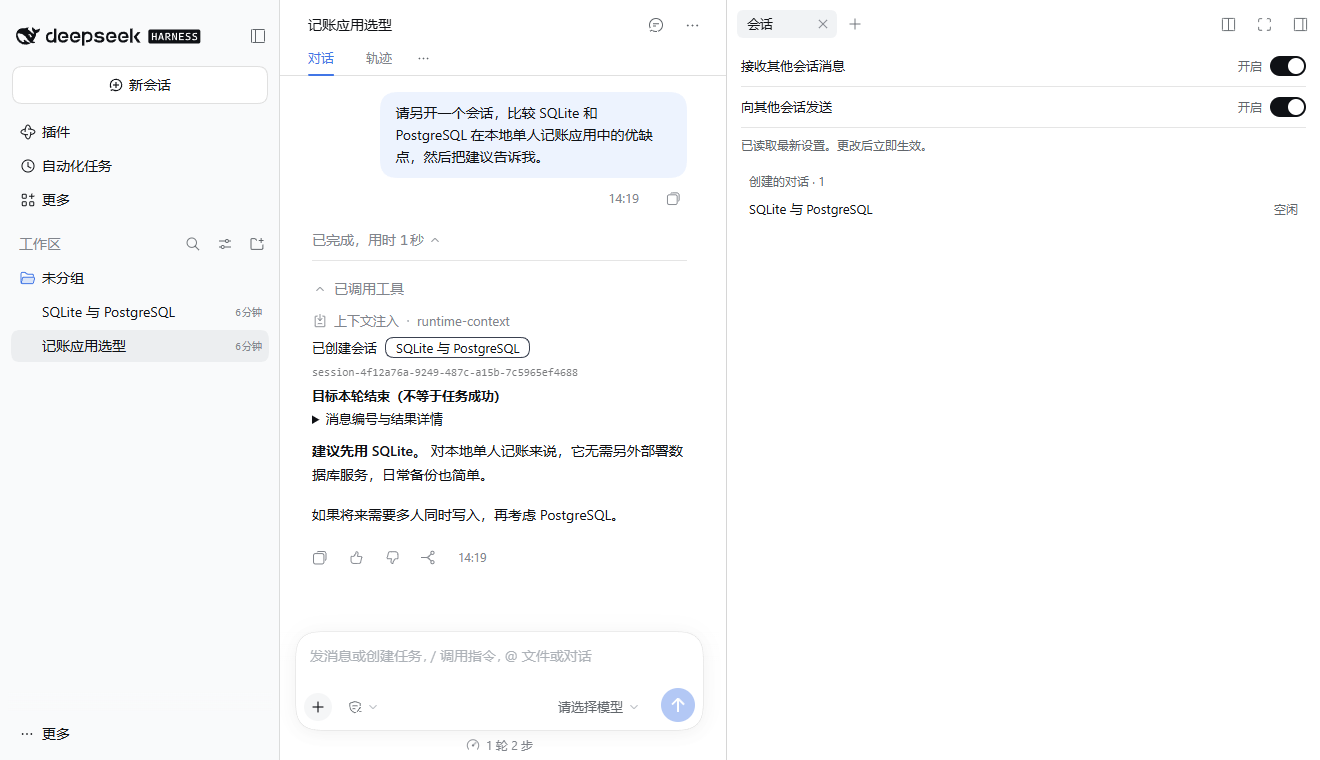
In the Chinese interface, the card opens the new SQLite and PostgreSQL conversation. You can also open it from the right sidebar.
Copy this request into an AI assistant that can operate your computer.
Install this plugin in my DSH setup, check compatibility, and confirm it is enabled: https://github.com/Ryuu-64/dsh-session-tools
In a DSH conversation, try:
Start a conversation called “SQLite vs. PostgreSQL”. Ask it to compare both databases for a local budgeting app used by one person, then bring back its recommendation.
Approve the request if DSH prompts you. Once the new conversation finishes, the AI can bring its answer back to the original chat. Click the conversation name in the creation card (「已创建会话」) to open it and see the full exchange. For a follow-up, ask the AI to find the conversation by title and tell it what to do next.
Include the background, file paths, and expected result in the task. The new conversation starts with the task text you provide.
Turning a switch off blocks new messages in that direction. Work already received can continue. Turning off sending also blocks creation of a session with a first message. Tasks can be sent between regular conversations, and DSH handles approvals. If a wait times out, ask the AI to check the same task again to avoid sending it twice. Communication and wait details (Chinese)
1129212995.CLASSIFICATION EVIDENCE
系统优先读取 GitHub Topics,再与站内分类词典和词根规则比对。当前命中: sessions。
alchaincyf
你想蒸馏的下一个员工,何必是同事。蒸馏任何人的思维方式——心智模型、决策启发式、表达DNA。Distill how anyone thinks.

freestylefly
Prompt as Code | GPT Image 2 / 2.5 提示词与案例库,530+ 个案例、20+ 套工业级模板与可复用 Skills,新增 2.5 同提示词对比专区,附完整提示词与生成记录,持续更新。

titanwings
Distilly — Distill how they think into reusable Skills for any Agent or Bot. Formerly Colleague Skill(原同事 Skill).