
模型与 MCP
待识别

rea
morluto
Reverse engineer anything with agents, from app behavior down to native binaries.
PROJECT TOPICS
INSTALL REFERENCE
dsh plugin --profile web add github:RickT34/dsh-compaction-manager
该命令指向仓库当前默认分支;尚无绑定当前 commit 的完整验证结果。
PROJECT README
English | 中文
Keep long agent sessions small without asking a model to summarize them.
In a long DeepSeek Harness session, most of the context is old tool output and tool call arguments: file reads, search results, command logs, whole files passed to write. Stock DSH trims only results over 8192 characters, then asks a model to summarize the oldest history. That summary costs an extra request and loses the details the agent may need later.
This plugin adds a model-free stage in front of the summary, and you decide exactly what that stage does: which steps run, in what order, with which thresholds, and for which tools. The steps hide old, bulky, duplicate or failed tool calls and leave a short notice in their place. The notice keeps the call's full description and an id, so the model can call restore_context to read the original back. If the steps bring the context under the threshold, the LLM summary does not run at all.
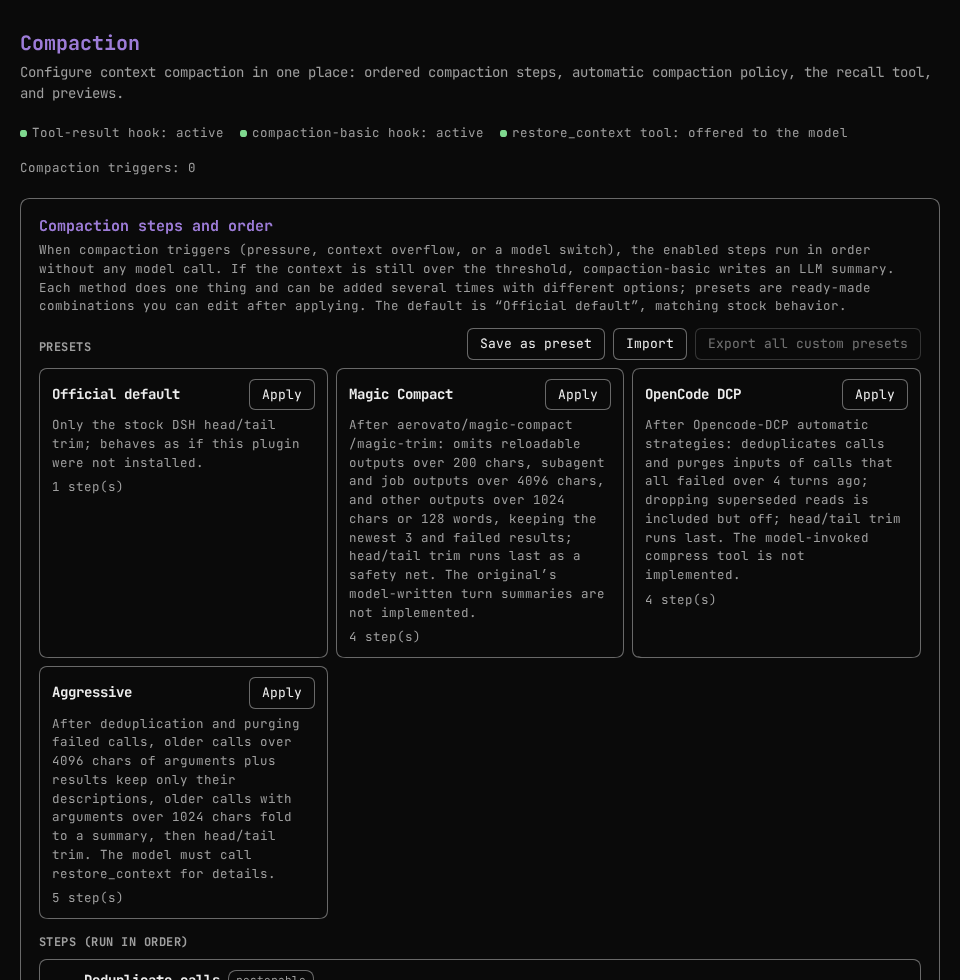
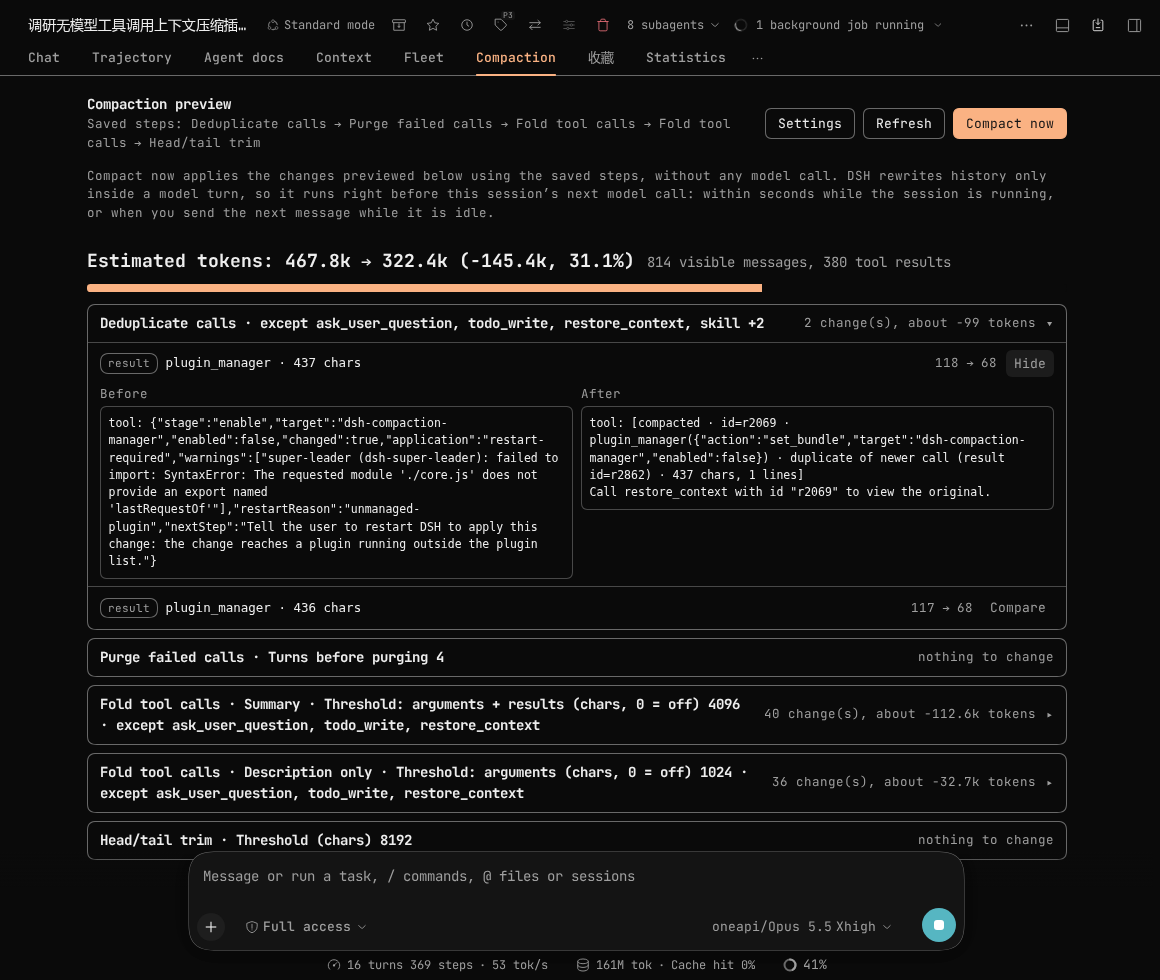
write that carried an entire file, down to a summary or just the call's description.On the session this plugin was developed in (about 470k estimated tokens, 380 tool results), the Aggressive preset cut the estimate by 31% without any model call.
Requires DeepSeek Harness >=0.2.2-rc.1 <0.3.0.
dsh plugin --profile web add dsh-compaction-managerOr in the Web app, open Plugins → Add plugin and enter dsh-compaction-manager. To install the latest commit from GitHub instead of the npm release, use github:RickT34/dsh-compaction-manager.
After installing:
DSH compacts when a request would exceed the threshold, when the provider reports a context overflow, or when you switch models. With this plugin installed, compaction runs in two stages:
compaction-basic replaces the oldest history with a model-written summary. This stage is always last. Its settings are in the panel (see Panel settings).Notices left by the steps keep the call's description argument in full and carry an id. Head/tail trim is the exception: it leaves the call untouched and adds an id only when Include recall id is on. While any enabled step leaves ids, the model gets a restore_context tool that returns the original content for an id.
Each method does one kind of change with one selection rule. A step is one method plus its own options. The same method can appear in several steps with different options. For example, the Magic Compact preset uses three Omit output steps with different thresholds for different tools.
Most methods have a tool scope: Only these tools (empty means all) and Skip these tools. Skip these tools starts with ask_user_question, todo_write and restore_context; Deduplicate calls also skips skill, subagent and subagent_fork, and head/tail trim skips nothing, like the official pruner. Drop superseded reads uses its own lists of read and write tools instead.
| Method | What it does | Main options (defaults) | Restorable |
|---|---|---|---|
| Head/tail trim | Results over the threshold keep their head and tail, with a fixed marker in between. With default options it matches the official tool-result-pruner byte for byte. |
threshold 8192, head 4096, tail 1024 chars | Only with Include recall id |
| Omit output | Older results over a character or word threshold become a one-line notice: tool, key arguments, full description, size, id. | 1024 chars, words off, keep newest 3, skip failed results | Yes |
| Deduplicate calls | For calls with the same tool and identical arguments, only the newest result stays. Older ones point to it. | minimum 200 chars, keep newest 2 | Yes |
| Drop superseded reads | A read result is replaced once the same path is later written, edited, or fully read again. | read tools read; write tools write, edit |
Yes |
| Purge failed calls | A call group in which every call failed is folded to tool names, descriptions and error messages once it is old enough. | 4 turns, keep newest 2 | Yes |
| Fold tool calls | An older call group, arguments and results together, is replaced with text. Summary keeps key arguments, status, size and the head of each result. Description only keeps just each tool name and description. | over 8192 chars in total, or over 1024 chars of arguments; keep newest 4 groups | Yes |
DSH does not allow rewriting tool call arguments on their own. Purge failed calls and Fold tool calls therefore replace a closed assistant tool-call message and its results with a single user message. After that the model no longer sees native tool-call structure for that group, and reasoning blocks in it no longer apply.
Results the model has not answered yet are never touched. The one exception is head/tail trim, which matches the official pruner and processes every result.
A preset is a ready-made list of steps. Apply replaces the current steps, which you can then edit before saving. The preset that matches the current steps is marked Current.
| Preset | Steps |
|---|---|
| Official default (default) | Head/tail trim. |
| Magic Compact | Omit output for read, read_image, skill, web_fetch over 200 chars; Omit output for subagent and job tools over 4096 chars; Omit output for all other tools over 1024 chars or 128 words; head/tail trim. After the model-free /magic-trim rules of aerovato/magic-compact. |
| OpenCode DCP | Deduplicate; drop superseded reads (off); purge failed calls after 4 turns; head/tail trim. After the automatic strategies of Opencode-DCP. |
| Aggressive | Deduplicate; purge failed calls; fold calls over 4096 chars in total to a summary; fold the remaining calls with over 1024 chars of arguments to descriptions only; head/tail trim. The largest calls lose the most, so they keep the most detail. |
Neither Magic Compact nor OpenCode DCP is ported in full. The parts of those projects that call a model (Magic Compact's turn summaries, DCP's compress tool) are not implemented.
Saving, deleting and importing are written to the settings at once, separately from the step draft. Built-in presets cannot be deleted or exported; apply one and save it under your own name to share it.
The file format:
{
  "format": "dsh-compaction-manager.presets",
  "version": 1,
  "presets": [
    {
      "name": "Trim reads early",
      "summary": "Omit read output over 500 chars, then the official trim.",
      "steps": [
        { "method": "omit-output", "options": { "tools": ["read"], "minChars": 500 } },
        { "method": "trim-head-tail" }
      ]
    }
  ]
}
A bare array of presets, or a single preset object, is accepted as well. Imports are limited to 200 KB, 50 presets per file, 50 steps per preset, 60-character names and 400-character descriptions. Step options must satisfy the method's own rules. A preset that uses a method from a plugin you have not installed still imports, with a warning.
The text a step writes in place of hidden content comes from a template. Each method has its own: one notice template for Omit output, Deduplicate calls and Drop superseded reads, the middle marker for head/tail trim, the folded text for Purge failed calls, and two templates (summary and description only) for Fold tool calls. The defaults produce exactly the text shown above.
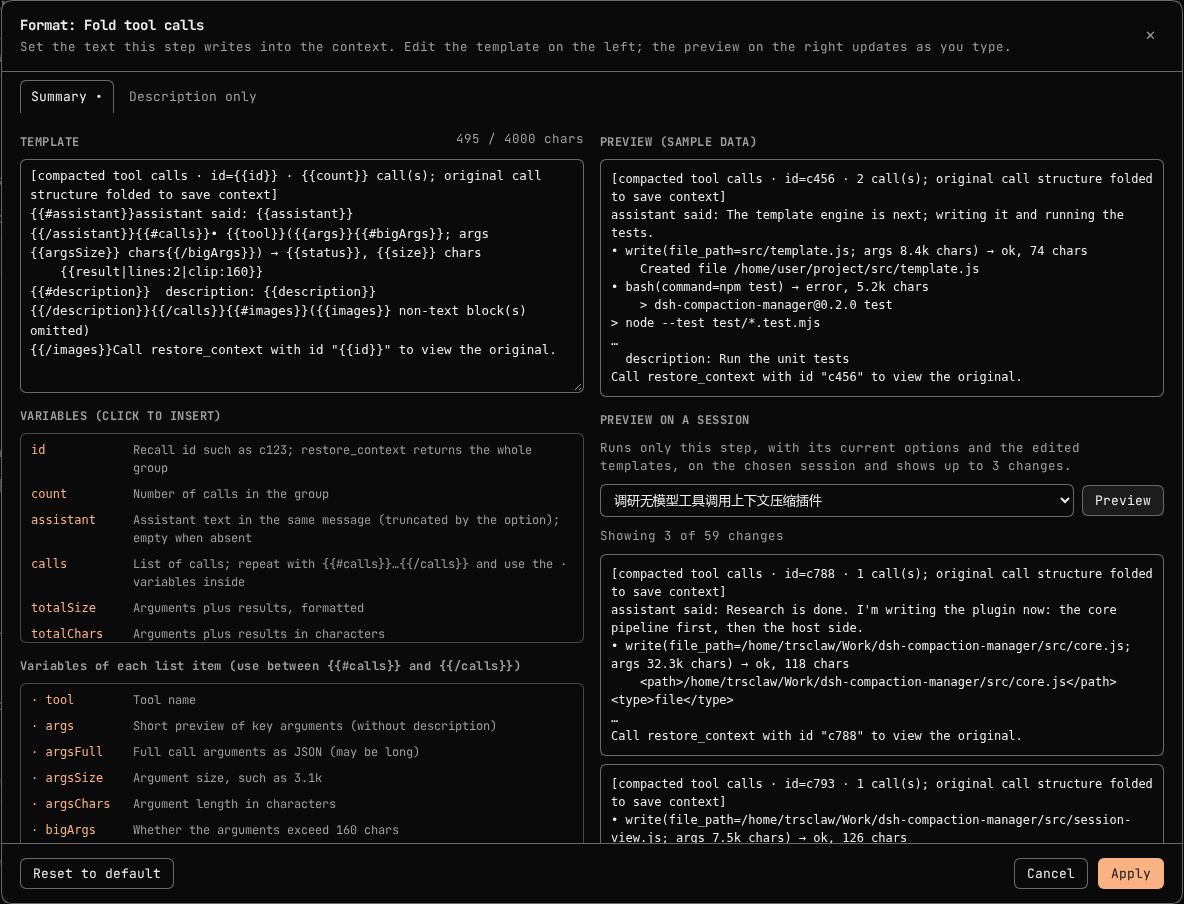
To change one, expand a step and click Format…. The dialog shows:
Apply stores the template in the step draft; Save on the page makes it take effect. A step with a custom format is marked Custom format, and custom presets and exported files include the step's formats.
Template syntax:
| Syntax | Meaning |
|---|---|
{{name}} |
Insert a variable. |
{{name\|clip:120}} |
Insert with filters: clip:N cuts to N characters, oneline joins lines, oneline:N joins and cuts, lines:N keeps the first N lines, trim removes surrounding whitespace. Filters can be chained. |
{{#name}}…{{/name}} |
Repeat for each item of a list (such as calls), or show once when the variable has a value. |
{{^name}}…{{/name}} |
Show only when the variable is empty, false, 0 or an empty list. |
{{! comment }} |
Not written. |
Templates cannot run code. Two safeguards apply to custom formats as they do to the defaults: a step never makes content larger, so a template that would grow a result is skipped, and the preview skips it too. For notice templates, the plugin recognizes results it already compacted by the fixed text at the start of the template, so the editor warns when a notice template does not start with at least 3 fixed characters. For example, a fold summary that keeps the first three lines of every result instead of a one-line head:
[compacted tool calls · id={{id}} · {{count}} call(s)]
{{#calls}}• {{tool}}({{args}}) → {{status}}, {{size}} chars{{#description}} · {{description}}{{/description}}
{{result|lines:3|clip:300}}
{{/calls}}Call restore_context with id "{{id}}" to view the original.thresholdRatio, retainRatio or retainTokens, headroomTokens, summary maxTokens, summary retries, overflow recoveries, and the summary provider and model. A blank field keeps the official value, and the placeholder shows the value in effect. Turning automatic compaction off also stops overflow recovery; /compact still works.This session uses at the top of the tab picks the steps for this session: the global settings, or any built-in or custom preset. Automatic compaction and Compact now follow the choice. A subagent session without its own choice inherits its parent's, so a preset chosen for a main session also applies to the subagents it starts. A preset is referenced by id: editing a custom preset changes every session that uses it, and deleting one sends those sessions back to the global steps, with a notice in the tab. LLM summary settings stay global. The Compaction panel shows how many sessions chose their own preset.
The Compaction tab simulates the saved steps on the current session without writing anything. It shows the estimated token count before and after, and every change each step would make, with the text before and after.
Compact now applies those changes without a model call. DSH accepts history rewrites only inside a model turn, so the request is queued and runs right before the session's next model call: within seconds while the session is running, or when you send the next message while it is idle. A queued request can be cancelled. Compact now runs only the steps; for an LLM summary, use /compact.
restore_context(id, offset?, max_chars?)id is r<seq> for a single tool result, or c<seq> for a folded tool call group.max_chars (1–60000, default 20000) starting at offset. Longer content tells the model which offset to request next.The Web app mounts compaction-basic and tool-result-pruner inside each agent preset, where another plugin cannot replace the services. While this plugin is loaded, it wraps their prototypes:
ToolResultPruner.prototype.pruneSession runs the configured steps. When the steps are exactly the default, it calls the original method unchanged.BasicCompactionEngine.prototype methods apply the panel's overrides of the compaction policy. With no overrides, the engine's own configuration is used as is.Unloading the plugin restores the original methods. Every rewrite uses the same replay-safe events as the official pruner (compaction/prune followed by a surface replace), so sessions stay readable after the plugin is removed. Pipelines saved by 0.1.x, whose methods were the presets themselves, are converted to the equivalent steps when read.
Other plugins can register methods and presets through the compactionMethods service. Both calls return a disposer.
export const inject = ['compactionMethods']

export function apply(ctx) {
  ctx.effect(() => ctx.compactionMethods.register({
    id: 'my-method',
    name: { zh: '我的方法', en: 'My method' },
    summary: { zh: '…', en: '…' },
    details: { zh: '…', en: '…' },
    options: [{ key: 'minChars', type: 'number', label: { zh: '最小字符数', en: 'Min chars' }, default: 500 }],
    tagKeys: ['minChars'],          // options shown on the step card
    recall: () => true,             // whether this method leaves restore_context ids
    formats: [{                     // optional: editable output templates
      key: 'notice',
      label: { zh: '提示', en: 'Notice' },
      default: '[compacted · id={{id}}] {{tool}} output hidden',
      marker: true,                 // its fixed start identifies compacted results
      vars: [{ name: 'id', description: { en: 'Recall id' } }, { name: 'tool', description: { en: 'Tool name' } }],
      sample: { id: 'r123', tool: 'bash' },
    }],
    plan(view, options) {
      return view.nodes
        .filter(n => n.type === 'tool' && !n.pending && n.chars > options.minChars)
        .map(n => ({
          type: 'result',
          seq: n.seq,
          content: [{ type: 'text', text: ctx.compactionMethods.render(options.formats.notice, { id: `r${n.rootSeq}`, tool: n.toolName }) }],
        }))
    },
  }))

  ctx.effect(() => ctx.compactionMethods.registerPreset({
    id: 'my-preset',
    name: { zh: '我的预设', en: 'My preset' },
    summary: { zh: '…', en: '…' },
    steps: [{ method: 'dedupe' }, { method: 'my-method', options: { minChars: 2000 } }],
  }))
}number, boolean, string, list and select. The panel builds the form from these declarations.options.formats holds the template for each declared format: the step's custom one, or the default. Render it with ctx.compactionMethods.render(template, vars). The format dialog uses vars and sample for its variable list and preview.view.nodes lists the visible messages in order. Each node has seq, rootSeq, type (user, assistant, tool, …), text, chars and turn. Tool nodes also have toolName, args, isError and pending.plan must not change anything. It returns candidates of two kinds:{ type: 'result', seq, content } rewrites one tool result.{ type: 'fold', startSeq, endSeq, content } replaces a closed tool call group with one user message.[compacted. Notices that use the ids r<rootSeq> and c<rootSeq> work with restore_context.npm run link-dsh # link the DSH packages the tests need from the local dsh installation
npm test # node --test test/*.test.mjs
npm run build # regenerate dist/client.js from src/client/*.js| Path | Contents |
|---|---|
src/core.js |
Surface view, candidate simulation, preview |
src/template.js |
Template engine, shared with the browser panel |
src/formats.js |
Default templates, variables and samples of the built-in formats |
src/methods.js |
Built-in methods |
src/presets.js |
Built-in presets and 0.1.x migration |
src/session-presets.js |
Per-session preset choice and subagent inheritance |
src/user-presets.js |
Validation, saving and import/export of custom presets |
src/registry.js |
Method and preset registry, pipeline normalization |
src/integration.js |
Wrappers around the official compaction classes |
src/host.js |
Settings schema, HTTP routes, restore_context, compact now |
src/client/ |
Panel and session tab (built into dist/client.js) |
dist/client.js is committed so that installing from GitHub needs no build step. Rebuild and commit it after changing src/client/.
CLASSIFICATION EVIDENCE
系统优先读取 GitHub Topics,再与站内分类词典和词根规则比对。当前命中: deepseek。
morluto
Reverse engineer anything with agents, from app behavior down to native binaries.

deepseek-ai
DeepSeek Harness: Everything is a Plugin.

nexu-io
The 1st Collaborative AI Design Agent Workspace. Local-first and open source. Create motion, prototypes, websites, apps, dashboards, presentations, images, and videos with your team and AI agents. Share work, exchange feedback, and iterate together in one workspace.