

其他
完整应用

deepseek-harness
deepseek-ai
DeepSeek Harness: Everything is a Plugin.
PROJECT TOPICS
INSTALL REFERENCE
dsh plugin --profile web add github:RiRi9909/DeepSeekHarness-community-index
该命令指向仓库当前默认分支;尚无绑定当前 commit 的完整验证结果。
PROJECT README
DeepSeekHarness-community-index — a web plugin for DeepSeek Harness (DSH).
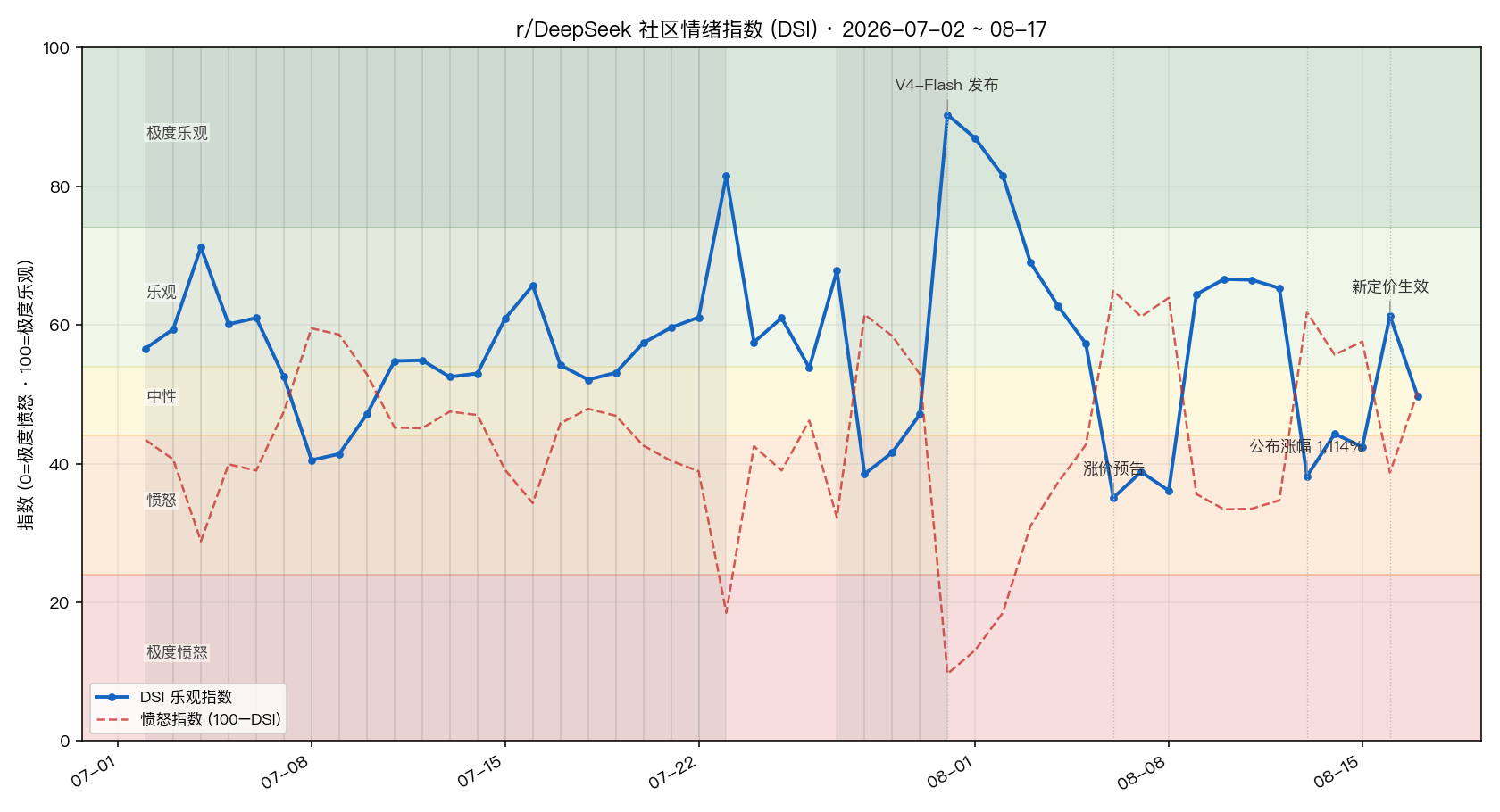
Registers a "Sentiment Cockpit" section in the settings panel that shows a live DSI optimism/anger index for the r/DeepSeek community (a 0–100 multi-signal weighted structure modeled after the Crypto Fear & Greed Index), backed by a data pipeline that refreshes on a schedule (every 60 minutes by default). When the pipeline fails it falls back to a bundled snapshot — the panel never goes blank.

assets/desktop/, source main.swift) — no Electron, no extra dependencies.assets/fallback/) when the pipeline fails or the cache is corrupt.allowBuilds approval.Recommended: install from this Git repository.
dsh plugin --profile web add github:RiRi9909/DeepSeekHarness-community-indexPin a commit to keep later pushes from changing what you actually run:
dsh plugin --profile web add github:RiRi9909/DeepSeekHarness-community-index#<commit-sha>
Other options (see the official publishing docs):
# local path
dsh plugin --profile web add /path/to/dsh-sentiment-cockpit

# tarball (built with pnpm pack)
dsh plugin --profile web add ./dsh-sentiment-cockpit-0.2.3.tgz
Restart DSH after installing. The plugin then shows up under Settings → Plugins, and the "Sentiment Cockpit" section appears in the settings panel.
sentiment-cockpit: enabled (default true), intervalMinutes (default 60, range 10–1440).Configured in the sentiment-cockpit settings namespace:
| Key | Default | Description |
|---|---|---|
desktopEnabled |
false |
Open the desktop widget when DSH starts |
desktopMode |
"desktop" |
"desktop" sticks to the desktop layer (normal windows cover it); "floating" keeps it on top |
desktopScale |
1 |
Scale (0.7–1.6) |
desktopX / desktopY |
-1 |
Window position; negative values auto-place it at the bottom-right |
Changes take effect after restarting DSH. The widget has two states and always boots in the mini state:
Positions of both states are remembered and restored across restarts (each boot still starts from the mini state).
If the bundled binary is missing (e.g. a non-arm64 Mac), the plugin attempts to compile assets/desktop/main.swift on the fly with the local swiftc.
@deepseek-ai/cordis, @deepseek-ai/dsh-settings, @deepseek-ai/dsh-typert-protocol, schemastery (resolved through the profile's shared node_modules).react (shared module loader), dsh-client-runtime / dsh-client-connection / dsh-client-locale / dsh-client-ui-slots (declared in dsh.client.inject). The client calls the Host's Typert gateway SRC channel directly via ctx.connection.rpc.call("/api", "cockpit/<method>", …).python3 (standard library only, no third-party packages).| Part | Files | Responsibility |
|---|---|---|
| Host | lib/index.js |
Cordis plugin exposing Typert RPC remote.cockpit (getSnapshot / refresh / status), drives the pipeline on a timer, manages the desktop widget process |
| Client | lib/client.js |
Registers the settings.section slot, renders the snapshot in an iframe srcDoc |
| Desktop widget | assets/desktop/main.swift (+ prebuilt DSHCockpitWidget) |
Native macOS floating window that renders the snapshot and auto-refreshes |
| Pipeline | lib/pipeline/ |
fetch_posts.py → fetch_comments.py → sentiment_index.py → build_snapshot.py (orchestrated by run_pipeline.py) |
| Fallback | assets/fallback/ |
Bundled snapshot used when the cache at ~/.dsh/storages/dsh-sentiment-cockpit/ is unavailable |
python3 lib/pipeline/run_pipeline.py --out ~/.dsh/storages/dsh-sentiment-cockpitpython3 is installed; run the pipeline command above manually to see the error.enabled to false in the sentiment-cockpit settings namespace.MIT © 2026 RiRi9909
CLASSIFICATION EVIDENCE
系统优先读取 GitHub Topics,再与站内分类词典和词根规则比对。当前命中: 无有效分类标签。
deepseek-ai
DeepSeek Harness: Everything is a Plugin.

anywhere-labs
为 DeepSeek Harness (DSH) 插件生态打造的现代化桌面端解决方案。万物皆「插件」,桌面本身也是「插件」。

walkinglabs
Harness engineering beginner tutorial, from 0 to 1