

其他
插件

dsh-bili-scroll
c1overzz
DSH 插件:每天替你刷一轮 B站,读字幕挑出值得的、写一份日报,值得的 @ 你
PROJECT TOPICS
INSTALL REFERENCE
dsh plugin --profile web add github:Rheasilvia/dsh-pretty-extension
该命令指向仓库当前默认分支;尚无绑定当前 commit 的完整验证结果。
PROJECT README
A polished theme editor for the DeepSeek Harness Web UI.
Customize colors, typography, and interface depth from a native-looking Settings → Pretty page.


Features · Installation · Usage · Development · Contributing
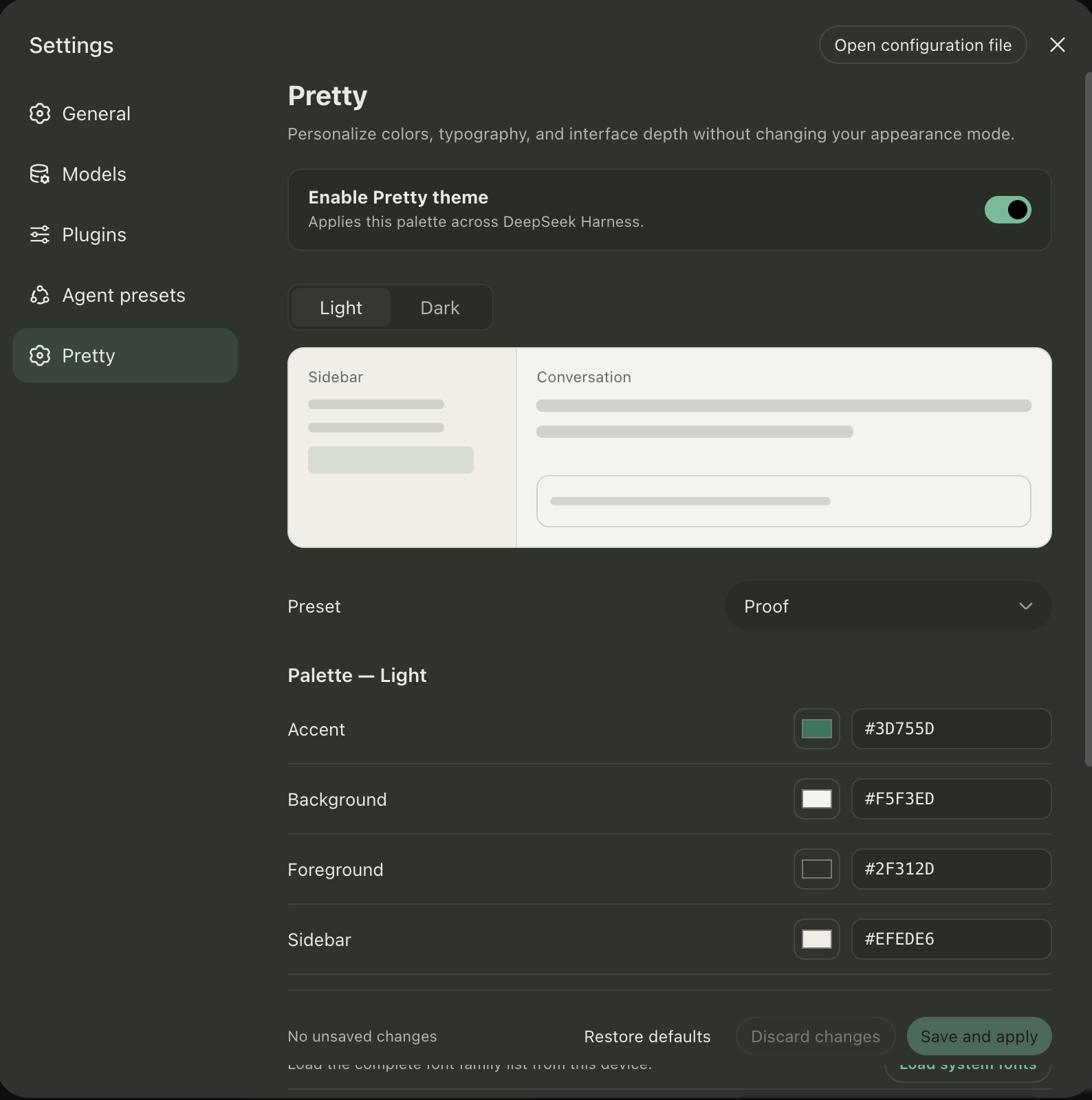
DSH Pretty Extension adds a complete theme editor to DeepSeek Harness. Start from one of 28 presets or build your own light and dark palettes, preview every change in context, and save the result through DSH's settings system.
The extension uses the public DSH plugin, settings, slot, and theme APIs. It does not fork or patch the DeepSeek Harness source tree, and it stays disabled until you explicitly enable it.
| Capability | What it adds |
|---|---|
| 28 theme presets | Ayu, Catppuccin, Codex, Dracula, GitHub, Nord, Proof, Tokyo Night, Vercel, Xcode, and more. |
| Independent light and dark palettes | Customize accent, background, foreground, and sidebar colors for each appearance mode. |
| Live preview | See the sidebar, conversation surface, and selected-session state before saving. |
| Typography controls | Choose separate UI and code fonts, including local macOS Font Book families when permitted by the browser. |
| Interface depth | Tune surfaces, borders, secondary text, hover states, and an optional translucent sidebar rendered at 82% opacity. |
| Accessible color correction | Low-contrast foreground colors are minimally adjusted to preserve a WCAG 4.5:1 text contrast ratio. |
| Native DSH integration | Uses DSH menus, semantic theme tokens, settings persistence, revision protection, and English/Chinese UI copy. |
0.2.0-rc.2 or later (Web or Desktop — the same package serves both, since the desktop app embeds the web UI).pnpm available on PATH when installing from the terminal or from the Web UI's Plugins page; dsh plugin forwards to pnpm. Installation from npm, the Plugin Market, or GitHub uses the published prebuilt bundles and needs no local build. The Desktop app uses the package manager bundled with the app.The package is published as dsh-pretty-extension. Pin the version you reviewed and restart DSH after the install:
dsh plugin --profile web add dsh-pretty-extension@0.3.2
dsh web
In the Desktop app, open Plugins → Add plugin and enter dsh-pretty-extension@0.3.2; the Desktop profile is managed by the app. npm installation uses the prebuilt Host and client bundles, so it does not require a Pretty-specific allowBuilds entry.
DSH has two plugin-market entry points. The package publishes the display metadata a plugin index reads: localized title and description, a 512×512 icon, engines.dsh, homepage, repository, and keywords. The curated community entry uses the same description and icon.
Community Plugin Market. Install the dsh-market plugin, restart DSH, then open Plugins → Plugin Market, select the UI Enhancements category, and search for Pretty:
dsh plugin --profile web add dshmarket
dsh web
The community catalog is curated in awesome-dsh-plugin; new entries are reviewed by its maintainers before they appear.
Official Discover tab (experimental). DSH ships no plugin index by default. Open Plugins, find Custom plugin indexes under Experimental plugins, and switch it on. Then add the community catalog as an index source in Plugins → Discover → Add index source:
https://cdn.jsdelivr.net/npm/dsh-plugin-catalog/index.jsonSearch for dsh-pretty-extension. Discover reads each listed npm version's published metadata.
If the plugin does not appear in either market yet, install it from npm above or from GitHub below; the package and the plugin are the same.
DSH Web and Desktop both expose a Plugins page, which installs into the profile the UI is running — web in a browser, the reserved desktop profile in the Desktop app — so no profile name is needed.
dsh web and open its loopback URL, or launch DeepSeek Harness Desktop.github:Rheasilvia/dsh-pretty-extensiondsh web process and reopen the UI.dsh plugin --profile <name> <args> forwards the remaining arguments to pnpm in the profile directory.
Stop any running dsh web process, install the plugin, and start DSH again:
dsh plugin --profile web add github:Rheasilvia/dsh-pretty-extension
dsh webThe dsh command installed from npm cannot manage the reserved Desktop profile and exits with:
error: profile "desktop" is managed exclusively by the Electron applicationInstall from the Plugins page instead. For the terminal, open DeepSeek Harness Desktop once so it initializes its profile, install the dsh command shipped with the app (the Manage dsh Command… menu item), fully quit the app, then run:
dsh plugin --profile desktop add github:Rheasilvia/dsh-pretty-extensionRelaunch the app after the command finishes. If another dsh installation comes first on PATH, the command manager reports it; run the Desktop command by its full path instead.
[!IMPORTANT]
dsh plugin addand the Plugins page update the profile on disk. A running DSH process does not load a newly added bundle, so restart DSH after installing, updating, or removing the plugin (profiles with DSH's HMR enabled apply the change without a restart).
[!NOTE] The repository ships reviewed, prebuilt Host and client bundles, source maps, and declarations under
lib/. Git installation does not run plugin lifecycle scripts and does not require a Pretty-specificallowBuildsentry.
For a reproducible installation, pin the GitHub dependency to a reviewed commit. The #<sha> suffix works in the Plugins page and on the command line:
dsh plugin --profile web add github:Rheasilvia/dsh-pretty-extension#YOUR_COMMIT_SHAUse a linked checkout for development or testing:
git clone https://github.com/Rheasilvia/dsh-pretty-extension.git
cd dsh-pretty-extension
corepack enable
pnpm install
pnpm build
dsh plugin --profile web add link:.
dsh web
After editing the source, run pnpm build and restart dsh web. You do not need to add the linked plugin again. For Desktop development, run dsh plugin --profile desktop add link:. with the Desktop dsh command and relaunch the app.
dsh web and open its loopback URL, normally http://127.0.0.1:3080, or launch DeepSeek Harness Desktop.[!NOTE] The Light and Dark buttons in Pretty select the palette you are editing. The active application appearance is still controlled by Settings → General → Appearance.
The plugin is disabled by default. Installing it alone does not change the DSH interface or write theme settings.
For an npm installation or an unpinned GitHub installation, stop DSH Web and run:
dsh plugin --profile web update dsh-pretty-extension
dsh web
If you pinned a GitHub commit, install the new reviewed commit SHA explicitly instead. For a Desktop installation, run dsh plugin --profile desktop update dsh-pretty-extension with the Desktop dsh command, or remove the plugin and add it again from the Plugins page. If the Plugin Market installed the plugin, it can also update it from its own Updates list.
Stop DSH Web, remove the plugin, and restart the profile:
dsh plugin --profile web remove dsh-pretty-extension
dsh web
For a Desktop installation, run dsh plugin --profile desktop remove dsh-pretty-extension with the Desktop dsh command, or remove the bundle from the Plugins page.
| Problem | What to do |
|---|---|
| Pretty does not appear in Settings | Confirm DSH is 0.2.0-rc.2 or later (dsh --version), the bundle is installed and enabled in the profile you are running (web for dsh web, desktop for the Desktop app), then fully restart DSH. |
| “Pretty is read-only in this browser” | Open DSH through 127.0.0.1, localhost, or another loopback address. Remote browser sessions intentionally use memory settings and cannot persist Pretty changes. |
| The Host settings provider is unavailable | Use the standard Web profile and restart it after installing or rebuilding the plugin. |
| Local fonts are unavailable | Local Font Access requires browser support, a loopback or secure context, and explicit permission. Built-in font stacks remain available. |
Pretty settings persist through DSH's configuration editor into the active profile's cordis.patch.yml, keyed by the plugin's ui-pretty entry id. Settings written by plugin versions before 0.3.0 in $DSH_HOME/settings.yaml are imported once by DSH itself on the first startup after the upgrade. Restore defaults clears the theme field override and lets the original DSH theme tokens take effect again.
Local Font Access is requested only after you click Load system fonts. The plugin stores the selected font family name; it does not copy or upload font files.
Local development requires Node.js ^22.19.0 || >=24.0.0 and pnpm 11.
| Command | Description |
|---|---|
pnpm typecheck |
Run the TypeScript type checker. |
pnpm test |
Run domain, controller, component, accessibility, and settings integration tests. |
pnpm build |
Build the Host entry, browser client bundle, declarations, and inline CSS Modules. |
pnpm check |
Run type checking, tests, and a production build. |
pnpm check:dist |
Rebuild and verify that the committed lib/ tree remains unchanged. |
pnpm watch |
Rebuild when source files change. |
pnpm pack --dry-run |
Inspect the publishable package contents. |
lib/ is generated by pnpm build and committed so Git installations remain scriptless. Never edit it by hand. After changing source or build tooling, run pnpm check and commit the regenerated lib/ with the source change. pnpm check:dist must then pass from the clean commit and in CI.
The version in package.json is the release version. Before the first tag, configure npm trusted publishing for Rheasilvia/dsh-pretty-extension with the workflow file release.yml; the release workflow authenticates through GitHub OIDC, so no npm token is stored in the repository. Then tag the reviewed commit and push the tag:
git tag v0.3.2
git push origin v0.3.2
.github/workflows/release.yml verifies that the tag matches package.json, runs pnpm check, pnpm check:dist, and pnpm pack --dry-run, then publishes with npm publish --provenance --access public. The equivalent manual publish, from an authenticated npm session on a clean checkout, is:
pnpm check && pnpm check:dist && pnpm pack --dry-run
npm publish --provenance --access public
npm view dsh-pretty-extension versionsrc/
├── index.ts # Host composition root and settings schema
├── settings/pretty-settings.ts # Persistent configuration contract
└── client/
├── index.ts # Browser composition root
├── locales.ts # English and Chinese UI copy
└── pretty/
├── PrettySection/ # Settings page and state branches
├── components/ # UI components and CSS Modules
├── state/ # Config form adapter, store, and controller
└── theme/ # Presets, font catalog, and token derivationThe Host exports the Config schema that DSH serves as the ui-pretty settings form. The browser client injects the Pretty page into DSH Settings and applies colors and fonts through an owned theme-token override. Adapters keep DSH services outside the UI and theme domain logic.
Issues and pull requests are welcome. Please read CONTRIBUTING.md and run the verification gates before opening a PR:
pnpm check
pnpm check:dist
pnpm pack --dry-runReleased under the MIT License.
A community-maintained plugin for DeepSeek Harness. This project is not affiliated with or endorsed by DeepSeek AI.
CLASSIFICATION EVIDENCE
系统优先读取 GitHub Topics,再与站内分类词典和词根规则比对。当前命中: 无有效分类标签。
c1overzz
DSH 插件:每天替你刷一轮 B站,读字幕挑出值得的、写一份日报,值得的 @ 你

hellowind777
一个自主的高级智能伙伴,不仅分析问题,更持续工作直到完成实现和验证。

xing-shuyin
Just open your browser — get all your work done.