

模型与 MCP
待识别

rea
morluto
Reverse engineer anything with agents, from app behavior down to native binaries.
PROJECT TOPICS
PROJECT README
Cortex: local-first pentest intelligence hub. Agents (pure stdio MCP server), the terminal (ctx CLI) and humans (desktop dashboard with a tactical 3D Memory Nebula) share one SQLite pentest memory; the same UI is also available in a browser on the local machine or a trusted intranet.





Authorized testing only. Cortex is built for systems you own or have explicit written permission to test. You are responsible for complying with applicable laws, contracts and scope boundaries.
English · 简体中文 · DSH plugin · Web UI (intranet only) · Windows desktop app · CLI (ctx) · MCP tools
Cortex also ships as a native DeepSeek Harness plugin (dsh-cortex/ in this repository):
cortex.export/v1), CSV and DefectDojo Generic Findings, with optional evidence files; local values are exported verbatim (no masking);Requirements: DeepSeek Harness ≥ 0.2.2-rc.1, Node.js ≥ 22.19 (bundled with the DSH desktop app) and a Cortex database with schema v5.
Install from the DSH Plugin Market (Plugins → Market, search @lievclouds/dsh-cortex), or run:
dsh plugin --profile desktop add @lievclouds/dsh-cortex   # from npm
dsh plugin --profile desktop add ./dsh-cortex             # local development
See dsh-cortex/README.md for installation details, configuration (CORTEX_DB_PATH,
read-only mode), the security model, the agent-tool reference and architecture.
ctx web serves the same React UI from a local HTTP server that reads and writes the same SQLite file as the desktop app, the CLI and the MCP server. It is for one user on the local machine or a trusted intranet: there are no accounts, no multi-user access and no public deployment — never expose this port to the internet.
Install directly from npm and start it:
# Node.js >= 22.12 required
npm install -g @lievclouds/cortex
ctx init --yes            # auto-detect and write MCP config + skills + hard rules for Claude Code / DSH / Codex / Cursor / WorkBuddy / ZCode
ctx web
ctx init --yes auto-detects installed agents and writes their MCP config, the four skills and the system-level hard rules. To target agents explicitly (lowercase ids, comma separated) use ctx init --yes --agents dsh,codex,claude,cursor,workbuddy,zcode, or a single agent such as ctx init --yes --agents claude; for English skills add --skill-lang en (skill language defaults to zh and can be overridden with CTX_SKILL_LANG).
Common options:
ctx web                                      # default 127.0.0.1:8787
ctx web --port 9000 --db /data/cortex.db     # explicit port and database
ctx web --host 192.168.1.20 --allow-intranet # trusted intranet only (explicit opt-in)
ctx web --no-open --json # no browser; JSON with tokenUrls, dbPath, readOnly…| Option | Meaning |
|---|---|
--port <port> |
Listen port, default 8787 |
--host <host> |
Bind address, default 127.0.0.1; any non-loopback address also requires --allow-intranet |
--db <path> |
SQLite file, default ~/.cortex/data.db (%USERPROFILE%\.cortex\data.db) or CTX_DB_PATH |
--allow-intranet |
Explicit opt-in for a non-loopback bind on a trusted intranet |
--no-open |
Do not open a browser automatically |
--json |
Global flag; print machine-readable JSON (tokenUrls, dbPath, readOnly, loopbackOnly, intranetAllowed) |
Startup prints one or more login URLs containing a per-run ephemeral token (http://…/?token=…, regenerated on every server start). Opening one sets an HttpOnly + SameSite=Strict session cookie (12 h) and redirects so the token disappears from the address bar; reloads keep the session, restarting the server invalidates it. The token exists only in that URL — it is never logged, persisted or accepted from any other query string. Scripts may send Authorization: Bearer <token> instead of the cookie.
127.0.0.1); a non-loopback bind is refused unless --allow-intranet is passed, and then it is only for a trusted intranet.10.0.0.0/8, 172.16.0.0/12, 192.168.0.0/16). Never create a port mapping, public reverse proxy or tunnel for this port.Host is validated against DNS rebinding, and writes are additionally gated by Origin / Referer / Sec-Fetch-Site.'self'; inline styles are allowed for Tailwind runtime styles), X-Content-Type-Options: nosniff, Referrer-Policy: no-referrer, X-Frame-Options: DENY and Cache-Control: no-store on API responses; 2 MB JSON body limit; per-IP rate limit (~300 requests / 10 s); errors are sanitized, and request logs never contain tokens, cookies or bodies. /api/app, /api/db and /api/config expose only the database file name, never its absolute path.ctx web --db); the sidebar row is a read-only display and the database picker is unavailable.navigator.clipboard with a legacy fallback; there is no native save dialog.ctx web, not on the browser's machine; Web mode asks for confirmation first.GET /api/events (SSE) refreshes the UI when an agent, the CLI or the desktop app writes the database./api/config reports readOnly: true) and write APIs return 403 with a clear message.ctx web, their IPC calls fail closed, and the HTTP server serves no /api/poc/* routes.If an internal TLS reverse proxy preserves a custom Host, add that hostname to the opt-in allow-list; keep the upstream on HTTP and add TLS plus extra authentication at the proxy:
CTX_WEB_ALLOWED_HOSTS=cortex.corp.example ctx webThe Windows installer is published to GitHub Releases by the release workflow. Current release: cortex-v0.1.5. macOS and Linux: install from npm (see CLI (ctx)).
| Platform | Download |
|---|---|
| Windows 10/11 x64 | Cortex-0.1.5-setup.exe |
The link always points at the newest Cortex release; the full list is on the Releases page. The installer is unsigned: Windows SmartScreen may warn ("More info → Run anyway").
On GPU-less, VM or remote-desktop Windows machines, ctx open --software forces software rendering. The installer already enables SwiftShader, so the 3D Memory Nebula keeps rendering instead of dropping straight to the 2D fallback.
The installer only installs Cortex and its shortcuts. Start Cortex, open MCP Access, then either:
ctx init --yes in a terminal (ctx init --yes --agents dsh --skill-lang en to choose explicitly).Uninstalling removes the program only — %USERPROFILE%\.cortex\data.db is preserved. The UI supports 中文 / English switching at any time; skill language can also be changed later with ctx init --skill-lang.
Runs on Node without Electron and reads the same SQLite database. All commands accept --json; exit codes are 0 success, 1 parameter/IO error, 2 data not found.
Recommended: install from npm (Node.js >= 22.12 required):
npm install -g @lievclouds/cortex
ctx init --yes            # auto-detect and write MCP config + skills + hard rules for Claude Code / DSH / Codex / Cursor / WorkBuddy / ZCode
ctx --version            # verify the command works
ctx doctor               # verify DB, MCP runtime and agent configs
ctx init --yes auto-detects installed agents; to target agents explicitly (lowercase ids, comma separated) use ctx init --yes --agents dsh,codex,claude,cursor,workbuddy,zcode, or a single agent such as ctx init --yes --agents claude; for English skills add --skill-lang en (skill language defaults to zh, and CTX_SKILL_LANG overrides the default), and for manual setups use ctx mcp print-config <agent>.
The database is created on first launch at %USERPROFILE%\.cortex\data.db (macOS/Linux: ~/.cortex/data.db); override with CTX_DB_PATH.
| Command | Description |
|---|---|
ctx init [--dry-run] [--yes] [--agents dsh,codex,claude,cursor,workbuddy,zcode] [--skill-lang zh\|en] |
Detect agents, show the planned diff, back up, then write MCP configs + skills + system rules |
ctx doctor |
Check database, schema, MCP/CLI runtime, agent configs, GUI install and versions |
ctx mcp print-config [agent] |
Print the stdio config snippet for DSH / Codex / Claude Code / Cursor / WorkBuddy / ZCode |
ctx vulns list [--severity] [--host] [--limit] |
List vulnerabilities |
ctx vulns get <id> |
Show one full vulnerability: description, impact, interfaces, Markdown reproduction steps (HTTP requests/responses), remediation, retests and status |
ctx vulns export <id[,id...]> [--out <dir>] [--all] [--severity …] [--host …] [--limit …] |
Export Markdown reports using the same template as the desktop app; default output directory ./cortex-reports |
ctx assets list [--search] [--status] |
List asset contexts |
ctx assets get <host_port> |
Show one asset context with full interfaces (raw requests), leaks and test parameters |
ctx snapshots list [--keyword] |
List cognitive snapshot sessions |
ctx snapshots get <session_id> |
Show one snapshot session |
ctx internal overview\|hosts\|routes --project <name> |
Read-only internal operations queries: overview, hosts/services, proxy routes (all accept --json) |
ctx loot import <file> --project <name> [--entry <host_port>] [--format auto] |
Parse a local Loot file into the internal operations domain (untrusted input: parsed only, never executed, no network) |
ctx loot list --project <name> |
List Loot import records |
ctx search <keyword> |
Search vulnerabilities, assets and snapshots together |
ctx open [--dev] [--path <exe>] [--software] |
Launch or focus the desktop app (Windows install or source build); --software forces software rendering for GPU-less / VM / remote-desktop machines |
ctx web [--port <port>] [--host <host>] [--db <path>] [--allow-intranet] [--no-open] |
Serve the same dashboard in a browser (loopback or trusted intranet only) |
claude opens Bun instead of Claude CodeRunning claude prints Bun's help instead of starting Claude Code:
C:\Users\you>claude
Bun is a fast JavaScript runtime, package manager, bundler, and test runner...
The claude on PATH is resolving to a Bun global shim, not to Claude Code. Cortex does not create or replace the claude command — ctx init only writes ~/.claude/CLAUDE.md, copies the skills and runs claude mcp add — so this is a PATH / alias problem, not an MCP or database problem. ctx init detects the Bun shim and skips claude mcp add / remove instead of registering against the wrong CLI.
Check what claude really resolves to:
where.exe claude          # every claude on PATH
Get-Command claude -All   # PowerShell: aliases and functions too
ctx doctor                # resolved path, kind (exe / cmd / bat) and probe result
ctx doctor shows the resolved command path, its kind (exe / cmd / bat) and the probe result, and calls out the Bun shim explicitly.
To fix it, remove the Bun global package and install Claude Code from the official installer (or npm):
bun remove -g @anthropic-ai/claude-codeirm https://claude.ai/install.ps1 | iex # Windows official installernpm install -g @anthropic-ai/claude-code # or npm, any platformReopen the terminal so PATH is re-read, re-register Cortex and verify:
ctx init --agents claude --yes
claude --version    # should contain "Claude Code"
claude mcp list # should contain "cortex"~/.claude: Cortex's rules and skills live there.where.exe claude finds nothing but running claude by hand still opens Bun, install the real CLI and reopen the terminal.CORTEX_CLAUDE_BIN overrides the resolved command path for tests or unusual installs.Once installed, Cortex is the memory layer for every engagement:
ctx provides vulnerability / asset / snapshot queries, full-text search, diagnostics and Markdown report export. ctx web serves the same pages to a browser on this machine or a trusted intranet.manage_snapshot list, loads the matching session (by project name, phase or session_id) and continues from unfinished_tasks / next_steps. If several sessions match, it asks you whether to continue one or create a new one.You: continue the "Example Program" IDOR task and resume the unfinished checks
Agent: manage_snapshot(list) -> manage_snapshot(load, SESS-...) ->
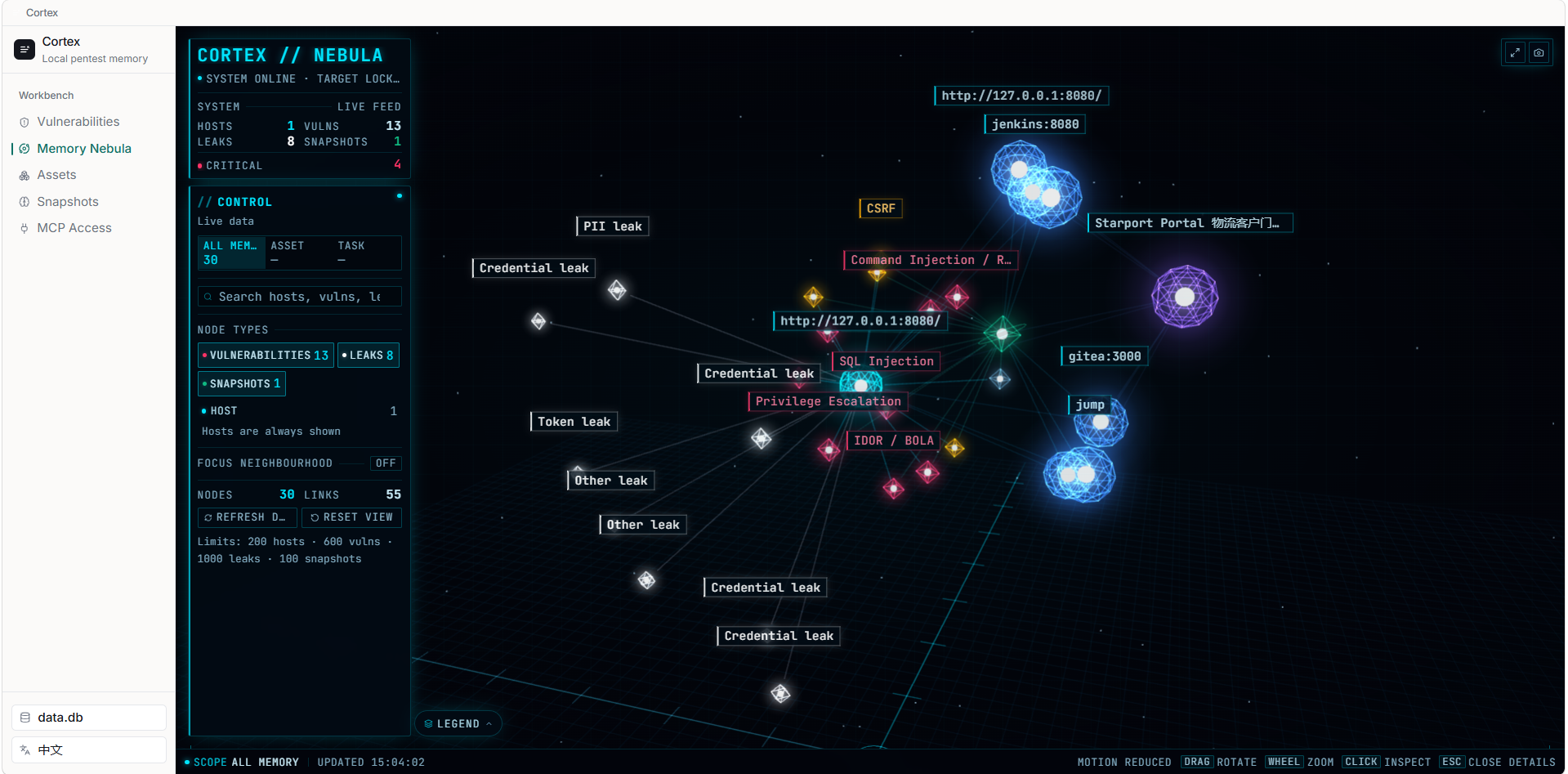
query_asset_context / query_vulnerabilities -> continue testingpath / method / params / raw request), leaked info, non-secret test_parameters and related vulnerabilities. Legacy interface_dir arrays are normalized automatically.save_vulnerability, query_vulnerabilities, update_vulnerability, sync_asset_info, query_asset_context, manage_snapshot, sync_internal_scope (internal operations: register footholds, internal hosts / services, credentials and pivots).ctx init detects installed agents and writes their MCP config, the four skills and system-level hard rules idempotently (with backups, a dry-run mode and JSON / TOML / YAML validation).+N aggregation, fullscreen and PNG export.ctx web): the same dashboard, asset library, snapshot and MCP pages in a browser on the same machine or a trusted intranet; per-run token login, no accounts, loopback-only by default, SSE refresh when the shared database changes.data.db, -wal, -shm) with chokidar and pushes data:changed, so agent writes usually show up in under a second without losing filters or open detail panels.skills/zh/** and skills/en/**; choose per installation.Memory Nebula turns the local SQLite memory into an explorable 3D star map: project/target hubs, host assets, vulnerabilities, leaks and snapshot sessions are connected by derived, read-only relations (no extra tables). It supports all-library / single-asset / single-task scopes, search and type filters, a focus neighbourhood, +N performance aggregation, fullscreen view and PNG export, plus a 2D SVG fallback when WebGL is unavailable.
The MCP server is stdio only: the agent starts it in its own process; there is no listening port and the GUI never starts MCP. Server name: cortex, version 0.1.5.
| Scenario | Launch command |
|---|---|
| Source build | node <repo>/out/mcp/stdio.cjs |
| Windows install | <install>\bin\node.exe <install>\bin\mcp-stdio.cjs |
DeepSeek Harness ($DSH_HOME/cordis.patch.yml, i.e. ~/.dsh/cordis.patch.yml — the home-level patch layer that DSH applies to every profile and keeps across profile recovery):
- insert:
    - id: mcp-cortex
      name: "@deepseek-ai/dsh-mcp-client"
      config:
        serverName: cortex
        transport: stdio
        command: "node"
        args:
          - "<repo>/out/mcp/stdio.cjs"
        toolCallTimeoutMs: 120000
Upgrading from an older Cortex? Earlier releases wrote this block into
~/.dsh/profiles/<profile>/cordis.patch.yml. Re-runctx init --agents dsh --yes: it writes the home-level layer and strips the old per-profile block (DSH rejects a duplicateserverName: cortex), so the registration survives profile resets and applies to every DSH surface.
Codex CLI (~/.codex/config.toml):
[mcp_servers.cortex]
command = "node"
args = ["<repo>/out/mcp/stdio.cjs"]
startup_timeout_sec = 20
tool_timeout_sec = 120
Claude Code:
claude mcp add --transport stdio cortex -- node <repo>/out/mcp/stdio.cjsCursor (~/.cursor/mcp.json) and WorkBuddy (~/.workbuddy/mcp.json):
{
  "mcpServers": {
    "cortex": {
      "command": "node",
      "args": ["<repo>/out/mcp/stdio.cjs"]
    }
  }
}
ZCode (~/.zcode/cli/config.json, user scope; project scope: <project>/.zcode/config.json):
{
  "mcp": {
    "servers": {
      "cortex": {
        "command": "node",
        "args": ["<repo>/out/mcp/stdio.cjs"]
      }
    }
  }
}npm run build
node out/cli/ctx.cjs init --dry-run # preview only
node out/cli/ctx.cjs init --yes # detect agents, back up and write
node out/cli/ctx.cjs init --yes --agents dsh --skill-lang en
node out/cli/ctx.cjs init --yes --agents workbuddy,zcode
node out/cli/ctx.cjs doctor # diagnose config + runtimectx init backs up existing files as .bak-YYYYMMDD-HHmmss, merges marker-managed blocks idempotently (old PENTEST markers are migrated), validates JSON / TOML / YAML before writing, and installs the selected skill language. Restart the agent afterwards (not the GUI); then verify a read-only tool call such as manage_snapshot({ "action": "list" }).
skills/
  zh/  vuln-db.skill.md  asset-context.skill.md  snapshot.skill.md  internal-ops.skill.md
  en/  vuln-db.skill.md  asset-context.skill.md  snapshot.skill.md  internal-ops.skill.md
ctx init copies the selected language to the agent skill directories (~/.agents/skills/<name>/SKILL.md, plus client-specific skill directories for Codex / Claude Code / ZCode; import the shared .agents/skills copies through the WorkBuddy Skill UI). The desktop MCP page and the installer both use the same generator, so configs and skills never drift apart.
Only for development, custom builds, or building the desktop installer; normal use should go through npm install -g @lievclouds/cortex.
# Node.js >= 22.12 required
git clone git@github.com:Revcloudi/Cortex.git
cd Cortex
npm install
npm run build            # typecheck + Electron + MCP + CLI
npm run build:web        # standalone Web SPA (required for ctx web)
npm run build:server     # Web HTTP server bundle (required for ctx web)
npm link                 # exposes `ctx` on PATH; without link: node out/cli/ctx.cjs
ctx --version
Other development commands:
npm run dev          # Electron + Vite dev mode
npm run typecheck    # Node + Web TypeScript projects
npm start            # preview the built desktop app
npm run dist:win # Windows installer (bundled Node runtime, artifact in release/)npm run build:runtime materializes the staged runtime/ directory (out/web → runtime/web/, out/server/web.cjs → runtime/web-server.cjs); electron-builder then maps runtime/ to <install>/bin/ in the installer. npm run dist:win runs build:web + build:server before packaging, so a freshly built installer includes the Web UI. The runtime build downloads a pinned Node LTS (v24.22.2) from the configured mirror (CTX_NODE_VERSION overrides the version). A runtime built without the Web artifacts still works for CLI/MCP (it prints a warning); a half-built state (SPA present but server bundle missing) fails the build on purpose.
npm run dist:win           # build + bundled runtime → Windows x64 NSIS installer (release/Cortex-0.1.5-setup.exe)
npm run build:runtime      # only materialize runtime/ (manual/advanced packaging)
The installed layout (per-user on Windows):
%LOCALAPPDATA%\Programs\Cortex\
  Cortex.exe                                    Electron shell
  resources/app.asar                            main / preload / renderer bundles
  bin\
    node.exe                                    bundled Node LTS runtime
    mcp-stdio.cjs                               stdio MCP entry
    ctx.cjs  ctx.cmd                            CLI + wrapper
    ctx-path.cjs                                installer PATH helper
    web-server.cjs                              HTTP server bundle for ctx web
    web\                                        standalone Web UI (index.html + hashed assets)
    skills\{zh,en}\...                          skill sources for ctx init
    node_modules\                               better-sqlite3 (Node-API)
.github/workflows/release.yml builds the Windows installer on v* / cortex-v* tags and publishes it to GitHub Releases. macOS/Linux install from npm (see CLI (ctx) above), so no macOS artifacts are produced.
src/
  shared/      shared contracts (types, IPC channels, AI config/repeater types, MCP config generator)
  core/        Electron-free database, paths, logging, version; core/poc (provider presets)
  mcp/         pure stdio MCP server and the seven tools
  cli/         ctx commands and agent config writers
  server/      ctx web HTTP server (auth, security, static SPA, REST/SSE routes; no /api/poc/*)
  main/        Electron main process (IPC, watcher, database switching); main/services
               (PocConfigService, RepeaterService, HttpBridge)
  preload/     contextBridge API (no eval/runCode surface)
  renderer/    React UI + lightweight zh/en i18n; pages/RetestPage and pages/AiConfigPage
skills/        bilingual agent skills (zh / en)
scripts/       build, runtime, packaging and legacy install scripts
build/ NSIS customizations%USERPROFILE%\.cortex\data.db (Windows) or ~/.cortex/data.db; override with CTX_DB_PATH (legacy PDH_DB_PATH is still honoured).PRAGMA journal_mode=WAL, busy_timeout=5000, synchronous=NORMAL, foreign_keys=ON; write transactions use BEGIN IMMEDIATE with bounded SQLITE_BUSY retries; schema version lives in PRAGMA user_version.poc_artifacts / poc_runs tables; the v3 vulnerability / asset / internal-operation tables and all original vulnerability evidence fields are untouched. The AI/retest config file config.json lives next to the active data.db.leaked_infos — an explicit trade-off of this version.CTX_MCP_LOG. The optional Web UI (ctx web) is a separate token-authenticated HTTP server that is off unless started, loopback-only unless --allow-intranet is passed.contextIsolation + sandbox, no nodeIntegration; the desktop renderer talks only to window.api and the main process re-validates every IPC payload (the browser Web build uses same-origin HTTP instead, see Web UI).HttpBridge (redirects re-validated, request/response caps, retest proxy credentials never reach the renderer). The retest proxy only applies to repeater traffic; AI keys and proxy passwords remain in the main process.MIT. See LICENSE.
CLASSIFICATION EVIDENCE
系统优先读取 GitHub Topics,再与站内分类词典和词根规则比对。当前命中: deepseek-harness。
morluto
Reverse engineer anything with agents, from app behavior down to native binaries.

deepseek-ai
DeepSeek Harness: Everything is a Plugin.

nexu-io
The 1st Collaborative AI Design Agent Workspace. Local-first and open source. Create motion, prototypes, websites, apps, dashboards, presentations, images, and videos with your team and AI agents. Share work, exchange feedback, and iterate together in one workspace.