

模型与 MCP
待识别

rea
morluto
Reverse engineer anything with agents, from app behavior down to native binaries.
PROJECT TOPICS
PROJECT README


四件事,一个插件,不动任何官方组件。 完全权限变红、推理等级变滑块、模型菜单补辨识度、会话列表加状态环。
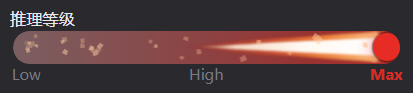
推理等级滑块 · Max 档(暗色主题)
English readers: see English below.
DSH 的界面有四处可以更好用:
background:0 0(透明)—— 扫一眼落不下点。这个插件把这四处逐个补上,且每处都能单独关掉。
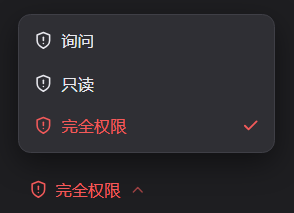
#ec1313,暗色 #f25a5a访问模式,当前:{名称} 模板,整串锚定,不是找关键词打开模型菜单,「推理等级」那一行下面直接就是滑块 —— 不用点进去:
┌──────────────────────────────┐
│ 模型        Deepseek-V4.1…  ›│
│ 推理等级                High ›│
│ [======|===============]     │  ← 滑块,停在当前档
│ Low        **High**       Max│  ← 档名当刻度,当前档加粗
└──────────────────────────────┘efforts,不写死aria-readonly模型菜单按官方尺寸(手机上也要用),所以这里不动宽度,改的是两处辨识:
┌──────────────────────────────┐
│ 搜索模型…                    │
├──────────────────────────────┤  ← 分组标题:14px 加粗 + 细分隔线
│ PROVIDER 名                  │    滚动时吸顶,自带不透明底
│                              │
│ ▢ Model-A · x0.8             │
│ ▣ Model-B · x0.12          ● │  ← 选中行:10% 洗色 + 2px 边 + 同色圆点
└──────────────────────────────┘--dsw-alias-menu-group-header-fill 铺底,否则下一组的行会从标题底下穿过去#0a84ff)10% 透明度的洗色、2px 同色半透明边(55%)、模型名 600左侧会话列表里,每个会话的状态从行首那个小点变成整行一圈边框:
| 状态 | 环的形态 |
|---|---|
| 运行中 | 电光蓝短弧顺时针绕圈,4.2 秒一圈 |
| 等你回答 | 霓虹黄整圈呼吸,1.9 秒一个周期 |
| 完成未读 | 绿色整圈呼吸,同 1.9 秒周期 |
| 空闲 | 没有环 |
inset:0),和选中态背景共用同一条边「等你回答」和「完成未读」共用一个节奏、不共用颜色:两者都是「这行有事」,所以呼吸同步;但黄表示「卡在你这儿」,绿表示「结果出来了」,两种事实不该用同一个颜色。
「完成」是什么意思:跟随宿主的 completionUnread —— 有结果你还没看,点开那个会话就消失。它不是「已跑完」的永久徽章。
为什么环不直接读宿主的点:宿主每行只渲染一个状态点,优先级是「等你 > 运行中 > 完成」。一个会话跑完了但还挂着一个待答问题时,宿主只会给出「等你」,完成这个事实根本没进 DOM,任何选择器都取不回来 —— 那正是「完成却显示黄色」的成因。所以环改读 uiSession.sessionStatus,三个事实各自独立可取,判定顺序为运行中 > 完成 > 等你:结果已经出来,比一个关于已结束轮次的问题更该被看见。uiSession 取不到时回落到宿主自己的点,环降级但不失效。
插件详情页(插件 → 已安装 → dsh-ember)有四个开关。前三项默认开启,会话状态环默认关闭:
| 开关 | 对应功能 | 默认 |
|---|---|---|
| 完全权限变红 | 第 1 项 | 开 |
| 推理等级滑块 | 第 2 项 | 开 |
| 模型菜单可读性 | 第 3 项 | 开 |
| 会话状态环 | 第 4 项 | 关 |
会话状态环默认关闭的原因:它重绘的是整个侧边栏的每一行,而不是输入区的单个控件。这类改动适合由用户主动打开,不适合装完就出现。
localStorage(键 dsh-ember:features),换浏览器或清缓存会回到各自默认值dsh plugin add dsh-ember也可以从 GitHub 直接装(会走源码构建):
dsh plugin add https://github.com/REALOIYO/dsh-ember或者先克隆到本地,再指向那个目录:
git clone https://github.com/REALOIYO/dsh-ember
dsh plugin add F:/path/to/dsh-ember装完重启 DSH。这是纯前端插件,没有服务端逻辑。
| 项 | 要求 |
|---|---|
| DSH | 0.2.1-rc.3(在 rc.3 上开发与验证) |
| 菜单 | [role="menu"][aria-label="模型与推理等级"] |
| 依赖服务 | slots sessions modelDirectories remote remote.session |
| 平台 | Web(桌面端与局域网访问一致) |
| 浏览器内核 | Chromium 111+(用到 :has() 与 color-mix()) |
官方触发器的盾牌图标不写 color,用 currentColor 描边 —— 所以给按钮上色,盾牌跟着变。
插件用 MutationObserver 监听,当触发器同时满足「aria-label 含访问模式」和「含完全权限文案」时打上 data-dsh-full-access,再配一条规则:
[data-dsh-full-access]{ color: var(--dsw-alias-state-error-primary) !important }
[data-dsh-full-access] svg{ color: inherit !important }
--dsw-alias-state-error-primary 在主题里本来就分开放(亮色 → red-600,暗色 → red-400),所以不用自己挑色就自动跟随明暗。
判据故意从严:两个条件都满足才动手 —— 官方哪天改了文案,结果是「不变红」而不是「染错按钮」。
用菜单的无障碍名定位,不用哈希类名(每次构建都变):
document.querySelectorAll('[role="menu"]')
→ aria-label 匹配 模型与推理等级档位不是猜的,是读模型适配器报的阶梯:
directory.store.getSnapshot()
→ snapshot.groups[i].models[j].reasoning.efforts
→ [{ id: 'low', name: 'Low' }, { id: 'high', name: 'High' }, …]
提交走 directory.select(),传完整三元组而不是裸档位 id:
await directory.select({
  provider: current.provider,
  model: current.model,
  reasoningEffort: levelId,
});
三个设计决定:
select() 是异步的,快照在写入后仍会短暂回报旧档位。立刻采纳会让旋钮先吸附再弹回,所以本地记住目标档,等上游追上来再认账aria-valuetext,不写数据。在 pointermove 里提交会打出十几次切换sessionStatus,纯 CSS 画宿主每行只渲染一个状态点,它选哪个由 sessionStatuses() 决定,顺序是「等你 > 运行中 > 完成」。这个顺序对点是对的 —— 它回答「为什么这行不能被忽略」;但它会让「跑完了但还挂着一个待答问题」的会话只剩 warning,完成这个事实在进 DOM 之前就被丢掉了,任何选择器都取不回来。这正是「完成却显示黄色」的成因。
环回答的是另一个问题:「这行的结果是什么」。所以它改读 uiSession.sessionStatus,那里 running / pendingInteraction / completionUnread 三个事实各自独立:
running            → ongoing(活的轮次永远优先,不能被遮)
completionUnread   → done   (结果已出来,比关于已结束轮次的问题更该被看见)
pendingInteraction → warning
其它               → 无环
判定结果写成 data-dsh-ember-ring 落在行上,CSS 只读这个属性:
[data-row-key^="session:"][data-dsh-ember-ring~="ongoing"]::after { … }
[data-row-key^="session:"][data-dsh-ember-ring~="warning"]::after { … }
[data-row-key^="session:"][data-dsh-ember-ring~="done"]::after { … }sessionStatus,变化时重跑一遍uiSession 取不到时回落到宿主自己的点,环降级(完成会并进黄色)但不失效idle 故意不写:没有环才是「无事发生」pointer-events:none,不改布局、不拦事件CSS 拆成四段,各自一个 <style> 标签。开关就是 tag.disabled = true —— 浏览器保留已解析规则,只停止应用,不重新解析也不增删 DOM。
配置读写全程 fail-open:localStorage 不可用、值损坏、或由旧版本写入(认得的功能更少),一律回落到各项自己的默认值(前三项开、状态环关)。
aria-label 文案判定完全权限。 官方若改文案(如「完整权限」),红色会失效但不会误染。修正位置:lib/client.js 的 FULL_ACCESS_LABELSavailable === false),与官方选择器一致display:none / visibility:hidden / opacity:0 或移除节点关闭菜单时,循环都会自停,并在菜单重新可见后自行恢复[aria-checked="true"] / [data-selected] / [class*="_selected"])。三条都不命中时静默无效果,不会误染data-menu-group-heading 定位,另有 section[data-menu-group] > div:first-child 兜底。官方若改属性名,结果是标题不再加粗,而不是样式串到别的元素上overflow-y:auto,菜单是 overflow:hidden,向外画的阴影会被裁掉;用内阴影伪造景深正是前几版「油腻」的来源#0a84ff,不走主题 token。 主题自带的 business blue 是 #4176e6,在 10% 洗色下亮度不足。若要跟随主题,把 rgba(10,132,255,…) 换回 var(--dsw-alias-state-business-primary) 并调高 alpha#00a2ff→#beeeff 梯度,等你 #ffd400,完成 #22c55e。之所以不用 color-mix(… , transparent) 降饱和:混透明会把颜色朝环背后的行填充混,浅色主题下无论比例多高都只能是米黄。深色主题下霓虹黄可能偏亮,如需分主题微调,改 lib/client.js 里 css_ring 的三条 backgroundlib/index.js loader 入口(空实现,dsh.client 声明才让宿主加载 client.js)
lib/client.js 全部前端逻辑:CSS 注入、权限染色、滑块组件、状态环、功能开关
cordis.patch.yml profile patch 层,插入一个 loader entry
docs/ 探测报告与验证记录离线验证台在 _tmp/(不在包内):用真实 DOM 复现会话行与 composer 行,不连 DSH 即可检查状态环与滑块。
验证台是开发用的临时产物,不随包发布;装好插件后不需要它。
MIT
Four things, one plugin, no shipped component replaced. Full access turns red, reasoning effort becomes a slider, the model picker gains bearings, and the session list gets a status ring.
Effort slider at the top rung · dark theme
Four spots in DSH could read better:
background:0 0.This plugin fixes all four, and each one can be switched off on its own.
#ec1313 light, #f25a5a darkOpen the model menu and the slider is right there under the effort row — no drilling in:
┌──────────────────────────────┐
│ Model       Deepseek-V4.1…  ›│
│ Effort                  High ›│
│ [======|===============]     │  ← the slider, parked on the current rung
│ Low        **High**       Max│  ← rung names as the scale, current in bold
└──────────────────────────────┘efforts, never hard-codedaria-readonlyThe picker is width-capped on purpose (it also has to work on a phone), so this changes no geometry — it adds contrast in two places:
┌──────────────────────────────┐
│ Search models…               │
├──────────────────────────────┤  ← group heading: 14px bold + hairline rule
│ PROVIDER NAME                │    sticks while scrolling, opaque bed
│                              │
│ ▢ Model-A · x0.8             │
│ ▣ Model-B · x0.12          ● │  ← selected: 10% wash + 2px edge + same-colour dot
└──────────────────────────────┘--dsw-alias-menu-group-header-fill bed so rows do not scroll through the sticky title#0a84ff), a 2px half-transparent edge of the same colour (55%), and a semibold nameIn the left session list, each session's state moves from a dot at the row's leading edge to a ring around the whole row:
| State | What the ring does |
|---|---|
| Running | A short electric-blue arc travels clockwise, one lap every 4.2s |
| Waiting on you | The whole ring breathes in neon yellow, 1.9s a cycle |
| Done (unread) | The whole ring breathes in green, same 1.9s cycle |
| Idle | No ring |
inset:0), sharing the edge the selection highlight usesprefers-reduced-motion: with motion off, all three states remain legible as static ringsWaiting and done share one rhythm, not one colour: both mean "there is something here for you", so they breathe at the same tempo — but yellow is "blocked on you" while green is "the result is here", and two different facts should not share a colour.
What “done” means: it follows the host's completionUnread — there is a result you have not looked at, and it clears the moment you open that session. It is not a permanent “finished” badge.
The plugin detail page (Plugins → Installed → dsh-ember) carries four switches. The first three are on by default; the session status ring is off:
| Switch | Feature | Default |
|---|---|---|
| Full access in red | Feature 1 | on |
| Reasoning effort slider | Feature 2 | on |
| Model picker legibility | Feature 3 | on |
| Session status ring | Feature 4 | off |
The ring ships off because it repaints every row of the sidebar rather than a single control in the composer. A change that wide is one a user should opt into, not discover.
localStorage (key dsh-ember:features); another browser or a cleared cache falls back to each feature's own defaultdsh plugin add dsh-emberOr straight from GitHub (builds from source):
dsh plugin add https://github.com/REALOIYO/dsh-emberOr clone it first and point at the directory:
git clone https://github.com/REALOIYO/dsh-ember
dsh plugin add F:/path/to/dsh-ember
Then restart DSH. It is browser-only; there is no host-side logic.
| Item | Requirement |
|---|---|
| DSH | 0.2.1-rc.3 (developed and verified on rc.3) |
| Menu | [role="menu"][aria-label="Model and reasoning effort"] |
| Services | slots sessions modelDirectories remote remote.session |
| Platform | Web (desktop and LAN access behave the same) |
| Engine | Chromium 111+ (uses :has() and color-mix()) |
The shipped trigger's shield glyph carries no color of its own and strokes with currentColor — so colour the button and the shield follows.
A MutationObserver tags the trigger with data-dsh-full-access when it matches both “aria-label looks like the access trigger” and “contains the full-access copy”, then one rule applies:
[data-dsh-full-access]{ color: var(--dsw-alias-state-error-primary) !important }
[data-dsh-full-access] svg{ color: inherit !important }
--dsw-alias-state-error-primary is already split per theme (light → red-600, dark → red-400), so the colour follows the theme without being picked here.
The predicate is deliberately strict: both conditions must hold — if the host renames the copy, the result is “no red” rather than “the wrong button painted”.
The menu is located by its accessible name, never a hashed class (those change every build):
document.querySelectorAll('[role="menu"]')
  → aria-label matches “Model and reasoning effort”
The rungs are not guessed; they are read from the ladder the model adapter reports:
directory.store.getSnapshot()
→ snapshot.groups[i].models[j].reasoning.efforts
→ [{ id: 'low', name: 'Low' }, { id: 'high', name: 'High' }, …]
Commits go through directory.select(), passing the full triple rather than a bare rung id:
await directory.select({
  provider: current.provider,
  model: current.model,
  reasoningEffort: levelId,
});
Three deliberate decisions:
select() is async and the snapshot briefly keeps reporting the old rung. Adopting it immediately makes the knob snap to the new rung and bounce back, so the target rung is remembered locally and acknowledged once the upstream catches uparia-valuetext but writes no data. Committing inside pointermove would fire a dozen switches per dragsessionStatus, paints in CSSThe host renders exactly one status dot per row, chosen by sessionStatuses() in the order waiting > running > completed. That order is right for a dot — it answers "why can this row not be ignored" — but it makes a session that finished while a question is still open report only warning. The completion is dropped before it ever reaches the DOM, so no selector can recover it. That is what made a finished run show up yellow.
The ring answers a different question: "what is this row's outcome". So it reads uiSession.sessionStatus, which holds running / pendingInteraction / completionUnread independently:
running            → ongoing  (a live turn always wins; never masked)
completionUnread   → done     (a result that exists outranks a question about a turn that already ended)
pendingInteraction → warning
otherwise          → no ring
The verdict is published on the row as data-dsh-ember-ring, and the CSS reads only that:
[data-row-key^="session:"][data-dsh-ember-ring~="ongoing"]::after { … }
[data-row-key^="session:"][data-dsh-ember-ring~="warning"]::after { … }
[data-row-key^="session:"][data-dsh-ember-ring~="done"]::after { … }sessionStatus and re-runs the pass on changeuiSession is unavailable the ring falls back to the host's own dot: degraded (done folds into yellow) but never brokenidle is absent on purpose: no ring IS "nothing to see"pointer-events:none — it changes no layout and intercepts no eventsThe CSS is split into four sections, each installed as its own <style> tag. Switching a feature off is tag.disabled = true — the browser keeps the parsed rules and simply stops applying them, so nothing is re-parsed and nothing is added to or removed from the DOM.
Reading and writing the setting fails open at every step: no localStorage, a corrupt value, or a value written by an older version that knew fewer features all resolve to “everything on”.
aria-label copy. If the host renames it (e.g. to a different word for full access), the red silently stops applying rather than painting the wrong control. Fix location: FULL_ACCESS_LABELS in lib/client.jsavailable === false), matching the shipped pickerdisplay:none / visibility:hidden / opacity:0 or by removing the node, the loop parks itself and resumes once the menu is visible again[aria-checked="true"] / [data-selected] / [class*="_selected"]). When none matches, the result is silence, never a mispainted rowdata-menu-group-heading, with section[data-menu-group] > div:first-child as a fallback. If the host renames the attribute the headings simply stop bolding — the styles never leak onto another elementoverflow-y:auto and the menu is overflow:hidden, so an outer shadow would be clipped; faking depth with an inner shadow is exactly what read as greasy in earlier versions#0a84ff, not a theme token. The theme's own business blue is #4176e6, which is too dim under a 10% wash. To follow the theme instead, swap rgba(10,132,255,…) back to var(--dsw-alias-state-business-primary) and raise the alpha#00a2ff → #beeeff gradient; waiting uses #ffd400; done uses #22c55e. color-mix(… , transparent) was deliberately avoided: mixing toward transparent blends against whatever sits behind the ring, which on a light theme is a near-white row, so no ratio above zero could avoid washing out to beige. On a dark theme the neon yellow may read as too bright — to tune per theme, edit the three background declarations in css_ring in lib/client.jslib/index.js loader entry (empty; the dsh.client declaration is what makes the host load client.js)
lib/client.js all browser logic: CSS injection, permission repaint, slider, status ring, feature switches
cordis.patch.yml profile patch layer, inserts one loader entry
docs/ probe reports and verification recordsAn offline harness lives in _tmp/ (not shipped): it reproduces the session row and the composer row with real DOM, so the ring and the slider can be checked without connecting to DSH.
The harness is a development artefact and is not published; it is not needed once the plugin is installed.
MIT
CLASSIFICATION EVIDENCE
系统优先读取 GitHub Topics,再与站内分类词典和词根规则比对。当前命中: deepseek、deepseek-harness。
morluto
Reverse engineer anything with agents, from app behavior down to native binaries.

deepseek-ai
DeepSeek Harness: Everything is a Plugin.

nexu-io
The 1st Collaborative AI Design Agent Workspace. Local-first and open source. Create motion, prototypes, websites, apps, dashboards, presentations, images, and videos with your team and AI agents. Share work, exchange feedback, and iterate together in one workspace.