
Agent 与会话
插件

nuwa-skill
alchaincyf
你想蒸馏的下一个员工,何必是同事。蒸馏任何人的思维方式——心智模型、决策启发式、表达DNA。Distill how anyone thinks.
PROJECT TOPICS
INSTALL REFERENCE
dsh plugin --profile web add github:QI-seven33/dsh-jev-mode
该命令指向仓库当前默认分支;尚无绑定当前 commit 的完整验证结果。
PROJECT README
中文 · Releases · Validation · Issues
An unofficial, optional Desktop preset maintained by QI-seven33. It retains the standard capability composition from DeepSeek Harness Desktop 0.2.2-rc.3 and adds limited project-file reads and a JEV authorization check. Your main-model configuration stays in use; the standard preset is unchanged.
There is no established general speed or safety improvement. Experiments have not shown a consistent benefit for everyday agent tasks. The classifier has known gaps; real-world authorization false-allow/false-block rates remain unmeasured.
In Harness Desktop's Plugins page, install and enable:
github:QI-seven33/dsh-jev-mode#v0.4.6Alternatively, download dsh-jev-mode-0.4.6.tgz and enter its absolute local path. Version 0.4.6 includes the unpublished 0.4.5 compatibility work and fixes its linked-workspace proxy-module failure. Public v0.4.4 is retained for the old Desktop 0.2.0-rc.2 host. The source ZIP is not a plugin package.
Fully restart Harness and select JEV decision mode in a new session. Open Settings → Models → JEV decision model → Edit to save your own TypeSafe API key. Keep your existing DeepSeek main-model settings. The credential dot means configured, not API connectivity verified.
No runtime dependencies or build/install lifecycle scripts are required. Verified environment: Desktop 0.2.2-rc.3 on Windows. Other versions and operating systems need separate validation. See installation details and acceptance steps.
| Request or operation | Behavior |
|---|---|
Explicit query about root package.json or README.md |
Code selects the file and uses native read/permissions; zero JEV selection calls. |
| Eligible short contrastive request between those two files | Bounded JEV selection. Confidence and selected probability must both reach 0.9; otherwise ordinary planning continues. |
| Operation classified at risk 2 or above | Hard rules run first, then JEV checks human authorization. Native permission vetoes remain authoritative. |
| Ordinary coding or document task | Standard planning and tools. No automatic skill selection, general preloading, or grounded/sufficient verification loop. |
jev_status reports the version and counters. jev_decide and jev_gate are available for explicitly requested diagnostics. A diagnostic result is not execution permission.
The default decision model is pinned to jev-1.13.0. Authorization uses Noul, thresholds 0.85 / 0.55, and gateAtRisk: 2. Main-model history, reasoning and tool definitions are retained. Cache hits are best-effort, not guaranteed.
Without a TypeSafe key, explicit reads still work, semantic reads fall back, and unavailable authorization checks ask for approval or deny. Choose the standard preset to stop using the mode; disable the plugin in Plugins to remove its contribution.
Resolve the public proxy module from the host-injected profileContext.installAnchor, rather than a bare import from the linked plugin workspace or an inferred ASAR path. Missing host transport produces a clear deployment error, no retry, zero HTTP requests and no provider-breaker failure.
Match the current native standard preset, replace removed module exports and single-tool dispatch, and follow the current working directory. Model, thresholds and permission ownership stay unchanged. A complete restart and a new session are required for Desktop acceptance.
JEV HTTP requests honor Harness launch proxy settings first. On Windows without explicit proxy settings, they read the enabled manual HTTP(S) system proxy automatically. Clash may stay in rule mode; Global mode, TUN and global environment edits are not required. Your proxy rules still decide the route. The adapter affects only JEV requests and never retries a failed proxy request directly.
The packaged Electron/ASAR and linked installation were checked with the default loader. A separate five-channel live smoke on 2026-11-17 used the installed 0.4.6 code and native credentials: five valid responses, 246–559ms, zero retries, rule mode and TUN off. These are connectivity observations, not speed or safety-quality evidence; see Validation. Each user still needs a key and a reachable service route. PAC/WPAD and SOCKS-only system proxies are unsupported; unavailable services return degraded results.
This is a reliability release: deadline-aware Retry-After handling, instance-local server cooldown, bounded credential lookup, and an auxiliary cancellation-signal repair. User cancellation does not count as a provider failure. It retains the compact settings card and native edit dialog from 0.4.3; the maintainer reported that UI working normally.
The experimental /jev-json-set transaction plugin is not included. Its narrow benchmark gains do not describe this release. See the changelog and validation for exact coverage, skips and measurement limits.
npm --prefix subproject publish and git -C subproject push can miss the JEV gate. A low risk label does not prove safety or authorization.Defaults include controlledFlow: true, semanticReads: true, autoGate: true, onGateFailure: escalate, and statusContext: false. Set semanticReads: false in the mode configuration to use ordinary planning for ambiguous reads. Restart and open a new session after changing preset configuration.
Component-test previews using host React/Modal and a stubbed credentials remote; not an authenticated Desktop session.

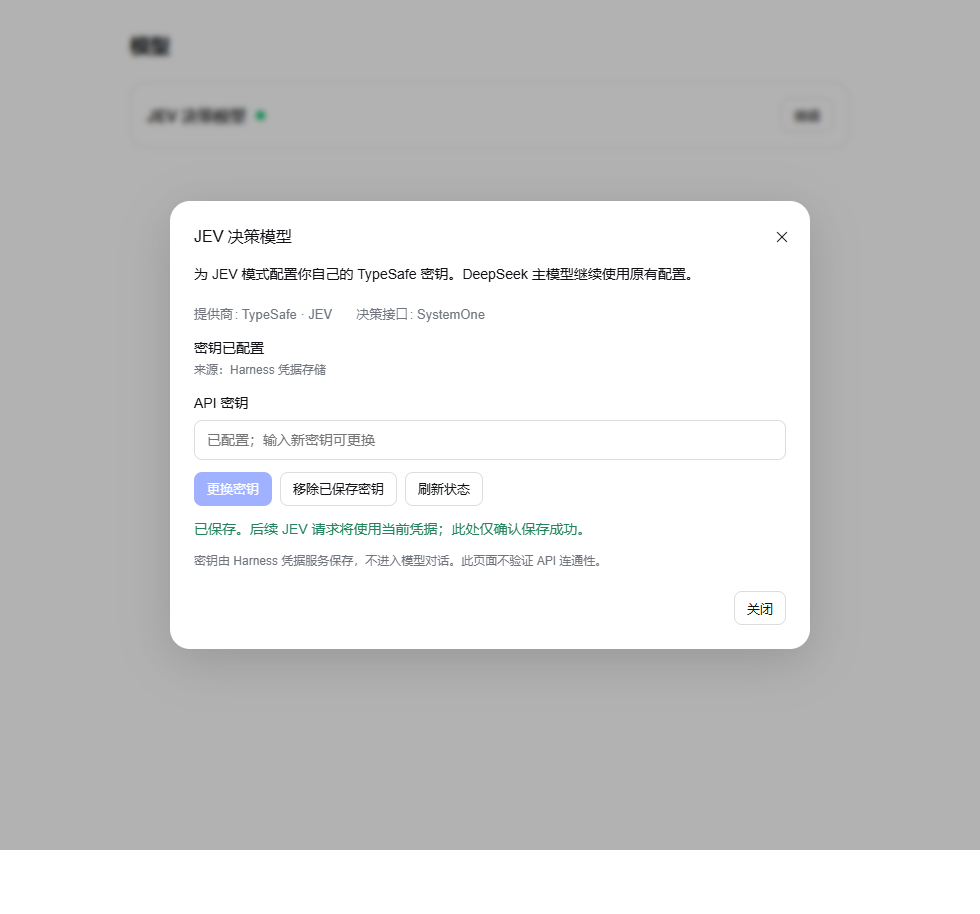
npm install --no-save --no-package-lock yaml@2
npm test
CI runs offline checks on Node 20/22/24. Native checks require Node 24 and host paths via DSH_HOST_NODE_MODULES / DSH_HOST_NATIVE_NODE_MODULES; absent-host skips are not compatibility evidence. Live API checks are opt-in.
For issues, include plugin/host versions, OS, new-session status and minimal reproduction steps. Remove credentials and sensitive content from logs. New feature research is closed; no additional JEV involvement in ordinary tasks is planned.
CLASSIFICATION EVIDENCE
系统优先读取 GitHub Topics,再与站内分类词典和词根规则比对。当前命中: prompt-cache。
alchaincyf
你想蒸馏的下一个员工,何必是同事。蒸馏任何人的思维方式——心智模型、决策启发式、表达DNA。Distill how anyone thinks.

freestylefly
Prompt as Code | GPT Image 2 / 2.5 提示词与案例库,530+ 个案例、20+ 套工业级模板与可复用 Skills,新增 2.5 同提示词对比专区,附完整提示词与生成记录,持续更新。

titanwings
Distilly — Distill how they think into reusable Skills for any Agent or Bot. Formerly Colleague Skill(原同事 Skill).