
模型与 MCP
待识别

rea
morluto
Reverse engineer anything with agents, from app behavior down to native binaries.
PROJECT TOPICS
PROJECT README
Live preview · static & Node.js servers · device frames · console error feed · point-and-ask DOM inspector — inside DeepSeek Harness.



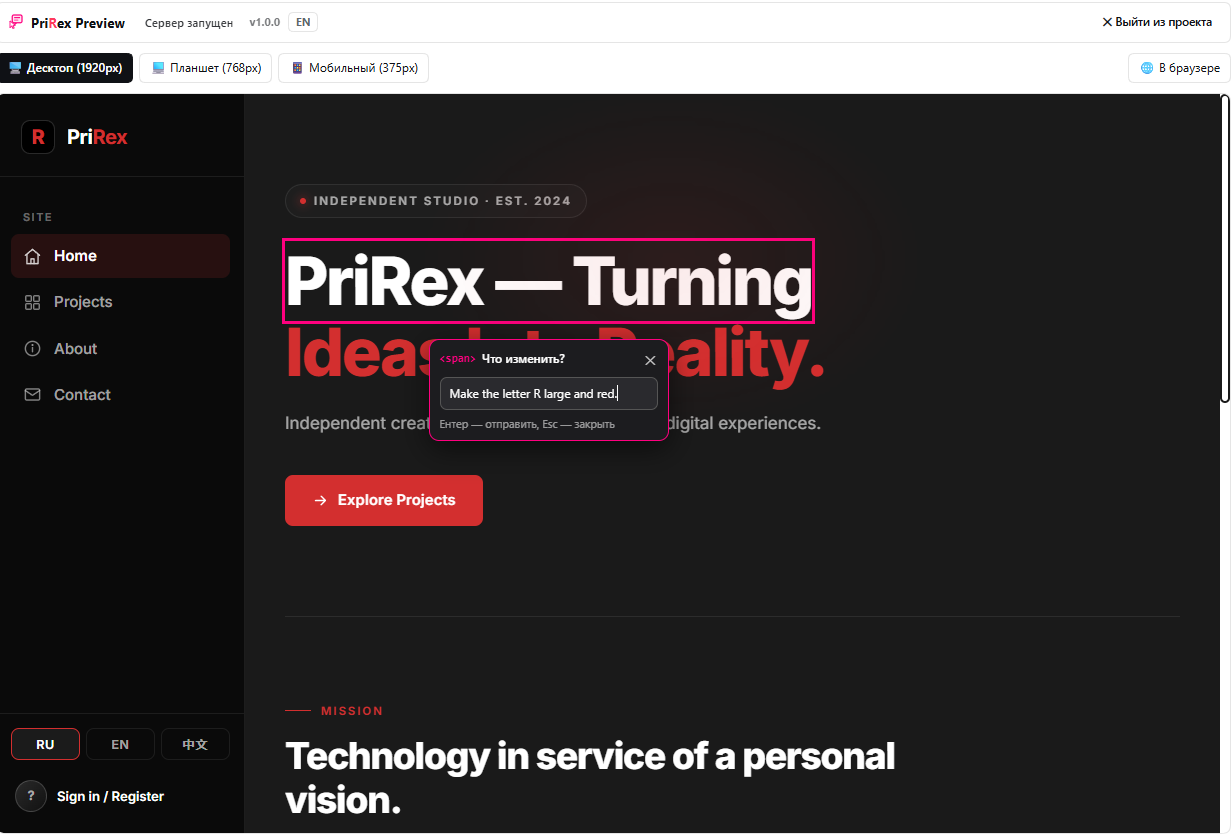
| Device frames · Панель устройств | Point-and-ask inspector · Точечный инспектор |
|---|---|
 |
 |
Desktop (1920px) / Tablet (768px) / Mobile (375px) switch the frame; the page is scaled to fit the sidebar, In browser opens the same URL outside DSH.Desktop (1920px) / Tablet (768px) / Mobile (375px) переключают фрейм, страница масштабируется под ширину боковой панели, In browser открывает тот же адрес вне DSH. |
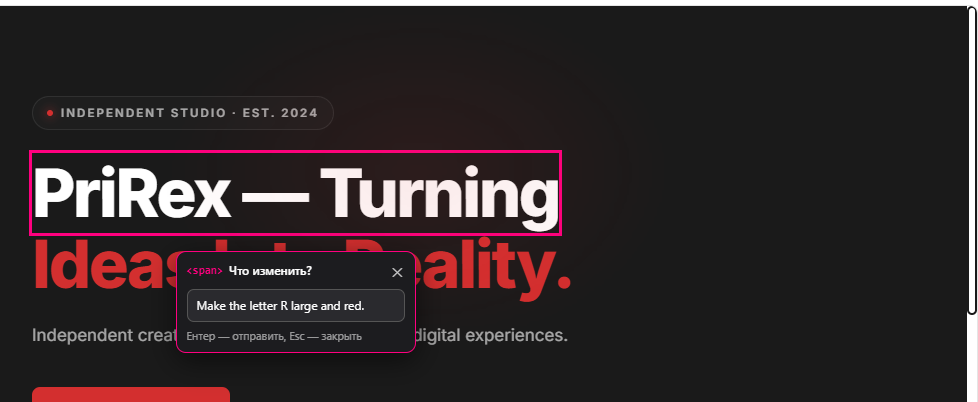
Hover → countdown → freeze (pink outline) → «Что изменить?». Наведение → обратный отсчёт → заморозка (розовый контур) → «Что изменить?». |
From the inspector to the chat draft · Из инспектора в черновик чата
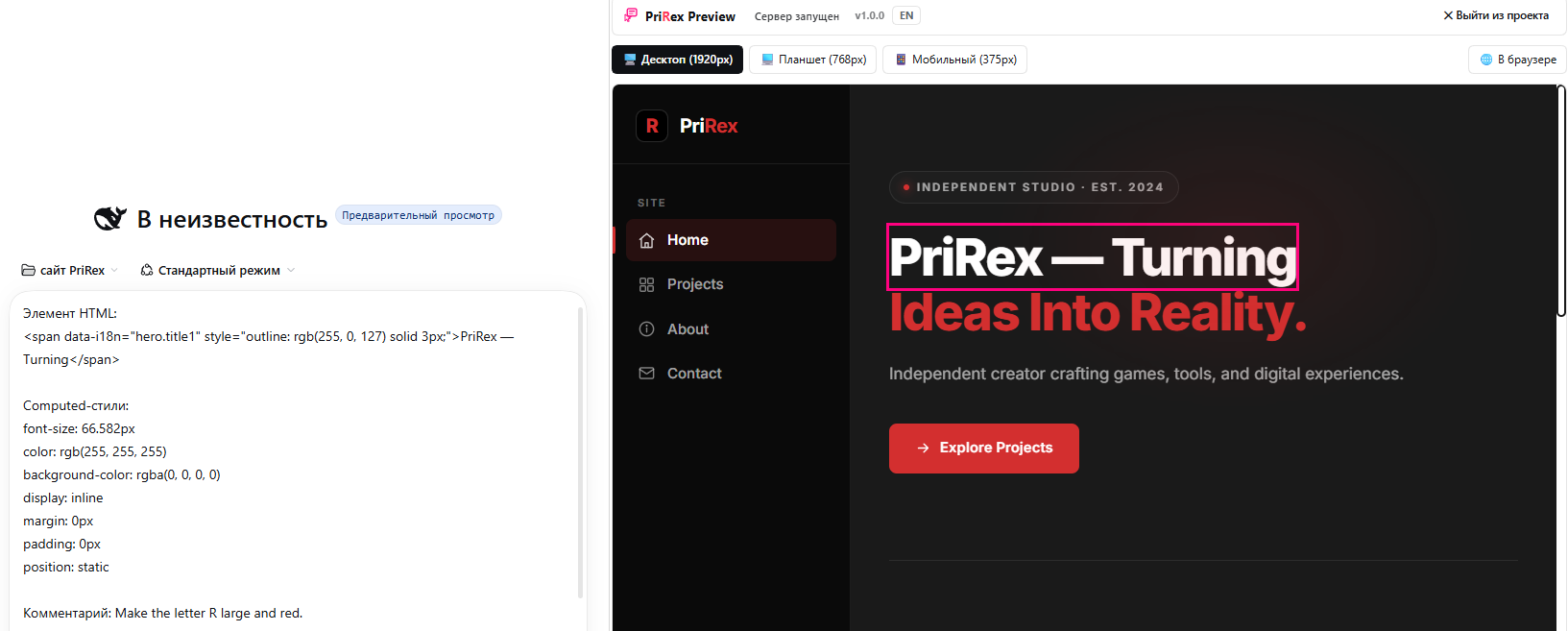
outerHTML + computed styles + your comment are inserted into the active chat draft; auto-submit is off, so you review and press send yourself — in the screenshot the payload is already in the input, the tab stays live beside it.
outerHTML + вычисленные стили + ваш комментарий вставляются в черновик активного чата; автоотправка выключена — вы проверяете текст и отправляете сами. На скриншоте payload уже в поле ввода, а вкладка с живой страницей остаётся рядом.
Result · Результат
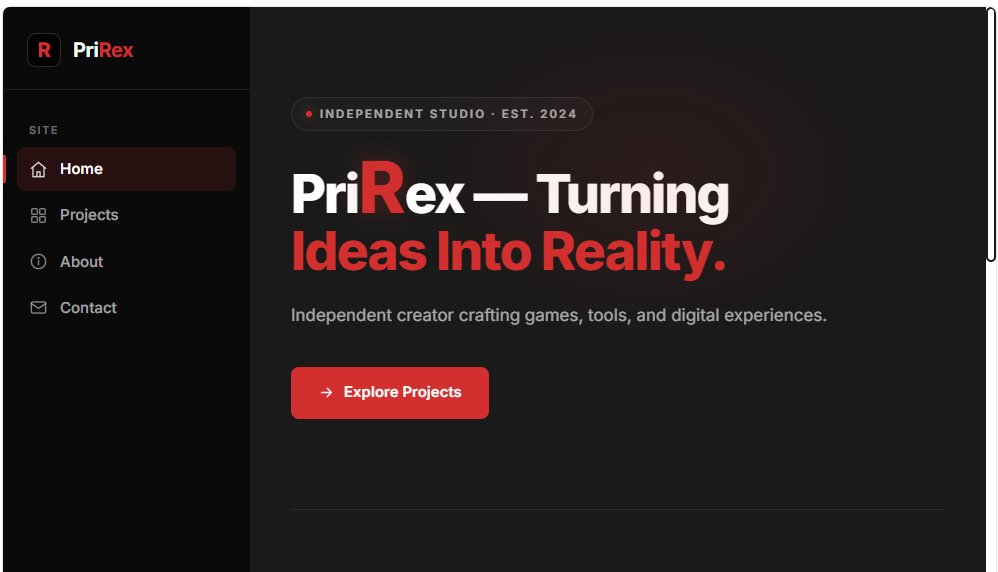
The loop closed: the agent edited the code and the page reloaded through live reload — the R in the headline is now red and large, exactly as asked in the panel.
Цикл замкнулся: агент поправил код, страница перезагрузилась через live reload — R в заголовке стала красной и крупной, ровно как просили в панели.
PriRex Preview is a local development companion for DeepSeek Harness (DSH). It adds a
PriRex Preview tab to the right panel: pick a project folder and get it served over HTTP with
live reload — a static site from the built-in server, or a Node.js project started with its own
dev/start script and proxied through localhost. Review it in desktop/tablet/mobile frames,
watch console errors stream in, and point at any element on the page to have its markup and
computed CSS dropped straight into your chat input.
Everything is local by design: the HTTP server and the WebSocket hub bind to 127.0.0.1,
no telemetry is emitted, and nothing leaves your machine.
index.html is picked automatically), while a Node.js
project is launched with its own dev script and previewed through a local reverse proxy.dev / start / serve / preview scripts are detected in
package.json (npm, pnpm, yarn and bun are recognised by lockfile or packageManager), and
a Node.js entry file is used when no script exists. If the declared manager is not installed
in the DSH process, the script runs through npm run instead (already-installed
node_modules are reused). The command is shown in the tab and can be edited before launch;
the dev-server port is found in its output and the server log streams live into the tab.chokidar watches project sources and pushes a reload signal to
the embedded WebView (150 ms static / 350 ms Node.js debounce, so save storms stay quiet).window.onerror, unhandledrejection and console.error
from the previewed page, with source/line/column; one click copies a ready-to-paste report.outerHTML and computed styles are
inserted into the active chat draft — auto-submit is always off, you review and send.node_modules, .git, dist, build, .next.Requirements: DeepSeek Harness with the Web surface, Node.js ≥ 20.
# 1. Clone
git clone https://github.com/Prirex/PriRex-Preview.git
cd PriRex-Preview

# 2. Install dependencies (pnpm or npm — the lockfile is pnpm's)
pnpm install        # or: npm install
pnpm run build      # or: npm run build

# 3. Verify the browser artifact is a valid classic script
pnpm run smoke      # or: npm run smoke
Then register the plugin in DSH: Plugins → Install bundle → local path and point it at this
folder. The bundled cordis.patch.yml inserts the prirexstudio row
automatically, so no manual patch editing is required.
lib/is committed on purpose — the compiled plugin works without a build step. Rebuild only after touchingindex.tsorclient.cts.
Both routes work, but they must not occupy the same slot at the same time.
Prirex/PriRex-Preview. pnpm copies the package into the profile as real files; lib/ is
already committed, so nothing is built during install.node_modules/dsh-prirex-preview.If a local link is still in place and you then install the GitHub version, pnpm cannot replace the junction and aborts before writing anything:
[ERR_PNPM_EPERM] [importPackage ...\node_modules\dsh-prirex-preview]
EPERM: operation not permitted, rename '...dsh-prirex-preview_tmp_12345_8' -> '...dsh-prirex-preview'
Removing the local link fixes it — only the junction is deleted, the project folder stays intact:
# close DeepSeek Harness first
cmd /c rmdir "C:\Users\<you>\.dsh\profiles\desktop\node_modules\dsh-prirex-preview"
The same EPERM can also surface on the symlink step (symlink 'D:\...\node_modules\...' -> ...),
when the junction points at a folder with its own node_modules; both variants have the same root
cause. The reverse order matters too: before linking a local folder, remove the GitHub copy.
Create any static page, e.g. index.html:
<!doctype html>
<html lang="en">
  <head><meta charset="utf-8"><title>Demo</title></head>
  <body>
    <h1 id="title">Hello, PriRex!</h1>
    <button onclick="console.error('boom from the page')">Break me</button>
  </body>
</html>
Open the right panel → PriRex Preview tab → choose the folder (it is scanned and started automatically).
Switch device width, then hover the <h1> for ~3 s: it freezes and the edit panel opens.
Type make the title red and larger → Enter. The inspector payload lands in your
chat draft; send it and let the agent edit the code — the page reloads itself on save.
Click Break me to see the error arrive in the console feed.
The tab also auto-opens the current session's working directory on first connect when the server is not running yet. Picking a folder (from the session or manually) scans it and starts the found static site or Node.js project; opening the tab itself never executes a project script.
package.json — a parent folder is fine, the tab scans up to
two levels of subfolders (Express, Vite, Next, Nuxt, SvelteKit, Astro, a plain server.js, …).
A static HTML site wins; if there is none, a Node.js project is found.package.json → npm run dev. The
manager follows the lockfile (pnpm-lock.yaml, yarn.lock, bun.lockb) or the
packageManager field; if that manager is missing from the DSH PATH the script falls back
to npm run, and if there is no script a Node.js entry file is used.http://localhost:<port> line from it, and opens the site through the proxy —
the inspector, console feed, device frames and HMR all work as in static mode.| Variable | Default | Description |
|---|---|---|
PRIREX_HUB_PORT |
3099 |
Port of the local WebSocket hub (127.0.0.1). |
PRIREX_NODE_TIMEOUT |
120000 |
How long to wait for a Node.js dev-server port (ms). |
PRIREX_ALLOWED_ORIGINS |
– | Extra comma-separated browser origins allowed to use the hub (localhost and the DSH Desktop dsh-app://app origin are always allowed). |
Per-user settings stored in localStorage:
| Key | Values | Description |
|---|---|---|
prirex.lang |
ru | en | zh |
UI language. |
prirex.hoverMs |
1500 | 3000 | 5000 |
Hover delay before inspecting. |
Hub: ws://127.0.0.1:3099. Page side identifies itself with hello; the sidebar tab sends
control messages. In static mode port is the preview server; in Node.js mode it is the proxy,
and devPort is the detected dev-server port.
| Direction | Message |
|---|---|
| tab → host | {type:'hello', sessionId} · {type:'detect', dir} · {type:'start', dir, file, mode?, command?} · {type:'stop'} · {type:'status'} · {type:'hover-ms', ms} |
| host → tab | {type:'detected', dir, mode, command, manager, script, entry, reason, files, file} · {type:'status', running, starting, mode, port, devPort, dir, file, files, command, logs} · {type:'node-log', line, stream} · {type:'node-exit', code, signal, error} · {type:'stopped'} · {type:'started-error', error} |
| host → page | {type:'reload', file} · {type:'hover-ms', ms} |
| page → host → tab | {type:'console-error', level, message, source, line, col} · {type:'inspector-prompt', comment, html, styles} |
PriRex-Preview/
├─ index.ts               # host service: WS hub, static server, Node.js runner, proxy, watcher, HTML injection
├─ client.cts             # browser artifact source: right-panel tab (React via DSH module table)
├─ logo-data.ts           # inlined brand logo for the client bundle
├─ cordis.patch.yml       # DSH bundle patch that registers the plugin row
├─ locale/{ru,en}.json    # plugin metadata strings
├─ scripts/               # finalize-client.mjs, smoke-client.mjs, test-hub.mjs
├─ types/                 # ambient typings
├─ lib/                   # committed build output: index.js, client.js (browser classic script)
└─ icon.svg # plugin iconnpm run build # tsc → lib/, then rewrite lib/client.cjs into a browser classic script
npm run smoke # execute lib/client.js in a bare VM (no exports/module/require)
npm run test:hub # end-to-end host protocol test (temp project, HTTP fetch, start/stop)
npm run check # build + smokeclient.cts is compiled to CJS and then rewritten by scripts/finalize-client.mjs
into an IIFE, because DSH evaluates client entries as classic scripts.
A running DSH keeps the host module it loaded at startup, so restart DSH after changing
index.ts; the client artifact is re-served on the next page refresh. The tab also tolerates an
older host: when detect is not answered it falls back to the v1.0 start flow.
Local-only tool: both servers bind to 127.0.0.1, static serving is path-traversal guarded, the
inspector never auto-sends messages, and a project's Node.js script is started only after you
explicitly pick its folder (or press Start Node.js server) — never merely by opening the tab
or a session. Found a problem? See SECURITY.md — please report privately, never in
a public issue.
package.json sets "private": true to prevent accidental publishes. The package is named
dsh-prirex-preview; to ship it through npm, flip that flag and — if you need a different name or
scope — update name in package.json, cordis.patch.yml and the id in
client.cts together, because the client registers itself in the DSH module table
under the package name.
dsh-app://app origin; the hub now accepts it (previously
the tab connected and was immediately disconnected, so the preview stayed on “Scanning files…”).npm run instead of failing with “command not found”.dev/start/serve/preview scripts, package manager by lockfile
or packageManager, Node.js entry fallback), dev-server spawn with streamed logs and port
detection, whole-process-tree stop, and a local reverse proxy that injects the inspector,
rewrites absolute redirects, forwards any API method and passes WebSocket upgrades through.127.0.0.1:3099, ephemeral HTTP preview server, chokidar
live reload, HTML discovery with depth/file caps, session working-directory auto-open.tsc + client finalizer), VM smoke test, end-to-end hub test.PriRex Preview — локальный инструмент разработки для DeepSeek Harness (DSH). Он добавляет
вкладку PriRex Preview в правую панель: выбираете папку проекта — получаете локальный
HTTP-сервер с живой перезагрузкой для статического сайта или запуск собственного
dev/start-скрипта Node.js с предпросмотром через локальный прокси; ниже — фреймы
«десктоп / планшет / мобильный», журнал ошибок консоли со страницы и DOM-инспектор, который по
наведению на элемент вставляет его разметку и вычисленные CSS-стили прямо в поле ввода чата.
Всё работает только локально: HTTP-сервер и WebSocket-хаб слушают 127.0.0.1, телеметрии
нет, данные не покидают машину.
index.html подхватывается автоматически), а Node.js-проект
запускается своим dev-скриптом и показывается через локальный обратный прокси.dev / start / serve / preview находятся в
package.json (npm, pnpm, yarn и bun определяются по lock-файлу или полю packageManager),
при их отсутствии используется точка входа Node.js. Если объявленный менеджер не установлен
в процессе DSH, скрипт запускается через npm run (уже установленные node_modules
переиспользуются). Команда видна во вкладке и её можно изменить перед запуском; порт
dev-сервера берётся из его вывода, а лог сервера идёт в вкладку.chokidar следит за исходниками и шлёт сигнал reload во
встроенный WebView (дебаунс 150 мс для статики и 350 мс для Node.js, чтобы серии сохранений
не спамили).window.onerror, unhandledrejection и console.error
просматриваемой страницы с файлом, строкой и колонкой; копирование готового отчёта в один клик.outerHTML и вычисленными стилями попадает в черновик активного чата — автоотправка всегда
выключена, отправляете вы сами.node_modules, .git, dist, build, .next пропускаются.Требования: DeepSeek Harness с веб-интерфейсом, Node.js ≥ 20.
# 1. Клонирование
git clone https://github.com/Prirex/PriRex-Preview.git
cd PriRex-Preview

# 2. Зависимости и сборка хоста + браузерного артефакта
pnpm install        # или: npm install
pnpm run build      # или: npm run build

# 3. Проверка, что браузерный артефакт — валидный классический скрипт
pnpm run smoke      # или: npm run smoke
Затем зарегистрируйте плагин в DSH: Плагины → Установить бандл → локальный путь и укажите эту
папку. Входящий в комплект cordis.patch.yml сам вставляет строку
prirexstudio — править патч вручную не нужно.
Каталог
lib/закоммичен намеренно: собранный плагин работает без шага сборки. Пересобирайте только после правокindex.tsилиclient.cts.
Работают оба способа, но они не должны занимать одно и то же место одновременно.
Prirex/PriRex-Preview. pnpm копирует пакет в профиль настоящими файлами; lib/ уже
закоммичен, поэтому при установке ничего не собирается.node_modules/dsh-prirex-preview.Если локальная ссылка уже стоит, а вы ставите версию с GitHub, pnpm не может заменить junction и падает до записи файлов:
[ERR_PNPM_EPERM] [importPackage ...\node_modules\dsh-prirex-preview]
EPERM: operation not permitted, rename '...dsh-prirex-preview_tmp_12345_8' -> '...dsh-prirex-preview'
Лечится удалением локальной ссылки — удаляется только junction, папка проекта остаётся на месте:
# сначала закройте DeepSeek Harness
cmd /c rmdir "C:\Users\<вы>\.dsh\profiles\desktop\node_modules\dsh-prirex-preview"
Тот же EPERM может прийти и с шага симлинков (symlink 'D:\...\node_modules\...' -> ...), когда
junction указывает на папку с собственным node_modules; причина у обоих вариантов одна. Обратный
порядок тоже важен: перед подключением локальной папки уберите копию, установленную с GitHub.
Создайте любую статическую страницу, например index.html:
<!doctype html>
<html lang="ru">
  <head><meta charset="utf-8"><title>Демо</title></head>
  <body>
    <h1 id="title">Привет, PriRex!</h1>
    <button onclick="console.error('ошибка со страницы')">Сломай меня</button>
  </body>
</html>
Откройте правую панель → вкладку PriRex Preview → выберите папку (она сама сканируется и запускается).
Переключите ширину устройства и наведите курсор на <h1> на ~3 с: элемент заморозится и
откроется панель правки.
Напишите «сделай заголовок красным и крупнее» → Enter. Данные инспектора окажутся в черновике чата: отправьте их, и агент поправит код — страница перезагрузится сама.
Нажмите «Сломай меня», чтобы увидеть ошибку в журнале консоли.
Если сервер ещё не запущен, вкладка при первом подключении сама открывает рабочую папку текущей
сессии. Статическая папка запускается сразу; Node.js-проект останавливается на карточке запуска,
чтобы скрипт из package.json не выполнялся без явного нажатия.
package.json — можно даже родительскую: вкладка сама
просканирует вложенные папки. Сначала ищется статический HTML-сайт, если его нет —
Node.js-проект (Express, Vite, Next, Nuxt, SvelteKit, Astro, обычный server.js).package.json → npm run dev.
Менеджер берётся из lock-файла (pnpm-lock.yaml, yarn.lock, bun.lockb) или поля
packageManager; если такого менеджера нет в PATH процесса DSH, скрипт запускается через
npm run, а при отсутствии скриптов используется точка входа Node.js.http://localhost:<port>, сайт открывается
через прокси — инспектор, журнал ошибок, фреймы устройств и HMR работают в обоих режимах.| Переменная | По умолчанию | Назначение |
|---|---|---|
PRIREX_HUB_PORT |
3099 |
Порт локального WebSocket-хаба (127.0.0.1). |
PRIREX_NODE_TIMEOUT |
120000 |
Сколько ждать порт Node.js dev-сервера (мс). |
PRIREX_ALLOWED_ORIGINS |
– | Дополнительные Origin через запятую, которым разрешён хаб (localhost и dsh-app://app из DSH Desktop разрешены всегда). |
Пользовательские настройки в localStorage:
| Ключ | Значения | Назначение |
|---|---|---|
prirex.lang |
ru | en | zh |
Язык интерфейса. |
prirex.hoverMs |
1500 | 3000 | 5000 |
Задержка наведения до инспектора. |
PriRex-Preview/
├─ index.ts               # хост-сервис: WS-хаб, статический сервер, запуск Node.js, прокси, watcher, инъекция
├─ client.cts             # исходник браузерной части: вкладка правой панели (React из таблицы DSH)
├─ logo-data.ts           # инлайн-логотип для клиентского бандла
├─ cordis.patch.yml       # патч бандла DSH, регистрирующий строку плагина
├─ locale/{ru,en}.json    # строки метаданных плагина
├─ scripts/               # finalize-client.mjs, smoke-client.mjs, test-hub.mjs
├─ types/                 # ambient-типизация
├─ lib/                   # закоммиченный результат сборки: index.js, client.js (классический скрипт)
└─ icon.svg # иконка плагинаnpm run build # tsc → lib/, затем перепаковка lib/client.cjs в браузерный классический скрипт
npm run smoke # запуск lib/client.js в чистой VM (без exports/module/require)
npm run test:hub # сквозной тест протокола хоста (временный проект, HTTP-запрос, start/stop)
npm run check # build + smokeclient.cts компилируется в CJS, а затем scripts/finalize-client.mjs
оборачивает результат в IIFE: DSH исполняет клиентские записи как классические скрипты.
Запущенный DSH держит в памяти хост-модуль, загруженный при старте, поэтому после правок
index.ts перезапустите DSH; клиентский артефакт подхватывается при следующем обновлении
страницы. Вкладка совместима и со старым хостом: если на detect нет ответа, она откатывается
к протоколу start версии 1.0.
Инструмент строго локальный: все серверы слушают 127.0.0.1, раздача файлов защищена от
path traversal, инспектор никогда не отправляет сообщения сам, а скрипт Node.js-проекта
запускается только после того, как вы явно выбрали его папку (или нажали
Запустить Node.js-сервер) — не при простом открытии вкладки или сессии. Нашли проблему —
см. SECURITY.md, сообщайте приватно, не через публичный issue.
В package.json стоит "private": true, чтобы исключить случайную публикацию. Пакет называется
dsh-prirex-preview; для раздачи через npm снимите этот флаг, а если нужно другое имя или скоуп —
меняйте name в package.json, cordis.patch.yml и id в client.cts
одновременно: клиент регистрирует себя в таблице модулей DSH под именем пакета.
dsh-app://app; хаб теперь принимает этот Origin
(раньше вкладка подключалась и сразу отключалась, поэтому предпросмотр висел на «Поиск файлов…»).npm run, а не падает с «команда не найдена».dev/start/serve/preview, менеджер по lock-файлу
или packageManager, запасная точка входа), запуск dev-сервера с потоковым логом и поиском
порта, остановка всего дерева процессов и локальный обратный прокси с инъекцией инспектора,
перезаписью абсолютных редиректов, пробросом API любого метода и WebSocket-апгрейдов.127.0.0.1:3099, HTTP-сервер предпросмотра на свободном порту,
live-reload через chokidar, поиск HTML с ограничениями по глубине и количеству,
автооткрытие рабочей папки сессии.tsc + финализатор клиента), VM smoke-тест, сквозной тест хаба.CLASSIFICATION EVIDENCE
系统优先读取 GitHub Topics,再与站内分类词典和词根规则比对。当前命中: deepseek-harness、deepseek-harness-desktop、deepseek-harness-plugin、deepseek-harness-plugins。
morluto
Reverse engineer anything with agents, from app behavior down to native binaries.

deepseek-ai
DeepSeek Harness: Everything is a Plugin.

nexu-io
The 1st Collaborative AI Design Agent Workspace. Local-first and open source. Create motion, prototypes, websites, apps, dashboards, presentations, images, and videos with your team and AI agents. Share work, exchange feedback, and iterate together in one workspace.