

模型与 MCP
待识别

rea
morluto
Reverse engineer anything with agents, from app behavior down to native binaries.
PROJECT TOPICS
INSTALL REFERENCE
dsh plugin --profile web add github:Phoeky/dsh-sensenova-pool
该命令指向仓库当前默认分支;尚无绑定当前 commit 的完整验证结果。
PROJECT README
商汤日日新(SenseNova)多 Key 轮换池 · DeepSeek Harness 插件
在一个地方填入多把商汤 API Key,即可在 DSH 对话窗口里直接使用日日新的各种模型 —— 遇 429 限流自动切换到下一把 Key,全程无感。


中文 | English
想要一个独立运行、不依赖 DSH 的网关服务? 请移步 Phoeky/st-rotator。 本插件是它在 DeepSeek Harness 里的内嵌版:不装 DSH、或者需要给整个局域网提供服务时,用那个项目更合适。
填入任意多把商汤 Key,请求在多把 Key 之间自动轮转,把每把 Key 的额度摊开使用。
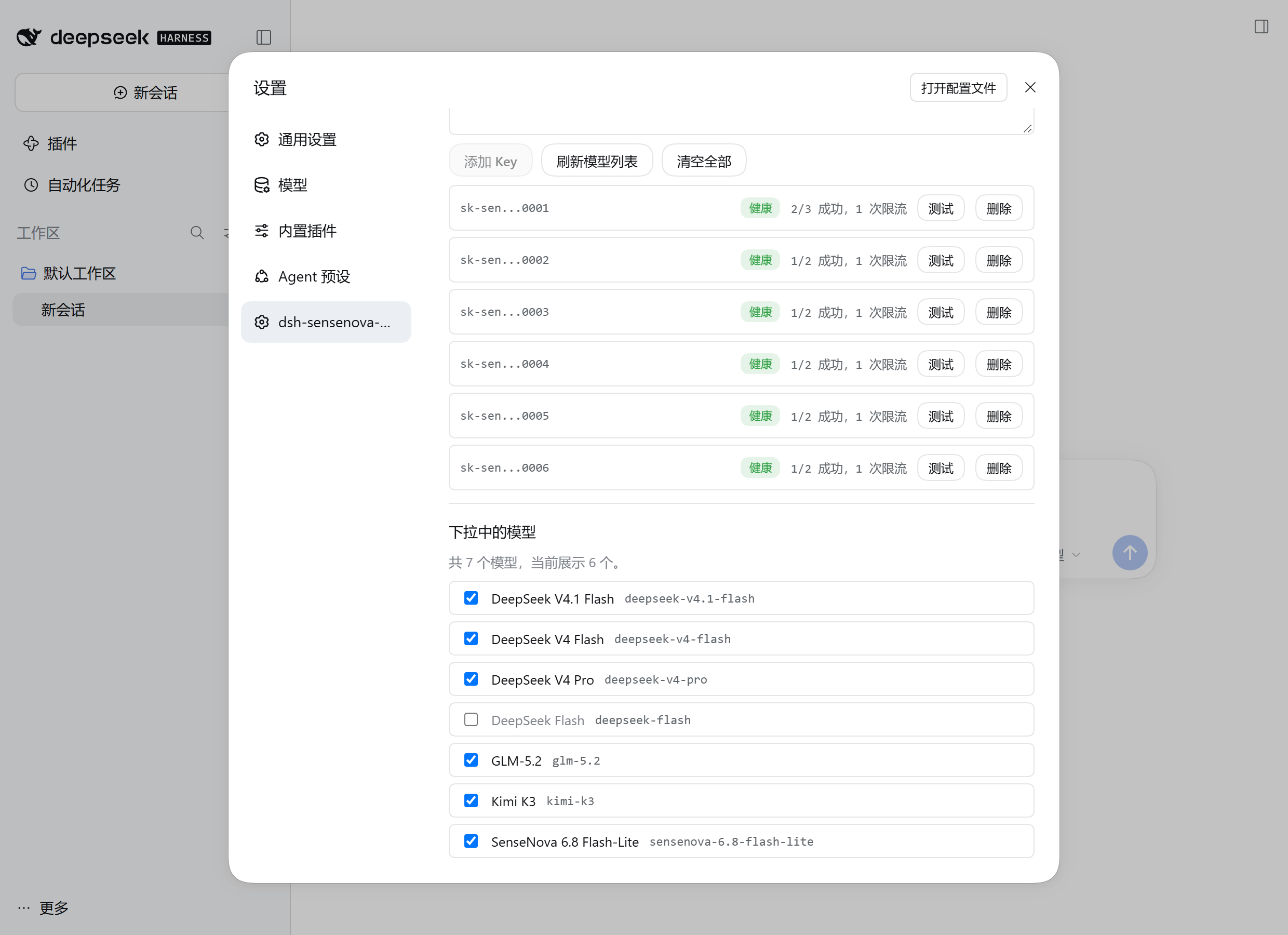
Bearer 前缀、首尾引号、重复项、明显无效的短串sk-example...0001 这样的掩码,明文 Key 不会出现在任何界面上这是本插件的核心能力。商汤的 Key 有较低的 RPM 上限(实测现有 Key 约 3 RPM),单靠重试无法解决。本插件的做法:
503 + Retry-After(而不是 429),交由 DSH 自行退避重试截图里的 2/3 成功,1 次限流 是真实发生的记录:这把 Key 触发过 1 次 429,被池子内部消化掉,上层没有收到过任何 429。
装好插件后,模型选择器里自动出现「商汤日日新(Key 轮换池)」分组,包含以下模型:
| 模型 | 上下文 | 最大输出 | 图片输入 |
|---|---|---|---|
deepseek-v4.1-flash |
1,048,576 | 65,536 | – |
deepseek-v4-flash |
1,048,576 | 65,536 | – |
deepseek-v4-pro |
1,048,576 | 65,536 | – |
deepseek-flash |
1,048,576 | 65,536 | – |
glm-5.2 |
1,048,576 | 131,072 | – |
kimi-k3 |
1,048,576 | 65,536 | – |
sensenova-6.8-flash |
1,048,576 | 65,536 | ✓ |
sensenova-6.8-flash-lite |
262,144 | 65,536 | ✓ |
启动时内置一份保守目录(无需网络即可用),拿到有效 Key 后自动通过 /v1/models 刷新,商汤日后上线新模型无需升级插件。
⚠️ 上游
/v1/models的context_length不一定可信:它把sensenova-6.8-flash报成 262,144, 而实测(2026-11-17 直连上游逐级加压)1,047,536 tokens 仍 200、约 1.05M 才 400 —— 真实窗口就是 1,048,576,被报小了 4 倍。对这类已实测的模型,插件用基线覆盖上游值;对照组flash-lite的 262,144 是真值(257,013 通过、275K 档 400),保持不动。其余模型仍以上游为准,不影响「新模型无需改代码」。
思考等级同样支持,且档位按模型自动适配:glm-5.3 只认 low / high / max,glm-5.2 七档全收,缺档时自动就近归位而不是撞 400(见下文「思考档位按模型映射」)。
Key 存在 DSH 的凭据库里,不写进任何配置文件。填入即生效,无需重启 DSH、无需改 YAML。
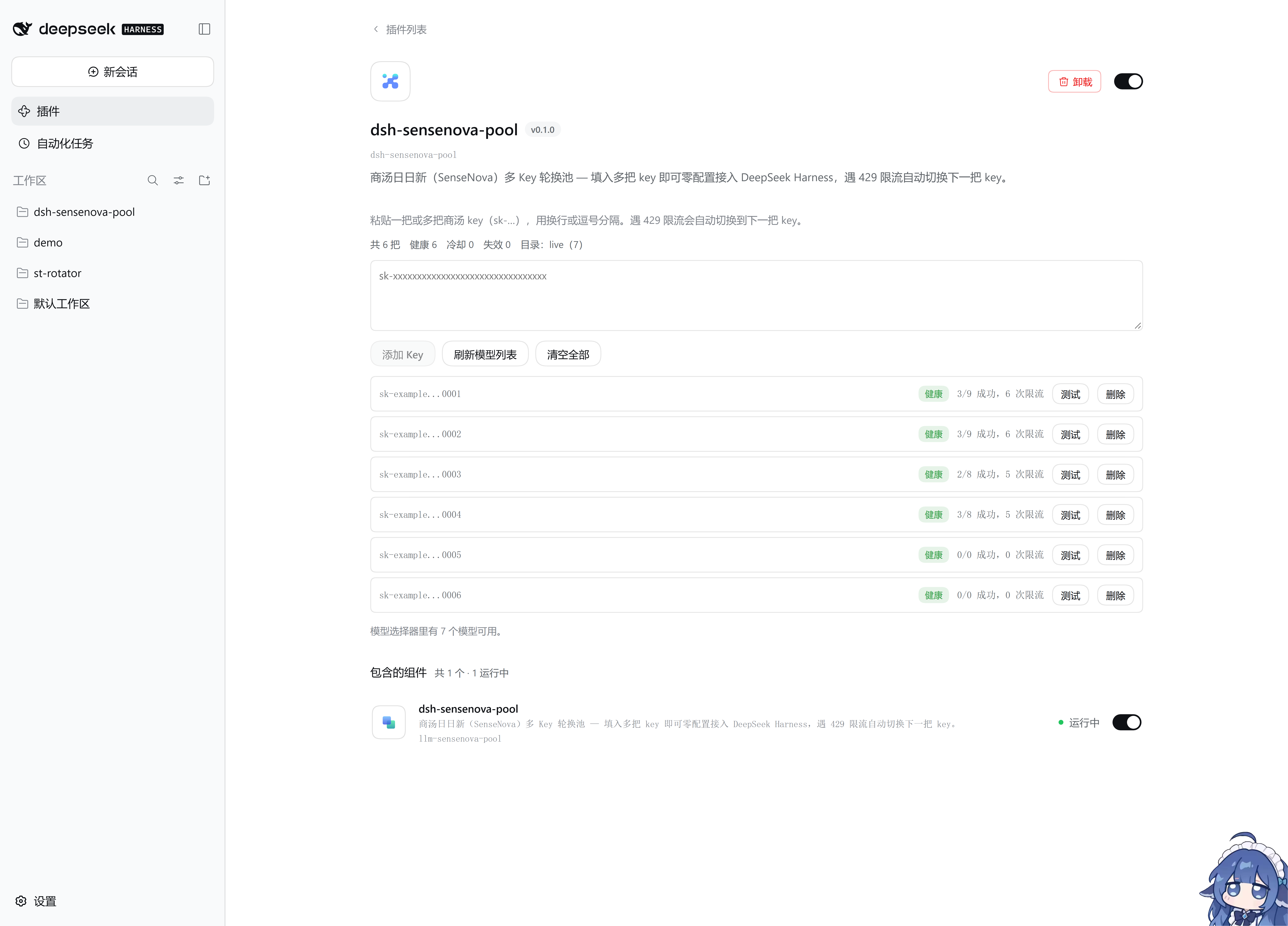
设置侧栏新增 dsh-sensenova-pool 分区,Key 池、对外接口、模型可见性都在这一页。插件页里的卡片同样可以打开。
每个模型的上下文窗口与最大输出都能改:点模型行右侧的「设置」,在展开的面板里填写后点「保存」才生效
(取消 丢弃草稿,恢复默认 清掉覆盖)。输入框接受 1M / 128K 这种简写,也接受精确数字。
上游对个别模型会报小窗口,基线只覆盖了我们实测过的那些;其余的可以按你自己的实测或套餐情况修正。
插件在 127.0.0.1 上起一个 OpenAI 兼容服务。设置页显示接口地址和 API Key,复制后填进其他 Agent 或客户端即可使用;请求共用同一个 Key 池,遇到限流同样自动换 Key。
curl http://127.0.0.1:51234/v1/chat/completions \
  -H "Authorization: Bearer sk-dsh-…" \
  -H "Content-Type: application/json" \
-d '{"model":"glm-5.2","messages":[{"role":"user","content":"ping"}]}'设置页列出目录里的全部模型。取消勾选的模型不再注册给 provider,也就不会出现在模型选择器里,这个选择重启后保留。套餐里不含某些模型时,可以在这里把它们关掉。
npm install dsh-sensenova-pool或使用 pnpm:
pnpm add dsh-sensenova-pool安装后,把 dsh-sensenova-pool 加入 profile package.json 的 dsh.profile.bundles:
{
  "dsh": {
    "profile": {
      "bundles": [
        "dsh-sensenova-pool"
      ]
    }
  }
}git clone https://github.com/Phoeky/dsh-sensenova-pool.git
cd dsh-sensenova-pool
npm install
npm run build
# 链接到你的 profile
pnpm --dir "$DSH_PROFILE_DIR" add "link:$PWD"同样需要把 dsh-sensenova-pool 加进 dsh.profile.bundles。
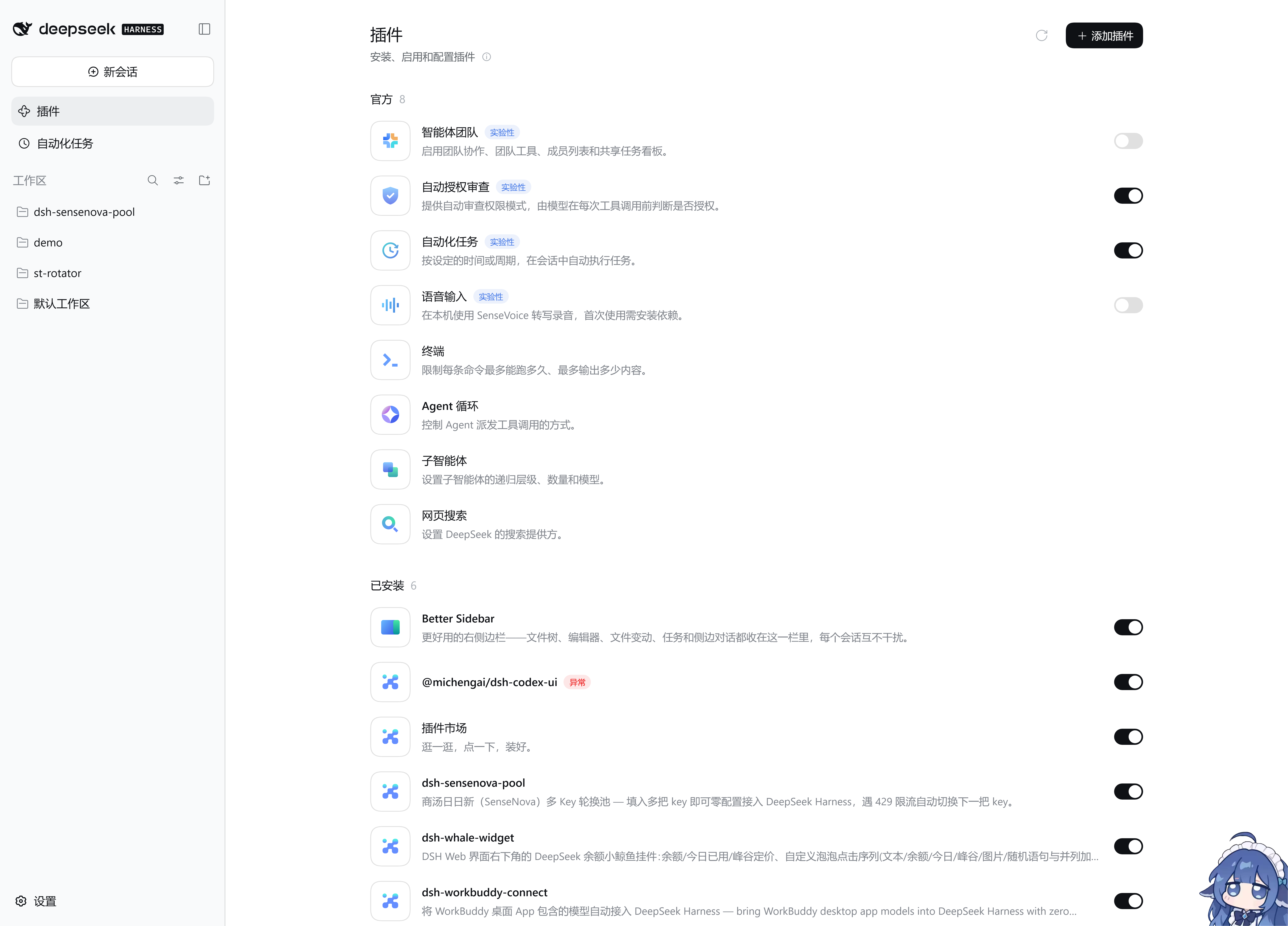
改完 package.json 后重启 DeepSeek Harness。确认安装成功:插件页的「已安装」列表里会出现本插件。
打开 设置 → dsh-sensenova-pool(或插件页里本插件的卡片),在弹出的卡片里粘贴一把或多把商汤 Key:
sk-aaaaaaaaaaaaaaaaaaaaaaaaaaaaaa
sk-bbbbbbbbbbbbbbbbbbbbbbbbbbbbbb
sk-cccccccccccccccccccccccccccccc点「添加 Key」。支持多种分隔方式,重复和无效项会被自动过滤。
新建会话,在模型选择器里选「商汤日日新(Key 轮换池)」下的任意模型,然后正常对话即可。
| 按钮 | 作用 |
|---|---|
| 测试 | 对单把 Key 发一次极小请求,立刻看到是否可用与延迟 |
| 删除 | 移除单把 Key |
| 清空全部 | 移除所有 Key |
| 刷新模型列表 | 主动从商汤 /v1/models 拉取最新模型目录 |
| 复制(接口区) | 复制接口地址 / 对外 API Key |
| 模型勾选框 | 决定该模型是否出现在模型选择器里 |
设置页「本地接口」区给出两样东西:
| 字段 | 示例 | 说明 |
|---|---|---|
| 接口地址 | http://127.0.0.1:51234/v1 |
OpenAI 兼容,/chat/completions、/models 都支持,流式/非流式都行 |
| API Key | sk-dsh-… |
填进 Authorization: Bearer 即可 |
任何 OpenAI 客户端都可以直接用它,例如:
from openai import OpenAI

client = OpenAI(base_url="http://127.0.0.1:51234/v1", api_key="sk-dsh-…")
print(client.chat.completions.create(
    model="glm-5.2",
    messages=[{"role": "user", "content": "你好"}],
).choices[0].message.content)
这个 Key 只被本地 shim 校验,不会发给商汤;真实的商汤 Key 始终只存在于插件内部。
绝大多数情况无需改动。如需微调,在 profile 的 cordis.patch.yml 里加入:
- id: llm-sensenova-pool
  name: dsh-sensenova-pool
  config:
    rpmLimit: 2          # 每把 Key 的本地 RPM 预限流上限;0 = 关闭
    maxAttempts: 6       # 单个请求最多尝试几把 Key
    maxConcurrency: 1    # 每把 Key 的并发上限;1 = 串行(推荐)
    acquireTimeoutMs: 180000
    requestTimeoutMs: 60000
    baseUrl: https://token.sensenova.cn/v1
rpmLimit: 2 是默认值,基于实测(真实上限约 3 RPM)。调大它不会提高吞吐,只会更容易被限流 —— 想提高吞吐应该增加 Key,而不是加压。
模型选择器里没有「商汤日日新」分组?
确认 dsh.profile.bundles 里有 dsh-sensenova-pool,然后重启 DSH。如果分组在但某个模型不见了,去设置页看看是不是被自己勾掉了。
管理卡片在哪?
两个入口都在:设置 → dsh-sensenova-pool(推荐),以及插件页里本插件的详情卡片。旧版 DSH 若没有设置分区,会退回只显示插件页卡片。
一直失败怎么办?
在卡片上点某把 Key 的「测试」看真实原因。403 model is not available in the current token plan 表示该模型不在这个 Key 的套餐里 —— 换模型,而不是换 Key。
DSH 弹「The application could not start or stopped unexpectedly」,完全起不来?
先看崩溃日志里的失败插件名。如果 Failed plugins 指向 credentials,且错误是
record "dsh-sensenova-pool/keys" ... has unknown field "payload",说明凭据库里那条记录
的标签写错了 —— DSH 的凭据库对记录做白名单校验,api-key 只认 kind/key/env,
grant 只认 kind/payload,一条记录不合规就会让 credentials 插件激活失败,进而
中止整个应用启动(0.1.1 及更早版本存在这个写入 bug,已修复)。
手工修复:编辑 $DSH_HOME/.credentials.yaml,把该记录的 kind: api-key 改成
kind: grant(payload.keys 里的 Key 原样保留),然后重启 DSH。
records:
  dsh-sensenova-pool/keys:
    kind: grant          # ← 必须是 grant;api-key 不接受 payload
    payload:
      keys:
        - sk-…
崩溃日志位置:Windows 下为 %APPDATA%\@deepseek-ai\dsh-desktop\logs\crash-*-host.log。
重启电脑后 Key 池空了(「忘记 Key」)?
0.1.2 及更早版本存在一个启动竞态:插件启动时只读一次凭据库,而 DSH 的凭据快照 是异步读盘填充的,冷启动磁盘慢时就会读到空快照,于是池子变成 0 把 —— 且此后没有任何 补载机制,只能重新填 Key。0.1.3 已修复(改为等凭据服务真正就绪后再装载)。
如果你还在旧版本上遇到,升级即可,不需要重新填 Key(Key 一直好好地在
$DSH_HOME/.credentials.yaml 里)。临时办法是在插件卡片上点一次「刷新/重载」。
报 400 inference request is invalid / 400 invalid arguments?
这是 商汤网关的 schema 校验比 OpenAI 官方严导致的,不是 Key 无效,也不是限流—— 换 Key 完全没用。Agent(DSH 的 pi-ai 层)会按 OpenAI 规范发出一些「官方接受、商汤不认」 的写法:
| 请求体写法 | 商汤 deepseek-v4-flash |
说明 |
|---|---|---|
{"role":"developer","content":"…"} |
❌ 400 | OpenAI 新规范里替代 system 的角色,商汤只认 system |
{"role":"assistant","content":null}(无 tool_calls) |
❌ 400 | 表示「这一轮只有工具调用」的常规写法 |
{"role":"system","content":null} / {"role":"tool","content":null} |
❌ 400 | 工具结果为空时很常见 |
tool_calls[*].function.arguments 传对象 |
❌ 400 invalid arguments |
必须是 JSON 字符串 |
content 传数字(123) |
❌ 400 invalid arguments |
必须是字符串或数组 |
temperature 等传字符串("0.7") |
❌ 400 invalid arguments |
必须是数字 |
logprobs / top_logprobs / metadata |
❌ 400 | 商汤不支持这些字段 |
reasoning_effort 传 off |
❌ 400 field ReasoningEffort invalid |
DSH 的 off 商汤拼作 none |
reasoning_effort 传该模型不认的档位(如 glm-5.3 收到 xhigh) |
❌ 400 field ReasoningEffort invalid |
合法词表按模型判定,见下方「思考档位按模型映射」 |
给 kimi-k3 传任何非 1 的 temperature |
❌ 400 field Temperature invalid, only 1 is allowed |
该模型没有可调随机性;shim 会在转发前把它归一到 1 |
0.2.1 已修复:shim 在转发前会把这些写法语义等价地规范成商汤接受的形式
(developer→system、null/缺失的 content→""、arguments 对象→JSON 字符串、
数值字符串→数字、off→none、摘掉不支持字段),
你不需要改任何配置。带 tool_calls 的 content: null 会保持原样(商汤接受,动它反而有风险)。
特别说明:
max与minimal本来就是合法档位(上游报错原文列全了它们), 所以不会被改动或降级 —— 否则会悄悄改掉你要求的推理强度。
刻意不代改的三类(改了只会把错误往后推):user.content 为空、数值越界
(如 temperature: 3)、未知 role。
💡 如果升级后仍报 400,说明是清洗层还没覆盖的新写法。此时把
debugRequestOn400打开,插件的 400 日志里会直接打出实际发出的请求体, 一眼就能定位是哪个字段——不用再猜。相关讨论见 issue #2。
issue #3 实测发现:上游的合法
reasoning_effort 集合是按模型判定的,不是全局一张表。glm-5.3 只认
low / high / max,收到 xhigh 就是 400;而 glm-5.2、deepseek-v4-flash
七档全收。单一映射表无论怎么调都会踩到某一头。
0.2.2 起改为每个模型维护一张实测词表:
| 模型 | 实测接受的档位 |
|---|---|
glm-5.3 |
low / high / max |
glm-5.2、deepseek-v4-flash、sensenova-6.8-flash、sensenova-6.8-flash-lite |
七档全收 |
kimi-k3 |
七档,max 未确认 → 不发 |
deepseek-flash |
七档,xhigh 未确认 → 不发 |
| 其他 / 新上架模型 | 保守表 low / high(全员交集,永不 400) |
模型选择器里只显示这张表里真实存在的档位:glm-5.3 的思考档下拉就是
Low / High / Max(+Default)—— 不会出现「选了 Xhigh、实际发 max」这种
看着能用、发出去却换了值的档位。
shim 侧另有一层兜底:万一别的客户端(或旧配置)发来该模型不认的值,转发前会
就近改合法 —— xhigh / max 这类饱和档由模型最强档承接(不降级,glm-5.3 的
xhigh → max),其余档向下取(medium → low、off → low),宁可省 token 也不
悄悄抬高成本。
未实测的模型(新上架、或还没测过的)只显示保守表 low / high —— 七档里只有这两档
是全员交集。写漏顶多降一档,写多会让整条链路每次都 400。新模型上架后,把它的词表
补进 MODEL_REASONING_EFFORTS(src/catalog.ts)即可。
Key 会泄漏吗?
不会。界面只显示掩码;明文只存在 DSH 凭据库($DSH_HOME/.credentials.yaml)中,不会写入任何配置文件,也不会出现在日志里。
设置页里的 API Key 和我的商汤 Key 是一回事吗?
不是。设置页「本地接口」区显示的 sk-dsh-… 是本地回环服务自己的校验密钥,只用于让别的本地程序访问 127.0.0.1 上的 shim;它不会被转发给商汤,和你的商汤 Key 没有任何关系。真正的商汤 Key 仍然只以掩码形式出现在列表里。
别的机器能连这个接口吗?
不能,也不需要。shim 只绑定 127.0.0.1,这是刻意的:它背后是你的额度。要在多台机器/整个局域网共享,请用 Phoeky/st-rotator 这类独立网关。
0.2.0-rc.2 或更高^22.19.0 || >=24.0.0本插件在设计与实现上参考了以下开源项目,特此致谢:
特别感谢以下朋友反馈问题、提供实测数据,其中好几处结论直接改变了实现方向:
sensenova-6.8-flash 的 1M 窗口谎报成 262144(还附了逐级加压的实测表,让"该不该覆盖上游"这件事有据可依)。reasoning_effort 的词表差异,直接促成了"按模型维护词表"这一版重构。Looking for a standalone gateway that runs without DSH? See Phoeky/st-rotator — this plugin is its in-harness edition. Use that project if you don't run DeepSeek Harness or need to serve a whole LAN.
A multi-key rotation pool for SenseNova (商汤日日新) as a DeepSeek Harness plugin.
Paste one or more SenseNova API keys in one place and use every SenseNova model directly in the DSH chat window — rate-limited keys (HTTP 429) are switched out automatically and transparently.
dsh-sensenova-pool holds the key pool, the local endpoint and the model list503 + Retry-After so DSH backs off on its own/v1/models once a valid key is present, so new models need no plugin upgradesk-example...0001 style masks are ever displayednpm install dsh-sensenova-poolAdd "dsh-sensenova-pool" to dsh.profile.bundles in your profile package.json, then restart DeepSeek Harness.
Open Settings → dsh-sensenova-pool (or the plugin card on the Plugins page), paste your keys, click Add keys, then pick any model under the "商汤日日新(Key 轮换池)" group in the model picker. The same page shows the local endpoint (base URL, port, API key) and lets you hide models from the picker.
The key pool is empty after rebooting the machine ("it forgot my keys")?
Versions 0.1.2 and earlier had a startup race: the plugin read the credential store once at startup, while DSH fills that store from disk asynchronously. On a slow cold boot the plugin read an empty snapshot, so the pool came up with zero keys — and nothing ever re-loaded it, forcing you to re-enter them. Fixed in 0.1.3 (the plugin now waits until the credentials service is genuinely ready before loading).
Upgrade and your keys will be picked up again; they were never lost (they live in $DSH_HOME/.credentials.yaml). On an older version, clicking reload on the plugin card recovers them for the session.
Thanks to everyone who reported issues and shared measured data — several conclusions came straight from these reports:
sensenova-6.8-flash's 1M window as 262144, with a full pressure-test table.reasoning_effort vocabulary measurements that drove the per-model table rewrite.CLASSIFICATION EVIDENCE
系统优先读取 GitHub Topics,再与站内分类词典和词根规则比对。当前命中: deepseek。
morluto
Reverse engineer anything with agents, from app behavior down to native binaries.

deepseek-ai
DeepSeek Harness: Everything is a Plugin.

nexu-io
The 1st Collaborative AI Design Agent Workspace. Local-first and open source. Create motion, prototypes, websites, apps, dashboards, presentations, images, and videos with your team and AI agents. Share work, exchange feedback, and iterate together in one workspace.