
模型与 MCP
待识别

rea
morluto
Reverse engineer anything with agents, from app behavior down to native binaries.
PROJECT TOPICS
INSTALL REFERENCE
dsh plugin --profile web add github:OuQiL/dsh-pinned-panel
该命令指向仓库当前默认分支;尚无绑定当前 commit 的完整验证结果。
PROJECT README



A Pinned group at the top of the DeepSeek Harness sidebar. Pinned conversations stop being pinned inside one workspace: they are collected into a Pinned group first in the session list, expanded by default — and opening one still drops you back into its original workspace.
English | 简体中文
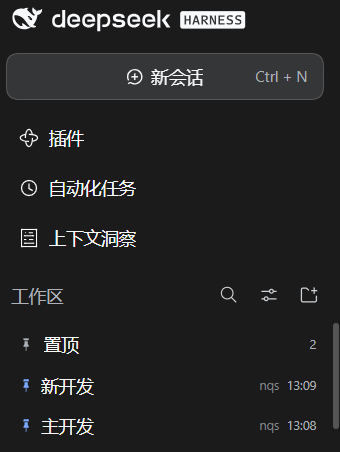
Pinned group first in the session list — two pinned conversations from one workspace, each still opening in its own workspace. (Chinese UI shown; titles and labels follow the active locale.)
Sidebar
├─ 📌 Pinned                     3      ← first in the list, expanded by default
│   ├─ 🔧 Fix expired login      14:32
│   ├─ 📊 API diff report        Yesterday
│   └─ 📝 Weekly draft           10-21
├─ 📁 default-workspace                 ← your workspaces, untouched
│   ├─ Conversation A
│   └─ Conversation B
└─ 📁 another-workspace--dsw-radius-md, hover/focus rings), light and dark themes included.localStorage).uiWorkspace.openSession() call, exactly like clicking that row in the sidebar: same working directory, same context, same history.pinnedSessionIds and workspace membership; pinning/unpinning stays the shipped 📌 action (plus a ✕ on hover).session.rename, forkSession, unpinSession, archiveSession). The menu takes focus and supports ↑/↓/Home/End, Enter and Esc. Double-click a title to rename it in place (Enter saves, Escape cancels). Archiving a conversation that is still running asks stop and archive first instead of silently ending its work.uiWorkspace.unarchiveSession) — archiving by accident no longer means hunting through the full archive view. It is collapsed by default and shows at most the 10 most recent items; a muted Show all · N row reveals the rest.Open Settings → Plugins.
Add plugin.
Paste the Git address of this repository:
github:OuQiL/dsh-pinned-panel(the dialog also accepts the full https://github.com/OuQiL/dsh-pinned-panel URL, a tarball, or an absolute local path)
Reload the page. The Pinned group appears at the top of the conversation list.
dsh plugin add github:OuQiL/dsh-pinned-panel
# or pin a profile explicitly
dsh plugin --profile desktop add github:OuQiL/dsh-pinned-panelgit clone https://github.com/OuQiL/dsh-pinned-panel.git
dsh plugin add /absolute/path/to/dsh-pinned-panelAfter changing lib/client.js in a linked checkout, reload the page (Ctrl+R) to load the fresh bundle; no reinstall is needed.
Settings → Plugins → dsh-pinned-panel → disable/uninstall, or dsh plugin remove dsh-pinned-panel.
| Surface | DeepSeek Harness Web GUI (the Desktop app renders the same Web surface) |
| Tested with | 0.2.1-rc.2 on Windows |
| Host half | none — it is a no-op; everything runs in the browser |
| Credentials / network | none |
| Sidebar | required; TUI/headless profiles have nothing to attach to |
Because it attaches to the sidebar list, a DSH release that restructures that list may require a small adaptation (see How it works); the plugin degrades to "no group" rather than breaking the app.
pinned state (Host)                   uiWorkspace service (shipped)
  pinnedSessionIds  ────┐                openSession(id)  ──► selects the Session
  items[].sessionIds ───┴──► Pinned group ──► unpinSession(id) ──► writes the pin set
                              (sidebar list)      (both official calls)
The shipped Workspace browser owns the single sidebar.workspaces slot, so there is no slot to add a group inside its list. Replacing the whole browser would mean reimplementing the app's session list and would break on upgrades. The smallest intervention is a sibling group at the top:
sidebar.footer.action, an empty action beside Settings; the seat renders nothing).MutationObserver (plus a slow fallback tick) re-attaches the host after React rebuilds the list.It only inserts, never hides or reorders anything the app renders.
*_listArea, *_list, *_groupSection), so it survives class-hash changes.[dsh-pinned-panel] sidebar list seam not found; the Pinned group cannot be placed.One React detail matters here: portal events bubble through the React tree, not the DOM tree, so the portaled group stops propagation for its own interactions. That keeps clicks inside the group from reaching whichever seat the portal is mounted under.
dsh-pin is the closest existing plugin; both are pure client-side, both attach to the sidebar list, and both use the shipped session-order/open APIs. The difference is the shape:
| dsh-pinned-panel (this) | dsh-pin | |
|---|---|---|
| Where pins show up | one Pinned group first in the session list | a global tray above all workspace groups, plus in-group pinning |
| Original rows | always kept | optionally hidden for globally pinned rows |
| Pin levels | one — it reuses the app's own pin state | two — workspace pin and global pin, with its own records |
| Extra chrome | none (no page, no rail icon) | tray chrome and per-row pin buttons |
| State it owns | only your collapse preference | its own localStorage records per pinned session |
| Undo / restore | the app's own unpin | precise restore of the pre-pin position |
If you want a floating tray and hidden original rows, use dsh-pin. If you want one extra group in the list and nothing else, use this.
The group does not appear.
Open the browser console. If it shows
[dsh-pinned-panel] sidebar list seam not found; the Pinned group cannot be placed.,
your DSH build moved the sidebar list and the seam needs adapting — please open an issue with that line and your DSH version.
The group appears twice, or loading fails with loaded without registering ….
An older copy under the pre-rename package id (@local/dsh-pinned-panel) is still installed. Uninstall it (Settings → Plugins) or restart the app; the bundle registers both ids so a leftover copy does not error out.
Clicking a row keeps ending on the same conversation.
Fixed in 0.1.6; make sure you are on 0.3.0+ (console prints [dsh-pinned-panel] active vX.Y.Z).
How do I verify which version is loaded? The console line on page load, or the Plugins page entry.
Do I need to configure anything?
No settings. The only stored value is your collapse choice, under the dsh-pinned-panel.sidebar.collapsed key.
Does it work across browsers? Pin state comes from the Host, so yes. The collapse preference is per browser.
Where do I unpin? The app's own 📌 action (as before), or the ✕ that appears on a row in the group.
apply().localStorage['dsh-pinned-panel.sidebar.collapsed']. Pin changes are the app's own actions through uiWorkspace.<style> element registered with the plugin's lifetime and using only DSH theme tokens.package.json bundle manifest: Host patch + browser half
cordis.patch.yml inserts one Host plugin row (no-op Host half)
index.js Host half: empty apply()
lib/client.js browser bundle: sidebar seat, list seam, Pinned group
locale/{zh,en}.json Plugin Manager title/description
icon.svg original artwork
scripts/verify.mjs local self-check (encoding, JSON, manifest, versions, dictionaries)
test/ unit tests for the pure sidebar logic (node --test)
scripts/ci-workflow-template.yml drop-in GitHub Actions workflow for both checks
assets/ README screenshot of the sidebar groupnode scripts/verify.mjs # encoding + JSON + manifest + version/dictionary guards
node --test "test/**/*.test.mjs" # pure logic: ordering, filtering, labels, activity
node --check lib/client.js # syntax onlyThere is no build step: lib/client.js is the shipped browser module
(window.__ModuleLoader__.load({ id, factory })), read directly by the client at page load.
It registers the factory under both the current package id and the pre-rename
@local/dsh-pinned-panel id, so a profile that still has the old package installed keeps
loading instead of failing with loaded without registering …. The legacy id is inert once
that package is uninstalled.
See CHANGELOG.md for the release history, including the two bugs that shaped the current implementation (portaled event bubbling, and a UTF-8 BOM that broke GitHub installs).
Issues and pull requests are welcome.
[dsh-pinned-panel].npm run check (verify.mjs + node --test).scripts/ci-workflow-template.yml is a ready-to-use Actions workflow for that check; copy it to
.github/workflows/verify.yml from an account/token allowed to edit workflows.MIT © 2026 OuQiL
Not affiliated with DeepSeek. "DeepSeek Harness" is the host application this plugin extends.
CLASSIFICATION EVIDENCE
系统优先读取 GitHub Topics,再与站内分类词典和词根规则比对。当前命中: deepseek、deepseek-harness。
morluto
Reverse engineer anything with agents, from app behavior down to native binaries.

deepseek-ai
DeepSeek Harness: Everything is a Plugin.

nexu-io
The 1st Collaborative AI Design Agent Workspace. Local-first and open source. Create motion, prototypes, websites, apps, dashboards, presentations, images, and videos with your team and AI agents. Share work, exchange feedback, and iterate together in one workspace.