
Agent 与会话
插件

nuwa-skill
alchaincyf
你想蒸馏的下一个员工,何必是同事。蒸馏任何人的思维方式——心智模型、决策启发式、表达DNA。Distill how anyone thinks.
PROJECT TOPICS
INSTALL REFERENCE
dsh plugin --profile web add github:OOOHS/dsh-3d
该命令指向仓库当前默认分支;尚无绑定当前 commit 的完整验证结果。
PROJECT README
An agent workspace for autonomous 3D creation. DSH 3D is a Blender plugin for DeepSeek Harness. It gives agents a persistent environment to create assets, inspect results, revise their work and develop reusable tools. Tasks span product modeling, scene assembly, materials and lighting, animation, asset editing and reconstruction from images.
Built on CheshireJCat/blender (dsh-blender), the project extends its tools, skills and analysis capabilities with shared editing state, native brushes and visual feedback, independent review, and project tools that agents can revise and replay during a task.
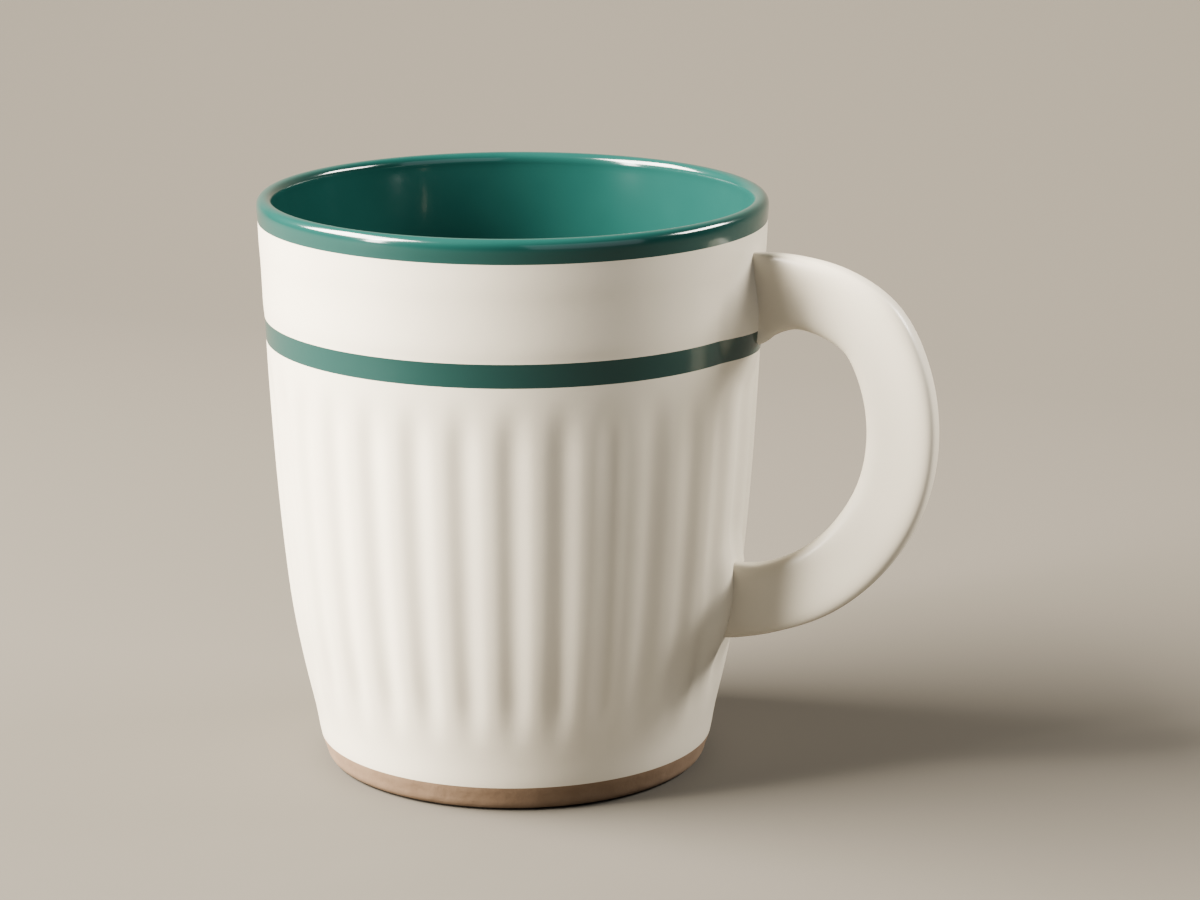
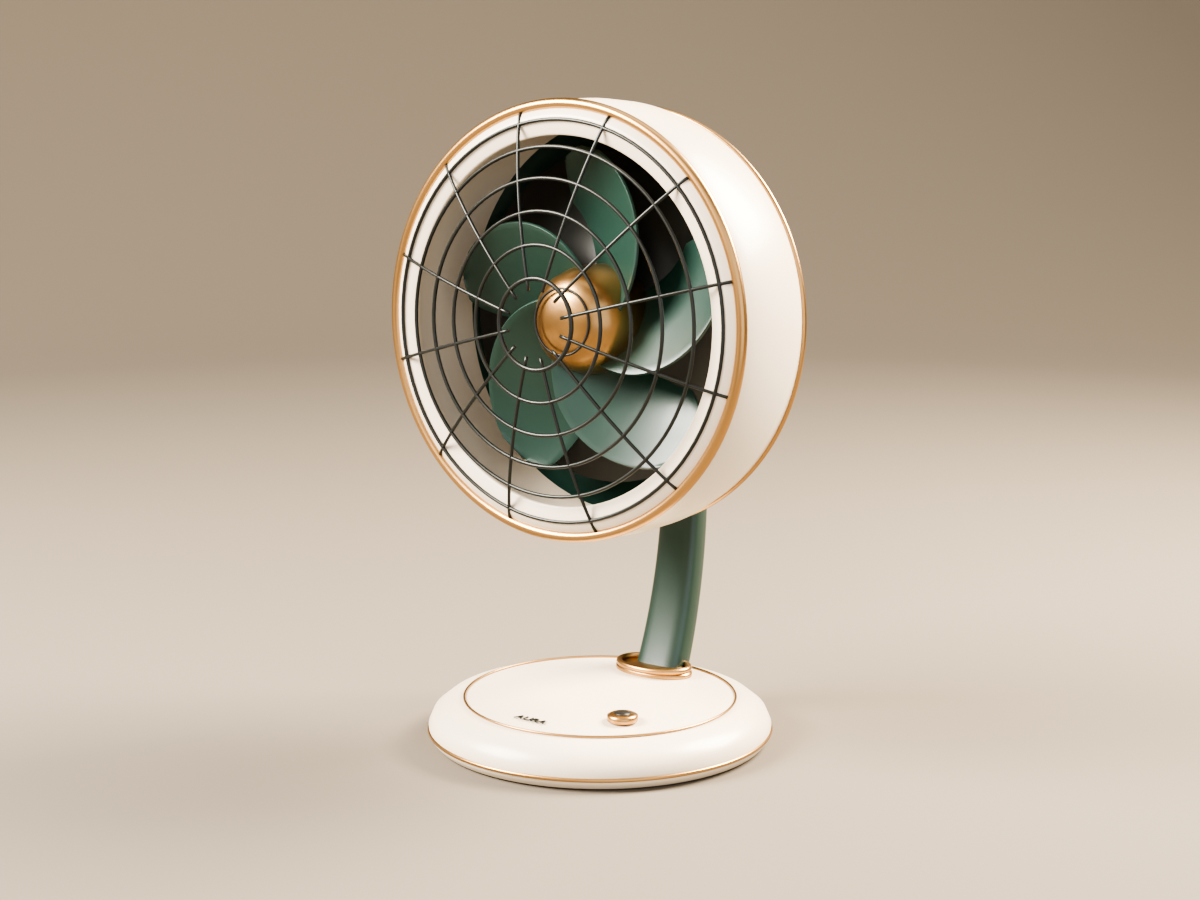
Two independent dsh sessions designed, modeled and rendered these products with dsh-3d dev.20. Each agent chose its construction methods, inspected renders and refined the result.
Ivory fluting, deep green glaze and an exposed clay-colored foot.
A cream housing, forest-green blades and stand, and brass-colored accents.
Task prompts and generation details
Improvement applies to both the asset and the way it is made.
For image reconstruction, an independent generative visual reviewer compares renders with the reference, describes differences and judges acceptance. The modeling agent can revise the asset and submit another result. Each review starts with the current evidence and saves its observations and judgment.
Agents can also write, call and revise their own tools during a task, preserving useful operations as code. Later work can reuse implementations, adjust parameters or reorganize the operations. Geometry construction, mesh editing, brushes, observation and delivery can all be composed into a replayable program.
Provide the tools an agent needs to construct, edit, observe and recover, and make those tools work together. Python, mesh editing and native brushes share one Blender scene. Agents can modify existing geometry or create new components.
Tool feedback includes views, local before-and-after images and measured changes, helping the model assess the effect of an action. Compact entry points and on-demand discovery expose detailed capabilities. Agents can compose these operations into tools suited to the task.
The main skill explains goals, capabilities, calling conventions and completion criteria. Specialist references are loaded as needed. Pruning prescribed workflows and repeated instructions gives the agent control over representations, component boundaries, operation order and candidate comparisons.
Observations, reviews and checkpoints support exploration: try an approach, inspect its effect, keep the result or restore an earlier scene and try again.
The ceramic mug and animated fan examples include editable assets, renders, original prompts and tool-use summaries.
Requirements: Node.js 22.12+, pnpm, Blender on PATH or configured with an absolute path, and Python 3.10+ for image-analysis helpers.
git clone https://github.com/OOOHS/dsh-3d.git
cd dsh-3d
pnpm install --frozen-lockfile
npx @deepseek-ai/dsh@0.2.1-alpha.2 plugin --profile web add .
npx @deepseek-ai/dsh@0.2.1-alpha.2 plugin --profile web exec dsh-3d-setup
npx @deepseek-ai/dsh@0.2.1-alpha.2 web
The plugin appears as DSH 3D (Development). Keep one version active when switching between this plugin and the original dsh-blender: turn off the current version, then turn on the other version.
For a custom Blender executable, add the following to your web profile's cordis.patch.yml, replacing the executable path:
- id: dsh-3d
  config:
    blenderExecutable: /absolute/path/to/blender
Model-provider credentials belong in your dsh environment or configuration. Keep API keys and local .env files outside version control.
When creating a session, choose:
dsh-3d-modeler): direct access to Python, native editing, brushes and observation tools.dsh-3d-code-modeler): compose authorized tools as await tools.name(...) inside run_code, suitable for maintaining replayable programs. This preset requires the host's programmatic tool runtime.dsh-3d-native-modeler): primitives, native mesh editing and brushes for action-space comparison experiments.For example: “Create a ceramic mug with a small whale relief. Save the editable project, a GLB and renders from several viewpoints.” The agent chooses methods, observes results and revises the asset.
Modeling and review are configured separately in agents/modeler.json and agents/reviewer.json, with overrides through modelerAgent and reviewerAgent. Defaults use deepseek-official / deepseek-flash, with high reasoning effort for modeling and low for review. Explicit model selections in the modeling session remain effective.
blender_execute runs Python in the current scene. blender_scene creates, opens, inspects and saves scenes. Project tools can define run(params) and be called repeatedly through tool_path; each call loads the latest source.
Python can continue editing meshes shaped with native brushes. The code-modeling preset also lets agents record brush steps in a complete program and replay them alongside construction. Within Blender Python, dsh.edit, dsh.sculpt, dsh.project and dsh.emit provide editing, sculpting, location projection and image output.
Replay programs retain the starting scene, parameters, dependencies and operation order. Screen-space strokes depend on the view and geometry; targeting code can project locations again during execution. Across multiple tool calls, a later failure preserves earlier completed operations for inspection and recovery.
Brushes support volume shaping, silhouette changes, bending, folds and surface work. In sculpt mode, agents can make successive strokes, change views, undo and redo. Committing retains the edits; discarding restores the state from entry. Brush assets and parameters are discovered from the local Blender installation.
The current bridge operates on fixed-topology base meshes with sufficient actual vertices in the edited region. Sculpting requires a desktop graphics context. Multires, Shape Keys and Dynamic Topology are currently unsupported. The interface has been tested on Blender 5.2.2 LTS and macOS ARM64. See the sculpting contract.
After registering a reference through review_reconstruction with action: "begin", the modeling agent can submit a saved scene and 1–6 corresponding renders. Each assessment creates an independent reviewer that observes and crops the current images, returns differences and an acceptance judgment, and archives the evidence and report. Format errors are returned as feedback so the reviewer can repair its submission within the round.
Acceptance applies to the submitted scene and renders. Registered reconstruction tasks continue by default until approval, user cancellation, a runtime budget limit or a pause for stalled progress. continueUntilApproved controls continuation; reviewContinuationBudgetMs sets a time budget, with the default of 0 following host and user limits. Each review defaults to five minutes, 24 steps and two recoveries from transient service errors.
Review uses its own model configuration and incurs the provider's API charges. Free-form creation follows the user's deliverables; the reference-image reviewer serves reconstruction tasks.
The local development environment uses dsh 0.2.1-alpha.2, Blender 5.2.2 LTS and macOS ARM64. Basic checks:
pnpm validate
pnpm test
Local integration tests require Blender and the analysis dependencies:
pnpm setup:analysis
BLENDER_EXECUTABLE=/absolute/path/to/blender pnpm test:sculpt
pnpm test:acceptance
Reviewer lifecycle and continuation checks use real dsh agents with a local scripted model adapter:
pnpm test:review-agent /absolute/path/to/dsh-host /absolute/path/to/python-with-Pillow
pnpm test:continuation /absolute/path/to/dsh-host
Python modeling code runs with the local Blender process's permissions. Working files, recovery scenes and observations are stored in the project's .dsh-blender/scenes/ directory.
The plugin code retains the upstream MIT license. Additional provenance and preserved license files are listed in NOTICE and under skills/create-3d-model/. Blender is a separate project with its own license. DSH 3D is an independent community project.
CLASSIFICATION EVIDENCE
系统优先读取 GitHub Topics,再与站内分类词典和词根规则比对。当前命中: ai-agent。
alchaincyf
你想蒸馏的下一个员工,何必是同事。蒸馏任何人的思维方式——心智模型、决策启发式、表达DNA。Distill how anyone thinks.

freestylefly
Prompt as Code | GPT Image 2 / 2.5 提示词与案例库,530+ 个案例、20+ 套工业级模板与可复用 Skills,新增 2.5 同提示词对比专区,附完整提示词与生成记录,持续更新。

titanwings
Distilly — Distill how they think into reusable Skills for any Agent or Bot. Formerly Colleague Skill(原同事 Skill).