
其他
完整应用

deepseek-harness
deepseek-ai
DeepSeek Harness: Everything is a Plugin.
PROJECT TOPICS
INSTALL REFERENCE
dsh plugin --profile web add github:Nth-5620/dsh-crystal-viewer
该命令指向仓库当前默认分支;尚无绑定当前 commit 的完整验证结果。
PROJECT README
A crystal-structure visualization window for DeepSeek Harness (DSH).
dsh-crystal-viewer is a standalone DSH plugin that gives a human user a window for inspecting crystal and molecular structures directly inside DeepSeek Harness. It combines an interactive 3D structure (rendered with a modified build of 3Dmol.js), a Q-peak (electron-density peak) layer, and a live parameter panel showing unit cell, symmetry, elements, atom statistics, Q-peak statistics and refinement R factors.
It opens as a sidebar / bottom-dock tab — exactly like DSH's built-in Terminal / Browser tabs — via the dsh-better-sidebar tab-registration API. It also registers a file previewer so that clicking a .res / .ins / .cif / .xyz / .mol / .pdb file in the Files tree renders it in 3D instead of a plain code viewer.
What this plugin is: a human-facing viewer. It self-parses structure files (unit cell, symmetry operators, atoms, Q peaks, bonds) to draw the structure and fill the panel. It is not a crystallographic computation engine — solving / refinement decisions and deep geometry analysis are out of scope for this plugin.
A human still needs to see the structure. This plugin is the window that a person looks at to make the calls that actually drive a structure-solution / refinement workflow:
All of these are "look at it" judgements — exactly what this viewer is for. It renders the structure and fills the panel so those calls can be made at a glance.
A condensed, feature-oriented summary — every item below is described further in the Screenshots section with a matching image.
None · Line · Stick · Ball and stick · CPK (space-filling) · Polyhedron (coordination polyhedra).Custom (one uniform color) · Color by Element (Jmol scheme) · Color by Group (periodic-table main group / transition-metal gold).None · Dashed line · Line · Stick, with per-axis range (0..2 = 2×2×2 supercell), line width / stick radius, axis coloring (a·b·c axes) or a custom color, and axis labels (a / b / c).Follow theme / White / Dark gray / Custom:), and an Outline edge effect.SYMM generator set (group multiplication) and applies the LATT lattice translation (body-centered I / face-centered F / base-centered A, B, C), so high-symmetry space groups (e.g. MOF Fm-3m, Im-3) render a full 1×1×1 unit cell instead of a sparse one. The tool can derive the full general-position set from just the generators + LATT (e.g. 11 SYMM rows + LATT -2 → 24 general positions).Grow toggle or the Lattice range, and axis labels.A live 7-group panel populated from the parsed file:
R1 · wR2 · GooF, d_max resolution, observed / total reflections, completeness, highest difference peak / deepest hole (Δρ).UNIT: formula counts.max summary. Hidden entirely when there are no Q peaks.The panel is built to answer "is it converging / should I continue?" at a glance.
--dsw-* design tokens, so the panel, the Display Style dialog and the canvas background automatically follow the harness light / dark theme (see the theme screenshot below). A MutationObserver on body[data-ds-dark-theme] re-renders the "Follow theme" background live when you flip the theme..xyz/.mol/.pdb) structures get only Atom + View tabs, and the panel omits Cell / Symmetry.All screenshots below were taken from the real plugin running inside a DeepSeek Harness session — the crystal-viewer tab/window in the DSH UI, exactly as a user would see it. Demonstrations use the public HKUST-1 (Cu-BTC) MOF and the caffeine molecule as examples.
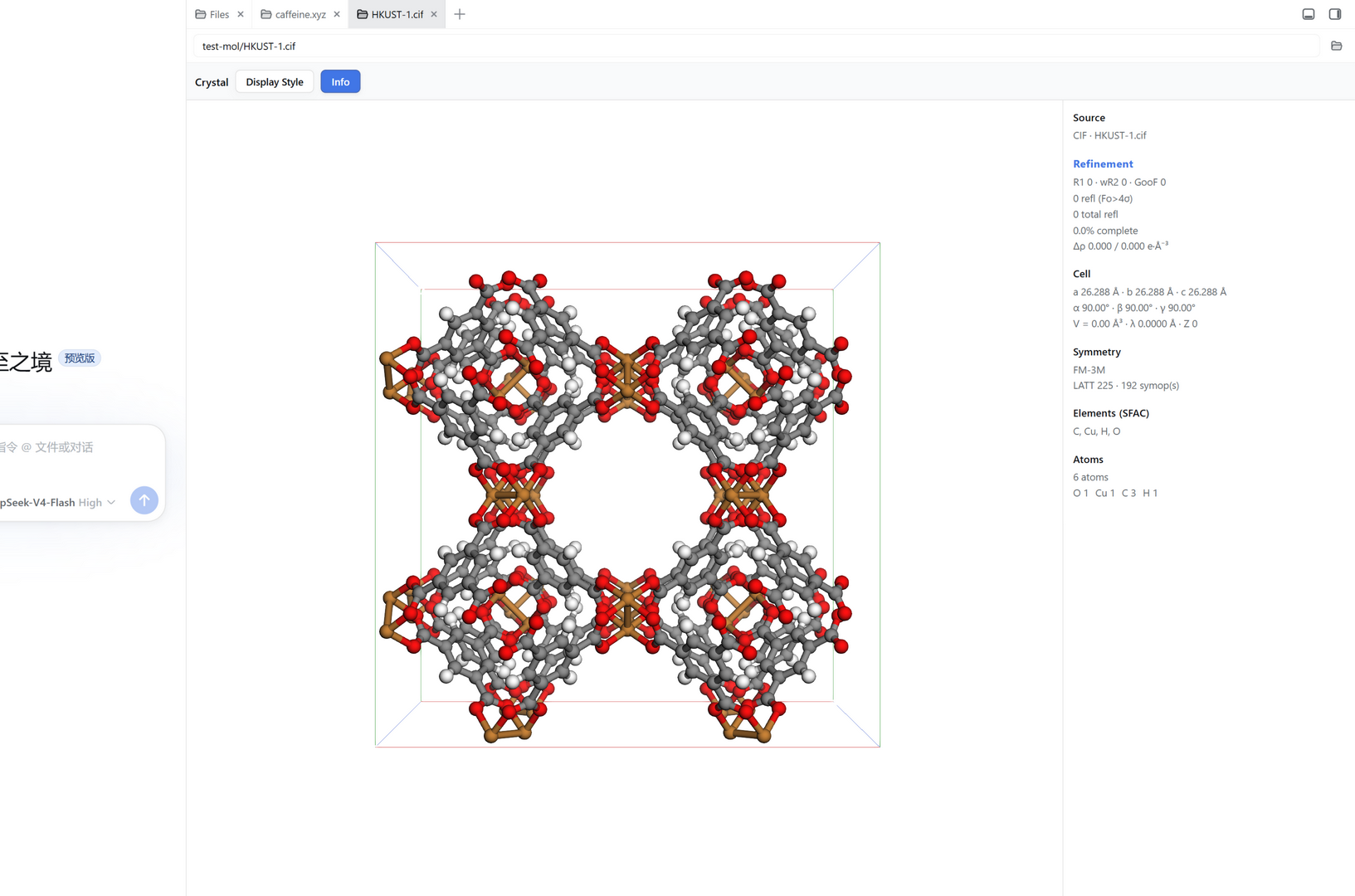
The crystal-viewer window shows an interactive 3D structure in the centre and the live parameter panel on the right. This is HKUST-1 / Cu-BTC (F m -3 m, a ≈ 26.29 Å). The plugin used the CIF's symmetry operations to render a complete unit cell — note how all the Cu paddle-wheel clusters and organic linkers fill the cell rather than a single asymmetric unit. The unit-cell box and axis labels are drawn.
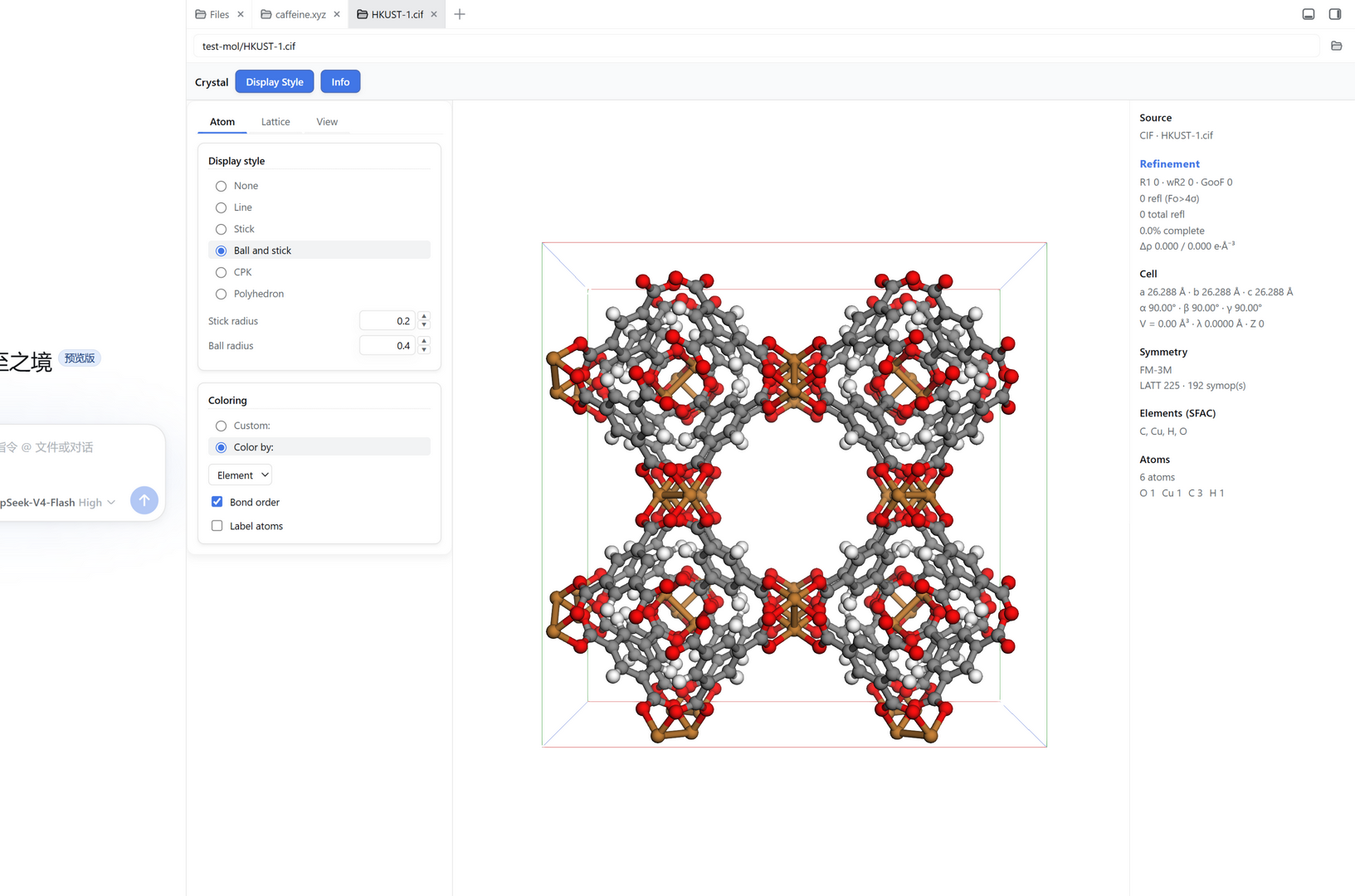
Clicking Display Style slides in a dialog on the left (so it never covers the parameter panel on the right). The Atom tab controls how atoms and bonds are drawn:
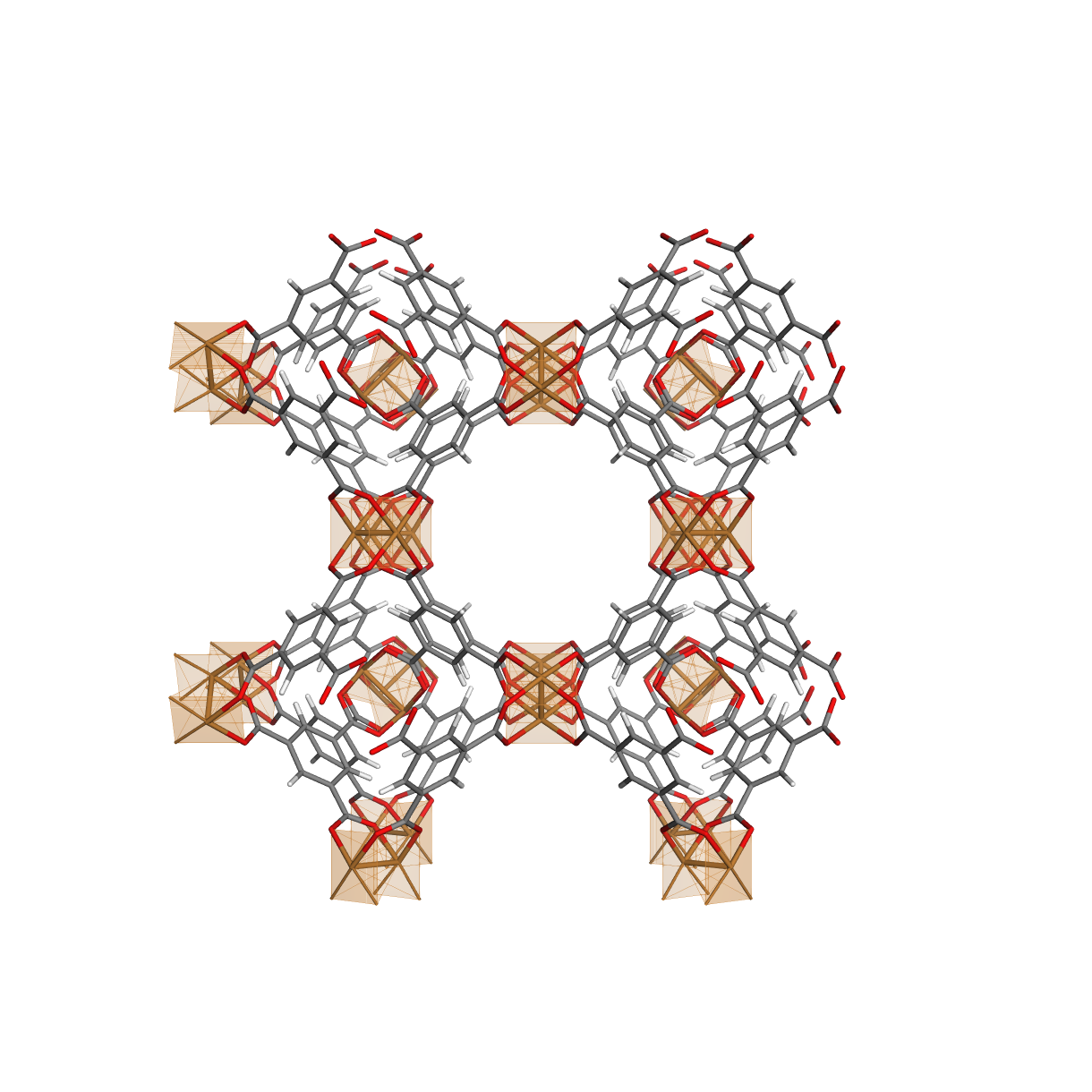
Switching to Polyhedron replaces the display with the coordination polyhedra: the framework is shown as thin sticks (bonds only), and each metal centre is drawn as a small sphere with its first coordination shell as a semi-transparent polyhedron plus the metal-to-ligand bonds — e.g. the Cu paddlewheel centres in HKUST-1 show their square-planar (4 × O) coordination. This is the "show me the coordination geometry" view that makes the "octahedron? square plane? tetrahedron?" call immediately. Centers are detected automatically by chemical character (a metal / low-electronegativity atom surrounded by donor ligands), so it works for both periodic frameworks (CIF) and molecular complexes (XYZ/PBD).
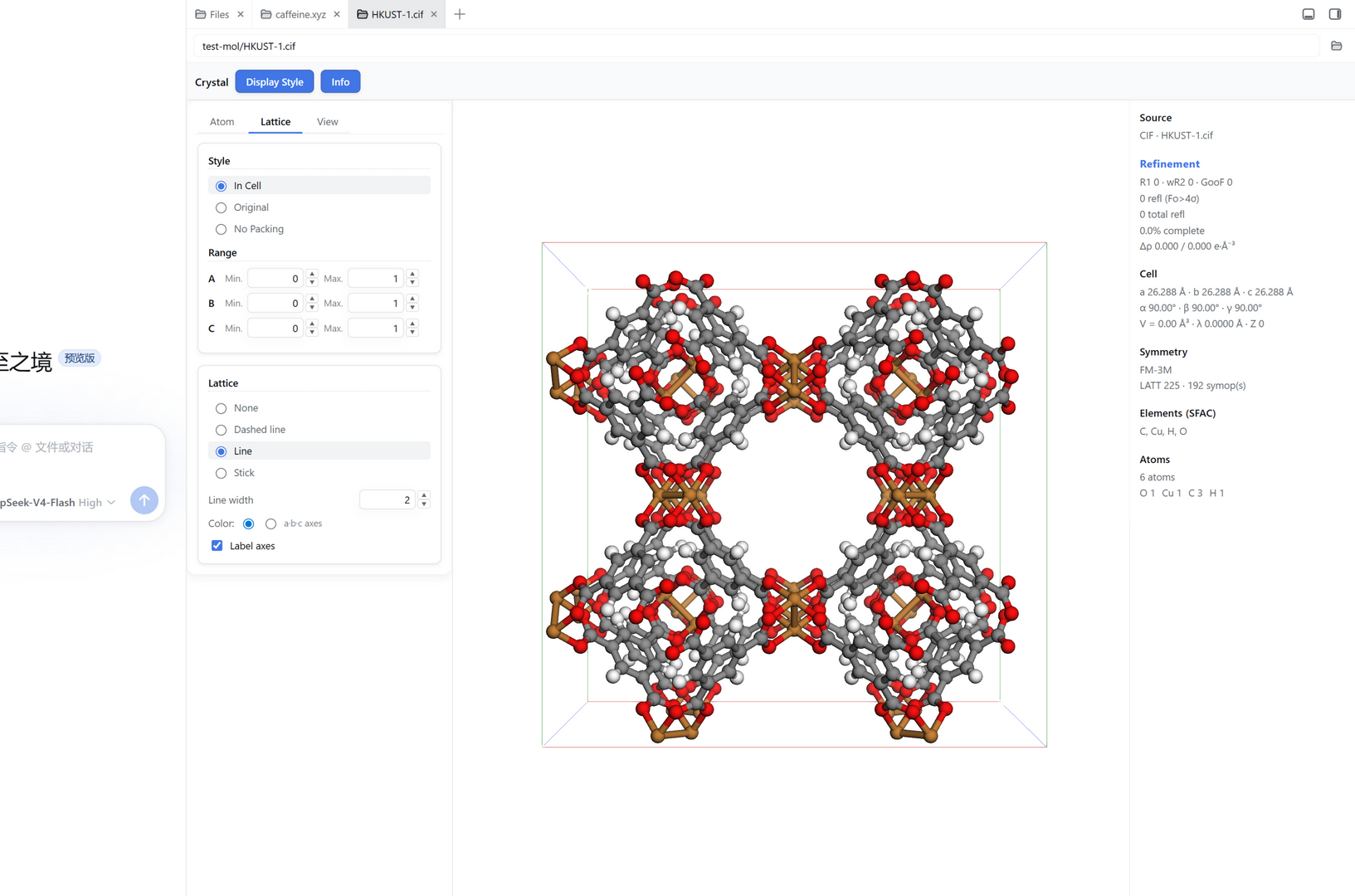
The Lattice tab exposes two material ideas at once:
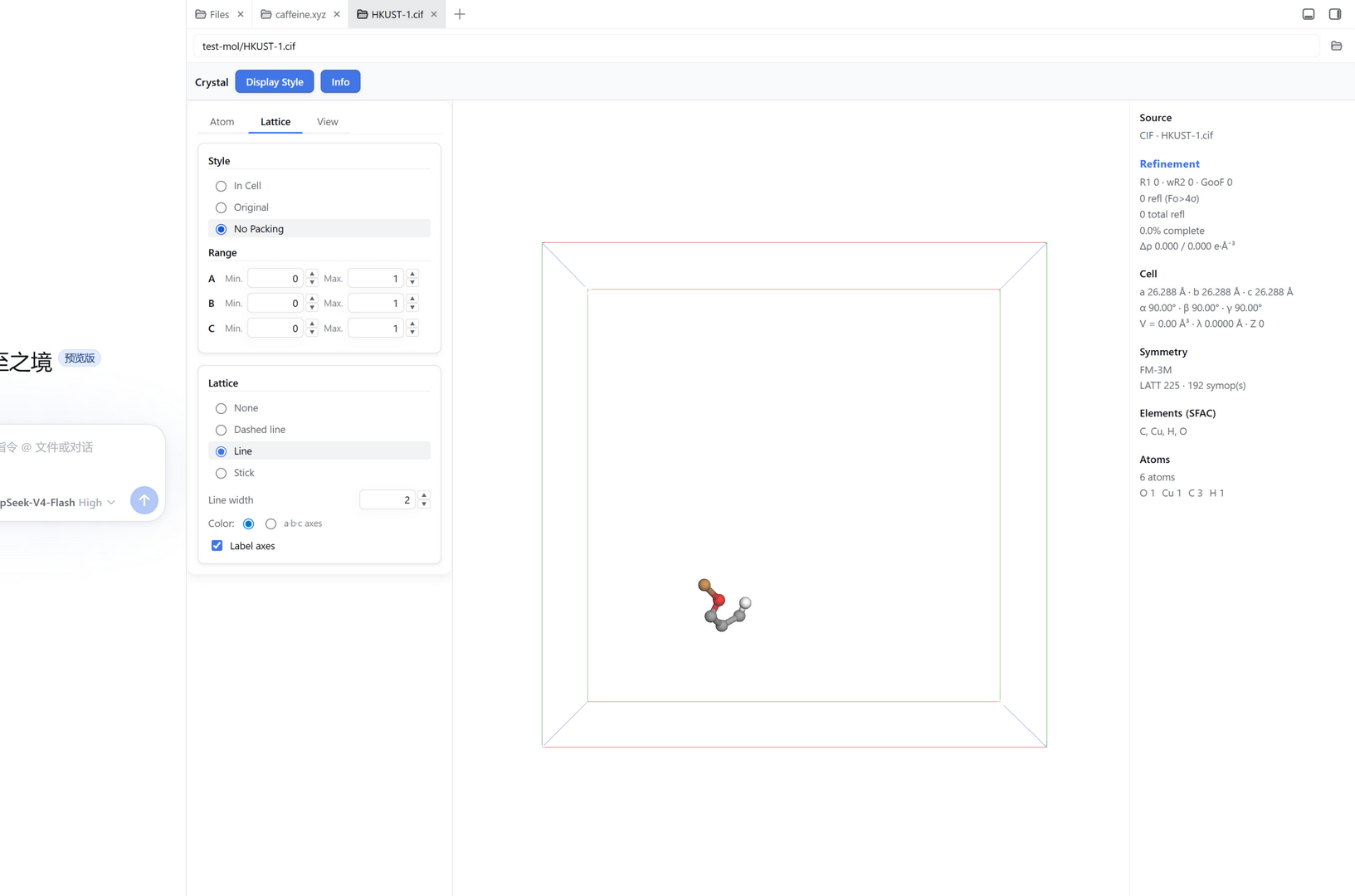
The No Packing mode is a key structure-solution helper. Here the same HKUST-1 CIF shows only the single asymmetric unit (a Cu paddle-wheel fragment) in a nearly-empty cell — versus the full symmetry-packed cell above. This is what you inspect when you need to see an atom's true fractional coordinates and connectivity without the clutter of symmetry mates.
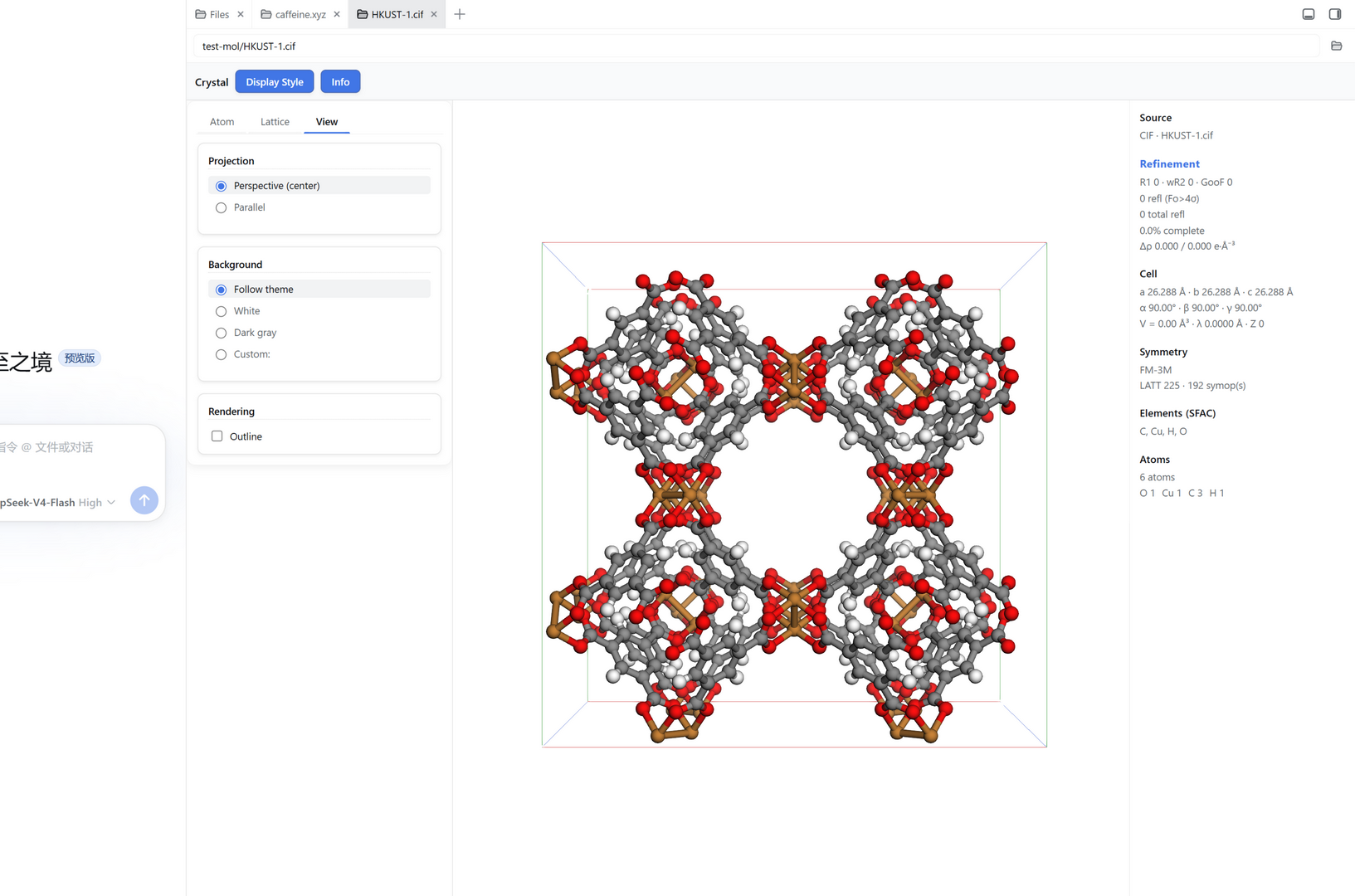
The View tab controls the projection and the canvas background:
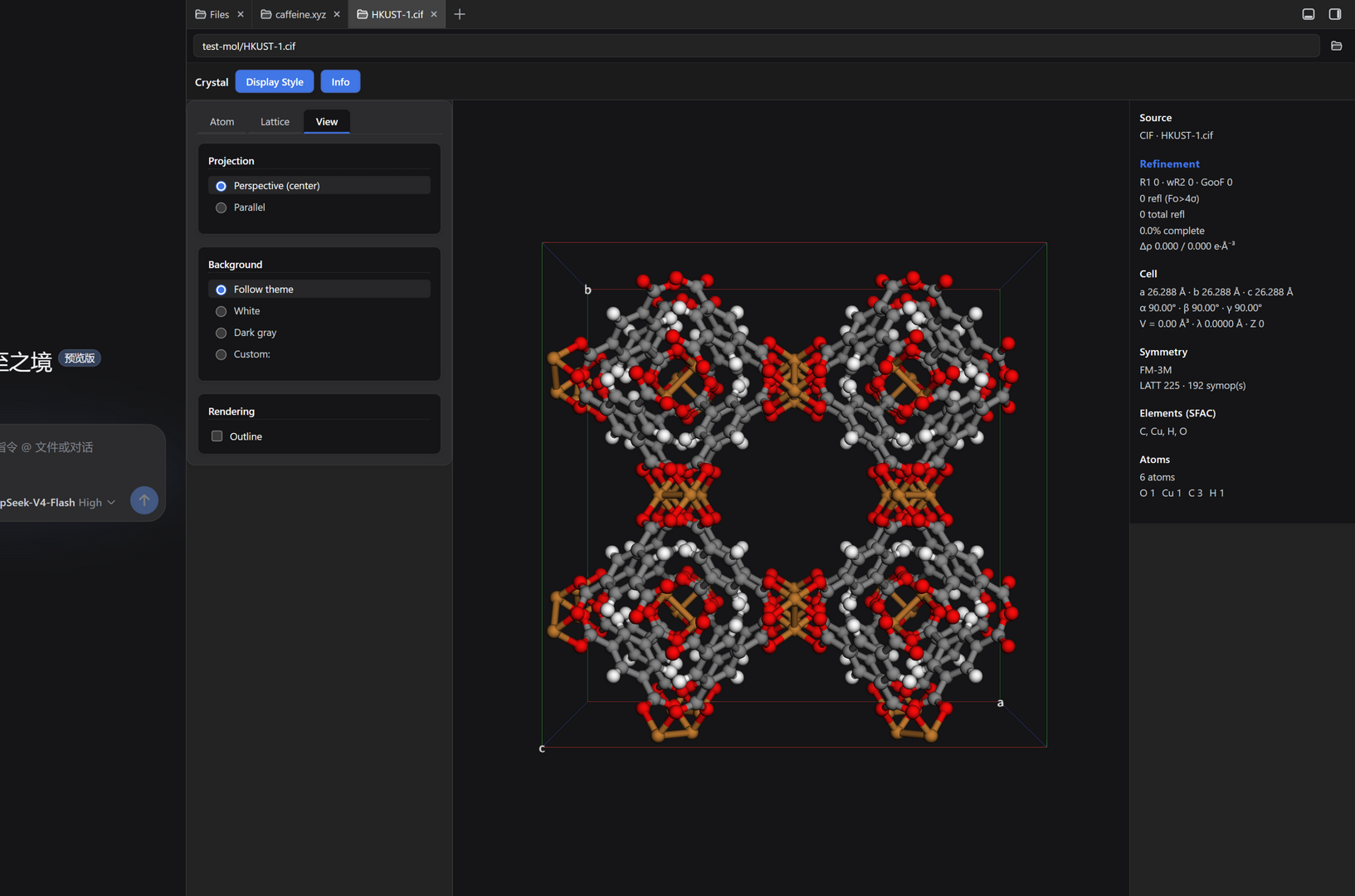
The whole plugin — the parameter panel, the Display Style dialog and the 3D canvas background — consumes DSH --dsw-* design tokens and follows the harness theme. Here the same HKUST-1 structure is shown with the harness switched to dark and the background set to Follow theme: the canvas backdrop becomes a dark gray instead of white, and every panel re-themes in lockstep. A MutationObserver on the theme attribute re-renders the background live, so toggling the theme updates the view instantly.
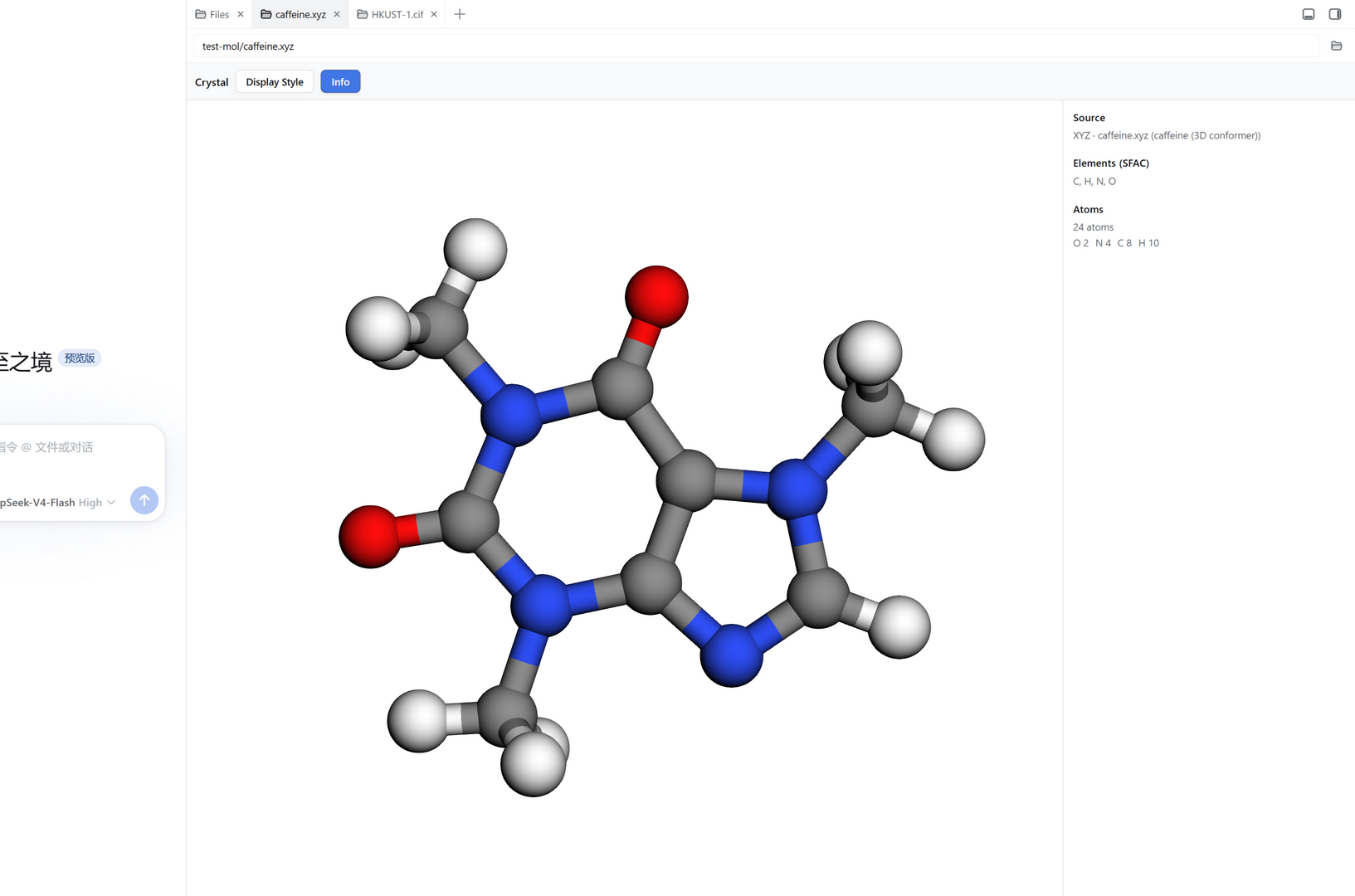
The plugin adapts to whether the file is a periodic crystal (has a unit cell + symmetry) or a non-periodic molecular structure. Open the caffeine molecule (a 3D conformer) and the difference is immediate:
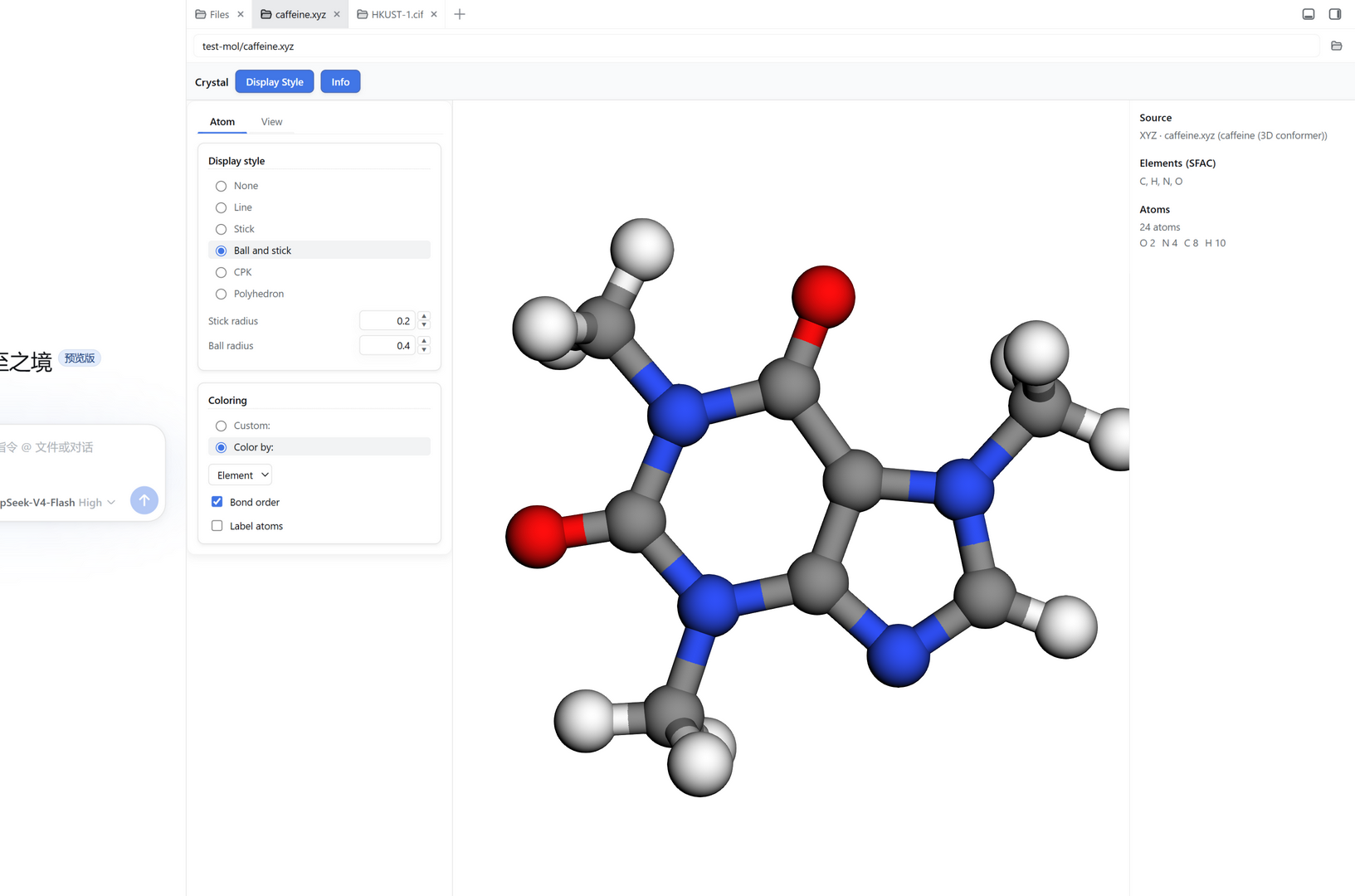
| Format | Role | Notes |
|---|---|---|
.cif |
Crystallographic Information File | Self-written parser + symmetry-expanded clean CIF re-emission for 3Dmol. |
.ins / .res |
SHELX input / output | Self-written parser reads unit cell, symmetry, SFAC/UNIT, atoms, Q peaks, MOLE groups, aniso / riding H; the .res REM block supplies R1 / wR2 / GooF, reflection counts and Δρ. Displayed in 3D; no screenshots are shown for this format in the README. |
.xyz |
Cartesian coordinates | Lightweight parser for the panel (non-periodic). |
.mol |
V2000 molfile | Lightweight parser for the panel; raw text fed to 3Dmol (bond order supported). |
.pdb |
Protein Data Bank | Lightweight parser for the panel; raw text fed to 3Dmol. |
.hkl |
Reflection data | Not parsed (not needed for 3D display; R factors come from .res / .lst). |
The .ins / .res (SHELX read/write) path fully supports round-tripping: parse the structure, view it in 3D, and read back the unit cell, symmetry, atoms, Q peaks and refinement statistics into the panel.
tsdown 0.22.14 (uses Promise.withResolvers). CI runs Node 22.corepack or local install).pnpm install
pnpm build # emits lib/index.js (host) + lib/client.js (client)
pnpm typecheck
.npmrcsetsauto-install-peers=falsebecause DSH host packages (@deepseek-ai/cordis,dsh-better-sidebar,react) are resolved at runtime from the DSH profile's hoistednode_modules, not from the npm registry.
dsh plugin --profile <name> add dsh-crystal-viewer
# or, for local development:
dsh web --patch /abs/path/cordis.patch.yml
Then open the DSH web UI, click the Crystal entry (sidebar + menu / bottom dock), and open a structure file — either via the path box or by clicking a .res/.cif/.xyz in the Files tree.
Hard-refresh the browser (Ctrl+F5) after installing or updating the client bundle.
This project stands on the shoulders of several excellent open-source projects. We are deeply grateful to their maintainers and contributors — LICENSE holds this project's MIT license, and NOTICE records the full legal text of every third-party license we inherit.
The dsh-crystal-viewer plugin itself is released under the MIT License (see LICENSE). You are free to use, copy, modify, merge, publish, distribute, sublicense and sell it, under the MIT conditions.
GLViewer adds models, applies styles, draws the unit cell and handles CIF.SYMM generators + LATT lattice translations) so 1×1×1 cells of high-symmetry space groups are fully populated.GLmol – Molecular Viewer on WebGL/Javascript, v0.47).NOTICE.ctx.betterSidebar tab API; this plugin registers its crystal-viewer tab through it.Verified and developed against DeepSeek Harness (DSH) v0.1.1-rc.2 (stable, port 3080) and v0.1.2-alpha.1 (developer channel, port 3081). The plugin declares engines.dsh: ">=0.1.0" in dsh.plugin.json, targeting the DSH dsh-external bundle/plugin interface.
Recommendation: run the DSH developer channel / alpha profile for the newest harness APIs, or the stable
0.1.1-rc.2profile — both are supported. Hard-refresh the browser (Ctrl+F5) after installing/updating.
dsh-better-sidebar — required for the tab entry. This plugin registers its crystal-viewer tab through ctx.betterSidebar. Verified against v0.17.1 (optional peer; graceful degradation if absent).** — DSH client runtime / locale / UI-slots / conversation / modules modules are injected by the DSH profile (client bundleinjectlist inpackage.json`dsh field)..res rows labeled Q#); structures without Q peaks simply have no Q-peak layer.LICENSE and the attribution section above.dsh-crystal-viewer/
├── src/
│ ├── index.ts # host half: /crystal-viewer/api/read route (optional fallback)
│ ├── client/
│ │ ├── index.tsx # client half: registerTab (entry, same mechanism as Terminal/Browser)
│ │ ├── CrystalViewer.tsx # 3D canvas (3Dmol): atom model + Q-peak model + Display Style + toolbar
│ │ ├── CrystalEmbed.tsx # file previewer (clicking a structure file in the Files tree)
│ │ ├── CrystalPanel.tsx # parameter panel (7 groups, incl. Refinement + Q-peak stats)
│ │ ├── display/ # displayStyle.ts (settings model + math) / render.ts / DisplayStylePanel.tsx
│ │ └── useCrystalModel.ts# path/format → structure → CrystalModel/ViewerModel
│ └── crystal-parse/
│ ├── shelx.ts # self-written .ins/.res parser (CELL/symmetry/atoms/Q peaks/MOLE)
│ ├── model.ts # CrystalModel / ViewerModel / QPeak types
│ ├── assemble.ts # parsed structure → CrystalModel/ViewerModel + formatFromPath
│ ├── cif.ts # CrystalModel → atomCif/qPeakCif + symmetry expansion (group closure + LATT)
│ ├── cif-parse.ts # generic .cif parser
│ ├── xyz-parse.ts # generic .xyz parser
│ ├── mol-parse.ts # generic .mol (V2000) parser
│ ├── pdb-parse.ts # generic .pdb parser
│ ├── parse.ts # unified dispatch (ins/res/cif/xyz/mol/pdb)
│ └── lst.ts # .lst refinement statistics
├── docs/
│ └── assets/ # README screenshots
├── LICENSE # MIT (this project)
├── NOTICE # third-party notices (3Dmol.js, GLmol, React, better-sidebar)
├── package.json / dsh.plugin.json / cordis.patch.yml
├── tsconfig*.json / tsdown.config.ts
└── README.mdLICENSE).We are deeply grateful to the maintainers of these projects. If you use this plugin, please respect their licenses as well — the full third-party texts are in NOTICE.
Thank you to all open-source maintainers whose work made this possible.
CLASSIFICATION EVIDENCE
系统优先读取 GitHub Topics,再与站内分类词典和词根规则比对。当前命中: 无有效分类标签。
deepseek-ai
DeepSeek Harness: Everything is a Plugin.

anywhere-labs
为 DeepSeek Harness (DSH) 插件生态打造的现代化桌面端解决方案。万物皆「插件」,桌面本身也是「插件」。

awesome-dsh-plugin
A curated list of plugins for DeepSeek Harness (dsh) · DeepSeek Harness 插件精选列表