
模型与 MCP
待识别

rea
morluto
Reverse engineer anything with agents, from app behavior down to native binaries.
PROJECT TOPICS
INSTALL REFERENCE
dsh plugin --profile web add github:Noob-stupid/dsh-connection-card-host
该命令指向仓库当前默认分支;尚无绑定当前 commit 的完整验证结果。
PROJECT README
English | 中文
Contribute: Card & adapter list → · Contribution guide → · 中文清单 Any ordinary DSH plugin can be listed as a card. One row per PR, with evidence.
Makes a connection a first-class object in DSH: sessions are nodes, a connection is the container, cards are connection-scoped plugins — a "connection-level plugin host".












Why this plugin: other plugins hard-code their capabilities inside the plugin; this one turns capability into cards you install on a connection — mounting, unmounting and isolation are all at connection granularity.
Running several DSH sessions at once (one researching, one coding, one running experiments) is normal. What's missing isn't "sessions can see each other" as a feature — it's a programmable relationship layer between DSH sessions: without a "relationship object" to hang things on, permission boundaries, shared premises and loadable capabilities have nowhere to live.
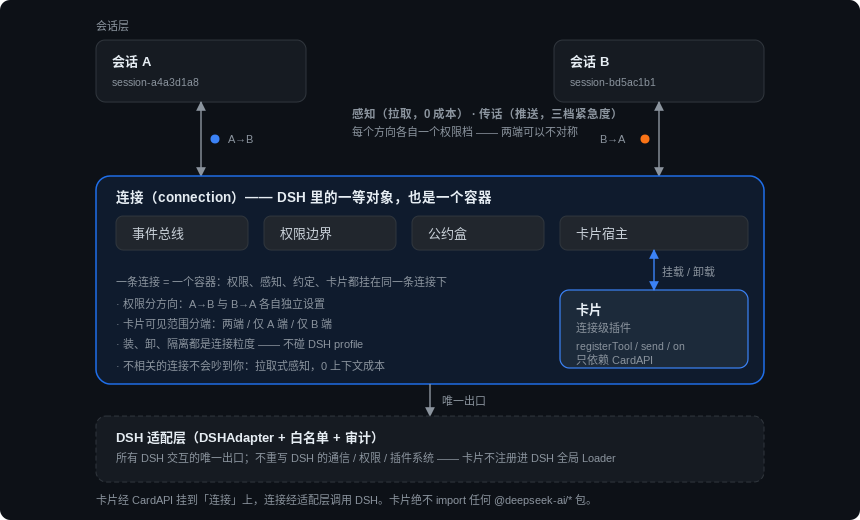
On top of that relationship layer, the two ends see each other, talk to each other and share tools — without getting in each other's way.
|
In practice (screen recording) 
|
Interaction structure (diagram) 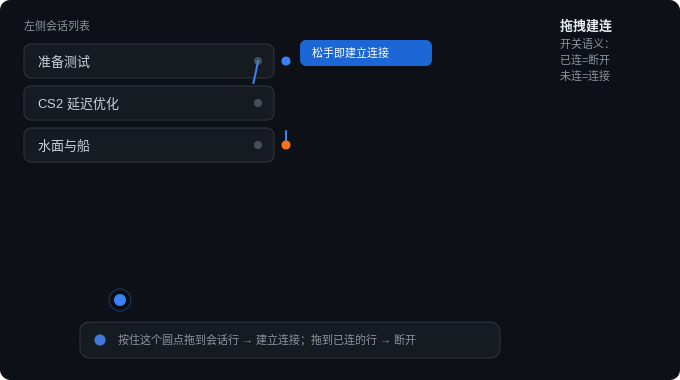
|
Left: the real thing · Right: the same action as an interaction diagram, showing the toggle semantics
| See each other | Look up which files the other session is editing, how far its plan has got, what tools it last used — collected automatically, no effort required from the other side |
| Talk to each other | Send a message with an urgency you choose: notify only (no interruption) / queue / interject / preemptive interrupt (fourth tier, off by default) |
| Share tools | Mount cards on a connection: a card can provide tools to the sessions, even with tens of MB of real dependencies |
| Shared premises | A "convention box" holds what you agreed on: interfaces, units, naming, who owns what |
| Stay out of the way | Awareness is pull-based — zero cost unless the other side asks. Unrelated connections never interrupt you |
Two examples of the same relationship layer applied: session A asks session B what it is doing right now, or session B hands session A a tool that only exists on that connection.
… on a session row)
and drag it onto a row in the session list.|
How to start, and the toggle semantics
|
Drag from a session row → after connecting (recording) 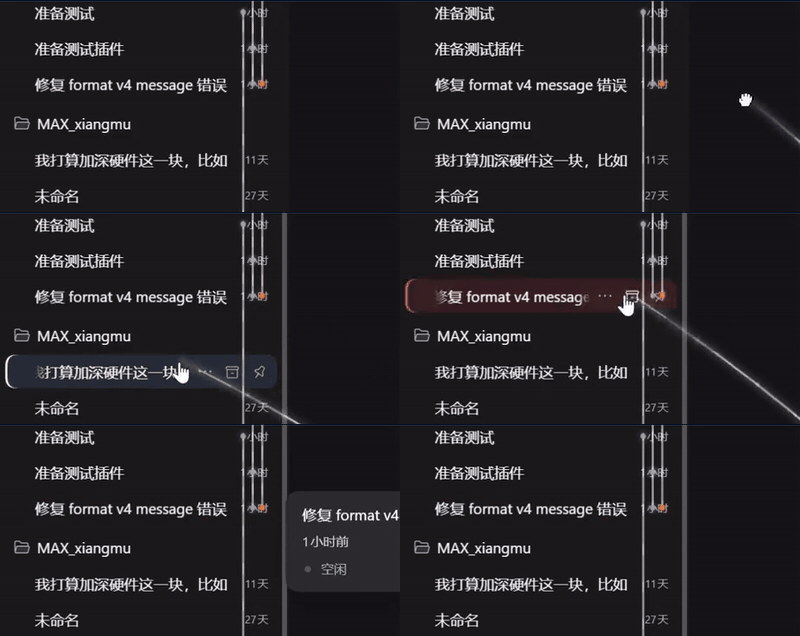
|
connection_peer_work itself.Once connected, a rail appears beside the session rows, with a coloured dot at each end — that's the permission for that direction:
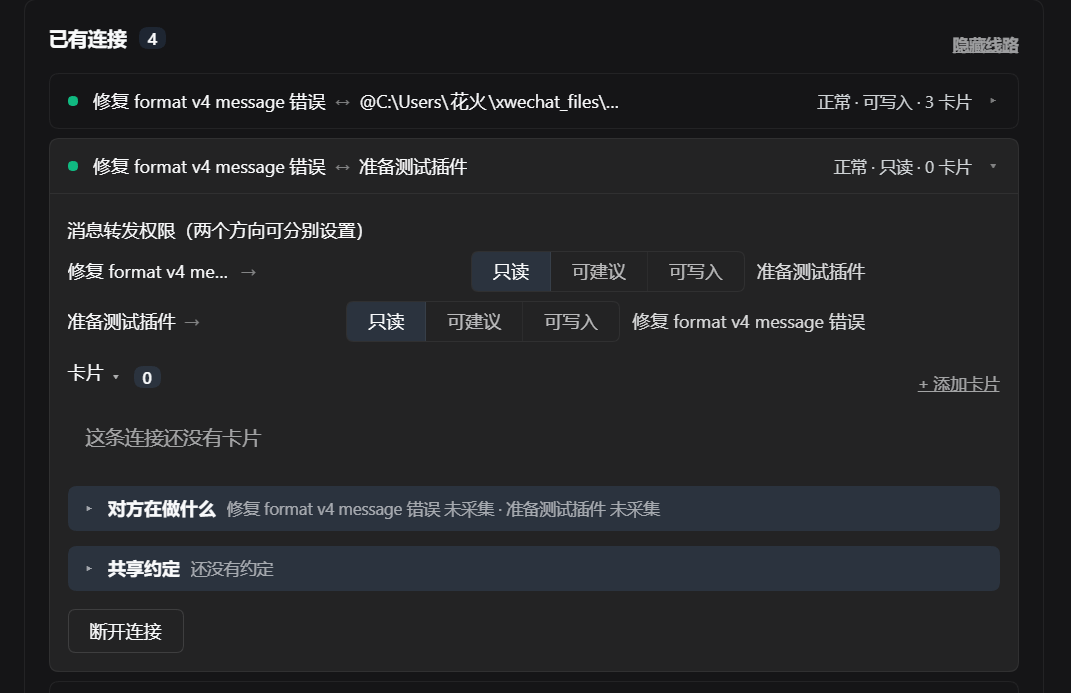
Connections persist: they are restored on the next DSH start.
These are separate, because their costs differ enormously:
| Layer | Mechanism | Enters the other's context? | Forces the other to act? | Cost |
|---|---|---|---|---|
| A. Work state | pull (the other asks) | only when it asks | ❌ no | 0 |
| B. Convention box | pull (the other asks) | only when it asks | ❌ no | 0 |
| C. Messaging | push (into its inbox) | unconditionally | ✅ always | every message |
The key fact: in DSH, delivering a message forces the other session to run a turn — the agent loop has no "saw it but ignored it" state. So "talking" and "being aware" have to be built separately: to make the other side know, use A/B; only to make it act, use C.
Collected from runtime events — it asks nothing extra of the model:
【session-1a2b3c4d】
status: running a command (2s ago)
recently touched: <workspace>/src/example.js
progress: turn 12 / step 4What you agreed on: interface signatures, units, coordinate systems, naming, who owns what.
Editable in the panel; sessions read and write it with connection_conventions / connection_declare.
| Urgency | Under the hood | What the other sees |
|---|---|---|
quiet |
inject |
placed in context without waking it — it sees the message next time it works, uninterrupted |
normal |
followup |
queued — it sees the message once it finishes what it's doing |
urgent |
steer |
interjected — inserted into the turn it's currently running, read immediately |
preempt |
steer + optional cancel |
preempted — interrupts the turn it's running (fourth tier, off by default; falls back to urgent when the conditions aren't met, and the message is still delivered) |
urgent on an idle peer degrades to queued automatically (the next turn starts
immediately, so the effect is the same), and never fails.
preempt conditions — all of them must hold, otherwise the message degrades to urgent
and is still delivered (it never fails):
| Condition | Value |
|---|---|
| Connection permission | write required (a read-only connection must not be able to stop the peer's work) |
| Rate limit | at most once per connection every 5 minutes |
| Peer is executing a tool | never interrupts — a cancelled half-finished tool leaves a dangling call |
| Peer idle, or its state unknown | does not interrupt; delivers only |
preemptis destructive by design: the interrupted turn loses the work it had already done. When you cancel a turn, passkeepInbox— the default clears the inbox, dropping the user's own queued input together with messages from other sessions.
A card = a plugin mounted on a connection, with per-side visibility.
| DSH plugin | Card | |
|---|---|---|
| Mounted on | the whole DSH (profile) | one connection |
| Who can call it | every session | only sessions on that connection |
| Visibility | global | per side: both / A only / B only |
| Lifetime | DSH start/stop | mounted and unmounted with the connection |
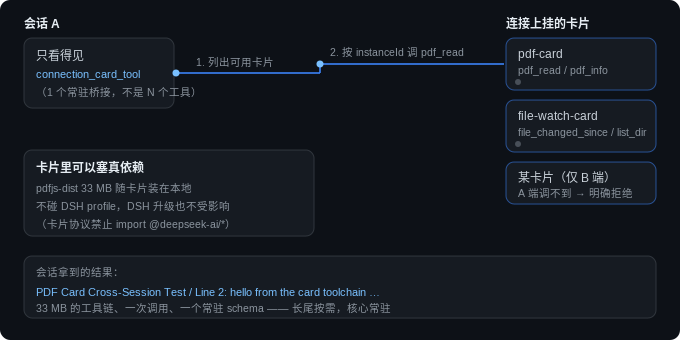
Tools registered with api.registerTool(name, fn) inside a card are reachable by sessions
on that connection through one resident bridge tool:
connection_card_tool                                  ← the only resident one (1 schema)
  ├─ no `tool` argument → list the cards and tools visible to *your* side of this connection
  └─ with `tool`        → call it
Why one bridge instead of one schema per tool: the latter would make every session pay a resident cost for every card tool, while cards are mounted and unmounted dynamically. The bridge costs one schema, and it's the natural place to enforce visibility.
A card may ship its own dependencies (tens of MB is fine) and is installed under
$DSH_HOME/connection-cards/cards/, without touching the DSH profile.
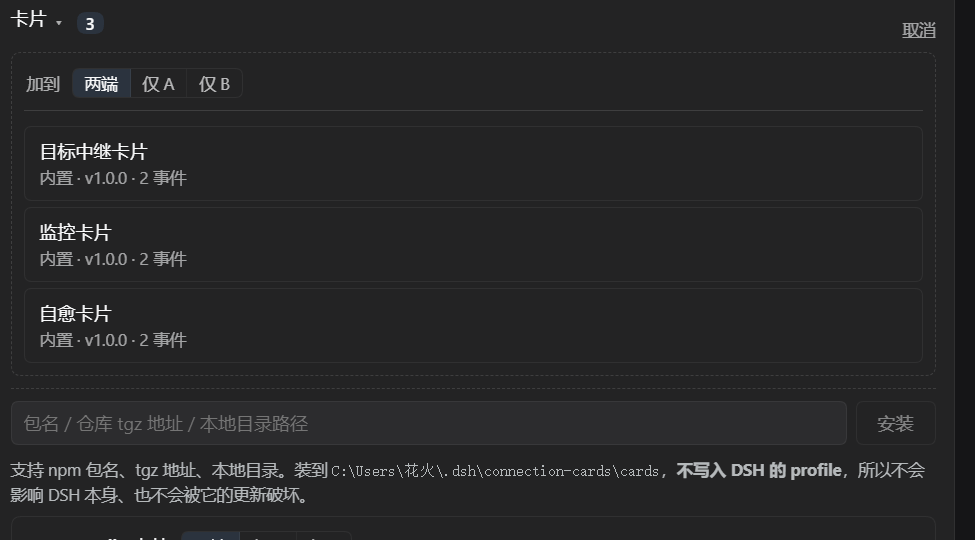
A card installs from one of three sources — the same three as the card picker in the connection panel:
| Source | What you give it | How it works |
|---|---|---|
| Package name (registry) | monitor-card / @scope/monitor-card |
pulls the tarball from the registry (one HTTPS GET) |
| Repo tgz URL | https://example.com/card.tgz |
download, then unpack |
| Local directory | D:\my-cards\monitor-card |
copied directly |
「检查更新」→「↑ 更新到 x.y.z」/「已是最新」/「无法检查」"Couldn't check" is never shown as "up to date" — that would be lying.
You can download and install external DSH-session plugin cards directly, inside DSH, and use them immediately. This is not an "official card marketplace", and it is not a curated store you submit to — it is open distribution: any package written against the card protocol can be installed into your own DSH from the three sources above.
Installed means usable — once a card is mounted on a connection:
connection_card_tool bridge) immediately — no DSH restart, no DSH config change:
no pnpm, nothing written to dsh.profile.bundles$DSH_HOME/connection-cards/cards/<id>/, fully isolated
from the DSH profileThird-party / community cards are not affiliated with the DSH project; this plugin offers no review, no endorsement, and there is no such thing as an "official directory".
A card is an ordinary DSH plugin, so not every plugin is card material. Whether a candidate can be mounted on a connection, and how much of it survives, is decided by the specifications below. The card picker labels candidates adapted / capability / local / global / undecided in advance, and labels only — it never blocks: mounting is always allowed, and the verdict is heuristic.
| Gate | Requirement | If it fails |
|---|---|---|
| ① Scope | Registers into connection-scoped positions (conversation.* / message.* / input.*) or is pure capability (no client half) |
Registers into App-scoped positions (sidebar / layout / settings page / themes / title bar / workspace) → not recommended as a card: a global UI does not fit in a connection-scoped panel and collides with the App layout |
| ② Module | Every dependency in the import closure of the host entry resolves | Mount refused, classified as fatal (a host capability is missing — the card needs redesign) or optional (a third-party dependency is missing — adding it is enough) |
| ③ Capability | inject ⊆ {tools, effect, llm, prompt} |
Mount refused — the card asks for host services this plugin does not have. Refusing is the correct behaviour; the answer is not to widen the capability surface |
Scope of gate ② — only files the entry actually loads at runtime count:
tests/, bin/, client/build.mjs and *.d.ts imports are not runtime dependencies.
No pnpm, no build step: the host never installs dependencies and never builds a package. A card whose build artifacts are not committed (source only) therefore cannot be mounted — the refusal says so.
mountable ≠ source readable ≠ slots registered ≠ rendered| Case | Result |
|---|---|
Uses only slots / effect |
Renders ✓ |
Needs client hooks (useScene / useEnabled / locale / configForms …) |
Mounts and registers its slots, but fails to render — the reason is shown, never a blank panel ✓ |
| Client bundle size | up to 32 MB (a self-contained bundle of a few MB is normal: inlined fonts and assets) |
| Component invocation | createElement(component, {}) — no props are passed, so a component that needs slot props fails and is caught by the error boundary |
| Supported | Not supported | |
|---|---|---|
| Host tools | api.registerTool(name, fn) → sessions call it through connection_card_tool |
tools registered into DSH's global loader |
| Panel | optional HTML rendered host-side | arbitrary browser-side execution inside the panel |
| Client UI | components that use slots / effect |
components that need client hooks, or slot props |
| Connection events | on(event, handler) / emit(event, data) |
cross-connection events |
| Messaging | send(kind, text) / read() as one side |
automatic mirroring of session content (see Configuration) |
| Dependencies | any dependency vendored inside the card | running pnpm or a build step on your machine |
| Distribution | registry / repo tgz / local directory | a curated marketplace or an approval step |
| Isolation | per-side visibility, version gating, crash isolation for import / apply |
a card that throws taking down the host |
| Boundary | Meaning |
|---|---|
| Per-side visibility | Scope is per side: both / A only / B only. Visible to A ≠ visible to B; the side that can't see it gets a refusal with the reason if it calls anyway |
| Version gating | A DSH version mismatch is refused clearly, with the reason — rather than installing and crashing later. Cards have a second guard: the CardAPI version (a card requiring a newer one is refused at mount time, with the reason) |
| Crash isolation | An exception from a card's import / apply does not take down the host |
| Not rewritten | We do not rewrite DSH's transport, permissions or plugin system, and a card is not registered into DSH's global loader |
The built-in cards are a starting point, not the ceiling. Any ordinary DSH plugin can be mounted as a card, and a card is just a package — so this list can grow from outside this repository.
Source of truth: awesome/README.md (send PRs there — one row per PR,
guide) · 中文清单
Shipped with the plugin — pick one in the card candidate list.
| Card | What it does | Needs (read / write) | Events |
|---|---|---|---|
Goal relay (goal-relay-card) |
Relays a goal and its status to the peer so both sides track the same "what are we doing" | goal_status / relay_goal |
goal_updated, goal_completed |
Monitor (monitor-card) |
Watches the peer's preset state and session activity; raises preset_error / session_idle |
preset_status, session_log / — |
preset_error, session_idle |
Self-heal (self-heal-card) |
On preset_error, asks the peer to repair its preset, then reports the outcome |
preset_status / repair_preset |
preset_error, preset_repaired |
Connection etiquette (connection-etiquette) |
Teaches the four urgency levels and forwards notes with the urgency you choose | — / send_message |
— |
| Plugin | What it brings to the connection | Status |
|---|---|---|
dsh-client-ui-voice |
A push-to-talk voice input control | ✅ mounts · UI captured and rendered · 1 slot |
gal-view |
A model/scene viewer panel | ⚠️ mounts · slots registered · rendering needs client hooks |
Listed so you do not spend an evening on it. The panel's refusal names the exact reason.
| Plugin | Why it cannot mount (today) |
|---|---|
dsh-usage |
Its host half imports 11 packages this plugin does not provide (credentials, webServer, session, …) — it needs a different kind of host, not a card |
| Sidebar / theme / layout replacements | Global UI, not connection-scoped: they belong to the app. The candidate list marks them global |
None listed yet — the first one could be yours.
A card is how one plugin teaches a connection: tools for that session, events between the two sides, and UI that sits next to the conversation instead of taking over the app.
Three layers, with hard boundaries — each talks only to the one below:
┌─────────────────────────────────────────────────────────────┐
│  Card layer (connection-scoped plugins)                     │
│  Depends only on CardAPI; NEVER imports @deepseek-ai/*      │
│  → DSH upgrades don't affect cards; our CardAPI changes do  │
│    (guarded by a version declaration)                       │
├─────────────────────────────────────────────────────────────┤
│  Connection layer (this plugin)                             │
│  connections / permissions / awareness / conventions /      │
│  card host / message delivery                               │
│  → on a DSH upgrade, this is the only layer to change       │
├─────────────────────────────────────────────────────────────┤
│  DSH adapter layer (DSHAdapter + allowlist + audit)         │
│  the single exit point for all DSH interaction              │
└─────────────────────────────────────────────────────────────┘One line, one dot at each end; the colour is the permission for that direction — the two directions are independent, so you can have "A may send, B may only watch":
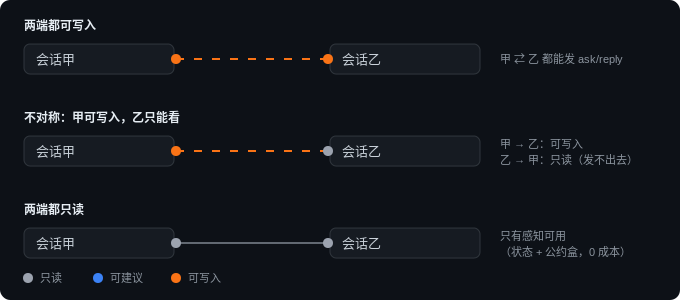
| Direction permission | Allows |
|---|---|
| Read-only | awareness and the convention box (both are pull-based, and independent of permission) |
| Suggest | messaging that does not modify the peer's work |
| Write | messaging that can change the peer's behaviour, including preempt |
Lowering a permission takes effect immediately; raising one requires confirmation from the side being granted it. Refusals explain themselves.
| Item | Cost | Notes |
|---|---|---|
| Awareness (layers A + B) | 0 context | pull-based; costs nothing unless the peer queries |
| Card tools | 1 resident schema | instead of one per card tool |
| Unrelated connections | 0 interruptions | connecting doesn't wake anyone; unrelated sessions carry on |
| Resident tool schemas | 5 connection_* tools, hidden from sessions with no connections |
tool schemas are filtered per session scope, so a session with no connections carries none of them |
A session that has at least one connection carries the five connection_* tool schemas.
From npm (recommended, version-pinnable):
dsh plugin --profile web add @noob-stupid/dsh-connection-card-hostPinned to a version — use the tgz attached to a Release:
dsh plugin --profile web add https://github.com/Noob-stupid/dsh-connection-card-host/releases/download/<tag>/noob-stupid-dsh-connection-card-host-<version>.tgz

# the same tgz, downloaded first — identical result
dsh plugin --profile web add ./noob-stupid-dsh-connection-card-host-<version>.tgz
Straight from GitHub (installs the latest commit on the default branch, not a pinned version):
dsh plugin --profile web add github:Noob-stupid/dsh-connection-card-host

# same thing, GitHub shorthand (the github: prefix is optional) — a slash means a GitHub repo
dsh plugin --profile web add Noob-stupid/dsh-connection-card-host
Prerequisites
pnpm on PATH — dsh plugin shells out to it.peerDependencies declares @deepseek-ai/dsh >=0.2.0-rc.1 <0.3.0 (plus
@deepseek-ai/cordis and the two @deepseek-ai/dsh-client-* packages). DSH gates on version
at install time and refuses clearly, with a reason, rather than installing and crashing later.peerDependenciesMeta.optional, so that installing by package name
adds exactly one package and does not drag the @deepseek-ai/* dependency tree into
your profile. This plugin *imports no `@deepseek-ai/package at runtime** (the two browser-side ones are injected by DSH'sModuleLoader), and marking them optional **does not weaken the gate** — DSH'sevaluatePluginCompatibilityreads only peerDependencies. Details in [docs/compatibility.md`](docs/compatibility.md).lib/ is committed and shipped, so the install arrives ready to load — there is no build step
and no build script to authorize.Build a connection — the quick start covers the two drag gestures and the sidebar panel. The drop target is the toggle, and connections are restored on restart.
Set permissions — per direction, in the connection panel. Lowering takes effect immediately; raising needs the other side's confirmation.
Let the sessions work — with a connection in place the sessions get the
connection_* tools:
| Tool | Purpose |
|---|---|
connection_peer_work |
read the peer's work state (layer A) |
connection_conventions |
read the convention box (layer B) |
connection_declare |
write the convention box (layer B) |
connection_send |
send a message, with an urgency (layer C) |
connection_card_tool |
list and call the tools the cards on this connection provide |
Awareness tools (connection_peer_work, connection_conventions) are read-only and cannot
modify the peer.
Installing the plugin is enough: it registers a connection-card skill through DSH's
skill-provider channel, so any agent in that install finds instructions for the connection
tools in its session catalog — no copying files into ~/.dsh/skills/ and no extra step.
skills/connection-card.md.quiet / normal / urgent / preempt).~/.dsh/skills/connection-card.md.Installing the plugin is enough: it registers a connection-card skill through DSH's
skill-provider channel, so any agent in that install finds instructions for the connection
tools in its session catalog — no copying files into ~/.dsh/skills/ and no extra step.
skills/connection-card.md.quiet / normal / urgent / preempt).~/.dsh/skills/connection-card.md.There is no config file for this plugin — it takes no settings schema. Everything that is configurable is configured in the UI, and everything else lives in one directory:
| Where | Holds |
|---|---|
| Connection panel (sidebar) | connections, per-direction permissions, the convention box, card mounting |
| Card picker (connection panel) | installing and updating cards |
$DSH_HOME/connection-cards/ |
all persistent state: connections.json, installed cards, the tamper-evident audit.log |
Two behaviours are deliberately off by default and are enabled by an explicit action:
| Behaviour | Default | How to turn it on |
|---|---|---|
preempt (preemptive interrupt) |
off | requires write permission on the connection (see layer C) |
| Third-party card adaptation | off | create $DSH_HOME/connection-cards/adapter.enabled; delete the file to turn it back off |
Automatic mirroring of session content is permanently off — nothing is forwarded between
sessions unless a session calls connection_send. Awareness (layers A and B) is the pull-based
alternative.
A card is just an npm package with a dshCard manifest:
{
  "name": "my-card",
  "version": "1.0.0",
  "main": "index.js",
  "dshCard": { "id": "my-card", "name": "My card", "entry": "index.js", "api": 1 }
}
// index.js — NEVER import anything from @deepseek-ai/*; go through `api`
export function apply(api) {
api.log(`mounted (scope=${api.scope})`)
// provide a tool to sessions on the connection
api.registerTool('greet', async (args) => {
return `Hello, ${args?.name ?? 'world'}`
})
}
// panel HTML (optional)
export function renderPanel(api) {
return `<div>visible to: ${api.scope}</div>`
}api member |
Meaning |
|---|---|
registerTool(name, fn) |
register a tool → sessions call it via connection_card_tool |
send(kind, text) / read() |
send and receive connection messages as one side |
on(event, handler) / emit(event, data) |
connection-scoped events |
scope |
which side this instance serves (both / a / b) |
log(...) |
write to the host log |
dshCard.api declares the CardAPI version the card needs (defaults to 1):
This is our own compatibility guard: cards don't depend on DSH internals, so a DSH upgrade doesn't affect them; but changing our
CardAPIdoes — and DSH's version gate can't see that layer.
See docs/card-protocol.md for details.
Remove the plugin
dsh plugin --profile web remove @noob-stupid/dsh-connection-card-hostRemove its state — the plugin keeps everything under one directory, so removing it also removes your connections, your installed cards and the audit log:
rm -rf "$DSH_HOME/connection-cards"Keep that directory if you intend to reinstall and want your connections back.
Do I need a connection before I can use cards? Yes. A card is mounted on a connection, and only sessions on that connection can call the tools it provides.
Does mounting a card change my DSH profile?
No. Cards install under $DSH_HOME/connection-cards/cards/<id>/; no pnpm run, nothing written
to dsh.profile.bundles, no restart.
Why can't I mount a popular plugin as a card? Most likely gate ② or gate ③ in what a card can and cannot do. The refusal names which gate failed and why. The most common cause is a package that ships source without committed build artifacts — the host never builds anything.
My card mounted but shows nothing. See the client-side UI table: a card that needs client hooks registers its slots but cannot render. The panel shows the reason instead of going blank.
Does a connection cost me context?
Awareness (layers A and B) is pull-based and costs nothing until a session asks. Sessions with
no connections carry none of the connection_* tool schemas; a session with a connection
carries the five schemas, and card tools cost one bridge schema in total.
Can I use it with the peer session offline? Messages still arrive, but the peer's UI shows them as ordinary messages rather than as a connection card, and the content is prefixed to say so. Nothing is lost.
Are third-party cards reviewed? No. There is no marketplace, no review and no endorsement — install from sources you trust.
| Document | Contents |
|---|---|
docs/capabilities.md |
Capability report: per-item results, total context cost, known limits |
docs/card-protocol.md |
Card protocol: manifest, CardAPI, install validation, distribution |
docs/compatibility.md |
Compatibility: how DSH's version gate works, the two lines of defence |
docs/adapter-api.md |
DSH adapter: the stable interface and its allowlist |
This repository is the stable face and only receives promoted releases. Development happens
on the preview line, dsh-connection-card-host-preview.
lib/ is committed and CI asserts source/artifact parity (scripts/ci/check-src-lib-parity.mjs),
so a change to src/ must be accompanied by a rebuilt lib/.npm test needs no dependencies and no network.If this plugin is useful, a star helps other DSH users find it.
MIT · not affiliated with the DSH project
CLASSIFICATION EVIDENCE
系统优先读取 GitHub Topics,再与站内分类词典和词根规则比对。当前命中: deepseek-harness。
morluto
Reverse engineer anything with agents, from app behavior down to native binaries.

deepseek-ai
DeepSeek Harness: Everything is a Plugin.

nexu-io
The 1st Collaborative AI Design Agent Workspace. Local-first and open source. Create motion, prototypes, websites, apps, dashboards, presentations, images, and videos with your team and AI agents. Share work, exchange feedback, and iterate together in one workspace.