

模型与 MCP
待识别

rea
morluto
Reverse engineer anything with agents, from app behavior down to native binaries.
PROJECT TOPICS
INSTALL REFERENCE
dsh plugin --profile web add github:Nikodem5/dsh-web-terminal
该命令指向仓库当前默认分支;尚无绑定当前 commit 的完整验证结果。
PROJECT README
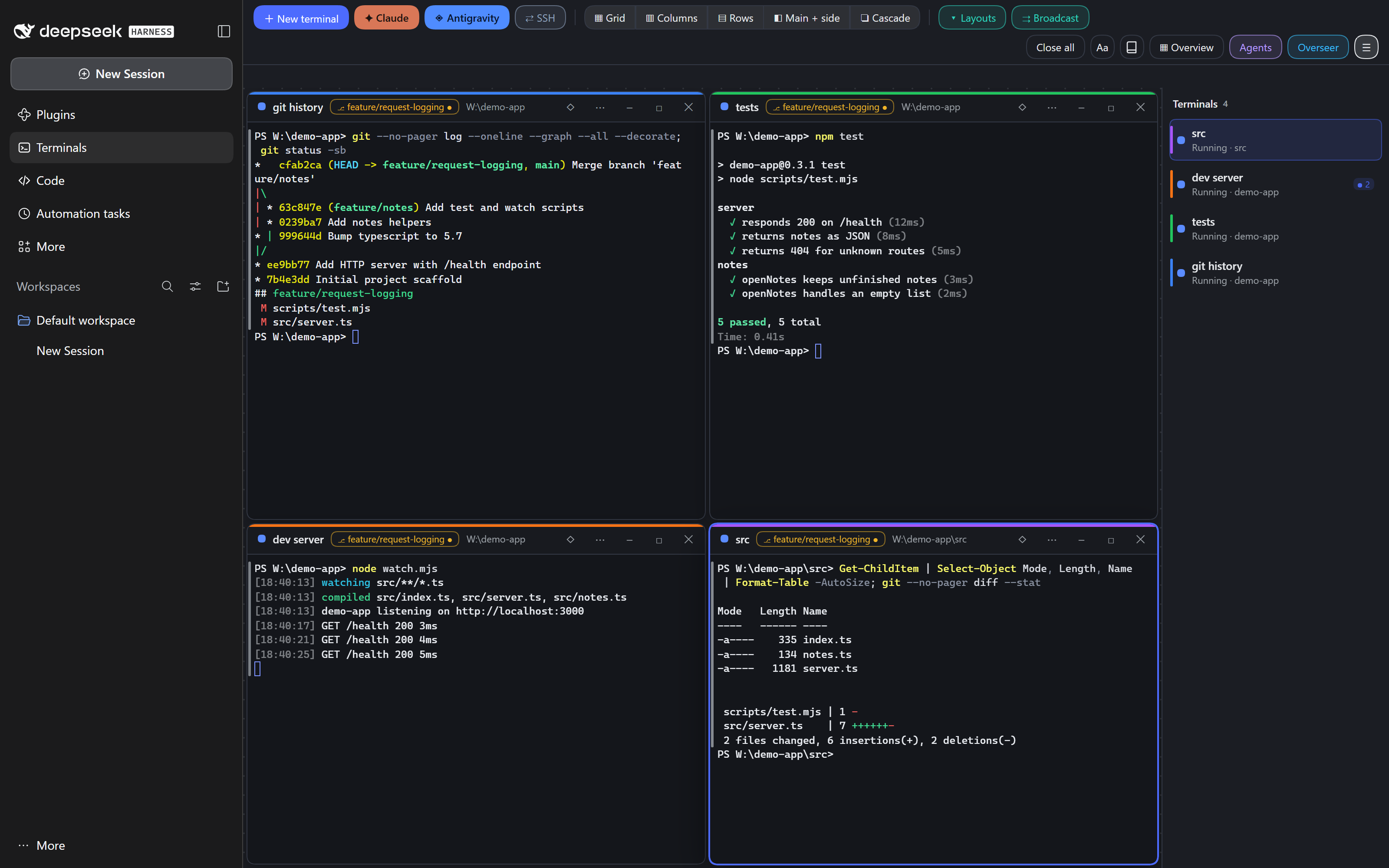
Terminals and a code editor for the DeepSeek Harness (DSH) desktop app, built for running several coding agents side by side and reviewing what they change.


| Plugin | What it adds | Package README | npm |
|---|---|---|---|
@nikodem5/dsh-web-terminal |
Terminals page: a workspace of real terminals, with agent status for Claude Code and Antigravity CLI | packages/terminal | npm |
@nikodem5/dsh-code-editor |
Code page: Monaco editor, git tools and markers for files an agent changed | packages/code-editor | npm |
Both plugins run locally; the one feature that sends data out is the terminal's optional Overseer (see How it works).
dsh-web-terminal)~/.ssh/config, clickable file paths, send a selection to another terminaldsh-code-editor)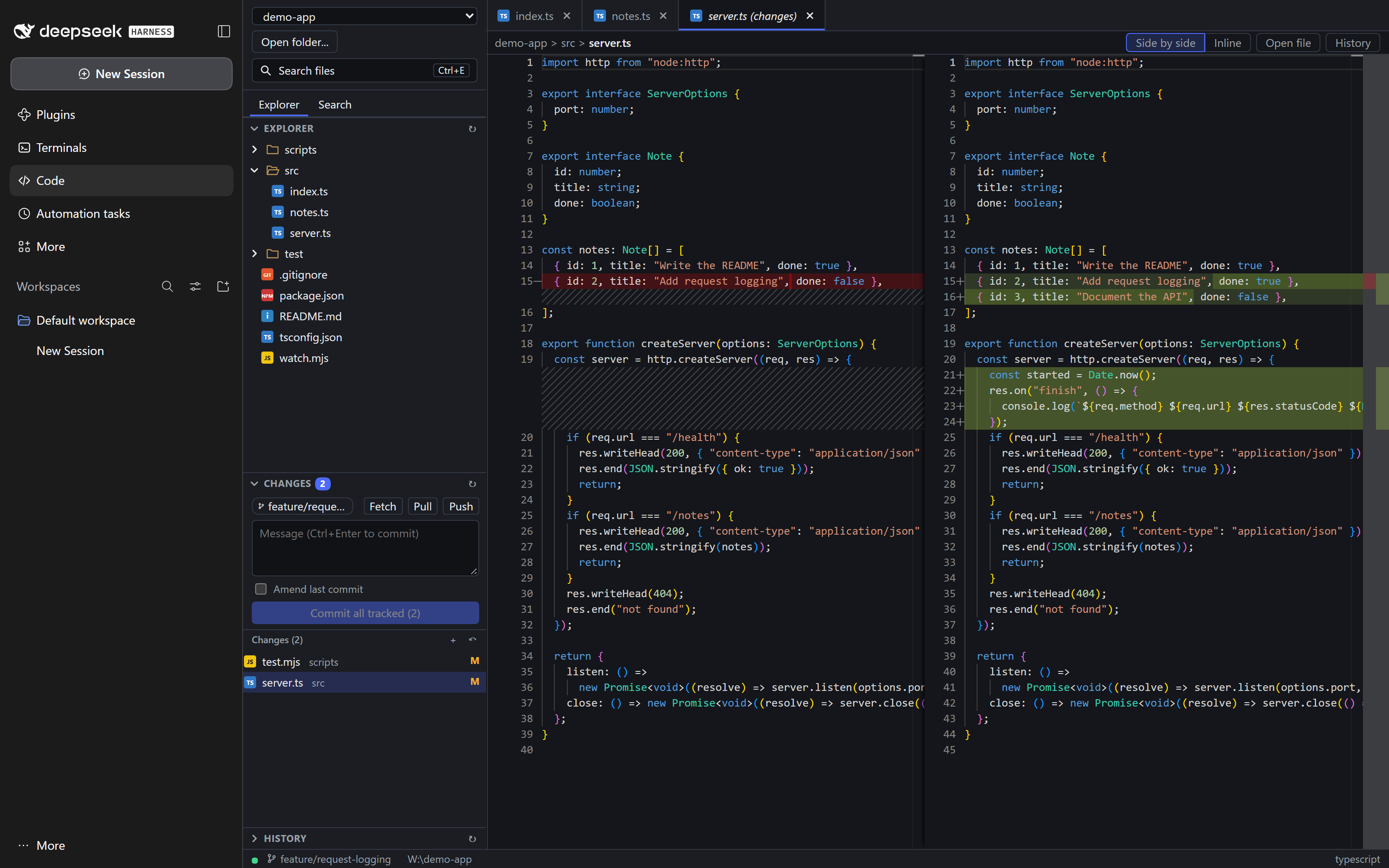
.git internals are off limitsFor the desktop app:
dsh plugin --profile desktop add @nikodem5/dsh-web-terminal
dsh plugin --profile desktop add @nikodem5/dsh-code-editor
For the browser GUI (dsh web):
dsh plugin --profile web add @nikodem5/dsh-web-terminal
dsh plugin --profile web add @nikodem5/dsh-code-editor
Restart DSH afterwards, since plugins load at startup.
Remove one with dsh plugin --profile <profile> remove <name>.
dsh-plugins-0.2.1.zip from GitHub Releases and unzip it.node install.mjs desktop (or web; with no profile both are used). --dry-run previews.To update, repeat with the newer archive. To remove: node install.mjs --remove desktop. Use
--package @nikodem5/dsh-web-terminal or --package @nikodem5/dsh-code-editor for just one plugin. --package also
accepts the short name (dsh-web-terminal) or the folder name.
git clone https://github.com/Nikodem5/dsh-web-terminal.git
cd dsh-web-terminal
npm install
npm run build
npm run install:desktop      # or install:web; restart the app afterwards
After that, the help panel (F1) → Update from source pulls, rebuilds and reinstalls with one button; Restart app next to it restarts the app.
npm test runs all tests; npm run pack builds the release archive dsh-plugins-0.2.1.zip into dist/. The installer copies each plugin
into ~/.dsh/profiles/<profile>/node_modules (override the location with DSH_HOME), because linked packages outside
the profile tree do not get their browser half loaded.
Up to 0.1.0 the plugins were installed under the unscoped names dsh-web-terminal and dsh-code-editor. The archive and source installers replace that copy in 0.2.0; if you switch to the npm packages, first remove the old copy with the installer you used (node install.mjs --remove --package dsh-web-terminal <profile>, and the same for dsh-code-editor), or both copies are loaded.
dsh web): the sidebar entries and pages use the panel list added in
that version, and older versions load the plugins without showing them. Developed and tested against 0.2.2-rc.1node for the Claude status-line and hook helpers; without it the usage
stats, the sub-agents panel and the "Idle" state of a fresh Claude terminal are unavailable (terminals and the other
agent states still work). The installer needs Node as wellagy), for the agent features (Antigravity reports status; usage and changed-file markers with its opt-in integration; no sub-agents)Each plugin has a host half (a Node module mounted in the DSH server: PTY sessions, file and git routes, WebSockets) and a client half (a bundle loaded into the app UI). Every route and socket accepts only loopback peers and Hosts and requires a per-boot token (see SECURITY.md). No data leaves your machine, with two exceptions: what the agents you run in a terminal (Claude Code, Antigravity CLI) send themselves, and the Overseer, which sends terminal content to the model provider configured in the app each time you ask it a question (it says so before the first one).
.git internals, and
never runs git through a shell.ssh and ~/.ssh/config; the plugin stores no passwords or keys.MIT, (c) 2026 Nikodem Marcinkiewicz
CLASSIFICATION EVIDENCE
系统优先读取 GitHub Topics,再与站内分类词典和词根规则比对。当前命中: deepseek-harness。
morluto
Reverse engineer anything with agents, from app behavior down to native binaries.

deepseek-ai
DeepSeek Harness: Everything is a Plugin.

nexu-io
The 1st Collaborative AI Design Agent Workspace. Local-first and open source. Create motion, prototypes, websites, apps, dashboards, presentations, images, and videos with your team and AI agents. Share work, exchange feedback, and iterate together in one workspace.