其他
完整应用

deepseek-harness
deepseek-ai
DeepSeek Harness: Everything is a Plugin.

Nexus-Aethra/DSHBox
Manage DeepSeek Harness locally: run multiple DSH versions in isolated containers, open the UI in an embedded WebView, import plugins/skills with one click, share extension bundles, and let a queued task system handle installs with live logs. Zero-dependency installer.
PROJECT TOPICS
PROJECT README
English · 简体中文
Managed DeepSeek Harness desktop runtime — run, isolate, and extend multiple DeepSeek Harness environments on your own machine, no browser tab required.
DSH Box is a lightweight desktop shell built with Tauri 2 that installs, launches, and manages independent DSH Containers — each with its own DSH version, profile, plugins, skills, workspace, and logs — and renders them in an embedded WebView.
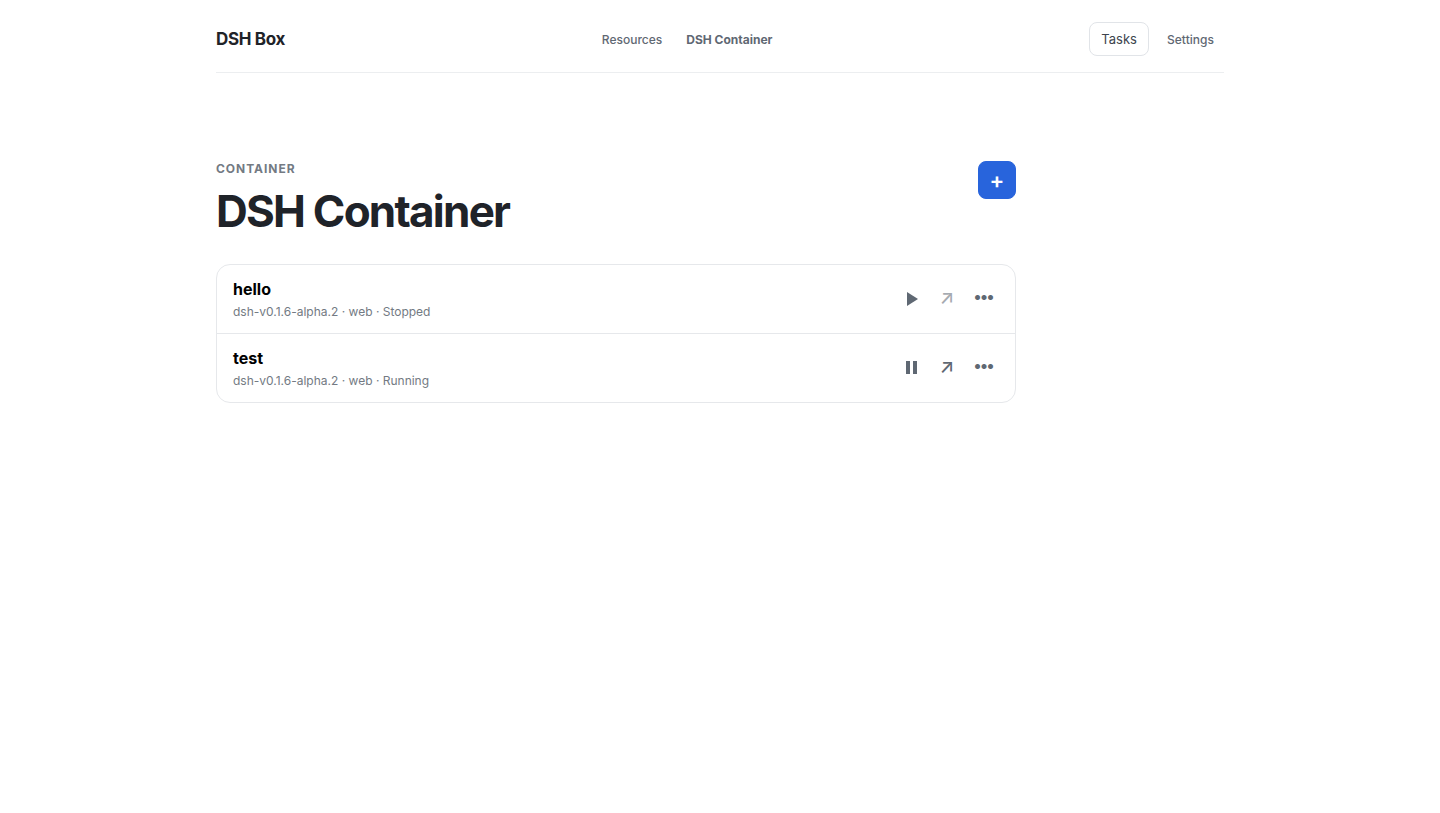
run is a copy (~10s).dshbox apply -f configures resources from one document; every verb answers --json.FROM + ADD describes a template; build once, run many.POST /rpc and one SSE stream serve the UI, the CLI and agents alike.dshboxd keeps working with the window closed.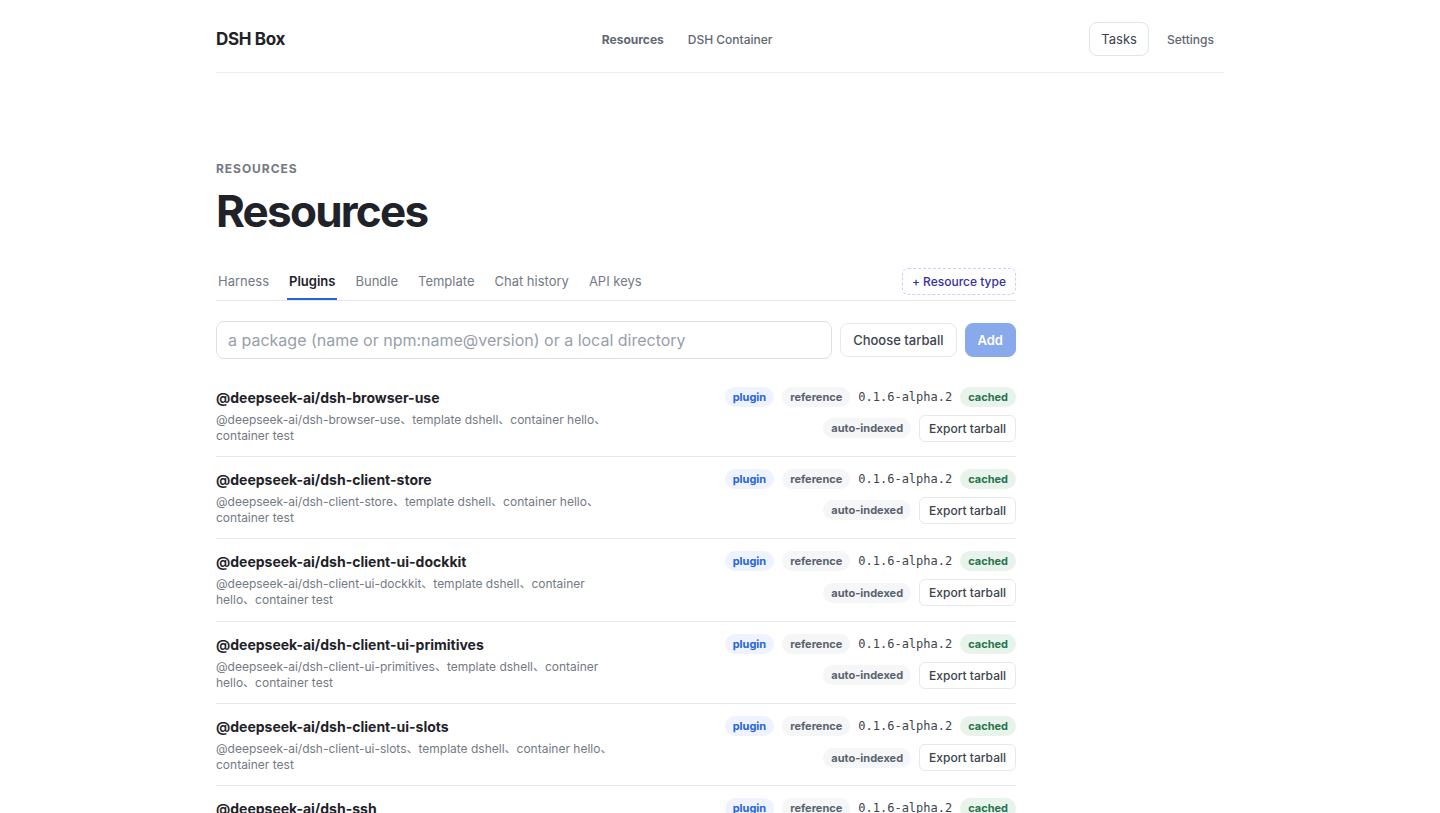
Download the installer for your platform from the Releases page of this repository:
| Platform | Artifact | Notes |
|---|---|---|
| Windows (x64) | dshbox_<version>_x64_<locale>.msi |
MSI installer with bundled runtime and sidecar |
| Linux (x64) | dshbox-<version>-amd64.deb |
Debian/Ubuntu package |
| macOS (arm64) | dshbox-<version>-arm64.dmg |
Apple Silicon |
Grab the latest version from the Releases page — artifact names follow the
<product>-<version>-<arch>convention. Every tagged release carries all three platforms, built by the release workflow.
No runtime prerequisites on Windows — the bundled Node/npm/pnpm/Git runtime travels inside the installer. Linux needs a system Git (apt install git or your distro equivalent); its configuration is isolated per-runtime-directory, so your host ~/.gitconfig is never read by DSH Box builds.
The app minimizes to the system tray on close. Use the tray menu to open the window or start/stop/restart the dshboxd background service.
DSH Box separates a Tauri desktop shell, a framework-free Rust workspace, a background daemon (dshboxd), and a small React frontend. The split exists so all business logic — plugin fetching, container lifecycle, template resolution, background tasks — is testable without a UI, and so a CLI or external agent can drive the same flows the UI does.
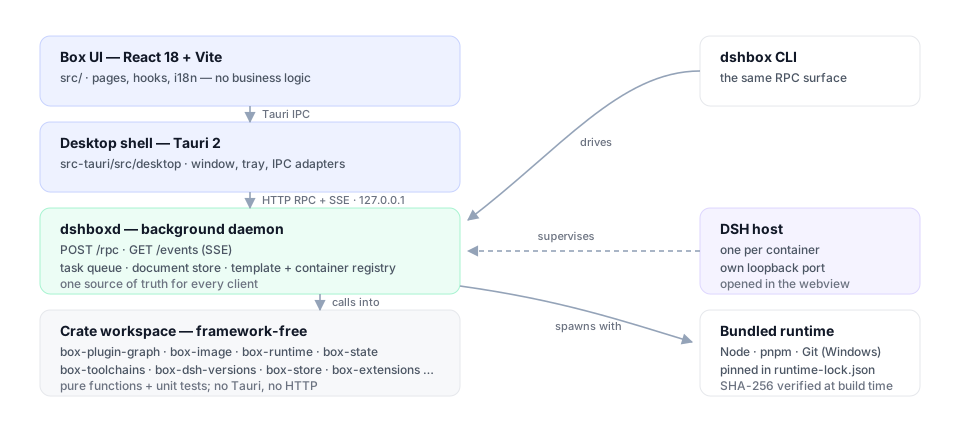
| Layer | What lives here | Why |
|---|---|---|
Frontend (React 18 + Vite, src/) |
Pages, components, useTaskQueue/useContainers/useResources/useSettings hooks. No business logic — pages fire RPC requests and react to daemon SSE events. |
Keeps the Box UI thin and lets any client (UI/CLI/agent) share the same code path. |
Desktop shell (Tauri 2, src-tauri/src/) |
Browser window, tray, Tauri IPC adapters. Listens on 127.0.0.1 to the daemon's loopback HTTP server. All real work is delegated to dshboxd over HTTP RPC. |
One source of truth for state changes — UI and CLI cannot drift. |
Daemon (src-tauri/crates/dshboxd) |
Long-lived background service. Owns the queue, the data store, the template index, container registry, and the SSE event bus. Single HTTP entry point (POST /rpc) plus GET /events?token=…. |
Background work (installs, rebuilds, uninstalls) survives the desktop window closing. |
Crate workspace (src-tauri/crates/) |
Framework-free Rust crates: box-foundation, box-runtime, box-scheduler, box-state, box-toolchains, box-dsh-versions, box-containers, box-extensions, box-image, box-template-core, box-data-scheduler, box-logger, box-dsh-context, box-server-core, box-api, box-client. |
Pure functions + unit tests; only the top-level dshbox binary and dshboxd link Tauri/HTTP. |
The dependency direction is one-way: foundation / runtime / scheduler / state → functional crates → Tauri/desktop adapters. Feature crates do not depend on Tauri or one another's mutable state.
Every UI / CLI action lands on POST /rpc with a JSON body of {"method": "...", "params": {...}, "token": "..."}. The daemon's dispatch table decides for each handler whether to synchronously return JSON (List templates, Read settings, …) or asynchronously enqueue a worker (Install, Build, Start container, Rebuild, Uninstall, …). Async handlers return a TaskRecord immediately; the client subscribes to GET /events?token=… for task_stage / task_log / task_finished / resource_added|updated|removed events. The daemon threads one connection per request, so a long task never blocks the liveness probe.
This means the same HTTP surface serves every consumer — the desktop app's Tauri IPC handlers, the CLI (dshbox rpc …), and external agents calling curl -d '…' http://127.0.0.1:7923/rpc. There is no "client fallback" or local-state divergence: the daemon's resource map and task queue are the only sources of truth.
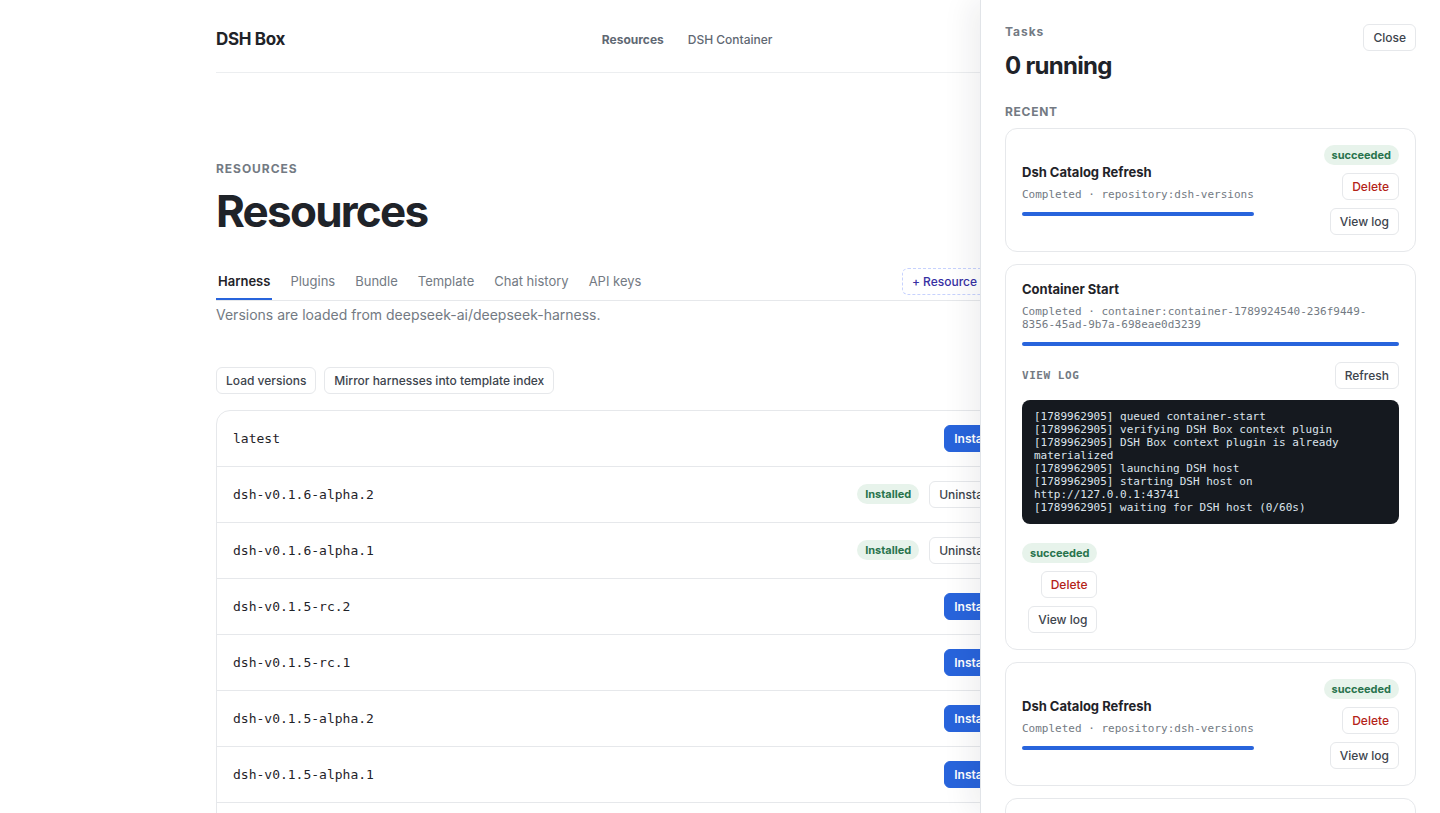
A task's log file is the UI's only window into it: the daemon writes it, the desktop streams the lines into the panel, and a step the user waits minutes for says what it is doing and how long it took.
A boxfile (.dsh) is the declarative script that describes a Container you want to instantiate. dshbox build resolves it into a sealed template recipe: physical Harness source without node_modules, plus the profile, local plugin artifacts, skills, and data needed by its ADD directives — including the client artifacts the prepared base already built. dshbox run <template> copies it to the final Container directory and links its dependencies offline; later starts do none of those steps.
The full grammar is in docs/template-system.md; the canonical reference example (every source shape) is in examples/boxfile-plugin-chains.dsh. Here is the minimal form:
FROM github.com/deepseek-ai/deepseek-harness:latest
PROFILE web
NAME my-team

ADD plugin github.com/owner/cordis-plugin-foo:1.2.3
ADD plugin npm:@linxin666/dsh-web-ui-all
ADD plugin ./plugins/secret
ADD skill team-conventions| Directive | Required | Notes |
|---|---|---|
FROM <ref> |
yes (exactly once) | GitHub short form (github.com/owner/repo[:tag|@ref]), or a local template name (e.g. web-base). Up to four levels of template inheritance. |
PROFILE <name> |
yes (exactly once) | Target DSH profile (web, headless, …). |
NAME <image-name> |
no | Defaults to the script file's stem. |
VERSION <image-version> |
no | Defaults to latest. |
LABEL key=value |
repeatable | Free-form metadata attached to the built template. |
DEF <name> @<path> |
repeatable | Defines a path alias usable as @<name> in subsequent ADD lines. |
ADD plugin\|skill\|data <src> [@<dest>] |
one or more | Resource you want baked into every Container made from this template. |
CP <src> [@<dest>] |
alias for ADD plugin |
Kept for backward compatibility. |
<src> accepts four shapes:
github.com/owner/repo[:tag|@ref]. The GitHub branch resolves through pnpm pack and the same fetching/import pipeline as npm; a tagged release becomes a ref_ on ParsedSource::Github.https://…/pkg.tgz, ./relative.tgz, /abs/path.tgz. Anything fetched and unpacked as a tarball../plugins/foo / /abs/path/foo. Imported directly (no archive round-trip) — useful for plugins in progress.name[@version] or @scope/name[@version] for plugins already in the Repository.git:… (clones via libgit2, no guessing) and npm:… (registry spec forwarded to pnpm).The :latest tag and the explicit latest keyword are interchangeable; both pin the harness repository's main branch.
How each ADD is stored matters:
ADD plugin — the source is imported into the shared Repository as an immutable local artifact.tgz, recorded by the sealed recipe, then added only while preparing a Container at its final path. No running Container has an absolute repository path or runs a plugin dependency install.ADD skill and ADD data — snapshotted into the data store (<runtime>/data/<digest>/), materialised in the built template, and copied into the Container profile.dsh-box-context plugin (@deepseek-ai/dsh-box-context) is copied automatically — you do not need to ADD it.dshbox build writes a digest-addressed sealed template. dshbox run <name> then:
FROM chain (max depth 4),<runtime>/instances/<id>/{profile,workspace,state,logs},pnpm dsh web from the Container's Harness copy and waits for readiness,paths.dshboxHome + paths.dshboxCli into the snapshot so the in-container agent can find the CLI.Where the work happens is deliberate:
| Step | What it does | Cost |
|---|---|---|
dshbox pull template |
clones the Harness commit, installs its dependencies and builds the client artifacts (native addon, host/client libraries, web frontend) into a prepared base, recording the revision and platform they were built for | once per Harness version, per platform |
dshbox build |
copies that base — artifacts included — and installs the profile's plugins into a sealed template | once per template |
dshbox run |
copies the sealed tree, links dependencies from the pnpm store, materialises Box's context plugin, starts the host | ~10s per container |
A base that predates this is repaired in place the first time a template is built from it, and a template carrying no artifacts for this commit and platform (an old one, or one imported from another OS) is rebuilt at container creation instead — the task log says which path was taken. The full storage, transaction, and migration contract is in docs/specs/prepared-template-runtime.md. This is a schema break: legacy shared runtimes/<version>/source layouts are not used by new builds.
plugin_dependency_graph answers "what loads, in what order, and why" for a sealed template, a container directory, or a running host. The daemon walks the package tree, scans each package's sources, and returns nodes, links, layer depths, load order, shared services, and diagnostics. The Dependency graph button on a template (Resources → Template) and on a container's detail view renders it.
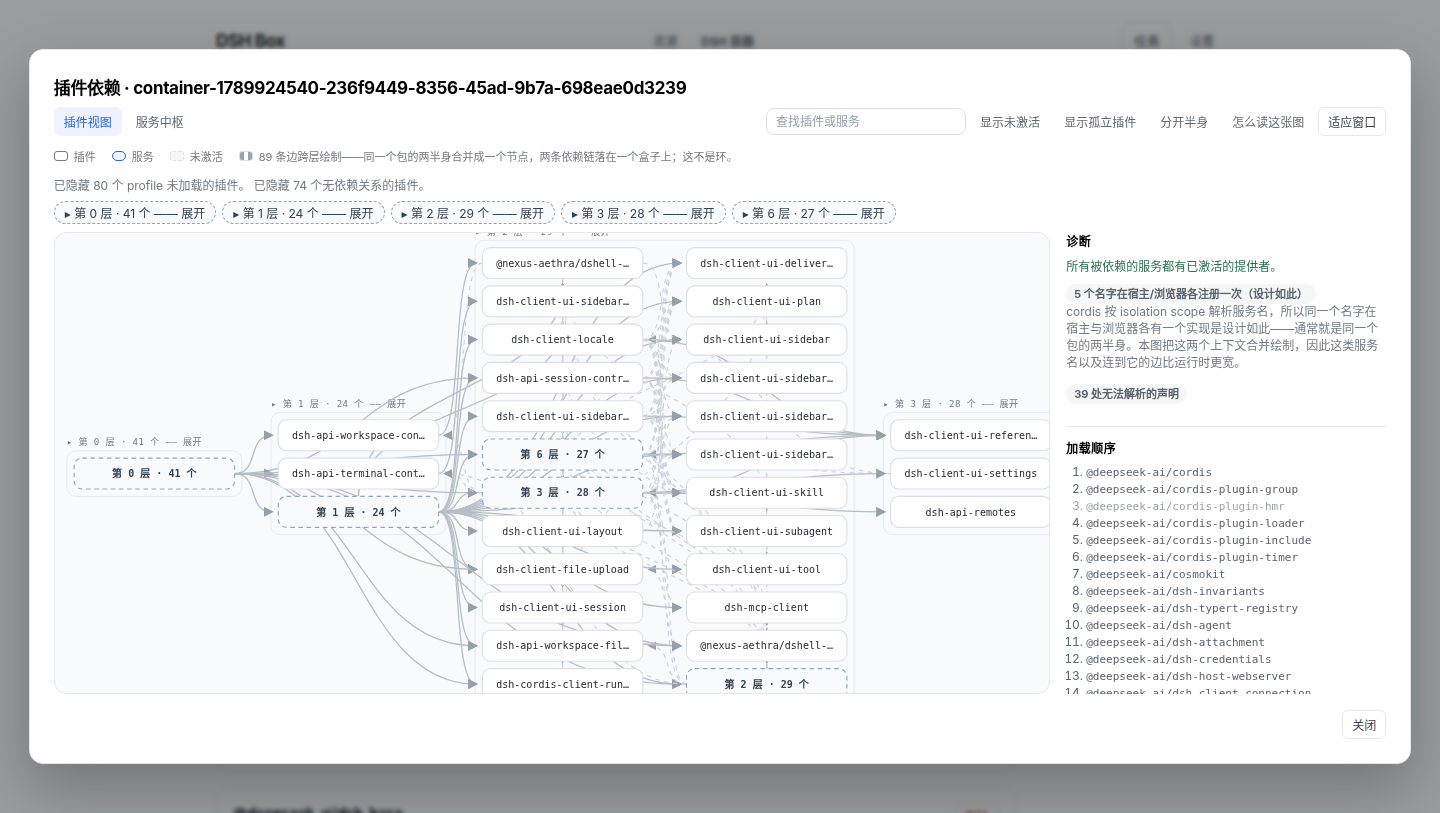
The drawing above is the real thing; the figure below names what it is made of — bands, halves, the dashed cross-context edge, and the pending member of a cycle.
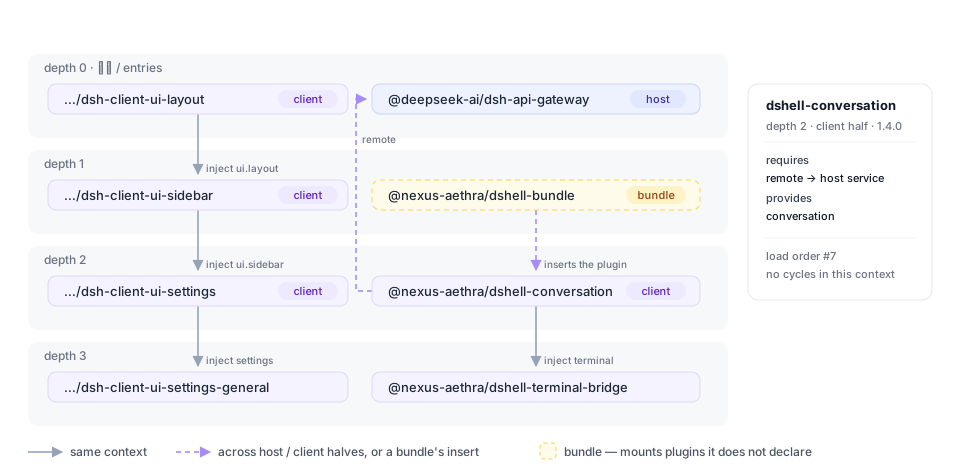
What it computes:
dsh.client + exports["./client"]) becomes two nodes, so inject/provide resolve inside one context. A name provided once per context is a shared service, not a conflict — which also means a cycle is either inside one context or it is real.inject is read where a plugin registers it: an Object.assign(target, { inject }) carrier, or a factory's returned { inject, apply }. A plain object property is not a plugin declaration; treating one as such invented 26 requirements on a real profile.apps/cli builds the root context and hands services to the plugins it mounts, so it is scanned and drawn as dsh (launcher) — without it, every plugin that injects profileContext reads as waiting on nobody.host A → B sits beside browser B → A — is a quiet grey dash with a legend line saying so. Splitting the halves leaves zero crossings, which is the check that the layering is right.cordis.patch.yml insert rows are read, so the plugins a bundle mounts appear as the nodes they are — including the ones a Boxfile ADDs, which is what makes a template preview show its own plugins before any container exists.dsh.client/exports subpath — as a prefix list, because a package ships lib/client.js and lib/client/ — lib/ when there is no src/, and never a build output directory.The scan is text-based on purpose — a small scanner over comment-blanked sources, not a TypeScript AST: the graph has to describe a container's node_modules without loading DSH, and a wrong node must be cheap to spot and correct.
A container persists state that is not code: conversations under profile/sessions/<workspace>/session-<id>/, provider keys in profile/.credentials.yaml, and whatever a plugin writes under its own directory. Box models each of those as a kind — a location, whether it holds secrets, and how deep its independent entries sit — and two verbs move it.
A kind is one or more parts, and a part is either a whole path or one key path inside a YAML document. The second shape exists because DSH splits some state across files: a provider key is a ref in .credentials.yaml, while the route that names the environment variable holding it lives in settings.yaml under llm-pi-ai.providers.<route>.apiKeyEnv — the rest of which belongs to other plugins. So the credentials kind carries both, extracted into one payload and merged back deeply, and a key arrives with the provider that uses it.
<runtime>/resources/<id>/payload/, digests it, and records it in the shared document store. --out file.tar.gz also packs it for another machine.Refuse is the default and checks every clash before writing anything; Merge replaces only what the payload carries and deep-merges YAML maps; Overwrite replaces the value first. A file a secret kind writes is tightened to 0600 on the way in and out, and a running container is refused unless --restart asks for stop → inject → start.<name>-2 rather than replacing the one already there, because taking a copy is an explicit act — the same kind from two containers must not land on one row.Kinds come from three places: Box ships sessions and credentials; a plugin package can declare its own in dshbox.resources; and when a plugin declares nothing, Box reads the join(root, 'a', 'b') chains in its shipped code and offers those paths as candidates — never as trusted paths. That is what the Resources panel shows: pick a plugin, see whether it persists anything, where, and how much.
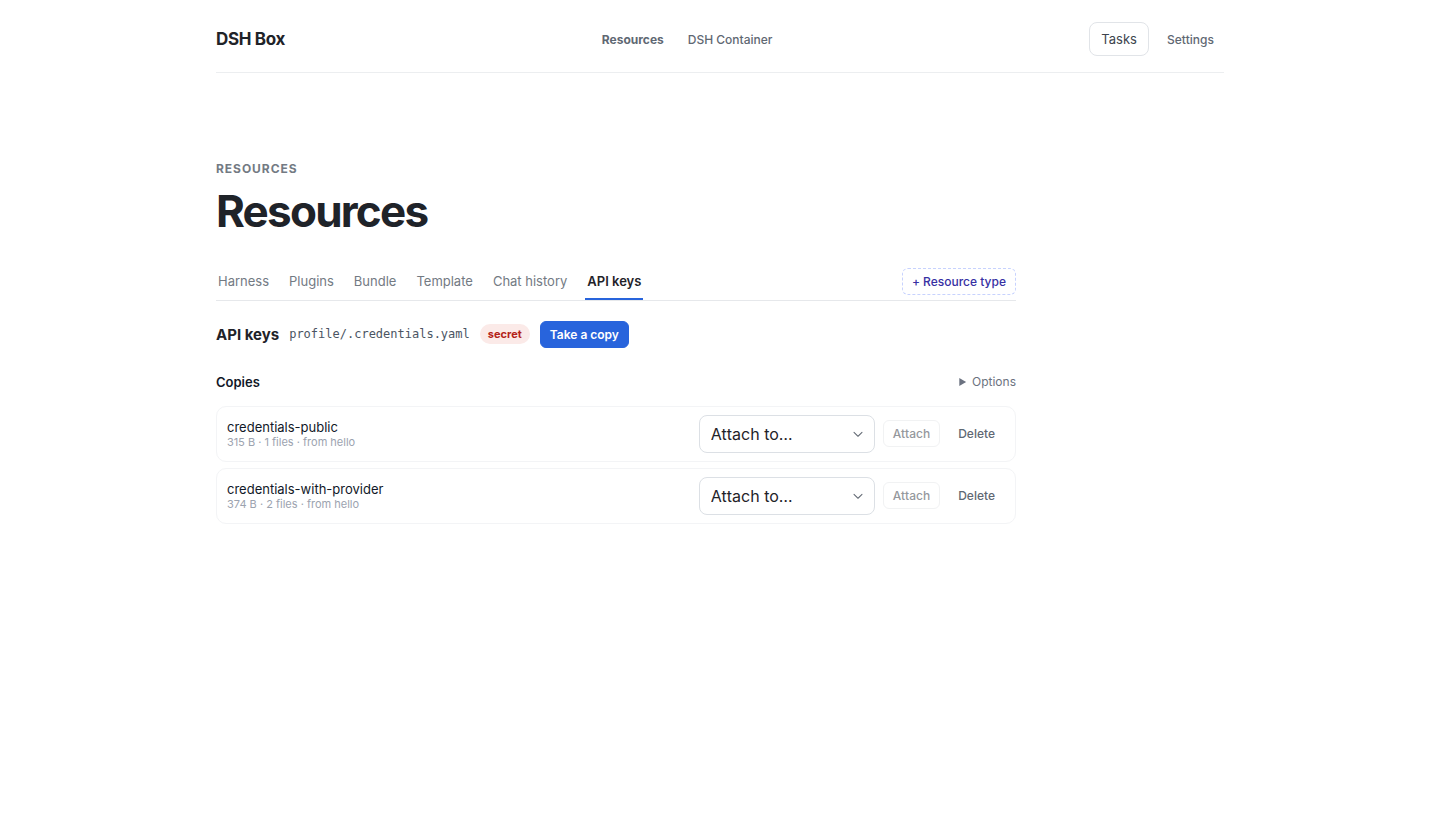
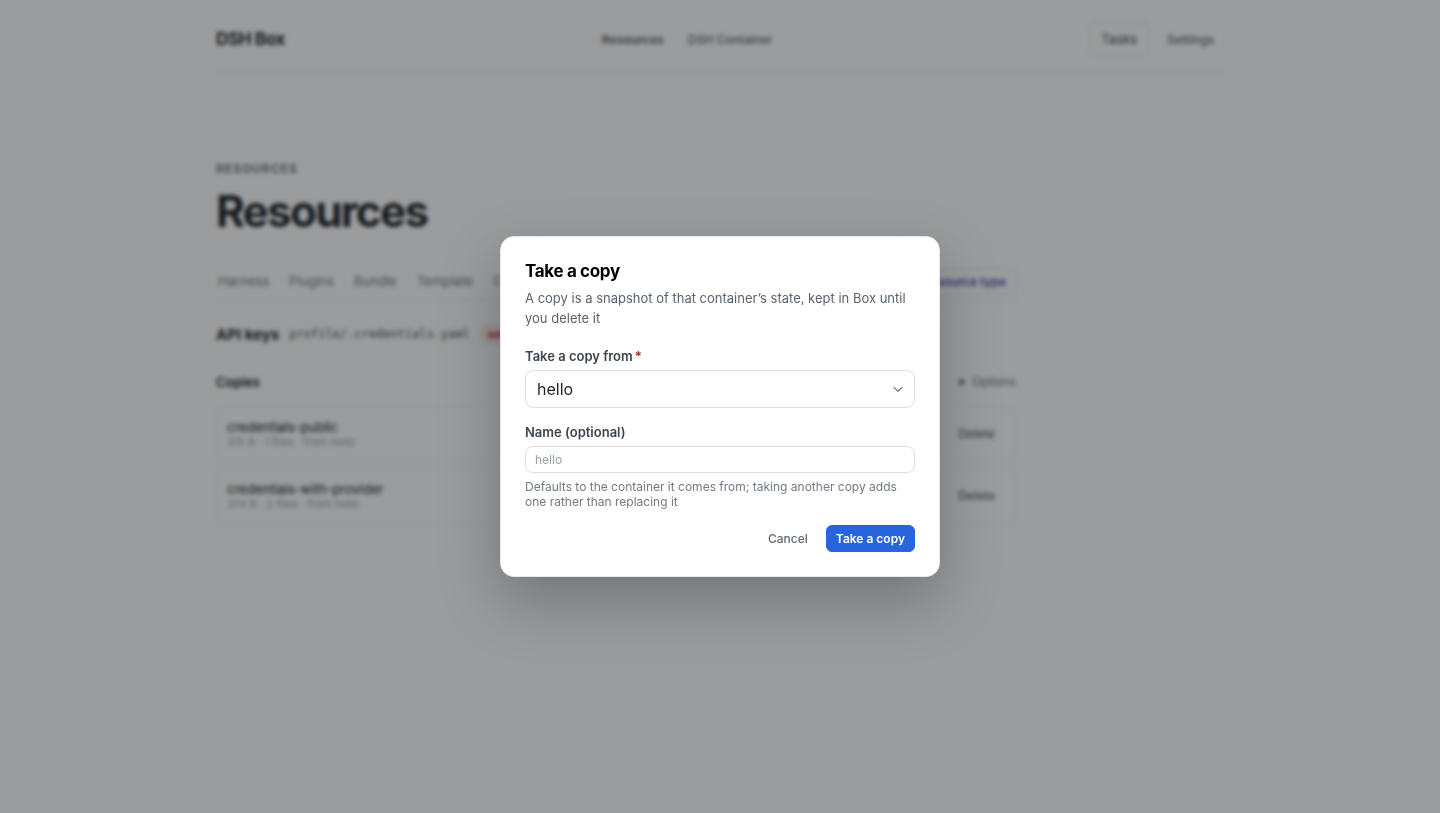
In the UI, a resource type is a tab in the Resources navigation. Chat history and API keys ship as tabs, and + Resource type adds one more: pick a container, then either a kind Box detected there, a plugin to scan (every package installed in the profile is offered, filtered as you type), or a path you pick in a tree of the container's storage area. Taking a copy is one button that opens a card — which container the state comes out of, and what to call the copy:
Any YAML block of a container file can be edited by its key path, in the same model: the document is a tree, picking a node loads that block, and a path that does not exist yet is how a block is added. Writing goes through the same merge-or-replace policy an injected copy uses.
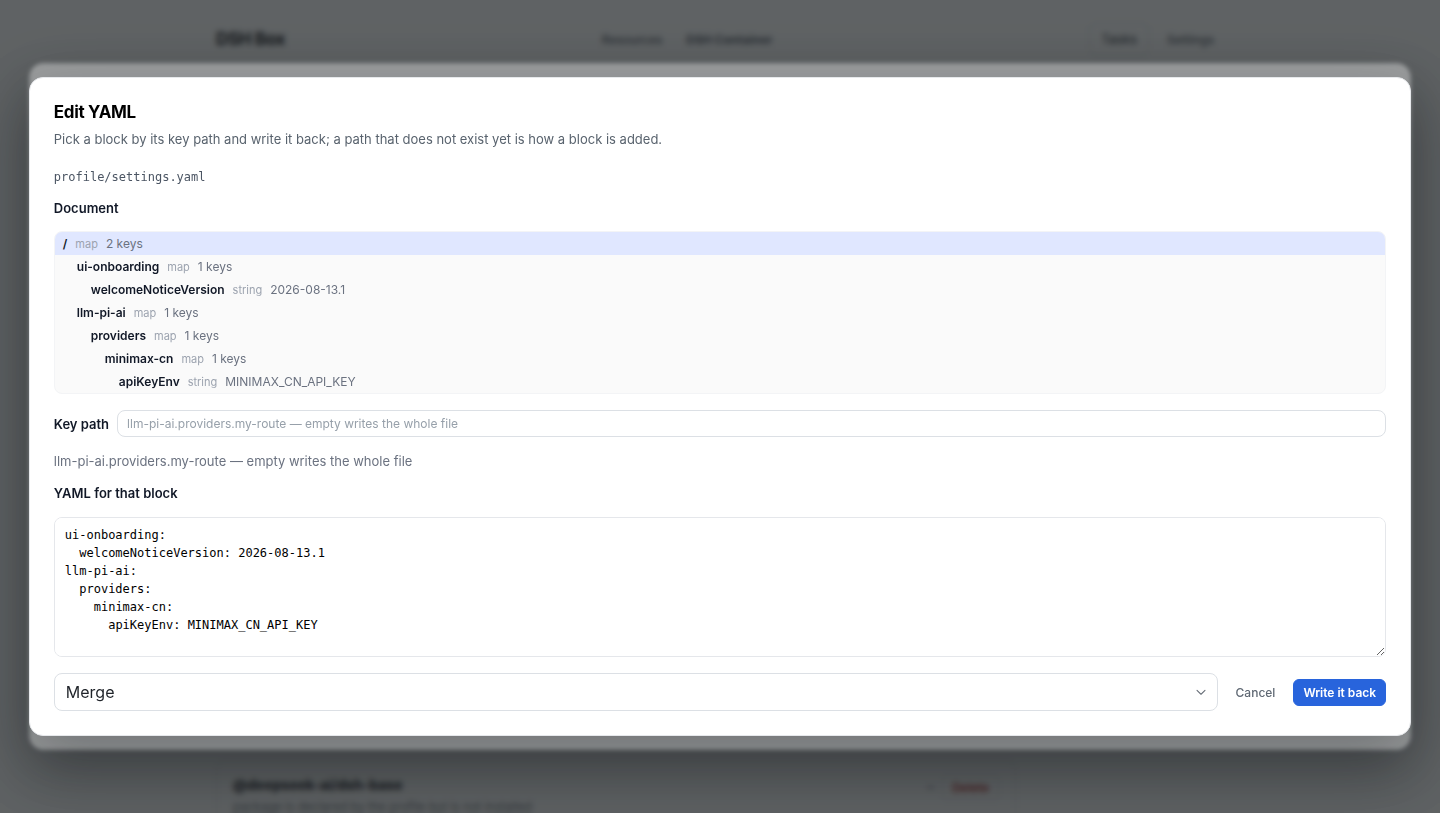
dshbox container resource list <id> [--plugin @scope/name]      # kinds, locations, sizes
dshbox container resource types [--json]                        # resource types (UI tabs)
dshbox container resource extract <id> credentials --name prod
dshbox container resource stored                                # what the Box store holds
dshbox container resource inject <id> credentials-prod --merge --restart
dshbox container resource inject <id> --from <other-container> --kind sessions
dshbox container resource read <id> profile/settings.yaml --section llm-pi-ai
dshbox container resource write <id> profile/settings.yaml --section llm-pi-ai.providers.acme \
--text 'apiKeyEnv: ACME_API_KEY' --mergeThe CLI is the agent surface and the UI is the human one, so the verbs an agent needs are non-interactive and machine-readable.
dshbox apply -f <file> takes one document and makes the resource layer match it:
container: test                 # default container for the entries below
types:                          # resource types to register (the UI's tabs)
  - label: ACME state
    kind: path
    path: profile/plugins/acme/state
copies:                         # state to extract into the store
  - name: before-upgrade
    kind: credentials
    from: test
Applying is idempotent — a type is keyed by kind + container + path, and a copy whose name is already in the store reports exists — --dry-run changes nothing, --json reports per entry, and an unknown key is an error rather than a silent no-op. Reading is machine-readable too:
dshbox apply -f resources.yaml --dry-run
dshbox apply -f resources.yaml --json
dshbox container resource list <id> --json
dshbox container resource read <id> profile/settings.yaml --json
dshbox help, dshbox container resource help, and dshbox apply help describe every verb without needing the UI.
Long-lived indexes are stored as documents instead of scattered files: the task queue goes through box_foundation::collection::DocumentStore — SQLite, via the box-store crate, at <runtime>/state/dshbox.db — so the daemon and the desktop app share one queue without either owning a file. Legacy task JSON is imported on first open and archived as *.pre-sqlite, and schema changes are forward-only migrations gated by PRAGMA user_version. Content-addressed directories (templates/<hash>/, data/<digest>/, runtimes/) stay on disk, and config.json stays machine-local in ~/.dsh-box/ — it never enters the store.
Containers, templates, plugins and skills are referenced by id, and deletion is soft-delete → fast queue → permanent delete, so an entity still in use is never garbage-collected. Full design in docs/specs/data-scheduler.md.
tracing + tracing-subscriber ship structured logs to <runtime>/logs/<component>.log (daily rolled) and mirror to stderr. Filter with RUST_LOG, e.g. RUST_LOG=info,dshboxd=debug,box_template_core=debug.
| Layer | Stack |
|---|---|
| Desktop shell | Tauri 2, Rust (Cargo workspace under src-tauri/) |
| UI | React 18, TypeScript, Vite |
| Background service | dshboxd sidecar (single HTTP entry: POST /rpc + GET /events) |
| Bundled runtime | Node / npm / pnpm / Git-Windows-only (per-platform archive, SHA-256-pinned in runtime-lock.json) |
| Targets | Windows x64 (MSI), Linux x64 (deb, rpm), macOS arm64 (dmg) — all built by the release workflow |
Prerequisites: Node.js 22.13+ with pnpm (the pinned packageManager needs node:sqlite), the Tauri 2 prerequisites for your platform, and 7-Zip (needed once by runtime:prepare to unpack the Windows PortableGit archive — install from 7-zip.org or apt install p7zip-full, and make sure 7z is on PATH). 7-Zip is a build-time-only tool; it never ships in the installer.
pnpm install
pnpm runtime:prepare    # fetch + verify + extract the bundled Node/pnpm/Git runtime
pnpm server:prepare     # build the dshboxd sidecar
pnpm tauri dev          # run in development
runtime:prepare verifies every archive against the SHA-256 pins in runtime-lock.json before extraction and aborts on mismatch. If 7-Zip is missing the Git step is skipped with a warning (Node/pnpm still prepare); re-run after installing it.
Release bundles (per platform):
pnpm bundle:windows     # Windows MSI installer
pnpm bundle:linux       # Linux .deb
pnpm bundle:macos       # macOS .dmg
Run the test suite:
cd src-tauri && cargo test --workspaceThe version lives in three files and they must agree — package.json, src-tauri/tauri.conf.json, and src-tauri/Cargo.toml. Bump all three, record what changed in CHANGELOG.md, then tag:
git tag v0.1.8 && git push origin v0.1.8.github/workflows/release.yml takes it from there: it builds the Linux .deb + .rpm, the Windows MSI, and the macOS arm64 .dmg through the same bundle:* scripts a developer runs locally, and attaches all of them to the GitHub Release for that tag. The tag is compared against the three version fields first, so a mismatched tag fails instead of publishing mislabelled installers; if a release for the tag already exists, the artifacts are re-uploaded over it. Running the workflow manually (workflow_dispatch) builds everything without publishing, which is the way to test a pipeline change.
Installers are unsigned: macOS needs the usual Gatekeeper bypass on first launch and Windows shows a SmartScreen prompt. Signing and notarization identities can be added to the workflow when certificates are available.
src/                       React/TypeScript management UI
src-tauri/                 Rust workspace + Tauri shell
  crates/                  focused, framework-free crates
    box-foundation         config, paths, document collections
    box-store              SQLite document store + legacy import
    box-runtime            absolute-path process exec
    box-scheduler          persisted task queue + locks
    box-state              ResourceStateManager (read model)
    box-toolchains         bundled Node/pnpm resolver
    box-dsh-versions       DSH GitHub catalogue (harness tag + installs)
    box-containers         Container metadata + active Host registry
    box-extensions         repository plugin/skill scan + transfer
    box-image              .dsh parser, manifest v6, gzip tar I/O
    box-plugin-graph       plugin dependency scan + graph assembly
    box-resources          resource kinds, extraction and injection
    box-template-core      root/common template install/uninstall core
    box-data-scheduler     soft-delete + dual-queue async hard-delete
    box-logger             tracing init + daily-rolled log files
    box-dsh-context        dsh-box-context plugin (paths.dshboxHome/dshboxCli)
    box-server-core        dshboxd helpers + service install
    box-api, box-client    RPC surface + client adapter
  src/desktop/app/         domain modules (containers, extensions, tasks, …)
  tools/runtime-packager   bundled Node/pnpm/Git runtime packager
examples/                  boxfile.dsh + plugin-chains example
docs/                      template-system.md, specs/, design/, notes/,
                           releases/, images/
.github/workflows/         release.yml — a v* tag builds the three installers
The canonical reference for the boxfile grammar is docs/template-system.md; prepared-base/sealed-template design lives in docs/specs/prepared-template-runtime.md; the full RPC + event-stream surface in docs/design/rpc-and-events.md.
Proprietary — see repository owner for licensing terms.
© Nexus-Aethra
CLASSIFICATION EVIDENCE
系统优先读取 GitHub Topics,再与站内分类词典和词根规则比对。当前命中: 无有效分类标签。
deepseek-ai
DeepSeek Harness: Everything is a Plugin.

anywhere-labs
为 DeepSeek Harness (DSH) 插件生态打造的现代化桌面端解决方案。万物皆「插件」,桌面本身也是「插件」。

walkinglabs
Harness engineering beginner tutorial, from 0 to 1