
开发工具
待识别

treg
superdesigndev
OpenRouter for agent tools. Join community here: https://discord.gg/6mQYYfFMAn
PROJECT TOPICS
INSTALL REFERENCE
dsh plugin --profile web add github:Nancy0-0/dsh-code-nav
该命令指向仓库当前默认分支;尚无绑定当前 commit 的完整验证结果。
PROJECT README

DeepSeek Harness(DSH)的插件 monorepo,包含两个互相独立的小插件,用来减少「聊天 → 文件树 → 编辑器」之间的来回:
dsh-symbol-links)——聊天消息里行内代码中的函数名、类型名可以直接点开,在右侧预览中定位到源码行。dsh-file-tree-actions)——给 Files 侧栏补上右键新建文件夹/文件、改名、移到回收站、复制路径,以及把文件拖进对话栏生成 @ 引用。两个包各自带 host 半和浏览器半,不共享运行时,也没有构建步骤;可以单独安装、单独卸载。
仓库:https://github.com/Nancy0-0/dsh-code-nav(MIT)
| 目录 | npm 包名 | 注册的宿主路由 | 状态 |
|---|---|---|---|
packages/symbol-links |
dsh-symbol-links |
POST /api/symbol-links/resolve |
定义跳转已实现;引用/实现候选为开发中(文本匹配) |
packages/file-tree-actions |
dsh-file-tree-actions |
POST /api/file-tree-actions |
新建/改名/回收站/复制/拖拽可用 |
[data-conversation-scroll])里的行内 <code>;链接、代码块、按钮内的代码不动。POST、调用官方的 openFile(path, { line })。右键菜单(2026-11-02 接入):打开定义、引用候选(文本匹配)、同名定义(候选)、复制名字。引用候选与同名定义都是正则/同名匹配,不声称语义调用关系或接口实现,仍按「开发中」对待;结果上限 50/20 条,超出或索引未完成会在面板里提示。
@ 引用。@相对路径;含空格的路径自动加引号。从 npm / 插件市场安装(发布后):
dsh plugin --profile <name> add dsh-symbol-links
dsh plugin --profile <name> add dsh-file-tree-actions
开发期从本地源码安装:
dsh plugin --profile desktop add C:\path\to\dsh-code-nav\packages\symbol-links
dsh plugin --profile desktop add C:\path\to\dsh-code-nav\packages\file-tree-actions
两个包都通过 cordis.patch.yml 向 profile 的 dsh.profile.bundles 插入一行;浏览器半由各自 package.json 的 dsh.client 段声明。
生效方式:首次安装或改动 host 半(index.js / lib/*)后需要重启 DSH;只改浏览器半(client.js)时刷新页面即可。安装后第一次也要刷新页面。
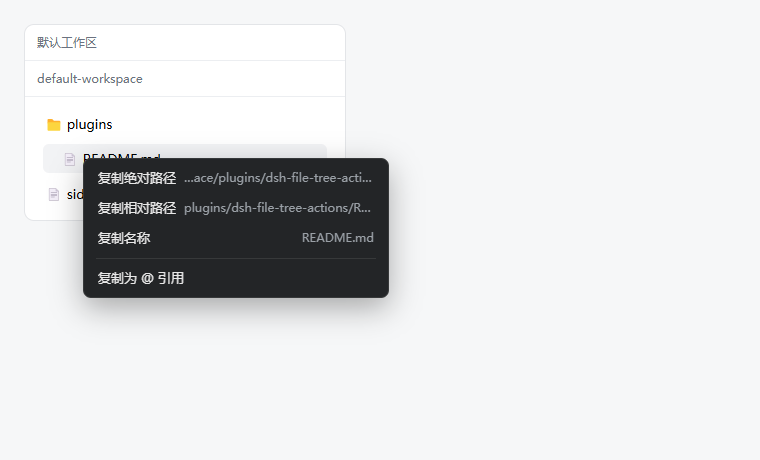
dsh-symbol-links / dsh-file-tree-actions,发布前检查项见 docs/RFC.md §8;data/plugins/*.yml + 提交步骤)在 docs/awesome-submission;| 项 | 说明 |
|---|---|
| DSH | 0.2.1-rc.3(Desktop 内置 Web 前端),其他 0.2.x 未逐一验证;0.3 未验证 |
| 平台 | web(DSH Desktop 与 dsh web 共用前端);symbol-links 跨平台 |
| Node.js | 仓库脚本要求 ^22.19.0 || >=24.0.0(node --test / node --check) |
| 回收站 | 仅 Windows;其他平台 file-tree-actions 的删除返回 501,不降级为永久删除 |
| LSP | 不依赖,也不调用语言服务器;解析是正则级的 |
dsh-code-nav/
├─ .github/workflows/ci.yml   # Windows + Ubuntu,node --check / node --test
├─ .gitignore
├─ LICENSE                    # MIT
├─ README.md
├─ DESIGN.md                  # 架构、安全边界、索引预算
├─ package.json               # private,workspaces: packages/*
└─ packages/                  # symbol-links / file-tree-actions
   ├─ symbol-links/           # dsh-symbol-links
   └─ file-tree-actions/      # dsh-file-tree-actions
每个包的典型布局(与现有插件一致):
symbol-links/
├─ lib/index.js        # host:只读索引 + POST 路由
├─ lib/resolver.js     # 纯解析逻辑(可单测,无 I/O)
├─ lib/client.js       # 浏览器:DOM 装饰 + 点击 + 打开预览
├─ test/               # node --test
├─ cordis.patch.yml
└─ package.json

file-tree-actions/
├─ index.js            # host:文件写路由
├─ client.js           # 浏览器:右键菜单 + 拖拽
├─ lib/paths.js        # 路径/名字校验
├─ lib/ops.js          # 文件系统动作
├─ test/               # node --test(含真实 Chromium harness)
├─ cordis.patch.yml
└─ package.json在仓库根目录:
npm test        # node --test + file-tree-actions 的 host 测试
npm run check   # 对两个包的 JS 逐个 node --check
根
package.json的check脚本按packages/symbol-links与packages/file-tree-actions这两个目录名写死了文件路径;若目录改名,请同步修改脚本。
via 标注来源。extraRoots(最多 4 个,只读)。超过 5 万个文件、单文件超过 2 MB 的内容会被跳过。incomplete 并在后台继续建;期间点击会提示「正在建立索引」。client.js 的改动。dsh-code-nav is a small monorepo of two independent DeepSeek Harness (DSH) web plugins:
@ mention — and lets you drag a row into the composer to insert an @path reference.dsh plugin --profile <name> add dsh-symbol-links
dsh plugin --profile <name> add dsh-file-tree-actionsCompatibility: DSH 0.2.1-rc.3 / Web; Node.js ^22.19.0 || >=24.0.0 for the repo scripts. Symbol resolution is regex-based (no LSP) and intentionally heuristic. Host-side changes require a DSH restart; client-only changes need a page refresh. See DESIGN.md for architecture, trust boundaries, and cold/hot index budgets.
MIT,见 LICENSE。
CLASSIFICATION EVIDENCE
系统优先读取 GitHub Topics,再与站内分类词典和词根规则比对。当前命中: developer-tools。
superdesigndev
OpenRouter for agent tools. Join community here: https://discord.gg/6mQYYfFMAn

T-Auto
A toolkit for low-level operations in DSH, designed to reduce token usage and task execution time / DSH 底层操作工具插件,旨在减少 Token 消耗与任务耗时

crafter-station
A public gallery of animated pets for Codex, Claude Code, DeepSeek Harness, Hermes, OpenCode, Gemini CLI, and more.