模型与 MCP
待识别

rea
morluto
Reverse engineer anything with agents, from app behavior down to native binaries.

NINKCH/dsh-infinite_canvas
Infinite Canvas — a node-based short-drama studio plugin for DeepSeek Harness: script, multi-shot storyboard, reference-consistent assets, one-shot video generation and final cut. Local-first, bring your own models.
PROJECT TOPICS
INSTALL REFERENCE
dsh plugin --profile web add github:NINKCH/dsh-infinite_canvas
该命令指向仓库当前默认分支;尚无绑定当前 commit 的完整验证结果。
PROJECT README
A node-based short-drama studio inside DeepSeek Harness. Start from a one-line idea, walk out with a storyboarded, voiced, subtitled video cut — right on an infinite canvas.
English | 简体中文 · User guide: English · 操作手册(中文)
Infinite Canvas is a DeepSeek Harness plugin that turns the web GUI's sidebar into a full creation studio. Instead of chat round-trips, you work the way directors do: nodes on an infinite canvas, wired into a pipeline — script, storyboard, character & scene assets, image generation, video generation, and a final cut with transitions, subtitles and dubbing.
Everything runs locally in your Harness. Bring your own generation APIs, or use the built-in demo mode to learn the whole flow with zero configuration.
The canvas and the agent share one brain. Every node is an AI workbench, and the chat side is the director: ask in plain language and the agent operates the canvas tools for you — batch work especially.
"Create a project called Time-Postman, write the world view and series bible first." "Write episode 1 based on the bible." → the script node generates one episode (60–120s), every scene marked with a
【场N】header. "Expand episode 1 into scenes." → per-scene text nodes + storyboard nodes appear, wired automatically. "Generate reference images for every character, scene and prop." → ten image nodes created and generated in one go. "Generate scene 1's video." → storyboard shots + reference images compose one multi-shot video call. "Send episode 1 to FilmCraft for an MP4 render." → FCP7 XML + SRT land in your data root for the Craft suite.
The heavy lifting — bibles, episode scripts, storyboard breakdowns, batches of reference images — is exactly what the agent is fast at. You then fine-tune the 20% you care about directly on the nodes: tweak a prompt, reorder references, re-roll one shot, pull an older result from history.
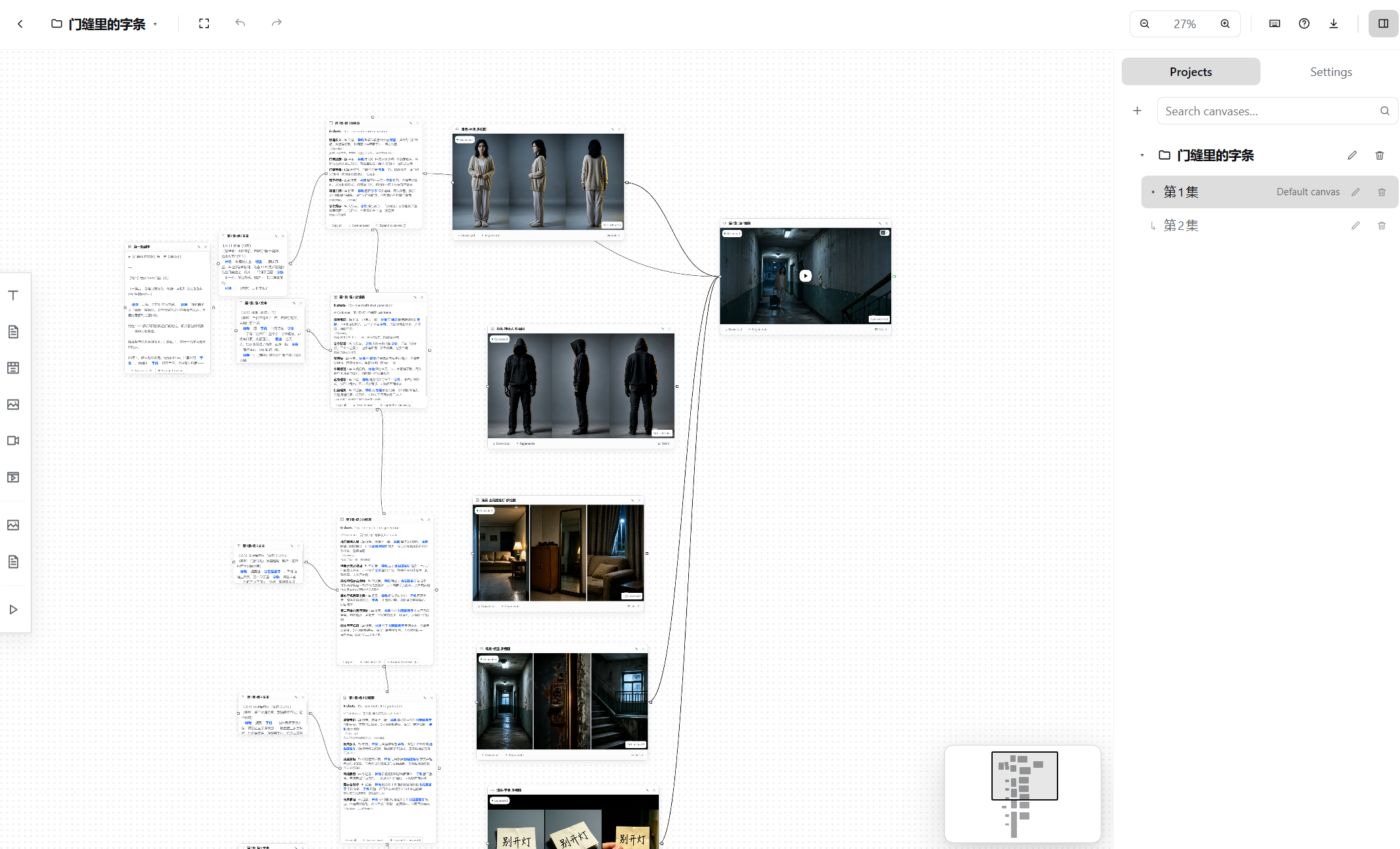
A full episode produced end to end with the flow above. The canvas with the whole episode laid out — the icon rail on the left adds nodes, the Projects panel on the right manages the canvases of the current project (第1集 / 第2集), while assets and the bible stay shared across the project:
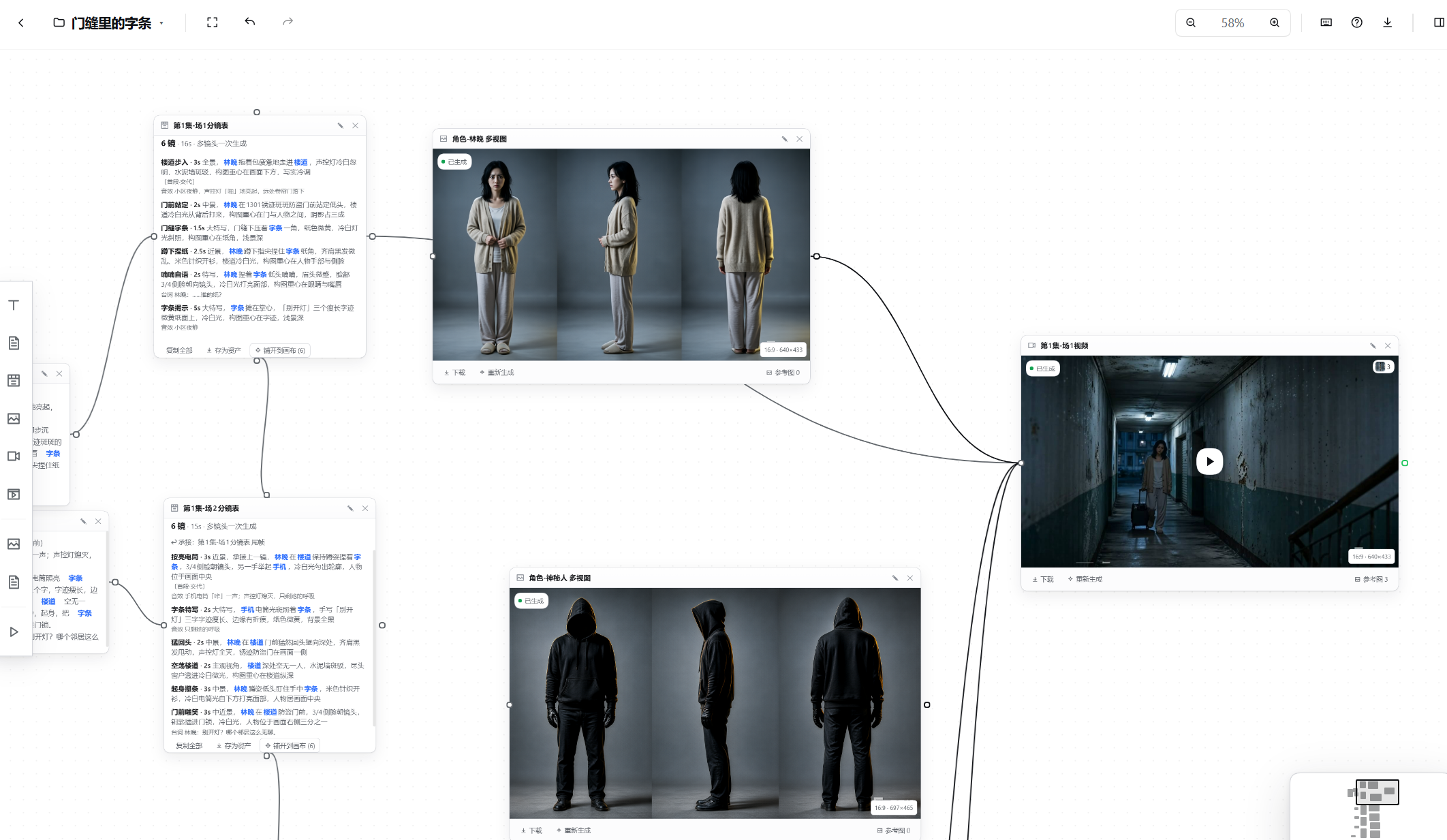
Shot 1 up close — storyboard → character/scene turnaround images → video, with the reference relationships drawn as edges:
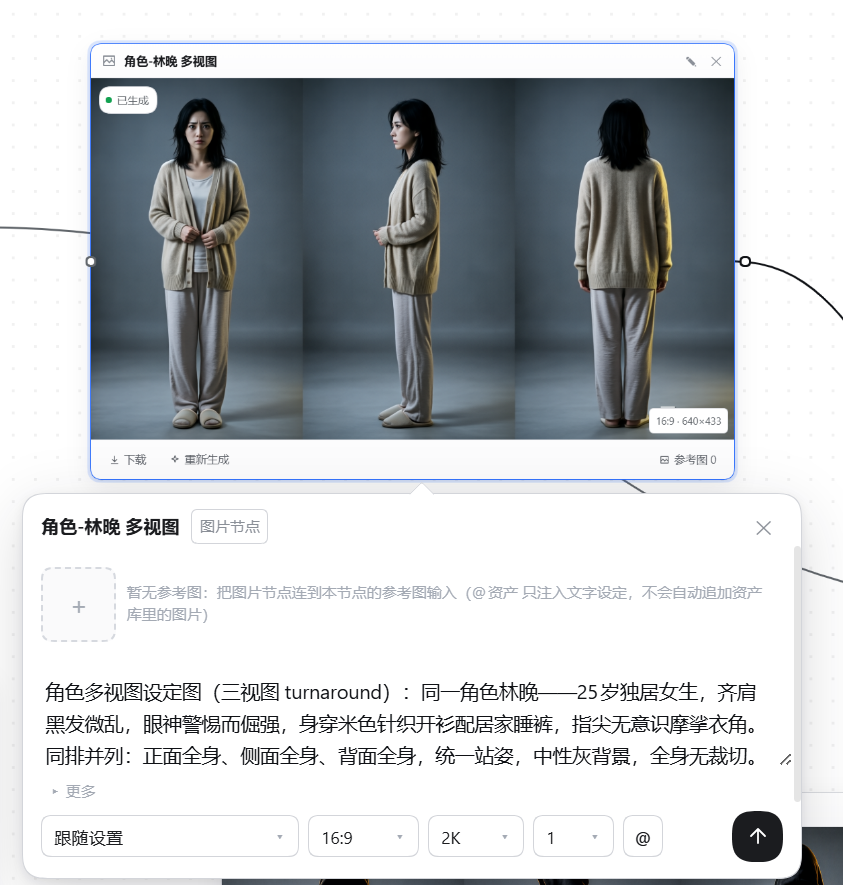
A node with its generation panel: click the content area to open it — references live in a draggable strip at the top, and model / ratio / quality / count sit on one row:
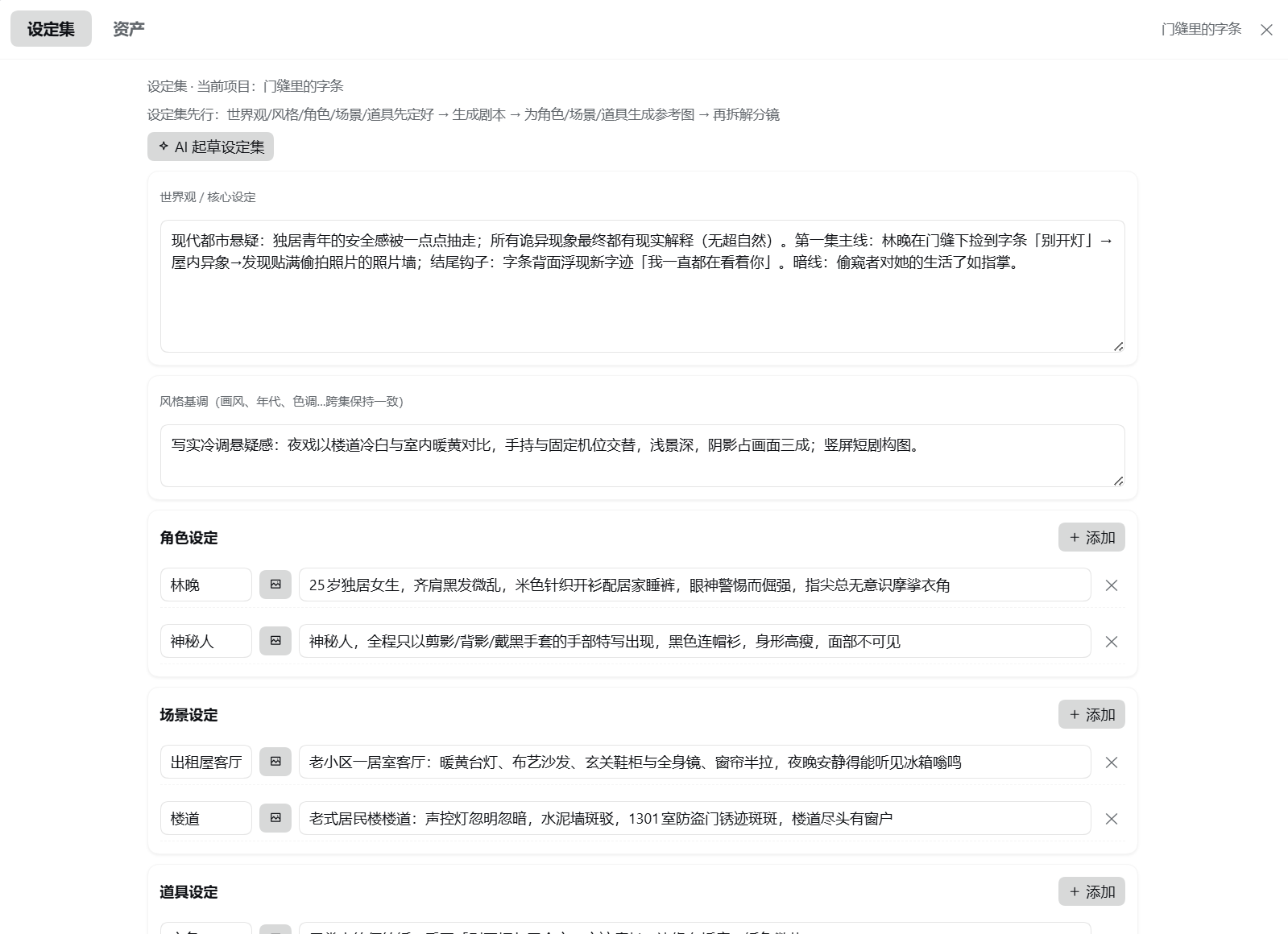
The bible modal — world view, style, character/scene/prop entries, each able to bind reference assets:
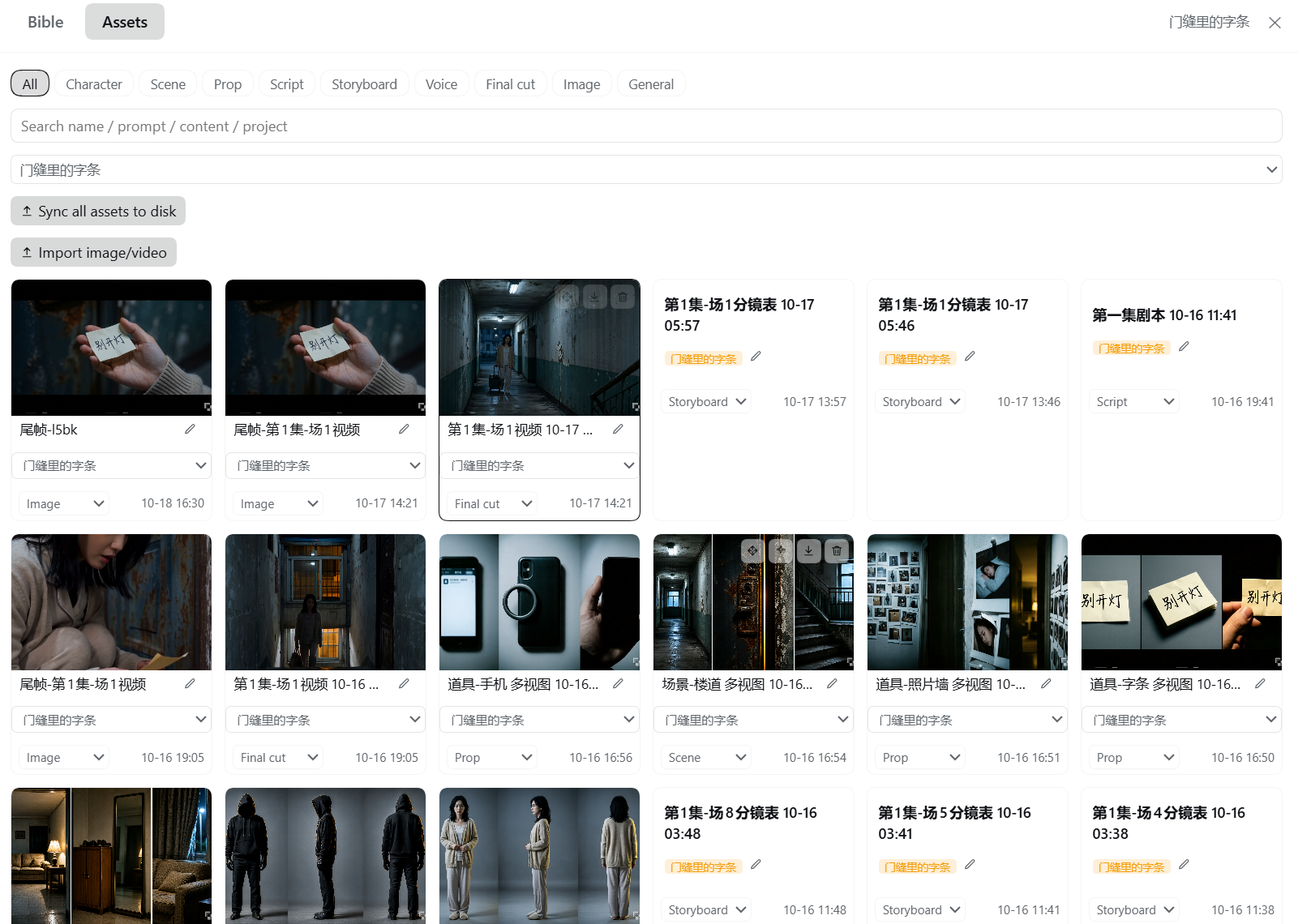
The assets modal — a card grid with search, category and project filters; videos use their first frame as the thumbnail (EN UI):
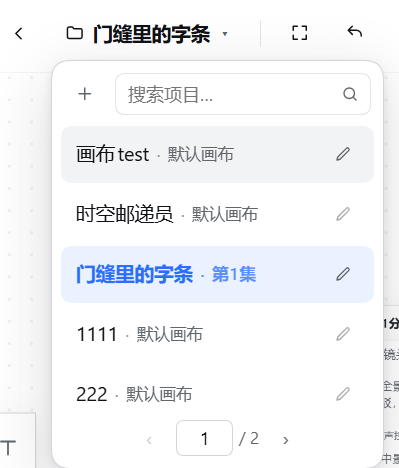
The project dropdown on the top-left project name: every row shows project · canvas, renames happen in place, and more than five projects paginate with a page-jump box (ZH UI):
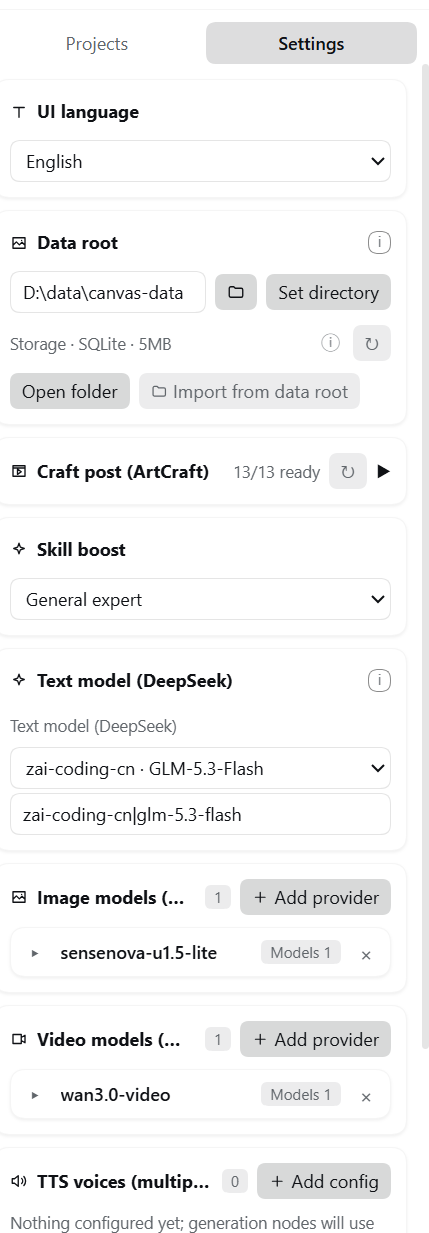
The Settings panel — data root, Craft status, Skill boost (General expert), text model and the image/video/TTS providers (EN UI):
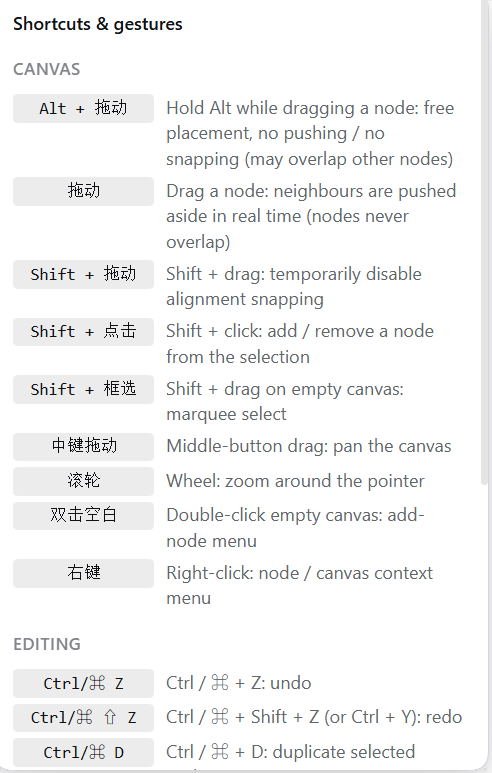
Shortcuts and gestures:
Help & feedback:

Every canvas (one episode) carries a host-enforced production stage — brief → bible → assets → script → storyboard → shots_ready → generating → qc → post → delivered — with six code gates (bible-first, storyboard quality, one video per storyboard, no per-shot nodes, destructive-op confirmation, stage order). Gates refuse with the exact missing items and always accept an explicit-user override (audited). canvas_production_status is the only basis for claiming "done".
With the Auto creation (experimental) switch on (Settings → 自动创作), the agent runs a writers room from one sentence — research → two independent pitches → cross-critique → producer decision → bible → script → per-scene storyboards (quality-gated) → budget sheet — with zero paid calls; approve once and it generates videos per storyboard and builds a final-cut node. The transcript lands on the canvas as a 编剧室会议 node; questions are forbidden in this mode. Settings only keeps the switch: the brief input, live phase/budget sheet, per-scene selection and approve/generate/abort controls live in the Production console (left icon rail), and the video unit price is set in chat ("set video price to X yuan/second" → canvas_production_set_price).
dsh-image-genIf the dsh-image-gen plugin is installed and configured, Settings shows 「图片模型(来自 dsh-image-gen)」: pick one of its providers/models and generate directly through its studio bridge — no base URL or API key in the canvas; credentials stay on the image-gen side.
canvas_layout_get reads the whole board's geometry; canvas_layout_node batch-places nodes by coordinate (media nodes can resize, ratio-preserving) and can pin nodes so canvas_relayout never moves them. Relayout packs clusters in bands instead of one endless column and never covers pinned nodes.
The canvas is not a separate window you have to switch to. It opens as a tab in the Harness right pane, so you can talk to the agent on the left and storyboard on the right at the same time — ask for a change in chat and watch the nodes update in place.
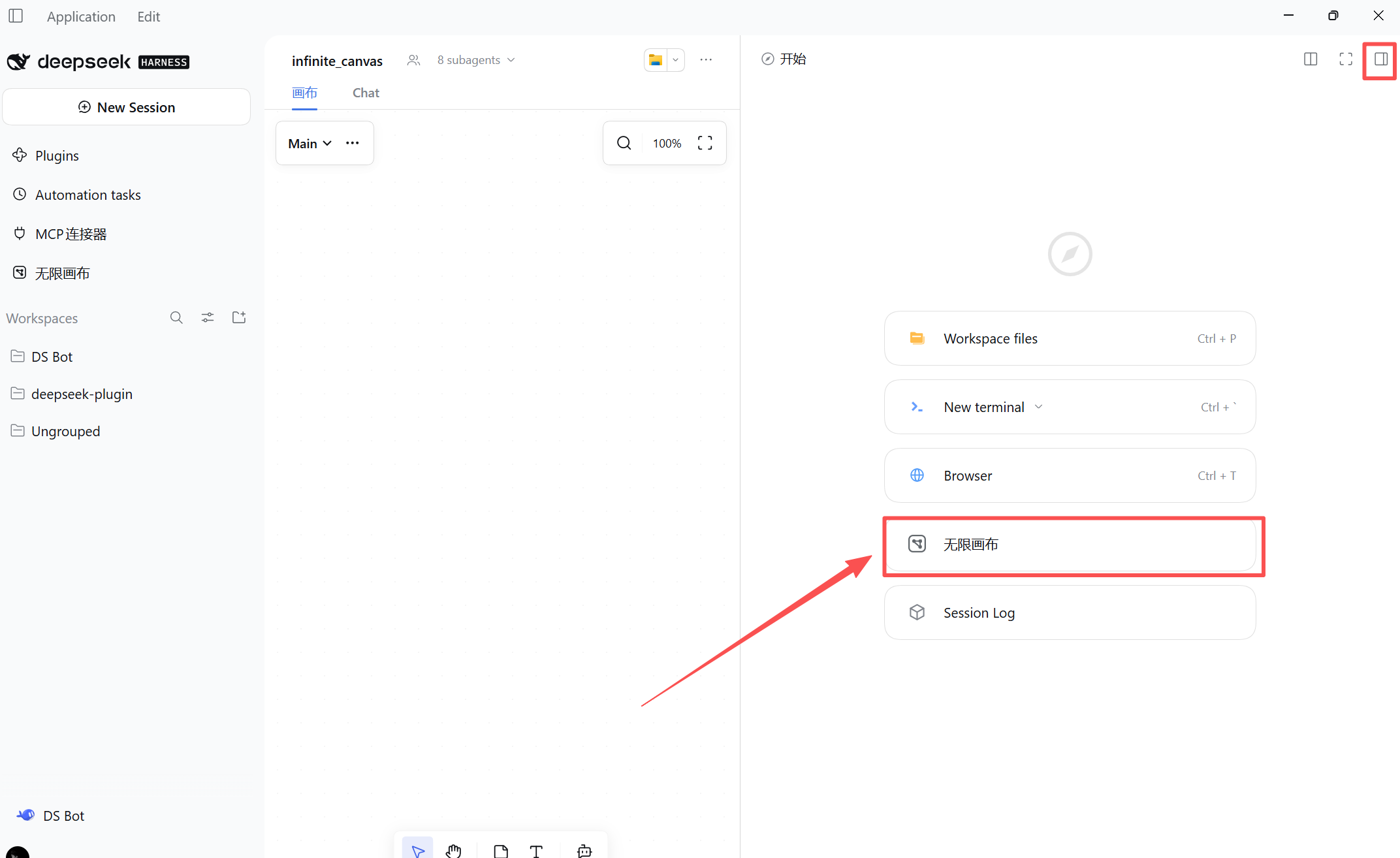
One live canvas at a time (shared node graph and generation state): opening it in the pane while the full-page panel is also open moves the canvas rather than duplicating it — the other side shows a "move the canvas here" button.
Built for long-running series: one workspace = one project, one session = one episode.
canvas_my_canvas ("this session = episode N of project X") and every canvas_* tool defaults to the bound canvas — write/connect/run/delete any node, update the bible, manage the episode. Cross-canvas and cross-project operations are a code-level ban: explicitly passing another project's or canvas's ids (including other canvases of the same project) is rejected with a locked error pointing at the unbind action. Unbound sessions are unrestricted.project.json, canvases/, memory/, bindings.json sit inside <workspace>/.infinite-canvas/ — copy the folder, move the series. (Media files stay in the plugin's data root.)A blocking & previz workspace that lives inside the same project: place real glTF characters and set dressing, frame them with real cameras, and send the result back to the canvas as an image or video node.
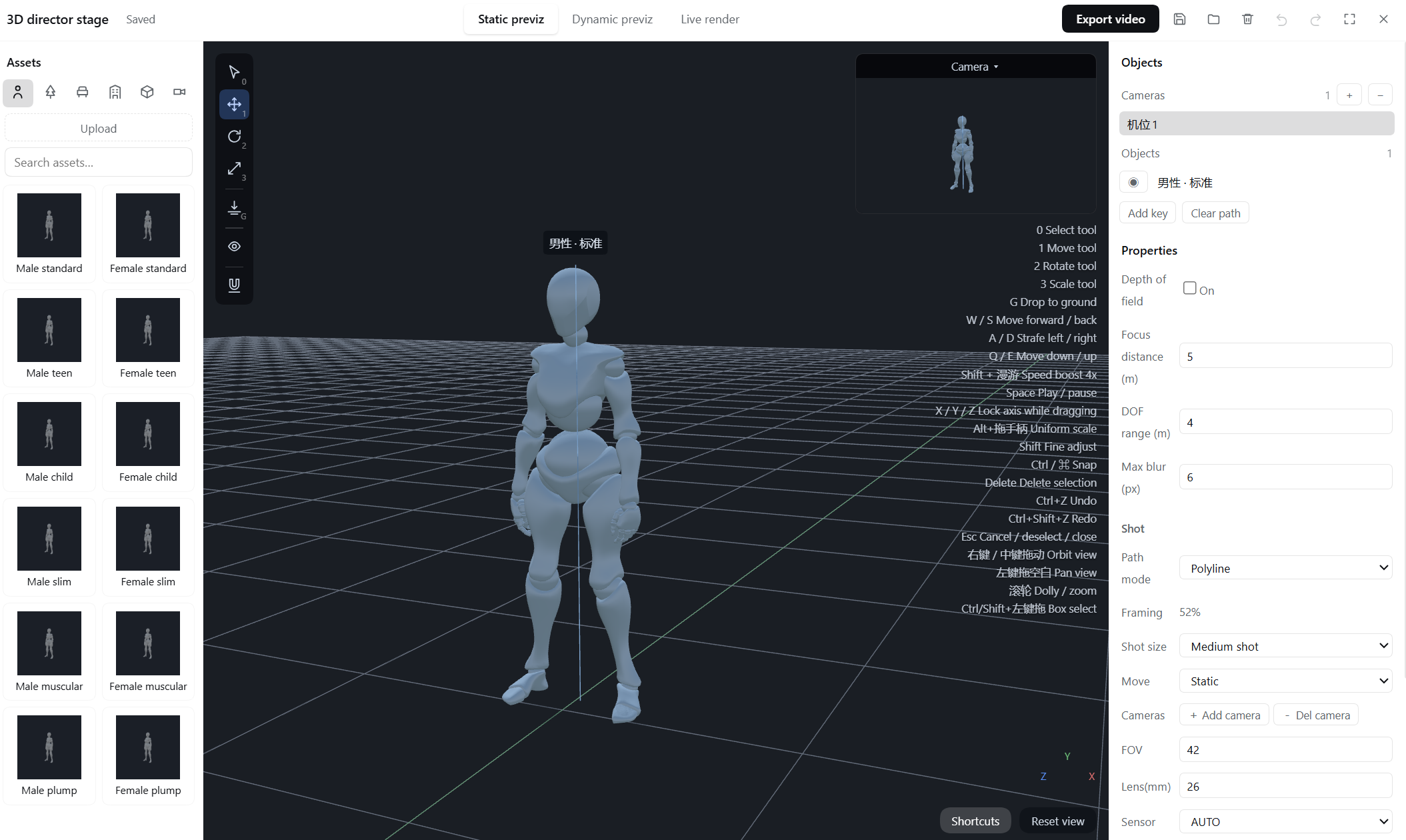
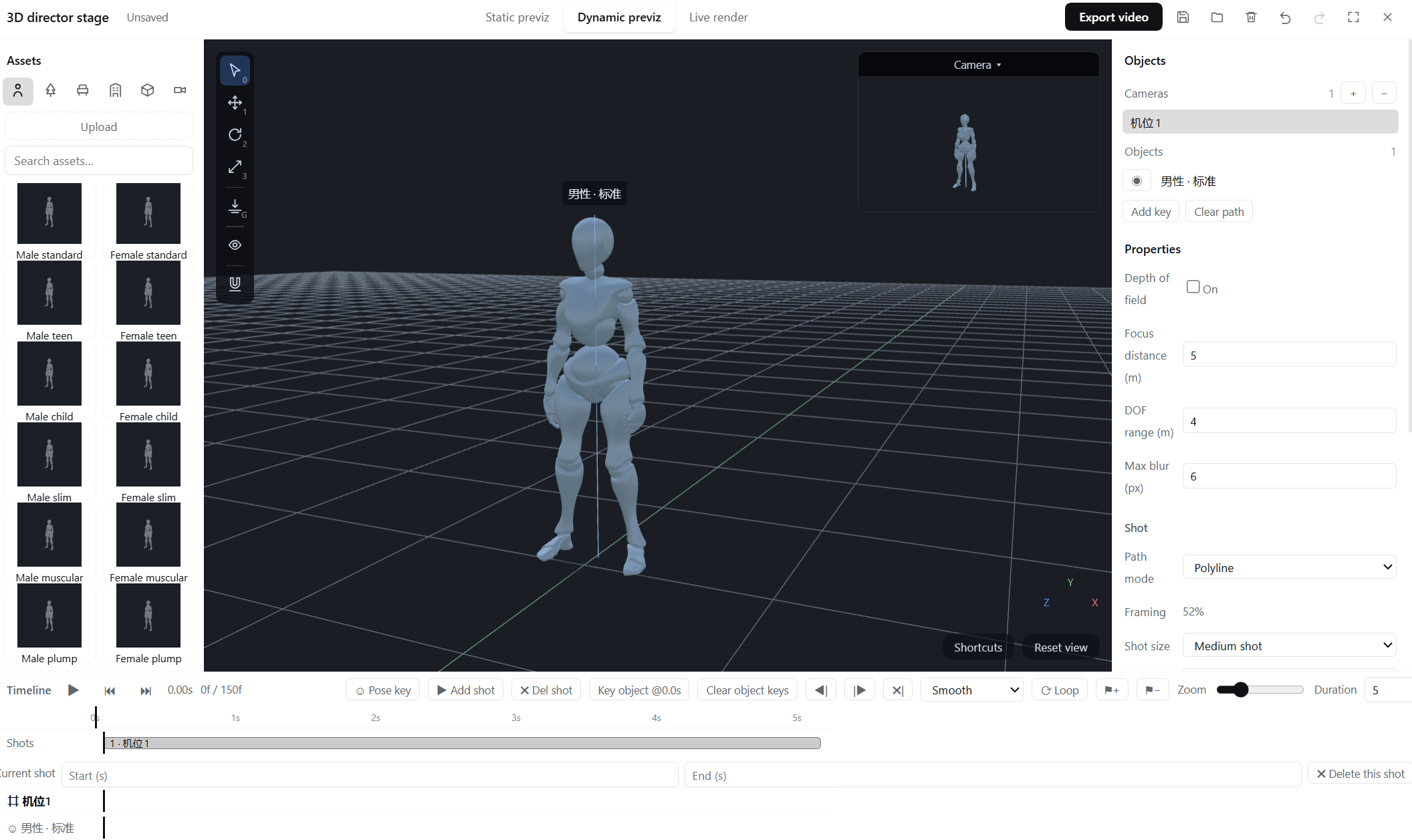
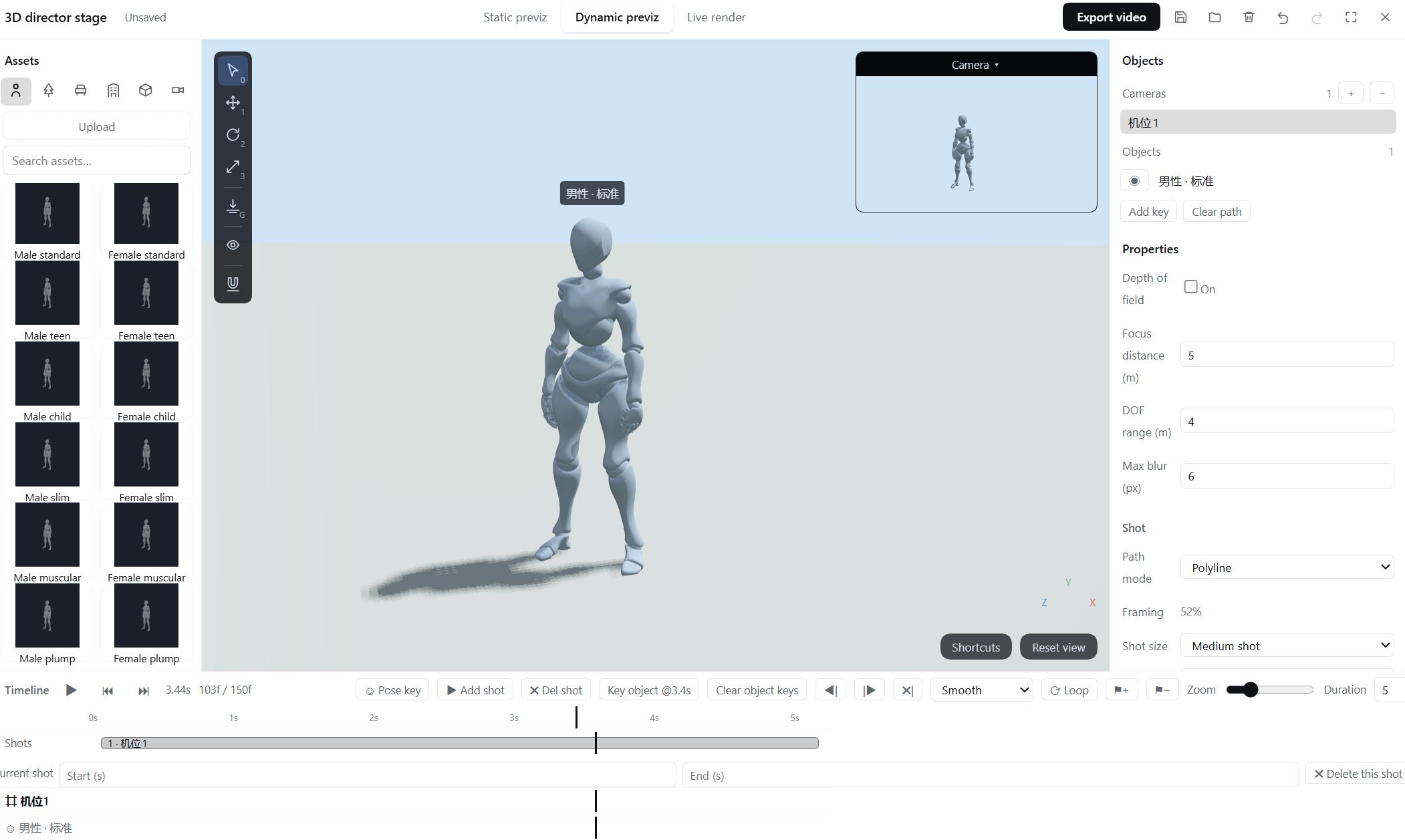
Assets are shared with the canvas: the characters, trees, furniture and buildings you already generated are directly usable as previz set dressing.
Full walkthrough — asset tabs, gizmo, keyboard map, shots and export: User guide → 3D Director Stage.
The third tab of the right sidebar decides how the whole piece is shot. It is not a prompt template — it is a binding constraint that gets composed into every script, storyboard, image and video generation. There are no dropdowns on the page: every option is an icon tile; click to select, click again to clear.
| Layer | Count | Decides | Why it needs its own layer |
|---|---|---|---|
| Director | 45 | Camera language, lighting, cutting rhythm, style parameters | It constrains the shot's camera fields, the keyframe, and the video's camera move at once — the least replaceable decision in the whole piece |
| Genre | 36 narrative / 10 sector | Pressure mechanics, audience payoff, scene granules, episode hooks | The same "revenge" premise is fragmented neon under Wong Kar-wai and hard-lit slow motion under Tsui Hark; folding them together poisons both |
| Spec | 8 | Structure blocks, ASL floor, rhythm, quality bar | It decides "short drama vs cinematic texture vs commercial", which is orthogonal to genre |
| Look | 9 | Imaging base, material, render texture | 2D thick paint / guoman 3D / game CG are imaging domains, not directors; mixing them into the director layer makes "how to cut" fight "what it looks like" |
Directors (45): Chinese 16 (Wong Kar-wai, Zhang Yimou, Hou Hsiao-hsien, Bi Gan, Tsui Hark, Lu Yang, Yuen Woo-ping, Wu Ershan, Ang Lee, Edward Yang, Jia Zhangke, Jiang Wen, Johnnie To, Ning Hao, Stephen Chow, Wong Jing) · Japan/Korea 7 (Kurosawa, Park Chan-wook, Bong Joon-ho, Kore-eda Hirokazu, Lee Chang-dong, Miyazaki Hayao, Shinkai Makoto) · Western 22 (Spielberg, Hitchcock, Kubrick, Scorsese, Fellini, Bergman, Tarkovsky, Nolan, Villeneuve, Fincher, Refn, Malick, Michael Mann, Coen Brothers, Ridley Scott, David Lynch, Alfonso Cuarón, Iñárritu, Wes Anderson, George Miller, Almodóvar, Guy Ritchie).
Specs (8): Short drama · Cinematic texture · Commercial · Documentary · Music video · Trailer · Explainer · Interview.
Vertical, horizontal, square or widescreen all work with any spec — aspect and resolution are chosen on the video node at generation time. Vertical delivery is common for short drama, but that is a distribution choice, not a craft spec; a short drama can equally be shot horizontal and to a cinematic standard.
| Node / capability | What it receives |
|---|---|
| Script node | Genre cards + the lens's narrative/rhythm/performance sections + the form's structure blocks |
| Storyboard node | The lens's camera language, lighting, style parameters and shot checklist + the form + the camera-move dictionary |
| Image node | A style lock: style parameters + look imaging/material + genre granules + three negative lists |
| Video node | Same (also appended when an upstream storyboard feeds it, without breaking the structured format) |
| Character/scene/prop sheets | The lens's lighting and colour + the look card |
| Bible AI draft | Same as script |
With all four layers empty nothing is injected — existing projects behave exactly as before.
The configuration is stored on the project document (same sync mechanism as the series bible), so the chat side reads the same selection the panel shows. Say "shoot this in Wong Kar-wai's style" in chat and the agent calls canvas_list_skills to see what craft exists, then canvas_skill_pack to pull the matching slice — the same slice the canvas itself uses.
Full walkthrough — User guide → Craft page.
flowchart LR
    A[Script node<br>ONE episode · scene headers] --> B[Expand to scenes<br>text + storyboard per scene]
    B --> C[Multi-shot video per scene<br>shots + refs in ONE call]
    C --> D[Tail-frame chaining<br>scene N last frame → N+1 first frame]
    A --> E[Reference image gen<br>characters · scenes · props]
    E --> C
D --> F[Final cut / FilmCraft<br>transitions · subtitles · voices]A per-project series bible (style baseline + character/scene/prop cards) is injected into every AI call, so wardrobes, locations and props stay coherent across shots and episodes. Entities referenced with @name in a prompt automatically carry their bible description and reference assets. After each storyboard run, a consistency check flags any name that isn't registered yet, and the agent fills the gaps.
Reference images connect as an ordered, visible list — [图1] 角色:Lin Ning, [图2] 场景:The Old House — and that exact order is what reaches the model. Multi-character frames stay unambiguous, and Volcano Engine Seedance's native [图N] convention is supported end to end (first frame, up to 4 reference images, official task API).
One storyboard = one multi-shot video generation. Expanding a storyboard wires it to a single video node: every shot (order + per-shot duration) is composed into one multi-shot prompt and your video model renders the whole clip in one call — the model makes the hard cuts, no per-shot stitching seams. The Final Cut node then stitches segments in order — crossfade or black transitions, burned-in subtitles, original audio and TTS voices mixed in — and exports a preview cut instantly. For real post-production, one click writes a FCP7 XML timeline + SRT to disk and hands the render to ArtCraft (FilmCraft) for a true MP4.
Pan, zoom, marquee select, alignment guides, groups that fold, a minimap, 60-step undo/redo, per-node media history (last 8 results), mask-based inpainting, and middle-click everything — the canvas part should feel like an editor, not a chat sidebar.
Text models come from Harness itself (no extra keys, no per-plugin parameters). Image and video backends use a provider + model structure: configure a provider once (URL, key, optional vendor-specific extra params as JSON) and list as many model IDs under it as you like; star one as the default route for nodes that don't pick one. Video endpoints are auto-adapted — OpenAI-style task APIs, Seedance-native content[] gateways and Sora-style /v1/videos are covered by an automatic fallback chain, resolutions/ratios/first-frames/references are mapped to each vendor's conventions, and oversized references are downscaled before sending. Every gateway call is relayed through the local Harness host process, so any vendor works (no CORS headaches). No backend configured? Demo mode synthesizes placeholder images and animated videos locally so the entire pipeline is testable offline.
Set a data root folder once and everything lands there, organized by project name: nodes and the series bible in project.json, the asset index in assets.json, media under image/ video/ audio/ text/, and Craft post-production under craft/. Moving to a new machine = copying the folder: point the new install's data root at it and every project (assets, bible, media) is recognized — plus a one-click Import from data root for anything not yet on disk. Put the folder inside a cloud-sync directory and multiple machines stay in sync automatically.
【场N】 scene headers → click Expand to scenes (or ask the agent) to get text + storyboard nodes per scene.Without any generation API configured, every step runs in demo mode — the full pipeline works offline.
The full walkthrough (with screenshots, model configuration and data-root migration) lives in the Chinese user guide.
| Kind | Protocol | Notes |
|---|---|---|
| Text | Harness LLM service | Episode scripts & storyboard writers; pick any configured model, or override per node |
| Image | OpenAI-compatible /images/generations, multi-reference via /images/edits |
Provider + model list with starred default; size (1K/2K/4K) × ratio; extra params as JSON; mask inpainting via edits + PNG mask |
| Video | OpenAI-style task APIs, Seedance-native content[], Sora-style /v1/videos — automatic fallback chain |
Episodes per scene (≤15s), 480P/720P/1080P, ratio, first frame, multi-reference (auto-downscaled), voice references via audios[] |
| TTS | OpenAI-compatible /audio/speech |
Per-shot voices mixed into the final cut |
All gateway calls are relayed by the local Harness host process (no browser CORS limits) — any vendor endpoint with an OpenAI-style shape works.
When the companion dsh-artcraft plugin is installed, the canvas talks to the local Craft family (PhotoCraft, FilmCraft, EffectCraft, LightCraft, VectorCraft, DesignCraft, … — every bin the Craft suite reports, currently 12) over same-origin HTTP. Point ArtCraft's data root at the same folder as the canvas data root and all post-production lands in projects/<project>/craft/ next to your other data: assets sync per project, images get headless PhotoCraft grading (single or batch), and final cuts export as FCP7 XML + SRT for FilmCraft to render as MP4. A status card in Settings shows one light per craft with an n/n ready summary.
The maintainer runbook (red lines, branch model, versioning) lives in RELEASING.md; the operations detail in docs/release.md; released changes in CHANGELOG.md — GitHub Release notes are written in English and copied from the changelog.
Publishing runs through npm Trusted Publishing (OIDC) — no npm token exists anywhere:
main → create a GitHub Release (tag v0.17.9, …) → Actions publishes that version automatically.publish.yml workflow guards on the release commit being on main and the tag matching package.json, then publishes with a provenance badge.localStorage (dsh-ic:*); asset metadata lives in IndexedDB (dsh-infinite-canvas) while media files persist on disk once a data root is set (per-project folders by project name, served by the plugin backend with HTTP Range support for video seeking).edits/mask inpainting requires a model that supports the endpoint (e.g. gpt-image-1).Apache-2.0
CLASSIFICATION EVIDENCE
系统优先读取 GitHub Topics,再与站内分类词典和词根规则比对。当前命中: deepseek-harness-plugin。
morluto
Reverse engineer anything with agents, from app behavior down to native binaries.

deepseek-ai
DeepSeek Harness: Everything is a Plugin.

nexu-io
The 1st Collaborative AI Design Agent Workspace. Local-first and open source. Create motion, prototypes, websites, apps, dashboards, presentations, images, and videos with your team and AI agents. Share work, exchange feedback, and iterate together in one workspace.