
模型与 MCP
待识别

rea
morluto
Reverse engineer anything with agents, from app behavior down to native binaries.
PROJECT TOPICS
PROJECT README
一个 DeepSeek Harness(DSH)插件:在会话里多看一页,把「这一轮到底调用了哪些技能、哪些 MCP、派了哪些子代理,以及它们是被提示词和思维链里的哪句话带出来的」画成一张可缩放的分支图。
它不埋点、不上传:所有信息都来自本机会话日志。
DSH 自带两个会话视图:对话(消息流)和 轨迹(时间轴泳道:输入 / 模型 / 工具)。轨迹能回答「什么时候、花了多久」,但回答不了:
调用可视化 就是补这一层:归因,而不是时序。
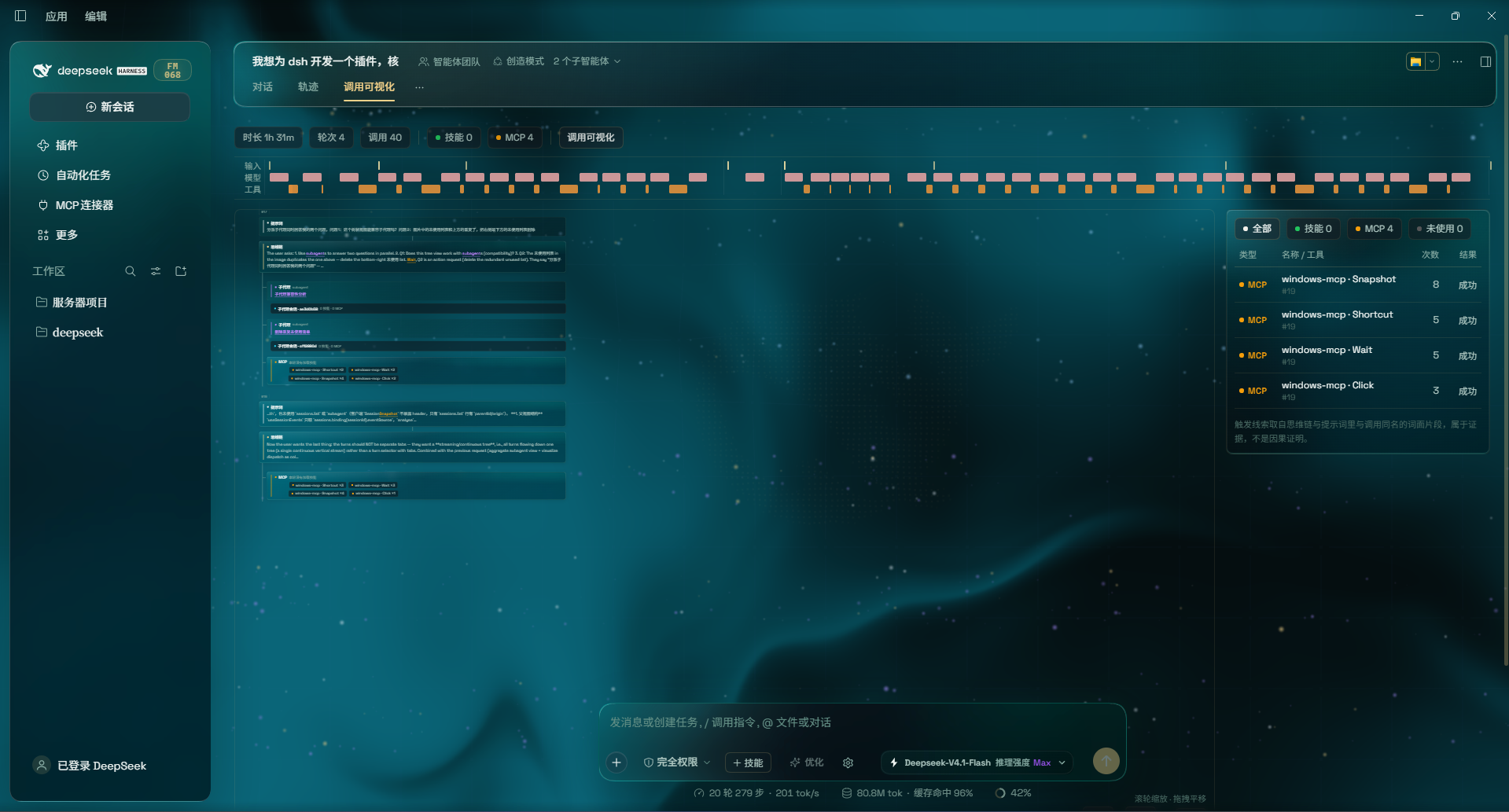
所有轮次按时间顺序连续排在同一张画布上,不再靠标签页切换:
最新 一键定位最后一轮对话,全览 把整棵树缩进一屏;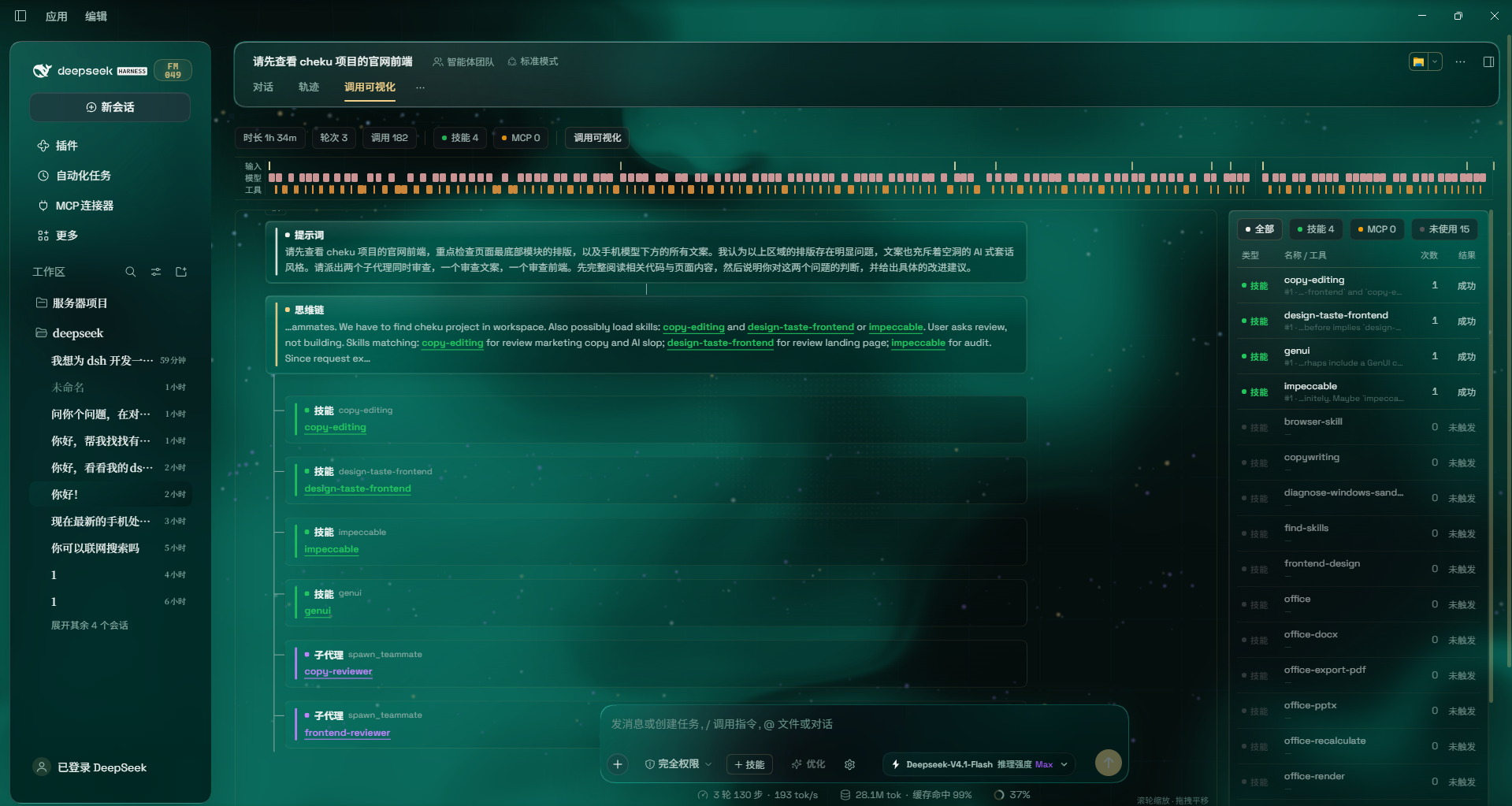
树会一直展开到最细一层,左侧是链路,右侧是同源的调用明细:
spawn_teammate / subagent / workflow / ralph 本身也是节点,节点下面挂子代理卡片——插件会去读那个子代理会话自己的技能 / MCP 调用并折叠进来,点卡片直达该子会话;windows-mcp · Click ×6);全部 技能 MCP 未使用,点行打开宿主原生调用详情。| 能力 | 说明 |
|---|---|
| 一页聚合 | 所有轮次按时间顺序连续排布,不用来回切页 |
| 可缩放画布 | 滚轮缩放(30%–240%)、拖拽平移、最新 / 全览 一键归位;进入默认落在最新一轮 |
| 归因树 | 提示词 → 思维链 → 技能 / MCP / 子代理,命中的词按目标节点上色(技能绿、MCP 琥珀、子代理紫) |
| 子代理聚合 | 派发节点独立成类;能拿到子会话时,把子会话内部的技能/MCP 折叠成筹码挂在下面,点卡片直达该子会话 |
| 调用明细表 | 类型 / 名称 / 次数 / 轮次 / 触发线索 / 结果,可筛「全部 / 技能 / MCP / 未使用」,点行打开宿主原生调用详情 |
| 未使用清单 | 本会话可用但一次没调用的技能与 MCP(未使用 筛选即可看到) |
| 轨道图 | 输入 / 模型 / 工具三泳道时间条,用于快速定位「哪一段在干什么」 |
要求:DSH 已安装并可用(本插件注册的是既有槽位 conversation.view,不改宿主编译产物)。
方式一:DSH 内置插件管理器(推荐)
把本目录作为本地包安装:
plugin_manager install_bundle target = <本目录的绝对路径>安装后刷新页面,会话头部会多出第三个视图标签 调用可视化。
也可以直接从 GitHub 安装:本仓库已声明 dsh.bundle manifest,可被 dsh plugin add 识别(纯 JS,无构建步骤)。插件已按 awesome-dsh-plugin 的收录规范备好元数据:assets/icon-180.png 为市场卡片图标,screenshots.json 声明商店详情页截图。
方式二:手动挂载
pnpm add <本目录绝对路径>(或把它软链进 node_modules/call-map);package.json 的 dsh.profile.bundles 数组里加入 call-map;卸载:plugin_manager remove_bundle target = call-map。
调用可视化;最新 回到最新一轮,全览 缩到整张图;所有数据来自本地会话事件(user/message、assistant/message、tool/call、tool/result、request/header、turn/start),插件自身不写会话、不联网:
skill 工具的调用,技能名取自其 arguments.name;mcp__<server>__<tool> 的调用;spawn_teammate / subagent / subagent_fork / workflow / ralph 的派发调用;<available_skills>)与已向本会话暴露工具的 MCP server,减去实际调用的部分;subagent / workflow 的结果里带 id,可直接聚合;spawn_teammate 只返回队友名,插件用「工作区会话标题 == 队友名」反查,队友会话被改名或尚未进入快照时会退化为「会话未加载」。轨迹 页的原版图表不是同一实现;宿主的 轨迹 页本身不受影响。轨迹 页的工具栏(时长 / 轮次 / 调用 那一行)没有对外插槽,所以本插件只能作为并列的第三个页签,无法把入口塞进那一行。不采集、不发送任何数据。全部计算在本地前端完成,不新增网络请求。
call-map/
├─ package.json        # 包清单(dsh.bundle / dsh.client 声明)
├─ cordis.patch.yml    # bundle 补丁:插入一行插件
├─ index.js            # Host 半边(本插件为空实现)
├─ client.js           # 全部逻辑:折叠会话事件 + 视图渲染
├─ locale/en.json      # 插件管理页显示名(英文)
├─ locale/zh.json      # 插件管理页显示名(中文)
├─ docs/*.png          # README 截图
├─ assets/icon-180.png # 市场卡片图标(180×180 PNG)
├─ screenshots.json    # 市场详情页截图声明(1–8 张)
└─ icon.svg # 插件图标A DeepSeek Harness (DSH) plugin that adds one more page to a session: it draws which skills, which MCP tools, and which subagents were actually used this turn — and which sentence or word in the prompt / reasoning brought them in — as a zoomable branch diagram.
No instrumentation, no uploads: every number comes from the local session log.
DSH ships two session views: Chat (the message stream) and Trajectory (a timing overview with input / model / tool lanes). Trajectory answers "when, and for how long". It cannot answer:
Call map adds exactly that layer: attribution, not chronology.
Every turn is laid out continuously on a single canvas, instead of one tab per turn:
Latest jumps back to the newest turn, Overview shrinks the whole tree into one screen;
The tree expands all the way down; the chain is on the left, the matching call table on the right:
spawn_teammate / subagent / workflow / ralph are nodes too, with subagent cards underneath — the plugin reads that child session's own skills / MCP calls and folds them in; click a card to jump to the child session;windows-mcp · Click ×6);All Skills MCP Unused; click a row to open the host's native call inspector.| Capability | Description |
|---|---|
| One-page aggregation | Every turn laid out chronologically on one canvas; no tab switching |
| Zoomable canvas | Wheel zoom (30%–240%), drag to pan, Latest / Overview shortcuts; opens on the latest turn |
| Attribution tree | Prompt → reasoning → skill / MCP / dispatch, with matched words coloured per target node |
| Subagent aggregation | Dispatch is its own node class; when a child session is reachable its skills / MCP are folded in as chips, and the card opens that session |
| Call table | Type / name / count / turn / trigger trail / result, filter by all / skills / MCP / unused; click a row for the host's native inspector |
| Unused inventory | Skills and MCP servers available in this session but never called (the Unused filter) |
| Lane chart | Input / model / tool time lanes for "what was happening when" |
Requires a working DSH install. The plugin registers into the existing conversation.view slot and does not modify any shipped build output.
Option 1 — DSH plugin manager (recommended)
Install this directory as a local package:
plugin_manager install_bundle target = <absolute path to this directory>Then reload the page: a third view tab, Call map, appears next to Chat and Trajectory.
You can also install straight from GitHub: the repo declares the dsh.bundle manifest, so dsh plugin add can pick it up (plain JS, no build step). Marketplace metadata follows the awesome-dsh-plugin conventions: assets/icon-180.png is the storefront tile and screenshots.json declares the store screenshots.
Option 2 — manual mount
pnpm add <absolute path> (or symlink it into node_modules/call-map);call-map to the dsh.profile.bundles array in the profile's package.json;Uninstall: plugin_manager remove_bundle target = call-map.
Call map in the header;Latest returns to the newest turn, Overview fits the whole tree;Everything comes from local session events (user/message, assistant/message, tool/call, tool/result, request/header, turn/start). The plugin never writes to a session and never touches the network:
skill tool call, named by its arguments.name;mcp__<server>__<tool>;spawn_teammate / subagent / subagent_fork / workflow / ralph;<available_skills> block in the system prompt) plus MCP servers that exposed tools to this session, minus what was actually called;subagent / workflow results carry one; spawn_teammate only returns a teammate name, so the plugin looks it up by "workspace session title == teammate name" and degrades to "session not loaded" when that fails.Trajectory page is untouched.No collection, no transmission. All computation happens in the local front-end, with no additional network requests.
call-map/
├─ package.json        # package manifest (dsh.bundle / dsh.client)
├─ cordis.patch.yml    # bundle patch: inserts one plugin row
├─ index.js            # Host half (empty for this plugin)
├─ client.js           # all logic: session-event folding + view rendering
├─ locale/en.json      # plugin-page display name (English)
├─ locale/zh.json      # plugin-page display name (Chinese)
├─ docs/*.png          # README screenshots
├─ assets/icon-180.png # storefront tile (180x180 PNG)
├─ screenshots.json    # store screenshots (1-8 images)
└─ icon.svg # plugin iconMIT
CLASSIFICATION EVIDENCE
系统优先读取 GitHub Topics,再与站内分类词典和词根规则比对。当前命中: mcp、deepseek-harness。
morluto
Reverse engineer anything with agents, from app behavior down to native binaries.

deepseek-ai
DeepSeek Harness: Everything is a Plugin.

nexu-io
The 1st Collaborative AI Design Agent Workspace. Local-first and open source. Create motion, prototypes, websites, apps, dashboards, presentations, images, and videos with your team and AI agents. Share work, exchange feedback, and iterate together in one workspace.