模型与 MCP
待识别

rea
morluto
Reverse engineer anything with agents, from app behavior down to native binaries.

NEXTINDIE/DeepSeek-Harness-for-VS-Code
DeepSeek Harness for VS Code: @dsh chat participant, sidebar & standalone chat, plan mode, goals, subagents, turn-level Git rollback, workspaces/jobs/settings panels, 13-language UI.
PROJECT TOPICS
INSTALL REFERENCE
dsh plugin --profile web add github:NEXTINDIE/DeepSeek-Harness-for-VS-Code
该命令指向仓库当前默认分支;尚无绑定当前 commit 的完整验证结果。
PROJECT README
Before using this extension: start the DeepSeek Harness server from your terminal first — the extension connects to it inside VS Code.
npx @deepseek-ai/dsh web
中文版 | Publisher: Jager · Latest: 0.13.73
Use DeepSeek Harness (dsh) directly in VS Code, alongside ChatGPT / Copilot: the built-in @dsh chat participant, secondary sidebar / standalone chat windows, workspaces / jobs / trajectory / settings panels, turn-level Git rollback, and a multi-language UI (简体中文 / 繁體中文 / English / 日本語 / 한국어 / Deutsch / Français / Español / Português / ไทย / Bahasa Indonesia / Türkçe / Русский / العربية — follows the VS Code display language or switch manually).
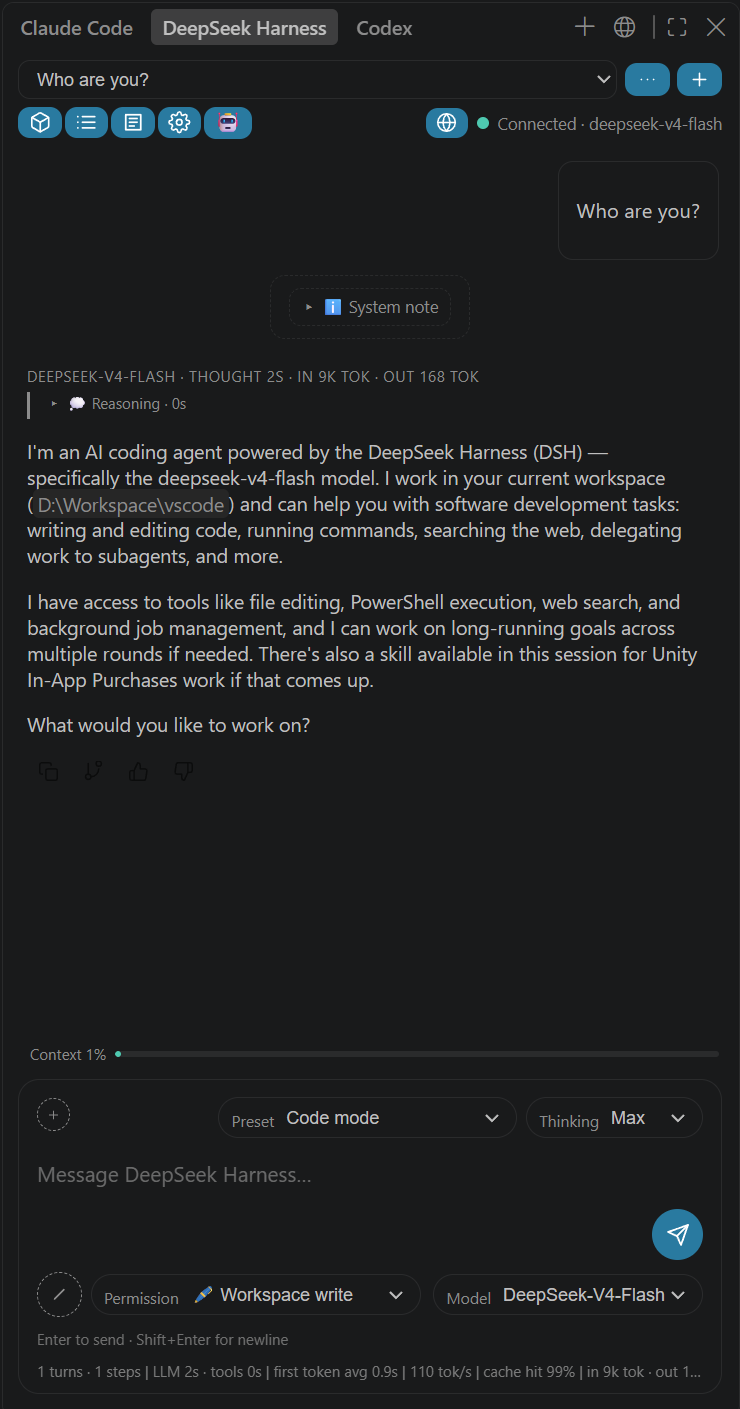
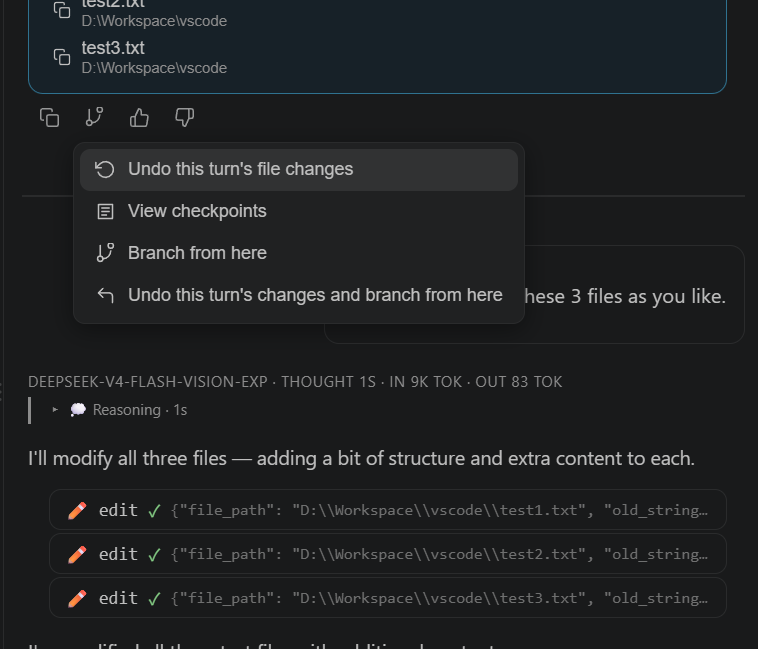
@dsh: type @ in the native Chat panel (Ctrl+Alt+I); streamed replies with tool calls and approval buttons; slash commands /new, /session <ID>, /preset <name>.DSH: Open Standalone Chat Window.4 turns 285 steps · 267 tok/s (click for session statistics — LLM time, tool time, average TTFT, output TPS) and 71M tok · 99.6% cache hit (click for token usage — exact total, cache hit, uncached input, cache read/write, output).messageFeedback with click-again-to-revoke, /feedback command fallback for older sessions) / message header shows model · thinking time · per-step tokens.Usage 25.8K tok pill (click for provider/model, cache hit rate, uncached input, cache read/write, output with reasoning share), a Ran for 5m 57s pill (click for total turn time, output TPS, time to first token), and the local clock of the closing message at the row's right end (HH:mm, M/D HH:mm for earlier days, Y-M-D HH:mm for other years). While the session is running, an earlier turn's action row and stats stay hidden and fade in on hover (only the settled latest turn shows them) — the web's data-actions-reveal behaviour.思考 • <first line> (expanded while it streams, collapsed once thinking ends, manual toggles preserved) and Read/Write/Pwsh/Grep • <human summary> with a status dot, a running sweep animation, and the full arguments/result (plus image results) behind a click; rows appear live as each event arrives, each run of rows ends with a web-style summary line (1 command · read 1 file · searched 2 times) that folds or unfolds that run when clicked, and the activity line above the composer names the running action (tool title + summary) rather than a generic label. Long JSON no longer floods the row.present parity): files the model delivers appear as cards at the turn tail — file name + description, an Open button (opens the file, or the HEAD→worktree diff for tracked files) and a ⋯ menu with "Open with default app" and "Reveal in File Explorer".dsh-git-rollback snapshots the workspace's git state (tracked + untracked files) at every turn start into hidden refs (refs/dsh/checkpoints/<sid>, zero pollution of your branch history) and records them under .dsh/rollback; the button restores the workspace to the state before that turn. Commands /rollback [N], /redo, /checkpoints work in both the web command panel and the VS Code chat (rollback is non-destructive: the pre-rollback state is saved first, /redo restores it, ignored files are never touched). Each message's ⋯/branch menu also offers "Undo this turn's file changes" (preview-and-confirm review dialog, reverses only the files that turn changed — your own commits and HEAD stay untouched), "View checkpoints", and "Undo this turn's changes and branch from here". The web chat gets the same Copilot-style turn dividers and a floating restore dialog out of the box (plugin web half, served via the DSH client-modules pipeline).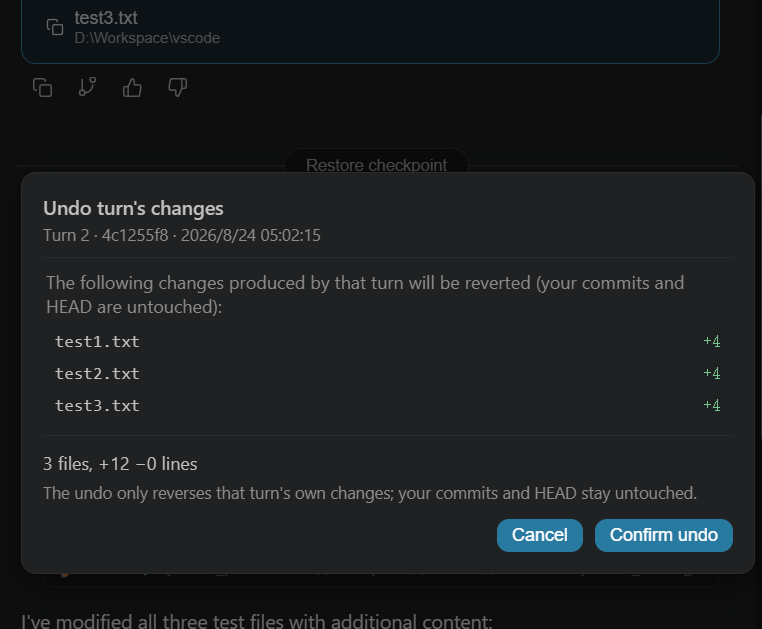
/plan, click to exit./ menu (official skill.list)..claude/commands, .claude/skills, .codex/skills (SKILL.md), .github/copilot-instructions.md, .github/instructions, .github/agents and .github/prompts are listed in the / menu and insertable./permission command).dsh.participantSessionMode: global to share one session.schedule/*, DSH 0.1.7+; full host-level task management on DSH 0.2.2+): every retained task with its rule text, next scheduled time and countdown, status (active / paused / ended), delivery target and search/status filters. On 0.2.2+ you can create tasks (name, prompt, one-shot delay / absolute time / fixed interval / daily / weekly / cron / RRULE timing, and a target session, a session created on first delivery, or a new session per run), edit them, pause / resume, run now, delete with optimistic-concurrency protection (updatedAt CAS — a concurrent edit refreshes the list instead of overwriting it), and clear all ended tasks. Open a task for its instruction, timing, time zone, target session (jump straight to it), last delivery and its delivery records (newest-first with paging, retention and "earlier records unavailable" facts). The catalog refreshes itself from the host's schedule/changed event; on 0.1.7–0.2.1 the panel stays read-only (delete + history) and says so instead of erroring.conversationContinuation; a Continue generating button appears above the composer and retries with an empty prompt — no need to retype the request. It is hidden while the session is running or when the host reports no eligible failure.interruptByUser and parent-less prompt shape with automatic fallback for older hosts. The model popover also carries the web UI's Enable agent team collaboration switch: it reads the agentTeam projection and calls agentTeams/setEnabled for the current session, staying hidden when the host does not compose the plugin. When teamwork is enabled, the subagent catalog shows the Shared tasks board with a progress summary, status dots, blocked-by warnings, and expandable description/owner details.settings/canOpenAgentPresetDirectory reports support and presets are otherwise read-only composition text.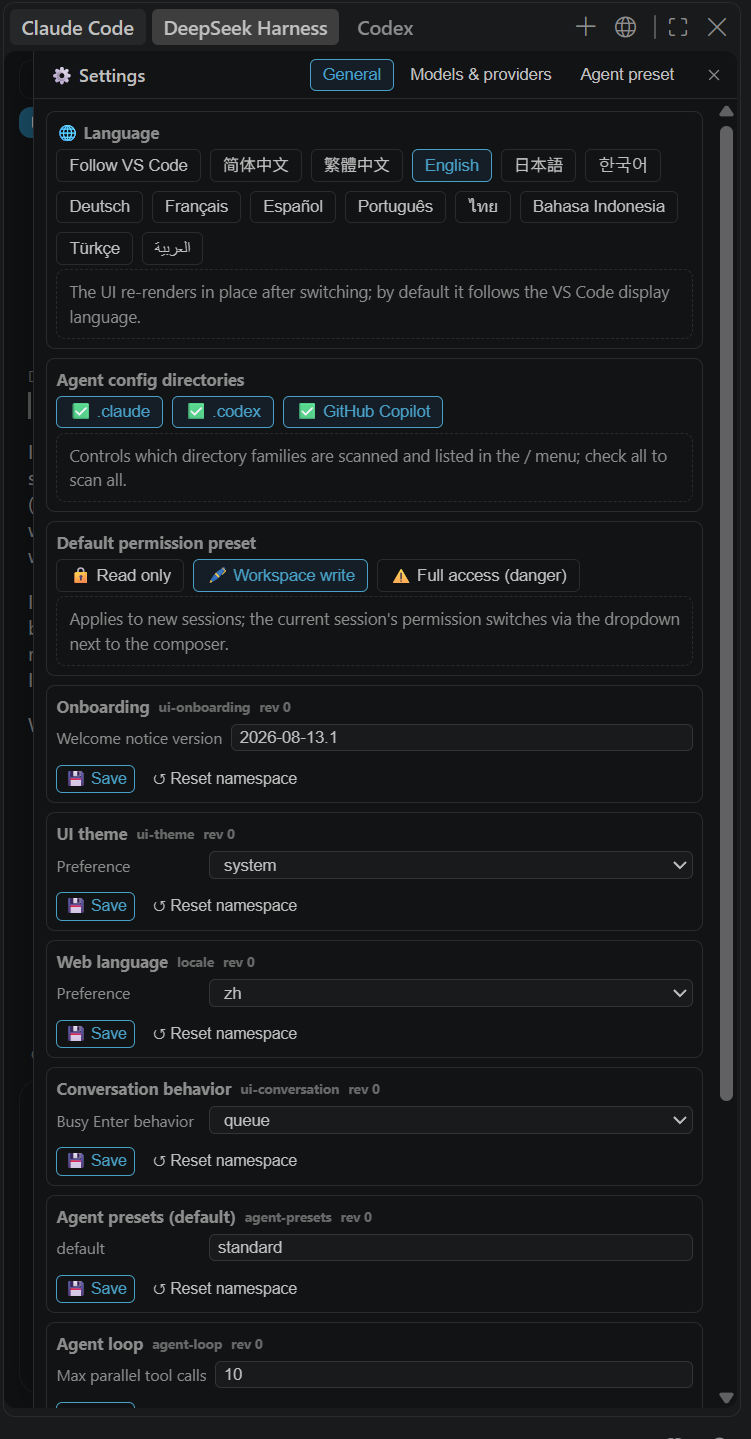
DSH: Generate Commit Message) reads the staged/unstaged git diff and generates a Conventional Commits-style message in a disposable session (archived immediately, never shown in the session list) with a lightweight model (default: the flash keyword matched against the DSH model catalog + low effort; configurable via dsh.commitModel / dsh.commitReasoningEffort), writing the result into the SCM input box and auto-cancelling on timeout or when the model requests extra interaction. The model switch is temporary — your default model and thinking depth are captured first and restored when generation ends, and the throwaway session is archived only after the answer arrives (DSH 0.1.7 blocks turns on archived sessions).dsh.language / the 🌐 section of the settings panel.cd <this folder>
npm install
npm run package # outputs Releases/dsh-vscode-<version>.vsixVS Code → Extensions → … → Install from VSIX → pick the file in Releases\ → reload.
Prerequisites: VS Code ≥ 1.90 (built-in chat ≥ 1.95; secondary sidebar container ≥ 1.106); DSH CLI or npx fallback; model credentials configured (same as dsh web).
dsh.sendKey in settings.json) picks Enter (default), Ctrl+Enter or Shift+Enter to send — the other combination inserts a newline. The pill on the composer hint line always shows the active binding and switches it on click. While running the send button (paper-plane line icon) becomes stop (square line icon), typing turns it back into send (queued send)./ button (bottom-left): command menu (plan / compact / goal / feedback / permission / skills / .claude). Most entries insert the command into the input (press Enter to run); Compact context runs /compact straight away and the conversation shows a live compaction row — a sweep while compacting, then "Compacted N history items (~T tokens)" with the summary expandable, and the compacted range collapses into that row (the same row appears for automatic compaction).+ button next to it: add file / add folder; the blue chip is the auto-attached active file.working_directory tool (click it to reveal the folder); the switch also appears in the transcript as a one-line notice instead of a user bubble. Pending timed questions survive a view reload or session switch (restored from the host's userQuestions projection), the background-jobs panel is fed by the new job/registered / job/settled events (status, exit code and duration), and a host that grants this connection only limited access is reported instead of failing calls with a raw denial code. The bundled dsh-git-rollback plugin declares engines.dsh, an icon and 15 locale entries, so DSH's plugin manager lists it as compatible with its localized title/description.DSH: Send Selection to @dsh; file → DSH: Ask @dsh About This File.| Key | Default | Description |
|---|---|---|
dsh.url |
http://127.0.0.1:3080 |
DSH web server URL |
dsh.autoStart |
true |
On VS Code startup, start dsh web if the server is not running |
dsh.command |
dsh |
Start command; falls back to npx |
dsh.autoStartTimeoutSec |
60 |
Auto-start timeout (seconds) |
dsh.participantSessionMode |
per-workspace |
@dsh session scope: per-project / global |
dsh.openPanelOnStartup |
false |
Open the standalone window on startup |
dsh.defaultReasoningEffort |
"" |
Default thinking depth for new sessions (off/high/max, model-dependent) |
dsh.commitModel |
deepseek-v4-flash |
Model used to generate commit messages (resolved from the DSH model catalog; falls back to the session's current model) |
dsh.commitReasoningEffort |
low |
Reasoning effort for commit messages (low = no thinking on DeepSeek models, fastest) |
dsh.language |
auto |
UI language: auto / zh-cn / zh-tw / en / ja / ko / de / fr / es / pt / th / id / tr / ru / ar |
dsh.installRollbackPlugin |
true |
Auto-install the turn-level Git rollback server plugin into the DSH web profile (enables /rollback, /redo, /checkpoints) |
dsh-git-rollback server plugin (host + web client halves) and installs it into your DSH web profile (~/.dsh/profiles/web) on activation (idempotent, version-tracked). If your DSH server was already running, the extension offers a one-click restart when it detects the plugin is not loaded yet. The web client half is picked up automatically by the DSH client-modules pipeline on the next server start — no manual setup.dsh plugin --profile web add dsh-git-rollback (published on npm), then restart dsh web..dsh/rollback records + hidden refs (refs/dsh/checkpoints/<sessionId>). Disable the auto-install with dsh.installRollbackPlugin: false."This session is already in use" / session/writer-held: a DSH session can only be written by one instance at a time. Quit the other instance that has it attached (the desktop app, another dsh web, or a second VS Code window driving the same server), or simply switch to another session in VS Code — then the notice bar above the composer disappears and model switching, renaming and sending work again.
Nothing appears → reload the window; run DSH: Show Diagnostics; check the extension runtime state for validation errors.
"No registered data provider" → run DSH: Repair Chat View (Reset View Locations) or Restart Extension Host.
Service worker error in the webview → VS Code 1.100.x platform bug: update VS Code or clear %APPDATA%\Code\Service Worker\CacheStorage.
"agent preset is fixed" → started sessions cannot switch presets; the preset pill only shows for new sessions.
Not connected → run DSH: Start Server; check dsh.url.
Server version: this build targets DSH 0.2.2-rc.3 and still speaks the wire protocol of 0.2.2-rc.1/rc.2 / 0.2.1-rc.x / 0.2.0-rc.2 / 0.1.7-rc.2 / 0.1.5-rc.1 / 0.1.2-rc.1. On 0.2.2 the automation-task panel upgrades to host-level create / edit / pause / resume / run-now / clear-ended, failed turns offer Continue generating, and named AgentTeam subagents keep their names in the catalog; on older hosts these panels stay read-only/absent and keep working. session/page remains a supported alias, and the new optional endpoints (worktrees/forge, liveshare, plugin details, action cards, deepseek import) are left untouched when a deployment does not compose them.
Server does not auto-start → the extension retries every 15 s and connects as soon as the server is up; see the [server] log in the "DeepSeek Harness" output channel. If the error mentions 0xC0000142/EPERM, VS Code was launched from a DSH session or a restricted terminal (child process creation blocked) — launch VS Code normally, or set that session's permission to danger-full-access.
npm install
npm run typecheck
npm run build
npm run package # → Releases/src/extension.ts, src/dsh/* (API client, server manager, session store, chat participant, project-session mapping, commit message generation).src/webview/{channel,panel,window,ui}.ts + media/chat.css; icon media/icon.png.package.nls.json + package.nls.zh-cn/zh-tw/ja/ko/de/fr/es/pt/th/id/tr/ar.json, l10n/bundle.l10n.json + bundle.l10n.zh-cn/zh-tw/ja/ko/de/fr/es/pt/th/id/tr/ar.json, the EN_TEXT dictionary in ui.ts + src/webview/texts/*.json.plugins/<name>/ (all new DSH server plugins go there); npm run build compiles them and syncs the bundle into resources/<name>/ via tools/sync-plugins.mjs for packaging into the vsix. Unit tests: cd plugins/<name> && npm test.使用前请先启动 DSH Web 服务:先在命令行中执行以下命令,安装并启动
dsh web,之后才能在 VS Code 中使用本插件。npx @deepseek-ai/dsh web
English version | 发布者:Jager · 最新版本:0.13.73
在 VS Code 中直接使用 DeepSeek Harness(dsh),与 ChatGPT / Copilot 一样融入 VS Code 聊天体系:内置聊天参与者 @dsh、辅助侧栏 / 独立聊天窗口、工作区 / 后台任务 / 轨迹 / 设置面板、回合级 Git 回退,以及多语言界面(简体中文 / 繁體中文 / English / 日本語 / 한국어 / Deutsch / Français / Español / Português / ไทย / Bahasa Indonesia / Türkçe / Русский / العربية,跟随 VS Code 显示语言或手动切换)。
@dsh:VS Code 原生 Chat 面板(Ctrl+Alt+I)输入 @ 选择 dsh;助手回复流式渲染,含工具调用与审批按钮;支持 /new、/session <ID>、/preset <名> 斜杠命令。DSH: 打开独立聊天窗口。4 轮 285 步 · 267 tok/s(点击展开 会话统计:模型用时 · 工具调用用时 · 首 token 平均 TTFT · 输出速度 TPS)与 71M tok · 缓存命中 99.6%(点击展开 Token 用量:精确总量 · 缓存命中 · 未缓存输入 · 缓存读取/写入 · 输出)。messageFeedback,再点一次即撤销,旧会话回退到 /feedback 命令)/ 消息头显示模型名 · 思考耗时 · 本步 token 消耗。用量 25.8K tok 胶囊(点击展开 提供方/模型 · 缓存命中率 · 未缓存输入 · 缓存读取/写入 · 输出(含推理占比))、用时 5分57秒 胶囊(点击展开 本轮总用时 · 输出速度 TPS · 首 token 用时 TTFT),最右侧显示收尾消息的本地时间(当天 HH:mm,更早 M月D日 HH:mm,跨年 Y年M月D日 HH:mm)。会话运行中,历史回合的操作条与统计默认隐藏、悬停该条消息才淡入(网页端 data-actions-reveal 同款),只有已结束的最新回合常显。思考 • <首行摘要>(流式期间展开,思考结束自动收起,手动开合会被保留)与 读取 / 写入 / Pwsh / Grep • <人类可读摘要>(状态点 + 运行中扫光),点击展开完整参数/结果(含图片结果);不再把整段 JSON 铺在行上。过程行随事件实时出现,每段末尾附一行网页端同款汇总(「执行了 1 条命令 · 读取了 1 个文件 · 搜索了 2 次」),点击即可折叠/展开该段;输入框上方的活动行同时说明当前动作(工具标题 + 摘要),不再是笼统的「执行工具…」。present 一致):模型交付的文件在回合尾渲染为卡片——文件名 + 描述、打开 按钮(已跟踪文件直接打开 HEAD→工作区 diff)与 ⋯ 菜单(用默认应用打开 / 在资源管理器中显示)。dsh-git-rollback 在每个回合开始时把工作区 git 状态(含未跟踪文件)快照到隐藏引用(refs/dsh/checkpoints/<sid>,用户分支历史零污染)并记录在 .dsh/rollback;点击按钮即可把工作区恢复到该回合之前的状态。/rollback [N]、/redo、/checkpoints 命令在 web 命令面板与 VS Code 聊天面板通用——回退非破坏性(先存保存点,/redo 可恢复,ignored 文件永不触碰)。每条消息的 ⋯/分支菜单另提供 「撤销本回合改动」(先预览后确认的审核弹窗,只反向应用该回合自身产生的文件改动——你自己的提交与 HEAD 完全不受影响)、「查看检查点」 与「撤销本回合变更并从此处新建分支」。网页端聊天开箱即用地获得同款 Copilot 风格回合分隔线与悬浮还原弹窗(插件 web 半区,经 DSH client-modules 管线分发)。
plan/mode 状态实时同步。/permission 命令。/session <ID> 显式切换;dsh.participantSessionMode: global 可全局共用。schedule/*,需 DSH 0.1.7+;0.2.2+ 为完整宿主级任务管理):列出全部任务(规则文案 · 下次计划时间与倒计时 · 状态 已开启/已暂停/已结束 · 投递目标),支持搜索与状态筛选。0.2.2+ 可直接新建(名称、提示词、一次性延迟 / 指定时刻 / 固定间隔 / 每天 / 每周 / Cron / RRULE 规则,目标可选现有会话、首次投递时新建会话或每次运行新建会话)、编辑、暂停/继续、立即运行、删除(带 updatedAt CAS 乐观并发保护——别处已修改时刷新列表而不是覆盖)与一次清除全部已结束任务;点开任务可看提示词、规则、时区、目标会话(一键跳转)、最近一次投递及其运行记录(新→旧分页、保留策略与「更早记录不可用」)。目录随宿主 schedule/changed 事件自动刷新;0.1.7–0.2.1 老宿主保持只读(删除 + 历史)并给出说明,不会报错。conversationContinuation 标记;输入框上方出现「继续生成」按钮,以空内容 prompt 重试,无需重新输入。会话运行中或宿主报告没有可继续的失败回合时自动隐藏。name(缺失时回退创建标签);子代理追问/打断改用 rc.2+ 的 interruptByUser 与无父会话请求体,并对老宿主自动回退。模型弹层还提供与网页端一致的启用智能体团队协作开关:状态来自 agentTeam 投影,切换调用当前会话的 agentTeams/setEnabled;宿主未组合该插件时自动隐藏。开启团队协作后,子代理目录会显示 共享任务 面板:进度摘要、状态点、依赖阻塞提示,以及可展开的描述/负责人详情。
DSH: 生成提交信息),读取 git 暂存/未暂存 diff,在一次性会话(生成期间隐藏、结束后归档,不占用会话列表)中用轻量模型按 Conventional Commits 风格生成提交信息并写入 SCM 输入框;模型与思考深度可配置(dsh.commitModel 为关键字,默认 flash,按目录匹配 / dsh.commitReasoningEffort),超时或模型请求额外交互时自动取消。模型切换是临时的——先记录你的默认模型与思考深度,生成结束即恢复;一次性会话在拿到结果之后才归档(DSH 0.1.7 对已归档会话会直接 block 回合)。dsh.language / 设置面板 🌐 就地切换。cd <本目录>
npm install
npm run package # 生成 Releases/dsh-vscode-<版本>.vsixVS Code 中:扩展 → … → 从 VSIX 安装 → 选择 Releases\ 下的 .vsix → 重载窗口。
npm install
npm run watch
用 VS Code 打开本目录,按 F5 启动扩展开发宿主。
@dsh 需要 ≥ 1.95;辅助侧栏容器需要 ≥ 1.106(旧版自动回退活动栏)。dsh),或允许扩展用 npx --yes @deepseek-ai/dsh@latest 自动启动服务器。dsh web 一致)。| 入口 | 说明 |
|---|---|
内置 Chat @dsh |
输入 @ 选 dsh;DSH: 打开内置聊天 (@dsh) 或状态栏 DSH 图标可自动填入 |
| 辅助侧栏 tab | 视图 → 外观 → Secondary Side Bar(Ctrl+Alt+B) |
| 独立窗口 | DSH: 打开独立聊天窗口 |
| SCM 提交按钮 | 源代码管理视图标题栏的 ✨ 按钮(DSH: 生成提交信息),多仓库时弹出选择 |
settings.json 里的 dsh.sendKey)可选 Enter(默认)/ Ctrl+Enter / Shift+Enter 发送,另一组合键换行;输入框提示行旁的胶囊始终显示当前键位,并可点击切换。运行中发送按钮(纸飞机线条图标)变为停止(方块线条图标),输入文字变回发送(消息排队)。↑ / ↓ 调回之前发送过的输入(与终端一致,需求来自 issue #20):光标在首行行首(或单行输入)时按 ↑ 逐条回溯历史输入,↓ 前进;越过最新一条会恢复进入历史前正在编辑的草稿(Esc 同效)。调回后手动编辑的内容不会被覆盖;多行文本中方向键仍只移动光标;历史在视图隐藏 / 重载后仍保留。/ 按钮:命令菜单(计划模式 / 压缩上下文 / 设置目标 / 记录反馈 / 切换权限 / 技能 / .claude 命令与技能)。多数项插入命令到输入框(回车执行);压缩上下文点击即执行 /compact,对话内实时显示压缩行 —— 压缩中扫光,完成后显示「已压缩 N 条历史记录(约 T tokens)」且摘要可展开,被压缩的区间折叠进该行(自动压缩同样单列一行)。+ 按钮:添加文件 / 添加文件夹(二选一);附件行蓝色芯片为自动附加的激活文件(× 移除)。working_directory 工具切换会话目录后,输入框提示行会出现"工作目录"胶囊(点击在资源管理器中定位),对话里同时出现一行小字提示(不再被当成用户发言);待答的限时提问在重载视图或切换会话后依然保留(由宿主的 userQuestions 投影还原);后台任务面板改用新的 job/registered / job/settled 事件驱动(状态、退出码、耗时);若宿主只给本连接授予受限访问权限,会明确提示而不是抛出 remote-access/denied 原始错误码。随包分发的 dsh-git-rollback 插件补上了 engines.dsh、图标与 15 种语言的显示文案,DSH 插件管理里现在显示为"兼容"并带本地化标题/描述。DSH: 发送选中代码到 @dsh;文件右键 → DSH: 向 @dsh 询问此文件。| 配置项 | 默认值 | 说明 |
|---|---|---|
dsh.url |
http://127.0.0.1:3080 |
DSH Web 服务器地址(修改后需重载) |
dsh.autoStart |
true |
VS Code 启动时若服务器未运行则自动启动 dsh web |
dsh.command |
dsh |
启动命令;找不到时回退 npx |
dsh.autoStartTimeoutSec |
60 |
自动启动最长等待秒数 |
dsh.participantSessionMode |
per-workspace |
@dsh 会话范围:每项目 / 全局 |
dsh.openPanelOnStartup |
false |
启动时自动打开独立聊天窗口 |
dsh.defaultReasoningEffort |
"" |
新会话默认思考深度(off/high/max 等,取决于模型) |
dsh.commitModel |
deepseek-v4-flash |
生成提交信息所用的模型(从 DSH 模型目录解析,找不到时回退当前模型) |
dsh.commitReasoningEffort |
low |
生成提交信息时的思考深度(DeepSeek 模型上 low 表示不开思考,最快) |
dsh.language |
auto |
界面语言:auto / zh-cn / zh-tw / en / ja / ko / de / fr / es / pt / th / id / tr / ru / ar |
dsh.installRollbackPlugin |
true |
自动把回合级 Git 回退服务端插件安装到 DSH web profile(启用 /rollback、/redo、/checkpoints) |
dsh-git-rollback 服务端插件(host + 网页端 client 两半),激活时幂等安装到你的 DSH web profile(~/.dsh/profiles/web,带版本标记增量更新)。若 DSH 服务器已在运行,扩展检测到插件未加载时会提示一键重启(仅限本扩展启动的服务器)。网页端 client 半区在下次服务器启动时由 DSH client-modules 管线自动发现,无需手动配置。dsh plugin --profile web add dsh-git-rollback(已发布到 npm),然后重启 dsh web。.dsh/rollback + 隐藏引用 refs/dsh/checkpoints/<会话ID>)。可设置 dsh.installRollbackPlugin: false 关闭自动安装。「当前会话已被占用」/ session/writer-held:DSH 的会话同一时刻只允许一个实例写入。请退出已挂载该会话的另一端(桌面端、另一个 dsh web,或驱动同一服务器的另一个 VS Code 窗口),或在 VS Code 里直接换一个会话 —— 输入框上方的占用提示条会自动消失,切模型 / 重命名 / 发送即可恢复。
扩展没出现:确认已重载窗口;扩展面板查看运行时状态有无校验错误;命令面板执行 DSH: 显示诊断信息。
视图占位"没有已注册数据提供程序":执行 DSH: 修复聊天视图(重置视图位置),或命令面板 Restart Extension Host。
Webview 报 Service Worker 错误:VS Code 1.100.x 平台缺陷,升级 VS Code 或清空 %APPDATA%\Code\Service Worker\CacheStorage。
"agent preset is fixed":已开始的会话不可切换预设,预设胶囊只在新会话显示。
未连接:执行 DSH: 启动服务器;检查 dsh.url 端口。
服务器版本:本版本面向 DSH 0.2.2-rc.3,同时仍讲 0.2.2-rc.1/rc.2 / 0.2.1-rc.x / 0.2.0-rc.2 / 0.1.7-rc.2 / 0.1.5-rc.1 / 0.1.2-rc.1 的线协议。0.2.2 上自动化任务面板升级为宿主级「新建 / 编辑 / 暂停 / 继续 / 立即运行 / 清除已结束」,失败回合会出现「继续生成」,具名 AgentTeam 子代理在目录中保留名称;老宿主保持只读/不显示这些入口并继续可用。session/page 仍是受支持的兼容别名;部署未组合的新可选端点(变更请求/工作树、liveshare、插件详情、action cards、DeepSeek 会话导入)在扩展侧按「不可用」跳过,不影响核心聊天。
启动时无法自动启动服务器:扩展会在 VS Code 启动时自动启动 dsh web(失败后每 15 秒重探,服务器上线即自动连接);具体失败原因见输出通道 "DeepSeek Harness" 的 [server] 日志。若报错含 0xC0000142/EPERM,说明 VS Code 是从 DSH 会话或受限终端启动的(子进程创建被拦截)——改用普通方式启动 VS Code,或把该会话权限调为 danger-full-access。
npm install
npm run typecheck   # 类型检查
npm run build       # 构建
npm run package # 打包到 Releases/src/extension.ts、src/dsh/*(API 客户端 / 服务器管理 / 会话存储 / Chat Participant / 项目会话映射 / 提交信息生成)。src/webview/{channel,panel,window,ui}.ts + media/chat.css;图标 media/icon.png。package.nls.json + package.nls.zh-cn/zh-tw/ja/ko/de/fr/es/pt/th/id/tr/ar.json(贡献点)、l10n/bundle.l10n.json + bundle.l10n.zh-cn/zh-tw/ja/ko/de/fr/es/pt/th/id/tr/ar.json(宿主运行时)、ui.ts 的 EN_TEXT 词典 + src/webview/texts/*.json(Webview)。plugins/<name>/(以后所有新插件都建在此目录);npm run build 会自动编译并同步到 resources/<name>/(tools/sync-plugins.mjs)随 vsix 打包分发。插件单元测试:cd plugins/<name> && npm test。CLASSIFICATION EVIDENCE
系统优先读取 GitHub Topics,再与站内分类词典和词根规则比对。当前命中: deepseek、deepseek-harness。
morluto
Reverse engineer anything with agents, from app behavior down to native binaries.

deepseek-ai
DeepSeek Harness: Everything is a Plugin.

nexu-io
The 1st Collaborative AI Design Agent Workspace. Local-first and open source. Create motion, prototypes, websites, apps, dashboards, presentations, images, and videos with your team and AI agents. Share work, exchange feedback, and iterate together in one workspace.