
模型与 MCP
待识别

rea
morluto
Reverse engineer anything with agents, from app behavior down to native binaries.
PROJECT TOPICS
INSTALL REFERENCE
dsh plugin --profile web add github:N9-Developer-Empowerment/DSH-Vibeify
该命令指向仓库当前默认分支;尚无绑定当前 commit 的完整验证结果。
PROJECT README
Turn your AI work into a living magazine.
DSH Vibeify is an open-source, local magazine for DeepSeek Harness. It gives AI work a visual, content-first home: use DeepSeek, ChatGPT, or both; keep Chat for control; and share only the finished article you choose.
Vibeify 0.17.1 improves magazine-card and image recovery while retaining DeepSeek-led with OpenAI support: DeepSeek V4.1 Flash 1017 leads through deepseek-flash, with GPT-6.1 Sol available for bounded tasks through ChatGPT-authenticated Codex. This mode uses Harness 0.2.1-rc.2 and Codex 0.164.0. See the installation route.
Release 0.17.1 · Source tag · Download release assets · Watch the finished walkthrough · See how it works · Get installation help · Email Vibeify
The real 2:24 demonstration opens Vibe with content, turns a Chat request into a visual card, uses an explicit Update, then previews one article privately before optional publication. Watch it on YouTube.
DSH Vibeify's magazine is not a public website. It turns DeepSeek Harness—a local runtime for agents, models, tools, permissions and sessions—into a creator-first streaming experience that behaves like a website. Vibe is the visual, content-first home; Chat remains underneath for detailed requests, progress, approvals, Queue, Steer and technical evidence. An optional, deliberately separate share service can publish one reviewed article at a time without exposing the local magazine or requiring the recipient to have DSH, ChatGPT, or DeepSeek.
Most AI products begin with an empty box. The person writes a prompt, waits for one answer, and repeats. DSH Vibeify begins with something useful to explore and turns Chat work from any thread into one continuous edition. Returning readers open their saved edition, newest stories first. A configured editorial direction takes precedence over the local welcome issue. First-time readers without a direction can still explore local orientation pages without a model call; Update my magazine or Update VIBE now requests a fresh people-centred issue. Look & feel controls the magazine palette, text size and spacing separately from Chat. For an explicit public-content request, each complete verified card can arrive while the rest of the answer is still being made; ordinary final answers join after completion. It generates extra magazine material only when the reader asks for an update.
The one sentence to remember: open Chat and say “Make a Vibe about…” when you want a deliberately edited Vibe article or series. That explicit wording tells the active DSH lead to use Vibeify's visual, linked, complete-chunk publishing contract. An ordinary Chat answer may still join Vibe after it finishes, but it is not guaranteed to receive the richer article structure or to stream card by card while the turn is running.
flowchart LR
    OPEN["Open local DSH"] --> WELCOME["Evergreen welcome issue\nwhy · how · try it in Chat"]
    WELCOME --> VIBE["Vibe already contains a visual edition"]
    VIBE --> EXPLORE["Read · watch · save · respond"]
    RADAR["Shared public radar\ntrends · culture · technology"] --> CACHE["Local hidden reserve\nsignals · candidates · ready pages"]
    CACHE --> VIBE
    EXPLORE --> SIGNAL["A Chat request, pull-to-update, or Update click"]
    SIGNAL --> HARNESS["DSH harness\nsessions · tools · models · permissions"]
    HARNESS --> LEAD["Active lead agent\nplans and defines acceptance"]
    LEAD --> INSTANT["Local reserve\nready pages + visual short"]
    LEAD --> WORK["Independent specialist lanes\nquick · culture · media · deep"]
    WORK --> CHECK["Lead verifies each finished lane independently"]
    CHECK --> STREAM["Each closed editorial chunk streams immediately"]
    INSTANT --> VIBE
    STREAM --> VIBE
    STREAM --> STOP["One bounded update completes, then stops"]
    VIBE --> PREVIEW["Share one article\nprivate preview first"]
    PREVIEW -->|"reader presses Publish"| PUBLIC["Public article link\nno DSH account required"]
    EXPLORE -. "open when you want control or detail" .-> CHAT["Chat\nask · queue · steer · approve · inspect"]
    CHAT --> HARNESS
The visible surface is website-like, but the machinery underneath is an agent harness:
| Layer | What it does |
|---|---|
| DSH | Runs sessions, agents, model routes, tools, permissions and approvals on the user's machine. |
| Vibeify | Adds the continuous editorial stream, visual presentation, local content buffer and safe route between generated work and the stream. |
| Vibe | Presents every thread's completed answers—and complete verified cards from an active public-content request—as one newest-first edition. A hidden local reserve may be prepared while Vibe is in recent use; only Pull to update, Update, a closed public-content card, or a completed Chat answer changes the visible magazine. It is not a separate public site. |
| Chat | Lets the user ask directly, queue or steer work, approve protected actions and inspect progress or technical evidence. |
| Lead agent | Plans, sets the acceptance bar, validates work and owns the final result. This is Codex in ChatGPT-only mode, or native DeepSeek in DeepSeek-only and DeepSeek-led/OpenAI-support modes. |
| Workers | Optionally perform bounded research, coding, analysis or media work; their output is not published merely because they say it is finished. |
| Optional share service | Receives one allow-listed, reader-reviewed article only after Share is clicked, shows a private preview, and performs a public write only after a second Publish public link click. It never receives the Chat prompt, reasoning, session identity, settings, local history, or credentials. |
“Streaming” here means a continuous stream of complete, formatted content items, not merely text appearing token by token. The edition is available immediately from local bundled, saved, and ready-reserve material. A deliberate pull or Update click releases ready pages immediately, including a visual short, then uses one foreground batch only when the reserve is short. During an explicit public-content Chat request, the first short verified card arrives before the whole series is researched and each later closed card follows independently; ordinary un-enveloped final answers join after durable completion. Neither route makes an extra AI call. Opening, scrolling, changing settings, or finishing a batch never changes the visible edition by itself.
This is the different paradigm: Chat is an available control surface, not the whole product. Each Chat thread remains request-driven and becomes idle after it answers. Vibe is the shared presentation layer across those threads, with an explicit update gesture when the reader wants more.
For a plain-English walkthrough of the two surfaces, instant local reserve, parallel agent lanes, complete-page streaming, stop conditions, provider modes, and privacy boundary, read How DSH Vibeify works.
Choose the provider setup that suits you:
The original Codex-led mode remains available as ChatGPT only (--provider chatgpt for the developer installer). For the new Both mode, connect DeepSeek under DSH Settings → Models and sign in to Codex with ChatGPT if you want the optional worker. Installation can finish before either account is connected. DeepSeek billing and ChatGPT plan limits remain separate.
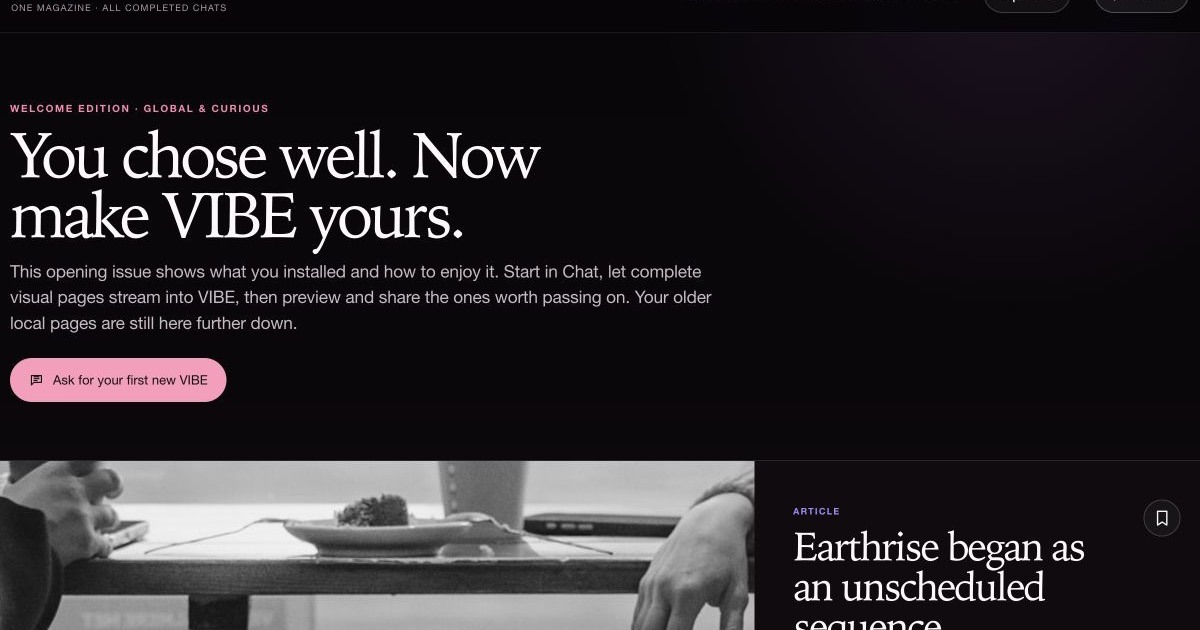
The first screen is Vibe itself: a full-screen editorial feed opens with the current welcome issue, followed by a bundled content well and the reader's older saved magazine. No guide, tile, recipe, or prompt must be selected. The welcome issue repeatedly points to one useful next move: open Chat, say “Make a Vibe about…”, watch the completed visual pages enter Vibe, then preview and share a good one. A new answer made during the current visit arrives above the welcome issue. Older saved pages remain further down rather than being deleted or mistaken for today's front page. Chat remains the detailed source view with the conventional DSH conversation and technical controls.
DSH is a fast-moving developer preview. Vibeify pins the versions it has tested and includes a health check, but you should still expect upstream changes.
Ask Chat to “Make a Vibe with an embedded game, calculator, form or interactive graph.” Self-contained interactive panels appear within the article. Open a panel to use it while reading; the built-in Mochi Meadow game is visible immediately and starts only when you press its start button.
The article carries the interaction into its private sharing preview and published page when the matching share-service version is deployed. Mochi Meadow uses the same implementation in all three places. Scores and form answers stay in the open panel; they are not saved or included in the shared article. Closing a panel or reloading resets its state. Panels cannot access your magazine, account, external services or local files.
Shared articles keep prose in a readable column while games and interactive panels use the available article width. Lead images preserve their aspect ratio in a bounded, centered frame, and supported media players appear in both preview and publication. One stylesheet and shared sizing and media policies govern both sharing views.
See interactive article authoring and sharing. Updating local Vibeify does not deploy the separate public share service.
For Vibeify questions, installation help, or responsible reports that should not begin in a public issue, email info@codingforjustice.org.uk. Do not send passwords, API keys, cookies, OAuth tokens, private prompts, session exports, or unreviewed logs.
Think of DSH as a control room for AI agents. DSH Vibeify changes that control room in three important ways:
It does not switch provider mode without telling you, send your images elsewhere, approve emails or other external actions for you, or promise equivalent quality where no Codex verification step is present.
For the verified Apple-silicon macOS route, download the installer, unzip it, and open Install DSH Vibeify.command. It installs or updates DSH and Vibeify, lets you choose DeepSeek only, ChatGPT only, DeepSeek with OpenAI support, or later, runs checks, and opens DSH. It never asks for an API key.
The repository also contains friendly Windows and Linux preview installers. They use the same public-source, immutable-package, provider-choice, non-billing-check, and do-not-interrupt-active-work contract. They will remain visibly labelled preview until the complete path has passed on real Windows and representative Linux machines; a Mac-only test is not treated as cross-platform evidence. See Installation for the current downloads and Installation and help FAQ for check-only mode and private, free-chat troubleshooting.
For the developer route you need Node.js 22.19+ in the 22.x line, or Node.js 24+, and Git:
git clone https://github.com/N9-Developer-Empowerment/DSH-Vibeify.git
cd DSH-Vibeify
./scripts/install-dsh.sh --replace
./scripts/install-vibeify.sh --provider deepseek-codex # DeepSeek leads, optional GPT-6.1 Sol worker
# Or choose deepseek (DeepSeek only), chatgpt (Codex leads), or auto (preserve/detect mode)
./scripts/doctor.sh
dsh web
The installer does not restart a DSH process that is already running. Finish active work first. If DSH is already open on port 3080, reuse that page instead of starting a second copy.
For screenshots, alternative profiles, DeepSeek credentials, updating, migration, and removal, read the full installation guide. For the product lifecycle before or after installation, see How it works.
chat- cards, then reads durable DSH history as the fallback and for un-enveloped final answers. It never reopens or resumes a thread. Internal subagents, the dedicated foreground update and the hidden background editor are never mistaken for reader conversations. Transport envelopes are removed during cache migration; card titles are not repeated in their bodies, and Markdown tables remain structured. Raw prompts, half-written envelopes, worker reports, candidate lists, attachments, reasoning, tool activity, approvals, session identifiers, aborted work and incomplete progress are never copied.dsh-visuals package is auto-discovered and keeps Vibeify usable when absent. Wikimedia Commons and Openverse work without keys. A standalone image credit linking to a Commons File page is also resolved to its verified image, including credits with the author outside the link; optional Pexels and Pixabay keys are entered under Settings → Images and stay in DSH's write-only credential store. Only a short explicit-magazine title is searched—never ordinary Chat copy, prompts, attachments, history or settings—and every accepted result keeps its creator, licence and original source.dsh-vibeify-experience supplies Vibe without installing a Codex provider, so native DSH/DeepSeek remains in control.dsh-vibeify uses ChatGPT-authenticated Codex and deliberately removes OpenAI API-key fallbacks from the child process. In this mode Codex remains the lead.dsh-vibeify-deepseek keeps native DeepSeek as the lead and adds a separate Vibeify preset with an optional one-shot GPT-6.1 Sol worker. DeepSeek reviews the returned evidence and owns the final answer. The original Standard preset remains available.deepseek-flash alias as its main route. Its optional GPT-6.1 Sol worker is available for bounded tasks through ChatGPT sign-in.No route promises lower total cost or identical results on every task. DeepSeek API use and ChatGPT plan use are separate. A worker can add value when a task is bounded, but the lead still has to review its evidence and decide whether to use it.
The Codex-led route may send well-defined execution packets to a DeepSeek worker when:
Codex does not simply ask whether the worker says it succeeded. It inspects the actual diff, files, test results, sources, or other task evidence. Passing work is reused; Codex repairs only failed or unverifiable parts instead of pointlessly repeating everything.
In the DeepSeek-led route, DeepSeek chooses whether a bounded task is suitable for the optional GPT-6.1 Sol worker. The worker uses a workspace-write sandbox with Codex automatic permission review. The lead reviews its result; it does not transfer final acceptance to the worker. The two-worker limit is prompt policy, not a hard runtime cap.
Pricing and model availability change. Consult current provider information before estimating costs.
The Vibe home owns one lean-back magazine, the evergreen welcome issue, saved chunks, completed-Chat projections from every local thread, live complete cards from explicit public-content requests, update controls, and reading position. It is the landing page on every visit; a previous Chat visit is not restored as home. Chat reveals the normal DSH conversation, Trajectory retains technical work, and Vibe returns to the top. On launch the authored welcome issue appears before older saved material; any new page made during that visit is appended normally and rises above it. Completed answers and explicitly published chunks are retained in a bounded 30-day browser-local cache, while deterministic welcome and example pages are rebuilt from the installed plugin and never persisted. Prompts, session ids and working activity are not cached. The uppercase VIBE settings control remains separate: colour affects Chat presentation, while editorial direction affects only the next requested magazine update. Neither changes models, permissions, routing, protected-action confirmation, or billing policy. In DeepSeek-only mode, Codex-specific capability and progress controls are omitted. See Vibe generated-content streaming for the lifecycle, live semantic-card route, local-history fallback, cache, timing, chunking, and worker method.
Select Chat, then VIBE settings at the bottom-right of the conventional DSH UI to choose a colour palette, a broad editorial direction, and an optional free-text editor note. These settings are stored only in that browser; the direction is passed to the lead only when you next pull to update or choose Update. Select the visually highlighted Vibe · Magazine session tab to return directly to the newest material.
Daniela Elliott leads the project’s experience design, look and feel, and visual VIBEs. The current palettes are a starting point for a more expressive, user-shaped agent workspace. See VIBEs to add or refine a palette.
DSH Vibeify is both a real DSH bundle and a Codex helper plugin:
DSH-Vibeify/
├── .agents/plugins/marketplace.json   # repository Codex marketplace
├── docs/                              # installation, design and security
├── plugins/dsh-vibeify/
│   ├── .codex-plugin/plugin.json      # Codex plugin manifest
│   ├── cordis.patch.yml               # DSH bundle configuration
│   ├── index.js                       # Codex adapter and worker routing
│   ├── codex-capability.js            # lead capability presets
│   ├── codex-settings.js              # live DSH settings integration
│   ├── delegation-contract.js         # worker/acceptance boundary
│   ├── progressive-output.js          # live final-answer delta bridge
│   ├── update-check.js                # fixed-source version and compatibility checks
│   ├── client-src/experience/         # stream shell, playout, cache, timing and catalogue modules
│   ├── preview/                       # isolated visual iteration harness
│   ├── client.js                      # generated DSH browser artifact
│   └── skills/dsh-vibeify/SKILL.md    # Codex operational guidance
├── plugins/dsh-vibeify-experience/    # provider-neutral DSH client package
├── plugins/dsh-visuals/               # optional public-image search and secure key references
├── plugins/dsh-social-desk/           # optional reviewed local social queue and official API adapters
├── services/vibe-share/               # optional account-free public article host
├── shared/vibe-share-contract.js      # allow-list boundary shared by DSH and host
└── scripts/                            # macOS, Windows and Linux installers, migration, doctor and safe support report
The bridge currently pins:
@deepseek-ai/dsh 0.2.1-rc.2@openai/codex 0.164.0 inside the governed bridge and native worker0.17.1Before changing authentication, approvals, routing, image transfer, external actions, or provider behavior, read Architecture, Security and billing, Contributing, and AGENTS.md.
Run the source checks with:
./scripts/doctor.sh --sourceFor visual iteration without restarting DSH:
cd plugins/dsh-vibeify
npm install
npm run build:preview
python3 -m http.server 4173 --directory ../../tmp/vibeify-preview
The release workflow also runs the Codex plugin validator, skill validator, package dry-run, isolated DSH composition, and server-start smoke test.
This optional step teaches Codex how to install and diagnose DSH Vibeify. It does not itself install the DSH runtime bundle.
codex plugin marketplace add /absolute/path/to/DSH-Vibeify
codex plugin add dsh-vibeify@dsh-vibeify
Start a new Codex task after installation so the helper skill is discovered cleanly.
Contributions are welcome. DSH Vibeify is an independent community project and is not an official DeepSeek or OpenAI product.
Image selection and Commons recovery are documented in Article images, including the single resolver, cache invalidation and retry rules.
If new sessions fail with a duplicate subagent tool after upgrading DSH, see
the runtime scope repair notes.
The installer and doctor now check that session and tool services share one runtime scope.
CLASSIFICATION EVIDENCE
系统优先读取 GitHub Topics,再与站内分类词典和词根规则比对。当前命中: deepseek、deepseek-harness、deepseek-harness-plugin。
morluto
Reverse engineer anything with agents, from app behavior down to native binaries.

deepseek-ai
DeepSeek Harness: Everything is a Plugin.

nexu-io
The 1st Collaborative AI Design Agent Workspace. Local-first and open source. Create motion, prototypes, websites, apps, dashboards, presentations, images, and videos with your team and AI agents. Share work, exchange feedback, and iterate together in one workspace.