其他
完整应用

deepseek-harness
deepseek-ai
DeepSeek Harness: Everything is a Plugin.

MysaDC/dsh-plugin-description
mount one row in the composition and every plugin card on the Web Settings plugin list page gets a bilingual (zh/en) description; it also publishes the pluginDescriptions service so other plugins can register their own descriptions.
PROJECT TOPICS
INSTALL REFERENCE
dsh plugin --profile web add github:MysaDC/dsh-plugin-description
该命令指向仓库当前默认分支;尚无绑定当前 commit 的完整验证结果。
PROJECT README
English | 中文
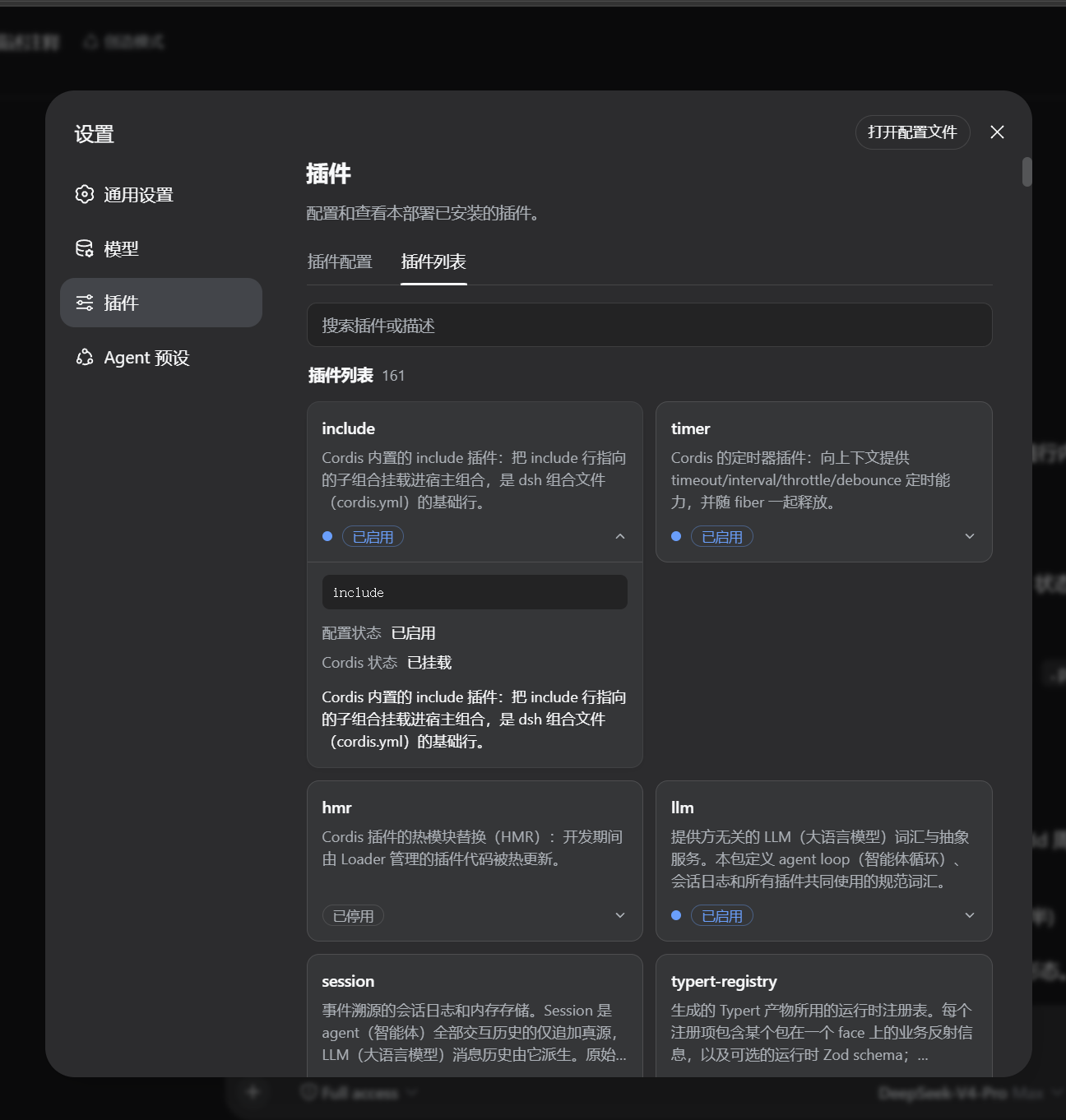
看到DSH插件页茫茫多的不知内容的插件感到无从下手?本插件为你补上每一个插件的自我描述,助你轻松挑选自己需要的插件。
给 DeepSeek Harness用的持久化组合插件:在组合里挂一行,Web 设置中的
插件列表页每张插件卡片就都带上中英文功能说明,并发布 pluginDescriptions
服务供其他插件注册自己的说明。
| 目录/文件 | 说明 |
|---|---|
src/index.js |
Host 半源码:提供pluginDescriptions 服务 + GET /plugin-descriptions 数据端点 |
src/client.js |
Client 半源码(window.__ModuleLoader__ factory):渲染带说明的插件卡片列表 |
lib/ |
构建产物(已提交):index.js 是 exports["."] 目标(字典内联),client.js 是 exports["./client"] 目标 |
descriptions/plugin-descriptions.json |
内置说明字典(模块名 →{ zh, en }),覆盖 DSH 出厂组合的全部 134 个模块名 |
scripts/build.mjs |
构建:src + 字典 → lib/、dist/package/;--verify 做完整校验(CI 用) |
scripts/regenerate-descriptions.mjs |
描述字典再生器:从某个 DSH checkout 的各包 README 重新提取字典 |
cordis.patch.yml |
bundle 补丁:dsh plugin add 安装后自动应用,插入组合行(宿主行 + 浏览器名册) |
dist/ |
构建产物(不提交,CI 生成:tgz、可安装包目录) |
pluginDescriptions
服务注册/覆盖说明,优先级高于内置字典。要求:可正常运行的 DeepSeek Harness Web profile(需要 pnpm,dsh plugin 依赖它)。
本插件是双面 npm 包并声明 dsh.bundle:dsh plugin add 安装后,插件管理器会把
它追加进 dsh.profile.bundles,启动时应用包自带的 cordis.patch.yml 自动插入组合行
(宿主行 + 浏览器名册),不需要手改任何组合文件。
npx @deepseek-ai/dsh plugin --profile web add https://github.com/MysaDC/dsh-plugin-description/releases/latest/download/dsh-plugin-description.tgz上面的命令不带版本号:releases/latest/download 永远指向最新 Release 的固定名安装件,
以后升级重跑同一命令即可。需要固定版本时再写具体版本号(每个 Release 都附带带版本号的 tgz):
npx @deepseek-ai/dsh plugin --profile web add https://github.com/MysaDC/dsh-plugin-description/releases/download/v1.2.1/dsh-plugin-description-1.2.1.tgz也可以从 Git 安装:不带 #tag 取默认分支的最新代码,带上 #tag 则固定版本
(无需构建:仓库提交了 lib/ 构建产物,安装时不跑任何脚本):
# 最新代码(默认分支)
npx @deepseek-ai/dsh plugin --profile web add github:MysaDC/dsh-plugin-description

# 固定版本
npx @deepseek-ai/dsh plugin --profile web add github:MysaDC/dsh-plugin-description#v1.2.1
安装后重启:
npx @deepseek-ai/dsh web若 pnpm 提示
ERR_PNPM_ADDING_TO_ROOT,在 profile 目录的.npmrc加一行ignore-workspace-root-check=true再重试。
npx @deepseek-ai/dsh web --dump-config | grep -n "plugin-description"输出中出现 plugin-description,并且在「设置 → 插件 → 插件列表」中每张卡片都带说明,
即表示已加载。
# 升级到最新版:重跑一次安装命令即可(pnpm 会重新解析 latest 安装件)
npx @deepseek-ai/dsh plugin --profile web add https://github.com/MysaDC/dsh-plugin-description/releases/latest/download/dsh-plugin-description.tgz

# 固定到指定版本(可选)
npx @deepseek-ai/dsh plugin --profile web add https://github.com/MysaDC/dsh-plugin-description/releases/download/v1.2.1/dsh-plugin-description-1.2.1.tgz

# 卸载(依赖与 bundle 层一并移除,组合文件不被改写)
npx @deepseek-ai/dsh plugin --profile web remove dsh-plugin-description
随后重启 dsh web 生效。
# POSIX:链接本仓库,重建后重启即生效
dsh plugin --profile web add link:$(pwd)

# Windows(pnpm 8 对盘符 link:/file: 规格有解析问题):打 tgz 再装
npm run build && npm pack --pack-destination dist
npx @deepseek-ai/dsh plugin --profile web add .\dist\dsh-plugin-description-<版本>.tgzdsh-plugin-description-v<版本>.zip,把解压出的整个包目录放到
<DSH_HOME>/profiles/node_modules/dsh-plugin-description/;cordis.patch.yml 加一行(内容同本仓库根目录的 cordis.patch.yml);不用改代码、不用重新打包,直接在页面上编辑:
改动会持久化到用户字典文件 <DSH_HOME>/plugin-descriptions.json(与 settings.yaml
同级),升级、重装插件都不会丢;也可以直接用文本编辑器修改它,重新打开页面即生效:
{
  "modules": { "@your-scope/your-plugin": { "zh": "中文说明", "en": "English description" } },
  "entries": { "your-row-id": { "zh": "只改这一张卡片的说明" } }
}说明的最终优先级:用户字典 > 插件运行时注册 > 内置特殊条目 > 内置字典。出于安全, 界面写操作只接受本机(回环地址)请求,与 DSH 设置 API 同级约束。
本插件的 Host 半在宿主组合发布服务 pluginDescriptions,同一 DSH 进程内的任何
Host 侧插件(组合行)都可以这样接入:
return {
  apply(ctx) {
    const descriptions = ctx.get('pluginDescriptions')   // 可选读取,必须判空
    if (descriptions === undefined) return
    ctx.effect(() => descriptions.register([
      // 按模块名注册(同模块的多个 Loader 条目共享这条说明)
      { moduleName: '@your-scope/your-plugin', zh: '你的插件的中文说明。', en: 'English description.' },
      // 按 Loader 条目 id 注册(精确到某一条组合行,优先于模块名)
      { entryId: 'your-row-id', zh: '针对特定条目 id 的说明。' },
    ]))
  },
}
契约细节:
register(entries) 接收 { moduleName?, entryId?, zh, en? } 数组,返回一个
disposer,精确撤销本次注册的条目;放进 ctx.effect 随插件 fiber 生命周期清理。resolve(moduleName, entryId) 按 entryId → moduleName 顺序查询注册表。inject: ['pluginDescriptions'],Cordis 会在服务出现前挂起插件。apply 里通过同一服务注册了自身
(dsh-plugin-description)的说明,插件列表页里那张卡片就是这么来的(内置字典里也有该条目,双保险)。descriptions/plugin-descriptions.json,新增
"<moduleName>": { "zh": "...", "en": "..." }。node scripts/regenerate-descriptions.mjs <checkout路径>,它会从各包 README 提取
首段,叠加 scripts/regenerate-descriptions.mjs 里的 OVERRIDES 人工校对表后重新生成字典。npm run build 后提交 PR。npm run build # src + 字典 → lib/{index,client}.js、dist/package/
npm run verify # 构建 + 完整校验(字典完整性、模块 id、exports 契约;CI 用)浏览器页白屏或启动失败? 本插件只做可选服务读取(ctx.get 判空),没有硬注入依赖,不会阻塞引导。若确实出现,把组合行disabled: true 即可排除。
想改某条说明文字? 三种方式:页面里点「编辑说明」直接改(立即生效,普通用户首选);
插件作者用 pluginDescriptions.register 运行时覆盖;或改descriptions/plugin-descriptions.json 后 npm run build 并更新 profile 里的包(提交合并后对所有人生效)。
官方插件的说明是哪里来的? 内置字典提取自 DeepSeek Harness 各官方包的 README 首段, 并经人工校对;个别条目(id 级,如 codex/claude-code 后端)有专属说明。
CLASSIFICATION EVIDENCE
系统优先读取 GitHub Topics,再与站内分类词典和词根规则比对。当前命中: 无有效分类标签。
deepseek-ai
DeepSeek Harness: Everything is a Plugin.

walkinglabs
Harness engineering beginner tutorial, from 0 to 1

anywhere-labs
为 DeepSeek Harness (DSH) 插件生态打造的现代化桌面端解决方案。万物皆「插件」,桌面本身也是「插件」。