
模型与 MCP
待识别

rea
morluto
Reverse engineer anything with agents, from app behavior down to native binaries.
PROJECT TOPICS
INSTALL REFERENCE
dsh plugin --profile web add github:Moyumole/dsh-plugin-updates
该命令指向仓库当前默认分支;尚无绑定当前 commit 的完整验证结果。
PROJECT README


Check the third-party plugins installed in your DSH profile against npm and update them in place — from a right-sidebar page, a Plugins-page tab, and a left-sidebar badge. 中文文档见 下方。
Repository: https://github.com/Moyumole/dsh-plugin-updates · Security: SECURITY.md
official !== true, availability === 'profile', installed === true), excluding this plugin itself.dsh plugin --profile <name> ... to act on them.removeBundle → installBundle(name@latest, { enabled })). "Update all" skips large packages (unpacked over 30 MB, e.g. dsh-pet at ~71 MB) and reports them; update those one at a time from their row. Installs ask the npmmirror mirror first and retry the official npm registry with the same version when the mirror has not synced it yet (the update check itself always uses the official registry).@deepseek-ai/dsh on npm and, when a newer version exists, shows "DSH x is available (current y)" with a link to the official release notes. It never installs DSH — the built-in desktop updater does that.zh, English otherwise. Panel copy, card/tab labels, toasts and the "last checked" time format re-localize when the language changes.0.2.1-rc.3 (Windows Desktop)0.3.xdesktop and web (examples use --profile web; replace with your profile name). Profiles are data directories: the DSH version comes from the running app/runtime, so all profiles opened by the same installation share one version.| DSH version | Status |
|---|---|
0.2.1-rc.3 |
✅ Verified on Windows |
other 0.2.x |
⚠️ Expected to work, not individually verified |
| other versions | ❌ Not supported |
⚠️ This plugin uses the host's non-public extension points (right-sidebar tab registry,
plugins.tabslot,sidebar.panellistshadowing,remote.pluginManager). They may change between DSH releases; the UI degrades instead of crashing, but behaviour can change.
From npm (recommended)
dsh plugin --profile web add "@moyumole/dsh-plugin-updates"Or enter the package name @moyumole/dsh-plugin-updates in "Settings → Plugins → Add plugin".
From GitHub (pinned)
dsh plugin --profile web add "github:Moyumole/dsh-plugin-updates#v0.3.5"The repository root is the plugin directory and lib/client.js is committed, so installing it does not require a build.
From a local directory (development)
dsh plugin --profile web add "<path>/dsh-plugin-updates"The install is recorded as a link: dependency in the profile and added to its bundle list.
Open the panel from any of: the right sidebar ("Start" → "Plugin updates"), "Settings → Plugins" → "Plugin updates" tab, or the left-sidebar Plugins icon.
| State | What you see |
|---|---|
| Update available | current version → latest version, "Update" button enabled |
| Up to date | "Up to date", no button |
| Incompatible | latest version's engines.dsh / @deepseek-ai/dsh-* peer range rejects the current DSH version; the update button is disabled by default |
| Check failed | only that row is marked failed; a network failure keeps the previous results and can be retried |
| Non-npm source | bundles whose source is not an npm dependency (git, local path, …) are marked "update not supported" |
Update flow: removeBundle(name) → installBundle(name@latest, { enabled }). This really changes the profile's package.json / pnpm-lock.yaml / node_modules, and the plugin is briefly unavailable while it is removed and reinstalled. Updated browser-side code usually takes effect after a refresh or a DSH restart. Confirm the target version before updating — updating is an npm supply-chain action.
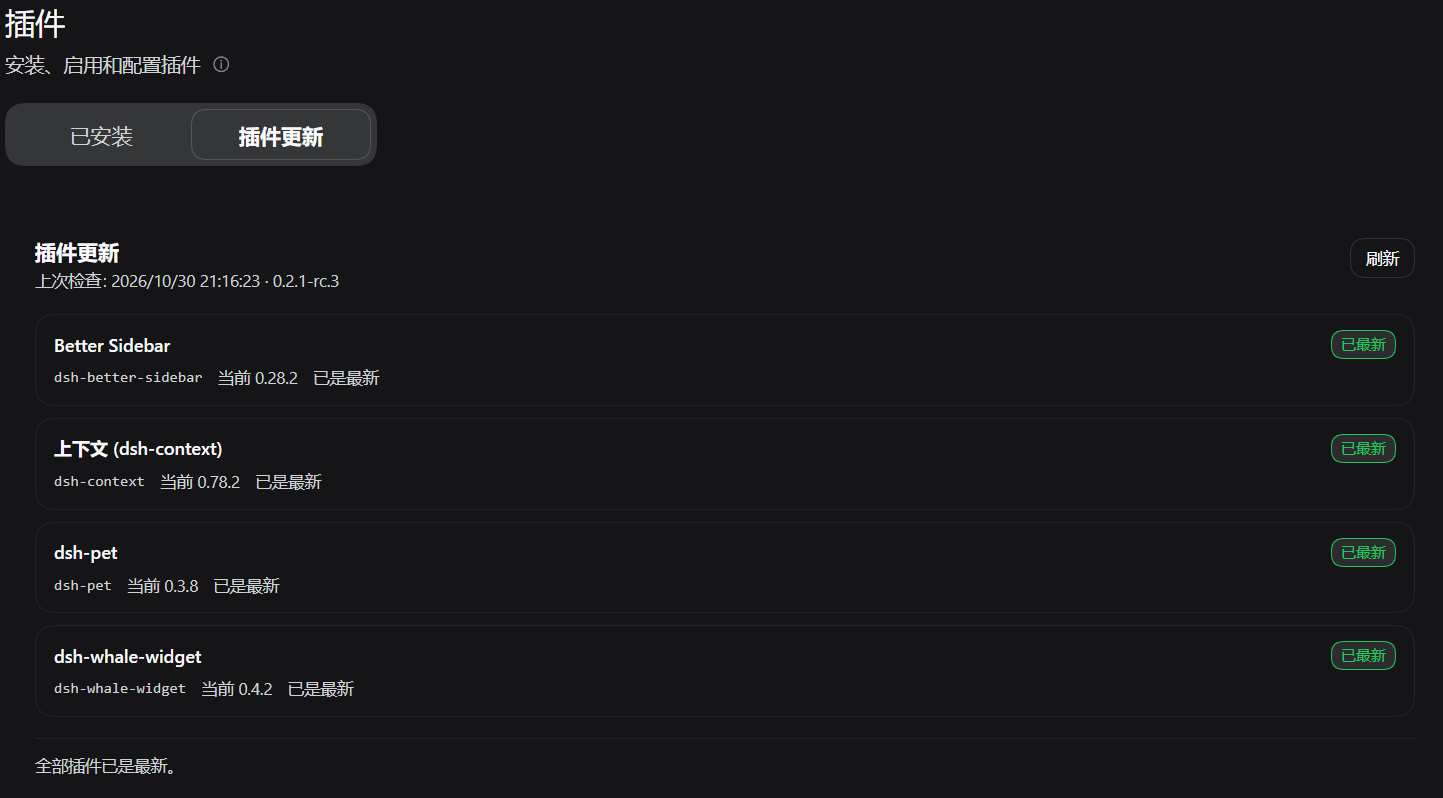
The "Plugin updates" tab on the Plugins page. Every bundle is up to date in this capture; when newer versions exist the badge, the "Update" buttons and "Update all" appear.

The right-sidebar Start/Guide card; an update badge appears on it when updates are available.

The left-sidebar "Plugins" icon keeps the host's own icon and adds a red dot while updates are pending.
Screenshots are taken on a clean test profile and contain no session titles, personal plugin lists or local paths.
<DSH_HOME>/profiles/*/package.json and the installed versions under each profile's node_modules, and exposes that inventory as a read-only JSON route (/plugin-updates/profiles) on the local web server. It never writes to a profile, never installs or removes anything, and the payload contains only profile names plus third-party package names/versions (no paths, credentials or session data)registry.npmjs.org, falling back to registry.npmmirror.com) for <name>/latest; the only data sent is the package name of installed third-party bundlesVerified on Windows + DSH 0.2.1-rc.3:
dsh-better-sidebar, dsh-pet, dsh-context, dsh-whale-widget)dsh-pet 0.3.7→0.3.8, dsh-better-sidebar 0.28.1→0.28.2, dsh-whale-widget 0.4.1→0.4.2; package.json / node_modules / pnpm-lock.yaml stay consistent and other bundles are untoucheddsh-context 0.77.0→0.78.1 + dsh-whale-widget 0.4.1→0.4.2, batch progress (1/2→2/2) and the batch toast workAutomated checks: node --test test/*.test.mjs (123 tests: SemVer, compatibility, registry fallback/cache/input hardening, row building, large-package protection, install-registry fallback, controller state machine and rollback, host-capability failures, auto-check scheduling policy, cross-profile inventory and route, UI rendering and style constraints, bundle consistency). CI also verifies the committed bundle matches its sources.
dsh plugin --profile <name> ...).installBundle), the panel shows a localized "plugin manager is not available" banner and updates fail on that row instead of throwing an obscure error.sidebar.panellist, priority: -1); a host redesign may require a visual sync, but functionality is unaffected.@deepseek-ai/* bundles.package.json / lockfile; a failed rollback is unrecoverable and needs a manual reinstall.cd dsh-plugin-updates
node scripts/build-client.mjs # generate lib/client.js from lib/src/*.js
node scripts/build-client.mjs --check # verify the bundle is up to date
node --test test/*.test.mjs # unit / UI / bundle consistency tests
node scripts/preview-rows.mjs 0.2.1-rc.3 # print the rows against the real profile + registryThe browser half is a generated single file because DSH loads exactly one ./client entry per package and cannot import sibling files at runtime. lib/src/*.js is plain testable ESM; the build script only strips imports/exports and concatenates — no bundler and no third-party dependency. lib/client.js is committed so installation never builds. CI and prepublishOnly verify freshness.
| File | Responsibility |
|---|---|
lib/index.js |
Host half: read-only scan of the other profiles, served as GET /plugin-updates/profiles |
lib/src/entry.js |
Slot registration and wiring (right-sidebar tab / Guide card / Plugins tab / left badge / toast / visible-page timer) |
lib/src/schedule.js |
Pure auto-check scheduling policy (30 minutes, skip while busy) |
lib/src/controller.js |
Panel state machine, Remote calls, rollback, progress and toasts |
lib/src/rows.js |
BundleInfo + registry manifest → panel rows |
lib/src/registry.js |
npm registry fetch, validation, 10-minute cache |
lib/src/compatibility.js |
engines.dsh / peer compatibility rules |
lib/src/semver.js |
Version and range comparison (includePrerelease) |
lib/src/i18n.js |
English and Chinese dictionaries |
lib/src/ui.js |
React panel, Guide card, tab title, icon, toast |
lib/client.js |
Generated: all of the above concatenated into one browser bundle |
Releasing is two steps: bump the version, push a tag. The tag triggers release.yml, which runs the tests, creates the GitHub Release from the matching CHANGELOG section, and publishes to npm via Trusted Publishing (OIDC) — no long-lived npm secret is stored in the repository.
# bump package.json + CHANGELOG, commit
git commit -am "release: vX.Y.Z"
git push origin main
# tag and push — npm + GitHub Release happen automatically
git tag vX.Y.Z
git push origin vX.Y.Z
npm publish --provenance; the release is skipped when the version already exists.publish → Run workflow (requires the NPM_TOKEN secret; not needed with Trusted Publishing)..npmrc with //registry.npmjs.org/:_authToken=${NODE_AUTH_TOKEN} is git-ignored).This is a regular DSH bundle (the host's normal plugin trust model, no extra sandbox), with a deliberately narrow surface. The full policy, threat model and residual risks are in SECURITY.md.
Remove @moyumole/dsh-plugin-updates from the official Plugins page (or dsh plugin --profile web remove @moyumole/dsh-plugin-updates). All slot registrations, timers and listeners are released with the plugin; no background process remains.
@deepseek-ai/dsh-client-ui-primitives (MIT, Copyright (c) 2026 DeepSeek); the toast layout follows DSH's own toast. See NOTICE.dsh-better-sidebar, dsh-pet or other third-party plugins is included; they are only integration-test subjects.MIT
在 DSH(DeepSeek Harness)内检查当前 profile 中第三方插件的 npm 新版本,并在面板里一键更新——右侧栏页面、插件页标签、左侧栏红点三个入口,同一个面板。
official !== true、availability === 'profile'、installed === true 的第三方 bundle,并排除本插件自身dsh plugin --profile <name> ...。removeBundle → installBundle(name@latest, { enabled })。「全部更新」会跳过大型插件(解包超过 30 MB,例如约 71 MB 的 dsh-pet)并在结果里提示;这些请在对应行单独更新。安装时先请求 npmmirror 镜像,镜像尚未同步该版本时自动用官方 npm registry 重试同一个版本(检查更新本身始终使用官方源)。@deepseek-ai/dsh 对比,有更新时显示「DSH 有新版本 x(当前 y)」并附官方 Release notes 链接;插件不负责安装 DSH,升级仍由桌面端自带更新器完成。zh 开头时显示中文,否则英文;切换语言后界面文案、卡片/标签、toast 以及「上次检查」的时间格式都会即时更新0.2.1-rc.3(Windows Desktop)0.3.xdesktop / web 均可(示例命令用 --profile web,按你的 profile 名替换)。profile 只是数据目录,DSH 版本来自运行中的应用/运行时,因此同一安装打开的所有 profile 共享同一个 DSH 版本。| DSH 版本 | 状态 |
|---|---|
0.2.1-rc.3 |
✅ 真机验证(Windows) |
其他 0.2.x |
⚠️ 预期可用,未逐一验证 |
| 其他版本 | ❌ 不保证 |
⚠️ 本插件使用了宿主的非公开扩展点(右侧栏 tab 注册、
plugins.tab槽、sidebar.panellist覆盖、remote.pluginManager)。DSH 升级后这些接口可能变化,UI 做了降级处理但功能可能受影响;使用前请以实际运行验证为准。
从 npm 安装(推荐)
dsh plugin --profile web add "@moyumole/dsh-plugin-updates"或在「设置 → 插件 → 添加插件」里输入包名 @moyumole/dsh-plugin-updates。
从 GitHub 安装(锁版本)
dsh plugin --profile web add "github:Moyumole/dsh-plugin-updates#v0.3.5"仓库根目录就是插件目录,lib/client.js 已随仓库提交,安装时不需要构建。
本地目录(开发调试)
dsh plugin --profile web add "<本机路径>/dsh-plugin-updates"安装会以 link: 依赖写入 profile 并加入 bundle 列表。
| 状态 | 展示 |
|---|---|
| 有更新 | 当前版本 → 最新版本,「更新」按钮可用 |
| 已最新 | 状态「已最新」,无按钮 |
| 不兼容 | 最新版 engines.dsh / @deepseek-ai/dsh-* peer 范围不接受当前 DSH 版本;默认禁用更新按钮 |
| 检查失败 | 只把该行标为失败,其他行不受影响;顶部网络失败可重试并保留上次结果 |
| 非 npm 来源 | source 不是 npm 依赖(git / 本地路径等)时标为「不支持一键更新」 |
更新流程:removeBundle(name) → installBundle(name@latest, { enabled })。更新会真实改动 profile 的 package.json / pnpm-lock.yaml 与 node_modules,且移除再安装期间该插件短暂不可用;被更新插件的浏览器端代码通常在刷新或重启 DSH 后生效。更新前请确认目标版本(更新本质上是 npm 供应链操作)。
「设置 → 插件」页的「插件更新」标签。此截图里全部插件都是最新;有可用更新时会显示红点、「更新」与「全部更新」按钮。
右侧栏「开始 / Guide」里的卡片;有可用更新时卡片上会出现红点。
左侧栏「插件」图标保留宿主原图标,有更新时右上角显示红点。
截图使用干净的测试 profile,不包含会话标题、个人插件列表或本机路径。
<DSH_HOME>/profiles/*/package.json 及各 profile node_modules 里已安装的版本,并通过本地 Web 服务器暴露只读 JSON 路由(/plugin-updates/profiles);不写 profile、不安装/卸载任何东西,返回内容只有 profile 名 + 第三方包名/版本(不含路径、凭据或会话数据)registry.npmjs.org,失败回退 registry.npmmirror.com)的 <name>/latest;只发送已安装第三方插件的包名在 Windows + DSH 0.2.1-rc.3 上已完成真机验证:
dsh-better-sidebar、dsh-pet、dsh-context、dsh-whale-widget)dsh-pet 0.3.7→0.3.8、dsh-better-sidebar 0.28.1→0.28.2、dsh-whale-widget 0.4.1→0.4.2,磁盘 package.json / node_modules / pnpm-lock.yaml 一致,其他插件未受影响dsh-context 0.77.0→0.78.1 + dsh-whale-widget 0.4.1→0.4.2,批量进度(1/2→2/2)与顶部汇总 toast 正常自动化测试:node --test test/*.test.mjs(123 项,覆盖版本比较、兼容性、registry 回退/缓存/输入加固、行构建、大插件保护、安装源回退、controller 状态机与回滚、宿主能力缺失、自动复查调度策略、跨 profile 清点与路由、UI 渲染与样式约束、bundle 一致性);CI 还会校验生成物与源码一致。
dsh plugin --profile <name> ...)。installBundle),面板会显示本地化的「插件管理器不可用」错误横幅,更新会按失败处理,而不是抛出难以理解的异常。sidebar.panellist 的 plugins 单元,priority: -1);宿主大改该图标时外观需要同步,功能不受影响。@deepseek-ai/*)。package.json / lockfile 的恢复语义;回滚失败属于不可恢复场景,需要手动重装。cd dsh-plugin-updates
node scripts/build-client.mjs # 由 lib/src/*.js 生成 lib/client.js(浏览器单文件 bundle)
node scripts/build-client.mjs --check # 校验生成物是否最新
node --test test/*.test.mjs # 单元/UI/bundle 一致性测试
node scripts/preview-rows.mjs 0.2.1-rc.3 # 用真实 profile + registry 打印面板会显示的行为什么浏览器端是生成物:DSH 的客户端加载器每个包只加载一个 ./client 入口文件,无法在运行时 import 同包的其他文件。lib/src/*.js 是可单测的普通 ESM,构建脚本只做「剥掉 import/export + 拼接」,不引入任何打包器或第三方依赖;生成后的 lib/client.js 直接提交,安装时无需构建。CI 与 prepublishOnly 会校验生成物与源码一致。
源码结构:
| 文件 | 职责 |
|---|---|
lib/index.js |
Host 半边:只读扫描其他 profile,并以 GET /plugin-updates/profiles 提供 JSON |
lib/src/entry.js |
槽注册与接线(右侧栏 tab / Guide 卡片 / 插件页 tab / 左侧栏红点 / toast / 可见页定时器) |
lib/src/schedule.js |
纯自动复查调度策略(30 分钟、忙时跳过) |
lib/src/controller.js |
面板状态机、Remote 调用、回滚、进度与 toast |
lib/src/rows.js |
BundleInfo + registry manifest → 列表行 |
lib/src/registry.js |
npm registry 拉取、校验与 10 分钟缓存 |
lib/src/compatibility.js |
engines.dsh / peer 兼容性判定 |
lib/src/semver.js |
版本与范围比较(includePrerelease) |
lib/src/i18n.js |
中英文字典 |
lib/src/ui.js |
React 面板、Guide 卡片、tab 标题、图标、toast |
lib/client.js |
生成物:上面所有 src 拼成的单文件浏览器 bundle |
发版只做两步:改版本号 → 打 tag 并 push。tag 会触发 release.yml:跑测试、用 CHANGELOG 对应版本创建 GitHub Release、通过 Trusted Publishing(OIDC) 发布 npm——仓库里不需要保存任何长期 npm secret。
# 改 package.json 版本和 CHANGELOG,提交
git commit -am "release: vX.Y.Z"
git push origin main
# 打 tag 并推送 —— npm 发布 + GitHub Release 自动完成
git tag vX.Y.Z
git push origin vX.Y.Z
npm publish --provenance,版本已存在时自动跳过。publish → Run workflow(需要 NPM_TOKEN secret,用 Trusted Publishing 时不需要)。.npmrc 里 //registry.npmjs.org/:_authToken=${NODE_AUTH_TOKEN},已被 git 忽略)。本插件是一个普通的 DSH bundle(宿主的正常插件信任模型,不做额外沙箱),但尽量收窄能力。完整说明见 SECURITY.md。
在官方插件页移除 @moyumole/dsh-plugin-updates(或 dsh plugin --profile web remove @moyumole/dsh-plugin-updates)。右侧栏 tab 类型、插件页 tab、左侧栏图标覆盖、toast 槽注册、定时器与监听器都随插件卸载释放,无残留进程。
@deepseek-ai/dsh-client-ui-primitives(MIT,Copyright (c) 2026 DeepSeek);toast 的位置/尺寸参考了 DSH 前端自身的样式。详见 NOTICE。dsh-better-sidebar、dsh-pet 等第三方插件的代码;它们仅作为集成验证对象。MIT
CLASSIFICATION EVIDENCE
系统优先读取 GitHub Topics,再与站内分类词典和词根规则比对。当前命中: deepseek-harness。
morluto
Reverse engineer anything with agents, from app behavior down to native binaries.

deepseek-ai
DeepSeek Harness: Everything is a Plugin.

nexu-io
The 1st Collaborative AI Design Agent Workspace. Local-first and open source. Create motion, prototypes, websites, apps, dashboards, presentations, images, and videos with your team and AI agents. Share work, exchange feedback, and iterate together in one workspace.