
模型与 MCP
待识别

rea
morluto
Reverse engineer anything with agents, from app behavior down to native binaries.
PROJECT TOPICS
INSTALL REFERENCE
dsh plugin --profile web add github:MoruTeaven/dsh-key-panel
该命令指向仓库当前默认分支;尚无绑定当前 commit 的完整验证结果。
PROJECT README
@moruteaven/dsh-key-panel on npm · English · 简体中文 · 日本語
A secret store for DSH Desktop. Keep API keys in one
place, have them injected into the assistant's shell as $DSH_* variables, and
decide — from a settings-page panel — exactly how much the assistant is allowed
to do with them.
The problem this solves: an assistant that needs to call Cloudflare, or OpenAI, or your database needs a credential. Pasting it into the conversation puts it in the transcript forever. Sending it as a file means it lands in some directory you forget about. This puts it in one file, exposes it as an environment variable, and never lets the value enter the conversation at all.
Assistant needs to deploy a Worker
  → writes: wrangler deploy --api-token $DSH_CLOUDFLARE_TOKEN
→ the shell has it; the model's context never doesreadonly (default) · write · edit.DSH_<PLATFORM>_<ACCOUNT>_ID and
DSH_<PLATFORM>_<ACCOUNT>_KEY. Grouping is only a way to organise storage —
the variable names stay flat, and so does everything that reads them.DSH_AGENT_*, and does enforce a scope already in the store, but the
panel field is hidden in this release.Settings → Keys, as it looks in use:
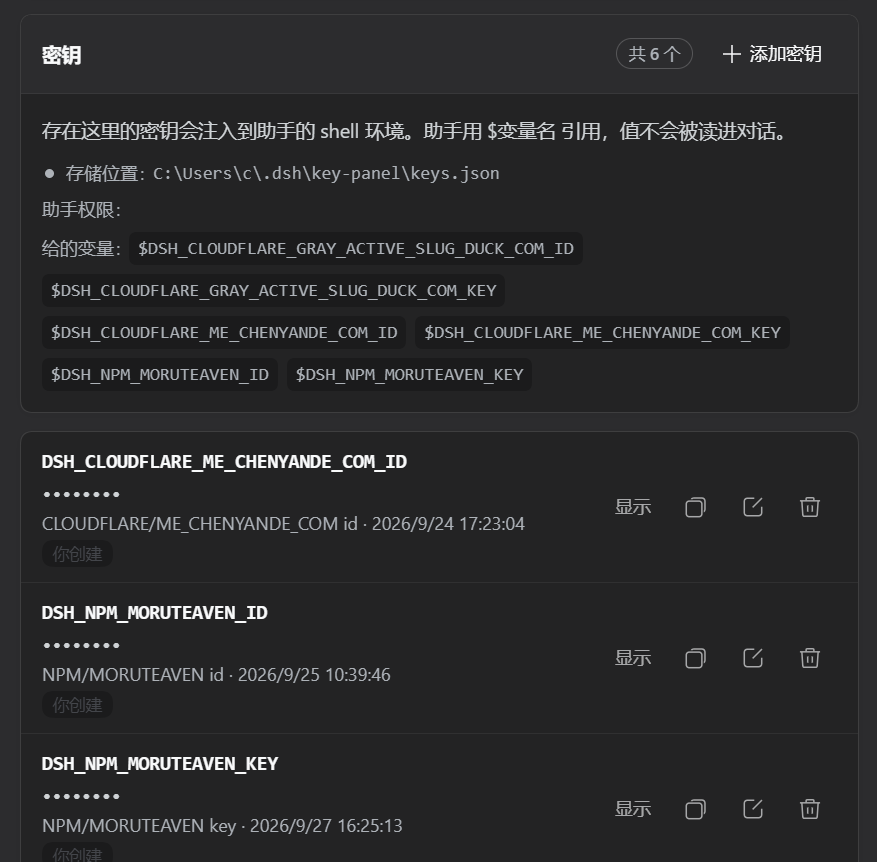
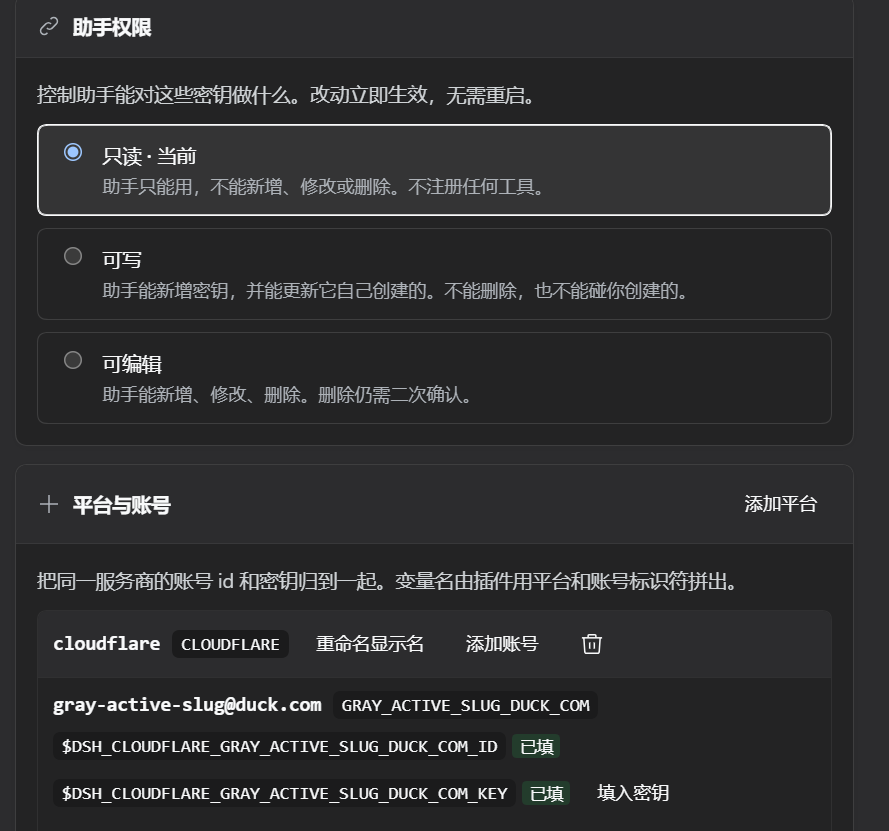
Settings → Plugins → search "dsh-key-panel" → Install → restart DSH DesktopThe panel then appears in Settings → Keys.
Other channels:
npm i @moruteaven/dsh-key-panel, then add the bare package name
@moruteaven/dsh-key-panel to dsh.profile.bundles in your profile's
package.json. The bundles list takes bare package names only; a file:
or path spec is rejected there (file: is fine in dependencies).Settings → Keys → Add key.
| Field | Notes |
|---|---|
| Name | Must match DSH_[A-Z][A-Z0-9_]* — e.g. DSH_CLOUDFLARE_TOKEN |
| Purpose | Optional. Shown to the assistant as the variable's description. |
| Value | The secret. Stored plaintext; shown masked afterwards. |
Then tell the assistant to use it:
Deploy the worker, the token is in
$DSH_CLOUDFLARE_TOKEN.
When a provider wants two values — an account id and a token, say — and you have more than one account with them, the flat list gets hard to read. Add platform and Add account group those keys and name them for you:
| You enter | You get |
|---|---|
platform CF, account WORK |
DSH_CF_WORK_ID and DSH_CF_WORK_KEY |
The panel shows both names before you commit, so you can see what will land in the shell. Identifiers are uppercase letters, digits and underscore; lowercase is rejected rather than silently uppercased, because a name you did not ask for is worse than one you have to retype.
Fill in the values from the account itself. Once the account exists, its two variable names are already decided — they are derived from the identifiers, not chosen by you. So the account row carries a Fill in keys button that opens a popup collecting both values at once and files them under that account. The derived names are shown in the popup but never typed, which is the point: making you carry a name the plugin computed up to the flat Add key card, once per field, was transcription.
An account row states everything one account has: its display name and identifier above, its two variable names below, each with its own state — a filled slot is a small dot, and only an empty one spends the word "Not set". The wording is spent where a click is still needed, so a scan down the card shows what is missing. The platform row above keeps only the display name, the account count and a few icon buttons; the variable names are not repeated there, because they belong to the account level.
Any slot can be left blank for now. Add key is still there for ungrouped keys, which have no account to be filled in from.
Each platform and account also takes a display name, which is what the panel
shows. It is separate from the identifier on purpose: identifiers are baked into
variable names and cannot be changed afterwards, while display names are yours to
edit at any time. If you want a platform to read as "Cloudflare" while its
variables stay DSH_CF_*, that is exactly what the two fields are for.
If the names an account would produce are already taken — you added
DSH_CF_WORK_KEY by hand before creating that account — the panel says so and
asks before continuing, naming the keys involved. Saving over them would replace
their values, so it is not done silently.
Two things worth knowing:
DSH_* names — that is the whole point, since a shell has no nesting. What
grouping buys you is a readable panel and, incidentally, a scope that lines up
with one account (see below).Keys you never filed stay exactly as they were. Nothing has to be reorganised for this feature to be useful, and an existing store keeps working unchanged.
The panel keeps two records, and puts them side by side:
| Record | Written by | Contains |
|---|---|---|
| declared | the assistant, calling key_panel_intent |
a timestamp it says a purpose, and the names it means to use |
| handed to command | the plugin itself, every time a shell command is resolved | a timestamp and the names that went into that command |
They are shown together, not paired. An intent and a use that sit near each other in the list may belong to the same task, but nothing in the data says so, and joining them would be a guess presented as a fact.
What "handed to command" does not mean. The host resolves the whole
$DSH_* environment before every shell command and cannot see what the command
does with it. So a row means those names were in scope at that moment — never
that the command read them, and never what it did with them. Treat the log as a
signal about which credentials a workflow depends on, not as an audit trail.
Two practical consequences of that:
key_panel_intent is optional and
skipping it costs nothing, so expect undeclared activity. The plugin asks for
intent where it is cheap, but never requires it — a required step in front of
every command would turn into a reflex and stop carrying information.The log lives beside the key store in usage.jsonl and holds names and
timestamps only. No value is ever written to it.
| Mode | Assistant can | Assistant cannot |
|---|---|---|
readonly (default) |
use keys | change anything — no write tool is registered at all |
write |
add keys; replace keys it created | delete anything; edit your keys |
edit |
add, change, delete | — (delete still needs confirmation) |
Set it in the panel. It applies to the next tool call, no restart.
Start at readonly. Move up only when you actually want the assistant adding
its own credentials — that is the one workflow the other two modes exist for.
Not exposed in the panel yet. The scope itself works — it is validated, persisted, and enforced on every model call, and a scope already in the store keeps applying. Only the field that sets it is hidden for now, behind the
SHOW_SCOPE_UIflag inlib/client.js. Set it by hand in the store if you need it; flipping the flag brings the field back.
This has a security consequence worth knowing before you pick a mode: with no scope set, the access mode is the only thing limiting which keys the assistant can reach. An unset scope means no restriction. If you want a narrower boundary, set one — in the store by hand for now.
The scope limits the assistant to matching names:
| Value | Effect |
|---|---|
| (blank) | no restriction |
DSH_AGENT_* |
only names with that prefix |
DSH_CF_* |
only that platform's keys |
DSH_CF_WORK_* |
only one account's credentials |
A single * is the only metacharacter. It cannot express a path or a regex.
| Setting | Where | Default |
|---|---|---|
| Access mode | Panel | readonly |
| Name scope | Store only (field hidden) | unrestricted |
| Store location | $DSH_HOME/key-panel/keys.json |
~/.dsh/key-panel/keys.json |
| Activity log | $DSH_HOME/key-panel/usage.jsonl |
~/.dsh/key-panel/usage.jsonl |
{
  "version": 2,
  "policy": { "accessMode": "readonly", "scopePattern": null },
  "platforms": {
    "CF": { "label": "Cloudflare", "createdAt": 1758428400000 }
  },
  "accounts": {
    "CF/WORK": { "platform": "CF", "identifier": "WORK", "label": "Work", "createdAt": 1758428400000 }
  },
  "keys": {
    "DSH_CF_WORK_TOKEN": {
      "value": "…",
      "description": "Cloudflare Workers deploy token",
      "origin": "operator",        // "operator" | "model"
      "platform": "CF",            // optional grouping
      "account": "WORK",
      "field": "key",              // "id" | "key"
      "createdAt": 1758428400000,
      "updatedAt": 1758428400000
    }
  }
}
Writes go through a temp file + fsync + rename, so a crash cannot leave a
renamed-but-empty file behind — which would read back as "all keys deleted".
A version 1 file loads as-is: the grouping fields are optional, so keys written before platforms existed simply read back as ungrouped. No migration step.
usage.jsonlActivity records live in a separate file, one JSON object per line:
{"t":1758428400000,"kind":"intent","names":["DSH_CF_WORK_TOKEN"],"note":"deploy staging"}
{"t":1758428450000,"kind":"use","names":["DSH_CF_WORK_TOKEN"]}| Field | Meaning |
|---|---|
t |
epoch milliseconds |
kind |
intent (assistant-declared) or use (handed to a command) |
names |
DSH_* names involved, deduplicated. Never a value. |
note |
intent only — the purpose, trimmed to 500 characters |
It is appended in batches and capped at the most recent 1000 entries, so it
cannot grow without bound. Unlike keys.json it is not written atomically
and not fsynced per line: a hard kill can truncate the final line, which
readers skip. That is the correct trade here — this file is a signal, not a
secret, and paying for durability would slow down every command.
Because the two kinds are written by different parties at different moments, they are stored as separate entries and correlated by timestamp when displayed. The plugin never joins them.
Values are stored in plaintext. This is deliberate and explained in full in SECURITY.md, along with the trust model, the invariants, and the non-goals.
The short version:
.env.readonly, the write tools do not exist rather than refusing —
the capability is absent, not argued about. (key_panel_intent is registered
in every mode; declaring a purpose changes nothing.)readonly limits what can change, not what can be seen: a key has to
be in the shell environment to work, so the assistant can list the names.
Names and purposes are non-secret by design; only values are.npm test # both suites — 486 assertions
npm run test:host # host half: policy, store, tools, gateway, MCP resources (335)
npm run test:client # client bundle: contract, slots, RPC, dictionaries (151)The client suite loads lib/client.js the way the real frontend does — a fake
window.__ModuleLoader__, seed-word-only require — and asserts the bundle
registers without side effects, that only seed modules are required, and that
every RPC endpoint the panel calls matches the gateway.
No build step. Plain ESM on the host, a CJS factory string in the browser.
lib/
  policy.js   access modes, scope glob, decision function
  store.js    persistence, provenance, atomic write
  tools.js    model-facing tools, confirmation ledger
  index.js    host half — Typert gateway, shellEnv registration
  client.js   browser bundle — settings panel
See CONTRIBUTING.md for the conventions this repo enforces and how to run the suites.
0.1.5-rc.1)Apache License 2.0 · attribution in NOTICE
Apache-2.0 was chosen over MIT/BSD for this project because it adds two clauses that matter for a tool handling credentials:
Everything else is permissive: use it commercially, modify it, ship it closed.
CLASSIFICATION EVIDENCE
系统优先读取 GitHub Topics,再与站内分类词典和词根规则比对。当前命中: deepseek-harness。
morluto
Reverse engineer anything with agents, from app behavior down to native binaries.

deepseek-ai
DeepSeek Harness: Everything is a Plugin.

nexu-io
The 1st Collaborative AI Design Agent Workspace. Local-first and open source. Create motion, prototypes, websites, apps, dashboards, presentations, images, and videos with your team and AI agents. Share work, exchange feedback, and iterate together in one workspace.