
模型与 MCP
待识别

rea
morluto
Reverse engineer anything with agents, from app behavior down to native binaries.
PROJECT TOPICS
INSTALL REFERENCE
dsh plugin --profile web add github:MateenAhmed737/dsh-plugin-opencode-local
该命令指向仓库当前默认分支;尚无绑定当前 commit 的完整验证结果。
PROJECT README

I wanted to use OpenCode's models in DeepSeek Harness through the OpenCode CLI installed on my own machine, the way T3 Code does. I couldn't find a DeepSeek Harness plugin that did that, so I built this one.
A DeepSeek Harness (DSH) plugin that adds an OpenCode (local) model provider. Every request is served by your own installed OpenCode, the same way T3 Code does it: one opencode serve on 127.0.0.1, started from your install with your own login and config, driven only through OpenCode's official clients.
provider/model ids.auth.json or any credential. OpenCode uses its own.opencode process. The plugin makes no calls to opencode.ai or any other host, uses no proxies, and sets no custom headers or user agent.| DeepSeek Harness | 0.2.x (tested on 0.2.1-rc.5) |
| DSH profiles | Desktop app and CLI/headless profiles |
| OpenCode | 1.14.19 or newer, including 2.x |
| Platforms | Windows (tested end to end), Linux (CI); macOS should work but is untested |
| Node | 22.19 or newer (DSH ships its own) |
Restricted OpenCode tools (shell, file edits, web fetch) go through DSH's approval prompt; see Permission policy.
Install OpenCode and check it runs:
npm i -g opencode-ai     # or see https://opencode.ai/docs/#install
opencode --version
opencode auth login      # only for paid providers; the free models need no login
Add the plugin to DSH.
DSH desktop app: open the plugin manager and add dsh-plugin-opencode-local.
DSH CLI:
dsh plugin --profile web add dsh-plugin-opencode-localUse the name of your own profile in place of web, for example desktop or headless.
To try an unreleased version, build it (npm ci && npm pack) and add the .tgz file instead.
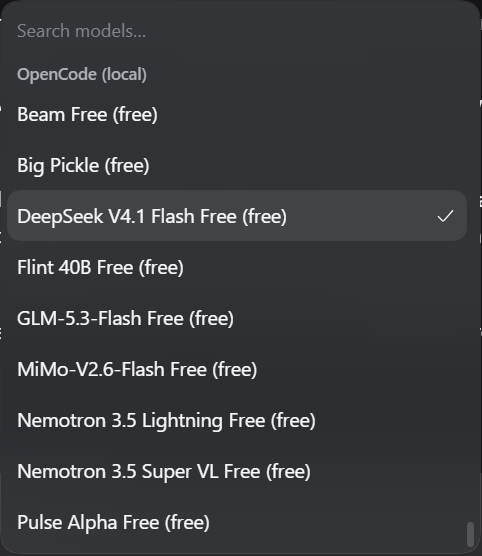
Restart DSH, open the model picker, and choose a model under OpenCode (local).
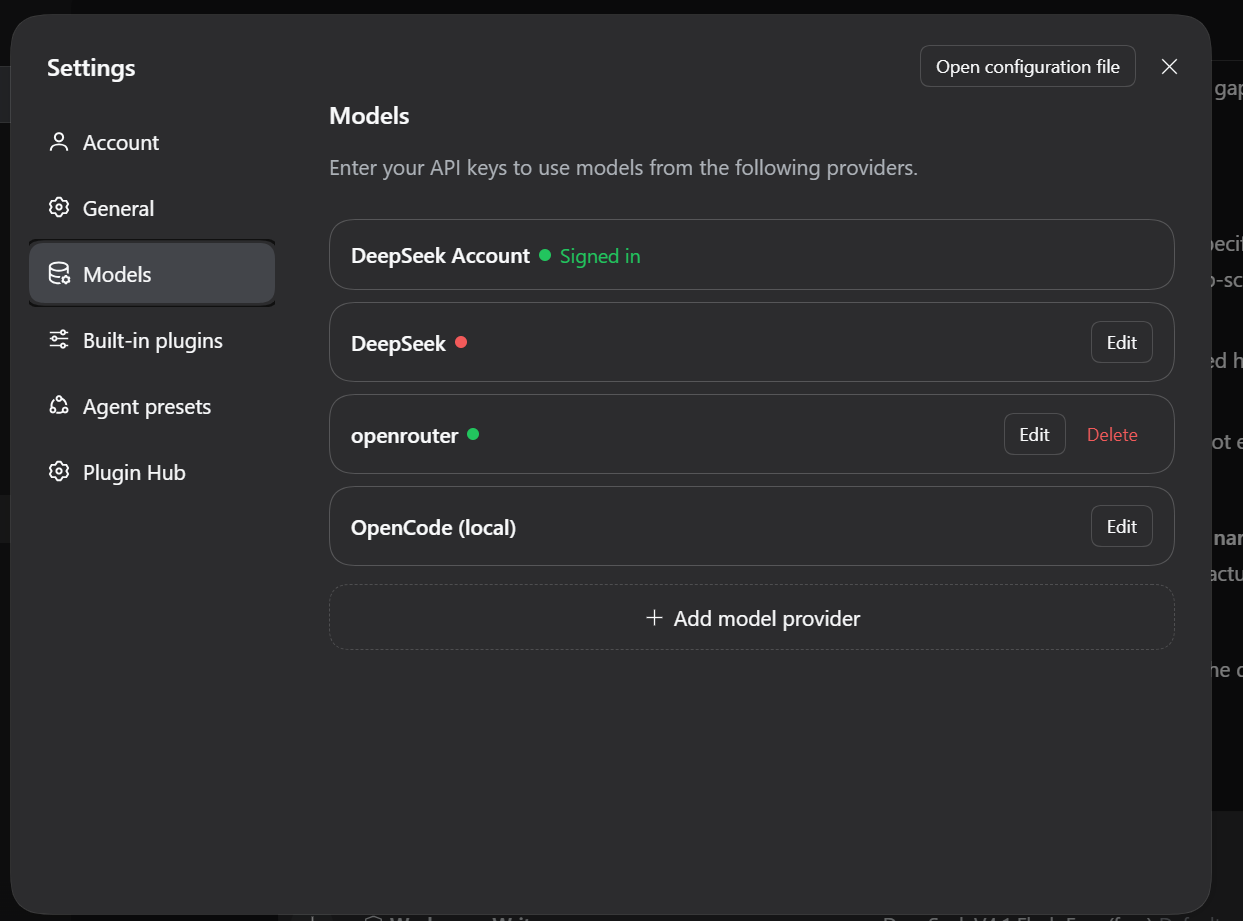
The provider also shows up in Settings → Models, where Edit opens its settings:
The plugin has no install scripts and downloads nothing. If opencode can't be found, the first request tells you how to install it or where to point binaryPath.
In DSH under Settings → Models → OpenCode (local), or in your profile's cordis.patch.yml under dsh-plugin-opencode-local.
| Setting | Default | What it does |
|---|---|---|
binaryPath |
opencode |
Path or PATH name of your opencode executable. |
serverUrl |
empty | Attach to an opencode serve you already run (e.g. http://127.0.0.1:4096) instead of starting one. |
serverPassword |
empty | That server's password (OPENCODE_SERVER_PASSWORD for 1.x, OPENCODE_PASSWORD for 2.x). |
cwd |
empty | Working directory for OpenCode sessions. Empty uses the DSH conversation's working directory. |
allowRestrictedTools |
false |
Allow the restricted tools (below) without asking. |
askForApproval |
true |
Ask in DSH's approval prompt before a restricted tool runs. When off, they're rejected. |
requestTimeoutMs |
1800000 |
Upper bound for one turn, in ms. 0 means no limit. |
modelRefreshSeconds |
300 |
How often the model list is re-read from OpenCode. |
showToolActivity |
true |
Show OpenCode's tool calls as short lines in the reply. |
localSessionTitles |
true |
Make DSH session titles locally instead of spending a model request on them. |
opencode --version, then opencode serve --hostname=127.0.0.1 --port=<free port> with your full environment and a new random password. It waits for the "listening" line and checks /global/health (1.x) or /api/info (2.x). If the server crashes it is restarted with backoff. When DSH stops or the plugin is disabled, the whole process group (or process tree on Windows) is killed.The same policy as T3 Code's default (non full-access) mode:
question, read, glob, grep, lsp, todowrite, task, skill. Reading .env files still asks; .env.example doesn't.bash (shell in 2.x), edit, webfetch, websearch, codesearch, external_directory, doom_loop, and anything not listed.Restricted tools are configured as ask, never deny. (A deny rule makes OpenCode's free tier refuse requests with FreeTierError.) When OpenCode asks:
allowRestrictedTools is on, it's allowed once;askForApproval is on, you decide;For 1.x the policy is passed in OPENCODE_CONFIG_CONTENT (your own OPENCODE_CONFIG_CONTENT, if set, is kept and only its permission key replaced). For 2.x it's set as session permission rules. The plugin never uses --auto or allow-all.
OpenCode questions (the question tool) can't be shown in DSH, so they're declined and the model continues without an answer.
OpenCode's error message is shown as is.
| OpenCode | DSH failure |
|---|---|
HTTP 429, FreeUsageLimitError |
RATE_LIMIT. The plugin doesn't retry it; wait and try again. |
HTTP 401/403, FreeTierError, ProviderAuthError |
AUTH |
| network errors, timeouts, lost connection to the local server | TRANSPORT (retried once by DSH) |
| HTTP 5xx | SERVER |
<none> (OpenCode couldn't read the provider's reply) |
a readable message with the HTTP status, as in T3 Code |
binaryPath to the full path. On Windows that's usually C:\Users\<you>\AppData\Roaming\npm\opencode.cmd.opencode upgrade or npm i -g opencode-ai@latest.opencode models in a terminal. If that's empty too, sign in with opencode auth login. The list refreshes every modelRefreshSeconds.serverUrl.allowRestrictedTools if you trust the model with your shell and files.The plugin never logs prompts, credentials or the server password. Server output shown in startup errors has the password removed.
npm ci
npm run check   # typecheck, build to lib/, unit tests
The tests run against a fake opencode (test/fixtures/fake-opencode.mjs) that speaks both the 1.x and 2.x APIs.
opencode serve on 127.0.0.1, the permission policy, the OpenCode 1.x/2.x handling and the error messages. Parts are adapted from its code (MIT, © 2026 T3 Tools Inc.).Details are in NOTICE.md.
MIT. See LICENSE.
CLASSIFICATION EVIDENCE
系统优先读取 GitHub Topics,再与站内分类词典和词根规则比对。当前命中: llm-provider、deepseek-harness。
morluto
Reverse engineer anything with agents, from app behavior down to native binaries.

deepseek-ai
DeepSeek Harness: Everything is a Plugin.

nexu-io
The 1st Collaborative AI Design Agent Workspace. Local-first and open source. Create motion, prototypes, websites, apps, dashboards, presentations, images, and videos with your team and AI agents. Share work, exchange feedback, and iterate together in one workspace.