
模型与 MCP
待识别

rea
morluto
Reverse engineer anything with agents, from app behavior down to native binaries.
PROJECT TOPICS
INSTALL REFERENCE
dsh plugin --profile web add github:Masterchiefm/dsh-mol-structure
该命令指向仓库当前默认分支;尚无绑定当前 commit 的完整验证结果。
PROJECT README
GitHub: https://github.com/Masterchiefm/dsh-mol-structure · License: MIT
一个让 DeepSeek Harness (dsh) 能够进行结构生物学信息分析、展示的插件:在 dsh 右侧 边栏内嵌本地 Mol* v5 结构查看器,让你在对话里直接加载、渲染、 标注和分析分子结构(PDB/mmCIF 等),AI 可以将结构生物学分析的图像直接展示给你。
mol_* 工具:加载结构(mol_load)、建场景/换表征
(mol_scene / mol_style)、注册可回放视图(mol_panel_define)、测量与氢键
标注(mol_measure / mol_hbonds / mol_structconn)、Cα 叠合(mol_align)、
状态存取与导出(mol_state / mol_export)、截图(mol_screenshot)等。对话里
说"加载 6w5c""看一眼 PAM 口袋"即可驱动。mol_status /
mol_select 可读);本机任意程序也能经 POST /api/mol-structure/command
用同一套命令词汇驱动查看器。给 agent 的提示(展示结构时必做):插件无法强制展开 dsh 的右侧栏(那是宿主 UI 状态,插件没有 API 碰它),只能请求切换到「结构视图」页签。因此凡是涉及结构 展示/分析的请求,agent 应在
mol_load等 3D 操作之前主动调用mol_panel打开右侧边栏的结构视图页签,让用户立即看到画面,而不是只汇报文字结果。
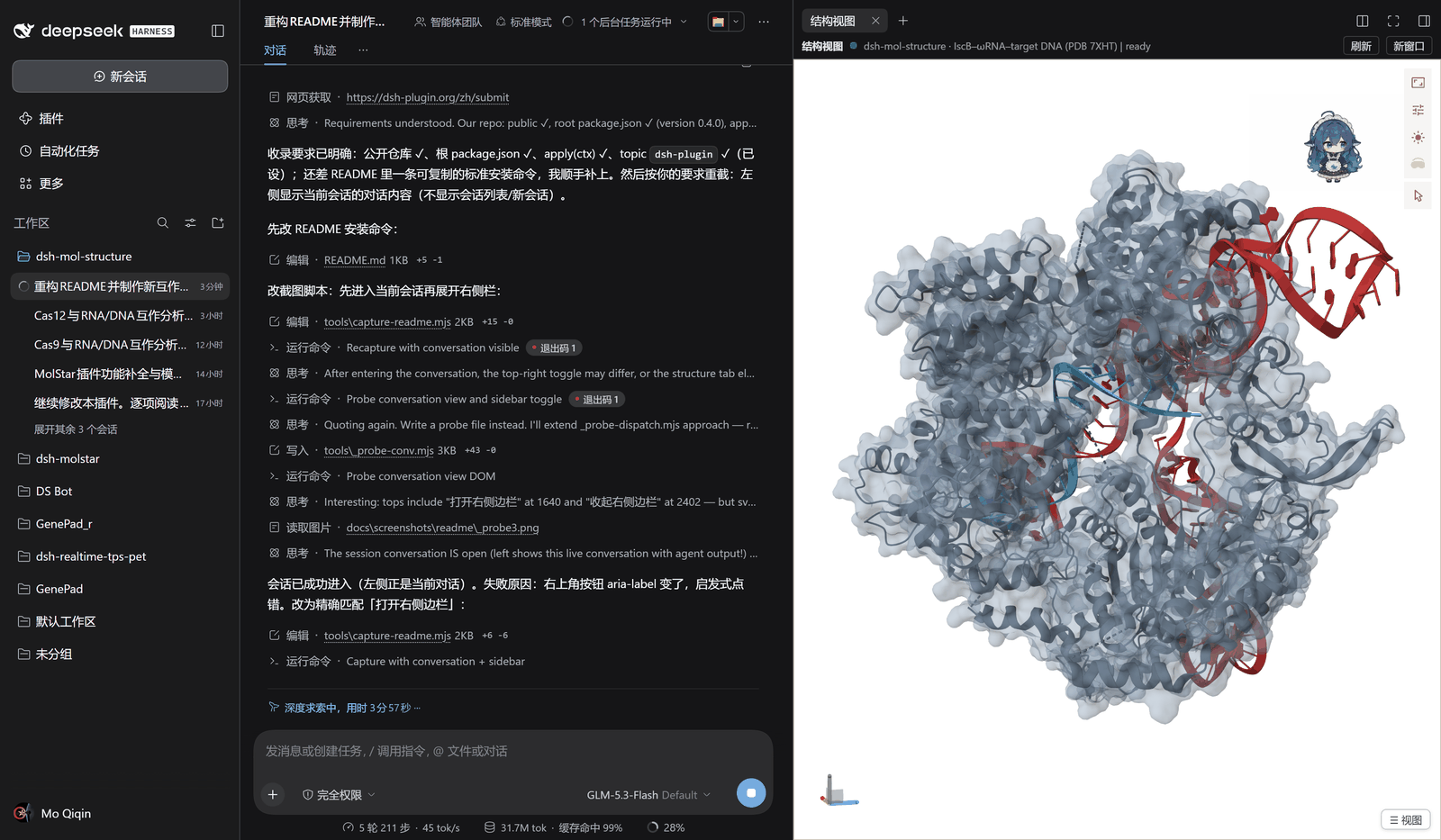
下图即插件在 dsh 里的实际样子:左侧是对话,右侧边栏是「结构视图」查看器 (SaCas9 半透明 surface + cartoon,sgRNA 红色 / 目标 DNA 青色 cartoon):
插件已发布 npm 包,一条命令装进
web profile(其他 profile 把 --profile web 换成对应名字即可):
dsh plugin --profile web add dsh-mol-structure装完重启应用(或新开会话),右侧边栏出现「结构视图」卡片。
在任一已打开的 dsh 会话里直接对 agent 说:
请安装插件
dsh-mol-structure(npm 包)
或给仓库地址源码安装:
请安装插件
https://github.com/Masterchiefm/dsh-mol-structure
agent 会调用 plugin_manager(install_bundle,target = 仓库目录的绝对路径,
真实目录、不要符号链接)——自动完成 profile 依赖登记、cordis.patch.yml 挂载与
client 半身注册。
设置 → 插件 → 本地路径安装,指向克隆出的目录;或者手动放置:
dist/)to %DSH_HOME%\profiles\desktop\node_modules\dsh-mol-structure\"dsh-mol-structure": "*" to the profile package.json dependencies"dsh-mol-structure" to dsh.profile.bundlesDo not add an entry to the profile cordis.patch.yml — the bundle's own
cordis.patch.yml (one insert row, id mol-structure) applies automatically.
mol_panel 切到该页签;右侧栏被收起时请在 UI 里展开);mol_load 返回链清单并自动注册总览/界面视图;mol_status 能读到该次点击。也可以源码安装(复制即可用;没有 npm 包时用这种方式):
dsh plugin --profile web add github:Masterchiefm/dsh-mol-structure
插件自带更新通道,默认开启自动检测(每 6 小时,可在 设置 → General → 「结构视图:自动检查更新」改为 每天/每周/关闭)。发现新版本时:
update 提醒;GET /api/mol-structure/update(状态)、
POST /api/mol-structure/update/check、
POST /api/mol-structure/update/apply。更新源固定为 GitHub 仓库 Masterchiefm/dsh-mol-structure 的
feed/manifest.json(raw.githubusercontent.com + jsDelivr 镜像,可变分支先钉到
完整 commit SHA)。清单里每个文件带 size + SHA-256,下载后逐一校验,任何一个字节
不符即拒绝安装并回滚。发新版流程:改代码 → bump package.json 与 index.js
的版本 → npm run build(改了 src/ 时)→ npm run manifest → 提交并推送
(含 feed/manifest.json)。
对 agent 说「加载 4oo8 并看看它怎么识别 DNA」即可复现下面的过程。结构:
Staphylococcus aureus Cas9(SaCas9)– sgRNA – 目标 DNA 三元复合物
(PDB 4OO8,Nishimasu et al. 2015,
本地文件 dist/structures/4oo8.cif)。
链组成:A = SaCas9(aa 3–1366)· B = sgRNA(97 nt)· C = 目标 DNA TS(0–20,
PAM 端)· D/E/F 为晶体内第二个复合物副本。
统一外观规范:蛋白 = 半透明 surface(alpha 0.45)+ 不透明 cartoon;DNA/RNA =
cartoon;互作特写处蛋白侧链用 ball-and-stick 突出。agent 会把每个视角注册成
mol_panel_define 可回放面板(控制卡一键重现)。
mol_load 后 agent 注册总览面板:蛋白半透明 surface 罩住 slate cartoon,
sgRNA(红)与目标 DNA(青)为 cartoon,嵌入中央通道的构象一目了然——
这就是第 1 节的截图。
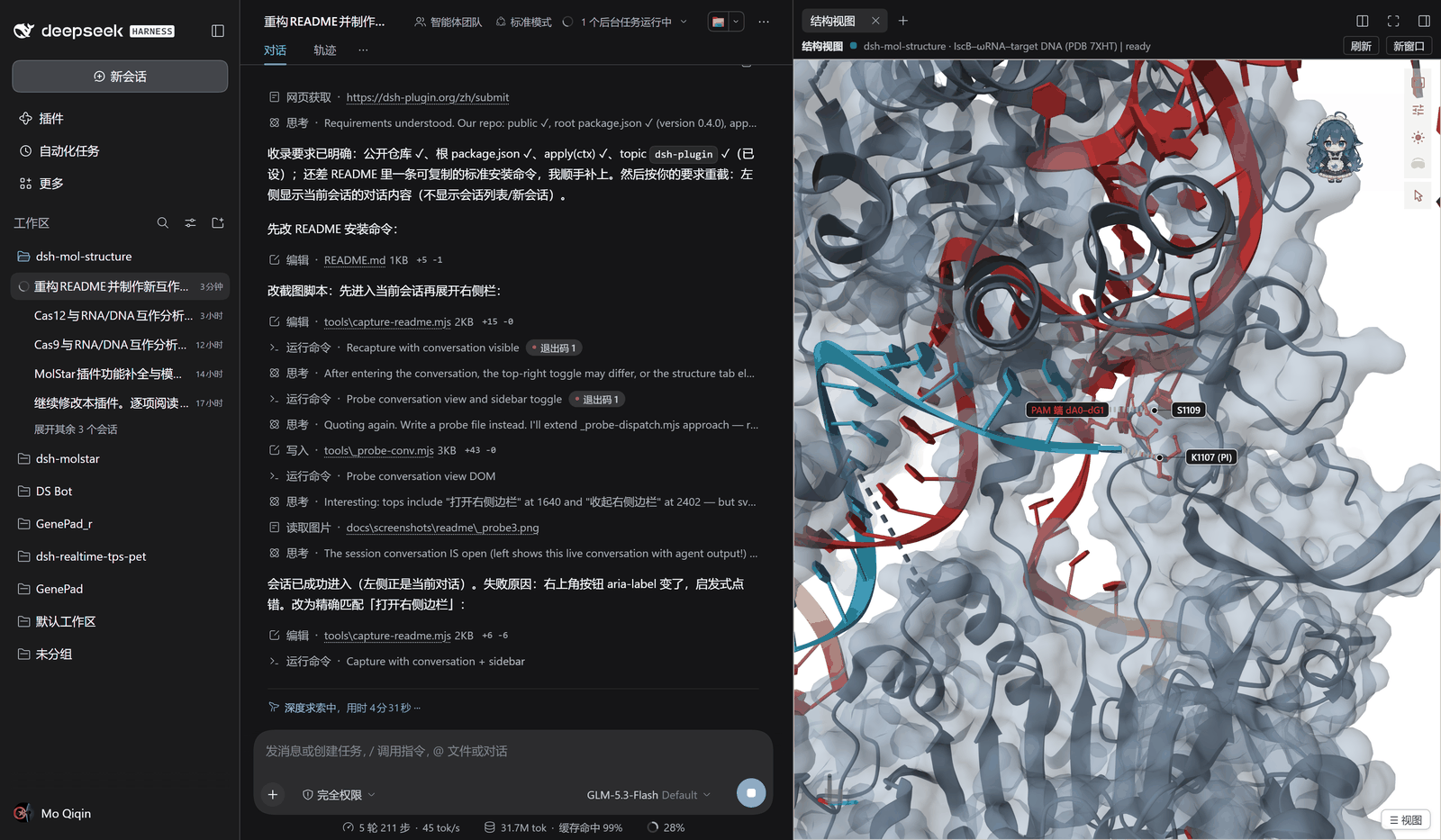
PI 域 S1106–I1110 环读 PAM 端碱基(dA0–dG1):K1107/S1109 侧链 stick 贴住 PAM 端磷酸骨架,距离线标注接触。互作处同时显示 surface(半透明)、cartoon (不透明)与侧链 stick:
sgRNA 5′ 段与目标 DNA 形成异源双链,REC lobe 正电槽残基 R75/Y72/R403 等 侧链 stick 夹住双链骨架,稳定 R 环构象:
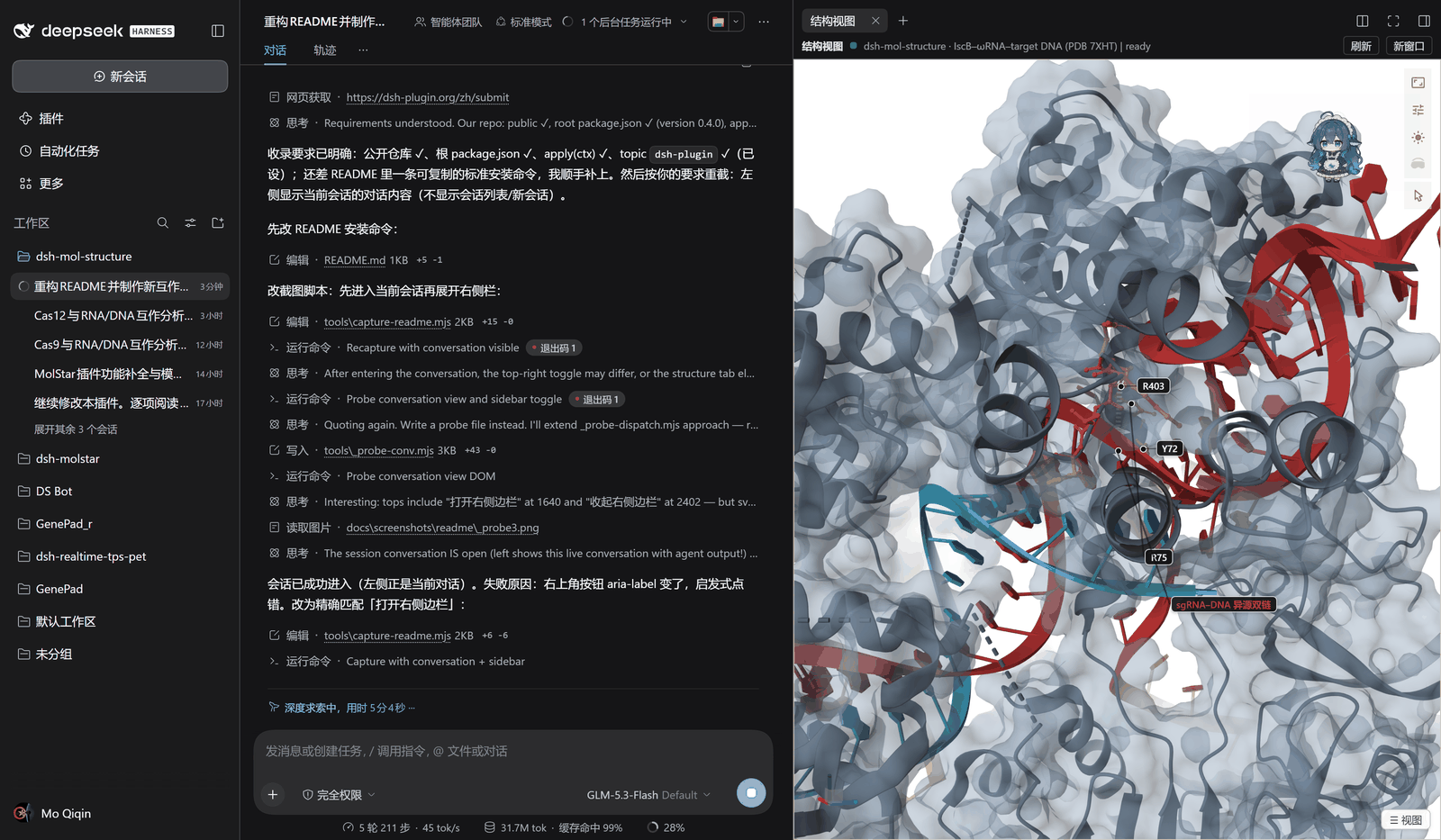
三张图均为真实 dsh 窗口截图(左侧对话 + 右侧「结构视图」边栏),
由 node tools/capture-readme.mjs 无头生成,可随时重截。
CLASSIFICATION EVIDENCE
系统优先读取 GitHub Topics,再与站内分类词典和词根规则比对。当前命中: deepseek-harness。
morluto
Reverse engineer anything with agents, from app behavior down to native binaries.

deepseek-ai
DeepSeek Harness: Everything is a Plugin.

nexu-io
The 1st Collaborative AI Design Agent Workspace. Local-first and open source. Create motion, prototypes, websites, apps, dashboards, presentations, images, and videos with your team and AI agents. Share work, exchange feedback, and iterate together in one workspace.