

模型与 MCP
待识别

rea
morluto
Reverse engineer anything with agents, from app behavior down to native binaries.
PROJECT TOPICS
INSTALL REFERENCE
dsh plugin --profile web add github:MYSTERY2019/dsh-skills-symlink
该命令指向仓库当前默认分支;尚无绑定当前 commit 的完整验证结果。
PROJECT README
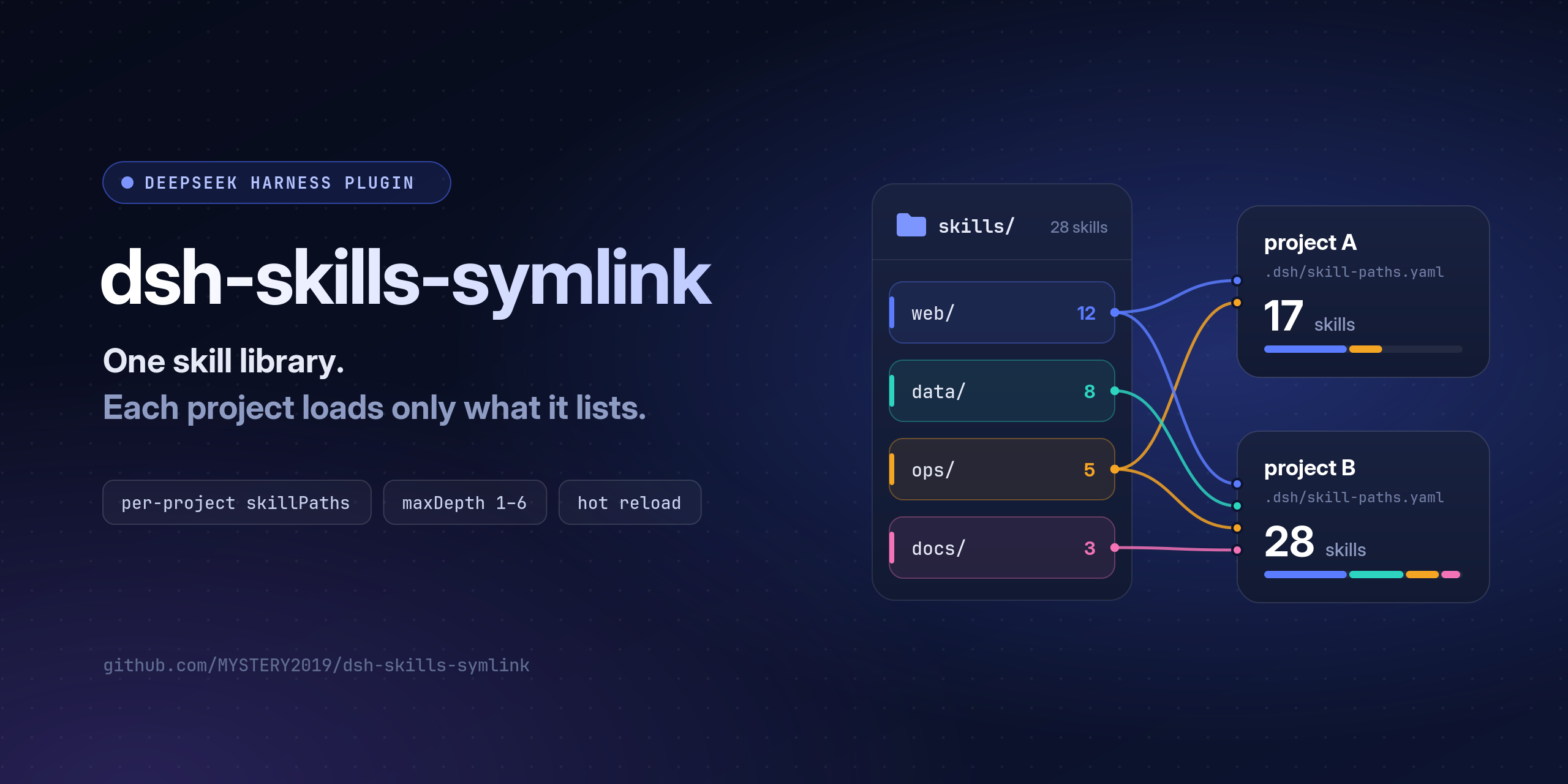


Give every project in DeepSeek Harness (DSH) its own set of skills. It replaces the skill symlink from Hermes: one shared library, and each project loads only the categories it lists. The plugin creates no symbolic links; the name only borrows the Hermes term.
.dsh/skill-paths.yaml per project, and each project sees only what it listsmaxDepth reads category/skill/SKILL.md layouts up to 6 levels deepIf you came from Hermes, you will miss its skill symlink. A skill lives once in a central repository, and any project that wants it symlinks it into its own skills directory. Edit the original and every project follows, with nothing to copy. Project A links the three writing skills, project B links the two tools skills, and each sees exactly its own set. Adding a skill is one more link; nothing else changes.
DSH replaced that with skill roots configured through customSkillDirs. Three things break on the way over.
First, each root only accepts <root>/<skill>/SKILL.md. A library laid out as category/skill/SKILL.md yields nothing when you point at the parent, with no error and no log line.
Second, the setting belongs to the host or the preset, not to the project. Every project sees the same skills, and "this project sees category A only" cannot be expressed.
Third, every skill's name and description goes into context each turn. With a large library that cost is fixed and cannot be scoped down.
This plugin moves the paths into the project, one .dsh/skill-paths.yaml per project, and maxDepth in the plugin row lets it read category folders, so a single parent path is enough. From one library, project A loads 17 skills and project B loads 28.
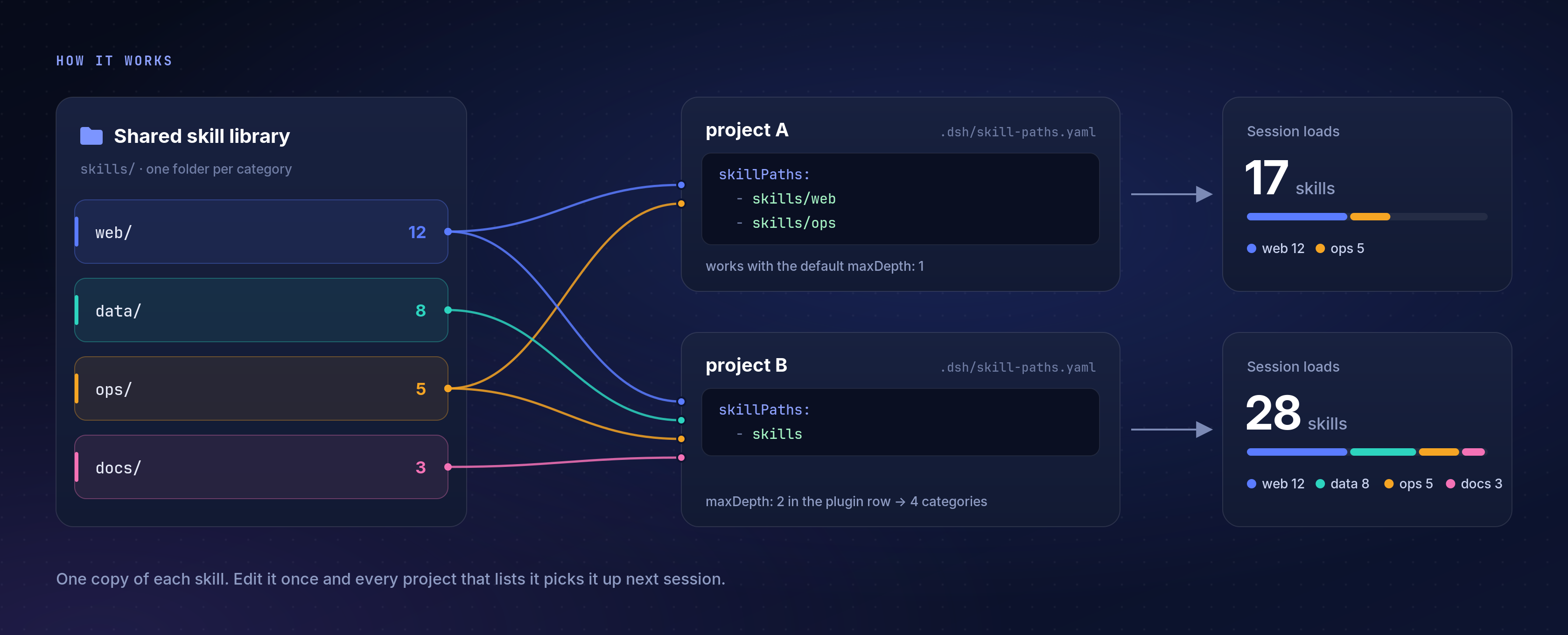
One library, two projects: A loads 17 skills, B loads 28.
Requires DSH >=0.2.1-rc.5 <0.3.0 (the 0.2.x line), Node.js ^22.19.0 || >=24.0.0, and access to GitHub while installing.
DSH Desktop: open Plugins in the sidebar and add
github:MYSTERY2019/dsh-skills-symlink#v0.4.0Restart DSH afterwards; dsh-skills-symlink should appear on the Plugins page. The 0.2.x dsh CLI refuses --profile desktop, so Desktop installs from the Plugins page only.
Other profiles (for example web) from the command line:
dsh plugin --profile web add github:MYSTERY2019/dsh-skills-symlink#v0.4.0You can also download dsh-skills-symlink-0.4.0.tgz from the Release and pass its path instead of the github:... spec.
Create .dsh/skill-paths.yaml in the project root:
version: 1
skillPaths:
  - skills
  - tools/skills
The project now sees only the skills under those two directories. Other projects do not. Paths are relative to the project root (the nearest Git root, otherwise the session's working directory).
A shared library outside the project needs allowExternalPaths in the plugin row first (see Configuration). Without it, that entry is skipped and the log says why:
# needs allowExternalPaths: true in the plugin row
version: 1
skillPaths:
  - ../shared-skills
The project file knows two keys, version and skillPaths. Options such as maxDepth and ignore belong to the plugin row; written into the project file they have no effect. The plugin ignores them, logs where they belong, and still loads the paths. An invalid entry (outside the project, not a string) is skipped on its own as well.
If the library is laid out as category/skill/SKILL.md, the project file still names the parent:
version: 1
skillPaths:
  - skills
and maxDepth in the plugin row says how deep to go (see Configuration):
| Layout | maxDepth |
|---|---|
root/skill/SKILL.md |
1 (default) |
root/category/skill/SKILL.md |
2 |
root/group/category/skill/SKILL.md |
3 |
Valid values are 1 to 6. Anything else (0, 7, 2.5) is treated as 1, with a warning in the plugin log.
| Where you put it | What happens | Work needed |
|---|---|---|
Inside a category you already list, as category/new-skill/SKILL.md |
picked up like its neighbours | none |
As a new sub-category, category/new-group/skill/SKILL.md |
promoted to its own root | none, if maxDepth already reaches that depth |
| As a new top-level category beside the ones you list | invisible, because the project file names categories one by one | add a line per project, or list the common parent instead |
Deeper than maxDepth allows |
invisible, and that root reports 0 skills | raise maxDepth in the plugin row |
Skills are read when a session starts, so a change appears in the next session rather than the one
that is running. scripts/post-install-check.mjs points at the depth case when a root resolves to
zero skills but holds SKILL.md files one level further down.
After installing and restarting, run the check that ships with the package:
node ~/.dsh/profiles/desktop/node_modules/dsh-skills-symlink/scripts/post-install-check.mjs --project .It prints the profile that holds the plugin, the version the host actually loaded, and every root
your project resolves. A version mismatch, a missing plugin row, or a project without a config
file is listed as a problem and the exit code becomes 1. Pass --profile to look at another
profile, or --json to script it.
Override the plugin row in the profile's cordis.patch.yml:
- id: dsh-skills-symlink
  config:
    maxDepth: 2
    allowExternalPaths: true
    ignore:
- _archive| Key | Default | Meaning |
|---|---|---|
maxDepth |
1 |
How many levels to scan, an integer from 1 to 6 |
ignore |
[] |
Category or group folder names skipped while descending; prefix* is supported; case-insensitive on Windows |
maxRoots |
2000 |
Most roots one project may expand into. Configured roots always stay, the rest of the budget is shared fairly between them, and empty folders watched only for new skills do not count |
allowExternalPaths |
false |
Allow absolute paths, .., and symbolic links that point outside the project |
watch |
true |
Watch skill folders so adding or removing a skill needs no restart |
watchFollowSymlinks |
same as allowExternalPaths |
Whether watching follows symbolic links |
configWatchIntervalMs |
500 |
How often .dsh/skill-paths.yaml is checked, 10–60000 ms |
diagnosticsFile |
true |
Write the diagnostics log |
logFile |
'' |
Custom log path; a relative path is resolved from the profile directory; empty writes <profile>/logs/dsh-skills-symlink.log |
A number that is out of range or not an integer falls back to its default with a warning; it never stops DSH from starting.
[!WARNING] When DSH overrides a plugin row it replaces
configas a whole; it does not merge. Write every key you need in one block, or the rest falls back to defaults. A row with onlymaxDepth, for example, turnsallowExternalPathsback tofalse, and paths outside the project are skipped (and logged).
Open Plugins → dsh-skills-symlink in the sidebar and scroll down to the plugin's own sections.
Skills overview lists one row per project. A row is read only when you open it, so the list opens fast.
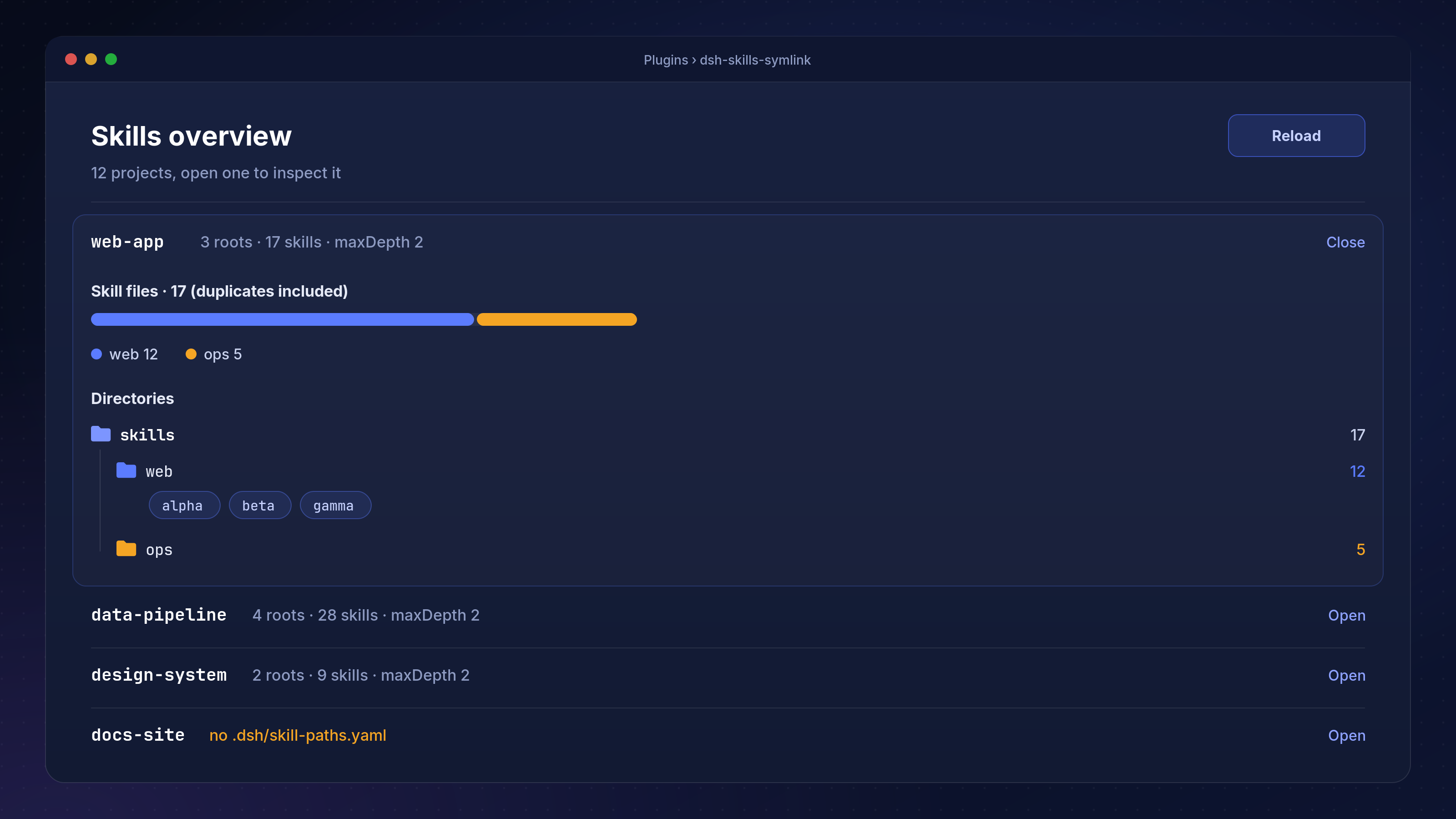
Skills overview on the Plugins page: one row per project, expanded to its skill mix and folder tree.
maxDepth expansion, not the lines in your yamlThe text follows the browser language: Chinese for a Chinese locale, English otherwise.
This section is read-only. To change configuration, go to Settings → Plugins, where a Skill structure tab reads one project at a time. It lists the configured paths, the expanded roots, and a Watched only line for empty categories watched so a first skill is found. It can add and remove paths in .dsh/skill-paths.yaml: the new file is validated before it is saved, and on an error the old file stays as it was.
The settings card reads and writes only workspaces DSH has opened. Its endpoint sits under DSH's own /api and passes the host's sign-in and Host/Origin checks first.
The first time skills are listed in a project, the plugin writes a block to <profile>/logs/dsh-skills-symlink.log:
roots() first call for cwd=.../my-app: projectRoot=.../my-app, configFile=found,
  configuredRoots=2, roots=3, watchOnlyRoots=1, maxDepth=2
  root[0] .../my-app/skills/web
  root[1] .../my-app/skills/data
  root[2] .../my-app/skills/data/api
Each root[i] is a folder this project actually scanned. When a skill is missing, start from this list.
Common causes: maxDepth too small, the folder matched by ignore, a path outside the project (or a symbolic link pointing outside it) without allowExternalPaths, or plugin options written into the project file. The last three each leave a warning in the log.
A successful load writes an applied line. no project config at ... means the project has no config file.
The lower rank wins:
| Source | rank |
|---|---|
<project>/.dsh/skills |
100 |
<project>/.agents/skills |
200 |
| Roots configured by this plugin | 250 |
Global customSkillDirs |
300 |
| User-level folders | 400 / 500 |
Between this plugin's own roots, the order is depth (shallower first), then skillPaths order, then code-point order of folder names (B sorts before a).
Every shadowed copy is logged with the SKILL.md paths of both sides, at maxDepth: 1 too, and again when the set of clashes changes.
The plugin reads files only while DSH resolves skills, and writes only the selected workspace's .dsh/skill-paths.yaml when you save the settings card. It makes no outbound requests and reads no credentials.
.. are rejected by default. Whether a path is inside the project is decided by its real path, so a symbolic link inside the project that points outside is rejected too, and checked again when a skill's body is loaded. Cloning someone else's repository cannot make DSH read other files on your machine..dsh folder or the config file is a symbolic link, and go through a temporary file and a rename, so a half-written file is never left behind.application/json, and at most 16 KB.This repository is a fork of NeoRrrr/dsh-project-skill-paths v0.3.0.
| upstream v0.3.0 | here v0.4.0 | |
|---|---|---|
Per-project skillPaths |
✅ | ✅ |
| Settings card | ✅ | ✅ |
| Hot reload | ✅ | ✅ |
Multi-level scan maxDepth |
❌ | ✅ |
ignore / maxRoots |
❌ | ✅ |
| Fake-skill guard | ❌ | ✅ |
| Loads on DSH 0.2.x | ❌ | ✅ |
| Diagnostics log | ❌ | ✅ |
The repository, the package name and the plugin id are all dsh-skills-symlink; that id is what the Plugins page shows. It does the same job as dsh-project-skill-paths; do not install both.
maxDepth − 1 is visited, but only a folder whose direct children include a skill folder becomes a root. Pure grouping folders are walked through, so maxDepth: 3 works for a grouped layout..md files are documentation and are dropped, so they never become fake skills. Flat .md skills placed directly in a configured root still work as upstream..md files is not promoted. Put each skill in <skill>/SKILL.md, or add that folder itself to skillPaths.SKILL.md is a skill: it is never promoted and never descended into. Folders are de-duplicated by real path, so a symlinked alias adds nothing.watch: true (the default) and maxDepth ≥ 2, empty category and group folders are watched too, so the first skill dropped in is found. These are the Watched only folders on the settings card; they do not count toward maxRoots.templates/ counts as a category. With maxDepth ≥ 3, a template folder holding a sample SKILL.md is discovered too; if it is only scaffolding, add it to ignore.maxDepth: 1 matches upstream exactly: only the configured roots are scanned, one level deep.npm ci
npm run check # syntax check + all tests
npm pack --dry-runOn Desktop, remove it from the Plugins page. For other profiles:
dsh plugin --profile web remove dsh-skills-symlinkCLASSIFICATION EVIDENCE
系统优先读取 GitHub Topics,再与站内分类词典和词根规则比对。当前命中: deepseek-harness。
morluto
Reverse engineer anything with agents, from app behavior down to native binaries.

deepseek-ai
DeepSeek Harness: Everything is a Plugin.

nexu-io
The 1st Collaborative AI Design Agent Workspace. Local-first and open source. Create motion, prototypes, websites, apps, dashboards, presentations, images, and videos with your team and AI agents. Share work, exchange feedback, and iterate together in one workspace.