
其他
完整应用

deepseek-harness
deepseek-ai
DeepSeek Harness: Everything is a Plugin.
PROJECT TOPICS
PROJECT README
Archive manager: list archived sessions in the Settings page and delete them for real (session log, archive marker, and projection cache removed together).
English | 中文



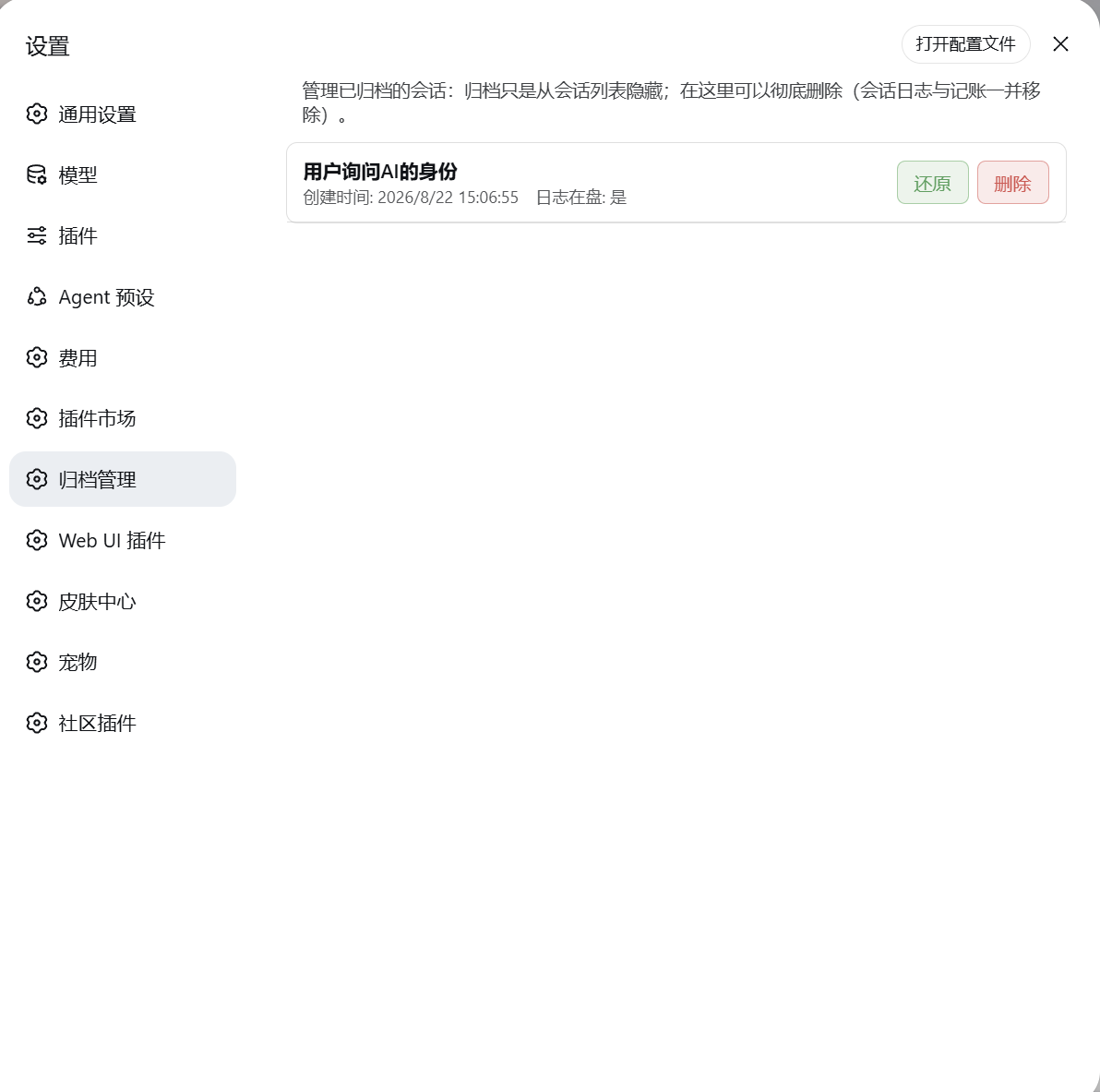
settings.section slot — peers with General, Models, etc.)DSH's "archive session" only hides a session from the grouped views: the session.jsonl.zstd log and its accounting stay untouched, and the official UI has no delete entry. This plugin adds the "real delete" capability — archiving is only hiding; when you actually want the disk cleaned up, do it here.
A dual-half plugin (the same shape as the official plugin ecosystem):
| Half | Location | Responsibility |
|---|---|---|
| host half | lib/ |
Mounts two HTTP routes: GET /dsh-archive-manager-plus/list lists archived sessions; POST /dsh-archive-manager-plus/delete deletes (session directory + workspace accounting + projection cache) |
| browser half | client/ |
Registers the settings.section page, renders the list + delete buttons (a confirm dialog first, then calls the host route) |
What a delete touches on disk:
global.archivedSessionIds in workspace.jsonsessionIds<DSH_HOME>/sessions/<workspace-encoded>/<session-id>/session_projcache.jsonThe
cost-meter/ledger.jsonis left alone (spend history is kept as a record).
npm install dsh-archive-manager-plusThis puts the package into your project/global node_modules; a DSH plugin must also be registered in a profile's bundle layer:
<profile>/package.json → dependencies, add "dsh-archive-manager-plus": "^0.1.0"dsh.profile.bundles, append "dsh-archive-manager-plus"npm install (or pnpm install), confirm the package landed in the profile, restart DSH and refresh the pagepowershell -ExecutionPolicy Bypass -File .\install.ps1The script resolves the plugin root from its own location (runnable from anywhere) and does: whitelist-copy the shipped files → register the dependency and bundle → Node self-verification (no BOM / valid JSON / entries complete) → rollback from backup on failure.
| Parameter | Description |
|---|---|
-ProfileDir <path> |
Explicit profile directory (highest priority) |
-ProfileName <name> |
Profile name, default web |
-DSHHome <path> |
DSH home (defaults to $env:DSH_HOME, then ~/.dsh) |
-DryRun |
Preview only, write nothing |
-SkipCopy |
Skip the file copy; update the manifest only |
.\install.ps1 -DryRun                    # preview
.\install.ps1 -DSHHome <your-dsh-home> # point at a specific homelib/, client/, cordis.patch.yml, LICENSE, README.md, package.json to
<profile>/node_modules/dsh-archive-manager-plus/<profile>/package.json → dependencies, add "dsh-archive-manager-plus": "<version>"dsh.profile.bundles, append "dsh-archive-manager-plus"⚠️ BOM trap: a
package.jsonwith a UTF-8 BOM makes DSH fail to boot withUnexpected token ''. Prefer the npm install or the one-shot script (both write BOM-less UTF-8 and self-verify).
⋯ menu → Archive session (archive 1–2 sessions to try)session.list rows) may briefly remain visible until the next reconnect/refresh — the file and registry layers are always consistent and durablesession- + hex/dashes), preventing path traversal<DSH_HOME>, <profile>…); do not paste machine paths, usernames, or session ids into issues/discussionsclient/client.js and refresh the page (HMR picks it up)lib/ and restart DSHinstall.ps1 to sync the manifest (no script edits needed)version in package.json (follow SemVer)node --check lib/*.js client/client.js + npm publish --dry-runnpm publish --registry=https://registry.npmjs.org/v<version>) to keep repository and npm in syncCLASSIFICATION EVIDENCE
系统优先读取 GitHub Topics,再与站内分类词典和词根规则比对。当前命中: 无有效分类标签。
deepseek-ai
DeepSeek Harness: Everything is a Plugin.

anywhere-labs
为 DeepSeek Harness (DSH) 插件生态打造的现代化桌面端解决方案。万物皆「插件」,桌面本身也是「插件」。

awesome-dsh-plugin
A curated list of plugins for DeepSeek Harness (dsh) · DeepSeek Harness 插件精选列表