
模型与 MCP
待识别

rea
morluto
Reverse engineer anything with agents, from app behavior down to native binaries.
PROJECT TOPICS
INSTALL REFERENCE
dsh plugin --profile web add github:MFn233/dsh-aardio
该命令指向仓库当前默认分支;尚无绑定当前 commit 的完整验证结果。
PROJECT README

The aardio toolchain for DeepSeek Harness: three bundled authoring skills, a keyword search engine over your own aardio installation, always-on project rules, open-in-IDE, and a settings page that points the plugin at the aardio folder on your machine.
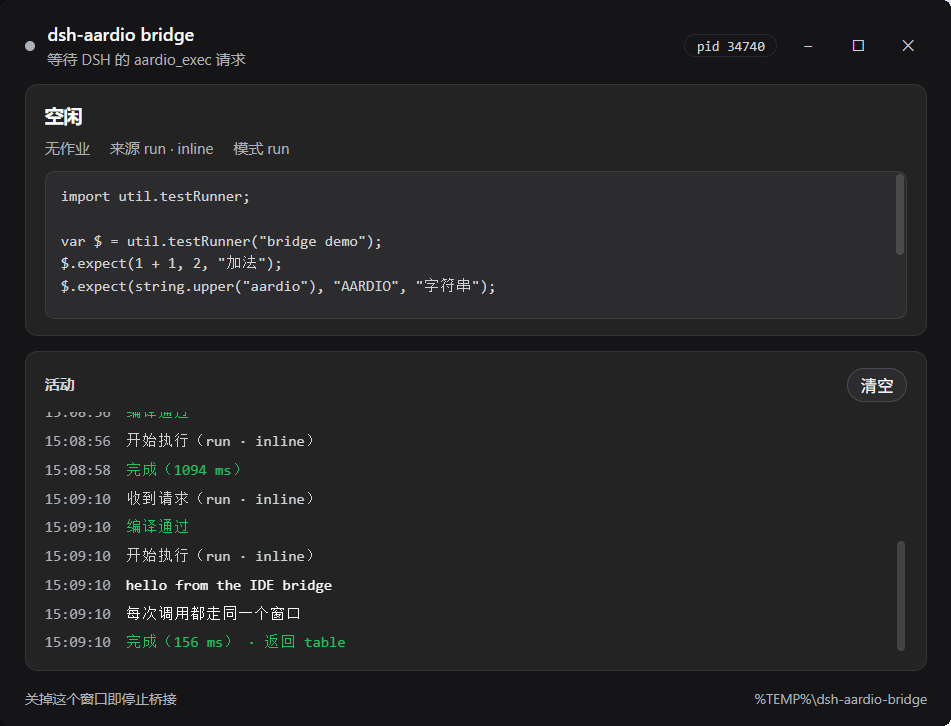
The bridge window reports what it is doing while aardio_exec runs: request source and mode, the code, live print lines, compile failures, and each result with its duration.
| Kind | Name | What it does |
|---|---|---|
| Skill | aardio |
Language rules, the local documentation map, and the working procedure for writing aardio code |
| Skill | aardio-project |
*.aproj project structure, version attributes, publish settings, and the traps around them |
| Skill | aardio-library |
User and extension libraries: intellisense/details blocks and the documentation layout |
| Tool | aardio_docs |
Search engine over docs/, examples/, and lib/: multi-term queries, phrases, exclusions, ranked hits with context, and a bounded read of any file inside the installation |
| Tool | aardio_exec |
Compile or run aardio code inside your running IDE through the optional bridge, returning print output, the return value, and errors |
| Tool | aardio_open |
Hand an .aardio file, an .aproj, or a project folder to the aardio IDE |
| Tool | aardio_env |
Report the resolved installation, where the value came from, and what was probed |
| Setting | Config page | Choose the folder that contains aardio.exe, with a folder picker and an auto-detect reset |
| Prompt rules | dsh-aardio:project-rules |
Tells the model that projects belong to the user and that dlg//lib/ edits need an IDE-side refresh |
From the Plugins page (recommended): open Plugins → Add plugin, choose the local directory that holds this package, and install it. DSH restarts the plugin when it activates; reload the page if the Plugins page was already open.
From the CLI:
dsh plugin --profile desktop add dsh-aardio
# or a checkout on disk:
dsh plugin --profile desktop add link:D:\path\to\dsh-aardio
Remove it with dsh plugin --profile desktop remove dsh-aardio.
After installation, a new session lists the three skills, and the three tools appear in the tool list.
You do not need to edit YAML. The plugin resolves the installation in this order:
aardioRoot setting (see below),AARDIO_ROOT or AARDIO_HOME environment variable,%ProgramFiles%\aardio, %LOCALAPPDATA%\aardio, %APPDATA%\aardio, and the usual aardio, Develop\aardio, Program Files\aardio, Applications\aardio, software\aardio, and tools\aardio folders on every fixed drive.A folder counts as an installation when it contains aardio.exe. If nothing matches, the tools say so and list every folder they probed; aardio_env shows the same information on demand.
The form sits on the bundle's own page: Plugins → Aardio toolchain. It renders between the description and the component list, so opening the plugin is enough — the row's own page (opened by the chevron beside the row title) shows the same form.
file:/// URLs, forward slashes, a trailing separator, or the aardio.exe file itself.An empty field means "auto-detect", and it is stored as an empty value rather than an empty string, so it never shadows a value set in a patch layer.
The same value can be pinned in cordis.patch.yml when you manage profiles by hand:
- id: dsh-aardio
  name: dsh-aardio
  config:
    aardioRoot: D:/path/to/aardio
A value set in the patch is a composition-layer value: the settings page shows it as inherited and can override or clear it.
aardio_docs — search and readThe search engine is built for an agent, not for a person reading a results page:
| Input | Meaning |
|---|---|
query |
listview checked requires both terms in a file; use "quoted phrase" for adjacency and -term to exclude |
scope |
docs, examples, lib, or all (default) |
mode |
all (default) or any; a multi-term search with no hits retries any and says so in relaxed |
context |
Lines around each hit, 0–4, default 1 |
limit / perFile |
Total matches (default 12, max 40) and matches kept per file (default 2) |
path |
Read a file instead of searching: absolute, or relative to the installation |
Ranking rewards the evidence that actually answers an API question: a term that is the file's name, a term at the start of a line (a definition), a documentation page, and an index.md. Standalone uses of string.save outrank prefixes like string.saveFiles, a multi-term query only matches a file where the terms appear within 20 lines of each other, binary-looking files are skipped, and overlapping snippets are collapsed.
path reads any text file inside the installation (400 lines per call, offset/lines) even when another tool's sandbox cannot reach that folder; paths outside the installation are refused.
Searches stop at 12000 files, 256 MB, or a 2 MB file, reporting truncated when a budget is hit. The file list is cached for 30 seconds, so repeated queries in one turn are cheap.
aardio_open and aardio_envaardio_open takes path; a folder opens its default.aproj so the IDE restores the project instead of a bare file. It launches the IDE detached and returns immediately.
aardio_env takes no arguments and is the first thing to call when a search finds nothing: it reports the resolved folder, whether it came from the setting, the environment, or detection, and which folders were probed.
Beyond the skills, the plugin adds one short system-prompt section (dsh-aardio:project-rules, order 10500, literal text):
default.aproj; the user creates the project in the aardio IDE, and the agent only edits main.aardio, resources, and code.dlg/ and lib/ changes need an IDE refresh. After editing either, the agent must ask the user to reopen the project or restart the IDE, or the IDE keeps serving cached forms and libraries.*.test.aardio using aardio's own util.testRunner and ask the user to press F5, instead of reaching for screenshots or simulated input; GUI smoke tests must not enter win.loopMessage().These rules are stated once, in one place, so they can be replaced or removed without touching the tools. The section is registered only when the deployment provides ctx.systemPrompt; a composition without it keeps working.
aardio ships util.testRunner — a Jest/PyTest-style structured assertion engine built for agents — and its own agent (AA / autos) verifies with it rather than with screenshots. This plugin adopts the same workflow:
test, expect, expectNear, contains, match, throws, notThrows, assert, fail, log, report), and the patterns for pure logic, file I/O, offscreen gdip pixels, and GUI smoke tests.xxx.test.aardio into your workspace; you press F5 in the IDE and paste back the JSON that print(JSON.stringify($.report())) produces.file and line, so the next attempt is a fix rather than a guess.The plugin still cannot run that test by itself unless the bridge below is running. aardio has no headless command-line entry, and loadcode/loadcodex exist only inside an aardio process.
aardio_exec)Starting the bridge once turns verification into a tool call instead of a request for the user to press F5.
bridge/aardioBridge.aardio in the aardio IDE (aardio_open can do it) and press F5.print lines as they arrive, compile failures, and the result — and stays idle until a request arrives. Closing it stops the bridge.aardio_exec({ code, mode: "check" }) — compile only, with line numbers;aardio_exec({ code }) or aardio_exec({ path }) — run and return everything print(...) received, the return value (as JSON), compileError, and error;aardio_exec({ path, replace: { oldCode, newCode } }) — replace one unique snippet in memory before compiling. This is the GUI smoke-test pattern: swap win.loopMessage(); for bounded test code without touching the source file;aardio_exec({ jobId }) — keep waiting for a run that outlived its timeout.How it works: one request/response file pair per DSH process under %TEMP%\dsh-aardio-bridge\, a one-time token in bridge.json, and a nonce per request — no port, no firewall rule, no third-party library, and two DSH instances can share one bridge without reading or deleting each other's files. The window is a WebView2 page styled with the host's own dark palette (rgb(21,21,23) base, rgb(35,35,36) cards, rgba(255,255,255,.08) borders), falling back to a plain text window when WebView2 is missing. The script mirrors the execution recipe aardio's own agent (AA / autos) uses in lib\autos\tools\handlers.aardio: loadcode to compile, a worker thread to run, and print overridden to collect output.
Boundaries worth knowing:
win.loopMessage() is not bounded. Overriding it inside the worker does not reach code that imports win itself (measured), so a bare call keeps running until its window closes. The result then carries a warning, and GUI smoke tests should pass replace to swap that line for bounded steps.pending with a job id: the plugin re-polls until its own deadline, then names the job so { jobId } can resume. If the code loops forever, stop it in the IDE.aardio_exec explains how to start it, and everything else keeps working.The three skills are registered by the plugin itself, with rank 600. A skill of the same name in your own skills directory ranks 400 and therefore wins, so you can keep experimenting locally without editing the package. Delete ~/.dsh/skills/aardio* if you want the bundled copies to be the only source.
The skills deliberately contain no absolute installation path: they tell the model to call aardio_env, and to prefer aardio_docs over guessing an API.
aardio.exe <script> only opens the IDE; /run, /build, and friends do nothing. loadcode/loadcodex exist only inside an aardio process. With the bridge running, the plugin compiles and runs code through your IDE; without it, the user presses F5.aardio_open refuses to run elsewhere. Search and skills still work against any copy of an installation.docs/index.md forbids redistributing the official documentation; this package contains only original indexes and summaries, and reads your installation in place.npm test # node --test: installation resolution, search, skills, tools, packaging
npm run check # syntax check of the Host and browser entry points
npm run pack:checkTests are offline and create their fixtures in the OS temp directory.
Config needs @deepseek-ai/schemastery, a peer provided by the profile that installs the plugin. A linked checkout has no node_modules, so lib/config.js also resolves the peer through DSH_INSTALL_DIR/DSH_PROFILE_DIR/DSH_HOME; without any copy the plugin still loads and falls back to the environment variable and detection, just without a settings page.
| Path | Role |
|---|---|
index.js |
Cordis entry: Config, inject, registration, disposal |
client.js |
Browser half: the plugins.row.config page for dsh-aardio#dsh-aardio |
lib/config.js |
Config schema and its peer resolution |
lib/installation.js |
Path normalisation, probing, precedence, diagnostics |
lib/search.js |
Query parsing, ranking, and the bounded read |
lib/bridge.js |
Node side of the IDE bridge protocol |
bridge/aardioBridge.aardio |
The IDE-side script the user starts with F5 |
lib/prompt.js |
The always-on project rules |
lib/skills.js |
Skill frontmatter and the provider |
lib/tools.js |
The three tool definitions |
skills/ |
The bundled skills |
docs/ |
The Plugins-page detail image |
MIT. The aardio documentation, examples, and library sources are not part of this package.
CLASSIFICATION EVIDENCE
系统优先读取 GitHub Topics,再与站内分类词典和词根规则比对。当前命中: deepseek-harness。
morluto
Reverse engineer anything with agents, from app behavior down to native binaries.

deepseek-ai
DeepSeek Harness: Everything is a Plugin.

nexu-io
The 1st Collaborative AI Design Agent Workspace. Local-first and open source. Create motion, prototypes, websites, apps, dashboards, presentations, images, and videos with your team and AI agents. Share work, exchange feedback, and iterate together in one workspace.