
其他
完整应用

deepseek-harness
deepseek-ai
DeepSeek Harness: Everything is a Plugin.
PROJECT TOPICS
INSTALL REFERENCE
dsh plugin --profile web add github:M1kasssa/dsh-usage-monitor
该命令指向仓库当前默认分支;尚无绑定当前 commit 的完整验证结果。
PROJECT README
一个为 DeepSeek Harness 网页界面 打造的毛玻璃(iOS Liquid Glass 风格)小部件,显示在侧边栏左下角「设置」按钮旁边,实时展示你的 DeepSeek 开放平台余额与 API 用量。
重要:插件包含 Host 半区(一个本地代理路由),它只在
dsh web进程启动时加载。仅刷新页面不够 —— 安装后必须重启进程(安装脚本会提醒你)。
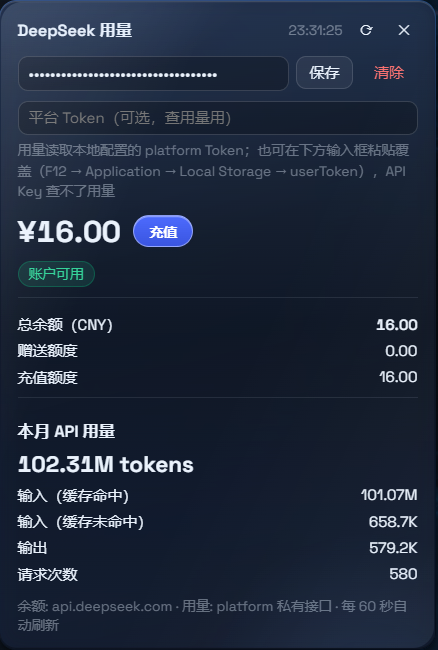
一条命令,在任何目录下执行:
powershell -ExecutionPolicy Bypass -Command "Invoke-WebRequest 'https://github.com/M1kasssa/dsh-usage-monitor/raw/main/install.ps1' -OutFile install.ps1; .\install.ps1"或者手动克隆:
git clone https://github.com/M1kasssa/dsh-usage-monitor.git
powershell -ExecutionPolicy Bypass -File .\install.ps1 -Source .\dsh-usage-monitor
脚本会:
%USERPROFILE%\.dsh\plugins\@deepseek-ai\dsh-client-ui-dsusage%USERPROFILE%\.dsh\profiles\node_modules\@deepseek-ai\dsh-client-ui-dsusage 创建目录联接(junction)%USERPROFILE%\.dsh\profiles\web\cordis.patch.yml 中注册 ui-dsusage(幂等,可重复执行)可覆盖参数:-DshHome <路径>(默认 %USERPROFILE%\.dsh)、-Profile <名称>(默认 web)、-Version <标签|分支>。
# 1. 将本仓库复制到 DSH 插件目录
mkdir -p "$DSH_HOME/plugins/@deepseek-ai"
cp -r dsh-usage-monitor "$DSH_HOME/plugins/@deepseek-ai/dsh-client-ui-dsusage"

# 2. 链接到 profile 的 node_modules
ln -s "$DSH_HOME/plugins/@deepseek-ai/dsh-client-ui-dsusage" "$DSH_HOME/profiles/node_modules/@deepseek-ai/dsh-client-ui-dsusage"

# 3. 在 profiles/web/cordis.patch.yml 中注册
- insert:
- id: ui-dsusage
name: '@deepseek-ai/dsh-client-ui-dsusage'安装完成后,请完全重启 dsh web 进程:
# 在运行 dsh 的终端里按 Ctrl+C,然后重新运行
npx @deepseek-ai/dsh web --port 3080
如果进程还在运行旧代码,胶囊按钮依然会出现(浏览器半区是热加载的),但用量不可用 —— 弹窗会显示红色警告提示你重启。如果看到该警告,请重启进程。
api.deepseek.com/user/balance,允许跨域,由浏览器直接请求)。localStorage.getItem('userToken')返回的是一个 JSON 字符串,形如 {"value":"PIAD…","__version":"0"} —— 复制其中的 value。
%USERPROFILE%\.dsh\ds-usage-token.txt/ds-usage/v1/usage),从私有看板接口 platform.deepseek.com/api/v0/usage/amount?month=&year= 拉取用量。仅凭 API Key 无法查询用量 —— 看板接口需要平台会话 Token。平台用量接口是私有、未公开文档化的接口,可能随时变化。如果用量停止更新,请提 issue。
浏览器(Client 半区)
├─ 余额: fetch https://api.deepseek.com/user/balance  (API Key,允许跨域)
├─ 用量: fetch http://127.0.0.1:3080/ds-usage/v1/usage (同源代理路由)
└─ UI:   sidebar.footer.action / shell.overlay 插槽中的胶囊按钮 + 弹窗

Node(Host 半区,lib/index.js)
└─ GET /ds-usage/v1/usage → curl platform.deepseek.com/api/v0/usage/amount
(模拟浏览器请求头;Token 来自 ?token= 覆盖参数或 $DSH_HOME/ds-usage-token.txt)两个半区都在同一个包内:lib/index.js 是 Host 入口,lib/client.js 是浏览器入口(在 package.json 中通过 dsh.client 声明),与 Aqua 主题插件完全一致。
# 删除目录联接(切勿加 -Recurse,否则会删掉插件目录本体)
[System.IO.Directory]::Delete("$env:USERPROFILE\.dsh\profiles\node_modules\@deepseek-ai\dsh-client-ui-dsusage")
# 删除插件目录
Remove-Item "$env:USERPROFILE\.dsh\plugins\@deepseek-ai\dsh-client-ui-dsusage" -Recurse -Force
# 从 profiles\web\cordis.patch.yml 中移除对应行
# 重启 dsh weblocalStorage 中,仅发送给 api.deepseek.com(Key 的目标服务)。platform.deepseek.com。MIT
CLASSIFICATION EVIDENCE
系统优先读取 GitHub Topics,再与站内分类词典和词根规则比对。当前命中: 无有效分类标签。
deepseek-ai
DeepSeek Harness: Everything is a Plugin.

anywhere-labs
为 DeepSeek Harness (DSH) 插件生态打造的现代化桌面端解决方案。万物皆「插件」,桌面本身也是「插件」。

walkinglabs
Harness engineering beginner tutorial, from 0 to 1