
模型与 MCP
待识别

rea
morluto
Reverse engineer anything with agents, from app behavior down to native binaries.
PROJECT TOPICS
INSTALL REFERENCE
dsh plugin --profile web add github:LuoZIren/dsh-deepseek-web
该命令指向仓库当前默认分支;尚无绑定当前 commit 的完整验证结果。
PROJECT README
简体中文 · English
Two controls, one purpose: keep DeepSeek's web chat and your DSH Session in the same window.
https://chat.deepseek.com/ in the shipped right-Sidebar Browser tab,
next to the current Session. Clicking again focuses the tab it already has.The bridge prefers a live text selection inside the DeepSeek page; with nothing selected it takes the last rendered answer block.
web_review, so the agent can
send a prompt into that same page and get the answer back as structured
findings. See Review bridge.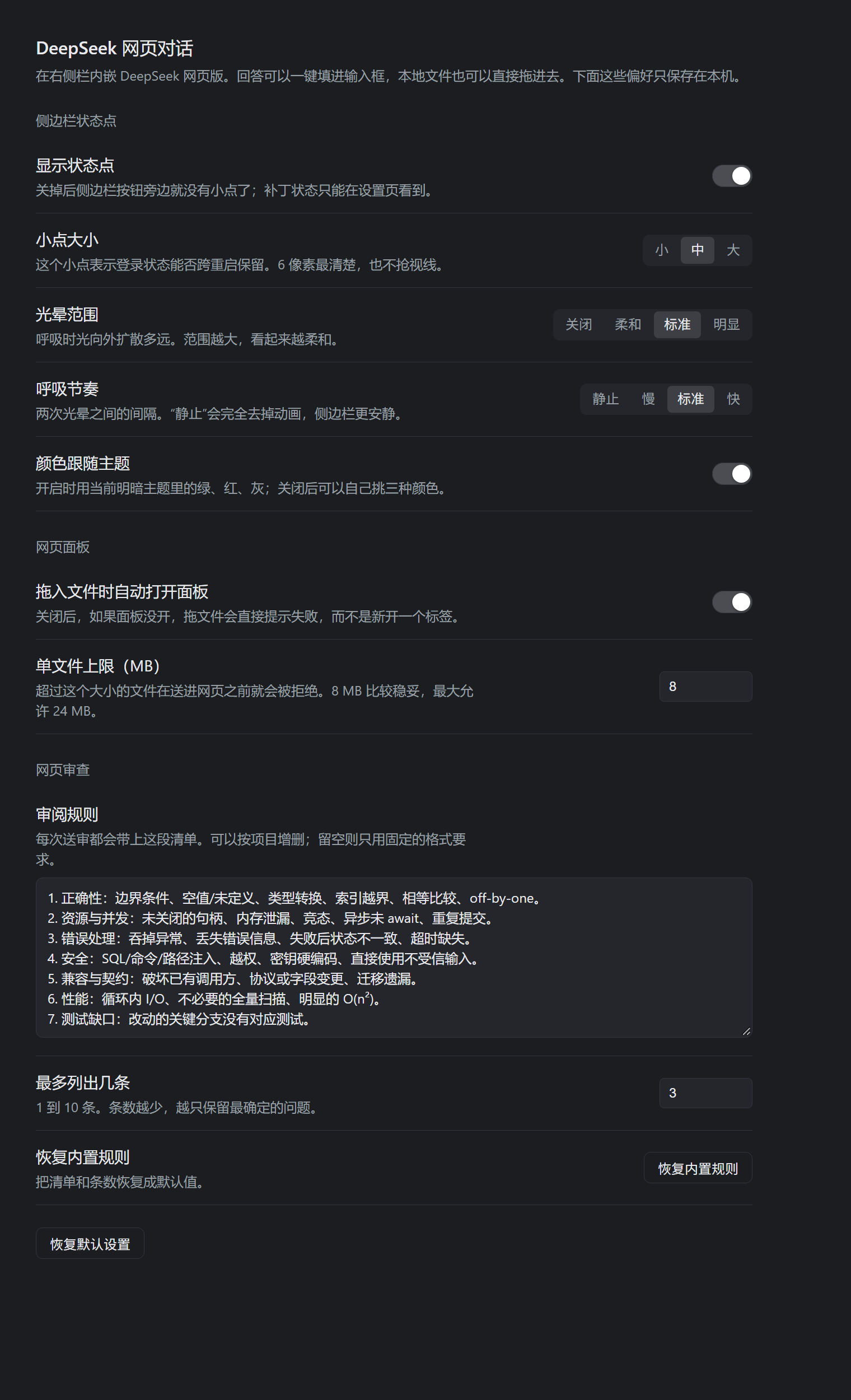
This is a DSH Desktop bundle, not an npm package. Distribution is the folder itself.
C:\plugins\deepseek-web-panel.plugin_manager → install_bundle with the absolute path). The agent adds
the dependency as a link: and the bundle row to your profile, so edits to
the folder stay live.Manual alternative: add "@local/dsh-plugin-deepseek-web": "link:C:/path/to/deepseek-web-panel"
to your profile's package.json, list the package under dsh.profile.bundles,
and install; cordis.patch.yml is the row this bundle inserts.
This repository also publishes a market index (market.json, format 1). Add
one of these URLs under Settings → Plugins → Discover:
https://fastly.jsdelivr.net/gh/LuoZIren/dsh-deepseek-web@main/market.json
https://gcore.jsdelivr.net/gh/LuoZIren/dsh-deepseek-web@main/market.json
https://raw.githubusercontent.com/LuoZIren/dsh-deepseek-web/main/market.json
The jsDelivr mirrors are listed first because raw.githubusercontent.com is
unreachable from some networks; the Host fetches the index itself, so pick one it
can reach.
The entry installs this repository as a commit-pinned Git package
(git+https://github.com/LuoZIren/dsh-deepseek-web.git#<commit>), so an update
means a new commit and a new version in the index — and the installing machine
must be able to clone github.com. A market index is just a JSON file a reader
is configured with; there is no central registry to submit to.
Requirements: DSH Desktop (Electron) on Windows, macOS or Linux. The sign-in
patch targets the desktop app.asar; a DSH upgrade replaces that file, which the
status dot then reports.
app.asar, after saving
app.asar.orig-bak. It refuses to write when the archive's shape changed.
That rewrite is what keeps the DeepSeek sign-in across restarts; without it
every launch asks you to sign in again.A 6 px dot rides to the right of the launcher and reports whether the partition patch is in place:
| Dot | Meaning |
|---|---|
| green | the archive carries the persistent statement |
| red | the statement is gone (an upgrade replaced it) — click the dot to rewrite it |
| gray | not known yet: open the DeepSeek panel once, or restart DSH |
Clicking a red dot asks the Host half to re-apply the patch; the tooltip then says a restart is needed, because the running process keeps the partition it was started with. A dot that stays red with "the archive no longer matches this patch" means a DSH build changed the statement itself — the plugin refuses to write rather than risk the archive, and the patch text has to be re-derived.
The dot reads two sources, in order: the Host half's GET /deepseek-web/patch
(the archive itself), and the live guest's partition attribute (what the
running process actually uses). The second one is what makes the dot correct
before the Host half has been reloaded by a restart.
Settings → DeepSeek web chat holds this plugin's preferences. They are
stored per browser profile (dsh.deepseek-web.settings.v1) and apply live — the
dot on the sidebar updates as you change them, without a reload.
| Group | Preference | What it does |
|---|---|---|
| Status dot | Show the dot | Hides the dot entirely; the launcher stays. |
| Dot size | 4, 6, or 8 px. | |
| Halo spread | Off / soft / normal / wide — how far the breathing glow reaches. | |
| Breathing rhythm | Still / slow / normal / fast. "Still" removes the animation. | |
| Colours follow the theme | On: green, red and grey come from the active theme. Off: pick three colours. | |
| Web panel | Open on drop | Off: a drop with no panel open reports an error instead of opening a tab. |
| Largest file (MB) | 1–24; files above it are refused before they cross into the page. | |
| Web review | Output format | Plain list, JSON with severity, or strict JSON with evidence and confidence. |
| Review checklist | Sent with every web_review request; edit it per project, empty it to keep only the fixed format rules. |
|
| Findings at most | 1–10. Fewer findings keeps only the most certain ones. | |
| Built-in checklist | Restores the default checklist and count. |
"Restore defaults" resets every value above. Every preference is written to local storage, so a fresh install starts from the defaults and a broken stored value falls back to them.
The default checklist follows the design of Alibaba's open-source Open Code Review: fixed check areas (correctness, resources and concurrency, error handling, security, compatibility, performance, tests) and precision before recall — a finding must be provable from the shown code, so the model is told to mark uncertainty instead of guessing. The wording is this plugin's own.
A bar appears at the top of the frame as soon as a drag can become a file. Nothing is sent until the drag is released on that bar — moving, pressing, or starting a native drag only announces the candidate, so an accidental 8-pixel drag can never hand a file to the page. Sources, in the order the bridge tries them:
| Source | What the bridge reads |
|---|---|
| File manager / desktop | the File objects of the drag itself |
| Conversation file or delivery card | its accessible description, title, data-*, href, or src; a card is an interactive button, so the bridge drags by pointer instead of native drag. A card header names no file, so the bridge gathers the distinct paths listed under it — one file for a single-file card, every file for a multi-file card (the bar shows the count before you release) |
| Inline file mention or image | the link address: dsh-resource://file/…, file:///…, or a relative href |
A reference that only shows a name (client.js, 简历.pdf) |
the Host half searches the current session directory by basename (depth 5, skipping node_modules, .git, dist…); a unique match wins, several matches is reported rather than guessed |
The session directory comes from the one visible session. A side-by-side multi-session layout keeps the last session that published it; a reference that fails to resolve that way still falls back to the by-name search, so the failure mode is a refusal rather than a wrong file.
Paths are normalized first: file:/// URLs, dsh-resource://file/… addresses,
:24 / :24-30 line anchors, and relative references resolved against the
session directory with that platform's separator. POSIX and Windows forms are
both understood, and a POSIX-shaped string on a Windows session is treated as a
site route rather than a file. A relative reference must look like a path (no
spaces, an extension), and a rooted one is never joined onto the session.
When nothing resolves, the bar says so and copies the pressed element's shape
(tag, class, and its title/href/aria-*) to the clipboard, which is the
fastest way to report a surface the bridge does not recognize yet.
Limits: 8 MB per file (one base64 string crosses into the guest in a single
executeJavaScript call, so the payload is capped well below IPC discomfort),
directories are refused, and the page must expose an input[type=file] or an
editable drop zone; without either the bar reports the failure instead of
pretending to send.
The Host half registers a web_review Tool: the agent sends a review prompt
(code, a diff, the answer format it wants), and the answer comes back as the
tool result. The page is driven the same way a person would drive it — the
prompt is typed into the composer and Enter is pressed — so no reverse-engineered
API, PoW solver or token refresh is involved.
Flow:
GET /deepseek-web/review/task every 1.2 s;POST /deepseek-web/review/result, which resolves the
waiting tool call.The message the page receives is composed on the Client: a fixed block (chosen by the Output format preference) followed by the checklist from Settings, the previous round when one is supplied, and the request the tool sent. The fixed block is not editable; everything after it is.
The default format asks for one JSON block:
{"findings":[{"severity":"high|medium|low","problem":"…","reason":"…","fix":"…"}]}The Host parses it (fenced block or bare object/array, English or Chinese keys,
severity words normalized), and the tool returns findings[] alongside the raw
report; parsed: false means the answer was prose and only report is usable.
Two behaviours ride on that shape:
cached: true, no page round-trip). force: true re-asks anyway.previousFindings: string[] and the page is asked to
confirm each one (fixed / still there / changed) before adding new ones.A web_review call renders through tool.call.toolview (keyed by tool name) as
a card instead of a plain text block: one row per finding with its severity, the
reason and the fix, plus a checkbox to tick a finding off once it is handled.
Ticks are stored per call id in local storage, so they survive a reload and stay
with the call they belong to. A run still in flight shows "reviewing…"; a run
whose answer was prose shows the answer text instead of rows.
The bridge is a Tool, and only an agent can call a Tool — so a review is asked
for in conversation ("use the web chat to review this diff"), not clicked. The
agent may call it more than once in a turn, passing previousFindings on the
second call. Nothing starts a review on its own.
Limits: 200 000 characters per prompt, 90 s default wait (300 s maximum), one review at a time, and the panel must be open and signed in. The prompt leaves this machine and is visible in that DeepSeek chat — treat it as a second opinion, not a gate.
Two details the Host half has to get right:
original-fs. Desktop runs the Host
under Electron's node, whose fs treats every path containing .asar as a
path inside an archive. open('…/app.asar') therefore becomes "open the
empty path inside app.asar" and fails with ENOENT, not found in …app.asar. original-fs is the same module without that layer (verified
against this build under ELECTRON_RUN_AS_NODE), with process.noAsar as the
fallback for a plain-node run.GET returns a per-process randomUUID, and a
POST must carry it in the query (or the x-dsh-deepseek-web: patch header),
so a page from another origin — which cannot read the GET body and does not
survive a preflight — cannot trigger a rewrite.Desktop creates the sidebar browser's storage partition in exactly one place
(DesktopBrowserGuests.acquire in the shell's main process):
let partition = this.partitions.get(workspace);
if (partition === void 0) {
  partition = `dsh-sidebar-browser-${randomUUID()}`;
  this.configureSession(session.fromPartition(partition));
  this.partitions.set(workspace, partition);
}
A partition name without the persist: prefix is an in-memory Electron session,
so cookies and localStorage die with the process: every launch is a brand-new
device, which is both the repeat sign-in and the reason DeepSeek's risk engine
treats the login as new. A plugin cannot change that — will-attach-webview
rejects any guest whose partition differs from the lease the main process
issued, and the lease always carries this exact string.
So the fix lives outside the plugin. tools/apply-persist-patch.mjs rewrites
that one statement in place, with a replacement of exactly the same 50 bytes
so no asar header, offset, or file table changes:
- partition = `dsh-sidebar-browser-${randomUUID()}`;
+ partition="persist:"+workspace.replace(/\W/g, "");
node tools/apply-persist-patch.mjs --check # report only
node tools/apply-persist-patch.mjs --apply # needs the app closed
node tools/apply-persist-patch.mjs --restore # back to stock--apply refuses while DeepSeek Harness runs, keeps one app.asar.orig-bak
beside the archive, and reads the bytes back to verify. The app must be closed
because it maps app.asar; the script parses the patched method before it
writes, and was dry-run against a copy of the archive first.
A DSH upgrade replaces app.asar, so the patch has to be re-applied after
every upgrade. The status dot is the reminder: it turns red, and one click on
it runs the same rewrite from the Host process (no terminal, no closed app — the
archive is writable while the app runs; the new bytes take effect on the next
launch).
The rewrite itself is a fixed procedure, not a per-build judgement call: one byte-for-byte substitution of a known 50-byte statement. Only if a DSH build changes that statement does the patch need re-deriving, and every path refuses to write in that case — the script exits non-zero, the dot reports "the archive no longer matches this patch", and the app is left untouched.
Effects to know about:
persist:<workspace without punctuation>, so the cookie
jar is written under the app's Partitions directory — sign in once, and the
session survives restarts. The sign-in is a stable device from then on.\W, so a workspace path made only of punctuation
collapses, and two very long paths that differ only after 200+ characters
could share a jar.DeepSeek's own client ships a hard-coded check:
navigator.userAgent.toLowerCase().includes('electron')
  || ('process' in window && window.process.type === 'renderer')
Either hit renders the usageEnvUnsafeTitle / usageEnvUnsafeWarn dialog
("使用环境异常 … 建议您使用我们的官方产品"). In this guest process is not
exposed (sandbox, contextIsolation, no node), so the user agent is the only
trigger. The plugin calls webview.setUserAgent() once per tab with the same
string minus the Electron/x.y.z and application tokens — platform and Chromium
version untouched — and reloads, so the check no longer fires and the sign-in
request no longer advertises an embedded browser.
The dialog is dismissible and its "closed" flag is persisted storage, so once the partition survives restarts, a dismissed dialog stays dismissed too.
chat.deepseek.com answers with content-security-policy: frame-ancestors 'none', so a plain <iframe> page inside DSH cannot load it. The shipped
Browser tab type is the supported way around that: on Desktop it embeds a real
Electron guest view (not a frame), which a site cannot refuse. The bridge then
reads that guest through webview.executeJavaScript(); the guest keeps
sandbox, contextIsolation, and nodeIntegration: false, so nothing is
injected into the page and no Node access is granted.
In the browser build of DSH the same tab type falls back to an iframe and no guest exists, so both controls report that embedded browsing is unavailable instead of failing silently.
| Piece | Where |
|---|---|
| Launcher | Client slot sidebar.footer.action, cell id deepseek-web |
| Navigation | ctx.sidebarRight.openTab('browser', { params: { url } }) |
| Bridge | Client slot conversation.input.right, cell id deepseek-web-pull |
| Insertion | inputActions.captureInsertion() + inputActions.insertText(text, span) |
| Styling | One style[data-plugin-css] tag using --dsw-* tokens; focus ring on :focus-visible only |
| Host half | empty apply(); the capability is entirely browser-side |
[class*="markdown"]),
not by a DeepSeek API. If the site reworks its markup, the shape fallback
chain degrades to the last message-like block; a manual selection always
works and is checked first.client.js
re-applies the module and replaces its slot registrations in place.ui-sidebar-browser row, which the Desktop profile enables by
default.CLASSIFICATION EVIDENCE
系统优先读取 GitHub Topics,再与站内分类词典和词根规则比对。当前命中: deepseek。
morluto
Reverse engineer anything with agents, from app behavior down to native binaries.

deepseek-ai
DeepSeek Harness: Everything is a Plugin.

nexu-io
The 1st Collaborative AI Design Agent Workspace. Local-first and open source. Create motion, prototypes, websites, apps, dashboards, presentations, images, and videos with your team and AI agents. Share work, exchange feedback, and iterate together in one workspace.