模型与 MCP
待识别

rea
morluto
Reverse engineer anything with agents, from app behavior down to native binaries.

LuoShanHui/dsh-doc-ledger
DSH 会话文档台账插件:记录每个会话使用/创建/修改过哪些文档,支持时间排序、类型分组、搜索、预览与跨会话汇总。 A DSH sidebar plugin: per-session document ledger — which documents a session read, created or modified — with time ordering, type grouping, search, two preview modes and a cross-session view. Windows only.
PROJECT TOPICS
INSTALL REFERENCE
dsh plugin --profile web add github:LuoShanHui/dsh-doc-ledger
该命令指向仓库当前默认分支;尚无绑定当前 commit 的完整验证结果。
PROJECT README
.java and one that is 90% .md
both get a useful breakdown, and a new extension appears without a code change. It only shows
when the family really has two or more extensions, and long lists fold into an "N more" counter.


English · 中文
A DSH sidebar plugin that keeps a per-session document ledger — which documents a session read, created or modified — with time ordering, type grouping, search, two preview modes and a cross-session view. Windows only, UI in Chinese and English.
// ~/.dsh/profiles/<profile>/package.json
"dependencies": {
  "dsh-doc-ledger": "github:LuoShanHui/dsh-doc-ledger#v0.5.0"
}#v0.5.0 pins the version; drop the tag to track the latest commit).
It is also published to npm, so "dsh-doc-ledger": "0.5.0" works too.doc-ledger row to cordis.patch.yml (same section), reload the page, and the Doc ledger
tab appears in the right sidebar.Requires DSH >=0.2.0-rc.1 <0.3.0-0 and Windows. If the install fails, or you want to modify the code, see
the local-directory option under Installation; for behaviour boundaries see
Known limitations.
Experimental: it depends on host internals (
sessionQuery,webServerprefix routes, bundle-patch injection) and has only been verified on DSH>=0.2.0-rc.1 <0.3.0-0. When the host changes those interfaces, this plugin has to follow.
| Shape | Entry point | Notes |
|---|---|---|
| Plugin (in-session tab) | A new Doc ledger tab in the right sidebar | The host half serves the page routes; the client half only mounts the tab. The current session refreshes silently every 8 seconds (no loading state, no list rebuild), and pauses while the quick-look dialog is open. |
| Static report | node tools/report.mjs --limit 40 |
Emits report.html; double-click to read it, no plugin install needed. The output contains real paths and is gitignored. |
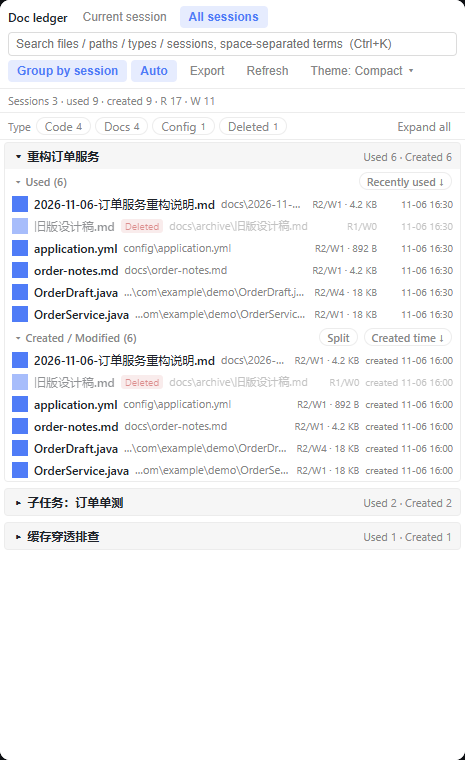
In short: open the tab and you get every document the session touched, split into Used and Created / Modified, filterable by type, searchable with multi-word AND, sortable per section, and previewable either through DSH's own document preview or through a built-in quick-look dialog.
All screenshots below are the English UI (?locale=en); the Chinese edition of each image lives beside
it as docs/zh-*.png and is used by README.zh.md. Same code, same synthetic data — only the
language differs.
| File | Content |
|---|---|
docs/en-overview.png |
All sessions: summary line, type chips, expanded Used / Created / Modified |
docs/en-current.png |
Current-session view (folds only this session, so opening the panel never waits for a full replay) |
docs/en-preview.png |
Quick-look dialog: file facts row, truncation/decode notice, body, full path, Esc to close |
docs/en-menu.png |
Context menu: "Preview in sidebar" / "Quick look" first, then "Open with" listing the programs registered for the extension (real icons) |
docs/en-filter.png |
A type filter in effect: the selected chip turns blue and ✕ Clear filters plus "Expand all" appear on the right |
docs/en-session.png |
Session-card context menu: copy session name / session ID, jump to this session |
docs/en-sort.png |
Per-section sort menu: each section sorts independently, clicking again reverses direction |
The workspace in the screenshots (C:\work\demo-workspace), the document names and the program list are
all synthetic sample data, not anyone's real project.
A profile is a pnpm project (~/.dsh/profiles/<profile> holds package.json, pnpm-lock.yaml and
pnpm-workspace.yaml). DeepSeek Harness runs an install at startup and deletes directories that are not
listed as dependencies, so do not cp the package into node_modules/ — it will disappear on the next
start.
Add one GitHub-hosted dependency to the dependencies of
~/.dsh/profiles/<profile>/package.json (pnpm clones the repo itself, no local clone needed;
#v0.5.0 pins the version, dropping the tag tracks the development head):
"dsh-doc-ledger": "github:LuoShanHui/dsh-doc-ledger#v0.5.0"To modify the code or work offline, point it at a local directory instead:
"dsh-doc-ledger": "file:<path>/dsh-doc-ledger"The npm package works as well (https://www.npmjs.com/package/dsh-doc-ledger; same code as the GitHub
tag, without cloning — a private mirror may lag behind):
"dsh-doc-ledger": "0.5.0"Install with the pnpm bundled in your runtime (<runtime> is your runtime directory; reuse an existing
store, otherwise pnpm offers to wipe the whole node_modules):
node <runtime>/dependencies/pnpm/bin/pnpm.mjs install `
  --config.store-dir=<pnpm-store> `
  --config.confirmModulesPurge=false
Append to the end of ~/.dsh/profiles/<profile>/cordis.patch.yml:
# dsh-doc-ledger: per-session document ledger sidebar tab
- insert:
    - id: doc-ledger
      name: dsh-doc-ledger
      config:
        maxSessions: 40
        debug: false
Reload the page (the client bundle has to be re-injected) — the Doc ledger tab appears in the right sidebar.
Verify:
GET /doc-ledger/api/all?scope=all returns 200 with a sessions[];GET /doc-ledger/api/all?scope=current&session=<id>&timing=1 returns 200 and data.timings.total is
usually under 20 ms;Switching profiles: the same four steps with desktop replaced by the target profile name.
The plugin sits on the loopback port the host provides (127.0.0.1), but loopback is not safety: any page the
user browses can send requests to http://127.0.0.1:<port>/doc-ledger/api/.... So the host side honours
exactly four rules, in this order:
127.0.0.1, localhost, [::1]). This is the DNS-rebinding guard.
Comparing Origin with the request's own Host proves nothing — an attacker page that resolves its own
domain to 127.0.0.1 sends Host: attacker.test and Origin: http://attacker.test, which are equal
and both attacker-controlled. Measured before this guard existed: /api/file returned a ledger
document's full text and /icon started PowerShell, from a rebinding origin.Sec-Fetch-Site of cross-site/same-site, an Origin/Referer pointing at
another site, or Origin: null all return 403.stat: /api/file, /api/open and /api/openwith accept only
files present in the current cached ledger — C:\Windows\win.ini and friends return 403. The allowlist
runs first on purpose: stat-ing the requested path first made the route an existence oracle (403 "not in
the ledger" / 404 "gone" / 400 "is a directory"). /icon accepts only executables the "open with"
enumeration actually listed, because extracting an icon starts a PowerShell process./api/open refuses GET, so <img src=...>, links and prefetches cannot start
a program.The plugin's routes do not go through the GUI's login state (the host only protects /), so those four
rules are its entire defence. All four are pinned by tools/route-check.mjs (23 assertions, including the
rebinding matrix) in CI, so a refactor cannot silently drop one of them.
~/.dsh/sessions/<project>/<session id>/session.v4.jsonl.zstd. If that structure is missing (different
DSH_HOME, changed runtime layout) it falls back to the old TTL invalidation — still correct, just slower.exists is cached for 20 seconds: a file deleted on disk shows as "Deleted" up to 20 seconds later.locale dictionary covers every string in the panel (198 keys) and
follows the host's UI language. A language we do not ship (Japanese, Korean, …) shows English, because
every host addLanguage fallback chain ends at English. Data itself (session titles, file names, paths,
program names) is shown as-is and not translated. See docs/i18n.md.git diff > x.diff, PowerShell
redirection or an unzip has no path argument to capture, so it only shows up under "used" once something
reads it. Covering that would require the runtime to report shell file writes.fs.writeFileSync allows this), it is recorded as created. Checked against file birth times
across all 64 sessions on this machine: 0 false positives.created: "confirmed" now needs a write in the same
session. 14 of the 38 confirmed rows this machine used to report had writes: 0 — they were documents the
session read and handed over, not ones it created. They still show as presented (presented: 1), with no
created time.explorer.exe and the PowerShell icon extraction are all Windows
implementations.uiWorkspace.openSession (no jump
entry) and sidebarRight.openResource (falls back to this plugin's own dialog).Everything below is detail: how the data is derived, how each part of the UI behaves, and the interesting implementation choices. Read it when you are changing the code, not when you are installing it.
Each session's log is folded into one record per file:
{ path, rel, name, ext, category,
  reads, writes, presented,
  firstUsedAt, lastUsedAt,      // usage history
  createdAt, updatedAt,          // creation / modification time
  created: "confirmed" | "inferred" | null,
uses: [{ kind, op, time, seq, turn }] }read-class tool calls (including mcp__*__read_file). Every call keeps a timestamp, which is
what makes "first / latest / count" and the per-call timeline possible.write and edit calls, plus the IDE writers (apply_patch, create_new_file,
rename_refactoring, move_file, refactor_safe_delete). created is tri-state:confirmed — written and delivered through the present tool (event deliverables/presented
carries the path). A path that was only presented is not a creation: it keeps presented: 1 and
created: null;inferred — the first write had no preceding read. The default observation policy reads before
overwriting, so "wrote without reading" is effectively a new file;null — modified only, not a creation.read, read_file, read_image and the MCP/IDE readers; stat, exists and
readdir targets are containers, not documents, and are not recorded.tool/result with isError is removed from the ledger, so errors never count
as "used". A failed run_code call rolls back every row its program produced (it is recorded under the
call id the scanner saw), not just one path.cwd and follows successful
working_directory calls; relative paths are normalized against the cwd in effect at the time.The React panel is the only maintained UI; the static report just assembles a self-contained HTML file
with lib/ui.js at export time. The old /doc-ledger/ui page was retired — that second UI had no
open-with menu, no icons and no split view, so keeping it in sync bought nothing.
uses[], ext, birthtime, mtime, exists and presented stay in host memory only: HTTP responses are
trimmed by slimFile(), because uses alone was 30% of the payload and the client never renders it.
FileTypeIcon, which the panel gets from the platform seed table via
require("@deepseek-ai/dsh-client-ui-primitives") — the package is one of the ten modules
every client bundle can require by name, so the glyph is identical to the one the rest of the
DSH UI draws. Confirmed working in the real window.
B is the actual Windows association icon, extracted per extension by the host through
shell32's SHGetFileInfo: app.getFileIcon is unreachable from the plugin process, so this is
the honest substitute. It only renders when tier A is missing, and it is what you get on a host
build that stops seeding the primitives package.
C is a drawn badge with the extension on a per-type tint — always available, and it sits
under the tier-B image so it doubles as the loading placeholder and the 404 fallback. Icons are
cached per extension in ~/.dsh/doc-ledger-fileicons/, so one extraction covers every .md.tabular-nums and turns blue when
selected) with a background tint and a 120 ms transition, sharing one shape language with the sort pill
on the right of each section title.✕ Clear filters appear to the right of the chips. It is a text action, not a pill — visibly a different kind
of control from a filter chip, in neutral grey (a faint background appears on hover), with feedback for
both mouse and keyboard. It resets type and "deleted" and keeps the search text (the tooltip says so).
The "▾ Expand all / ▴ Collapse all" control on the right uses the same action style, right-aligned.Shift+Enter, or "Quick look" in
the menu, opens this plugin's own dialog.parentSessionId, so a child card gains
"Jump to parent: created 11-03 14:20 · updated 11-04 09:12 — created and modified times are shown
together instead of being inferred from the sort; stamps from another year keep their year
(2025-11-04 10:33).rev fingerprint includes the deleted count and the titles, so a file vanishing from disk
shows up on a silent poll too (the old rev looked at event counts only and never refreshed).created rule; present counts as
confirmed, write-without-read counts as inferred);writes > 0 && created === null), with no
overlap against the created list; the card title mirrors it as used u · created n · modified m;session- prefix); 150 ms debounce,
Ctrl/⌘+K to focus. Space-separated terms must all match (AND); each term highlights independently and
overlapping ranges merge; the empty state lists every term. The input's draft state is local, so typing
re-renders only the input, not a 900-row list.tabIndex=0, the rest -1), with ↑/↓ moving row by row and Home/End jumping to the ends — so 40 expanded
cards cost 40 Tab presses rather than 400+. Enter opens in the host document preview, Shift+Enter opens
quick look, Shift+F10 opens the row menu, Esc dismisses dropdown → menu → dialog in that order. Card
titles, section titles and type chips are real <button>s (Tab-reachable, Enter/Space activate); the sort
menu moves with ↑/↓/Home/End, selects with Enter, closes with Esc and returns focus to the chip that opened
it; the preview dialog is role="dialog" aria-modal="true" — focus moves in on open, Tab cycles inside,
and focus returns to the originating row on close; toasts are role="status" aria-live="polite".✓, failures are red !.
Click to dismiss immediately, otherwise it fades after 4 seconds (the old version used one dark red for
everything, which made a successful copy look like an error).localStorage (key prefix dsh.docLedger.v1.), surviving reloads and panel remounts.maxSessions (40 by default) the summary says "latest 40 sessions of 49" and a
"Load earlier sessions" button appears; each click raises the cap by 40 and refetches until every session is in.rev matches the current one the panel
does not re-render at all (0 DOM mutations measured while polling). It pauses while the quick-look
dialog is open, while the panel is hidden (document.hidden), when switched to "All sessions", or when the
toggle is turned off (Auto ⇄ Paused, persisted). Closing the dialog triggers one silent refresh.▾ switches programs,
opens the system "Open with" dialog, or reveals the file. Next to it, "Sidebar" hands the current file to
the host's document preview (see Preview); the
full path at the bottom copies on click. A facts row under the title shows size · lines · decoding ·
created/updated · read/write counts; past 200 KB, or when some bytes cannot be decoded, a yellow notice row
appears above the body (the old version appended … truncated straight into the body, where it got copied
along with the content). "Refresh" re-reads the current file and keeps the scroll position.DSH's right sidebar already ships a document preview tab
(@deepseek-ai/dsh-client-ui-sidebar-documentpreview). It opens a file by resource address and
dispatches to eight renderers: text / markdown / html / image / pdf / office / excel / code.
So this plugin no longer implements image or Markdown rendering of its own; clicking a row hands the address
to the host:
// dsh-resource://file/session/<sessionId>/<path>: backslashes normalize to /, every segment is
// component-encoded, `:` stays literal so a Windows drive letter still reads as C:/…
ctx.sidebarRight.openResource(address);
Three boundaries are deliberate:
openResource: a failed typeof probe falls back to this plugin's own dialog, no error;Shift+Enter, or "Quick look" in the menu, opens the
dialog with this plugin's own decoder (next section).A ledger records everything a session touched, so encodings are naturally mixed: UTF-8 source, GB18030 SQL
exported from an old project, UTF-16LE from PowerShell redirection, a UTF-8 file with a few GBK lines. Early
versions decoded everything as UTF-8; in the real ledger on this machine, three GB18030 .sql files
previewed as 4845 / 6315 / 4022 literal �.
The current order (lib/preview-text.js, pure functions, unit-tested):
EF BB BF → UTF-8, FF FE / FE FF → UTF-16LE / BE; the BOM never reaches the body;\n and decode each line as both UTF-8 and GB18030, taking whichever has fewer
replacement characters, line by line with no cross-talk;Same real files, after: 4845 → 0, 6315 → 0, 497 → 29, 271 → 26, 425 → 2. Whatever still cannot be
decoded is reported honestly in replacements ("N characters could not be decoded") rather than faked, and a
Node build with a small ICU table (no gb18030 decoder) falls back to UTF-8.
The host process's PATH may be stripped (cmd.exe and explorer.exe by bare name give ENOENT), and spawn
errors are asynchronous. Early versions returned 200 right after spawn, swallowing the error, which looked
like "clicked, nothing happened". Now:
%WINDIR%\explorer.exe;spawn event confirms, and 500 with a reason on error;!,
successes teal ✓);/select,<path>; opening uses explorer.exe <path> (ShellExecute, i.e.
the system default association).Endpoints:
GET /doc-ledger/api/apps → {apps:[{id,label}]}, the launchers detected on this machine;POST /doc-ledger/api/open?mode=open|reveal&path=<absolute>[&app=<id>] (GET returns 405 so a cross-site
<img> cannot start a program);/open-in-app/icon/<id>.Two Windows-specific traps that made launches silently invisible — windowsHide and a leaked
ELECTRON_RUN_AS_NODE — are documented under Traps we hit.
There is no separate "open with the system default" entry any more — the menu lists every program this machine has registered for the extension, with the default marked "(default)". All of it comes from the registry, none of it is guessed:
HKCU\...\Explorer\FileExts\.<ext>\UserChoice → its ProgId is the default;HKCU\Software\Classes\.<ext>\OpenWithProgids and HKCR\.<ext>\OpenWithProgids are
the other ProgIds (in these two keys the names live as values, not subkeys);HKCU\...\Explorer\FileExts\.<ext>\OpenWithList is either a ProgId (WorkBuddy.WorkBuddy)
or an exe name (Code.exe);HKCR\<ProgId>\shell\open\command, then to its first executable;
an exe name resolves via HKCR\Applications\<exe>\shell\open\command or App Paths;UserChoice default.For .md on this machine the enumeration yields VS Code (default) / WorkBuddy / IntelliJ IDEA. Results
are cached per extension for 60 seconds.
The preview dialog's own split button mirrors this list:
[ icon Open with VS Code ] [▾] [Close]▾: a dropdown listing every program registered for the extension (real icon + name +
"(default)"), followed by "Choose another program…" and "Reveal in Explorer";position: absolute inside the dialog, right-aligned; the dialog container
is overflow: visible so a short preview cannot clip the menu."Choose another program…" still calls rundll32 shell32.dll,OpenAs_RunDLL <path>, the native Windows
"Open with" dialog, where any installed program can be picked on the spot.
Security: the exe in /api/open?mode=open&app=<exe> must appear in that extension's enumeration, or the
request returns 400 ("this program is not registered for .md"); path must also be a file that appeared in
the ledger, or 403. Together with POST-only and the same-origin check, this local route cannot be turned into
an arbitrary program launcher by a web page.
The icons in the list are extracted from the executable (what Explorer shows), not initial-letter blocks:
GET /doc-ledger/icon?path=<exe>, using .NET's
[System.Drawing.Icon]::ExtractAssociatedIcon to pull a 32×32 icon and save it as PNG;~/.dsh/doc-ledger-icons/, file name sha1(exe + mtime), so upgrading a program refreshes
its icon automatically; an in-process Map cache makes the second request roughly 10 ms;Every item from /api/openwith carries an icon field that the client loads with <img>.
The menu is positioned with position: absolute inside the panel (not fixed), and narrowed horizontally,
flipped vertically and scrolled to the panel's real size, so a narrow sidebar cannot clip it. Each section
binds its own target, so the "Created / Modified" sort no longer pops the "Used" menu.
Early versions set the state to loading on every poll, the render function early-returned on that, and the
preview dialog and the list were unmounted — after <pre> remounted, the scroll position was back at the
top, which looked like "auto-refresh breaks the preview". Three guarantees now:
silent: payload is replaced only when new data arrives, with no loading state in between;previewRef); closing it triggers one silent refresh, so
nothing is missed;renderModal() outside the data branch, so even a real
loading/error transition cannot unmount it.Measured: open the preview, scroll to 260 px, wait 10 seconds (which should have triggered a poll) — same DOM
node, scrollTop still 260, 0 loading flashes, 0 requests; close the preview — exactly 1 silent refresh. The
list's scroll position is likewise preserved across polls.
http://127.0.0.1:<port>/doc-ledger/...
| Route | Method | Purpose |
|---|---|---|
/api/all?scope=all\|current&session=<id>&limit=<n>&timing=1&force=1 |
GET | The ledger payload; scope=current folds only one session, timing=1 adds timings and bypasses caches, force=1 forces a replay |
/api/file?path=<absolute> |
GET | Quick-look bytes (≤200 KB), with ETag / If-None-Match → 304 |
/api/openwith?path=<absolute> |
GET | Programs registered for the extension, with icons and the default marker |
/api/open?mode=open\|reveal&path=<absolute>[&app=<id>] |
POST | Launch or reveal; GET returns 405 |
/icon?path=<exe> |
GET | Real 32×32 PNG icon extracted from the executable |
/api/_clienterror |
POST | Opt-in client diagnostics, ignored unless debug: true |
| Technique | Effect |
|---|---|
?scope=current&session= folds one session |
613 KB → 19 KB, 1.7 s → 15 ms |
gzip + slimFile() |
613 KB → 31 KB full payload |
3-second snapshot cache + rev fingerprint |
repeat requests and polling cost ≈ 0; 0 DOM changes while rev is unchanged |
Log size+mtime fingerprint + per-session ledger on disk |
cold full build 8.3 s → 0.9 s; closed sessions never replay again |
| "Expand all" in batches of 8 cards | 170 ms of blocking → 78 ms, no task over 50 ms |
| Batched icon extraction (one PowerShell call for N) | 6 icons 1288 ms → 255 ms |
200 KB preview cap + ETag |
big files cannot blow up memory; unchanged files answer 304 |
| 15-second replay floor for live sessions | a silent poll of a busy session reuses the last fold |
Ledger caching lives in ~/.dsh/doc-ledger-ledgers.json.gz, keyed by the log's size:mtime stamp. The cache
format and the ledger engine each carry a version (LEDGER_VERSION, LEDGER_ENGINE), so a change to either
invalidates every entry rather than producing a wrong answer, and at most 250 sessions are kept.
Each entry follows symptom → cause → fix. These are the ones that cost real time; the details live here rather than being scattered through the reference above.
listSessions() returns nested records, not flat ones. Symptom: reading record.id or
record.cwd gives undefined. Cause: the shape is
{ header: { id, createdAt, cwd, agentPreset }, live, persisted }. Fix: read through header./api/file answers ENOENT. Cause: the header event is folded into data, and sometimes never appears
in the stream. Fix: buildLedger accepts options.header so the caller can seed it from the session
listing.readTitleSnapshots() has two value shapes. Symptom: titles render as [object Object]. Cause:
it returns [{ status, value: { session, title } }], and title is either a string or a snapshot
object. Fix: accept both.file://. Symptom: /plugins/* client-asset routes never
resolve, so an HTTP probe cannot tell whether the tab registered. Cause: the desktop shell does not
serve those routes. Fix: the client bundle is injected from the boot manifest after a browser reload;
verify in the page, not over HTTP.locale.getLocale() returns a snapshot object, not a string. Symptom: English plurals show 1 files.
Cause: it returns { active, locales, revision }, and passing that object to Intl.PluralRules throws
RangeError — a catch then silently degrades every plural to the _other form. Fix: unwrap .active.windowsHide: true hides the window you just launched (important).
Symptom: "Reveal in Explorer" and "open with the default program" both looked like clicked, nothing happened — the process started, exited 0, the API returned 200, and nothing appeared on screen.
Cause: windowsHide: true sets STARTUPINFO.wShowWindow = SW_HIDE on Windows, so explorer.exe creates
the new window hidden — and GUI programs (VS Code, IDEA, …) likewise.
spawn(explorer, ["/select,", path], { windowsHide: true }) // ← the fatal lineFix: never pass windowsHide for a launch the user should see. Only the helper process that brings
Explorer to the foreground with PowerShell stays hidden (otherwise it flashes a black box).
How to verify (whether the window is actually visible, not how many windows exist):
# count visible vs hidden among CabinetWClass top-level windowsBefore the fix: visible=2 hidden=15; after dropping windowsHide, every reveal bumps visible by one and
leaves hidden unchanged. Also note: explorer.exe /select,<path> always opens a new window; it does
not reuse an existing one.
ELECTRON_RUN_AS_NODE leaks into spawned GUI apps (subtler).
Symptom: the first click on VS Code opened a window; after closing it, later clicks did nothing at all.
Cause: the host itself is Electron, and its process environment carries ELECTRON_RUN_AS_NODE=1. Inherited
through spawn, any Electron app (VS Code, Cursor, …) starts in plain Node mode: Code.exe some-doc.md
is executed as node some-doc.md, which fails 78 ms later with SyntaxError: Invalid or unexpected token
and exits, so a window never appears. It also writes nothing to %APPDATA%\Code\logs, so from the outside
it is simply "clicked, nothing happened".
Code.exe file.md → stderr: file.md:1 SyntaxError: Invalid or unexpected token → exit 1Fix: launch GUI programs with an environment stripped of the Electron switches.
const env = {};
for (const [key, value] of Object.entries(process.env)) {
  if (/^ELECTRON_/i.test(key)) continue;
  env[key] = value;
}
spawn(command, args, { detached: true, stdio: "ignore", windowsHide: false, env });
Verify: same exe, same file — with the variable removed the window title immediately becomes
file.md - Visual Studio Code, and closing and clicking again works second and third time too.
Note: native programs such as IntelliJ IDEA are unaffected by that variable; when it is already running, a new
idea64.exehands the file to the existing instance and exits (the window title becomes the file). That is normal JetBrains single-instance behaviour, not a launch failure.
maxHeight squeezes the small rows. Symptom: the 11px rows in the preview
dialog clip mid-glyph and look like they are covered by the body. Cause: a height deficit is distributed
over every child, so the rows shrink while the body keeps its height. Fix: flex: 0 0 auto plus an
explicit lineHeight on every non-body row, and flex: 1 1 auto; minHeight: 0 on the body. Measured in
a 520×320 window: the meta / notice / footer rows stay 27 / 27 / 29 px, nothing clipped.requestAnimationFrame is throttled to ~1 s in a non-composited page (measured 594/1000/1000 ms).
Symptom: chunked expansion appears frozen. Fix: chunk with setTimeout(…, 0); rAF would make
"Expand all" feel broken.size:mtime fingerprint, so the
exact-stamp cache never hit. Fix: a 15-second replay floor for silent polls (force=1 and timing=1
still replay fully). Measured on a 290 KB log: a real replay is 26–42 ms of replay, 51–67 ms wall
clock — the ~1 s figure from profiling was 32 sessions replaying cold, not one poll.categoryLabel("unknown") returns the localized "Other" instead
of echoing the raw category, and the old expectation still passed for the wrong reason. Fix: make the
assertion state the new contract.CATEGORY_LABEL and the sort-key tables are built when the factory
is evaluated, before apply() installs the translator. Fix: store keys in those tables and resolve
them through t() at render time.Verified on this machine (Windows, DSH >=0.2.0-rc.1 <0.3.0-0, 64 sessions on disk, 1 953 ledger rows):
write/edit tools, in-program fs.writeFileSync, absolute-path
literals, one-use-per-fs-call, concatenated directory prefixes, stat/readdir containers, failed-program
rollback, read_image and IDE writers, confirmed-vs-presented, working_directory switching);Host, the rebinding matrix, same-origin 403,
ledger allowlist checked before any stat, POST-only, 400/404/405, unknown route 404);dsh-resource:// addresses);npm run harness in both languages;Not verified:
client.js against a fake cordis context);readSession decoding the log. Moving the fold to a
worker_threads worker was implemented and then reverted: the event array is 54 MB of data (21 391
events), its structured clone cost 451 ms per replay, so the worker made every replay ~25× slower.
The lever that actually works is not replaying: exact size:mtime stamps for closed sessions and the
live replay floor for working ones (see Requests and caching).PTC (programmatic tool calling) sessions do not call write/edit as separate tool calls; they run a program
that calls fs.writeFileSync inside it. The engine therefore reads three channels:
file_path argument (write, edit, read_image, mcp__*__read_file, the IDE
writers, …);tools.xxx({ file_path }) calls inside a PTC program, found in the program text;stat/exists/readdir is a container, and "dir/" + name is a directory prefix, so neither
becomes a document.All three run through the same first-touch creation rule, so a PTC session and a plain tool-calling session produce the same ledger shape. One fs call produces exactly one use (the scanner used to record it twice), and a program that throws has its rows rolled back by call id.
The panel receives the active session id directly as the standard sessionId prop; the snapshot selector is
only a fallback for older slot signatures. That is why the tab opens instantly on the right session without
any extra round trip.
index.js             host plugin: routes, snapshots and caches, registry enumeration, icon extraction
client.js            client plugin: the sidebar tab (assembled from src/client/*.js — do not edit by hand)
src/client/*.js      client sources, 15 fragments by responsibility; run npm run build:client after editing
lib/ledger.js        engine: events -> per-file ledger (pure functions, no dependencies)
lib/ui.js            static report only: assembles a self-contained HTML file
lib/ui.css           static report only
lib/ui.client.js     static report only: list / sort / search in the browser
lib/preview-text.js  preview decoding: BOM / UTF-8 / per-line GB18030 fallback (pure functions, no dependencies)
tools/build-client.mjs      deterministic concatenation of src/client/*.js into client.js (--check verifies)
tools/i18n-check.mjs        i18n integrity: key sets, references, placeholders, plural coverage
tools/i18n-extract.mjs      extracts remaining hard-coded Chinese strings into docs/i18n-strings.md
tools/report.mjs     static report generator (reuses the same engine)
tools/ledger-scan-check.mjs    engine regression: 14 PTC scenarios
tools/preview-decode-check.mjs decoder regression: 10 encoding scenarios
tools/harness/                 UI verification: real client.js + fake ctx + synthetic ledger (npm run harness)
tools/route-check.mjs          host route and security regression: 23 assertions (incl. DNS rebinding)
tools/cache-check.mjs          cache decisions + engine fingerprint + page-slice guard: 12 assertions
tools/client-core-check.mjs    client pure functions: 69 assertions (search, sort, merge, timestamps, format, plurals, locale, sections, glyph URLs)
tools/theme-check.mjs          theme factory: 9 assertions (three themes, key parity, pairwise distinct)
tools/row-time-check.mjs       one timestamp per row and the size suffix: 6 assertions
tools/readme-check.mjs         bilingual README parity: sections, links, anchors, image files, language prefixes, npm `files`
tools/release-notes-check.mjs  release-note parity: English twin, structure, tag-pinned images
tools/registry-check.mjs       marketplace entry: icon path exists, bitmap icon for awesome-lint
tools/report-check.mjs         static report generation + the zstd/engines contract
npm test runs twelve check scripts in order (engine 14 + decoder 10 + routes/security 23 + cache 12 + client 69 + theme 9 + row time 6 + i18n 1 + README parity 11 + release notes 13 + registry 3 + report 2 = 173 checks, no external dependencies), and CI runs them on three Node versions. The i18n suite is one case covering 199 keys. CI also runs npm run check:client to
prove that the committed client.js matches src/client/*.js byte for byte.
For UI changes, look at the panel in a browser with npm run harness: it serves the real client.js against
a fake cordis context and a synthetic ledger, and its fixture deliberately contains "a multi-word search that
must match only one file", "a deleted file" and "a subagent session". See tools/harness/README.md. Add
?locale=en (or ?locale=zh) to check both languages.
The engine depends on no @deepseek-ai/* package; the host and client use only Node built-ins and ctx
services. The client bundle is hand-written — the split into fragments is for readability and testability
only: the host loads a single factory closure (require injects react and nothing else), so the sources
are concatenated in a fixed order into one client.js with no bundler. Every UI string goes through t("key");
see docs/i18n.md for the dictionaries and how they are verified.
CLASSIFICATION EVIDENCE
系统优先读取 GitHub Topics,再与站内分类词典和词根规则比对。当前命中: deepseek-harness、deepseek-harness-plugin。
morluto
Reverse engineer anything with agents, from app behavior down to native binaries.

deepseek-ai
DeepSeek Harness: Everything is a Plugin.

nexu-io
The 1st Collaborative AI Design Agent Workspace. Local-first and open source. Create motion, prototypes, websites, apps, dashboards, presentations, images, and videos with your team and AI agents. Share work, exchange feedback, and iterate together in one workspace.