
模型与 MCP
待识别

rea
morluto
Reverse engineer anything with agents, from app behavior down to native binaries.
PROJECT TOPICS
INSTALL REFERENCE
dsh plugin --profile web add github:LuYanFCP/dsh-kicad
该命令指向仓库当前默认分支;尚无绑定当前 commit 的完整验证结果。
PROJECT README
English | 中文
KiCad for DeepSeek Harness (dsh): a native dsh plugin bundle that lets the agent read, edit and check KiCad schematics, with KiCad itself (kicad-cli) deciding whether the design is correct.
Developer preview. Built and tested against dsh
0.2.1-rc.2and KiCad10.0.7. dsh's plugin APIs are pre-stable, so every package pinsengines.dshto>=0.2.1-rc.2 <0.3.0-0.
| Surface | What it does |
|---|---|
Tools (kicad_*) |
doctor (is this machine ready: kicad-cli and KiCad 8+, libraries, Python, with fixes and install commands), read_schematic, list_components, get_symbol_pins, list_nets (KiCad netlist), search_symbols (installed libraries), erc, drc, render (SVG, PNG attached as an image for image-capable models; for boards KiCad's 3D view from any side or angle), export (netlist/BOM), simulate (SPICE verification with ngspice: operating point, transient and AC runs, with requirement assertions judged on the numbers, see Simulation), sim_model (find the SPICE models in a model file or folder, with their pins), check_mcu (static check of how a microcontroller is wired, see MCU wiring check), datasheet (read a part's datasheet PDF: its sections, search, whole pages) and check_design (unit tests for the schematic, quoted from the datasheets; see Datasheet checks), simulate_firmware (run an ATtiny or ESP32 firmware against the board, see Firmware against the board), export_fab (Gerber/drill/position/BOM zip with 3D previews, refused until KiCad finds the board ready, see Fab output), fab_preset (JLCPCB/PCBWay design rules), create_schematic, and edit_schematic — an atomic batch of edits (add/move/remove symbols, set values/footprints/properties, wires, labels, power symbols, junctions, no-connects, pin-to-pin wires routed around parts and other nets, pin-to-net connections, plus layout by function: titled block frames, moving a part or a whole block together with its wiring, page size and title block); for boards read_pcb (outline, layers, rules and net classes, footprints with courtyards and pad nets, zones, DRC's unrouted count) and edit_pcb — an atomic batch (board outline and mounting holes, moving, flipping and locking footprints, design rules and net classes in the .kicad_pro, tracks with pad-to-pad endpoints, vias, zones, keepouts, silkscreen text and reference designators, removal by uuid); and update_pcb — Update PCB from Schematic, headless: a new board gets KiCad's empty board, a default stackup and a placeholder outline; on an existing board placed footprints stay put, new ones are staged beside the outline, and nets, values and fields follow the schematic; it refuses with the REF:PINs to fix, and KiCad's schematic parity check judges the result; and autoroute — routes the board with Freerouting, keeping hand-routed (locked) and existing tracks, refilling copper pours, with KiCad's DRC as the verdict (see Routing). Untouched file text stays byte-identical. |
| Policy | Design edits go through dsh approval (ask); writes are confined to the session's working directory (a monotonic guard); after every successful edit KiCad ERC (schematic) or DRC (board edit or fab preset, zones refilled; with the schematic parity count after update_pcb) runs and its verdict is appended to the tool result, and so are the project's design checks that fail after a schematic edit; the system prompt gets stable KiCad working rules and a dynamic "KiCad project in this directory + last ERC/DRC" context. |
| Skills | kicad-agent-workflow, kicad-design-brief, kicad-erc-triage, kicad-drc-triage, kicad-schematic-design, kicad-datasheet-checks (read each part's datasheet and keep its requirements as checks), kicad-pcb-layout (from the synced schematic to the fab files: rules, placement, critical nets, GND pour, autoroute, DRC, fab output, each step judged by KiCad), kicad-simulate, kicad-mcu-check. |
| Commands | /erc, /drc, /bom, /simulate, /design-checks, /mcu-check and /mcu-sim (model-free, run on the project's root design), /kicad-fab (fab zip), /kicad-render, /kicad-doctor (environment check), /kicad-install (install KiCad, the Freerouting autorouter or Espressif's QEMU for ESP32 firmware simulation, see below). |
| Agent preset | eda — a standard-like tool set with an electronics-design persona. The KiCad tools are global, so every preset can use them. |
| Web UI | Right-sidebar viewer for *.kicad_sch / *.kicad_pcb with two modes: Interactive — the embedded KiCanvas viewer (hierarchical sheets, symbol/footprint/net inspection, layer toggles, KiCad or Witch Hazel theme, reloads when the file changes) — and SVG (kicad-cli render, pan/zoom, multi-sheet, Render button, re-renders a board by itself when it changes; also the automatic fallback); boards also get 3D, modelled on KiCad's 3D Viewer (see 3D view); conversation cards for ERC/DRC, schematic and board edits (with the automatic ERC/DRC verdict), Update PCB (the changes, the parts waiting for placement, KiCad's parity count), autoroute (what Freerouting added, KiCad's unrouted count and DRC errors), fab output (the gate, the files, Download zip, the 3D preview) and the environment check; with Follow agent on, a board opens in the sidebar while the agent syncs, edits or routes it, as a schematic does; settings pages for the sidecar (the kicad-cli, Python, Java, Freerouting, ngspice and QEMU paths, plus the KiCad environment check and Install KiCad) and the policy (approval, auto-ERC, auto-DRC, auto-render). The viewer and failed tool cards show a notice with Install KiCad when KiCad is missing or too old. |
| Standalone MCP server | The Python sidecar speaks MCP over stdio, so Claude Code or an RL environment can use the same tools without dsh. |
| KiCad side (optional) | An IPC plugin with an "Open in DSH" toolbar action. |
dsh-kicad-bundle  (cordis.patch.yml: global rows + presets/eda.patch.yml)
├─ dsh-kicad-bridge     Host  ctx.kicad service; runs the Python sidecar through ctx.subprocess, speaks MCP to it
│    └─ sidecar/        Python ≥3.10, stdlib-only core: lossless .kicad_sch S-expression editing, symbol libraries,
│                       pin geometry, kicad-cli (ERC/DRC/netlist/BOM/SVG), fab output; optional extras: png (cairosvg), ipc (kicad-python)
├─ dsh-tool-kicad       Host  kicad_* tools (defineTool), paths resolved against the session working directory
├─ dsh-kicad-policy     Host  tools.guard + tools/pre-execute (ask/deny) + tools/post-execute (auto ERC/DRC) + prompt section/context
├─ dsh-kicad-skills     Host  skill provider + /erc /drc /bom /kicad-fab /kicad-render
└─ dsh-client-ui-kicad  Client sidebarRightTabs type + tool.call.toolview rows + plugins.row.config pages
kicad-plugin/           KiCad IPC plugin ("Open in DSH")
market/                 plugin-market index example
Design decisions:
.kicad_sch S-expressions) and judged with kicad-cli; no KiCad GUI is needed. The IPC API (kipy) is only an optional live channel (ipc_status), because it needs a running GUI and admits one client at a time.kicad-cli, never from the model.src/dsh.ts, src/client/dsh.ts); the Client uses public seams only (sidebarRightTabs, keyed slots, remote.workspaceFiles, remote.commands, config forms) and imports no dsh Client package, as dsh asks of third-party UI plugins.>=0.2.1-rc.2 <0.3 (npm i -g @deepseek-ai/dsh), Node >=22.19, pnpm 11 (for building from source)>=3.10 on PATH (python3; python on Windows) — no Python packages needed for the corekicad-cli (tested with 10.0.7). Found via the setting, $KICAD_CLI, PATH, macOS/Windows install dirs, or Flatpak org.kicad.KiCadrsvg-convert, ImageMagick or the png extra for PNG renders; the ipc extra for the IPC channel; ngspice (ngspice on PATH, or $NGSPICE) for kicad_simulate; pdftotext from poppler (poppler-utils; or $PDFTOTEXT) for kicad_datasheetPlugins → KiCad → KiCad bridge shows the environment check: each item (kicad-cli, KiCad version ≥ 8, symbol and footprint libraries, Python ≥ 3.10, optional KiCad 3D models, PNG rasterizer and kicad-python) with its status and how to fix it. /kicad-doctor prints the same in a conversation, and the model has kicad_doctor; a tool that fails because KiCad is missing names the install command.
When KiCad is missing or too old, the page (and the viewer's notice) lists the ways to install it on this machine:
| Platform | Option | Runs from dsh? |
|---|---|---|
| Fedora | sudo dnf install -y kicad |
no: needs root, shown with Copy command |
| Ubuntu and derivatives | KiCad PPA: sudo add-apt-repository -y ppa:kicad/kicad-10.0-releases && sudo apt-get update && sudo apt-get install -y kicad |
no (root) |
| Debian | sudo apt-get install -y kicad |
no (root) |
| Arch | sudo pacman -S --needed kicad kicad-library |
no (root) |
| openSUSE | sudo zypper install kicad |
no (root) |
| any Linux with flatpak | flatpak remote-add --user … flathub + flatpak install --user flathub org.kicad.KiCad |
yes, per user, no root (about 1.5 GB) |
| macOS | brew install --cask kicad |
yes, if Homebrew is installed |
| Windows | winget install --id KiCad.KiCad -e |
yes, if winget is available (Windows may ask for permission) |
| everywhere | installer from kicad.org | link |
Nothing runs until you click Install… and confirm the exact command. dsh never runs sudo: root-only options are shown for you to run in a terminal, then Check again. A running install shows its log and can be stopped; when it finishes the bridge restarts its sidecar and checks again, so the new kicad-cli (including the Flatpak one, via flatpak run --command=kicad-cli org.kicad.KiCad) is used without restarting dsh. From a conversation: /kicad-install lists the options, /kicad-install flatpak --yes runs one, /kicad-install status follows it.
The settings page has no session of its own: it runs these checks through your most recent session, so open or start one first.
git clone https://github.com/LuYanFCP/dsh-kicad && cd dsh-kicad
pnpm install && pnpm run build
dsh plugin --profile web add "$PWD/packages/kicad-bundle"
dsh web
dsh plugin … add <dir> links the directory; leaf packages resolve through this checkout's node_modules, and dsh maps @deepseek-ai/* imports to the running installation. Rebuild and restart dsh after code changes. In the Web UI you can also use Plugins → Install with the same absolute path.
In dsh, Plugins → Add plugin, enter https://github.com/LuYanFCP/dsh-kicad and install (or dsh plugin --profile web add https://github.com/LuYanFCP/dsh-kicad). The repository root is itself the dsh-kicad bundle; it loads the prebuilt dist/dsh-kicad. Append #<tag-or-commit> to pin a version.
dsh finds plugins through plugin markets: JSON indexes you add once. This repository publishes one.
https://raw.githubusercontent.com/LuYanFCP/dsh-kicad/main/market/index.jsonkicad, 原理图, 电路板, circuit board, then Install → Enable now. No restart needed.The market entry installs dist/dsh-kicad, a single self-contained package built by pnpm run dist (scripts/pack-dist.mjs), from a pinned Git commit. The same package installs directly:
dsh plugin --profile web add "git+https://github.com/LuYanFCP/dsh-kicad.git#<commit>&path:/dist/dsh-kicad"To publish a new version: pnpm run dist, commit, then add a version to market/index.json with that commit and check it with node market/validate.mjs <dsh>/node_modules/@deepseek-ai/dsh-plugin-market-index.
kicad_edit_schematic batch (you approve it), and reads the ERC verdict that the policy appends..kicad_sch from Workspace files: the KiCad tab shows the render, refreshed after each agent edit; Render re-renders on demand./erc, /drc, /bom work without the model.A new design is drawn block by block, like a reference design. The agent first plans the blocks (title, parts, area on the page). It then builds one block per kicad_edit_schematic call and frames it with add_block: a dashed frame titled with the block's job and main part (3V3 LDO — AMS1117-3.3, MCU — ATtiny85), with short notes inside where a choice needs explaining. Blocks connect only through net labels and power symbols. After every batch that places or moves parts, the edit result names the parts outside every block, and the agent is not done while there are any. kicad_read_schematic lists the same parts as outside_blocks. An existing schematic keeps its organisation unless you ask to reorganise it. The board placement below follows the same blocks.
A part's limits and the parts it needs come from its datasheet, not from the model's memory. kicad_datasheet {path, reference | lib_id | url | pdf, query?, pages?} reads the datasheet: the symbol's own link, a URL the agent found with web_search, or a PDF in the workspace. It downloads the PDF once into .dsh-kicad/datasheets/, extracts the text per page with pdftotext, and returns the pages of the usual sections (absolute maximum ratings, operating conditions, electrical characteristics, application information, layout), the lines matching a query, or whole pages. A link that leads to a web page or a zip is refused with what to do instead.
kicad_check_design turns those pages into unit tests for the schematic. Each check states one requirement and quotes the words it comes from. The checks are kept in design-checks.json next to the schematic, and the tool judges them on KiCad's netlist and the part values. Rules:
max_voltage, voltage_range;voltage_difference (a regulator's dropout headroom);capacitance (every capacitor between two nets);resistance (pull-ups, pull-downs, series resistors);same_net;led_current (rail voltages, Vf and the series resistor).A check counts only when its source holds: the quote must be in the datasheet text (or in a workspace file such as design-brief.md, for the user's own numbers), and it must state the check's numbers. Otherwise the check is CANNOT VERIFY, never passed. After every schematic edit the checks re-run and the failing ones are appended to the result; /design-checks runs them without the model.
On the AMS1117-3.3 the datasheet says "The addition of 22µF solid tantalum on the output will ensure stability for all operating conditions". A design with the usual 10 µF fails that check (capacitance +3V3 → GND = 10.1 µF < 22 µF); with 22 µF it passes. The kicad-datasheet-checks skill says what to take from each kind of part.
After kicad_update_pcb creates a board, one kicad_edit_pcb operation, auto_place, lays it out from the schematic's functional blocks (the add_block frames; without them its sheets, else net connectivity): each block stays together, connectors sit on the board edge facing out (a footprint's "PCB Edge" mark lands on the edge), decoupling capacitors go next to their IC's power pins and crystals next to their IC, power parts get extra room, and the outline is sized to fit (a drawn outline is kept and filled instead). place_block lays out one block in a given spot or rectangle. kicad_read_pcb then reports courtyard overlaps, footprints outside the outline and the total ratsnest length, and kicad_render with view: "3d" shows the result. On the usb-attiny85 board it gives no courtyard overlap, everything inside the outline, the USB-C on the edge, and a ratsnest of 214 mm against 345 mm for random placement (details).
kicad_autoroute {pcb, nets?, exclude_nets?, passes?, timeout?} writes the board as a Specctra design, runs Freerouting headless, and adds only the new tracks and vias; footprints never move. Every track and via already on the board is fixed wiring, so the agent routes critical nets by hand first (power, USB or differential pairs, a crystal: kicad_edit_pcb add_track / add_via with locked: true) and the router completes the rest. Copper zones (a GND pour on both layers) are refilled and saved afterwards by kicad-cli pcb drc --refill-zones --save-board, whose verdict (unrouted count, DRC errors, schematic parity) is the result. The run can be cancelled from dsh and stops at timeout (default 300 s), keeping what it routed; the design, session and log stay in <project>/.dsh-kicad/autoroute/. When connections stay open, the result suggests routing them by hand or, on an auto_placed board, clearing the routes (remove_tracks) and placing again with more room (gap: 2, group_gap: 4): that routes the usb-attiny85 example completely.
Freerouting (GPL-3.0) is a separate Java program and is not bundled. /kicad-doctor checks for Java and Freerouting; /kicad-install freerouting --yes downloads the pinned release jar (2.5.0, about 65 MB, SHA-256 checked) into your data directory (~/.local/share/dsh-kicad/freerouting on Linux), never with sudo. Freerouting 2.5.0 needs Java 25+: the doctor lists the package-manager command or the Temurin JRE. The bridge's java and freerouting settings point at an existing Java or jar.
kicad_simulate {path, analyses?, assertions?, probes?, timeout?} checks what a schematic does, not only how it is wired. KiCad exports the SPICE netlist (kicad-cli sch export netlist --format spice, which reads the symbols' Sim.* properties, so a design simulated here also simulates in KiCad's own Simulator), ngspice runs it headless, and each requirement is an assertion the tool judges on the numbers, as ERC and DRC are judged by KiCad: the model never decides.
op (DC operating point, the default), tran {stop, step?}, ac {start, stop, points?}; one of each per call.V(net), V(a,b), I(R1|C1|L1|D1|V1). Assertions: {probe, min?, max?, equals? + tol | tol_pct, abs?, measure?, at?, from?, to?, ref?} with SPICE-style numbers (10k, 100n, 3.3, 20m). Measures: final, initial, max, min, mean, rms, pp, at (transient); gain_db, phase_deg, peak_gain_db, lowpass_cutoff_hz, highpass_cutoff_hz (AC, ref for gain relative to the input).{probe: "V(3V3)", min: 3.2, max: 3.4}, an LED {probe: "I(D1)", min: "5m", max: "15m", abs: true}, a low-pass {probe: "V(OUT)", analysis: "ac", measure: "lowpass_cutoff_hz", equals: 1000, tol_pct: 5}.Simulation_SPICE (VDC, VSIN, VPULSE, IDC) and a model for every part that matters: R, C and L simulate from their value; a diode or LED needs set_sim_model {reference, device: "D", params} (hidden Sim.Device) (the tool refuses otherwise, because without it KiCad wires the diode backwards); ICs, regulators and transistors need a vendor model (below). Parts without a model are left out and listed in the result.kicad_sim_model {path, name?} lists the .subckt (with their pins and the comment above them) and .model definitions in a model file, or in every model file below a folder. kicad_edit_schematic set_sim_model {reference, library, name, pins?} binds one to a symbol: it writes the hidden Sim.Library (relative to the project), Sim.Name, Sim.Device and Sim.Pins, matches symbol pins to model pins by name, and refuses with both pin lists when it cannot (give pins: {"1": "GND", "2": "OUT", "3": "IN"}), because KiCad trusts a wrong Sim.Pins and simulates the wrong circuit. {reference, device: "D", params} sets a built-in device without a file. Models come from files you provide; none are bundled, and the agent is told not to invent any. Subcircuit internals stay out of the result.monte_carlo: {runs?, seed?, tolerances?, distribution?, min_pass_rate?} repeats the run with R, C and L values (defaults ±5 %, ±10 %, ±10 %; tolerances: {R: 1, C1: "20%", V1: 2} in percent by part letter or reference, V and I sources by DC level) drawn at random, uniform within the tolerance or gaussian with 3σ at the tolerance, and reports per assertion how many runs held, the min, mean, max and the first failing draw. Seeded, so repeatable; min_pass_rate (default every run) accepts a share below 100 %. Only plain R, C, L values and source levels vary, not the parameters inside vendor models.save_spec: true writes the analyses, assertions and monte_carlo of a call to <schematic name>.sim.json (plain JSON: analyses, assertions, probes, monte_carlo, timeout; spec names another file). Later kicad_simulate calls and /simulate use that file when it exists, so a change is re-verified against every saved requirement without retyping them; arguments named in a call replace the same key of the file./kicad-doctor checks for it and lists the command for this machine (sudo dnf install ngspice, sudo apt-get install ngspice, brew install ngspice, ...). The netlist, deck, rawfiles and log are kept in <project>/.dsh-kicad/sim/<name>/. /simulate runs the project's saved requirements (an operating point when there are none) without the model; the kicad-simulate skill teaches the agent to turn requirements into assertions and iterate.kicad_check_mcu {path, reference?, requirements?} checks how each microcontroller is wired, from KiCad's netlist and a per-family pin table (an MCU provider), and judges the result itself. It is a static check, not a firmware simulation: it cannot know what the firmware does with a pin.
i2c_sda, i2c_scl, spi_*, pwm, adc are judged against them (an I²C SDA on PB4 fails). For the ATmega48/88/168/328 (the Arduino UNO/Nano chip; pins named by port, PB0-PD7): RESET unpulled, VCC and AVCC decoupling, AVCC that does not reach VCC (the datasheet wants it connected even without the ADC; an LC filter counts), AREF tied straight to a rail (selecting the AVCC or 1.1 V reference would short it) or without its capacitor, a crystal on XTAL1/XTAL2 without load capacitors, PB6/PB7 used as GPIOs (only with the internal oscillator), ADC6/ADC7 (analog only, no pull-up) behind a button; requirements pwm (OC0A/B, OC1A/B, OC2A/B), adc, i2c_* (PC4/PC5), spi_*, uart_tx/uart_rx (PD1/PD0), int0/int1. For the Arduino Nano and UNO module symbols (pins D0-D13, A0-A7): D0/D1 in use (the board's USB serial), D13 as an input on a Nano (its LED pulls it to about 1.7 V), A6/A7 analog only, AREF tied to a rail, and the same requirements by Arduino pin.[{net: "VBAT_SENSE", needs: "adc1"}, {pin: "U1:IO25", needs: ["output", "dac"]}]; needs is output (not input-only), input, adc / adc1 (usable with WiFi) / adc2, dac, touch or boot_free (not a strapping pin). Each is judged against the GPIO the signal is on; the agent is told to choose GPIOs for them before wiring.cannot_verify with the reason; the verdict is then neither passed nor failed, and the requirements on it are ?.mcu_data/esp32.json (classic ESP32 modules and PICO), attiny85.json (the 8-pin ATtiny25/45/85), atmega328p.json (the ATmega48/88/168/328 family), arduino_nano.json and arduino_uno.json (the tables were transcribed from the vendors' datasheets, Espressif's hardware design guidelines and Arduino's schematics, so check them against your part's datasheet) says which symbols it covers and, per GPIO, what matters. A project adds its own family as <family>.mcu.json next to the schematic (id, name, match, gpio_pin_pattern with ports for pins named by port, pin_aliases, gpios; same structure, same rules); the project's file wins for the same id. /mcu-check runs the check on the project schematic without the model; the kicad-mcu-check skill teaches the agent to set requirements first and fix the findings.kicad_simulate_firmware {path, firmware?, stimuli?, assertions?, duration?, clock_hz?, ...} runs a firmware image on a simulated ATtiny25/45/85 or classic ESP32 wired as the schematic says and judges what the board does, so "pressing the button lights the LED within 20 ms" is checked rather than assumed. The firmware is one you built: for the ATtiny a .hex or .elf (avr-gcc, PlatformIO, Arduino; an ELF also carries the initial EEPROM), for the ESP32 a merged flash image (see below); the plugin never builds, writes or invents one.
.eeprom); the watchdog (reset and interrupt mode, the timed-sequence rules, wake-up from power-down); resets (the RESET pin, the watchdog, the 64 ms start-up delay, MCUSR flags); the USI in three-wire mode (SPI as master or slave, software strobe or external clock); idle and power-down sleep. It is checked against programs compiled by avr-gcc at four optimisation levels (148 result bytes of arithmetic, sorting, CRC, soft-float compared with Python) and against known timings.stimuli: {at: "30ms", press: "SW1", name: "press"}, release, toggle, {at, drive: "NET", level: high|low|release|<volts>} (an ideal source that also overrides a rail, e.g. a battery that sags), {at, temperature: 85}. assertions: a subject ({led: "D2", is: "on"}, {pin: "PB4", level: "high"}, {net, level}, {net, min, max} in volts, {pin, duty, tol} / {pin, freq, tol_pct} for a PWM pin, {led, min, max} for the fraction of time an LED is lit) and a moment (at, {after: "press", within: "20ms"}, {from, to} throughout), or logged events: {reset: "watchdog", after, within}, {resets: 0, at}, {eeprom: 0, is: 42, at}, {usi: "tx", nth: 1, is: 165, by}. Other inputs: eeprom (initial bytes), usi_input (what a slave shifts in), startup_ms, rstdisbl (PB5 as a GPIO), vcc, led_vf.save_scenario: true writes the arguments to <schematic name>.fw.json; later calls and /mcu-sim use that file when it exists, so every saved requirement is re-checked after a change (arguments named in a call replace the same key of the file).cannot verify, never passed, and so is the verdict. Other MCUs (STM32, ESP32-S2/S3/C3, other AVRs) are refused; kicad_check_mcu still checks their wiring.timeout. clock_hz defaults to 1 MHz (the factory 8 MHz RC with the divide-by-8 fuse): set it to the clock the firmware was built for.The classic ESP32 (WROOM/WROVER modules and PICO) runs on Espressif's QEMU (qemu-system-xtensa -machine esp32): the ROM, the second-stage bootloader, your application and FreeRTOS on both cores, so an ESP-IDF or Arduino-ESP32 build runs as it is. QEMU is a separate install: kicad_doctor reports it, /kicad-install qemu-esp32 downloads Espressif's release (checked against its SHA-256, no root), and the one ESP-IDF installs (idf_tools.py install qemu-xtensa) is found too; the qemu setting or $QEMU_XTENSA points to another.
esptool.py --chip esp32 merge_bin -o flash.bin @flash_args in the build folder, or Arduino's .merged.bin), or the build folder's flasher_args.json, which is merged for you. It is padded to a flash size QEMU accepts; the file itself is never written.GPIO_IN gets the levels the board gives the pins. Pins are GPIO2, IO2 or U1:IO2 in assertions. The board side is the same DC network (pin drivers by drive strength, about 33 Ω at the default; 45 kΩ pulls; ESP32 thresholds).{reset: "watchdog"}, also power-on, software, external, deep-sleep, brownout). The UART0 output is captured: {uart: "ready", by: "2s"} or {uart: "Guru Meditation", is: "absent"}.GPIO_PINn says (rising, falling, any edge, low or high level), PCPU_INT/ACPU_INT show it per CPU, and the GPIO source of QEMU's interrupt matrix is raised through QEMU's qtest socket. The CPU takes the interrupt the firmware mapped, so attachInterrupt, gpio_isr_handler_add and MicroPython's Pin.irq run their handlers, about 2 ms after the stimulus (the time the simulator needs to stop next to it). The result lists every interrupt.HPOINT, the dithering bits, IDLE_LV when the output is off), including hardware fades and their end interrupt. {pin, duty}, {pin, freq} and LED brightness ({led, min, max}) then work as on the ATtiny: MicroPython's PWM(Pin(2), freq=1000, duty_u16=16384) reports 998 Hz, and so does the simulation. A fade shows in the timeline by its first and last step. A timer that is paused or held in reset while it drives a board pad, and the timers' overflow interrupts (one every period), stop the run.adc_oneshot_read, Arduino's analogRead and MicroPython's ADC do) reads the voltage the board puts on the channel's pad (a divider, a net you drive), with the channel's attenuation and bit width. The reading is a typical chip's: the inverse of ESP-IDF's own calibration (its line fitting, and its lookup table at the top of the 12 dB range) for the 1100 mV reference the simulated chip carries in eFuse. analogReadMilliVolts, adc_cali_raw_to_voltage and MicroPython's read_uv() therefore give the board's voltage back to within a millivolt: MicroPython's ADC(Pin(34), atten=ADC.ATTN_11DB) on a 1.65 V divider reads 1872 and reports 1650 mV. The result lists each channel's first conversion and every change (the pad's voltage, the reading, its calibrated value). Noise, the spread between chips and ADC2's arbitration with WiFi are not simulated. A pad that floats reads 0 and is a hazard; a PWM wave on the pad reads as its average only through an RC filter (a capacitor on the net), otherwise the run stops, as it does for the hall sensor.-icount): every instruction advances it by 8 ns, so busy code takes the same simulated time on any host, while idle time (the CPU waiting in WAITI, as the FreeRTOS idle task does) passes in real time. A run therefore takes at least its simulated duration of wall-clock time. Timings inside the application repeat to well under a millisecond from run to run; the boot of a dual-core firmware varies by some tens of milliseconds (QEMU runs the two cores in turns). The simulated time includes the boot: about 0.2 s for a small program, about 2 s for MicroPython, so put stimuli after the firmware has set its pins up (the timeline shows when). A firmware that sleeps with no timer pending (FreeRTOS's tick always is) stops QEMU's clock: the time until the next stimulus then passes for the board only (the result says so), and with no stimulus left the run ends there as a stall. duration defaults to 2 s (at most 30 s).Guru Meditation, abort()) and a firmware waiting for hardware that never answers. Assertions after that point are cannot verify. Hardware the simulation does not emulate (WiFi, Bluetooth, the touch pads, the temperature sensor, ...) that the firmware touched while it ran is listed under not_emulated.Open a .kicad_pcb and pick 3D next to Interactive / SVG, much like KiCad's View → 3D Viewer. The Host exports the board as a binary glTF scene (kicad-cli pcb export glb with copper, pads, zones, mask, silkscreen and the footprints' 3D models) into <project>/.dsh-kicad/render/<board>/, cached by board content, so reopening is instant. The view reads it through remote.workspaceFiles (raw bytes; 2 MiB windows beyond dsh's 32 MiB whole-file limit) and shows it with three.js: drag to rotate, right- or Shift-drag to pan, scroll to zoom; Top / Bottom / Front / Back / Left / Right / Iso, Perspective / Orthographic, Components and Reset view. When the board changes (an agent edit, KiCad saving) it is exported again after a quiet second and the camera stays where it was; a failed export keeps the last good model and says why.
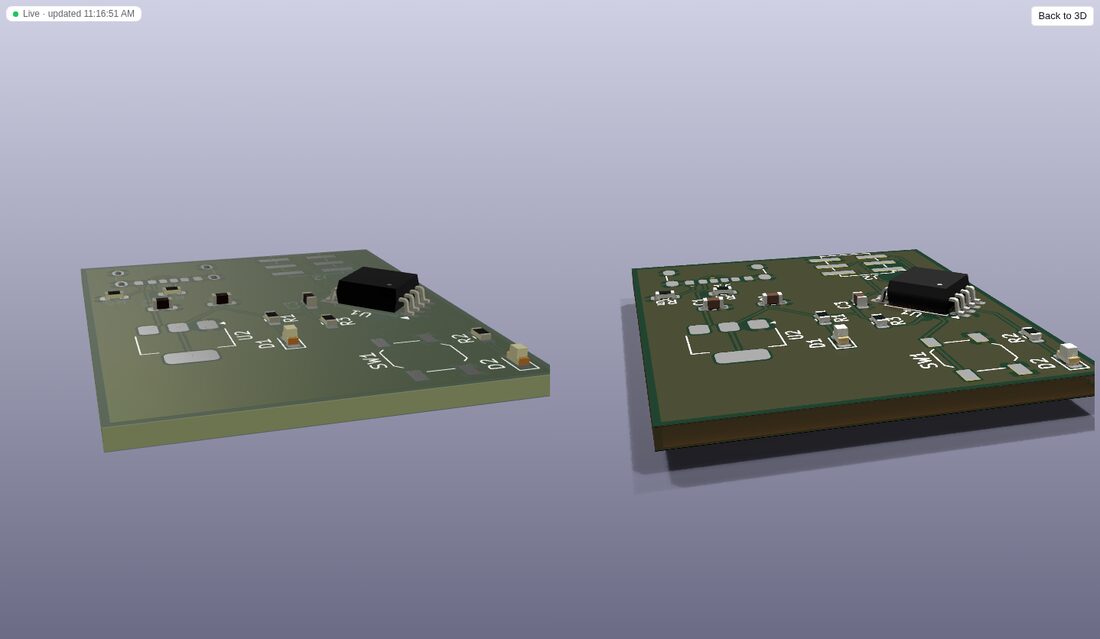
KiCad render renders the current camera with KiCad's own renderer (kicad-cli pcb render --quality high, a few seconds), mapping the orbit camera to --rotate / --zoom / --pivot / --perspective, for KiCad's exact look. Without WebGL the 3D mode shows such renders, with the same view buttons.
three.js (about 645 KB, 163 KB gzipped) is a separate client chunk, lib/client.three.js, that dsh loads the first time a board opens in 3D; the main client module grew by about 28 KB.
The model gets the same angles: kicad_render {view: "3d", side?, rotate?: "-45,0,45", zoom?, pivot?, perspective?, quality?: "basic" | "high"} (the defaults and results are unchanged; /kicad-render <board> --3d --rotate=-45,0,45 does it from a conversation).
KiCad's 3D model library. Component bodies come from KiCad's 3D models (${KICAD10_3DMODEL_DIR}), which most Linux distributions package separately. /kicad-doctor checks for them (the variable is resolved like KiCad: environment, then Preferences → Configure Paths, then the built-in default), and the 3D view shows a notice with the fix when footprints reference models that cannot be found:
| Platform | 3D models | Runs from dsh? |
|---|---|---|
| Fedora | sudo dnf install -y kicad-packages3d |
no: needs root, shown with Copy command |
| Debian, Ubuntu (incl. the KiCad PPA) | sudo apt-get install -y kicad-packages3d |
no (root) |
| Arch | sudo pacman -S --needed kicad-library-3d |
no (root) |
| openSUSE | sudo zypper install kicad-packages3D |
no (root) |
| Flatpak KiCad | flatpak install --user flathub org.kicad.KiCad.Library.Packages3D//stable |
yes, per user (about 640 MB download) |
| macOS | included in KiCad.app (DMG and Homebrew cask); brew reinstall --cask kicad restores them |
yes, with Homebrew |
| Windows | included in the full installer (and winget install KiCad.KiCad); keep the "3D models" component |
link |
| everywhere | the kicad-packages3D archive for your KiCad version, then set KICAD10_3DMODEL_DIR |
link |
The distribution packages are about 270 MB to download and 3.1 GB installed. Without them the 3D view and renders show the bare board with pads, copper and silkscreen.
/kicad-fab [board.kicad_pcb] [--preset jlcpcb|pcbway] [--force] [--step] [--ipc2581] [--odb] (the agent's kicad_export_fab) lets KiCad judge the board first. DRC errors, unrouted connections, schematic parity issues (when the schematic sits next to the board) and, with a preset, errors against that fab's limits refuse the export, and nothing is written. --force exports anyway; the result and fab-manifest.json say so.
Output goes to <project>/fab/<preset or kicad>/: Gerbers for copper, mask, paste, silkscreen and Edge.Cuts with the Gerber job file; Excellon drill files with a Gerber X2 drill map; assembly/ with the position CSV and BOM (plus JLC BOM/CPL with --preset jlcpcb); preview/ with front and back 3D PNGs; and <board>-<preset or fab>.zip with everything except the previews.
kicad_fab_preset makes a fab's limits (minimum track, clearance, drill, annular ring, hole spacing, copper to edge) the project's design rules, so kicad_drc checks what the fab can make: board setup minimums go into the .kicad_pro, custom rules into a managed block of the .kicad_dru (your own rules stay). The values come from each fab's published capabilities (presets/); the fab's own review has the last word.
claude mcp add kicad -- uvx --from "git+https://github.com/LuYanFCP/dsh-kicad#subdirectory=packages/kicad-bridge/sidecar" dsh-kicad-sidecar --root .
# or from a checkout, without uv:
PYTHONPATH=packages/kicad-bridge/sidecar/src python3 -m dsh_kicad_sidecar --root /path/to/project
--root (repeatable) confines file access. --call <tool> --args '<json>' runs one tool and prints its result.
Copy kicad-plugin/ into KiCad's IPC plugin directory (KiCad 9/10: the plugins folder under your KiCad documents directory, e.g. ~/Documents/KiCad/10.0/plugins/dsh-kicad), enable Preferences → Plugins → Enable KiCad API, and restart KiCad. The toolbar button copies the project path to the clipboard and starts dsh web from the project directory (dsh web has no workspace flag, so use Add workspace and paste).
Row (cordis.patch.yml id) |
Field | Default | |
|---|---|---|---|
kicad-bridge |
launcher |
python |
python runs the sidecar from source; uv runs it in a uv venv with uvExtras (png, ipc) |
python (live) |
python3 |
interpreter | |
kicadCli (live) |
auto | kicad-cli path | |
java (live) |
auto | Java 25+ for Freerouting ($JAVA_HOME, then PATH) |
|
freerouting (live) |
auto | freerouting.jar ($FREEROUTING_JAR, then the jar /kicad-install freerouting downloaded) |
|
ngspice (live) |
auto | ngspice for kicad_simulate ($NGSPICE, then PATH) |
|
qemu (live) |
auto | Espressif's qemu-system-xtensa for ESP32 firmware simulation ($QEMU_XTENSA, PATH, ESP-IDF's tools, then the one /kicad-install qemu-esp32 downloaded) |
|
requestTimeoutMs |
300000 |
||
kicad-policy |
approval (live) |
ask |
ask / allow for design edits |
autoErc (live) |
true |
ERC after each schematic edit | |
autoDrc (live) |
true |
DRC after each board edit (with --refill-zones when the board has zones) |
|
autoRender (live) |
true |
refresh the sidebar SVG after each edit | |
restrictToWorkspace, extraRoots |
true, [] |
write confinement | |
guidance, projectContext |
true |
prompt section / dynamic context | |
kicad-tools |
attachRenders |
true |
attach PNG renders for image-capable models |
(live) fields are editable in the Plugins page without restart.
pnpm install && pnpm run build
pnpm test            # vitest: host packages against dsh's real ToolRuntime/SkillRegistry + real sidecar; client in jsdom
pnpm run test:py     # pytest: S-expression round trip (KiCad demo files), schematic and board editing judged by kicad-cli, MCP server
python packages/kicad-bridge/sidecar/tests/make_fixtures.py   # regenerate fixtures with the editor itself
Real-dsh smoke test without an API key: install the bundle, then from a directory with a KiCad project run dsh --profile web --patch scripts/dsh-smoke/smoke.patch.yml --no-open and read dsh-kicad-smoke.json.
The Client is compiled by scripts/build-client.mjs, which reproduces dsh's module-loader artifact (window.__ModuleLoader__.load({ id, factory(require) })) with only the shell's platform modules external. docs/spike-third-party-bundle.md records how third-party Host + Client loading was verified.
kicad_update_pcb), placed (auto_place), edited, routed (kicad_autoroute), checked and exported (kicad_export_fab). Autorouting needs Java 25+ and Freerouting, which are installed separately (see Routing); dense boards may keep a few unrouted connections for the agent to finish by hand.Sim.Device set (see Simulation).approval: allow.scripts/vendor-kicanvas.mjs (see packages/client-ui-kicad/vendor/kicanvas/README.md for the offline/icon/theme patches). It parses KiCad 10 files but ignores tokens it does not know yet; the SVG mode is the kicad-cli ground truth. It needs WebGL2.flatpak run --filesystem=host --filesystem=/tmp --command=kicad-cli org.kicad.KiCad; this was tested with a stand-in flatpak, not a real Flatpak KiCad. The install commands for apt/pacman/zypper/brew/winget are documented but were only exercised on Fedora./kicad-doctor entries to the log of the session they borrow (dsh logs every command).MIT
CLASSIFICATION EVIDENCE
系统优先读取 GitHub Topics,再与站内分类词典和词根规则比对。当前命中: deepseek。
morluto
Reverse engineer anything with agents, from app behavior down to native binaries.

deepseek-ai
DeepSeek Harness: Everything is a Plugin.

nexu-io
The 1st Collaborative AI Design Agent Workspace. Local-first and open source. Create motion, prototypes, websites, apps, dashboards, presentations, images, and videos with your team and AI agents. Share work, exchange feedback, and iterate together in one workspace.