
其他
完整应用

deepseek-harness
deepseek-ai
DeepSeek Harness: Everything is a Plugin.
PROJECT TOPICS
PROJECT README
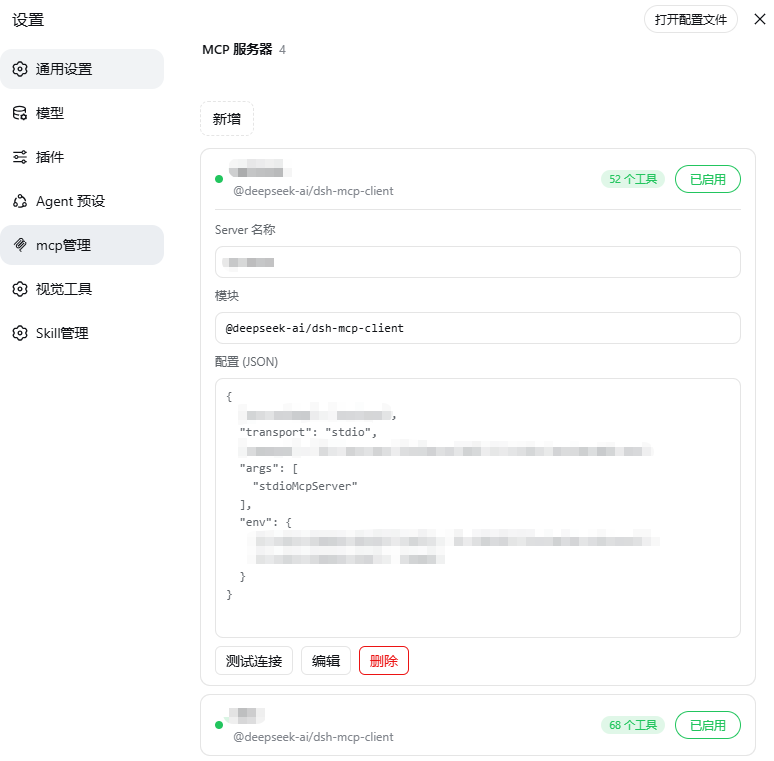
An MCP server management plugin for DeepSeek Harness (DSH) — visually view, add, edit and remove MCP servers in the Web settings, with built-in connection testing.



$DSH_HOME/profiles/web/cordis.patch.ymlA single-package, two-half DSH bundle:
| Half | Entry | Role |
|---|---|---|
| Host | lib/index.js |
mcpInventory Remote service: list/add/update/removeServer/test, reads/writes cordis.patch.yml, counts tools |
| Client | lib/client.js |
"MCP Servers" section in the settings panel (dsh.client bundle, auto-discovered by client-modules) |
The package declares itself via dsh.bundle.patch (cordis.patch.yml) and is auto-mounted after dsh plugin installs it.
dsh) installeddsh web) availabledsh plugin --profile web add @wanghailong0419/dsh-mcp-manager
dsh web # restart to take effectnpm package: https://www.npmjs.com/package/@wanghailong0419/dsh-mcp-manager
dsh plugin --profile web add file:/path/to/dsh-mcp-manager/bundle
dsh webdsh plugin --profile web update @wanghailong0419/dsh-mcp-manager
dsh plugin --profile web remove @wanghailong0419/dsh-mcp-manager
dsh plugin addautomatically adds the package to thedsh.profile.bundleslayer (it detects thedsh.bundledeclaration) — no manual config editing needed.
dsh web, open Settings → MCP ManagerChanges are written to
cordis.patch.ymland take effect after restartingdsh web(HMR is disabled in web mode).
- id: mcp-example
  name: '@deepseek-ai/dsh-mcp-client'
  config:
    serverName: example
    transport: stdio
    command: npx
    args: ['-y', '@modelcontextprotocol/server-xxx']
    env:
TOKEN: !!js process.env.MY_TOKENtools service: toolCount depends on DSH's tool registrystdioMcpServer mode launches the IDE process once more, which takes longerThe "MCP Servers" icon in the settings panel's left navigation is patched automatically when the plugin activates (injects an MCP logo branch into the official dsh-client-ui-settings-general navIcon; idempotent and fails silently). If DSH upgrades overwrite the official package, the patch is re-applied automatically on next startup — no manual action needed.
Upgrade note: if you're upgrading from an earlier manual installation, remove the manually added
mcp-inventory/ui-settings-mcpentries fromcordis.patch.ymlfirst (the bundle provides them automatically; duplicates cause service conflicts). Fresh installs can ignore this.
MIT
CLASSIFICATION EVIDENCE
系统优先读取 GitHub Topics,再与站内分类词典和词根规则比对。当前命中: 无有效分类标签。
deepseek-ai
DeepSeek Harness: Everything is a Plugin.

anywhere-labs
为 DeepSeek Harness (DSH) 插件生态打造的现代化桌面端解决方案。万物皆「插件」,桌面本身也是「插件」。

walkinglabs
Harness engineering beginner tutorial, from 0 to 1