

模型与 MCP
待识别

rea
morluto
Reverse engineer anything with agents, from app behavior down to native binaries.
PROJECT TOPICS
INSTALL REFERENCE
dsh plugin --profile web add github:Lionad-Morotar/dsh-jump
该命令指向仓库当前默认分支;尚无绑定当前 commit 的完整验证结果。
PROJECT README

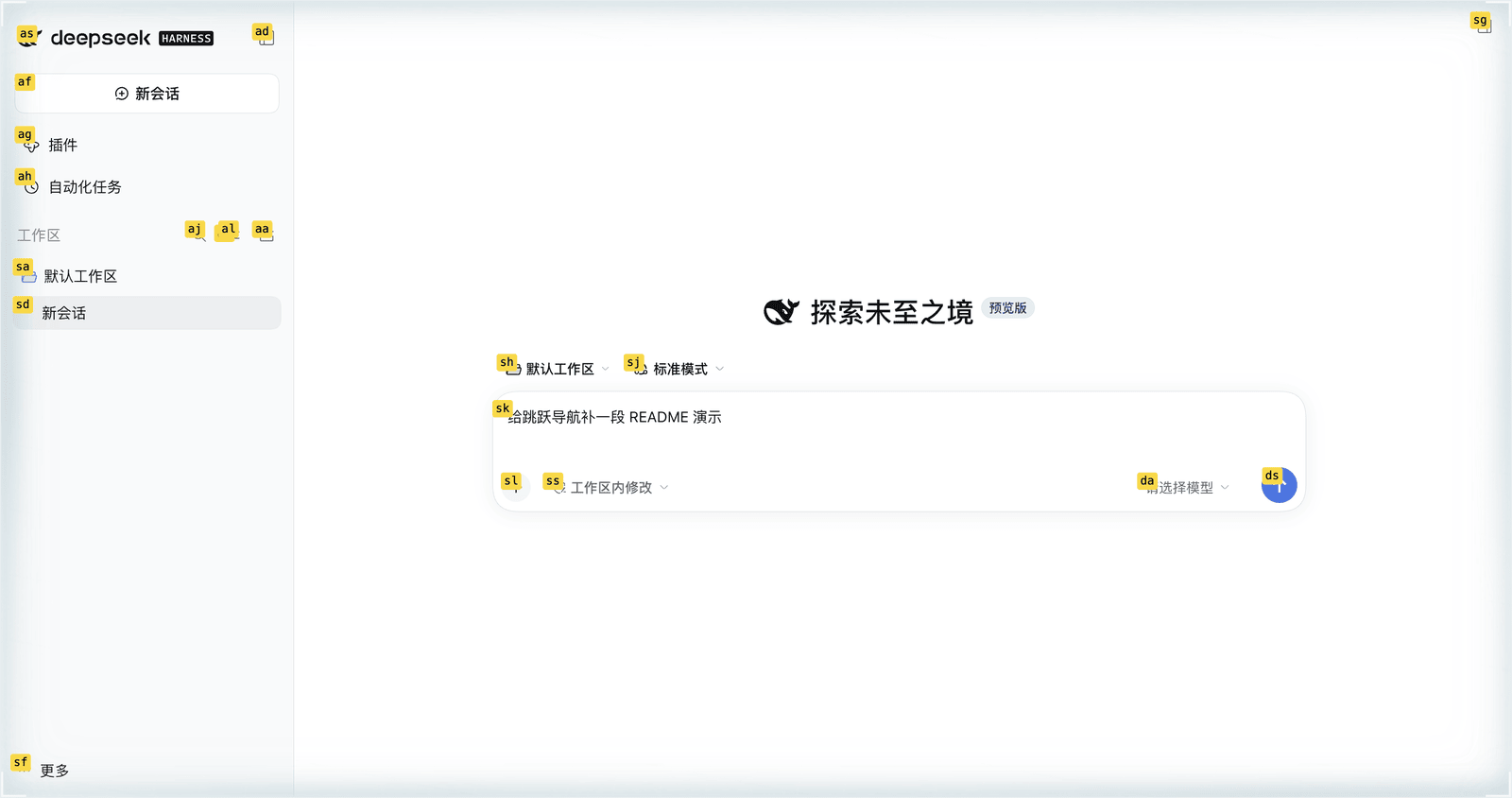
Keyboard jump navigation for the DeepSeek Harness Web GUI: press the click or focus chord, type a letter label, and the labelled element is clicked or focused.





中文 · Install · What gets labelled · How labels are assigned · Performance · v1 boundaries · Layout
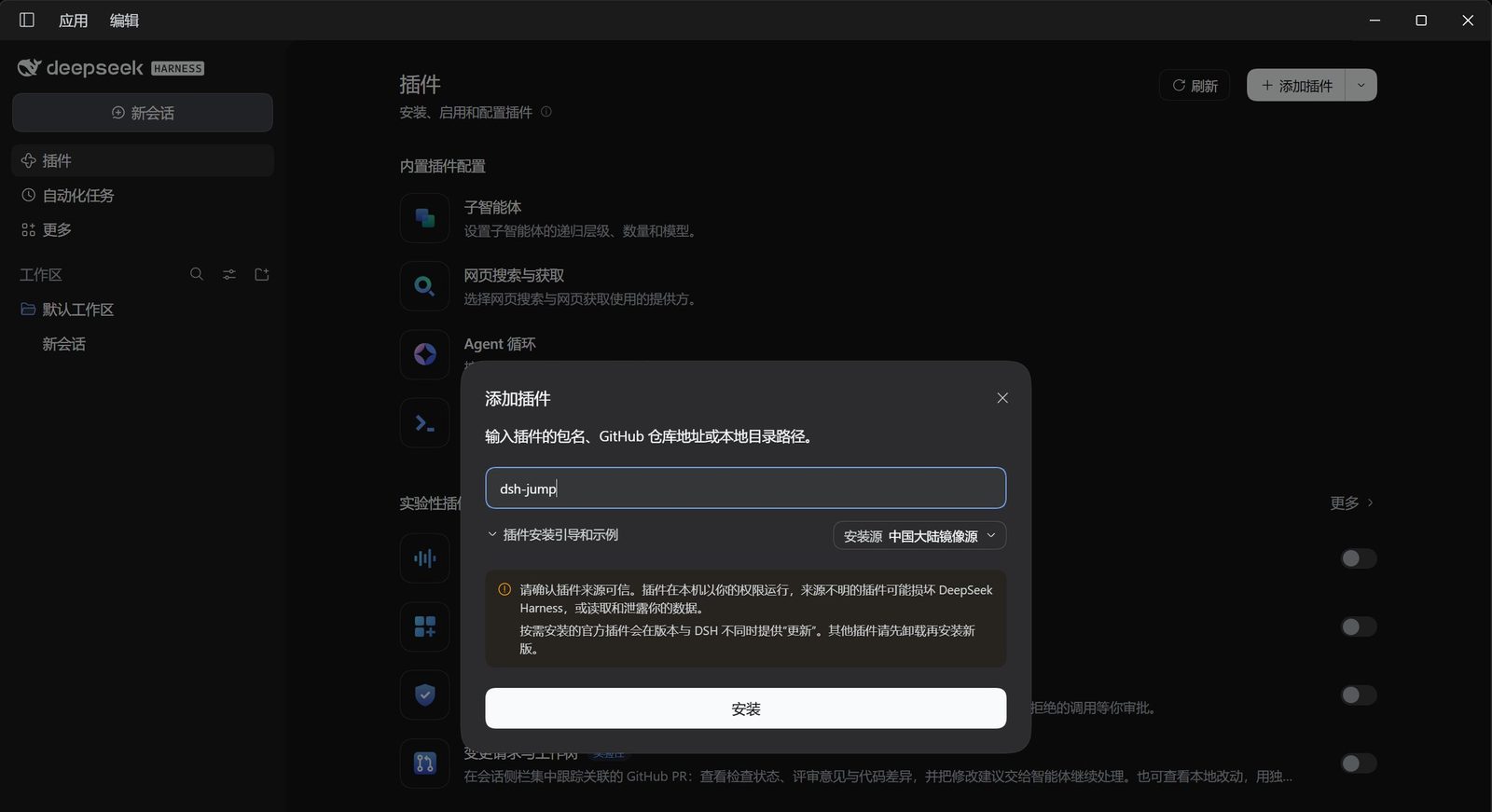
dsh plugin --profile web add dsh-jumpThen restart the profile: the bundle patch registers the Loader row, so no
manual cordis.patch.yml edit is needed. The plugin manager UI works too:
open Plugins, click Add plugin, type dsh-jump, and confirm.
To track this repository instead of the published version:
{
  "dependencies": {
    "dsh-jump": "link:../dsh-jump"
  },
  "dsh": {
    "profile": {
      "bundles": ["...", "dsh-jump"]
    }
  }
}
Then dsh plugin --profile web install and restart DSH. The path in link:
resolves relative to ~/.dsh/profiles/web, so adjust it to wherever the
checkout lives on your machine. Pointing at a git URL works too:
dsh plugin --profile web add github:Lionad-Morotar/dsh-jump.
Append to the profile's cordis.patch.yml:
- insert:
    - id: jump
      name: 'dsh-jump'
The top level of that file must always stay a YAML array ([] when empty).
给 DeepSeek Harness Web GUI 的键盘跳跃导航:按下和弦后,视口里的可交互元素会被打上 字母标签,再敲标签即可点击或聚焦到它。
Cmd+H(非 Mac 上是 Ctrl+H),Esc 退出。engines.dsh is >=0.2.0-rc.2 <0.3.0-0. Prereleases participate in the
range, so 0.2 release candidates pass and 0.3 does not.
The plugin manager takes the title and one-line description from
locale/en.json and locale/zh.json, and the icon from
exports["./icon"]. assets/icon-180.png is the same artwork at 180px for
GitHub-hosted catalog entries, which reject SVG.
Three families:
a[href], button, input, select, textarea,
summary) plus anything with a tabindex.button, link, tab,
treeitem (the sidebar's project and session rows), option, the
menuitem* family, checkbox, radio, switch, slider, spinbutton.
Structural roles (row, columnheader, gridcell) are deliberately
absent: a row is a container and a header is a label, so labelling them
hands dead labels to presentational tables, and an interactive grid marks
its cells with tabindex, which the first family already catches.[contenteditable]:not([contenteditable=false])) and the
text-entry roles textbox / searchbox / combobox. This is what makes
the composer reachable: it is a Lexical-managed
div[contenteditable=true][role=textbox] with no tabindex, so no native
selector matches it. contenteditable=false is excluded because Lexical
marks chips and command tokens with it, and the deepest-candidate rule
would let a chip steal the label from the composer that owns it.Labels follow the eye, not the DOM. Candidates are clustered into rows by
vertical overlap, rows are ordered top to bottom, and each row is consumed
left to right, so a row rendered right-to-left in the markup still reads as,
ad from the left edge. The first nine labels are a s d f g h j k l; past
nine the whole round switches to equal-length two-key labels (as, ad, ...)
so a short label cannot steal the first stroke of a longer one, and past 81 to
three-key.
An element keeps the label it had last round. After each round the plugin
records which label each element carried, keyed by the element's identity (an
explicit data-row-key, the composer marker, or a data-slot boundary plus
the control's accessible name and tag). The next round hands a remembered
label back to its element first, and the remaining labels fill the gaps, so a
button that appears above the one you use does not push its label onto a
neighbour.
Memory is spent only when it is unambiguous: a remembered label is ignored
when its length differs from the round's label length, and when two
candidates share one identity both are dropped rather than guessed. The table
holds 64 entries for the current page load and evicts the entry that has gone
longest without a hit. It is never written to localStorage or
sessionStorage, so a reload starts with no memory.
Both activation modes jump to the same set, and the matched element decides what "jumping" means. Click mode ships bound; focus mode ships unbound, so a reader who wants it records a chord on its settings row first:
focus() in focus mode.The split is not stylistic: synthetic pointer and mouse events are untrusted,
so the browser runs no default focusing for them (dispatching the whole
sequence at a button, an input and a contenteditable element left
activeElement unchanged in all three cases), while a focused button does
nothing. Mode therefore only picks the fallback; the target picks the action.
Labels are rendered as an overlay by the client entry; while jump mode is active all keydown events are consumed by the state machine, so typing inside a focused input never leaks through.
Activation blurs the focused element before it collects labels, so the next
letter is a label even when the chord was pressed inside a text field. On
macOS the host process also remembers the current input source, switches to
com.apple.keylayout.ABC for the round, and switches back on Escape, on a
completed label, or when the plugin unloads. The page cannot do this itself:
it asks the host over POST /api/dsh-jump/ime, and the host runs
im-select. A missing binary or a host without a web server skips the switch
and labels still appear. im-select is a machine dependency, not a package
one: install it yourself with brew install im-select.
A third activation mode, off by default. It uses the same label round as the other two, but picking a label does not click and does not move focus: it inserts a description of the element into the current session's composer as a structured chip.
settings.section, id jump, order 25); its chord button starts
recording, and a "turn off reference mode" control unbinds it again.
Restoring that row means unbinding, because it has no shipped chord to fall
back to.clipboardText is [ui element button#gx-reference] or
[ui element button[data-testid=gx-reference]]; the label is
button「引用」. The model text is one line of facts:
[ui element] <button> data-testid="gx-reference" role=button aria-label="引用" class="gx-btn" text="引用".
Identity priority is data-testid > id > up to three authored classes; a
class counts as authored when it carries a - or _ and is not a utility
word or a generated hash (css-…, sc-…, _…).conversation.input.overlay
publishes { sessionId, inputActions }; with no session, or on a host
without that slot, the insert answers no-session and nothing is clicked.insertReference falls back to
inputActions.insertText(clipboardText), whose plain text is still sendable
where a chip without a codec would be refused at send time and keep the
draft. If neither channel accepts the write the pick is silently dropped.
inputTriggers, sessions and conversation are all soft-probed, so a
host missing any of them keeps the navigation and loses only the chip's
send-time identity.data-testid > id > tag plus its authored classes > role /
aria-label > visible text. Each step is exhausted before the next one
starts, so a stale id elsewhere on the page cannot beat a live test id, a
hit is scrolled to the centre of the viewport and focused with
preventScroll, and the composer is never a candidate: its text can hold
the very words the target carried, so revealing it would scroll to the chip
the reader just clicked. A miss answers false and the host keeps its own
gesture.A round costs one collection pass and one paint, and both used to grow with the square of the page. Measured on a 1841×1274 view with 1189 visible candidates over 25k DOM nodes, a round took 72ms to collect and 5.4ms to repaint on every stroke of a three-key label. Neither is on the critical path now:
position:absolute inside a
fixed; inset:0 container rather than fixed themselves, so the browser
tracks one containing block instead of one per badge.In-place updating leans on the snapshot rule in v1 boundaries: label, target and rect are fixed when the round opens, so only the prefix can change inside a round. A new round mints new badges, which is what stops a label from staying over a target that has moved since.
localStorage
(dsh-jump:bindings:v1), not in package config. The host's own shortcut
registry cannot hold them (a bare home-row label stroke is rejected as
modifier-less, and the shipped Cmd+H default collides with reserved
primary chords), so the listener is plugin-owned and the settings page
writes to the same plugin-owned document.ctx.inject
rather than sampling it once: services start one at a time, so a single
ctx.get("slots") during apply can legitimately return undefined. With
neither the slot service nor a React seed, navigation still works; only the
ability to remap is missing.src/index.ts host half: serves POST /api/dsh-jump/ime and runs im-selectsrc/host/input-source.ts one round: remember, switch to ABC, restoresrc/host/ime-route.ts the route, re-attached if the web server appears latesrc/client/entry.ts loader adapter: takes the factory's require, resolves
React, then hands the real context to runtime.tssrc/client/runtime.ts composition: one bindings store shared by the listener
and the settings rowsrc/client/hints.ts hint collection and label streamsrc/client/target.ts which action a matched target needs (click vs focus)src/client/keys.ts key state machinesrc/client/bindings.ts chord model, platform defaults, validation, formattingsrc/client/store.ts the persisted pair, total on read, normalized on writesrc/client/recorder.ts one keydown into a candidate chordsrc/client/settings-controller.ts the recording mode's rules, renderer-freesrc/client/settings-page.ts the settings page: one row per modesrc/client/react.ts the narrowed React slice and the recording listenersrc/client/copy.ts the page's Chinese and English copysrc/client/config.ts selectors and the label key mapsrc/client/ime.ts the page's begin/end notice to the host routelib/ committed build products (pnpm run build)pnpm install
pnpm test # vitest
pnpm typecheck # tsc --noEmit
pnpm run build # esbuild src -> lib, committedlib/ is committed on purpose: an installed profile loads lib/ straight from
the package and never runs a build step, so the built files have to be in the
tarball and in the repository.
The build produces a two-entry package: lib/index.js is the host half (the
input-source route) and lib/client.js is the browser half inlined with its
React imports resolved at load time.
npm version <patch|minor|major>   # or edit package.json
pnpm run release                  # test, build, then publish to registry.npmjs.org
git push --follow-tags
release runs the tests and the build before publishing, so a failing suite
stops the release. Publishing goes to registry.npmjs.org explicitly because a
global registry setting elsewhere (a mirror, for instance) would otherwise
send the tarball to the wrong place while reads still succeed.
CLASSIFICATION EVIDENCE
系统优先读取 GitHub Topics,再与站内分类词典和词根规则比对。当前命中: deepseek-harness。
morluto
Reverse engineer anything with agents, from app behavior down to native binaries.

deepseek-ai
DeepSeek Harness: Everything is a Plugin.

nexu-io
The 1st Collaborative AI Design Agent Workspace. Local-first and open source. Create motion, prototypes, websites, apps, dashboards, presentations, images, and videos with your team and AI agents. Share work, exchange feedback, and iterate together in one workspace.