
其他
完整应用

deepseek-harness
deepseek-ai
DeepSeek Harness: Everything is a Plugin.
PROJECT TOPICS
PROJECT README
对话轮次结束时,自动向 ntfy / 任意 webhook 推送通知(如小米手环、手机、Bark、Telegram、公司内网…)。
settings.yaml| 能力 | 说明 |
|---|---|
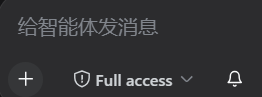
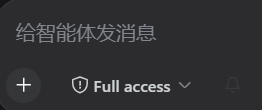
| 🔔 输入栏铃铛 | 输入框左端小铃铛,点击开/关,颜色区分状态 |
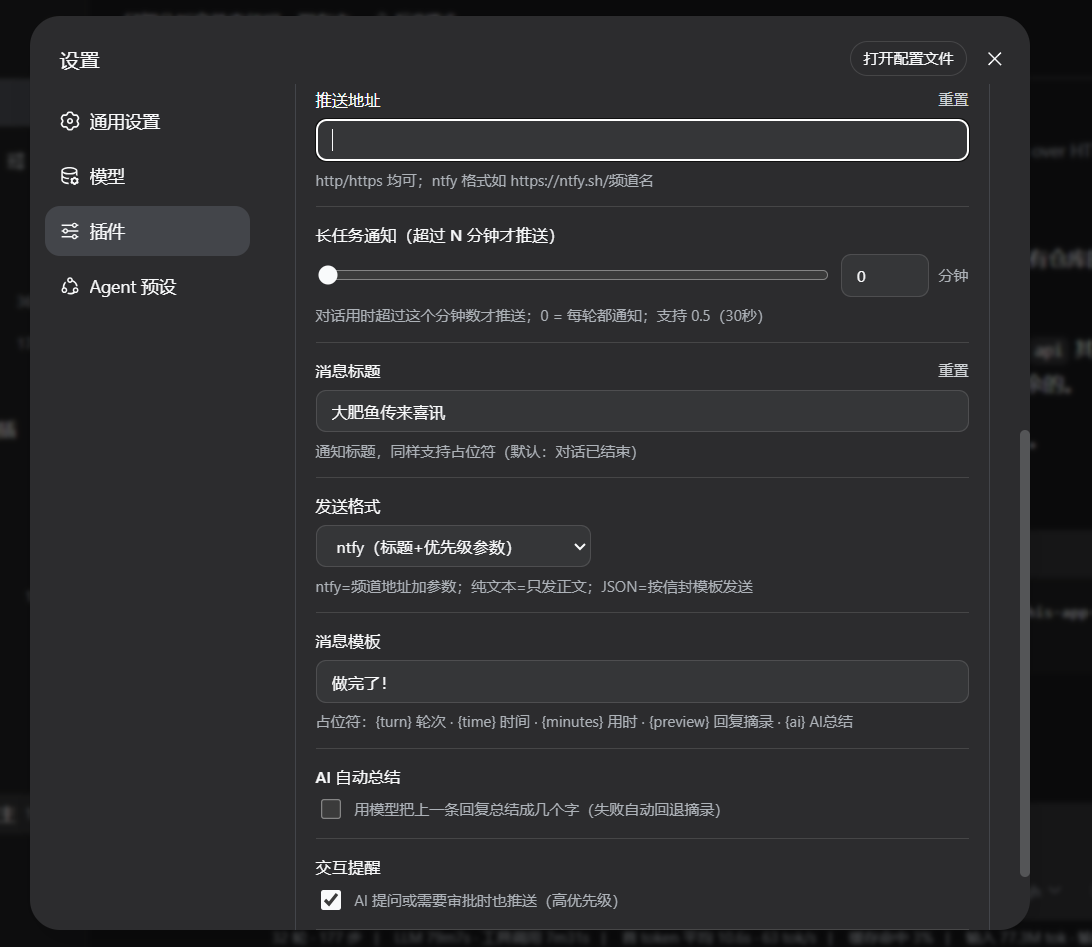
| ⏱ 长任务阈值 | 滑块(不均匀档位 0 / 0.5 / 1 / 2 / 3 / 5 / … / 240 分钟)+ 数字输入,对话用时超过才推送 |
| ✏️ 消息模板 | 标题与正文均可用占位符:{turn} 轮次 · {time} 时间 · {minutes} 用时 · {preview} 回复摘录 · {ai} AI 总结 |
| 🤖 AI 总结 | 开启后取上一条回复,调模型总结成几个字填入 {ai}(失败自动回退摘录) |
| 📮 发送格式 | ntfy(标题+优先级参数)/纯文本/自定义 JSON(信封模板 {title} {body} {priority},适配 Bark/Telegram/Discord 等) |
| 💾 配置持久化 | 标准 settings 命名空间(settings.yaml 的 band-notify: 段),与官方插件同机制 |
| 🩺 心跳日志 | 每次触发写日志,便于排查 |
在 WebUI 输入框左端有铃铛按钮:点击「🔔(开)↔ 🔕(关)」切换是否推送;设置页有插件配置卡,所有项可视化保存。
| 输入栏铃铛 · 开启 | 输入栏铃铛 · 关闭 | 插件配置卡 |
|---|---|---|
 |
 |
 |
插件只是"发出通知",手环/手机要收到,需要手机端配合,共三步:
https://ntfy.sh/你的频道 中的频道名),订阅即可💡 先按 #使用 的发送工具发一条测试,手机亮了 → 手环震了 → 大赢鲸的完成提醒就全链路通了。
band-notify-plugin/
├── plugin/                  # 插件本体(宿主 + 浏览器端 + 包定义)
│   ├── index.js             # 宿主:事件监听 → 模板渲染 → 发送
│   ├── client.js            # 浏览器端:铃铛 + 插件配置卡(__ModuleLoader__ 格式)
│   └── package.json         # 包定义(dsh.client 声明)
├── script/
│   └── ntfy_push_test.js    # 独立发送工具(命令行/环境变量)
├── docs/screenshots/        # 界面预览截图(铃铛开/关、配置卡)
├── DEVELOPMENT.md           # DSH 插件开发规范指引(官方文档 + 社区资源 + 参考实现)
├── config.example.json      # 配置示例(复制改名为你的配置)
└── README.md
想开发自己的 DSH 插件?看 DEVELOPMENT.md——官方规范索引、社区教程、以及本插件的实现要点。
dsh plugin(官方方式,需 pnpm)
dsh plugin把参数转发给 profile 目录里的 pnpm,装完后若包声明了dsh.bundle,会自动把它加入 profile 的 bundle 层(本插件已声明dsh.bundle.patch,补丁层自带插件行,无需手改cordis.patch.yml)。
# 先装 pnpm(一次即可)
npm install -g pnpm

# 本地路径安装(未发布 npm 时,路径换成你的 plugin 目录)
dsh plugin --profile web add "file:F:\路径\band-notify-plugin\plugin"

# npm 发布后即可直接按包名安装
# dsh plugin --profile web add band-notify

# 或从 git 安装
# dsh plugin --profile web add git+ssh://git@ssh.github.com:443/Lichen455/band-notify.git
⚠️ 开发机保留真实配置时,可继续用方式二指向运行副本;
dsh plugin适合全新环境 / 其它机器。
前置:DSH(DeepSeek Harness)Web 版,$DSH_HOME 即 ~/.dsh。
拷贝插件到你的 profile 目录:
# Windows 示例(Linux 同理替换路径)
Copy-Item plugin -Destination "$HOME\.dsh\profiles\web\band-notify" -Recurse
建两个 junction(loader 解析与浏览器模块扫描各需一个):
New-Item -ItemType Junction -Path "$HOME\.dsh\profiles\node_modules\band-notify" -Target "$HOME\.dsh\profiles\web\band-notify" -Force
New-Item -ItemType Junction -Path "<你的node全局模块目录>\band-notify" -Target "$HOME\.dsh\profiles\web\band-notify" -Force
(第二个 junction 的目录要能被 harness 的 Node 解析到,例如 D:\nodejs\node_modules。)
补丁行:编辑 $DSH_HOME\profiles\web\cordis.patch.yml,追加:
- insert:
    - id: band-notify
      name: band-notify
      inject: [subprocess, webServer]
重启 DSH。输入栏出现铃铛;设置 → 插件配置 出现「完成提醒」卡片。
插件内若硬编码了本机路径(
D:\nodejs\node.exe、process.cwd()等),请按你的环境调整plugin/index.js中的SENDER/cwd。
配置存于 settings.yaml 的 band-notify: 段(也可直接在 WebUI 插件配置卡里改):
band-notify:
  enabled: true          # 总开关
  minMinutes: 0          # 长任务阈值(分钟,支持 0.5;0=每轮都通知)
  endpoint: https://ntfy.sh/你的频道   # 推送地址
  template: 第 {turn} 轮对话已完成 ({time}) · 用时 {minutes} 分钟   # 正文模板
  titleTemplate: 对话已结束            # 标题模板
  format: ntfy           # ntfy | text | json
  jsonTemplate: '{"title":"{title}","body":"{body}"}'   # format=json 时的信封模板
aiSummary: false # AI 自动总结发送工具(不依赖 DSH):
node script/ntfy_push_test.js "标题" "正文" 4 你的频道
# 或
NTFY_TITLE="标题" NTFY_BODY="正文" NTFY_PRIORITY=4 NTFY_TOPIC=你的频道 node script/ntfy_push_test.js
ntfy 通用发布(任何终端):
curl -H "Title: 标题" -d "正文" https://ntfy.sh/你的频道ntfy 格式;其它 JSON 接口用 json + 信封模板。agent-default-model/llm-pi-ai),失败会自动回退为摘录。config.example.json 模板。MIT
CLASSIFICATION EVIDENCE
系统优先读取 GitHub Topics,再与站内分类词典和词根规则比对。当前命中: 无有效分类标签。
deepseek-ai
DeepSeek Harness: Everything is a Plugin.

anywhere-labs
为 DeepSeek Harness (DSH) 插件生态打造的现代化桌面端解决方案。万物皆「插件」,桌面本身也是「插件」。

walkinglabs
Harness engineering beginner tutorial, from 0 to 1