






模型与 MCP
待识别

rea
morluto
Reverse engineer anything with agents, from app behavior down to native binaries.
PROJECT TOPICS
INSTALL REFERENCE
dsh plugin --profile web add github:LiDu-china/dsh-dafeiyu-emotion
该命令指向仓库当前默认分支;尚无绑定当前 commit 的完整验证结果。
PROJECT README
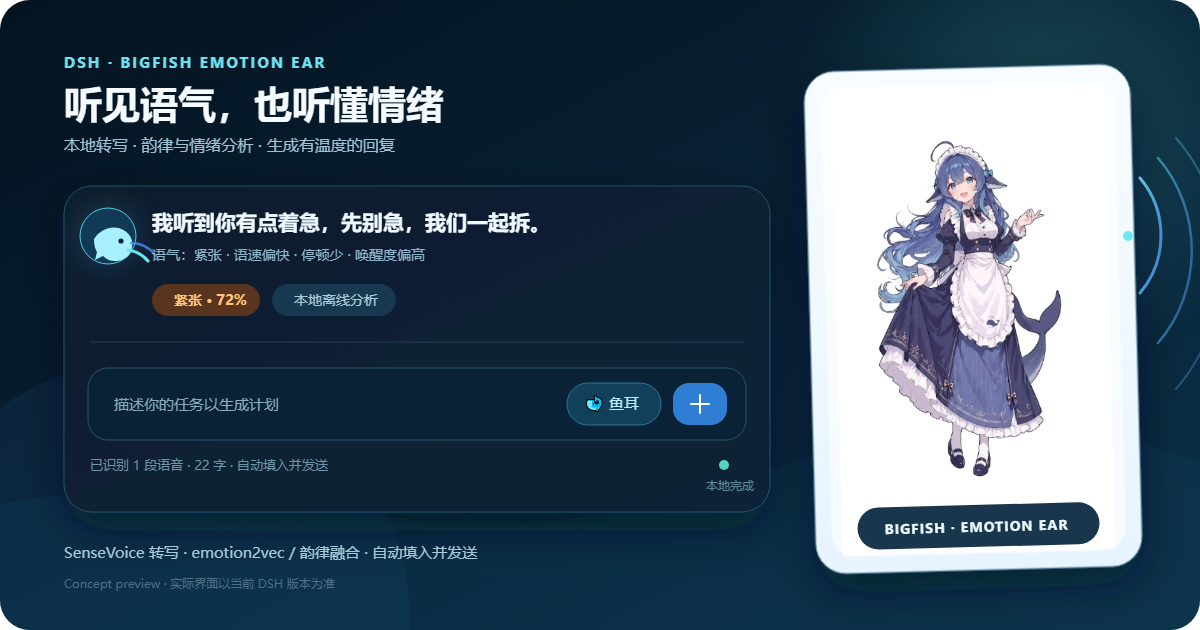
预览为功能示意图,实际界面以当前 DSH 版本为准。
角色主视觉采用蓝发鲸鱼少女的大肥鱼设定。
这是一个给 DeepSeek Harness 使用的语音情绪插件。
它会在 DSH 输入框旁边加一个 🐋 鱼耳 按钮:
它不是在“读心”。它做的是 语音转写 + 可解释的声学/文本情绪估计,然后把这份估计作为回复风格参考。
轻量模式需要先在 插件 → Voice Input 中启用并准备 DSH 的本地语音模型。
如果你本机已经有 语音转文本 / VoiceSense 项目,可以把 backendRoot 指向它:
插件不会重新下载模型,也不会修改 VoiceSense 项目;它只是启动一个常驻 worker 复用已有环境。
/context 接口,其他插件可以读取最近一次情绪上下文、趋势和最近记录;dsh-dafeiyu 0.1.23+;dsh-dafeiyu 提供,本插件负责“听觉与情绪”;桌宠互动走
dsh-dafeiyu的 HelperProcess 协议:state思考、task逐字气泡、pulse庆祝。新版 bundle 把情感插件排在dsh-dafeiyu之前以安装桥接钩子;旧安装需要重装并重启 DSH。嘴型同步仍需要新的角色动画素材。
插件已收录到 1024Store,可在 DSH 的 插件市场 / Discover 中搜索:
大肥鱼情绪耳朵
dsh-dafeiyu-emotion
dsh-dafeiyu-emotion 已发布到 npm。1024Store 会自动刷新一键安装入口;如果客户端尚未缓存到新版本,可以直接使用下面的 npm 命令。
dsh plugin --profile desktop add dsh-dafeiyu-emotionDSH Web 使用 --profile web。安装后启用 dsh-dafeiyu-emotion,再按提示启用 DSH 自带 Voice Input(轻量模式),或配置本地增强后端。
dsh plugin --profile desktop add github:LiDu-china/dsh-dafeiyu-emotioncurl -L -o dsh-dafeiyu-emotion-0.3.4.tgz \
https://github.com/LiDu-china/dsh-dafeiyu-emotion/releases/download/v0.3.4/dsh-dafeiyu-emotion-0.3.4.tgz
dsh plugin --profile desktop add "D:/path/to/dsh-dafeiyu-emotion-0.3.4.tgz"DSH Desktop 的 profile 由 Electron 应用管理;命令行安装请使用桌面应用自带的
dsh命令。
助手回复生成后,插件会通过本机事件流把文本交给 TTS,让大肥鱼把回复读出来。
默认使用 Piper 本地模型,音色是 zh_CN-huayan-medium。它不联网,延迟低,适合日常对话:
python -m pip install piper-tts把模型放到默认目录:
~/.dsh/dafeiyu-emotion/tts/piper/zh_CN-huayan-medium.onnx
~/.dsh/dafeiyu-emotion/tts/piper/zh_CN-huayan-medium.onnx.json
也可以在设置页填写自定义 Piper 模型路径。模型缺失或合成失败时,会自动回退到浏览器 speechSynthesis,不会让回复静默丢失。
如果更喜欢更自然的在线音色,可以把引擎切到 Edge TTS,默认音色 zh-CN-XiaoyiNeural。Edge 需要网络,且回复文本会发送到 Microsoft;如果网络或服务不可用,同样会回退到浏览器语音。
插件会把自己的设置卡片注册到 DSH 的插件设置页。打开:
设置 → 插件 → 大肥鱼情绪耳朵可以直接调整:
卡片顶部会实时显示当前模式:轻量模式、增强模式已就绪、模型加载中、后端目录不存在或等待 Voice Input。保存后配置会立即写入 DSH 设置,并在路径或超时变化时自动重启语音 worker。
如果安装了 Better Sidebar,还可以在右侧边栏的 + 菜单里固定「情绪耳朵」,把同一份设置和状态放在对话旁边。
插件会向 DSH 注册一个原生快捷键命令。打开:
设置 → 快捷键 → 搜索“大肥鱼语音”即可改成你习惯的组合。默认值:
| 客户端 | 默认快捷键 |
|---|---|
| DSH Desktop(Windows / Linux / macOS) | Alt+V |
| DSH Web(Windows) | Ctrl+Alt+V |
| DSH Web(macOS) | Cmd+Option+V |
| DSH Web(Linux) | 默认未绑定,请在快捷键设置中指定 |
空闲时按一次开始录音;录音中再按一次会结束并分析。快捷键需要包含 Ctrl、Alt、Shift 或 Cmd 等修饰键,不能设置成裸字母键。
如果 Voice Input 尚未准备完成,本插件会直接提示,不会静默降级或上传音频。
在你的 DSH profile 配置覆盖层中,把 backendRoot 指向 VoiceSense 项目根目录:
- id: dsh-dafeiyu-emotion
  config:
    backendRoot: D:/path/to/voice-sense
可配置字段:
| 字段 | 默认 | 说明 |
|---|---|---|
enabled |
true |
是否启用插件 |
backendRoot |
空 | VoiceSense 项目根目录;空则使用 DSH Voice Input 轻量模式 |
pythonPath |
空 | 自定义 Python;空则自动寻找 .venv-ser |
language |
zh |
识别语言:zh / en / auto |
empathyStyle |
gentle |
共情策略:gentle / direct / humorous / concise |
ttsEnabled |
true |
是否朗读大肥鱼回复 |
ttsEmotionAdapt |
true |
按上一句情绪微调语速和音调 |
petReactionEnabled |
true |
朗读时驱动本地大肥鱼思考/庆祝 |
petSayEnabled |
true |
朗读时把回复文本逐字显示在大肥鱼气泡里 |
ttsOnlyAfterVoice |
true |
只朗读录音后两分钟内的回复 |
ttsEngine |
piper |
piper 本地 / edge 在线 / browser 系统语音 |
ttsVoice |
zh-CN-XiaoyiNeural |
Edge TTS 音色 |
ttsRate |
+6% |
Piper/Edge 语速 |
ttsPitch |
+12Hz |
Edge 音调 |
ttsPiperModel |
空 | 自定义 Piper 模型路径;空则用默认目录 |
maxAudioBytes |
12 MB | 单次录音大小上限 |
startupTimeoutMs |
180000 | 首次加载增强后端的最长等待 |
requestTimeoutMs |
180000 | 单次分析请求超时 |
也可以设置环境变量:
DSH_DAFEIYU_EMOTION_BACKEND=D:/path/to/voice-senseflowchart LR
A[点击鱼耳] --> B[浏览器录音 / 16k WAV]
B --> C{本地增强后端?}
C -- 有 --> D[SenseVoice + emotion2vec]
C -- 无 --> E[DSH Voice Input / SenseVoice]
E --> F[韵律特征 + 文本线索]
D --> G[情绪融合结果]
F --> G
G --> H[生成情绪上下文 prompt]
H --> I[填入 composer]
I --> J[自动发送给 DSH]
J --> K[大肥鱼回应]音频不会进入 Session 事件或附件;只有最终文本和情绪摘要会进入对话。分析期间的 WAV 使用系统临时目录,请求结束即删除。
检查系统麦克风权限、DSH 窗口权限,以及是否选择了可用的输入设备。关闭后重新点击即可。
去 插件 → Voice Input 启用并下载模型;或者配置增强后端的 backendRoot。
增强模式首次启动需要加载 SenseVoice、BERT 文本模型和 emotion2vec,通常十几到几十秒;之后 worker 常驻,热请求通常在一秒内。
不会。插件只增加一段带边界的情绪上下文,并要求模型“自然承接、不要复述分析、不要声称读心”。正常的任务指令、代码修改、工具调用仍由 DSH 正常处理。
git clone https://github.com/LiDu-china/dsh-dafeiyu-emotion.git
cd dsh-dafeiyu-emotion
npm run check
npm packdsh-dafeiyu-emotion/
├─ src/index.js Host:HTTP 端点、DSH Voice Input 调用、增强后端
├─ lib/client.js 浏览器:录音、WAV、韵律特征、情绪 UI、自动发送
├─ backend/voice_worker.py 可选 VoiceSense 常驻 worker
├─ cordis.patch.yml bundle 挂载:大肥鱼 + 情绪耳朵
├─ assets/icon-512.png 插件图标
├─ assets/bigfish-*.png 角色主视觉素材
├─ docs/preview.svg 可编辑预览源
└─ package.json欢迎提交 issue / PR。请优先附上:
本项目不是 DeepSeek 官方项目;第三方名称、模型和角色权利归各自权利人所有。
如果它让你的 DSH 更有温度,欢迎给仓库点一个 ⭐。
BigFish Emotion Ear is a DSH companion plugin that listens to the user, transcribes speech locally, estimates vocal emotion and speaking style, and adds a compact emotion-aware context to the current DSH conversation before the model replies.
dsh plugin --profile desktop add dsh-dafeiyu-emotionThe package is live on npm and listed in 1024Store. The store's one-click entry refreshes automatically. A GitHub-source install and a tarball on GitHub Releases are also available.
Then enable Voice Input in DSH Plugins and prepare its local model. For the enhanced mode, set backendRoot to a voice-sense checkout with .venv-ser.
The shortcut command is listed as BigFish voice: start / stop. Desktop defaults to Alt+V; Web defaults to Ctrl+Alt+V on Windows, Cmd+Option+V on macOS, and is unbound on Linux Web until you choose a binding.
Emotion estimation is probabilistic and context-dependent. It is a communication aid, not mind reading and not a medical or psychological diagnostic tool.
MIT. See LICENSE.
CLASSIFICATION EVIDENCE
系统优先读取 GitHub Topics,再与站内分类词典和词根规则比对。当前命中: deepseek-harness。
morluto
Reverse engineer anything with agents, from app behavior down to native binaries.

deepseek-ai
DeepSeek Harness: Everything is a Plugin.

nexu-io
The 1st Collaborative AI Design Agent Workspace. Local-first and open source. Create motion, prototypes, websites, apps, dashboards, presentations, images, and videos with your team and AI agents. Share work, exchange feedback, and iterate together in one workspace.