
模型与 MCP
待识别

rea
morluto
Reverse engineer anything with agents, from app behavior down to native binaries.
PROJECT TOPICS
INSTALL REFERENCE
dsh plugin --profile web add github:LeeKai233/dsh-increasing-my-english
该命令指向仓库当前默认分支;尚无绑定当前 commit 的完整验证结果。
PROJECT README
中文 · Changelog · MIT License
Transcribe podcast recordings into speaker-diarized transcripts with the Bailian bl speech recognize CLI, read them in the DSH right sidebar, and press Ctrl on a word or sentence to look it up and keep it in a wordbook with phonetics, meanings, example sentences, word forms and etymology. While the plugin is idle, the wordbook compares every transcript in the workspace and fills in the word's other senses automatically. Then open the third view, Review, to review those words actively every day, and the fourth view, Graph, to see how the transcripts, the words, and the words among themselves connect.


Requires DSH >= 0.2.0 (web UI: the desktop app or dsh web). Transcription needs a logged-in Bailian CLI; PDF import needs poppler.
Copy this paragraph into a new DSH conversation opened in the folder where you want your English material to live. The prompt is written for networks that cannot reach overseas sites: the agent does not fetch a guide from GitHub, it works from the README.zh.md shipped inside the installed package plus the panel's Environment check card, does everything that does not need your hands, and replies with what is left for you and a 10-minute reading task.
You're my English intensive-reading setup partner inside DSH. My network cannot reach GitHub, so do not fetch
raw.githubusercontent.com or any other blocked host: install the plugin from the sidebar → Plugins → Add plugin
by entering dsh-increasing-my-english (the plugin page probes the npm registry and registry.npmmirror.com and
picks the faster one; switch the registry explicitly if that fails), then once it is installed and enabled
(ask me to restart DSH if a restart is needed) confirm the english_transcribe and english_vocab tools appear.
Then follow the README.zh.md that ships inside the installed package (desktop on Windows:
%USERPROFILE%\.dsh\profiles\desktop\node_modules\dsh-increasing-my-english\README.zh.md) and the panel's
Environment check card for the rest. Do everything that does not need my hands; stop only for clicks, logins,
a restart, or approvals. Then reply with three short sections: what you finished, what only I can do (with the
exact place to click), and one 10-minute reading task to start with. Do not delete or rewrite my data, do not
send content anywhere except the Bailian ASR call and the plugin's own lookup, and never echo credentials.
Prefer to do it by hand? The three steps below walk through the same setup. The repository's detailed setup guide is extra material for people who can reach GitHub — it is not published with the npm package and is not needed to install the plugin.
dsh-increasing-my-english → install and enable it.Then open the English practice tab in the right sidebar. Once the Environment check card in the empty state is all green (it requires bl signed in, Poppler and a writable workspace; with existing transcripts the card is also shown while the Transcribe panel is open), drop a recording into recordings/ and start transcribing. As you collect words into the wordbook, open the third view Review for one active-recall round a day.
See the illustrated steps in README.zh.md — the eight screenshots live in assets/bailian-cli/. In short:
bl --version.bl auth login --console.bl auth login --console into PowerShell and press Enter.…\.bailian\config.json (i.e. %USERPROFILE%\.bailian\config.json).bl usage free to inspect the free quota (bl usage free --all for every model).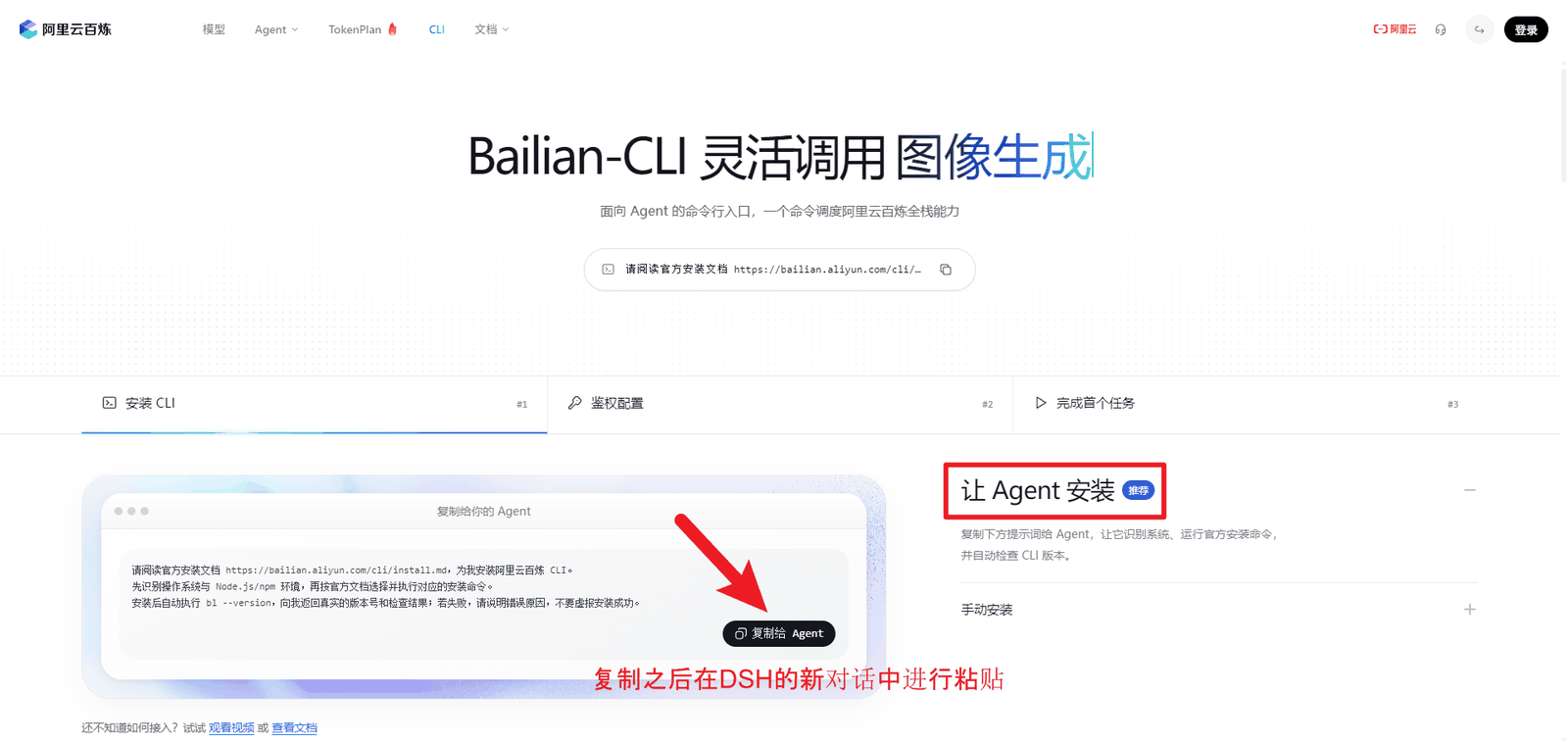
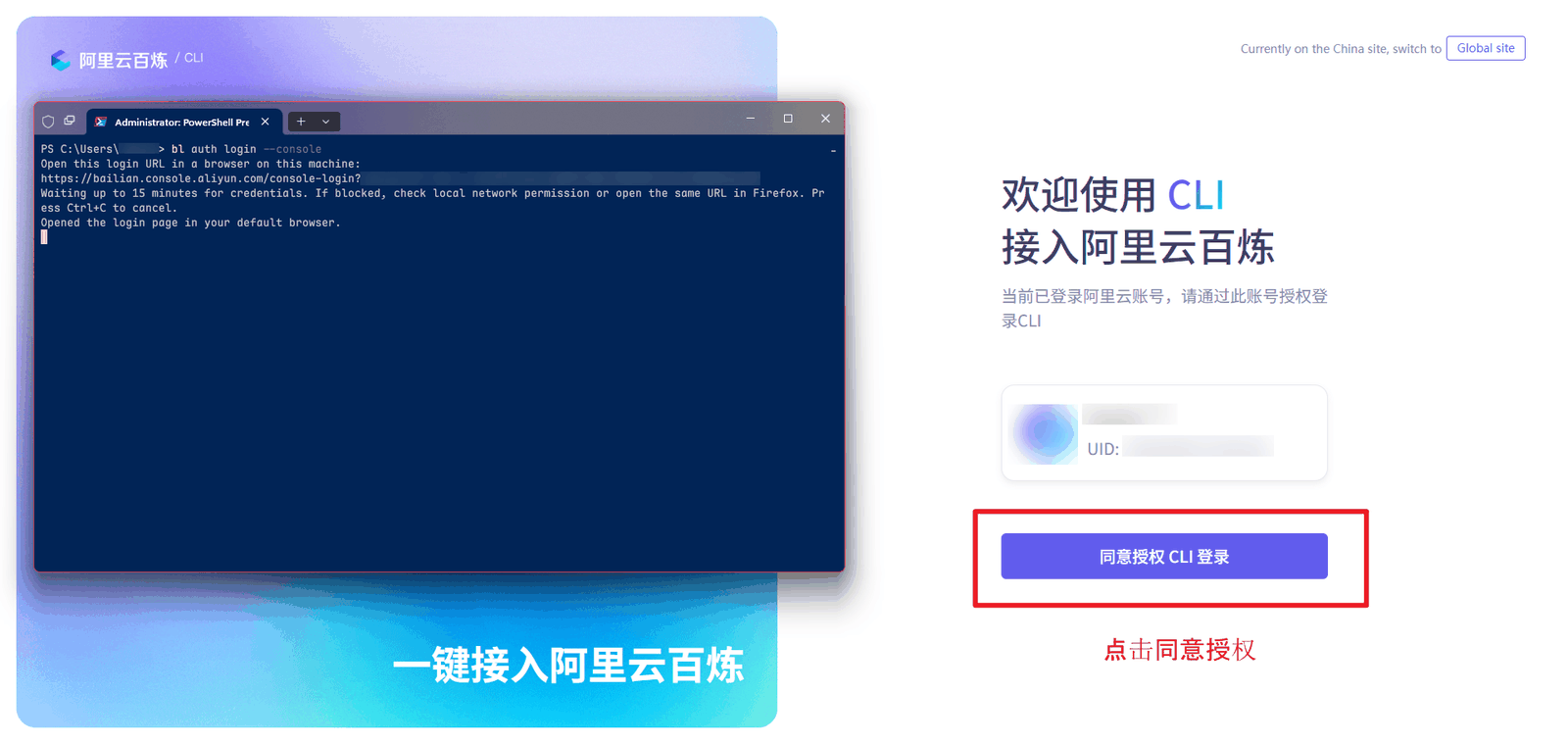
No-terminal path: just ask the assistant in a new conversation to “install the Bailian CLI” and “log in to the Bailian CLI”. It runs the official installer and bl auth login --console in a background terminal; you only complete the browser login and authorization, then the assistant reports the result. The panel's Environment check card verifies it.
| Step | Recommendation |
|---|---|
| Installing the DSH plugin | The plugin page automatically picks the faster registry between registry.npmjs.org and registry.npmmirror.com. A freshly published package can take 5–10 minutes to reach npmmirror; if it is not found right after release, retry a few minutes later. |
Bailian CLI bl |
Use the official Bailian China-site installer/docs (https://bailian.console.aliyun.com/cli), not third-party mirrors. |
| poppler (PDF import) | Prefer winget install -e --id oschwartz10612.Poppler; if poppler already exists elsewhere, point DSH_ENGLISH_PDFTOPPM / DSH_ENGLISH_PDFTOTEXT at the existing pdftoppm.exe / pdftotext.exe. |
| GitHub | Only developers need it (source, issues, release notes); installing the plugin and logging in the CLI never require direct GitHub access. The setup prompt at the top does not fetch a GitHub guide either — it reads the README.zh.md shipped in the package plus the panel's Environment check, so the paragraph runs end to end on a restricted network. |
.dsh-english/config.json (transcription model, lookup backend and other settings follow it). Switching is refused while a transcription is running; if the library folder is unavailable, data actions fail but the switch can still be turned off.~/.dsh/english-practice.json (DSH_HOME/english-practice.json when DSH_HOME is set) as { "version": 1, "sharedRoot": "<absolute path>" }; deleting it turns sharing off. Multiple DSH instances writing the same library are best-effort.recordings/; to transcribe audio that lives in the current project, use Choose folder… or paste its absolute path.recordings/ (mp3 / m4a / wav / aac / flac / ogg / opus / amr / wma / mp4 / webm).recordings/, or paste the absolute path of any folder/audio file and click Scan, or use Choose folder…; then pick a Model (default qwen-audio-3.1-asr-flash-filetrans, list provided by the host) and optionally the number of speakers (diarization is always on), then click Start. Transcription runs in the background, usually 1–3 minutes; the transcript appears automatically when done.english_transcribe tool and waits for completion.qwen-audio-3.1-asr-flash-filetrans; on failure it falls back to fun-asr and records the fallback in the transcript's warnings..dsh-english/lookup-cache.json.vocab.enrich, tool action=enrich).vocab.analyze, tool action=analyze).v. 介入;干预;调停 + v. 介入;干预, n. 丑闻 + n. 丑闻(尤指性丑闻)), keeping the fuller wording and its example/source; parts of speech only merge when one explanation strictly contains the other, so n. 增加 and v. 增加 stay separate. The wordbook card, the review card, the graph detail, the lookup popover, vocab/生词本.md and the assistant's list all use the same rule; stale duplicates are persisted away the next time an entry is rewritten.english_vocab and writes phonetics/meanings/translations back.vocab/生词本.md is a readable export rewritten after every change..dsh-english/recall.json, and deleting that file starts from scratch.recall.mode in the host config is only the default for the first visit.ad- / in- are ignored) or a word form one of them lists.transcripts/, vocab/vocabulary.json and the review progress on every visit; it stores no new file. Deleting a word or a transcript removes its node and links on the next visit. On a very large workspace the view keeps the most connected words and transcripts and reports how many it trimmed..txt / .text / .md / .markdown / .html / .htm / .tex / .rst / .log (≤3MB) and .pdf (≤20MB, up to 120 pages rendered by default).$…$ math is kept (rendered in the sidebar).pdftoppm renders page images and pdftotext -bbox supplies a word-coordinate text layer, so you can select words and press Ctrl exactly like in a transcript.pdftoppm / pdftotext); when missing, import fails and the Environment check card shows the winget install -e --id oschwartz10612.Poppler command.asr.mergeGapMs (default 4000ms) are merged into paragraphs; transcription applies this automatically.transcripts/<name>.json, matching job records and PDF page cache only — your audio files are never touched.env.check; nothing is probed locally). It is collapsed by default and only auto-expands once when a problem is detected; click the title to expand/collapse it manually.bl (Ready / Missing / not signed in, with the version when expanded), PDF (Ready / Missing, i.e. Poppler), Workspace (Ready / not writable); when Shared is on, a fourth Shared library chip (Ready / unavailable).bl, PDF tool (Poppler) and Workspace, the status of the transcripts / vocab / recordings directories and writability, a Notes (warnings) list, and a Check again button.bl missing → npm i -g bailian-cli --registry=https://registry.npmmirror.com; bl not signed in → bl auth login --console; Poppler missing → winget install -e --id oschwartz10612.Poppler (Linux/macOS: brew install poppler / sudo apt install poppler-utils). Click Check again afterwards. Note: Poppler only affects PDF import — without it, transcription and lookup still work, but the check will not be all green (the PDF chip shows Missing).<workspace>/
recordings/ your audio files (read-only for the plugin)
transcripts/<name>.json normalized transcript (segments + ms timestamps)
transcripts/.jobs/<id>.json job state (15s heartbeat; stale after 90s = interrupted)
transcripts/.jobs/<id>.raw.json raw ASR output
vocab/vocabulary.json wordbook source of truth (words + sentences)
vocab/生词本.md readable export rewritten on every change
.dsh-english/config.json optional configuration overrides
.dsh-english/lookup-cache.json lookup cache
.dsh-english/recall.json recall progress (mastery, daily rounds; cleaned up when entries are deleted)
.dsh-english/pdfs/<uuid>/ PDF cache (source.pdf / page-XX.png / words.xml)With the Shared switch on, all of these directories live in the shared-library project; switch it off to use each project's own directories. The library folder is never copied or moved.
The data format is frozen at version: 1 (only optional fields may be added); the recall progress file .dsh-english/recall.json is a separate new data file, also at version: 1. Corrupt JSON is backed up as *.corrupt-<timestamp> and the default is used instead.
.dsh-english/config.json is optional; defaults apply when it is missing:
{
  "asr": {
    "model": "qwen-audio-3.1-asr-flash-filetrans",
    "fallbackModel": "fun-asr",
    "language": "en",
    "maxJobMinutes": 30,
    "pollIntervalSeconds": 2,
    "mergeGapMs": 4000,
    "toolTimeoutMinutes": 32
  },
  "lookup": {
    "backend": "ds",
    "provider": null,
    "model": null,
    "timeoutMs": 20000
  },
  "import": {
    "maxPdfPages": 120,
    "dpi": 100
  },
  "dirs": {
    "recordings": "recordings",
    "transcripts": "transcripts"
  },
  "recall": {
    "newPerDay": 10,
    "dailyLimit": 30,
    "mode": "mix"
  },
  "analysis": {
    "enabled": true,
    "idleMinutes": 3,
    "batchWords": 2,
    "maxContexts": 6,
    "maxContextChars": 240,
    "timeoutMs": 30000,
    "retryMinutes": 10
  }
}
The host caches the config for about 2 seconds: edits take effect after a moment, no DSH restart needed.
| Key | Default | Meaning |
|---|---|---|
asr.model |
qwen-audio-3.1-asr-flash-filetrans |
default transcription model |
asr.fallbackModel |
fun-asr |
fallback when the primary model fails; empty string disables it |
asr.language |
en |
language hint (zh, …) |
asr.maxJobMinutes |
30 | maximum runtime of one transcription job |
asr.pollIntervalSeconds |
2 | polling interval for bl speech recognize |
asr.mergeGapMs |
4000 | auto-merge threshold for adjacent segments of the same speaker |
asr.toolTimeoutMinutes |
32 | overall timeout of the english_transcribe tool; must exceed maxJobMinutes |
lookup.backend |
ds |
ds (current DSH model; fast, no Bailian text quota) / bl (bl text chat) / off |
lookup.provider / lookup.model |
null |
override the lookup model; null follows the DSH default model |
lookup.timeoutMs |
20000 | per-lookup timeout in milliseconds |
import.maxPdfPages |
120 | maximum pages rendered for PDF import |
import.dpi |
100 | PDF page rendering resolution |
dirs.recordings / dirs.transcripts |
recordings / transcripts |
relative directories inside the workspace |
recall.newPerDay |
10 | max new words introduced per day; 0 reviews due words only |
recall.dailyLimit |
30 | max questions in one daily round |
recall.mode |
mix |
practice direction for the first visit: mix / en-zh (English → Chinese) / zh-en (Chinese → English); changes in the panel are remembered in the browser |
analysis.enabled |
true |
run the automatic background pass; false stops it (the card's Analyze senses button and action=analyze still work) |
analysis.idleMinutes |
3 | how long the workspace must be free of plugin requests before a background batch starts (0.5–120) |
analysis.batchWords |
2 | max words analysed per background batch (1–20); batches are 20s apart |
analysis.maxContexts / analysis.maxContextChars |
6 / 240 | context sentences per word and their max length in the prompt |
analysis.timeoutMs |
30000 | timeout of one sense-analysis model call (5000–120000) |
analysis.retryMinutes |
10 | how long a failed analysis waits before it is retried (1–1440) |
Executable paths are not configurable through the config file. config.json lives in the (writable) workspace, so to keep it from becoming an execution vector, bl, pdftoppm and pdftotext can only be overridden through read-only environment variables (absolute path or bare command name; no spaces, arguments or shell metacharacters):
| Environment variable | Default command | Purpose |
|---|---|---|
DSH_ENGLISH_BL |
bl |
Bailian CLI |
DSH_ENGLISH_PDFTOPPM |
pdftoppm |
PDF page rendering (poppler) |
DSH_ENGLISH_PDFTOTEXT |
pdftotext |
PDF word-coordinate text layer (poppler) |
The legacy keys blPath, import.pdfToPpmPath and import.pdfToTextPath are removed: they are ignored and reported as warnings in the Environment check card with the matching environment variable. Unknown keys are ignored; invalid values fall back to defaults with a warning. On Linux/macOS install poppler with brew install poppler or sudo apt install poppler-utils.
english_transcribe { audio, speakers?, model?, language? } — transcribe and wait; returns {ok,jobId,transcript,segments,speakers,durationMs,model,warnings,state,error?}. audio may be relative to the current workspace or shared library, or absolute. Failures are actionable (install/login commands when bl is missing or not logged in).english_vocab { action, ... } — action is one of list (defaults to pending entries) / lookup / add / update / enrich / analyze / remove / export. analyze (optional id) compares every transcript for the word, appends the other senses with context/source evidence and returns {analyzed,updated,added,skipped,failed,remaining,entries}. Without id one call analyses at most analysis.batchWords stale words (default 2); repeat while remaining > 0.list defaults to pending entries; update lets the assistant fill phonetics/meanings/example translations itself; enrich re-queries word forms and etymology by id; export rewrites vocab/生词本.md.POST /dsh-english/api (loopback only with the x-english-practice: 1 header; a browser Origin must be local), transcript and wordbook bodies and PDF page images are read through plugin HTTP actions (transcripts.read / vocab.read / pdf.page) so they also work when the shared library lives in another project, and the assistant calls the two tools above.It cannot find bl / says the CLI is not logged in.
The error code is bl/missing or bl/not-authenticated. The Environment check card (shown in the empty state, or while the Transcribe panel is open) points at the missing step. Manual fix: npm i -g bailian-cli --registry=https://registry.npmmirror.com, then bl auth login --console, then bl auth status. Restart DSH afterwards so the process picks up the new PATH. Other common codes: pdf/poppler-missing (no poppler), http/rate-limited (too many requests), config/invalid (config unreadable).
PDF import fails with pdf/poppler-missing.
Install poppler with winget install -e --id oschwartz10612.Poppler; if it is installed in a non-default location, set DSH_ENGLISH_PDFTOPPM / DSH_ENGLISH_PDFTOTEXT. Restart DSH afterwards.
How do I write Windows paths?
Use absolute paths such as D:\Podcasts\ep12.m4a. Paths with spaces can be pasted directly into the Scan field — no quotes, no escaping needed.
What does it cost?
Transcription calls Bailian ASR and is billed at Bailian prices; audio is uploaded to Bailian temporary storage (kept for 48h). Check the free quota with bl usage free; without top-up, models stop when the quota is used up. Lookups use the current DSH model by default (ctx.llm) and cost no Bailian text quota; only lookup.backend = "bl" routes lookups through Bailian text models.
Why does an entry have no meaning yet? Failed lookups are stored as “needs details”. Click Fetch forms & etymology on the card, or ask the assistant to “complete the pending wordbook entries”.
When does the multi-sense analysis run, and does it cost extra?
By default it runs in the background after the plugin has been idle for about 3 minutes — the panel does not need to be open. You can also click Analyze senses on a card or ask the assistant for action=analyze. It uses the same backend as lookups (the current DSH model by default; Bailian text models when lookup.backend = "bl"), analyses only stale words, and never repeats a model call while the corpus is unchanged. Stop the background pass or tune idleMinutes / batchWords in the analysis section of .dsh-english/config.json; enabled: false does not block the manual Analyze senses button or the tool action.
Privacy.
No telemetry. Transcripts, the wordbook and the cache are plain files in your workspace (or in the shared-library project you explicitly turned on). The HTTP endpoint listens on loopback only, requires a custom request header, and rejects a non-local Origin when the browser sends one. The sharing switch stores only one absolute path in ~/.dsh/english-practice.json and uploads nothing.
Uninstall / switch source. The desktop plugin row is owned by the Electron profile: use Remove then Add in the plugin page instead of editing the manifest by hand. Removing the plugin keeps your workspace data.
| Path | Purpose |
|---|---|
index.js |
Plugin entry: name / inject / apply(ctx), assembly only (~22 lines) |
host/ |
Host half, 16 modules: analysis / api / asr / config / env / graph / json-store / lookup / paths / pdf / recall / senses / text / tools / transcript / vocab |
client.js |
Client half: single-file window.__ModuleLoader__.load bundle (§0–§9 partitions) |
cordis.patch.yml |
Bundle patch (insert id english-practice) |
locale/{zh,en}.json |
Plugin-page metadata (title / description) |
icon.svg |
Plugin-page icon |
assets/bailian-cli/ |
README screenshots (8 PNGs) |
tests/ |
node --test unit + contract + integration tests (15 *.test.mjs) |
AGENTS.md |
Maintainer contract: architecture, frozen interfaces, release flow |
README.md / README.zh.md |
English / Chinese docs |
CHANGELOG.md |
Changelog (Keep a Changelog) |
LICENSE |
MIT |
whalepicks.json |
whale-picks store manifest, schemaVersion 1.1 |
.github/workflows/ci.yml |
CI: node --check both entries + node --test (Node 22, no npm install) |
Published npm contents follow package.json#files: index.js, host/, client.js, cordis.patch.yml, locale/*.json, icon.svg, assets/, README.md, README.zh.md, CHANGELOG.md (package.json and LICENSE are always included by npm; tests/, AGENTS.md, whalepicks.json and .github/ are not published).
index.js assembles, host/ holds the 16 modules), the Client half is a hand-written single-file client.js (window.__ModuleLoader__.load bundle, §0–§9 partitions). No TypeScript, no bundler, no runtime dependencies.dsh web).package.json's dsh manifest or cordis.patch.yml changes: restart DSH.npm run check (node --check index.js + node --check client.js + node --test, which auto-discovers tests/*.test.mjs); requires Node 20+. Currently 15 test files (unit + contract + integration), all green.dsh-increasing-my-english; the desktop profile installs this checkout via link:. A rename must update package.json, cordis.patch.yml, client.js PKG and loader id, and the locale meta..dsh-english/, /dsh-english/api, the x-english-practice header, tool names english_transcribe / english_vocab, tab kind english-reader, locale NS englishPractice, patch row id english-practice, and the recall data file .dsh-english/recall.json (version: 1).MIT © 2026 LeeKai233
CLASSIFICATION EVIDENCE
系统优先读取 GitHub Topics,再与站内分类词典和词根规则比对。当前命中: deepseek-harness。
morluto
Reverse engineer anything with agents, from app behavior down to native binaries.

deepseek-ai
DeepSeek Harness: Everything is a Plugin.

nexu-io
The 1st Collaborative AI Design Agent Workspace. Local-first and open source. Create motion, prototypes, websites, apps, dashboards, presentations, images, and videos with your team and AI agents. Share work, exchange feedback, and iterate together in one workspace.