
其他
完整应用

deepseek-harness
deepseek-ai
DeepSeek Harness: Everything is a Plugin.
PROJECT TOPICS
PROJECT README

简体中文 | English
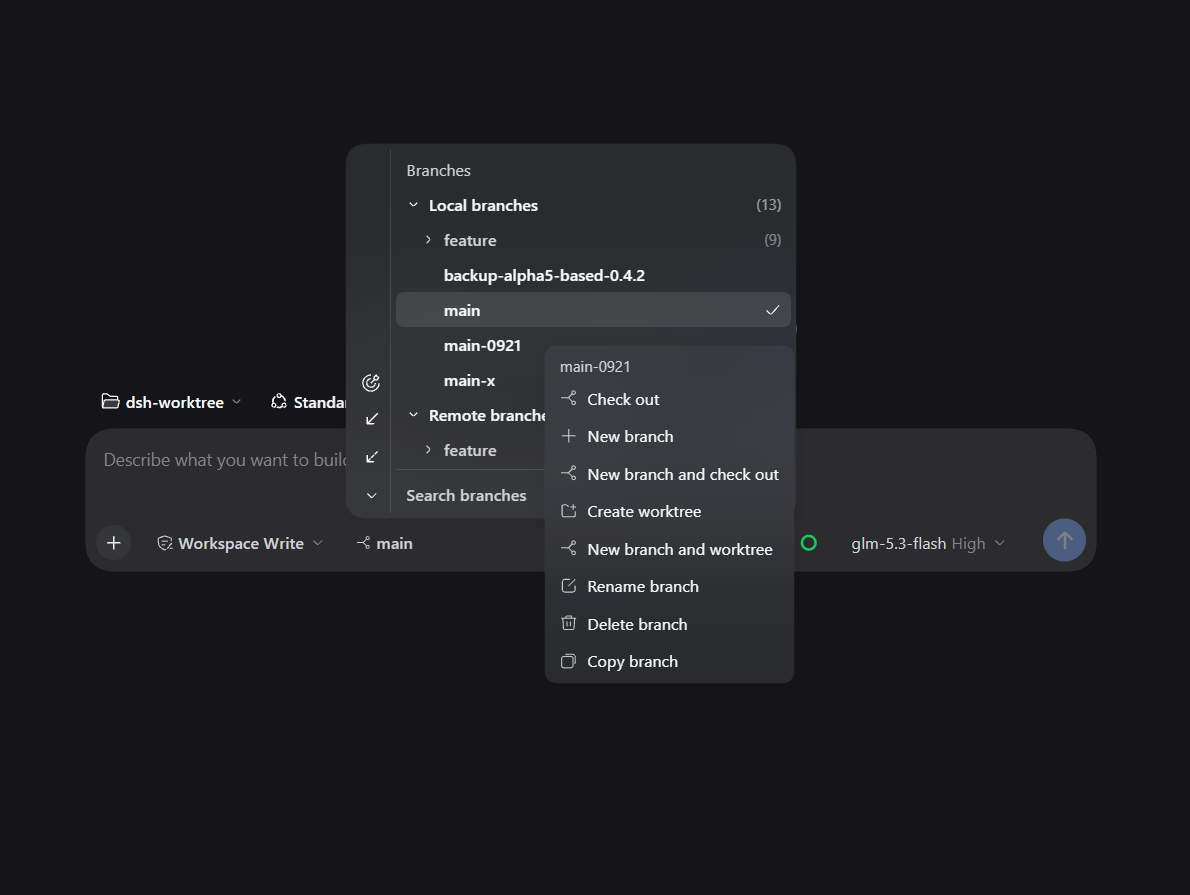
A dsh plugin for simple branch & worktree management in the Web UI. The composer tool row shows the current branch: pick another to switch in place, or flip the Worktree toggle to get an isolated worktree as a real workspace — as shown in the screenshot above.
Repo: https://github.com/LaoYueHanNi/dsh-git-worktree
[!IMPORTANT] GitHub direct installs have ended — the repository no longer carries prebuilt output. Install from npm instead:
dsh plugin --profile web add @laoyuehanni/dsh-git-worktreeUpgrading from a legacy
github:install (≤ 0.3.2, package namedsh-git-worktree)? An in-placeupdatefails to load — remove the old name first, then add again. Worktree folders and the plugin's settings carry over untouched.
/ as a folder hierarchy — collapsible folders, last-segment labels, the checked-out branch's chain opens centered. Local and remote branches render as two collapsible groups (a single remote strips its prefix), with bottom search (ancestor folders kept, hits highlighted), locate-current-branch and expand/collapse tools, and ↑N/↓N divergence marks on tracking branches.origin/feat-x in the remote group and it checks out in place with a tracking branch directly (no confirmation); the worktree toggle sends the pick to an isolated worktree instead.-d: git refuses unmerged commits and occupied branches), copy branch; a worktree row offers go-to-worktree, copy path, and remove worktree. Second-level dialogs open IN PLACE of the menu; in-place actions keep the menu open, so rows can be acted on in a run. Keyboard: arrow keys + Enter.<repo>/.dsh/gitworktree/<branch>/ inside the repository (locally ignored through .git/info/exclude — the repo's git status stays clean) and registers a real workspace, with same-branch re-creates reusing the existing worktree wherever it lives. Once the session starts the directory is fixed — the worktree verbs hide along with the Worktrees group..dsh/gitworktree layouts (new) and the legacy central root (old, kept for existing worktrees) — grouped by repository with a source badge, orphan directories included.~/.dsh/gitworktree by default) read-only — existing worktrees stay put and keep working; new ones are created inside their repository. A legacy ~/.dsh/gitworktree/settings.json value migrates automatically on upgrade.[!NOTE]
- The native sidebar is untouched: worktrees are ordinary registered workspaces, and the workspace tree nests the per-repository layouts under their repository automatically (existing centrally-stored worktrees keep their old location — only new ones nest).
git clean -xdff(double-f) deletes the in-repository worktree directories (a single-fskips nested repositories).git worktree prunerestores the registrations afterwards, but uncommitted work inside them is lost.- If every workspace of a repository is deregistered, its worktrees no longer appear in the manager (or the auto-prune); re-register any directory of that repository to bring them back.
dsh plugin --profile web add @laoyuehanni/dsh-git-worktreeThe package declares
dsh.bundle, soaddwires the plugin into the profile's layer stack automatically — no config editing needed. Requires thewebprofile (dsh web) and a dsh 0.2.0-rc.1 (or later) host.
Running a dsh 0.1.2 alpha host? Install the dedicated compatibility build instead:
dsh plugin --profile web add @laoyuehanni/dsh-git-worktree@dsh-alpha
@dsh-alphais a dist-tag resolving to the latest alpha-host compatibility build (currently0.4.3-dsh-0.1.2-alpha.5) with peers pinned to the alpha line — a plainupdatenever mixes the two channels. On 0.2.0-rc.1 or later, use the default line above.
dsh plugin --profile web update @laoyuehanni/dsh-git-worktreedsh plugin --profile web remove @laoyuehanni/dsh-git-worktreeWorktree folders are kept at both locations (the per-repository .dsh/gitworktree layouts and the legacy central root); the plugin's own settings live in the dsh settings document.
Build once, install a symlink, iterate:
pnpm install
pnpm build:all
pnpm test                # vitest
node scripts/smoke.mjs  # real-git smoke over the built lib
dsh plugin --profile web add link:D:/Code/dsh-worktree
Rebuild and restart dsh web to apply changes (pnpm watch:client in the plugin directory hot-reloads the client). No prepare script by design — lib/ never enters the repo; pnpm publish builds it fresh into the tarball.
Temporary host-only mount (this launch only, no profile changes): create a cordis.yml next to the repo pointing at the built host half (Windows needs the file:/// form), then launch with it:
- insert:
    - id: git-worktree
      name: 'file:///D:/Code/dsh-worktree/lib/index.js'
dsh web --patch <plugin-dir>/cordis.ymlOnly the host half mounts in this mode (the /plugin/git-worktree/* routes keep working); for UI work use the link: install above.
CLASSIFICATION EVIDENCE
系统优先读取 GitHub Topics,再与站内分类词典和词根规则比对。当前命中: 无有效分类标签。
deepseek-ai
DeepSeek Harness: Everything is a Plugin.

anywhere-labs
为 DeepSeek Harness (DSH) 插件生态打造的现代化桌面端解决方案。万物皆「插件」,桌面本身也是「插件」。

walkinglabs
Harness engineering beginner tutorial, from 0 to 1