
其他
插件

dsh-bili-scroll
c1overzz
DSH 插件:每天替你刷一轮 B站,读字幕挑出值得的、写一份日报,值得的 @ 你
PROJECT TOPICS
INSTALL REFERENCE
dsh plugin --profile web add github:LWLAymh/dsh-edit-guardian
该命令指向仓库当前默认分支;尚无绑定当前 commit 的完整验证结果。
PROJECT README
A DeepSeek Harness Web plugin that adds file-change visibility, keep/undo controls, and a command safety gate to the browser UI:
write, edit, or str_replace_editor, the tool row renders as file +N lines -M lines [show diff]. Clicking the button expands a context-aware diff inline./undo command).bash / pwsh executes a command that matches a destructive pattern (rm, Remove-Item, format, git reset --hard, git push --force, curl|sh, …), the execution is routed through the DSH approval seam and the Web UI asks the user to approve or reject it. In the shell tool row, the matched dangerous text is highlighted in red. When a tool call requests sandbox escalation (sandbox_permissions), the affected path / workdir is highlighted in red with a “需要权限” badge.| Tool | Behavior |
|---|---|
write |
Shows the created/updated file with added/removed line counts and a show diff toggle. |
edit |
While running, shows the intended change from the call arguments; once settled, shows the applied hunks from the real before/after result. |
str_replace_editor |
Shows the call-time diff card and keeps it visible after the result (the stock UI only shows it while running). |
Line counts are computed with a line-level diff over the per-hunk diff payloads. For very large hunks the summary falls back to an approximate count; the expanded diff is always the authoritative one.
A persistent conversation.input.dock entry above the composer renders the summary whenever there are unkept file changes, including while the agent is still working. The header shows the file count and a collapse toggle. Each file row shows:
+N行 -M行 line stats/undo <path> and removes it from the summary after successHeader actions:
/undo --all and clears the summaryResolution is tracked per tool-call id, so if a file changes again after being kept, the new change reappears in the summary.
Undo is handled by the host half, which records the pre-edit before content of every successful write / edit result. Reverting writes the recorded before back to disk; files created by write (before: null) are removed. Changes made through str_replace_editor or shell commands are not restorable by /undo.
The host half listens on tools/pre-execute and inspects bash / pwsh command strings. When a command matches a dangerous pattern, the plugin returns an ask decision with a human-readable reason. The DSH tool registry then resolves that decision through ctx.approval, so the standard Web approval prompt is shown before anything executes.
Trust everything in advance — switch the session to the Full access permission preset in the Web UI (danger-full-access sandbox mode). dsh-edit-guardian then lets dangerous commands through without prompting, matching DSH's existing "full access" semantics.
Fail-closed: if the user rejects, cancels, or no approval channel is available, the command does not run.
| Pattern | Meaning |
|---|---|
rm |
deletes files or directories |
rmdir / rd |
removes directories |
Remove-Item |
PowerShell file/directory deletion |
del |
Windows file deletion |
format / mkfs / diskpart / dd of= |
destructive disk/volume operations |
git clean / git reset --hard / git push --force |
destructive Git operations |
shutdown / reboot / halt / poweroff / Restart-Computer / Stop-Computer |
shutdown/reboot |
Clear-Content |
PowerShell content erasure |
curl\|sh / wget\|sh |
executes a remote script through the shell |
Patterns are simple regular expressions, so harmless commands that merely mention rm (for example echo "rm -rf") may also prompt. This is intentional: when in doubt, ask. Use the Full access preset to skip prompts.
| File-change summary | Dangerous-command approval |
|---|---|
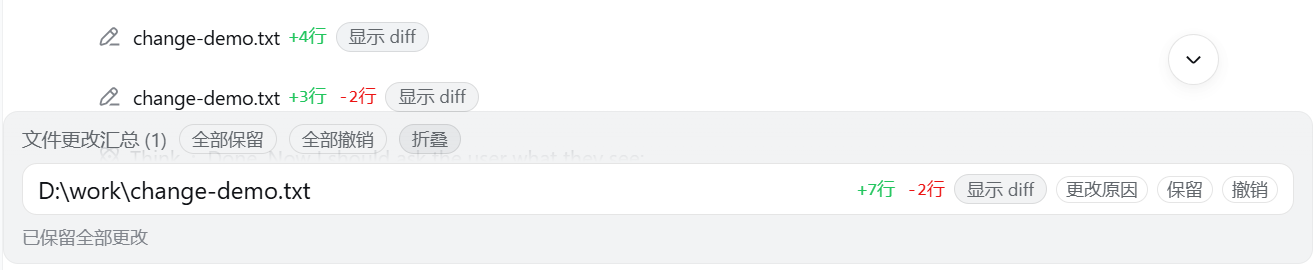 |
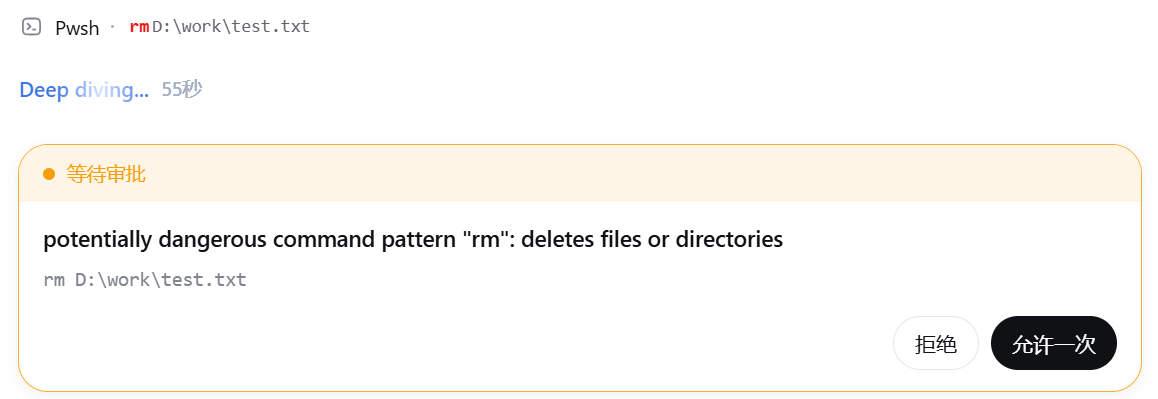 |
Install into your web profile:
# from a local checkout
dsh plugin --profile web add file:./dsh-edit-guardian

# or from a GitHub repository
dsh plugin --profile web add git+https://github.com/<your-name>/dsh-edit-guardian.git

# or, once published to npm
dsh plugin --profile web add dsh-edit-guardian
Then restart the web profile:
dsh --profile webThe plugin does not hot-reload into an already-running Web process.
Uninstall:
dsh plugin --profile web remove dsh-edit-guardiandsh-edit-guardian/
├── lib/
│ ├── index.js # host half: dangerous-command gate, undo recorder, /undo command
│ └── client.js # web client half: file rows, shell rows, change summary
├── cordis.patch.yml # bundle patch inserting the host row
├── dsh.plugin.json # plugin metadata
├── scripts/ # local smoke tests
│ ├── smoke-host.mjs
│ └── smoke-client.cjs
├── package.json
└── README.md / README.zh.mdtools/pre-execute listener. Returning { kind: "ask", reason } from the waterfall short-circuits the built-in tool pipeline into serviceAsk, which calls ctx.approval.request(...). The existing dsh-host-apiproxy approval answerer then shows the prompt in the browser. When the session's sandbox mode is danger-full-access, the listener delegates to next() instead of asking. It also records successful write / edit results and registers the /undo command.tool.call.toolview entries with a negative shadowing priority:write, edit, str_replace_editor → the compact +N / -M [show diff] row with a context-aware collapsible diff, and a red “需要权限” badge when the call requests sandbox_permissions.bash, pwsh → the danger-aware shell row that highlights matched dangerous text in red, shows the requested sandbox mode + workdir in red for escalation calls, and expands to the terminal output.conversation.input.dock entry that renders the persistent change summary with per-file keep/undo and header keep-all/undo-all actions, plus a collapse toggle.Smoke tests do not require a running DSH instance:
node scripts/smoke-host.mjs
node scripts/smoke-client.cjs
After changing source files, reinstall the local package into the profile and restart the web profile:
dsh plugin --profile web add file:./dsh-edit-guardian
dsh --profile webcd dsh-edit-guardian
git init
git add .
git commit -m "dsh-edit-guardian: file-change summary with keep/undo and command safety gate"
git branch -M main
git remote add origin https://github.com/<your-name>/dsh-edit-guardian.git
git push -u origin mainThen add the repository topic dsh-plugin in the GitHub repo settings so DSH plugin search (find_dsh_plugin) can discover it.
If you publish to npm, fill in the real "repository" field in package.json first:
npm publishAfter publishing, users can install with:
dsh plugin --profile web add dsh-edit-guardianwrite / edit only; str_replace_editor and shell-command modifications are not restorable by /undo yet.bash / pwsh is replaced by the danger-aware renderer; its collapsed summary shows the command instead of the description./undo are relevant there.workspace-write + never approval-policy combination, ask decisions are rejected instead of prompting.MIT
CLASSIFICATION EVIDENCE
系统优先读取 GitHub Topics,再与站内分类词典和词根规则比对。当前命中: 无有效分类标签。
c1overzz
DSH 插件:每天替你刷一轮 B站,读字幕挑出值得的、写一份日报,值得的 @ 你

hellowind777
一个自主的高级智能伙伴,不仅分析问题,更持续工作直到完成实现和验证。

xing-shuyin
Just open your browser — get all your work done.